
Author
In modern DevOps, observability plays a critical role in keeping applications healthy, reliable, and scalable. Monitoring and alerting systems help detect issues early and allow teams to respond before they impact users.
Monitoring in DevOps refers to continuously collecting and analyzing system metrics to understand application performance and health in real time.
? Goal: To know what is happening inside your system in real time and quickly detect any issues.
Understanding metrics, logs, and traces is essential for effective monitoring and observability in DevOps.
Metrics are numerical values that show the performance and health of your system over time.
Example:
CPU usage = 75%
Requests per second = 120
Logs are detailed records of events that happen inside your application or system.
Example:
“User login failed due to invalid password”
“Database connection timeout”
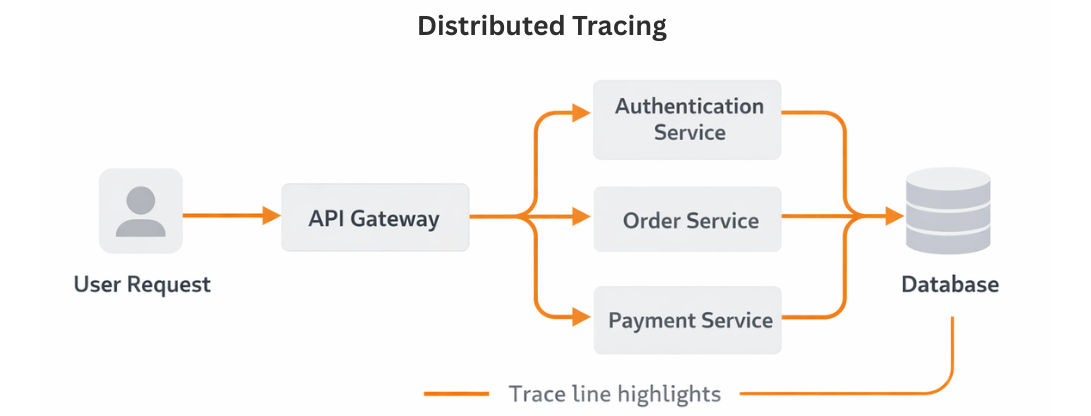
Traces track the complete journey of a request across multiple services.
Example:
User Request → API Gateway → Auth Service → Order Service → Database
| Feature | Metrics | Logs | Traces |
|---|---|---|---|
| Type of Data | Numeric data (CPU, memory, requests) | Event-based records | Request flow data |
| Purpose | Monitoring & alerting | Debugging issues | Tracking request journey |
| Usage | Dashboards, alerts | Error analysis | Microservices tracing |
| Example | CPU = 75% | “User login failed” | Request → API → Service → DB |
Modern DevOps systems rely on observability tools to understand what is happening inside applications running in production. These tools help you detect issues, analyze performance, and improve system reliability.
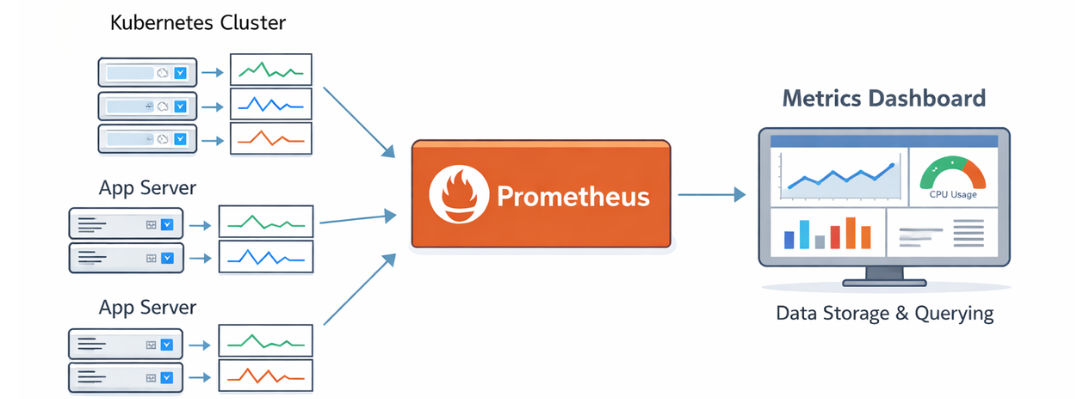
Prometheus is one of the most widely used monitoring systems for collecting and storing time-series metrics
Example Use Case
You can monitor:
Example metric:
http_requests_total
Example PromQL query:
rate(http_requests_total[5m])
Grafana is a powerful visualization tool used to create real-time dashboards from monitoring data.
Example Use Case
A DevOps dashboard showing:
? This helps teams quickly detect system issues visually.
ELK Stack is used for collecting, processing, and analyzing logs from applications and infrastructure.
Components of ELK Stack
Elasticsearch
Logstash
Kibana
Filebeat / Fluentd (Log Shippers)
How ELK Works
Application Logs → Fluentd/Filebeat → Logstash → Elasticsearch → Kibana
Example Use Case
You can analyze:
Example log:
ERROR 500: Internal Server Error at /api/user
Prometheus is used to collect metrics from Kubernetes.
apiVersion: v1
kind: ConfigMap
metadata:
  name: prometheus-config
data:
  prometheus.yml: |
    scrape_configs:
      - job_name: 'kubernetes'
        static_configs:
          - targets: ['localhost:9090']
Deploy Prometheus (simplified):
kubectl apply -f prometheus.yaml
Grafana is used to visualize metrics collected by Prometheus in the form of dashboards.
Steps to Create Dashboard
Example metrics:
ELK Stack is used to collect, store, and analyze logs from applications in Kubernetes.
Log Flow
Application Logs → Logstash → Elasticsearch → Kibana
Kubernetes Logging Agents
In Kubernetes, logs are usually collected using:
? These agents send logs to the ELK pipeline.
What Each Component Does
Monitoring without alerts is not useful in production.
Common Alerts
CPU Alert
- alert: HighCPUUsage
  expr: node_cpu_usage > 80
  for: 1m
Memory Alert
- alert: HighMemoryUsage
  expr: node_memory_usage > 80
  for: 1m
Pod Failure Alert
- alert: PodDown
  expr: kube_pod_status_phase{phase="Failed"} > 0
Alertmanager is used to send and manage alerts like email or Slack notifications.
route:
  receiver: email-alert

receivers:
- name: email-alert
  email_configs:
  - to: [email protected]
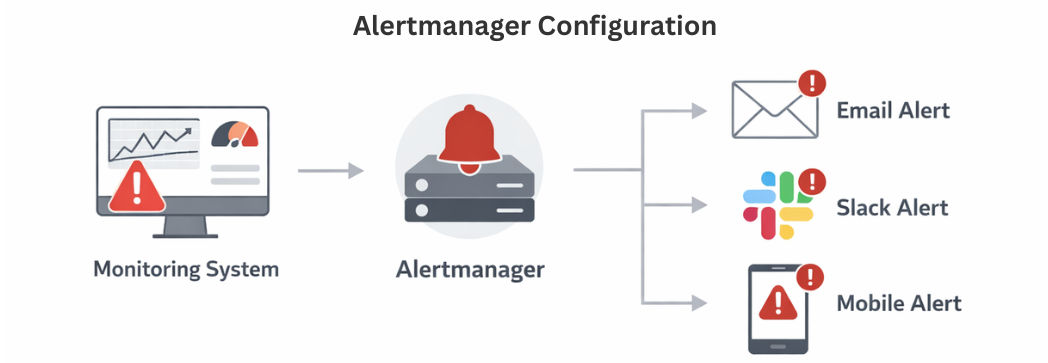
Email Alerts
Slack Alerts
Alertmanager can also send alerts to Slack channels.
receivers:
- name: slack-alert
  slack_configs:
  - api_url: <https://hooks.slack.com/services/XXX>
    channel: '#alerts'
Kubernetes supports built-in health checks to ensure your application is running properly.
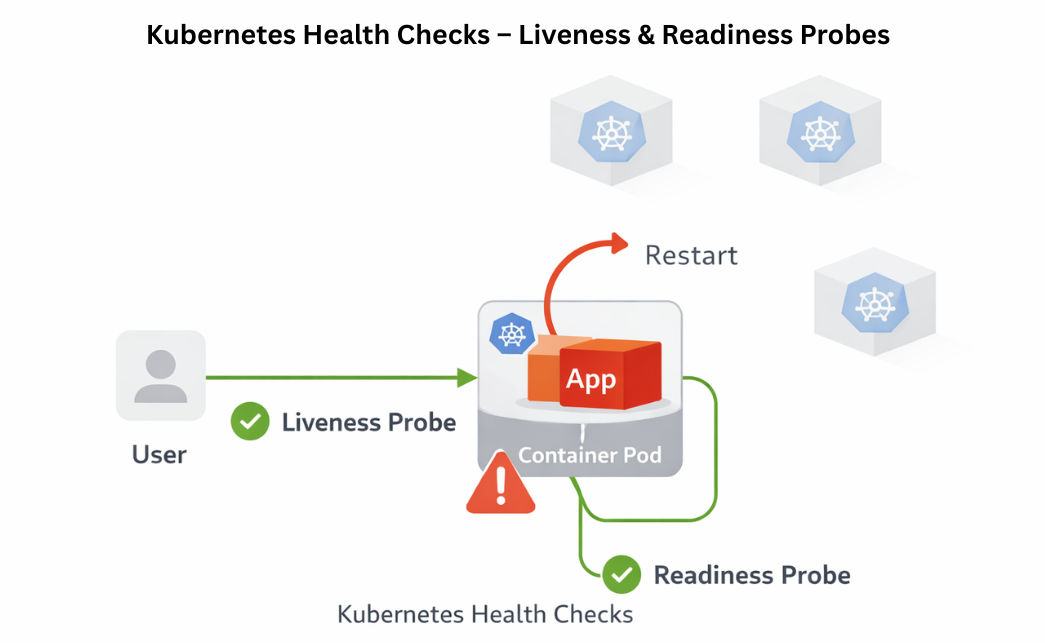
Example Liveness Probe
livenessProbe:
  httpGet:
    path: /
    port: 80
  initialDelaySeconds: 5
  periodSeconds: 10
Jaeger
OpenTelemetry
SLI means the actual performance measurement of a system in real time. It shows what is really happening in production.
Example:
These measured values are called SLI.
SLO means the target or goal set for system performance. It defines what level of performance you want to maintain.
Example:
If the system goes below this target, alerts are triggered.
SLA means a formal agreement between a company and its customers. It defines the promised level of service and consequences if it is not met.
Example:
| Feature | SLI (Service Level Indicator) | SLO (Service Level Objective) | SLA (Service Level Agreement) |
|---|---|---|---|
| Meaning | Actual measured performance of a system | Target performance goal | Formal promise to customers |
| Purpose | Shows real system behavior | Defines expected performance level | Defines service commitment and penalty |
| Nature | Metric / Data | Goal / Target | Legal / Contract |
| Based on | Monitoring data | Business requirement | Customer agreement |
| Example | 99% uptime, 250ms response time | 99.9% uptime target | Refund if uptime < 99.5% |
| Usage | Used in monitoring tools | Used in system design | Used in contracts |
Production-grade monitoring is essential for running reliable Kubernetes systems. It helps you continuously track system health, detect issues early, and respond quickly to failures.
A complete monitoring setup includes:
This combination ensures full visibility into your applications and infrastructure, making your system stable, scalable, and production-ready.
