
Author
In modern backend systems and Java microservices, performance optimization is critical. While distributed caches like Redis are excellent for multi-service caching, sometimes you need a lighter, faster cache inside a single application instance. This is where Caffeine local caching comes in.
Caffeine is a high-performance, in-memory caching library for Java applications, designed for ultra-fast access, minimal memory overhead, and high concurrency. Understanding Caffeine is essential for reducing latency and improving response time in single-service applications.
Caffeine is an open-source, in-memory cache library for Java that offers:
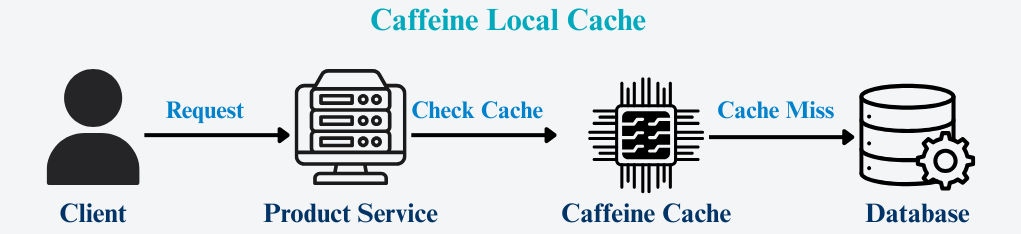
Unlike Redis, Caffeine stores data within the JVM, so there’s no network overhead, making it blazing fast for local caching.
Local caching stores data inside the application’s memory. Each application instance maintains its own cache, so requests for frequently accessed data can be served without network calls, resulting in much faster responses.
Key Points:
Example: Local Caching with Caffeine
Without Caffeine (every request hits the database):
Client → Product Service → Database
With Caffeine Cache (cache used on repeated requests):
Client → Product Service → Caffeine Cache → Database (onlyon cache miss)
How it works:
Caffeine is a high-performance local cache library designed for ultra-fast in-memory caching within a single application instance.
Key Advantages:
| Feature | Caffeine (Local) | Redis (Distributed) |
|---|---|---|
| Location | Stored in JVM memory – extremely fast but limited to a single instance. | Stored on an external server – accessible by multiple services for shared caching. |
| Network Call | No network latency – in-memory access within the application. | Requires network communication, slightly slower but shared across services. |
| Shared Across Services | Not shared – each instance has its own cache. | Shared – ensures consistent data across multiple services. |
| Setup | Minimal – include the Caffeine library. | Requires a Redis server or managed service. |
| Best For | Single-service optimization, reference data, ultra-low latency. | Distributed systems, multi-service data sharing, centralized caching. |

This setup provides low latency, high performance, and consistent distributed caching, ideal for microservices and high-traffic applications.
This follows the Cache-Aside (Lazy Loading) pattern.
Shows how to integrate Caffeine caching in a Spring Boot application step by step.
Add the necessary Caffeine and Spring Boot cache dependencies to your project.
<dependency>
    <groupId>com.github.ben-manes.caffeine</groupId>
    <artifactId>caffeine</artifactId>
</dependency>
<dependency>
    <groupId>org.springframework.boot</groupId>
    <artifactId>spring-boot-starter-cache</artifactId>
</dependency>
Activate caching support in Spring Boot with @EnableCaching.
import org.springframework.cache.annotation.EnableCaching;
import org.springframework.boot.SpringApplication;
import org.springframework.boot.autoconfigure.SpringBootApplication;

@EnableCaching
@SpringBootApplication
public class ProductApplication {
    public static void main(String[] args) {
        SpringApplication.run(ProductApplication.class, args);
    }
}
Define cache settings such as maximum size and expiration time in a configuration class.
import com.github.benmanes.caffeine.cache.Caffeine;
import org.springframework.cache.caffeine.CaffeineCacheManager;
import org.springframework.context.annotation.Bean;
import org.springframework.context.annotation.Configuration;
import java.util.concurrent.TimeUnit;

@Configuration
public class CacheConfig {
    @Bean
    public CaffeineCacheManager cacheManager() {
        CaffeineCacheManager cacheManager = new CaffeineCacheManager("products");
        cacheManager.setCaffeine(Caffeine.newBuilder()
            .expireAfterWrite(10, TimeUnit.MINUTES)
            .maximumSize(1000));
        return cacheManager;
    }
}
Apply @Cacheable on service methods to cache results and reduce database calls.
import org.springframework.cache.annotation.Cacheable;
import org.springframework.stereotype.Service;

@Service
public class ProductService {
    private final ProductRepository productRepository;

    public ProductService(ProductRepository productRepository) {
        this.productRepository = productRepository;
    }

    @Cacheable("products")
    public Product getProductById(Long id) {
        System.out.println("Fetching from database...");
        return productRepository.findById(id).orElse(null);
    }
}
Use @Cacheable, @CachePut, and @CacheEvict to manage caching behavior effectively.
@Cacheable – Caches method results@CachePut – Updates cache after method execution@CacheEvict – Removes entry from cacheExample:
@CacheEvict(value = "products", key = "#id")
public void deleteProduct(Long id) {
    productRepository.deleteById(id);
}
This setup ensures fast read performance, reduced DB load, and efficient caching for single-service microservices.
AsyncLoadingCache<Long, Product> cache = Caffeine.newBuilder()
    .maximumSize(1000)
    .expireAfterWrite(10, TimeUnit.MINUTES)
    .buildAsync(id -> productRepository.findById(id).orElse(null));
Caffeine caching is widely used in production for scenarios requiring ultra-fast, in-memory data access:
Follow these practices to get the most out of Caffeine caching and avoid common pitfalls:
Common Mistakes to Avoid:
Caffeine local caching is a lightweight and high-speed caching solution for Java applications. It minimizes database access, speeds up responses, and boosts overall performance.
Ideal for single-service optimization and read-heavy APIs, Caffeine provides a simple yet powerful way to improve application efficiency.
