
Author
Kubernetes Architecture defines how different components of Kubernetes work together to manage, deploy, and scale containerized applications.
It is designed in a way that separates control logic from execution, making the system scalable and efficient.
? In simple words: Kubernetes architecture is the structure that controls how containers run across multiple machines.
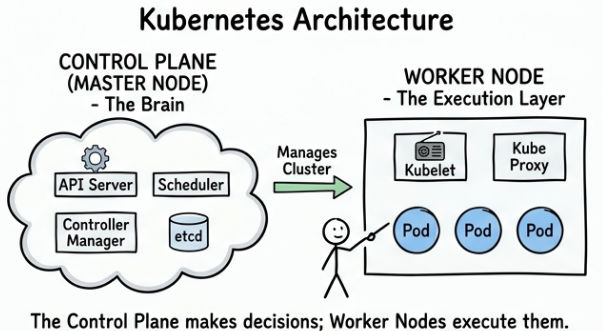
A Kubernetes cluster is the core environment where applications run. It consists of two main parts:
? The control plane acts as the brain, while worker nodes act as the execution layer.
Example
Let’s say you want to run a web app with 2 instances:
apiVersion: apps/v1
kind: Deployment
metadata:
  name: my-app
spec:
  replicas: 2
  selector:
    matchLabels:
      app: my-app
  template:
    metadata:
      labels:
        app: my-app
    spec:
      containers:
      - name: nginx-container
        image: nginx
kubectl apply -f deployment.yaml
Kubernetes automatically:
The Control Plane is responsible for managing the entire cluster and ensuring everything works as expected.
The API Server is the central entry point for all Kubernetes operations. Every request—whether from kubectl, a web UI, or external APIs—is first received and processed by the API Server.
It performs the following tasks:
Example
When you run the following command:
kubectl apply -f deployment.yaml
The process works like this:
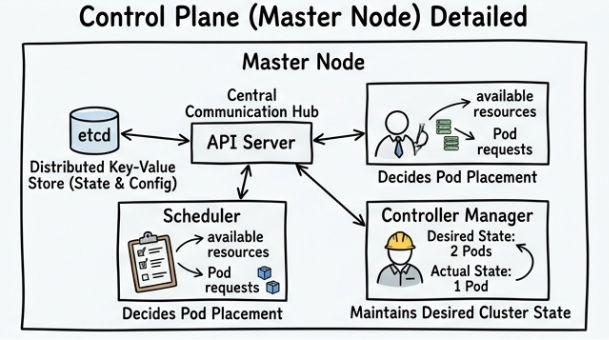
The Scheduler is responsible for deciding which worker node will run a pod. It ensures that workloads are distributed efficiently across the cluster.
It evaluates multiple factors before placing a pod:
Example
When you deploy an application:
kubectl apply -f deployment.yaml
The process works like this:
The Controller Manager is responsible for ensuring that the cluster always matches the desired state defined by the user.
It continuously monitors the system and makes adjustments whenever there is a difference between the desired state and the actual state.
It performs tasks like:
Example
Suppose you define a deployment with 2 replicas:
spec:
  replicas: 2
What happens:
etcd is the core database of Kubernetes that stores all the cluster data in a key-value format.
It acts as the single source of truth, meaning Kubernetes relies on it to know what is happening inside the cluster.
It stores:
Example
When you create a deployment:
kubectl apply -f deployment.yaml
What happens:
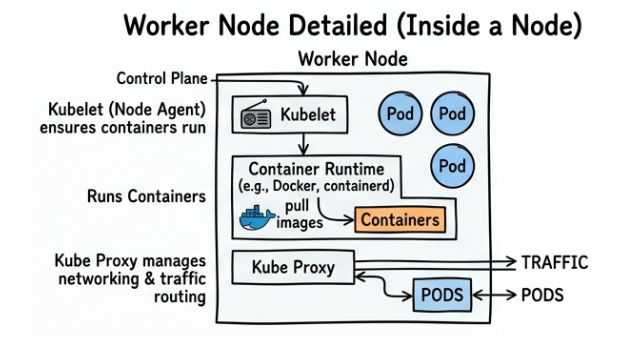
Worker nodes are responsible for running your actual applications inside containers. Each node includes key components that ensure applications run smoothly and communicate properly.
Kubelet is an agent that runs on every worker node and ensures containers are running as expected.
It:
Example
When a pod is assigned to a worker node:
kubectl apply -f deployment.yaml
What happens:
? If the container crashes, Kubelet reports it and helps restart it.
Kube Proxy is responsible for managing network communication inside the cluster.
It:
Example
? If multiple pods are running your app:
The container runtime is responsible for actually running containers on the node.
It:
Example
? When a pod is created:
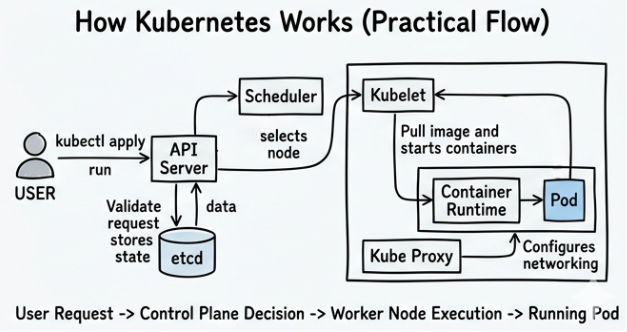
Here’s the real working flow:
kubectl apply -f deployment.yaml
| Feature | Control Plane | Worker Node |
|---|---|---|
| Role | Manages the entire cluster | Runs applications |
| Components | API Server, Scheduler, Controller Manager, etcd | Kubelet, Kube Proxy, Container Runtime |
| Function | Decision making and management | Execution of workloads |
| Responsibility | Maintains cluster state and scheduling | Runs containers and handles resources |
Kubernetes components communicate with each other using APIs and internal networking, ensuring smooth coordination across the cluster.
? This centralized communication model keeps the system consistent, reliable, and easy to manage.
Suppose a pod crashes:
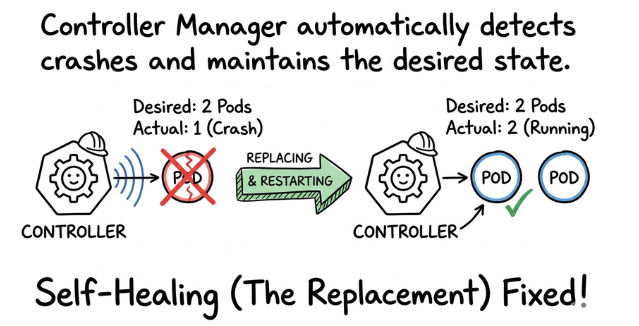
? This entire process happens automatically without any manual intervention.
Kubernetes architecture is designed to efficiently manage containerized applications by clearly separating control (decision-making) from execution (running applications). This design makes the system highly scalable, reliable, and easy to manage in real-world environments.
The Control Plane handles all the decisions and maintains the desired state, while Worker Nodes execute those decisions by running applications smoothly. All components work together in an automated way to ensure high availability and performance.
