
Author
Kubernetes Networking & Traffic Management defines how pods communicate with each other, how services are exposed, and how traffic flows inside and outside the cluster.
In simple terms, it ensures that your applications can talk internally within the cluster and be accessed externally in a controlled and reliable way.
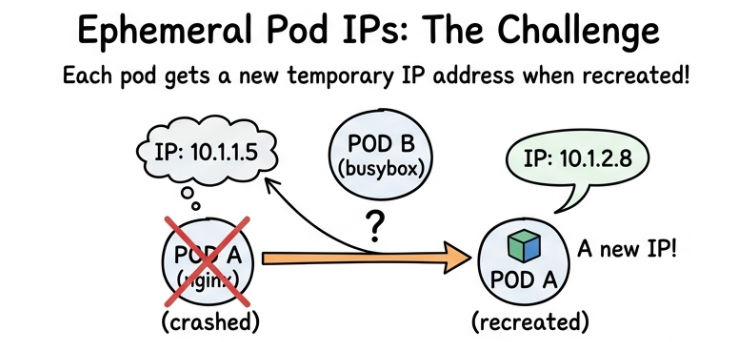
In Kubernetes, pods are ephemeral (temporary) in nature:
This creates a challenge:
How do services communicate if IPs keep changing?
In Kubernetes, every pod gets its own unique IP address, and all pods inside the cluster can communicate with each other directly.
Example
Step 1: Create Pod A (nginx)
apiVersion: v1
kind: Pod
metadata:
  name: pod-a
spec:
  containers:
  - name: nginx
    image: nginx
    ports:
    - containerPort: 80
Step 2: Create Pod B (busybox)
apiVersion: v1
kind: Pod
metadata:
  name: pod-b
spec:
  containers:
  - name: busybox
    image: busybox
    command: ["sh", "-c", "sleep 3600"]
Step 3: Get Pod IP
kubectl get pods -o wide
Example output:
pod-a 10.244.1.5
Step 4: Access Pod A from Pod B
kubectl exec -it pod-b -- sh
wget [<http://10.244.1.5>](<http://10.244.1.5/>)
Problem
If Pod A restarts:
A Service in Kubernetes provides a stable IP address and DNS name for a group of pods.
? Since pod IPs change frequently, Services act as a fixed entry point to access applications.
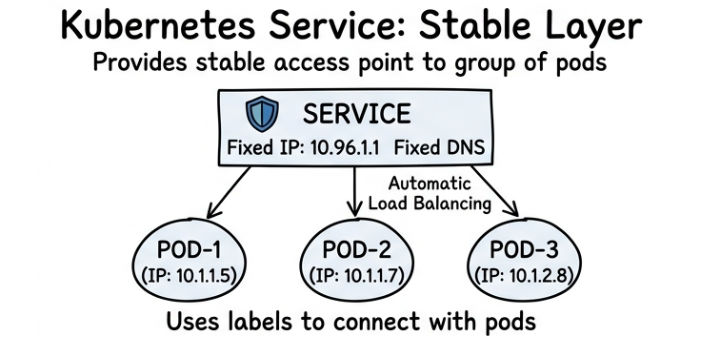
Used for internal communication inside cluster
Example
apiVersion: v1
kind: Service
metadata:
  name: backend-service
spec:
  selector:
    app: backend
  ports:
    - port: 80
      targetPort: 8080
Used to expose service outside the cluster (for testing)
Example
apiVersion: v1
kind: Service
metadata:
  name: test-service
spec:
  type: NodePort
  selector:
    app: myapp
  ports:
    - port: 80
      targetPort: 8080
      nodePort: 30080
Access Example:
http://<NodeIP>:30080
Used to expose service to internet (production)
Example
apiVersion: v1
kind: Service
metadata:
  name: web-service
spec:
  type: LoadBalancer
  selector:
    app: frontend
  ports:
    - port: 80
      targetPort: 8080
Ingress in Kubernetes is used to manage external HTTP/HTTPS traffic in a smart and centralized way.
Instead of exposing multiple services separately, Ingress gives you one entry point for all external traffic.
Key Features
/api, /ui)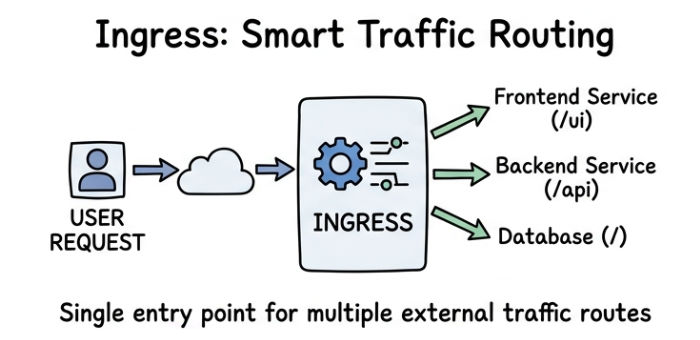
Example (Ingress)
Step 1: Backend Service
apiVersion: v1
kind: Service
metadata:
  name: backend-service
spec:
  selector:
    app: backend
  ports:
    - port: 80
      targetPort: 8080
Step 2: Frontend Service
apiVersion: v1
kind: Service
metadata:
  name: frontend-service
spec:
  selector:
    app: frontend
  ports:
    - port: 80
      targetPort: 3000
Step 3: Ingress Rule
apiVersion: networking.k8s.io/v1
kind: Ingress
metadata:
  name: app-ingress
spec:
  rules:
  - http:
      paths:
      - path: /api
        pathType: Prefix
        backend:
          service:
            name: backend-service
            port:
              number: 80
      - path: /ui
        pathType: Prefix
        backend:
          service:
            name: frontend-service
            port:
              number: 80
In Kubernetes, the request from a user does not go directly to a pod. It follows a structured flow to ensure security, scalability, and proper routing.
Typical Traffic Flow
User Request → Ingress → Service → Pod
Explanation:
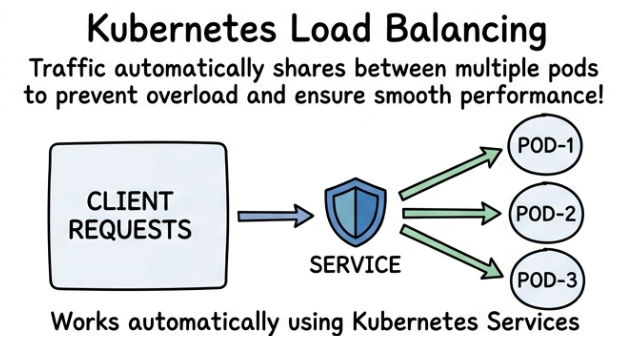
http://myapp.com/api).Kubernetes automatically distributes incoming traffic across multiple pods to ensure smooth performance and reliability.
Key Points
Simple Example
If you have 3 pods running:
Pod-1, Pod-2, Pod-3
? Traffic flow:
Request 1 → Pod-1
Request 2 → Pod-2
Request 3 → Pod-3
Network Policies in Kubernetes are used to control and restrict traffic between pods.
? In simple words: They decide which pod can talk to which pod.
Key Points
Example Network Policy
apiVersion: networking.k8s.io/v1
kind: NetworkPolicy
metadata:
  name: allow-backend
spec:
  podSelector:
    matchLabels:
      app: database
  ingress:
  - from:
    - podSelector:
        matchLabels:
          app: backend
Explanation:
backend can access the databaseIn a real Kubernetes-based web application:
