
Author
Now that you understand Docker basics like images and containers, let’s see how everything works together inside Docker architecture.
Docker architecture defines how different Docker components work together to build, ship, and run containers efficiently.
It is based on a client-server model, where different parts of Docker communicate with each other to perform tasks.
In this model:
docker run, docker build)? In simple words: Docker architecture explains how your command turns into a running container.
The Docker Client is the interface you use to interact with Docker and execute commands.
It runs commands such as:
docker build → Builds a Docker image from a Dockerfiledocker pull → Downloads an image from a Docker registrydocker run → Creates and starts a container from an imageIt sends requests to the Docker Daemon through the REST API.
Example (Command Line)
docker build -t my-app .
docker pull nginx
docker run -p 8080:80 nginx
When you run docker run nginx, the Docker Client sends this command to the Docker Engine, which then processes it and starts a container.
The Docker Host is the system (physical or virtual machine) where Docker is installed and runs all container-related operations.
It acts as the main environment that manages and stores Docker resources.
It includes:
? It is the environment where all Docker operations are executed.
Example (Real-World View):
When you run a container:
docker run nginx
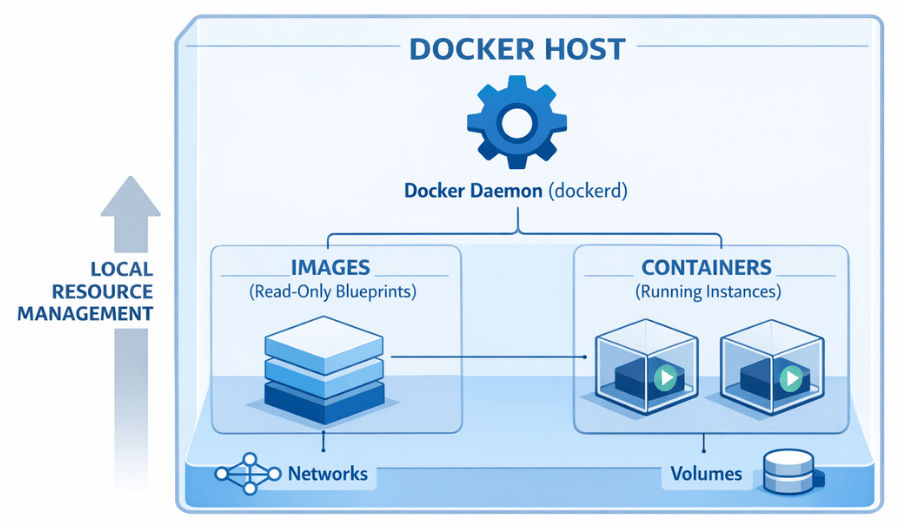
What happens on Docker Host:
The Docker Daemon (dockerd) is the core background service of Docker that runs on the Docker Host.
It is responsible for receiving commands from the Docker Client and performing all Docker operations.
It performs tasks such as:
? In simple words: The Docker Daemon is the engine that does all the actual work in Docker architecture.
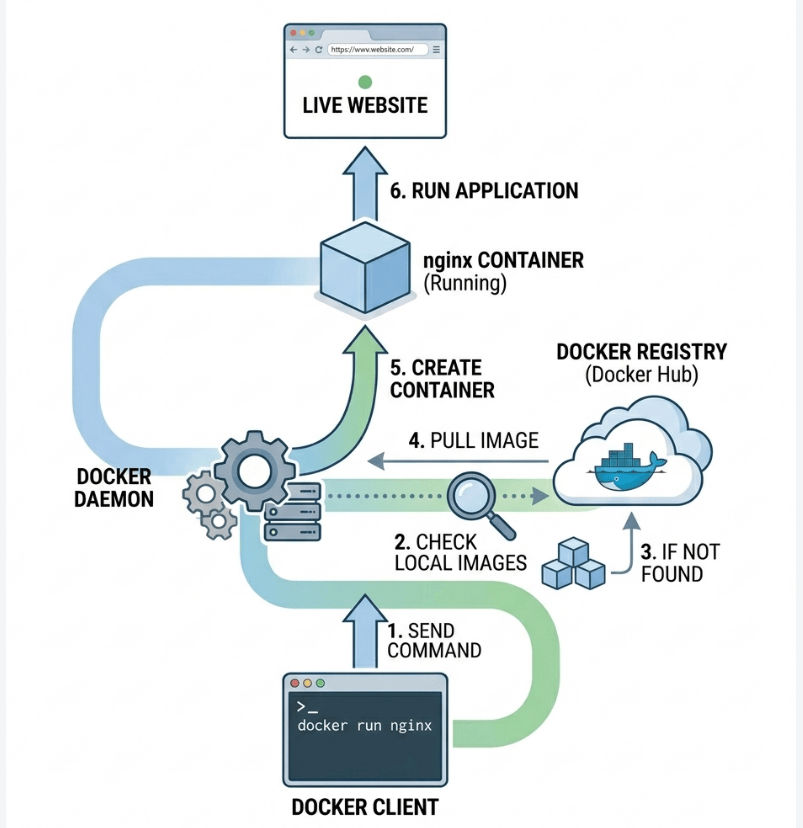
Example (How it works in real life)
When you run:
docker run nginx
Example Commands (Useful for understanding Daemon activity)
docker ps
Shows containers currently managed by Docker Daemon
docker images
Shows images stored and managed by Docker Daemon
docker logs container_id
Shows logs of containers running under Docker Daemon
Docker Images are read-only templates used to create containers.
They act as a blueprint of an application, which includes everything needed to run the app.
Docker images:
? Think of it as a blueprint that is used to create running containers.
Example (Pulling an Image)
docker pull nginx
? This command downloads the nginx image from Docker Hub to your local system.
Example (Listing Images)
docker images
? This shows all Docker images available on your system.
Example (Using Image to Run Container)
docker run nginx
? This creates a container from the nginx image and runs it.
Dockerfile Example (How Image is Built)
FROM openjdk:21
WORKDIR /app
COPY target/app.jar app.jar
ENTRYPOINT ["java","-jar","app.jar"]
? This Dockerfile is used to build a Docker image for a Spring Boot application.
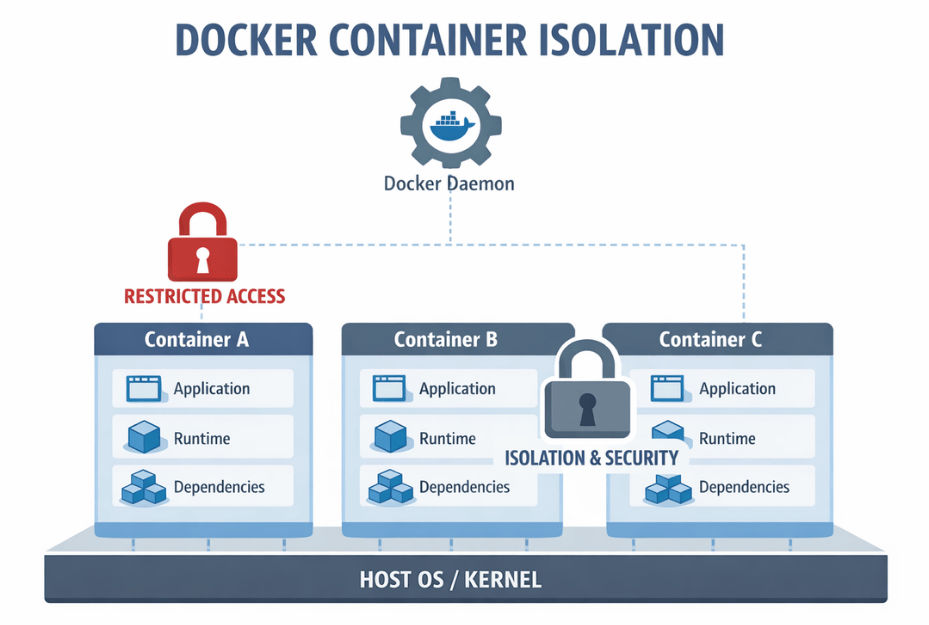
Containers are running instances of Docker images.
In simple words, when you run an image, it becomes a container.
Containers are:
? This is where your actual application runs.
Example (Run a Container)
docker run nginx
? This command creates a container from the nginx image and starts it.
Example (List Running Containers)
docker ps
? This shows all currently running containers.
Example (Stop a Container)
docker stop container_id
? This stops a running container safely.
A Docker Registry is a storage system where Docker images are stored and shared.
It acts like a library of Docker images.
There are two types:
? Docker pulls images from the registry when they are not available locally.
Example (Pull Image from Registry)
docker pull nginx
? This command downloads the nginx image from Docker Hub (public registry).
Example (Push Image to Registry)
docker push my-app
? This uploads your custom image to a registry.
Here’s the complete workflow of how Docker runs an application:
? This process is fast, automated, and works in seconds.
Docker Client
     ↓
Docker Daemon (Docker Engine)
     ↓
Check Local Images
     ↓
If Image Not Found
     ↓
Docker Registry (Docker Hub)
     ↓
Pull Docker Image
     ↓
Create Container
     ↓
Run Application
Docker architecture is based on a simple client-server model where the Docker Client sends commands, the Docker Daemon processes them, and containers are created using Docker Images. All components like images, containers, and registry work together in a smooth workflow to build, ship, and run applications quickly.
? In simple words: Docker architecture turns a simple command into a running application in a fast, automated, and efficient way.
