
Author
In many real-world applications, deleting data permanently from the database is risky and often unacceptable.
Business requirements usually demand data recovery, auditing, history tracking, and compliance.
This is where Soft Delete becomes essential.
Soft Delete is a technique where:
deleted, is_deleted)deleted_at)ACTIVE, DELETED, BLOCKED)Soft Delete is when a record is marked as deleted instead of being physically removed from the database, allowing it to be recovered, audited, or kept for compliance purposes.
? The data still exists, but behaves as if it were deleted.
| Feature | Soft Delete | Hard Delete |
|---|---|---|
| Data removed from database | The record is not physically removed; it is only marked as deleted | The record is permanently removed from the database |
| Data recovery | Possible, because the data still exists in the table | Not possible, once deleted the data is lost forever |
| Audit and history support | Fully supported, since historical records remain available | Not supported, deleted data cannot be audited |
| Referential integrity | Preserved, because related records still reference existing rows | Risky, may break foreign key relationships |
| Compliance friendliness | Suitable for compliance and legal requirements | Not suitable for compliance-sensitive systems |
| Usage in real-world systems | Very commonly used in enterprise applications | Rarely used, mainly for temporary or non-critical data |
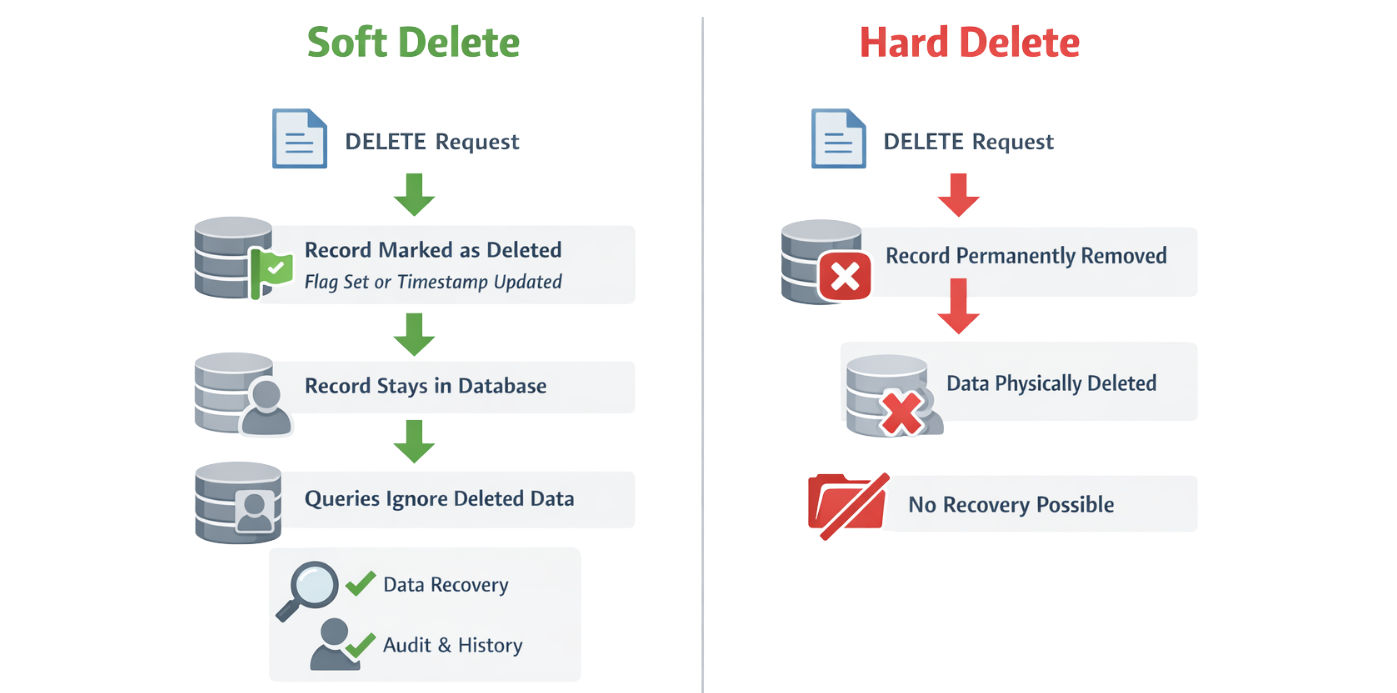
Soft Delete is widely used because it:
| Approach | Example | Description | Use Case |
|---|---|---|---|
| Boolean Flag | is_deleted = true |
Marks a record as logically deleted using a simple true/false flag | Best for simple, high-performance systems |
| Timestamp | deleted_at = NOW() |
Stores the exact time when the record was deleted; record is active when the value is NULL |
Audit-heavy and compliance-driven systems |
| Status Column | status = DELETED |
Supports multiple lifecycle states (ACTIVE, INACTIVE, DELETED) | Complex workflows and state-driven applications |
@Entity
@Table(name = "users")
publicclassUser {

@Id
@GeneratedValue
private Long id;

private String name;

privatebooleandeleted=false;
}
DELETE request
     ↓
UPDATE deleted flag =true
     ↓
Record staysindatabase
     ↓
Application queries ignore it
userRepository.deleteById(id);
This is the simplest way to implement soft delete in Spring Data JPA.
You manually update a flag instead of deleting the record.
@Modifying
@Query("UPDATE User u SET u.deleted = true WHERE u.id = :id")
voidsoftDeleteById(Long id);
What this does:
UPDATE query instead of a DELETEdeleted = true)List<User>findByDeletedFalse();
What this does:
deleted = falseHibernate provides built-in support for soft delete using annotations.
This approach is automatic, safe, and widely used in real-world Spring Boot applications.
@Entity
@Table(name = "users")
@SQLDelete(sql = "UPDATE users SET is_deleted = true WHERE id = ?")
@Where(clause = "is_deleted = false")
publicclassUser {

@Id
@GeneratedValue
private Long id;

private String name;

@Column(name = "is_deleted")
privatebooleandeleted=false;
}
@SQLDelete
DELETE SQLUPDATEUPDATE usersSET is_deleted=trueWHERE id= ?
@Where
WHERE is_deleted=false
| Action | Result |
|---|---|
repository.delete() |
Executes UPDATE, not DELETE |
| Fetch queries | Return only non-deleted records |
| Database row | Remains physically present |
| Application code | Requires no extra filtering |
userRepository.deleteById(id);
UPDATE usersSET is_deleted=trueWHERE id= ?
Works seamlessly with:
@EntityGraphBy default, soft-deleted records are hidden because of the @Where clause.
For admin or audit scenarios, you may need to fetch deleted data explicitly.
@Query(value = "SELECT * FROM users WHERE is_deleted = true", nativeQuery = true)
List<User>findDeletedUsers();
Why native query?
@Where does not apply to native queriesHibernate Filters provide dynamic control over soft delete behavior.
Use this approach when:
Entity Configuration
@FilterDef(
    name = "deletedFilter",
    parameters = @ParamDef(name = "isDeleted", type = Boolean.class)
)
@Filter(name = "deletedFilter", condition = "is_deleted = :isDeleted")
@Entity
publicclassUser {
// fields
}
Enabling the Filter
Sessionsession= entityManager.unwrap(Session.class);

session.enableFilter("deletedFilter")
       .setParameter("isDeleted",false);
Now:
false → fetch active recordstrue → fetch deleted records⚠️ Advanced usage — not required for most projects
Instead of a boolean flag, use a timestamp.
Entity Fields
@Column(name = "deleted_at")
private LocalDateTime deletedAt;
Hibernate Configuration
@SQLDelete(sql = "UPDATE users SET deleted_at = NOW() WHERE id = ?")
@Where(clause = "deleted_at IS NULL")
Benefits
⚠️ Slightly more complex than boolean flag
⚠️ Important Limitation
Soft delete does NOT cascade automatically.
What this means:
@SQLDelete on child entities@EntityGraph@EntityGraph works normally@Where filtering still applies✔ Safe and recommended combination
✔ No extra configuration required
DTO projections automatically respect soft delete because:
Why this is powerful
private LocalDateTime deletedAt;
private String deletedBy;
This enables:
@Where → deleted data leaks@SQLDelete + @Whereis_deleted or deleted_at| Aspect | Soft Delete | DTO Projection |
|---|---|---|
| Purpose | Controls the lifecycle of data (logical deletion, recovery, auditing) | Optimizes data fetching by retrieving only required fields |
| Data stored | Full entity remains in the database | Only selected fields are fetched into DTOs |
| Used for | Enforcing business rules, compliance, and historical tracking | Read-only API responses, reports, or dashboards |
| Deletes data | No — data remains but marked as deleted | No — data is not physically removed |
| Impact on performance | Slightly more storage but safe for queries | Improves performance by reducing unnecessary data retrieval |
| Integration | Works at the entity/database level | Works at the query level and can respect soft delete filters |
@SQLDelete + @Where.