
Author
Bean Validation (JSR 380) is a Java standard for validating objects using annotations like @NotNull, @Email, and @Size. In Spring Boot, it’s implemented via Hibernate Validator and triggered with @Valid in controllers. If validation fails, Spring automatically returns a 400 Bad Request, preventing invalid data from reaching the business logic.
Bean Validation allows you to define rules directly on fields or methods, eliminating the need for manual if-else checks.
Validation Flow
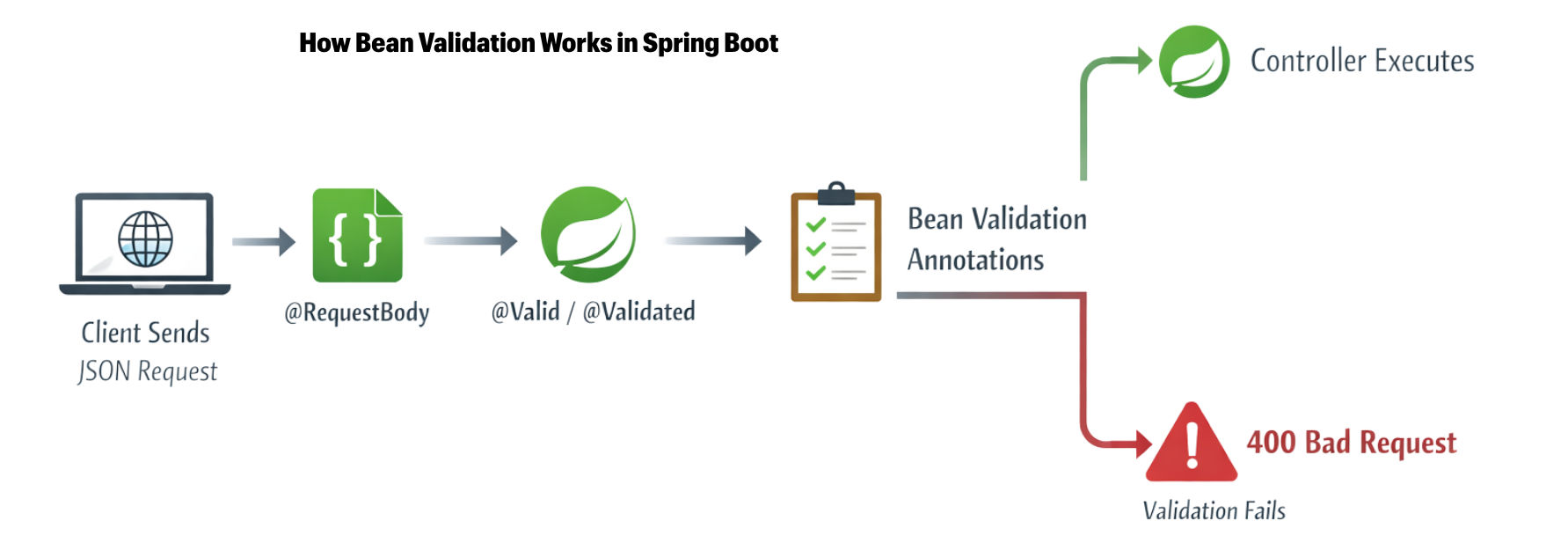
@Valid triggers validation on DTO or model fields.Bean Validation is used to validate user input or request data in Java and Spring Boot applications.
Spring Boot integrates Hibernate Validator by default, making it easy to enforce rules on DTOs, entities, or request objects.
Basic Constraints
| Annotation | Description | Example |
|---|---|---|
@NotNull |
Field must not be null | @NotNull(message="ID cannot be null") private Long id; |
@NotBlank |
String must not be null, empty, or whitespace | @NotBlank(message="Name is required") private String name; |
@NotEmpty |
String or collection must not be empty | @NotEmpty(message="Roles cannot be empty") private List<String> roles; |
@Size(min, max) |
Limits length of String or size of collection | @Size(min=5, max=50, message="Username must be 5-50 chars") private String username; |
@Email |
Must be a valid email format | @Email(message="Email should be valid") private String email; |
Numeric Constraints
| Annotation | Description | Example |
|---|---|---|
@Min(value) |
Minimum numeric value allowed | @Min(value=1, message="Age must be at least 1") private int age; |
@Max(value) |
Maximum numeric value allowed | @Max(value=100, message="Age cannot exceed 100") private int age; |
@Positive |
Must be a positive number (>0) | @Positive(message="Salary must be positive") private double salary; |
@PositiveOrZero |
Must be zero or positive | @PositiveOrZero(message="Balance cannot be negative") private double balance; |
@Negative |
Must be a negative number (<0) | @Negative(message="Discount must be negative") private double discount; |
Date Constraints
| Annotation | Description | Example |
|---|---|---|
@Past |
Date must be in the past | @Past(message="Birthdate must be in the past") private LocalDate birthDate; |
@Future |
Date must be in the future | @Future(message="Expiry date must be in the future") private LocalDate expiryDate; |
@PastOrPresent |
Date must be past or today | @PastOrPresent(message="Start date cannot be in the future") private LocalDate startDate; |
@FutureOrPresent |
Date must be today or in the future | @FutureOrPresent(message="Event date cannot be in the past") private LocalDate eventDate; |
DTO Validation indicates a real-world demonstration of how to apply validation rules on a DTO (Data Transfer Object) in Spring Boot. It shows how annotations like @NotBlank, @Email, and @Min are used to ensure incoming data meets specific requirements before processing.
publicclassUserDTO {

@NotBlank(message = "Name is required")
private String name;

@Email(message = "Invalid email address")
private String email;

@Min(value = 18, message = "Age must be at least 18")
privateint age;

// Getters and Setters
public StringgetName() {
return name;
    }

publicvoidsetName(String name) {
this.name = name;
    }

public StringgetEmail() {
return email;
    }

publicvoidsetEmail(String email) {
this.email = email;
    }

publicintgetAge() {
return age;
    }

publicvoidsetAge(int age) {
this.age = age;
    }
}
@Valid@RestController
@RequestMapping("/users")
publicclassUserController {
@PostMapping
public ResponseEntity<User>createUser(@Valid@RequestBody UserDTO userDTO) {
UsersavedUser= userService.saveUser(userDTO);
return ResponseEntity
.status(HttpStatus.CREATED)
.body(savedUser);
}
}
What happens:
@Valid triggers all validation rules defined in UserDTO.Example:
@PostMapping("/users")
public ResponseEntity<User>createUser(@Valid@RequestBody UserDTO userDTO) {
return ResponseEntity.ok(userService.saveUser(userDTO));
}
org.springframework.validation.annotation.Validated).@Valid functionality.Example with validation group:
@PostMapping("/users")
public ResponseEntity<User>createUser(
@Validated(OnCreate.class)@RequestBody UserDTO userDTO) {
return ResponseEntity.ok(userService.saveUser(userDTO));
}
| Feature | @Valid |
@Validated |
|---|---|---|
| Specification | JSR-380 (Java Bean Validation standard) | Spring-specific annotation |
| Validation Groups | Not supported | Supported |
| Usage | Simple request body or method parameter validation | Advanced validation, supports groups and class-level validation |
| Target | Method parameters | Method parameters & classes |
| Common Use Case | Basic DTO validation in controllers | Conditional/group validation, cross-parameter checks |
Custom Bean Validation allows you to define your own validation rules when the built-in annotations like @NotNull or @Email are not sufficient. You create a custom annotation (e.g., @StrongPassword) and implement a validator class (like PasswordValidator) that contains the logic to check the rule.
This is useful for complex validations such as password strength, ID formats, or business-specific rules.
Example annotation:
@Constraint(validatedBy = PasswordValidator.class)
@Target({ FIELD })
@Retention(RUNTIME)
public@interface StrongPassword {
    Stringmessage()default"Weak password";
    Class<?>[] groups()default {};
    Class<?extendsPayload>[] payload()default {};
}
@Constraint(validatedBy = ...) → Specifies the validator class that implements the logic.message → Default error message if validation fails.groups → For grouping validations (used with @Validated).payload → For custom metadata (optional).This annotation can then be used on fields in a DTO:
publicclassUserDTO {
@StrongPassword
private String password;
}
When used with @Valid, Spring Boot automatically triggers your custom validation.
When validation fails in Spring Boot (using @Valid), it throws MethodArgumentNotValidException and returns 400 Bad Request by default. You can customize responses using @ControllerAdvice, @ExceptionHandler, and custom error DTOs for consistent, user-friendly messages.
Example:
@ControllerAdvice
publicclassGlobalExceptionHandler {

@ExceptionHandler(MethodArgumentNotValidException.class)
public ResponseEntity<ErrorResponse>handleValidationExceptions(
            MethodArgumentNotValidException ex) {

        List<String> errors = ex.getBindingResult()
                                .getFieldErrors()
                                .stream()
                                .map(err -> err.getDefaultMessage())
                                .collect(Collectors.toList());

ErrorResponseresponse=newErrorResponse(LocalDateTime.now(),400, errors);
returnnewResponseEntity<>(response, HttpStatus.BAD_REQUEST);
    }
}
Bean Validation (JSR 380) is the foundation of validation in Spring Boot. Using annotation-based rules with @Valid or @Validated:
