
Author
Docker uses a smart layered storage system combined with Union File System (OverlayFS) to make images lightweight, reusable, and fast.
This is one of the most important Docker concepts because it explains how images are built, stored, and optimized.
Docker images are built using multiple read-only layers that are stacked on top of each other like a tree structure.
Each line (instruction) in a Dockerfile creates a new layer in the image.
? In simple words: A Docker image is a combination of multiple stacked layers.
Example of Docker Image Layers
FROM openjdk:21
WORKDIR /app
COPY target/app.jar app.jar
ENTRYPOINT ["java","-jar","app.jar"]
How layers are created:
FROM openjdk:21 → Base layer (OS + Java environment)WORKDIR /app → Creates a working directory layerCOPY target/app.jar app.jar → Adds application code layerENTRYPOINT ["java","-jar","app.jar"] → Final runtime configuration layerDocker images are built in a layered format. Each layer adds a new change on top of the previous one.
Base Image Layer (OS)
        ↓
Runtime Layer (Java / Node / Python)
        ↓
Application Layer (Code)
        ↓
Configuration Layer
        ↓
Writable Container Layer
Docker layers are mainly divided into two types:
| Feature | Read-Only Layers (Image Layers) | Writable Layer (Container Layer) |
|---|---|---|
| Purpose | Forms the base Docker image | Stores runtime changes during container execution |
| Creation Time | Created during image build process | Created when container starts running |
| Modifiability | Cannot be modified once created | Can be modified during container runtime |
| Data Type | Static data | Dynamic data |
| Sharing | Shared across multiple containers | Unique for each container |
| Storage | Stored in Docker cache system | Stored inside container filesystem |
| Lifecycle | Remains until image is deleted | Removed when container is deleted |
Docker uses layer caching to improve build speed and efficiency.
How it works:
Example:
If you only change application code:
? This is why Docker is very efficient in CI/CD pipelines.
Docker uses Copy-on-Write (CoW) to manage data efficiently.
How it works:
? In simple words: Docker never edits original data — it creates a copy when changes are needed.
-in-spring-boot_20260401_073927.png)
Docker uses Union File System (OverlayFS) to combine multiple image layers into a single unified filesystem view.
This is what makes Docker feel like a complete operating system even though it is made of many layers.
? In simple words: Multiple layers are merged and shown as one complete system inside the container.
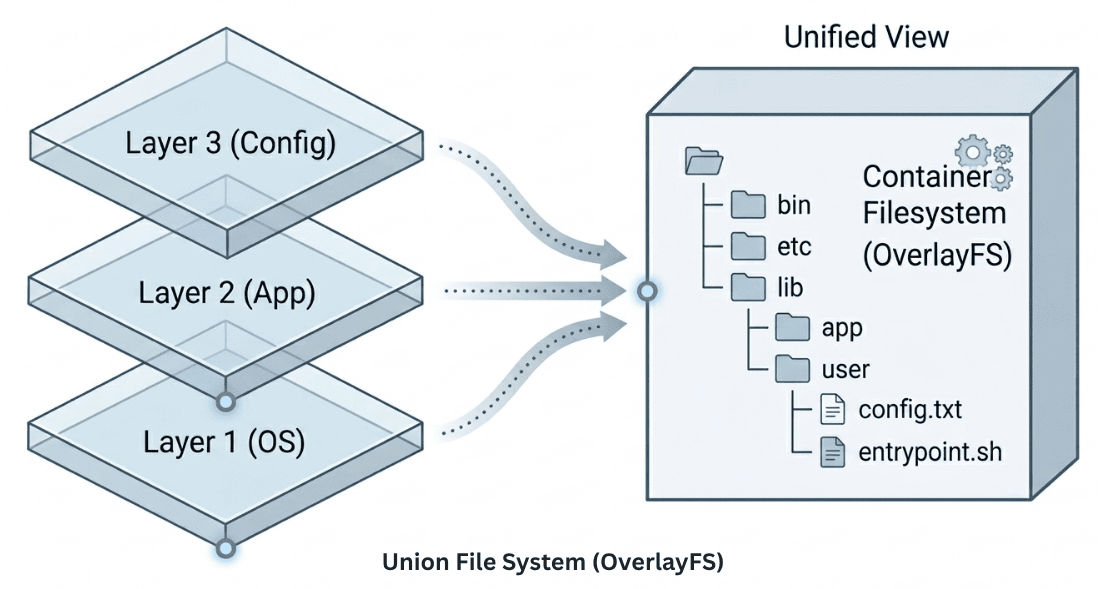
Docker uses a layered stacking approach:
Docker follows a structured flow where image layers are combined and used to run containers.
Docker Image Layers (Read-Only)
        ↓
Union File System (OverlayFS)
        ↓
Container Writable Layer
        ↓
Running Application
Docker provides a command to view how an image is built step-by-step using layers.
This is very useful for debugging and understanding image structure.
Command:
docker history <image_name>
Example:
docker history nginx
Docker layers improve performance by reusing cached layers, which makes builds and deployments faster and avoids unnecessary work.
Docker layer optimization helps reduce image size, improve build speed, and make deployments more efficient.
Docker storage layers and Union File System (OverlayFS) make Docker highly efficient by enabling layer reuse and reducing duplication.
? This layered architecture is the key reason Docker is faster and more resource-efficient than traditional virtual machines.
