
Author
Microservices architecture breaks applications into small, independent services. Kubernetes provides the tools to deploy, manage, and scale these services efficiently.
? Kubernetes helps run and manage microservices automatically.
A Pod is the smallest and most basic unit in Kubernetes. It represents a running instance of your application inside the cluster.
A Pod acts as a wrapper around one or more containers and provides them with a shared environment.
It can contain:
All containers inside a Pod share:
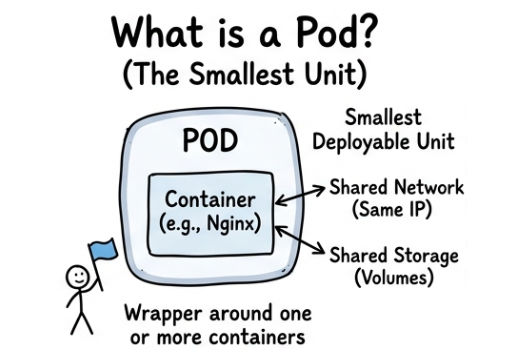
? This allows containers in the same pod to communicate easily.
Example
apiVersion: v1
kind: Pod
metadata:
  name: my-pod
spec:
  containers:
  - name: nginx
    image: nginx
? This configuration creates a Pod that runs a single nginx container.
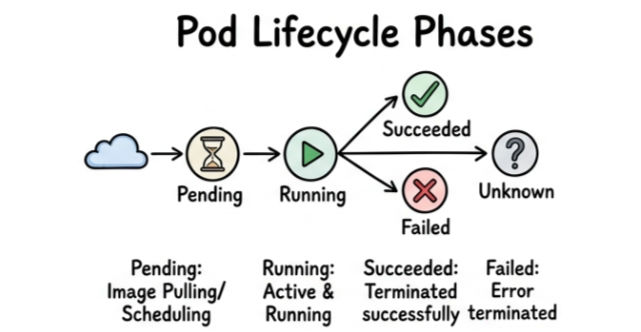
A Pod goes through different stages during its lifecycle, which represent its current state in the Kubernetes cluster.
Pod Lifecycle Phases:
| Feature | Single Container Pod | Multi-Container Pod |
|---|---|---|
| Definition | Runs a single container inside a pod | Runs multiple containers inside the same pod |
| Complexity | Simple and easy to manage | More complex due to multiple containers |
| Use Case | Standard applications | When containers need to work closely together |
| Communication | Not required (single container) | Containers communicate via shared network (localhost) |
| Resource Sharing | Uses pod resources alone | Shares CPU, memory, and storage with other containers |
| Example | Simple web server (nginx) | App container + logging/sidecar container |
A Deployment is a Kubernetes resource used to manage, scale, and maintain pods automatically. It ensures that your application is always running in the desired state.
Instead of managing pods manually, you define the desired configuration, and Kubernetes handles the rest.
A Deployment helps with:
Example
apiVersion: apps/v1
kind: Deployment
metadata:
  name: my-app
spec:
  replicas: 2
  selector:
    matchLabels:
      app: my-app
  template:
    metadata:
      labels:
        app: my-app
    spec:
      containers:
      - name: nginx
        image: nginx
What This Configuration Does
? If one pod crashes, Kubernetes automatically creates a new one.
Run the Deployment
kubectl apply -f deployment.yaml
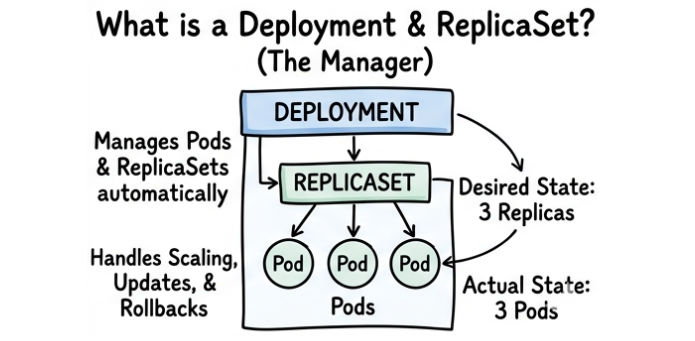
A ReplicaSet is a Kubernetes component that ensures a specified number of pod replicas are always running in the cluster.
It continuously monitors pods and maintains the desired count.
Example
apiVersion: apps/v1
kind: ReplicaSet
metadata:
  name: my-replicaset
spec:
  replicas: 2
  selector:
    matchLabels:
      app: my-app
  template:
    metadata:
      labels:
        app: my-app
    spec:
      containers:
      - name: nginx
        image: nginx
? This ensures 2 pods are always running.
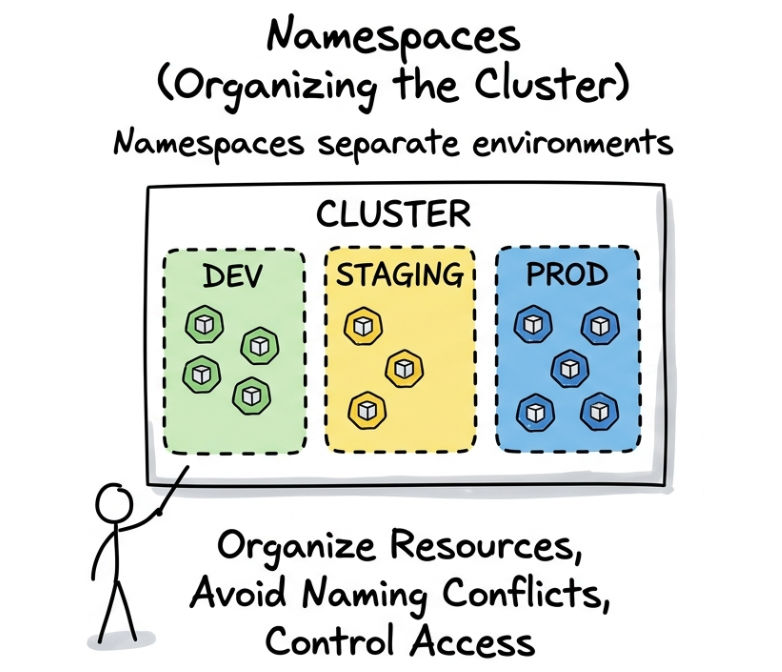
Namespaces are used to organize and separate resources inside a Kubernetes cluster.
They are useful for managing multiple environments within the same cluster.
Benefits:
Example : This creates a namespace named dev.
kubectl create namespace dev
? You can deploy resources inside a namespace:
kubectl apply -f deployment.yaml -n dev
Labels are key-value pairs attached to Kubernetes objects to identify and organize them.
Selectors are used to filter and group resources based on labels.
Example
metadata:
  labels:
    app: my-app
? A Service or Deployment can use this label to find matching pods.
Annotations are used to store additional metadata about Kubernetes objects.
Unlike labels:
Example
metadata:
  annotations:
    description:"This is my app"
Kubernetes is well-suited for microservices architecture because it allows each service to run independently while still being managed as part of a larger system.
It enables:
How It Works (Deployment Pattern)
In a typical microservices setup:
Kubernetes core concepts such as Pods, Deployments, ReplicaSets, and Namespaces form the foundation for building and managing microservices efficiently. These components work together to simplify application deployment, scaling, and maintenance in modern environments.
By using these concepts, developers can create systems that are not only easy to manage but also highly scalable and reliable.
