LLM Providers Integration
Introduction
LLM Providers Integration is the process of connecting your application with powerful AI models to add smart features like chatbots, content generation, summarization, and automation. Instead of building complex AI models from scratch, developers use APIs from leading providers to quickly integrate intelligence into their applications.
? In modern backend development (especially with Spring Boot), this approach helps you build scalable, intelligent, and production-ready applications without managing heavy AI infrastructure.
What is LLM (Large Language Model)?
A Large Language Model (LLM) is an advanced AI system that can understand and generate human-like text. These models are trained on massive datasets, allowing them to answer questions, write content, generate code, and understand context.
? In simple words: LLM is the brain behind AI tools like chatbots and smart assistants.
Popular LLM Providers
Some of the most widely used LLM providers include:
- OpenAI – Known for GPT models like ChatGPT.
- Google – Offers Gemini models with strong AI capabilities.
- Anthropic – Provides Claude models focused on safety and long context.
- Meta – Creator of LLaMA models.
- Microsoft – Azure OpenAI Service for enterprise use.
- Cohere – Specializes in embeddings and text generation.
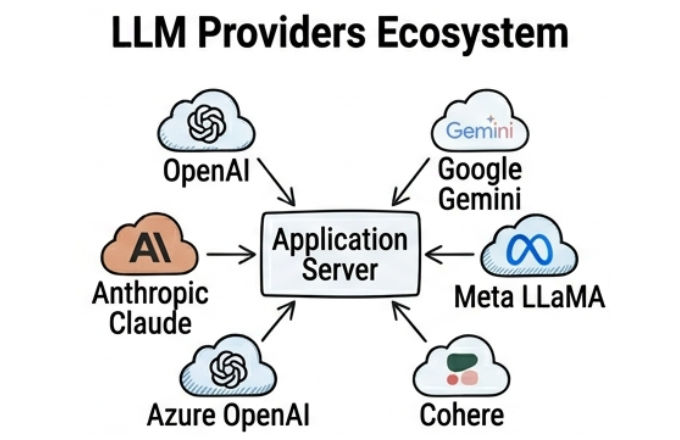
? Each provider offers different pricing, performance, and features, so choosing the right one depends on your use case.
Why LLM Providers Integration is Important
- Faster Development: No need to train AI models from scratch.
- Cost Efficient: Pay only for what you use.
- Scalability: Handle large-scale traffic easily.
- Better User Experience: Enable smart chat, automation, and personalization.
How LLM Integration Works (Step-by-Step Flow)
- User sends a request (question or prompt).
- Backend processes the input.
- Application sends API request to LLM provider.
- AI model processes the request.
- Response is generated (text/code/summary).
- Application returns output to the user.
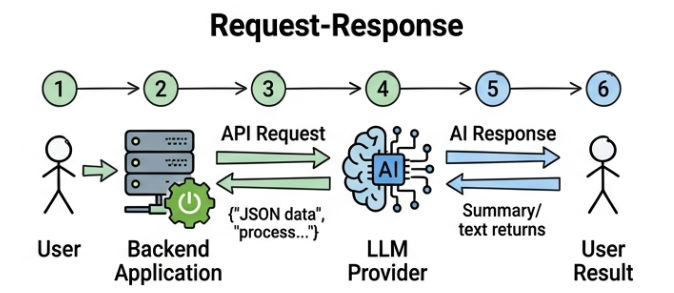
? This flow ensures smooth communication between your app and AI systems.
LLM Integration in Spring Boot (Spring AI)
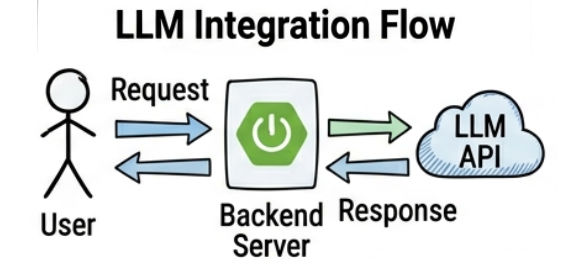
In Spring Boot, you don’t build AI models—you connect to them using APIs.
Frameworks like Spring AI simplify integration by handling:
- API communication
- Request formatting
- Response parsing
Example Configuration
spring.ai.openai.api-key=${OPENAI_API_KEY}
Example Usage
chatClient.prompt()
    .user("Explain Kubernetes in simple terms")
    .call()
    .content();
? This sends a request to the AI model and returns a smart response.
Key Components of LLM Integration
- Use REST APIs or SDKs to connect your application with AI providers.
- API keys are required for secure access and authentication.
- Write clear and structured prompts to improve response quality and accuracy.
- Choose the right model based on speed, cost, and accuracy to balance performance and budget.
- Tokens include both input and output text, so managing token usage is important to control costs.
- Use retry logic to handle temporary failures in API calls.
- Set timeouts to avoid long waiting times during slow responses.
- Use fallback models to ensure your application continues working even if the main provider fails.
Prompt Templates & Dynamic Prompts
- Prompt templates help create reusable and structured prompts.
- They allow you to define a standard format and reuse it with different inputs.
Example
Explain {topic} in simple words
Dynamic Usage
topic = "Docker"
- The placeholder
{topic} is replaced dynamically based on input
- This approach improves consistency and reduces manual effort
- It also makes your prompts more scalable and easier to manage in applications
Streaming Responses (Real-Time Output)
- Streaming allows responses to be delivered token by token in real time.
- Users can see output as it is being generated like live typing.
- Useful for chat applications where instant interaction is needed.
- Helps in building real-time AI assistants with faster responses.
- Improves overall user experience by reducing waiting time.
- Instead of waiting for the full response users start seeing answers instantly.
Security & API Key Management
API keys are sensitive credentials used to access LLM providers so they must be protected properly to avoid misuse, unauthorized access, and unexpected billing issues.
Best Practices:
- Use environment variables to store API keys instead of hardcoding them in code.
- Never expose API keys in the frontend application or client-side code.
- Avoid committing API keys to GitHub or any public repositories.
- Use secret management tools like AWS Secrets Manager, HashiCorp Vault, or Spring Cloud Config in production.
- Rotate API keys regularly to improve security and reduce risk of long-term exposure.
Example (Environment Variable Usage in Spring Boot)
spring.ai.openai.api-key=${OPENAI_API_KEY}
String apiKey = System.getenv("OPENAI_API_KEY");
Rate Limiting & Cost Optimization
Rate limiting and cost optimization are important techniques in LLM integration to control API usage, improve performance, and reduce unnecessary expenses while keeping the system stable and scalable.
Rate Limiting:
- Limit number of requests per user within a specific time window.
- Prevent API overload and system crashes during high traffic.
- Protect backend services from abuse or excessive usage.
- Ensure fair usage across all users.
Example approach in Spring Boot
import java.util.concurrent.ConcurrentHashMap;

public class RateLimiter {

    private final ConcurrentHashMap<String, Integer> requestCount = new ConcurrentHashMap<>();
    private final int LIMIT = 10;

    public boolean isAllowed(String userId) {

        requestCount.putIfAbsent(userId, 0);

        int count = requestCount.get(userId);

        if (count >= LIMIT) {
            return false;
        }

        requestCount.put(userId, count + 1);
        return true;
    }
}
Cost Optimization:
- Use smaller and cheaper models when high accuracy is not required.
- Cache frequent responses to avoid repeated API calls.
- Reduce token usage by writing efficient prompts.
- Avoid unnecessary API calls by validating input before sending requests.
- Batch requests where possible to reduce overhead.
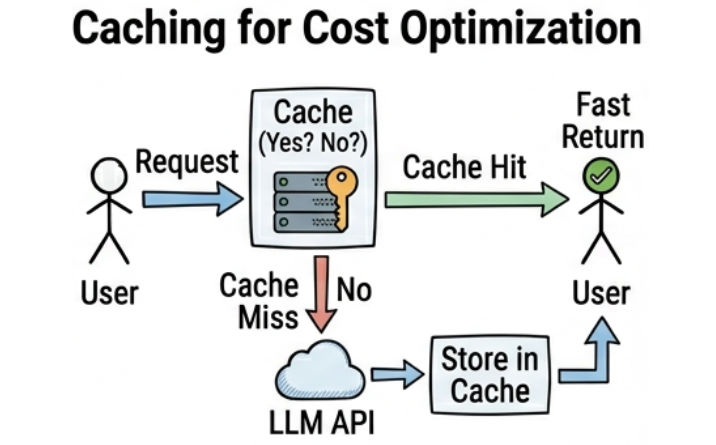
Example (Simple caching idea)
import java.util.HashMap;

public class CacheService {

    private final HashMap<String, String> cache = new HashMap<>();

    public String getResponse(String input) {

        if (cache.containsKey(input)) {
            return cache.get(input);
        }

        String response = "AI response for: " + input;
        cache.put(input, response);

        return response;
    }
}
Error Handling & Reliability
Error handling and reliability are very important in LLM integration because API calls can fail due to network issues, rate limits, timeout problems, or provider downtime so your system must handle these failures gracefully to ensure a stable user experience.
Proper Error Handling Example (Spring AI)
try {
    chatClient.prompt()
            .user("Hello")
            .call()
            .content();
} catch (Exception e) {
    // retry or fallback logic
}
Improved Production-Ready Approach
- Use retry mechanism for temporary failures.
- Implement fallback response when primary LLM fails.
- Set proper timeout to avoid long waiting requests.
- Log errors for debugging and monitoring.
- Handle rate limit exceptions separately for better control.
Example with Retry Logic
public String getResponseWithRetry() {

    int attempts = 0;

    while (attempts < 3) {
        try {
            return chatClient.prompt()
                    .user("Hello")
                    .call()
                    .content();

        } catch (Exception e) {
            attempts++;
        }
    }

    return "Service is temporarily unavailable, please try again later";
}

Common Use Cases
- AI Chatbots are used to build intelligent conversational systems that can answer user queries, assist in navigation, and provide real-time support across websites and applications.
- Content Generation helps in automatically creating blogs, social media posts, product descriptions, and marketing content using simple prompts.
- Code Generation is used by developers to generate boilerplate code, debug issues, or convert logic into working code snippets quickly.
- Customer Support Automation improves support systems by handling FAQs, ticket responses, and basic troubleshooting without human involvement.
- Document Summarization helps in converting long documents, reports, or articles into short and meaningful summaries for faster understanding.
- Search & Recommendation Systems enhance user experience by providing smart search results and personalized recommendations based on user behavior and context.
Real-World Example
AI Chatbot (Spring Boot)
- User asks: “Explain Java Streams”
- Backend sends request to AI
- AI generates response
- Output is displayed to user
? With streaming → Live typing response
? With caching → Faster repeated responses
? With rate limiting → Stable system under load
Challenges in LLM Integration
- Cost Management: High usage increases cost and can impact overall system budget.
- Latency: API responses can be slow due to network delay or heavy model processing.
- Vendor Lock-in: Dependency on a single provider makes switching difficult in future.
- Data Privacy: Sensitive user data must be handled carefully to avoid security risks.
Future of LLM Integration
- Multi-model orchestration where multiple AI models work together and the system automatically selects the best model for each task.
- Hybrid AI (cloud + local) combining cloud-based LLMs with local models for better performance, privacy, and flexibility.
- AI agents and automation where AI systems can independently perform tasks, make decisions, and complete workflows with minimal human input.
- Personalized AI experiences that adapt responses based on user behavior, preferences, and context for better accuracy and relevance.
Conclusion
LLM Providers Integration is a powerful approach to bring AI capabilities into modern applications by connecting with providers like OpenAI or Google so developers can build intelligent, scalable, and user-friendly systems.
? With the right strategy, proper security practices, and optimization techniques, you can create future-ready AI applications that perform efficiently and also rank well on search engines.

