
Author
Deploying a Java JAR file to the cloud means making your application live so users can access it anytime, from anywhere. Instead of running your app on a local system, you host it on cloud servers that are scalable, reliable, and always available.
Cloud deployment is the process of hosting and running your application on remote cloud servers instead of a local machine or on-premise infrastructure. These servers are managed by cloud providers and are accessible over the internet, allowing your application to be available to users from anywhere.
In simple words: Cloud deployment means putting your application on the internet so anyone can access it, instead of running it only on your local computer.
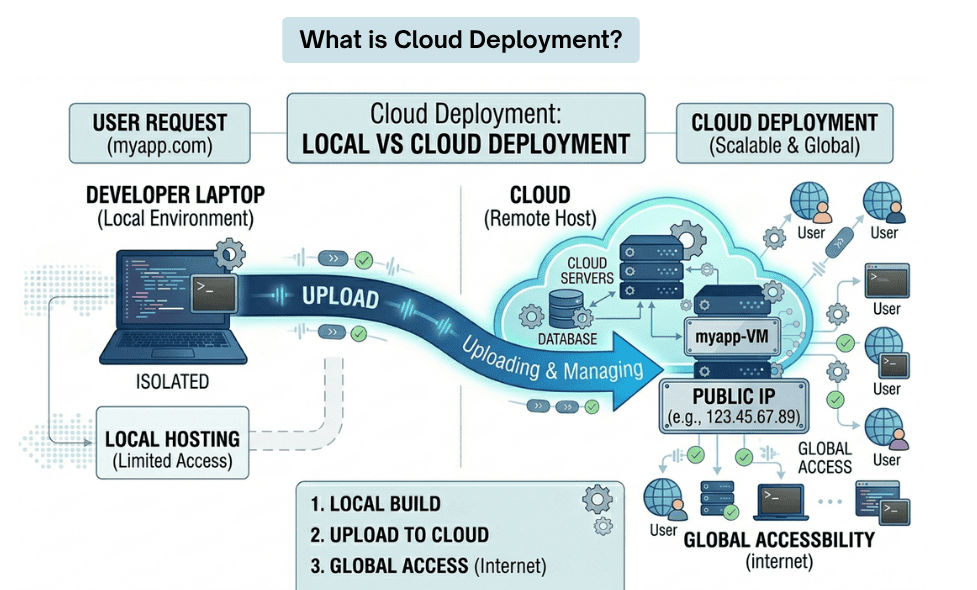
Cloud services are mainly divided into IaaS, PaaS, and SaaS, based on how much control and responsibility you have over the infrastructure and application.
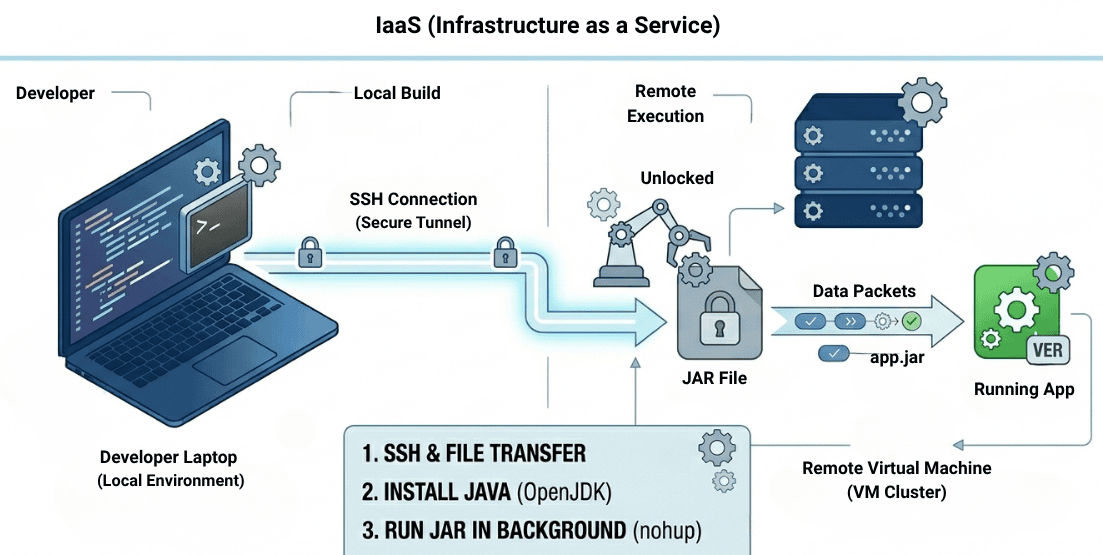
IaaS provides basic computing resources such as virtual servers, storage, and networking. You are responsible for managing the operating system, runtime, and application, while the cloud provider manages the physical hardware.
Examples:
? Best for full control and custom infrastructure setup.
PaaS provides a ready-to-use platform where you can deploy your application without managing servers or infrastructure. The provider handles the underlying setup, including OS and runtime.
Examples:
? Best for quick development and easy deployment.
SaaS is fully developed software that is available over the internet. You do not need to install, deploy, or manage anything—just use the application through a browser.
Examples:
? Best for end users who only want to use software without managing it.
| Feature | IaaS | PaaS | SaaS |
|---|---|---|---|
| Full Form | Infrastructure as a Service | Platform as a Service | Software as a Service |
| User Control | High | Medium | Low |
| Managed By Provider | Hardware, Networking | Infrastructure + Runtime | Everything |
| Managed By User | OS, Runtime, App | Application & Data | Nothing |
| Main Use | Custom setup & control | App development & deployment | Using ready-made software |
| Setup Complexity | High | Medium | Very Low |
Before deploying your application to the cloud, you need to create a JAR file. In a Spring Boot project, this is typically done using Maven.
Build your application using:
./mvnw clean package
or
mvn clean package
After a successful build, the JAR file will be generated inside the target folder:
target/app.jar
This JAR file contains your complete application along with all required dependencies, making it ready for deployment in any environment.
Virtual Machines (IaaS)
In this approach, you deploy your JAR file on a cloud-based virtual machine. You are responsible for setting up the environment, installing required software, and running the application.
? You manually configure the server, install Java, and run your application using the JAR file.
Follow these steps to deploy and run your JAR file on a virtual machine:
1. Connect to your server
ssh ubuntu@your-server-ip
2. Install Java
sudo apt update
sudo apt install openjdk-17-jdk-y
3. Upload your JAR file
scp target/app.jar ubuntu@your-server-ip:/home/ubuntu
4. Run the application
java-jar app.jar
5. Run in background (production use)
To keep your application running even after closing the terminal:
nohup java-jar app.jar > app.log2>&1 &
This command runs the application in the background and stores logs in the app.log file.
Environment variables are used to store configuration values like database URLs, ports, and API keys outside your code. This helps keep your application secure, flexible, and easy to manage.
Set environment variables
export DB_URL=your_database_url
export PORT=8080
Spring Boot configuration
server.port=${PORT}
This tells Spring Boot to read the port value from the environment variable.
To make your application accessible from the internet, you need to allow traffic on the port your app is running on (e.g., 8080).
Allow port using firewall
sudo ufw allow 8080
Cloud Configuration
In addition to server-level firewall settings, you must also allow inbound traffic in your cloud provider’s dashboard:
80800.0.0.0/0 for public access)To make your application accessible using a domain name instead of an IP address, you need to configure DNS.
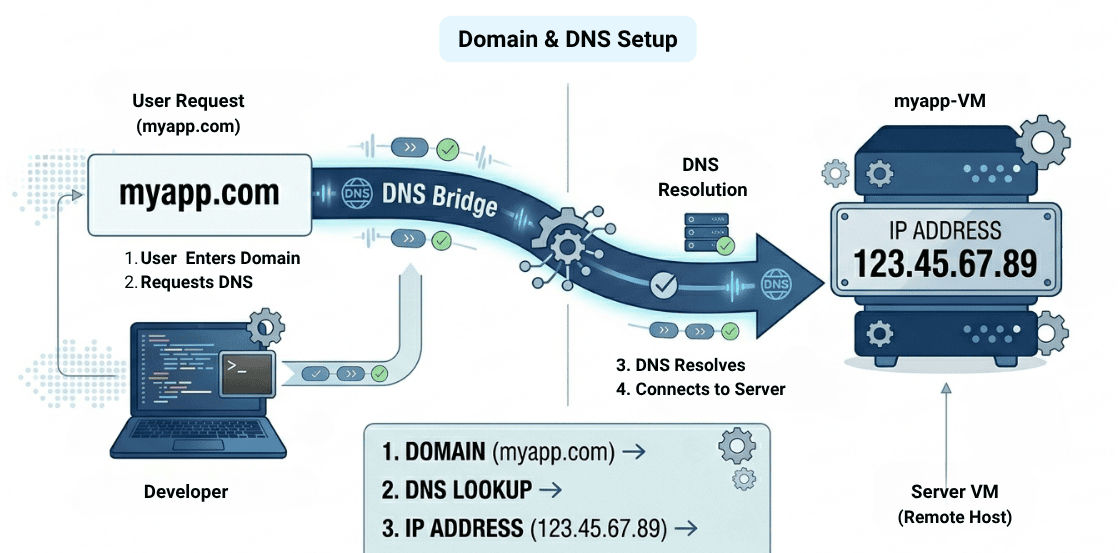
Example:
myapp.com → 123.45.67.89
? After this setup, users can access your app using myapp.com instead of the IP address.
Secure your application using a free SSL certificate from Let’s Encrypt.
Install Certbot
sudo apt install certbot python3-certbot-nginx -y
Generate SSL Certificate
sudo certbot --nginx
? This will automatically configure HTTPS for your domain and secure data transfer between users and your application.
Logging helps track application behavior and debug issues in production.
Check logs
tail -f app.log
? Displays real-time logs of your application.
You can also use:
Scaling ensures your application can handle more users and traffic efficiently.
Vertical Scaling
Horizontal Scaling
? Horizontal scaling is more reliable and commonly used in production environments.
Instead of manual setup, you can use Platform-as-a-Service (PaaS) to deploy your application quickly.
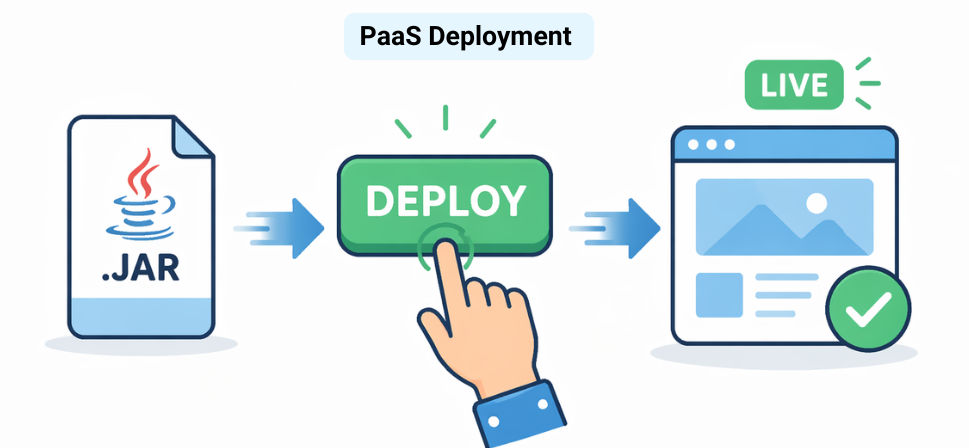
? Simply upload your JAR file, and the platform handles infrastructure, scaling, and deployment automatically.
These practices help keep your application secure, reliable, and scalable.
Deploying a JAR file to the cloud is a crucial step in making your application live, scalable, and ready for production use. It allows your application to be accessed globally while ensuring high availability and better performance.
With technologies like Spring Boot and modern cloud platforms, developers can easily deploy, manage, and scale applications, making it easier to build reliable and production-ready systems.
