
Author
Sometimes the built-in Bean Validation annotations like @NotNull, @Email, or @Size are not enough for your application’s specific rules. In such cases, you can create custom validators to enforce your own validation logic.
Spring Boot provides standard validations (@NotNull, @Email, @Size, etc.), but sometimes you need rules that don’t exist out-of-the-box, for example:
Custom validators allow you to define and enforce these rules in a reusable and centralized way.
Custom validators extend the built-in Bean Validation framework to enforce rules that are specific to your application. They are triggered automatically when you use @Valid or @Validated in your controller.
Define a new annotation for your validation rule and link it to a validator class using @Constraint.
Example: Username validation
import jakarta.validation.Constraint;
import jakarta.validation.Payload;
import java.lang.annotation.*;

@Documented
@Constraint(validatedBy = UsernameValidator.class)// Link to the validator class
@Target({ ElementType.METHOD, ElementType.FIELD })
@Retention(RetentionPolicy.RUNTIME)
public@interface ValidUsername {
    Stringmessage()default"Invalid username";// Default error message
    Class<?>[] groups()default {};// For validation groups
    Class<?extendsPayload>[] payload()default {};// Optional metadata
}
The validator contains the logic to check whether a field is valid.
import jakarta.validation.ConstraintValidator;
import jakarta.validation.ConstraintValidatorContext;

publicclassUsernameValidatorimplementsConstraintValidator<ValidUsername, String> {

@Override
publicvoidinitialize(ValidUsername constraintAnnotation) {
// Optional initialization logic
    }

@Override
publicbooleanisValid(String username, ConstraintValidatorContext context) {
if (username ==null)returnfalse;
// Example: username must be 5-15 letters only
return username.matches("^[a-zA-Z]{5,15}$");
    }
}
Apply your custom annotation to the field you want to validate.
import jakarta.validation.constraints.NotNull;

publicclassUserDTO {

@NotNull(message = "Username cannot be null")
@ValidUsername
private String username;

// getters and setters
}
When you use @Valid on a DTO in your controller method, Spring Boot automatically performs both standard and custom validations before the method executes.
import org.springframework.web.bind.annotation.*;
import jakarta.validation.Valid;
import org.springframework.http.ResponseEntity;
import org.springframework.http.HttpStatus;

@RestController
@RequestMapping("/users")
publicclassUserController {

@PostMapping
public ResponseEntity<String>createUser(@Valid@RequestBody UserDTO user) {
return ResponseEntity.status(HttpStatus.CREATED).body("User is valid!");
    }
}
If the username is invalid, Spring automatically responds with 400 Bad Request and the custom message "Invalid username".
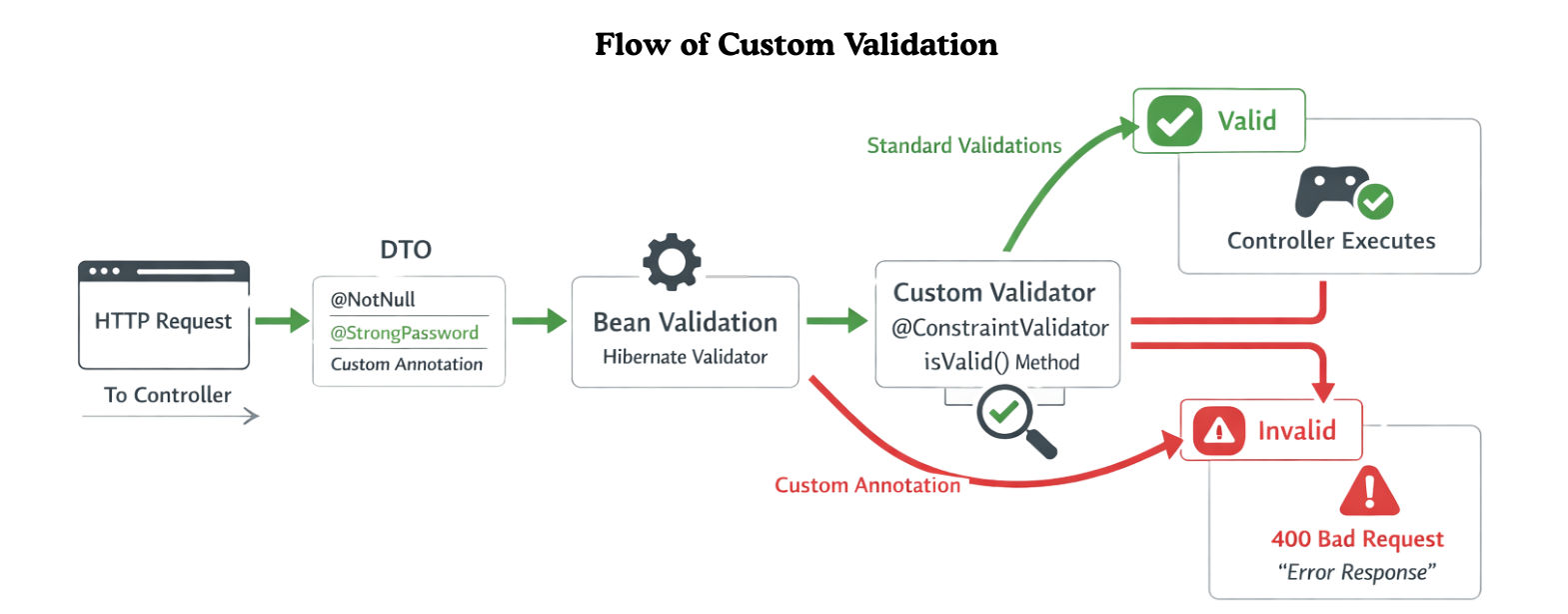
Here’s what happens internally:
@Valid triggers Spring Boot’s validation mechanism.@NotNull, @Email, etc.)@ValidUsername, @StrongPassword)ConstraintValidator class’s isValid() method is called.We want to enforce the rule:
Password must contain at least 1 uppercase letter, 1 number, 1 special character, and be at least 8 characters long.
1. Create the Custom Annotation
import jakarta.validation.Constraint;
import jakarta.validation.Payload;
import java.lang.annotation.*;

@Documented
@Constraint(validatedBy = PasswordValidator.class)// Link to validator class
@Target({ ElementType.FIELD })
@Retention(RetentionPolicy.RUNTIME)
public@interface StrongPassword {
    Stringmessage()default"Password is too weak";// Default error message
    Class<?>[] groups()default {};// For validation groups
    Class<?extendsPayload>[] payload()default {};// Optional metadata
}
This annotation can now be used on any field in a DTO.
2. Implement the Validator Class
import jakarta.validation.ConstraintValidator;
import jakarta.validation.ConstraintValidatorContext;

publicclassPasswordValidatorimplementsConstraintValidator<StrongPassword, String> {

@Override
publicbooleanisValid(String password, ConstraintValidatorContext context) {
if (password ==null)returnfalse;

// Password rules:
// At least 1 uppercase, 1 number, 1 special character, min 8 characters
Stringregex="^(?=.*[A-Z])(?=.*\\\\d)(?=.*[@$!%*?&]).{8,}$";

return password.matches(regex);
    }
}
Optional: You can customize initialize() if you want to pass dynamic rules (like minimum length) from the annotation.
3. Apply the Annotation in a DTO
import jakarta.validation.constraints.NotBlank;

publicclassUserDTO {

@NotBlank(message = "Name is required")
private String name;

@StrongPassword
private String password;

// Getters and Setters
}
4. Trigger Validation in a Controller
import org.springframework.web.bind.annotation.*;
import jakarta.validation.Valid;
import org.springframework.http.ResponseEntity;
import org.springframework.http.HttpStatus;

@RestController
@RequestMapping("/users")
publicclassUserController {

@PostMapping("/register")
public ResponseEntity<String>registerUser(@Valid@RequestBody UserDTO user) {
return ResponseEntity.status(HttpStatus.CREATED).body("User registered successfully!");
    }
}
If the password doesn’t meet the strength requirements, Spring automatically returns a 400 Bad Request with the message "Password is too weak".
5. Example Requests
Valid password:
{
"name":"Alice",
"password":"Strong@123"
}
Response:
201 Created - User registered successfully!
Invalid password:
{
"name":"Bob",
"password":"weakpass"
}
Response:
400 Bad Request - Password is too weak
@Valid or @Validated in controllers.1. Reuse Validators
2. Custom Messages with Parameters
public@interface ValidUsername {
    Stringmessage()default"Username must be between {min} and {max} characters";
intmin()default5;
intmax()default15;
    Class<?>[] groups()default {};
    Class<?extendsPayload>[] payload()default {};
}
3. Combine with Standard Annotations
@NotNull(message = "Username cannot be null")
@ValidUsername
private String username;
4. Unit Test Validators Separately
Custom validators in Spring Boot let you enforce application-specific rules beyond standard annotations. By pairing a custom annotation with a validator class, you create reusable, centralized, and automatic validation. Integrated with @Valid or @Validated, invalid data is caught early, keeping your code clean, maintainable, and robust.
