
Author
Advanced AI features enhance modern applications by making them more intelligent, interactive, and context-aware.
They go beyond basic text generation and enable systems to perform complex tasks like reasoning, memory handling, tool usage, and automation.
? These features are essential for building production-ready, scalable, and reliable AI systems.
? They help you move from a simple AI demo to a real-world, enterprise-level application.
Advanced AI features refer to powerful capabilities built on top of Large Language Models (LLMs) that improve performance, usability, and intelligence.
In simple words: these features make AI smarter, more useful, and closer to real-world problem solving.
Instead of just answering questions, AI can now remember, decide, act, and interact with systems.
Practical Example (AI Decision + Action Flow in Java)
public class AIAgent {

    private final EmailService emailService;
    private final MeetingService meetingService;

    public AIAgent(EmailService emailService, MeetingService meetingService) {
        this.emailService = emailService;
        this.meetingService = meetingService;
    }

    public String processRequest(String userInput) {

        // AI-like intent detection (simplified logic)
        if (userInput.contains("send email")) {
            emailService.sendEmail("[email protected]", "Hello from AI");
            return "Email sent successfully";
        }

        if (userInput.contains("schedule meeting")) {
            meetingService.schedule("Team Sync Meeting");
            return "Meeting scheduled successfully";
        }

        return "No actionable intent found";
    }
}
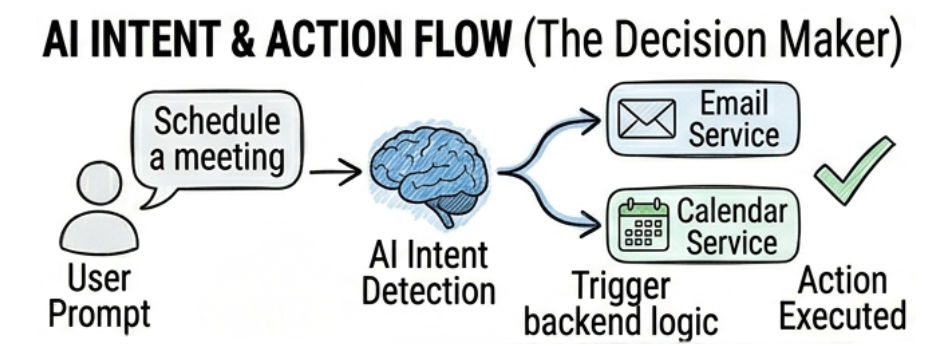
? This shows how AI systems can go beyond text generation and actually perform actions based on user intent.
? This is the base concept behind AI Agents and Tool Calling systems.
Streaming allows AI to send responses token by token in real-time.
Instead of waiting for the full response, users see output as it is generated.
? This improves user experience, especially in chat applications.
Practical Example (Streaming Response in Spring AI)
import org.springframework.ai.chat.client.ChatClient;
import reactor.core.publisher.Flux;

public class StreamingService {

    private final ChatClient chatClient;

    public StreamingService(ChatClient chatClient) {
        this.chatClient = chatClient;
    }

    public Flux<String> streamResponse(String prompt) {

        return chatClient.prompt()
                .user(prompt)
                .stream()
                .content();
    }
}
Controller Example (Real-Time Output API)
import org.springframework.web.bind.annotation.*;
import reactor.core.publisher.Flux;

@RestController
@RequestMapping("/ai")
public class StreamingController {

    private final StreamingService streamingService;

    public StreamingController(StreamingService streamingService) {
        this.streamingService = streamingService;
    }

    @GetMapping("/stream")
    public Flux<String> stream(@RequestParam String prompt) {
        return streamingService.streamResponse(prompt);
    }
}
Function calling allows AI to interact with backend logic or external APIs.
? This makes AI not just a responder, but a decision-maker and executor.
Practical Example (Java Tool Execution Logic)
public class BookingAgent {

    private final BookingService bookingService;

    public BookingAgent(BookingService bookingService) {
        this.bookingService = bookingService;
    }

    public String handleRequest(String userRequest) {

        if (userRequest.contains("book ticket")) {
            bookingService.bookTicket("user123");
            return "Ticket booked successfully";
        }

        return "No action matched";
    }
}
? AI decides when to call backend functions based on user intent.
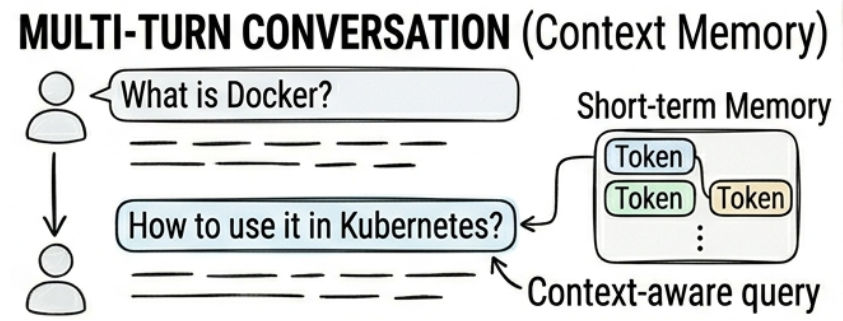
Multi-turn conversations allow AI to understand and maintain context across multiple user interactions.
Example:
User: “What is Docker?”
User: “How is it used in Kubernetes?”
Practical Example (Conversation Context Handling)
import java.util.ArrayList;
import java.util.List;

public class ConversationMemory {

    private final List<String> history = new ArrayList<>();

    public String chat(String userMessage) {

        history.add(userMessage);

        // Simulated context-aware response
        if (history.size() > 1) {
            return "Answer based on previous context + new query: " + userMessage;
        }

        return "First interaction: " + userMessage;
    }
}
? AI stores previous messages and uses them to generate better responses.
Context memory stores past interactions to improve response relevance.
? Helps AI give more connected and personalized responses.
Practical Example (Session Memory Storage)
import java.util.HashMap;
import java.util.Map;

public class MemoryStore {

    private final Map<String, String> userMemory = new HashMap<>();

    public void savePreference(String userId, String data) {
        userMemory.put(userId, data);
    }

    public String getPreference(String userId) {
        return userMemory.getOrDefault(userId, "No memory found");
    }
}
? This is how AI systems store and reuse user-specific context.
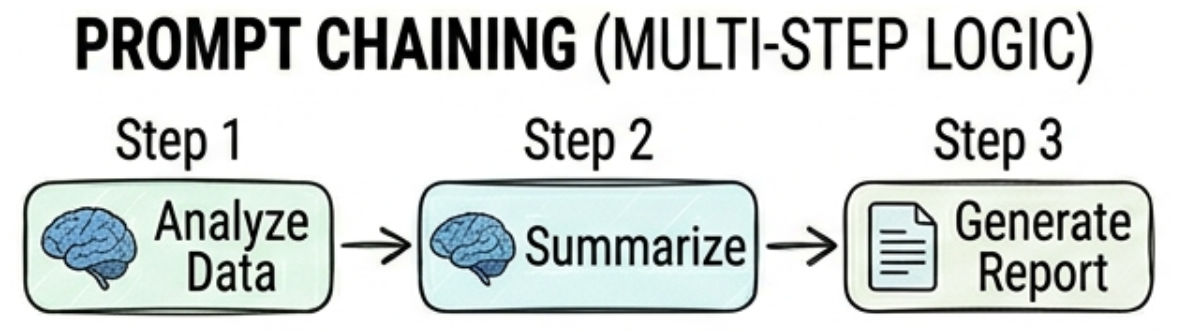
Prompt chaining breaks complex tasks into multiple smaller steps.
? This improves control, accuracy, and structure of AI output.
Practical Example (Prompt Chaining Flow in Java)
public class PromptChainingService {

    public String generateEmail(String userInput) {

        // Step 1: Generate summary
        String summary = summarize(userInput);

        // Step 2: Convert summary into email
        String emailDraft = convertToEmail(summary);

        // Step 3: Format email
        return formatEmail(emailDraft);
    }

    private String summarize(String input) {
        return "Short summary of: " + input;
    }

    private String convertToEmail(String summary) {
        return "Email content based on: " + summary;
    }

    private String formatEmail(String email) {
        return "Formatted Email:\\n" + email;
    }
}
? Each step is broken into smaller tasks for better accuracy and control.
Caching stores previous AI responses to avoid repeated API calls.
Practical Example (Simple Cache Implementation)
import java.util.HashMap;
import java.util.Map;

public class AICacheService {

    private final Map<String, String> cache = new HashMap<>();

    public String getResponse(String query) {

        if (cache.containsKey(query)) {
            return cache.get(query); // return cached response
        }

        String response = callAI(query);

        cache.put(query, response); // store response

        return response;
    }

    private String callAI(String query) {
        return "AI Response for: " + query;
    }
}
? This avoids unnecessary AI API calls and saves cost.
Guardrails ensure AI responses are safe, controlled, and appropriate.

Practical Example (Basic Guardrail Filtering Logic)
public class GuardrailService {

    public String validateResponse(String response) {

        if (response.contains("hate") || response.contains("violence")) {
            return "Response blocked due to safety policy.";
        }

        if (response.length() > 1000) {
            return "Response too long, trimmed for safety.";
        }

        return response;
    }
}
? This ensures AI output stays safe and controlled before showing to users.
AI usage can become expensive, so optimization is very important in production systems.
? The goal is to reduce unnecessary API calls and improve efficiency without affecting performance.
Best Practices (with Practical Logic)
? These techniques help build cost-efficient and scalable AI systems.
Practical Example (Token Optimization + Cache Check)
public class CostOptimizationService {

    private final AICacheService cacheService;

    public CostOptimizationService(AICacheService cacheService) {
        this.cacheService = cacheService;
    }

    public String getOptimizedResponse(String query) {

        // Step 1: Check cache first
        String cached = cacheService.getResponse(query);
        if (cached != null) {
            return cached;
        }

        // Step 2: Optimize prompt (reduce token usage)
        String optimizedPrompt = query.trim().toLowerCase();

        // Step 3: Call AI only if needed
        return callAI(optimizedPrompt);
    }

    private String callAI(String prompt) {
        return "AI Response for: " + prompt;
    }
}
? This reduces unnecessary API usage and saves cost.
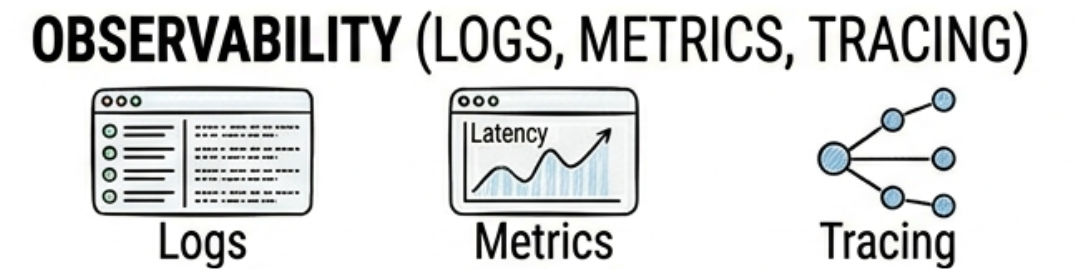
Observability helps monitor, debug, and improve AI systems effectively.
? It provides visibility into how your AI system is performing in real time.
Key Components
? This is critical for production-grade AI systems.
Practical Example (Simple Logging + Monitoring)
import java.time.LocalDateTime;

public class ObservabilityService {

    public String processRequest(String request) {

        log("Request received: " + request);

        String response = "Processed AI response for: " + request;

        log("Response generated: " + response);

        return response;
    }

    private void log(String message) {
        System.out.println(LocalDateTime.now() + " | " + message);
    }
}
? This helps track system behavior and debug issues easily.
AI agents can take actions, make decisions, and execute multi-step workflows automatically.
? They go beyond text generation and act like intelligent automation systems.
Practical Example (AI Agent Decision System in Java)
public class AIAgentService {

    private final EmailService emailService;
    private final MeetingService meetingService;
    private final ReportService reportService;

    public AIAgentService(EmailService emailService,
                          MeetingService meetingService,
                          ReportService reportService) {
        this.emailService = emailService;
        this.meetingService = meetingService;
        this.reportService = reportService;
    }

    public String executeTask(String task) {

        if (task.contains("email")) {
            emailService.sendEmail("[email protected]", "AI Generated Email");
            return "Email sent successfully";
        }

        if (task.contains("meeting")) {
            meetingService.scheduleMeeting("Team Sync");
            return "Meeting scheduled successfully";
        }

        if (task.contains("report")) {
            reportService.generateReport();
            return "Report generated successfully";
        }

        return "No valid action found";
    }
}
This example shows how an AI system moves from understanding → action → response generation in a real-world workflow.
String query = "Schedule a meeting tomorrow";

// Step 1: Understand user intent
String intent = aiService.detectIntent(query);

// Step 2: Execute backend action based on intent
if ("schedule_meeting".equals(intent)) {
    meetingService.schedule("Tomorrow");
}

// Step 3: Generate final response using LLM
String response = chatClient.prompt()
        .user("Confirm meeting scheduled for tomorrow")
        .call()
        .content();

System.out.println(response);
Flow Explanation:
Advanced AI features are essential because they transform basic LLM integration into real-world intelligent systems.
They help in:
Advanced AI features are widely used in real-world production systems to build intelligent and scalable applications.
Advanced AI features transform basic AI systems into production-ready intelligent applications capable of solving real-world business problems.
By combining capabilities like streaming responses, memory management, caching strategies, and observability, developers can build highly efficient and scalable AI systems.
These features are essential for creating enterprise-grade AI applications that are reliable, optimized, and deliver real business value.
