
Durgesh Tiwari
Author
Cloud computing has changed the way modern applications are built, deployed, and managed. Earlier, organizations had to buy physical servers, networking equipment, and storage before launching an application. This required a large investment, regular maintenance, and IT teams to manage the infrastructure.
Today, businesses can use computing resources over the internet whenever they need them. They can increase or decrease resources based on demand and pay for the resources they use.
This makes cloud computing flexible, easier to manage, and useful for applications of different sizes.
Whether you are building a small website or a large distributed system, understanding cloud fundamentals is an important part of learning system design.
Cloud Computing is the delivery of computing services such as servers, storage, databases, networking, software, and computing power over the internet.
Instead of buying and maintaining physical hardware, organizations can use resources provided by cloud providers when they need them.
In simple words, Cloud Computing allows you to use computers, storage, and software over the internet without owning the physical hardware.
Example
Suppose you want to launch an online shopping website.
Instead of buying servers and building a data center, you can rent virtual servers, databases, and storage from a cloud provider such as AWS, Microsoft Azure, or Google Cloud.
The cloud provider manages the physical infrastructure, while your team focuses on building and running the application.
Cloud computing works by providing computing resources through the internet. Instead of running everything on a company's own physical servers, applications can use servers, storage, databases, and networking resources managed by a cloud provider.
When a user opens a cloud-based application, the request travels through the internet to the cloud infrastructure. The cloud platform processes the request using the required computing resources and sends the result back to the user.
Simple Flow
┌──────────────┐
│     User     │
└──────┬───────┘
       │
       ▼
┌──────────────┐
│   Internet   │
└──────┬───────┘
       │
       ▼
┌─────────────────────┐
│   Cloud Provider    │
│                     │
│  ┌───────────────┐  │
│  │ Application   │  │
│  │ / Server      │  │
│  └───────┬───────┘  │
│          │           │
│     ┌────┴────┐      │
│     ▼         ▼      │
│  Database   Storage  │
└──────┬──────────────┘
       │
       ▼
┌──────────────┐
│   Response   │
│    to User   │
└──────────────┘
Example
Suppose you open an online shopping website.
You send a request through your browser.
The request reaches the cloud through the internet.
A cloud server processes the request.
The application retrieves product information from a database.
Product images are loaded from cloud storage.
The server sends the result back to your browser.
You don't need to know where the physical server is located. The cloud provider manages the underlying infrastructure.
Before cloud computing, organizations had to estimate how much hardware they would need in the future. They often had to buy enough servers to handle peak traffic, even when those servers were not fully used.
Cloud computing allows organizations to add or remove resources based on actual demand.
Benefits of Cloud Computing
No need to buy expensive physical hardware.
Pay for the resources you use.
Scale resources up or down based on demand.
Deploy applications faster.
Improve application availability.
Support backup and disaster recovery.
Use infrastructure from different regions.
Reduce hardware maintenance work.
Example
An online learning platform receives heavy traffic during exam season.
Instead of buying permanent servers for this short period, the platform can add more cloud resources when traffic increases and reduce them when traffic returns to normal.
This helps the platform handle peak traffic without keeping extra servers running all the time.
A Cloud Provider is a company that provides computing resources and services over the internet.
Cloud providers offer services such as:
Virtual Machines
Storage
Databases
Networking
Containers
Serverless Computing
Monitoring
Security Services
The three major cloud providers are:
AWS
Microsoft Azure
Google Cloud Platform (GCP)
Amazon Web Services (AWS) is the cloud platform provided by Amazon.
AWS offers services for computing, storage, databases, networking, security, analytics, and other workloads.
Example
A company can use Amazon EC2 to run virtual machines and Amazon S3 to store application files.
Common AWS Services
EC2 — Virtual machines
S3 — Object storage
RDS — Managed relational databases
Lambda — Serverless computing
VPC — Virtual networking
Microsoft Azure is Microsoft's cloud computing platform.
Azure provides services for computing, storage, databases, networking, security, application development, and enterprise systems.
Example
A company already using Microsoft technologies can use Azure to run applications and connect them with other Microsoft services.
Common Azure Services
Azure Virtual Machines — Virtual machines
Azure Blob Storage — Object storage
Azure SQL Database — Managed relational databases
Azure Functions — Serverless computing
Azure Virtual Network — Virtual networking
Google Cloud Platform (GCP) is Google's cloud computing platform.
GCP provides services for computing, storage, databases, networking, analytics, machine learning, and application development.
Example
A company building a data analytics application can use Google Cloud services to process and store large amounts of data.
Common GCP Services
Compute Engine — Virtual machines
Cloud Storage — Object storage
Cloud SQL — Managed relational databases
Cloud Functions — Serverless computing
Google Kubernetes Engine — Managed Kubernetes
All three cloud providers offer similar services, but their service names, features, tools, and pricing can be different.
Feature | AWS | Microsoft Azure | Google Cloud (GCP) |
|---|---|---|---|
Virtual Machines | EC2 – Runs virtual servers in the cloud | Azure Virtual Machines – Runs virtual servers with flexible configurations | Compute Engine – Provides scalable virtual machines |
Object Storage | S3 – Stores files, images, videos, and other objects | Blob Storage – Stores unstructured data such as files and media | Cloud Storage – Stores files and other large amounts of data |
Serverless | Lambda – Runs code without managing servers | Azure Functions – Runs event-based code without server management | Cloud Functions – Runs small pieces of code based on events |
Managed Kubernetes | EKS – Runs and manages Kubernetes clusters | AKS – Managed Kubernetes service for deploying containers | GKE – Managed Kubernetes service for running containerized applications |
Managed Database | RDS – Manages relational databases without handling database servers manually | Azure SQL – Managed SQL database service | Cloud SQL – Managed relational database service |
A Cloud Deployment Model describes where cloud infrastructure is hosted and who can use it.
Organizations choose a deployment model based on their business needs, security requirements, scalability, and budget.
The four common cloud deployment models are:
Public Cloud
Private Cloud
Hybrid Cloud
Multi-Cloud
                 Cloud Deployment Models
                          │
        ┌─────────────────┼─────────────────┬─────────────────┐
        ▼                 ▼                 ▼                 ▼
   Public Cloud      Private Cloud      Hybrid Cloud      Multi-Cloud
(Multi-tenant) (Single tenant) (Private + Public) (2+ Providers)A Public Cloud is owned and managed by a third-party cloud provider. Its infrastructure is shared by multiple customers and is accessed over the internet.
It is widely used because it is cost-effective, scalable, and easy to set up.
Example
A startup hosts its website on AWS without buying physical servers.
The startup pays only for the cloud resources it uses.
Benefits
Low cost.
Easy to scale.
No hardware management.
Fast deployment.
Global availability.
A Private Cloud is dedicated to a single organization.
It can be hosted in the company's own data center or managed by a cloud provider. The infrastructure is used only by that organization.
Private Cloud is often used when security, privacy, and compliance are important.
Example
A bank uses a private cloud to store customer financial data and meet strict security requirements.
Benefits
Better security.
More control over infrastructure.
Better data privacy.
Custom configurations.
Suitable for sensitive applications.
A Hybrid Cloud combines Public Cloud and Private Cloud.
Organizations can keep sensitive workloads in a private cloud while using the public cloud for applications that need more computing resources.
Example
A hospital stores patient records in a private cloud but hosts its public website on a public cloud.
Benefits
Flexible infrastructure.
Better scalability.
Improved security.
Cost optimization.
Easier disaster recovery.
A Multi-Cloud strategy uses services from two or more cloud providers.
Instead of depending on a single provider, an organization can use different cloud platforms for different workloads.
This can improve flexibility, reliability, and help avoid vendor lock-in.
In simple words, Multi-Cloud means using multiple cloud providers for different workloads.
Example
A company stores data on AWS, uses Google Cloud for machine learning, and uses Microsoft Azure for identity management.
Benefits
Avoids vendor lock-in.
Better reliability.
Greater flexibility.
Access to the best services from different providers.
Improved disaster recovery.
Cloud providers operate data centers in different parts of the world.
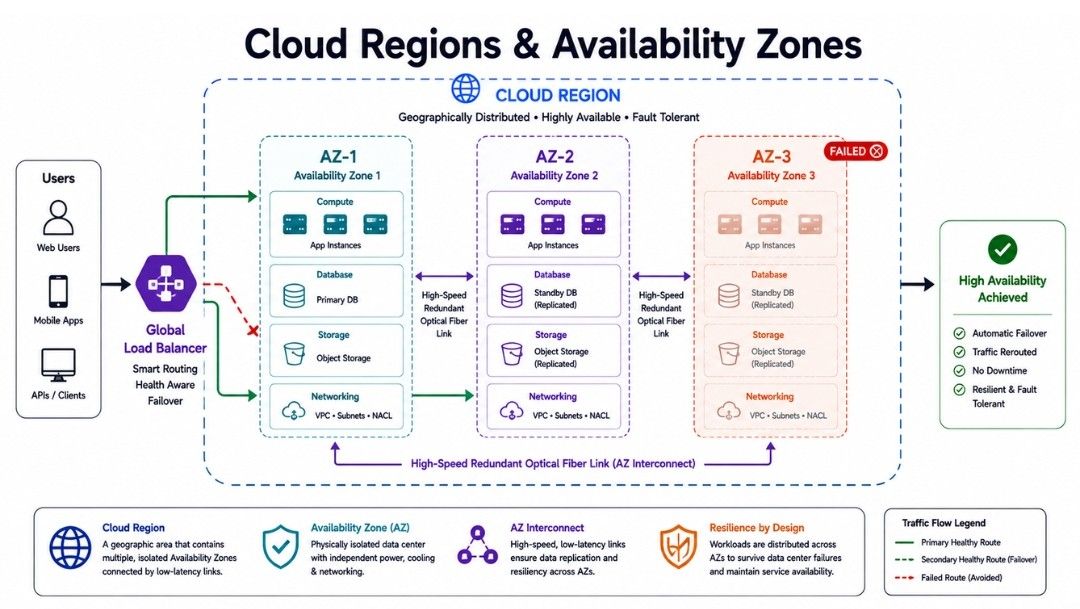
A Region is a geographical area where a cloud provider operates one or more data centers.
Each Region contains multiple Availability Zones (AZs). An Availability Zone is an isolated data center with its own power, cooling, and networking.
If one Availability Zone fails, the application can continue running from another Availability Zone in the same Region.
In simple words, Regions help serve users from different locations, while Availability Zones improve reliability within a Region.
Example
Suppose an application is hosted in the Mumbai Region using three Availability Zones.
If one Availability Zone goes offline because of a power failure, traffic can be routed to the remaining Availability Zones.
Benefits
High availability.
Better fault tolerance.
Lower latency.
Improved disaster recovery.
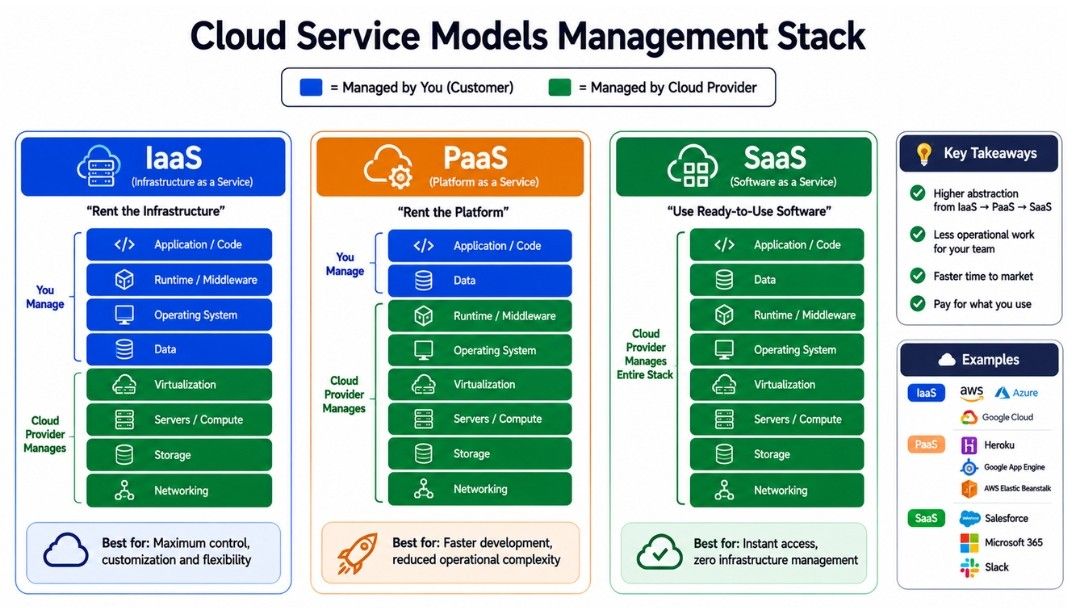
Cloud providers offer different service models based on how much infrastructure you want to manage.
The three main cloud service models are:
Infrastructure as a Service (IaaS)
Platform as a Service (PaaS)
Software as a Service (SaaS)
Infrastructure as a Service (IaaS) provides virtual servers, storage, networking, and other infrastructure resources over the internet.
The cloud provider manages the physical hardware, while you manage the operating system, applications, and data.
In simple words, IaaS gives you virtual computers that you can configure according to your needs.
Example
A company uses Amazon EC2 to run virtual machines for its web application.
Benefits
More control over infrastructure.
Easy to scale resources.
Flexible resource management.
Pay only for the resources you use.
Platform as a Service (PaaS) provides a ready platform for developing, testing, and deploying applications.
The cloud provider manages the infrastructure, operating system, and runtime environment. Developers can focus mainly on writing and deploying code.
In simple words, PaaS lets developers build and deploy applications without managing servers.
Example
A developer deploys an application using Google App Engine without managing the underlying servers.
Benefits
Faster application development.
No server management.
Automatic scaling.
Easier deployment.
Software as a Service (SaaS) provides ready-to-use software over the internet.
Users can access the software through a web browser without installing or managing the underlying infrastructure.
In simple words, SaaS lets you use software directly over the internet without managing the servers or application.
Example
Common SaaS applications include Gmail, Google Docs, Microsoft 365, and Zoom.
Benefits
No installation required.
Accessible from anywhere.
Automatic updates.
Low maintenance.
Serverless Computing allows developers to run application code without managing servers directly.
The cloud provider manages the underlying infrastructure, including server provisioning, maintenance, and scaling.
Serverless applications can automatically scale based on demand.
In simple words, Serverless lets developers run code without managing servers directly.
Example
Suppose an application allows users to upload images.
A serverless function can automatically resize an image whenever a new image is uploaded.
The developer writes the function, while the cloud provider manages the infrastructure required to run it.
Benefits
Less server management.
Automatic scaling.
Suitable for event-based workloads.
Pay based on usage on many services.
Faster development for suitable applications.
Important Point: Serverless does not mean there are no servers.
Servers still run the application. The difference is that the cloud provider manages those servers for you.
Cloud Storage allows applications to store data using infrastructure provided by a cloud provider.
Different applications need different types of storage. The three common types are:
Object Storage
Block Storage
File Storage
Each type is designed for a different type of workload.
Object Storage stores data as objects. Each object contains the data, metadata, and a unique identifier.
It is commonly used for large amounts of unstructured data such as images, videos, documents, backups, and logs.
Examples
An online shopping website stores product images and videos in object storage. The application can access these files through APIs whenever needed.
Benefits
Highly scalable.
Good for large files.
Suitable for backups and media.
Easy to access through APIs.
Block Storage divides data into fixed-size blocks and provides them to a system as storage devices.
It is commonly used when applications need fast and consistent storage access, especially for databases and virtual machine disks.
Example
A database running on a virtual machine can use block storage to store and read database files quickly.
Benefits
Good performance.
Suitable for databases.
Low-latency storage access.
Can often be resized based on workload needs.
File Storage stores data in files and folders. It works like a traditional file system and can be shared by multiple systems.
It is useful when several servers or applications need to access the same files.
Example
Suppose multiple application servers need to access the same documents. File storage provides a shared folder that all these servers can use.
Benefits
Familiar file and folder structure.
Easy file sharing.
Useful for applications that need shared directories.
Feature | Object Storage | Block Storage | File Storage |
|---|---|---|---|
Data Structure | Stores data as objects with metadata and a unique identifier | Stores data in fixed-size blocks | Stores data as files and folders |
Common Use | Images, videos, backups, logs | Databases, VM disks, application disks | Shared documents, application files, shared directories |
Access Method | APIs / HTTP | Attached to a system as a storage device | File system |
Scalability | Very high | High | High |
Performance | Good for large-scale data storage | High performance and low latency | Good for shared file access |
Best Suited For | Unstructured data and media | Databases and applications requiring fast storage | Applications requiring shared files |
Example Workload | Product images and videos | Database storage | Shared application files |
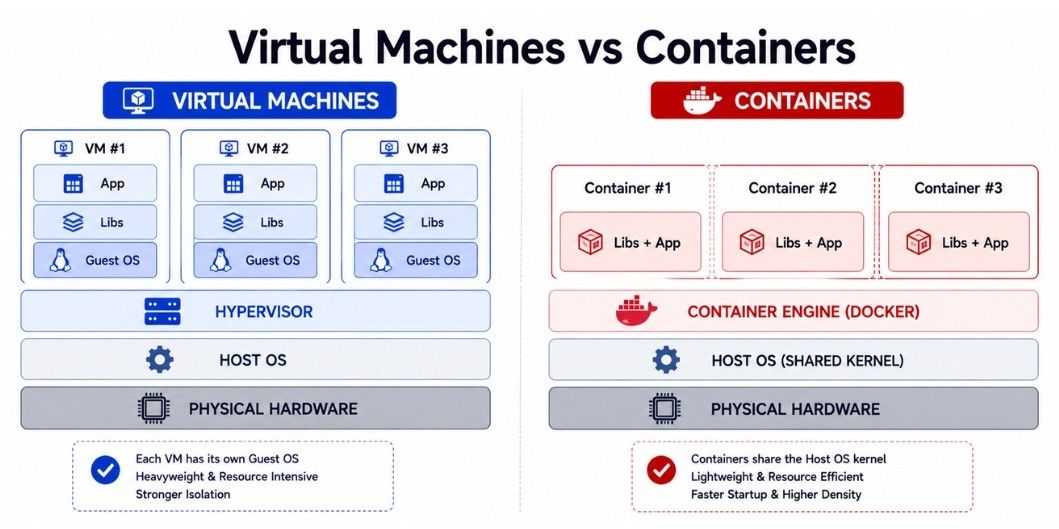
A Virtual Machine (VM) is a software-based computer that works like a physical computer.
Each VM has its own operating system, CPU, memory, storage, and applications. A single physical server can run multiple VMs using a hypervisor.
Example
One physical server can run:
Ubuntu VM
Windows VM
CentOS VM
Each VM works independently from the others.
Benefits
Better use of physical hardware.
Strong isolation between VMs.
Supports multiple operating systems.
Easy to move or migrate between servers.
A Container is a lightweight package that includes an application and all the files and dependencies it needs to run.
Unlike Virtual Machines, containers share the host operating system. This makes them faster to start and more efficient in resource usage.
Example
A developer packages a Node.js application into a Docker container.
The same container can run on a laptop, testing server, and production server without changing the application.
Benefits
Lightweight.
Faster startup.
Efficient resource usage.
Consistent deployments.
Ideal for microservices.
Virtual Machines (VMs) and Containers are both used to run applications, but they use different approaches.
Feature | Virtual Machines (VMs) | Containers |
|---|---|---|
Operating System | Each VM has its own operating system. | Containers share the host operating system. |
Startup Time | Take more time to start. | Start very quickly. |
Resource Usage | Use more CPU, memory, and storage. | Use fewer resources. |
Size | Usually large because each VM includes an OS. | Smaller because they share the host OS. |
Isolation | Provides stronger isolation. | Provides process-level isolation. |
Performance | Good, but has more overhead. | Usually faster with less overhead. |
Portability | Can be moved between compatible virtualized environments. | Easy to move between systems that support the container runtime. |
Best Use Case | Running different operating systems or applications that need strong isolation. | Microservices, cloud-native applications, and fast deployments. |
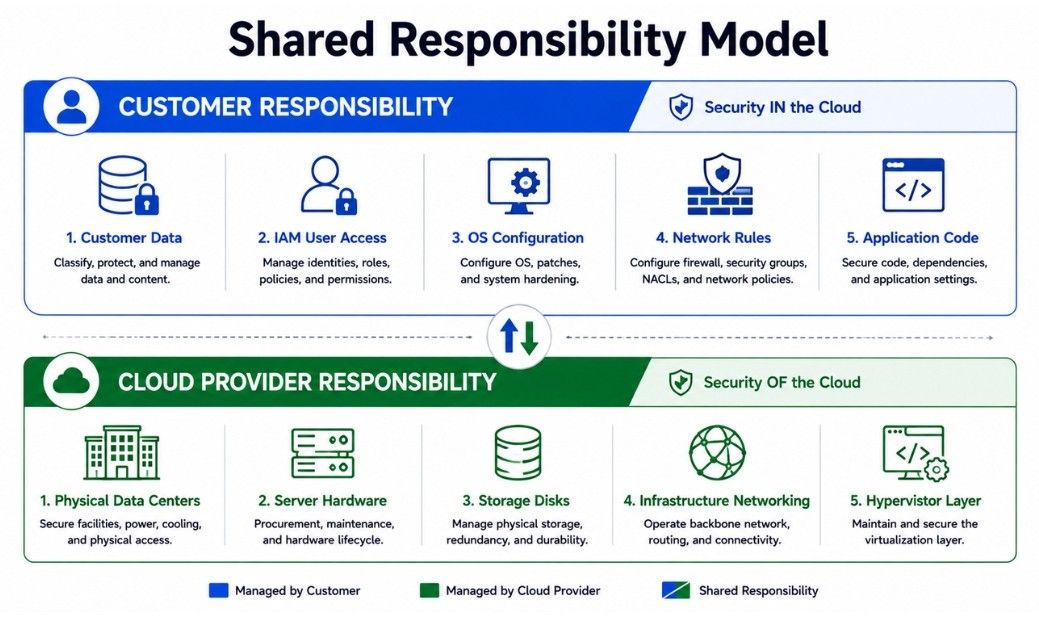
The Shared Responsibility Model explains how security responsibilities are divided between the cloud provider and the customer.
The cloud provider is responsible for protecting the underlying cloud infrastructure, while the customer is responsible for securing the applications, data, accounts, and configurations they control.
In simple words, the cloud provider secures the cloud infrastructure, while the customer secures what they put in the cloud.
Depending on the cloud service, the provider is generally responsible for:
Physical data centers.
Physical servers.
Networking infrastructure.
Hardware.
Core cloud infrastructure.
Customers may be responsible for:
Application security.
User accounts.
Access permissions.
Application data.
Network configuration.
Operating system configuration in IaaS.
Data protection and backups.
Example
Suppose an employee uses a weak password and an attacker gains access to the company's account. The company is responsible for protecting that account.
If a physical server in the cloud provider's data center fails, the cloud provider is responsible for the underlying hardware.
Important: The exact division of responsibility depends on the cloud service being used, such as IaaS, PaaS, or SaaS.
Consider an online video streaming platform.
The company hosts its application on a Public Cloud and uses multiple Availability Zones to keep the service available even if one zone fails.
It uses IaaS for virtual machines, PaaS for application development, and SaaS tools for team collaboration.
Image processing runs on a Serverless Computing platform, while the main application runs in Containers for faster deployment and scaling.
The company also follows a Multi-Cloud strategy for backups and analytics to reduce dependency on a single cloud provider.
For security, both the cloud provider and the company follow the Shared Responsibility Model. The provider secures the underlying infrastructure, while the company protects its applications, data, and user access.
Cloud Computing allows organizations to use servers, storage, networking, and other computing resources over the internet without owning physical hardware.
Cloud Deployment Models include Public Cloud, Private Cloud, Hybrid Cloud, and Multi-Cloud, allowing organizations to choose how their cloud infrastructure is deployed and used.
Regions and Availability Zones improve application availability, fault tolerance, and disaster recovery.
IaaS, PaaS, and SaaS provide different levels of infrastructure management, from virtual infrastructure to ready-to-use software.
Serverless Computing allows developers to run code without managing servers and automatically scales resources based on demand.
Virtual Machines provide isolated virtual computers, while Containers provide a lightweight way to package and run applications.
Object, Block, and File Storage provide different ways to store and access application data based on workload requirements.
The Shared Responsibility Model defines which security responsibilities are handled by the cloud provider and which are handled by the customer.
Together, these Cloud Fundamentals help developers and system designers build applications that are scalable, reliable, and easier to manage.
