
Durgesh Tiwari
Author
In every System Design interview, estimation plays an important role before you start designing the architecture. To make quick and practical estimations, engineers rely on a few commonly used engineering numbers.
These are industry-standard approximations, not exact values. They help estimate latency, storage, bandwidth, throughput, and memory without spending time on complex calculations. Knowing these numbers is enough to make logical architecture decisions in both interviews and real-world projects.
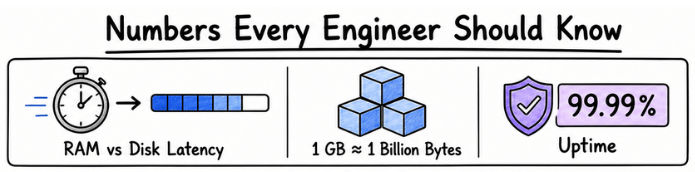
Large-scale applications process millions of users and requests every day. Before choosing databases, caching, or load balancing, engineers first estimate the expected workload.
For example, accessing data from memory is much faster than reading it from disk or over the network. That's why technologies like Redis, CDNs, and application caching are widely used to improve performance.
Understanding these common engineering numbers helps you estimate system resources quickly and design scalable, high-performance applications with confidence.
Latency is the time taken to complete an operation. In System Design, even a small difference in latency can affect the overall performance of an application.
The table below shows a few latency values that engineers commonly use during interviews and capacity planning.
Operation | Approximate Latency |
|---|---|
CPU Register Access | Less than 1 ns |
L1 Cache | ~1 ns |
L2 Cache | ~4 ns |
L3 Cache | ~10 ns |
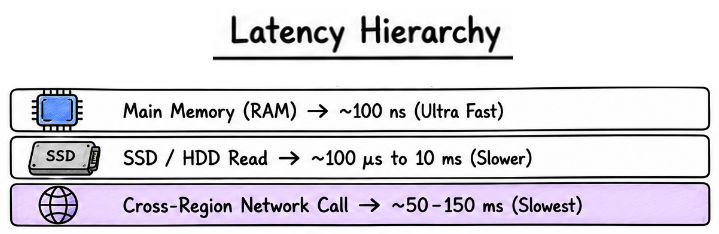
Main Memory (RAM) | ~100 ns |
SSD Read | ~100 μs |
HDD Read | ~5–10 ms |
Network Request (Same Data Center) | ~0.5–1 ms |
Cross-Region Network Call | ~50–150 ms |
Internet Request | ~100–300 ms |
Why Is This Important?
Looking at these numbers, one thing becomes clear—memory access is much faster than disk or network access.
This is why applications try to keep frequently used data closer to the user by using technologies like Redis, Memcached, CDNs, and browser caching. In most cases, reducing network calls improves performance far more than optimizing CPU operations.
Storage estimation is a common part of System Design interviews. Before choosing a database or storage solution, you should know the basic storage units used in capacity planning.
Unit | Value |
|---|---|
1 KB | 1,024 Bytes |
1 MB | 1,024 KB |
1 GB | 1,024 MB |
1 TB | 1,024 GB |
1 PB | 1,024 TB |
During interviews, engineers rarely use exact values. To keep calculations simple, they usually assume:
1 KB ≈ 1,000 Bytes
1 MB ≈ 1 Million Bytes
1 GB ≈ 1 Billion Bytes
These rounded values make quick estimations easier without affecting the overall design.
Bandwidth is the amount of data that can be transferred over a network in a given time. It is an important factor when designing applications that handle large file uploads, downloads, video streaming, or real-time communication.
Some common network speeds are shown below.
Connection | Approximate Speed |
|---|---|
100 Mbps | 12.5 MB/s |
1 Gbps | 125 MB/s |
10 Gbps | 1.25 GB/s |
Example
If each uploaded image is 2 MB and users upload 100 images every second:
Bandwidth = 2 MB × 100
          = 200 MB/s
This means the application should be able to handle around 200 MB of incoming data every second.
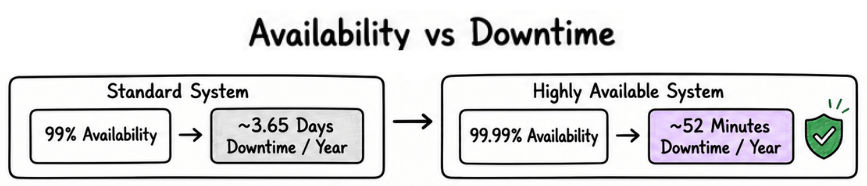
Availability shows how often a system remains accessible to users. It is usually measured as a percentage, and even a small improvement can significantly reduce downtime.
Availability | Maximum Downtime Per Year |
|---|---|
99% | ~3.65 Days |
99.9% | ~8.76 Hours |
99.99% | ~52 Minutes |
99.999% | ~5 Minutes |
Higher availability is achieved by using techniques such as:
Multiple application servers
Data replication
Automatic failover
Health checks
Disaster recovery
As availability increases, the system becomes more reliable, but the architecture also becomes more complex and expensive to maintain.
Throughput measures how much work a system can process in a given period. In System Design, it helps estimate the workload that the application, database, and infrastructure must handle.
Some commonly used throughput metrics are:
Requests Per Second (RPS)
Queries Per Second (QPS)
Transactions Per Second (TPS)
Messages Per Second (MPS)
Example
If an application receives 864 million requests per day:
864,000,000 ÷ 86,400
≈ 10,000 RPS
In this case, the system should be designed to handle around 10,000 requests every second.
Memory estimation is commonly used when planning caching systems such as Redis or Memcached. It helps estimate how much RAM is required to store frequently accessed data.
Example
Suppose:
One cache entry = 500 Bytes
Total cached entries = 10 Million
500 × 10,000,000
= 5,000,000,000 Bytes
≈ 5 GB
This means a cache server with 2 GB RAM would not be enough, so additional memory or multiple cache servers would be required.

During System Design interviews, engineers often use a few standard values to make quick estimations.
1 Day = 86,400 Seconds
1 Hour = 3,600 Seconds
1 Million = 10⁶
1 Billion = 10⁹
1 TB = 1,024 GB
Average Image Size = 1–5 MB
Average Video Size = 100 MB–1 GB
Average Text Message = 100–500 Bytes
Average URL Size = 100–200 Bytes
These are approximate values, but they are widely used for quick capacity planning and estimation.
During estimation questions, interviewers care more about your approach than perfect calculations.
Keep these tips in mind:
Start with clear and reasonable assumptions.
Use simple, rounded numbers.
Focus on the order of magnitude instead of exact values.
Explain your calculations step by step.
Update your estimates if new information is provided.
A clear thought process and logical assumptions are more valuable than memorizing exact numbers.
