
Durgesh Tiwari
Author
PostgreSQL is an open-source relational database widely used for modern web applications, APIs, SaaS platforms, and data-intensive systems.
Basic SQL commands such as SELECT, INSERT, UPDATE, and DELETE are easy to learn. But production PostgreSQL requires a deeper understanding of how the database works internally.
Important PostgreSQL concepts include:
Database architecture
Indexes and query planning
Transactions and locking
MVCC
VACUUM
WAL
Replication
Partitioning
Backup and recovery
Scaling and performance
This guide explains these concepts step by step with simple explanations and practical examples.
PostgreSQL is an open-source relational database management system (RDBMS).
It stores data in tables and uses SQL to read and modify that data.
For example, an online store might have a users table:
users

id | name  | email
---|-------|----------------
1  | Rahul | [email protected]
2  | Amit  | [email protected]
An application can retrieve the users with:
SELECT * FROM users;PostgreSQL processes the query, finds the required rows, and returns the result to the application.
PostgreSQL also provides features such as:
Transactions
Indexes
MVCC
Replication
Partitioning
WAL
Backup and recovery
Advanced data types
Full-text search
These features make PostgreSQL suitable for both small applications and large production systems.
PostgreSQL follows a client-server architecture.
A basic request flow looks like this:
Application
     ↓
Database Connection
     ↓
PostgreSQL Server
     ↓
Query Processing
     ↓
Tables and Indexes
     ↓
Result
The application sends a SQL query to PostgreSQL. The server processes the query, accesses the required data, and returns the result.
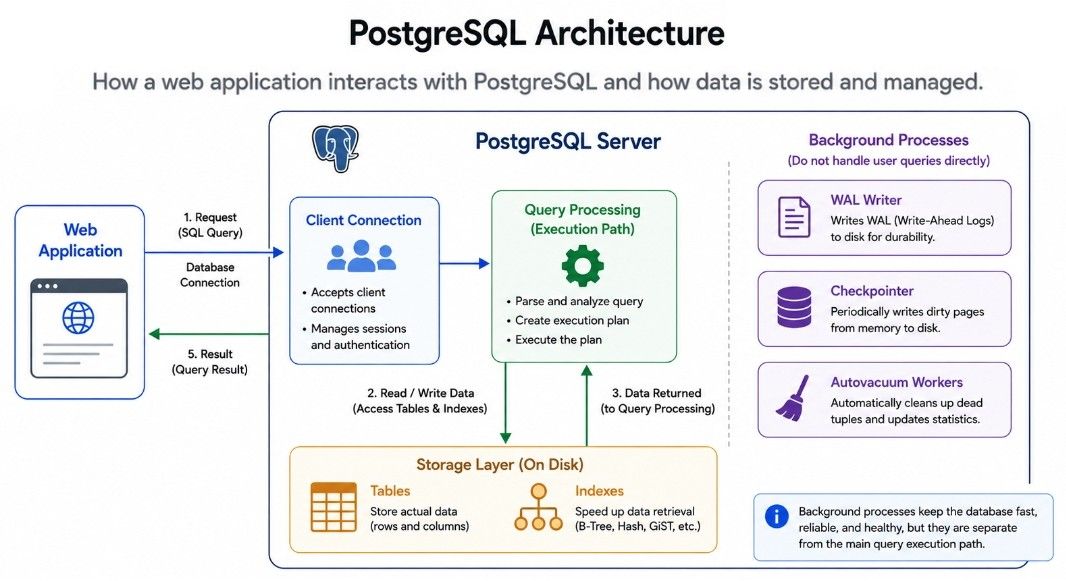
PostgreSQL uses multiple processes to handle client connections and background database tasks.
A simplified view is:
PostgreSQL
    ├── Client Processes
    ├── Background Processes
    ├── WAL Writer
    ├── Checkpointer
    └── Autovacuum Workers
Each process has a different responsibility.
For example, the WAL writer helps write WAL data, the checkpointer handles checkpoint-related work, and autovacuum workers help clean up old row versions and maintain database health.
This process-based architecture is an important part of how PostgreSQL handles queries, transactions, maintenance, and recovery.
Understanding how PostgreSQL stores data helps explain indexes, VACUUM, table bloat, and query performance.
At the SQL level, you work with tables and rows. Internally, PostgreSQL stores table data in files divided into fixed-size pages.
A PostgreSQL page is normally 8 KB.
A simplified view is:
Database
   ↓
Table
   ↓
Pages
   ↓
Rows
Indexes also use pages, but they store data in a different structure.
Suppose you have a users table:
users

id | name  | city
---|-------|---------
1  | Rahul | Jhansi
2  | Amit  | Delhi
3  | Neha  | Pune
PostgreSQL stores the table across multiple pages rather than treating it as one large block.
For example:
users table

Page 1
 ├── Row 1
 ├── Row 2
 └── Row 3

Page 2
 ├── Row 4
 ├── Row 5
 └── Row 6
When PostgreSQL needs specific data, it must locate the relevant page and row.
Without a suitable index, PostgreSQL may need to scan many pages to find matching rows. An index can help it locate the required data more efficiently.
This storage model is important for understanding how PostgreSQL handles indexes, VACUUM, table bloat, and disk I/O.
An index is a data structure that helps PostgreSQL find rows more efficiently.
Suppose a users table contains 10 million rows and you run:
SELECT *
FROM users
WHERE email = '[email protected]';
Without a suitable index, PostgreSQL may need to scan a large part of the table.
You can create an index on email:
CREATE INDEX idx_users_email
ON users(email);
PostgreSQL can then use the index to locate matching rows more efficiently.
Think of a book. Without an index, you may need to search page by page. With an index, you can quickly locate where a topic appears.
Database indexes work in a similar way.
However, indexes are not free. They require:
Disk space
Memory
Additional work during INSERT, UPDATE, and DELETE
So creating an index on every column is usually not a good idea. Indexes should match the queries your application actually runs.
B-Tree is PostgreSQL's default index type and is suitable for many common queries.
For example:
CREATE INDEX idx_users_age
ON users(age);
It can help with queries such as:
WHERE age = 25
WHERE age > 25
WHERE age BETWEEN 20 AND 30It can also support many ORDER BY operations.
The index is organized as a balanced tree, allowing PostgreSQL to narrow down the search instead of checking every value.
B-Tree is a good general-purpose choice for equality, range, and ordering queries.
A Hash index is designed mainly for equality comparisons.
For example:
WHERE user_id = 101It is not intended for range conditions such as:
WHERE age > 25B-Tree indexes can also handle equality searches, so a Hash index should not be chosen automatically just because the query uses =.
The actual workload and query plan should guide the choice of index type.
A composite index contains multiple columns.
For example:
CREATE INDEX idx_orders_customer_date
ON orders(customer_id, created_at);
It can be useful for queries such as:
SELECT *
FROM orders
WHERE customer_id = 101
ORDER BY created_at;
The column order matters.
These two indexes are different:
(customer_id, created_at)
(created_at, customer_id)
Choose the order based on how your application filters, sorts, and searches the data.
A composite index should be created for a real query pattern rather than simply combining columns that may be useful someday.
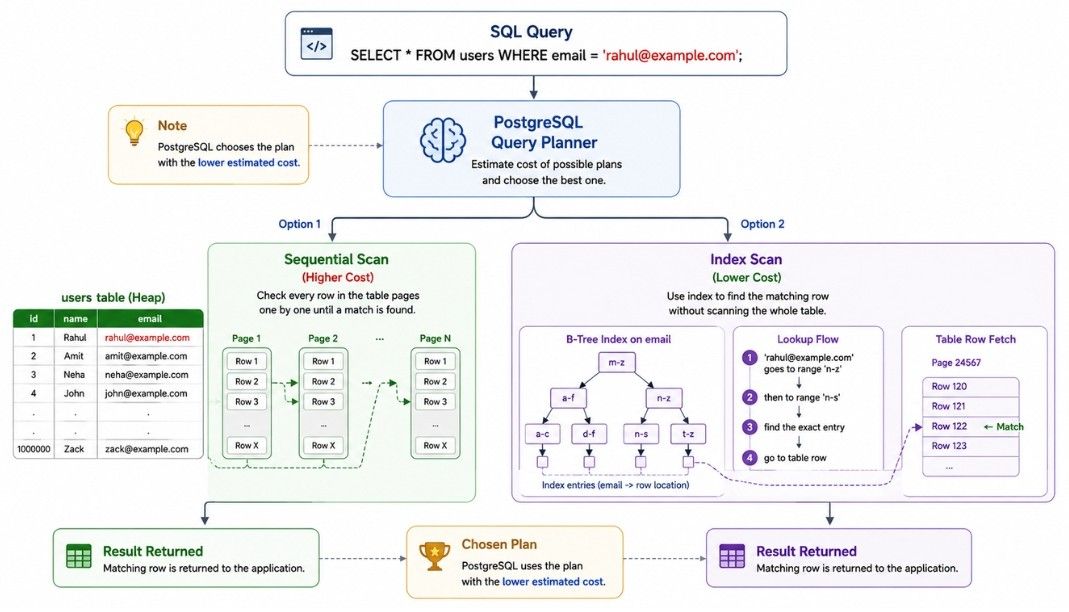
When PostgreSQL receives a SQL query, it needs to decide how to execute it efficiently.
For example:
SELECT *
FROM users
WHERE email = '[email protected]';
PostgreSQL's query planner evaluates possible execution strategies and chooses the one it estimates will have the lowest cost.
It may choose a:
Sequential Scan — checks rows from the table directly.
Index Scan — uses an index to find matching rows.
Other execution strategies — depending on the query and available data.
Creating an index does not mean PostgreSQL will always use it.
For example, if a table contains only 100 rows, scanning the table directly may be cheaper than using an index.
PostgreSQL makes this decision using table statistics and estimated costs.
So the important point is:
PostgreSQL uses an index when its query planner estimates that the index will make the query more efficient.
When a PostgreSQL query is slow, it is better to inspect the query plan instead of guessing.
PostgreSQL provides two useful commands:
EXPLAIN
EXPLAIN ANALYZE
EXPLAIN shows the execution plan PostgreSQL expects to use.
EXPLAIN
SELECT *
FROM users
WHERE email = '[email protected]';
The plan may show an Index Scan, Sequential Scan, or another operation.
EXPLAIN ANALYZE actually runs the query and shows the real execution information.
EXPLAIN ANALYZE
SELECT *
FROM users
WHERE email = '[email protected]';
It can help you compare estimated and actual rows, execution time, scan methods, joins, and other operations.
|
|
|---|---|
Shows the execution plan PostgreSQL plans to use. | Executes the query and shows the actual execution details. |
Does not execute the query. | Actually executes the query. |
Shows estimated rows and costs. | Shows estimated and actual rows, along with execution time. |
Useful for understanding the planned query strategy. | Useful for checking how the query actually performed. |
A transaction is a group of database operations treated as a single unit of work.
For example, transferring ₹500 from one bank account to another requires two operations:
Subtract ₹500 from Account A.
Add ₹500 to Account B.
Both operations should succeed together. If one fails, the transaction can be rolled back.
BEGIN;

UPDATE accounts
SET balance = balance - 500
WHERE id = 1;

UPDATE accounts
SET balance = balance + 500
WHERE id = 2;

COMMIT;
If something goes wrong, you can use:
ROLLBACK;Transactions help PostgreSQL maintain data consistency when multiple database operations must succeed or fail together.
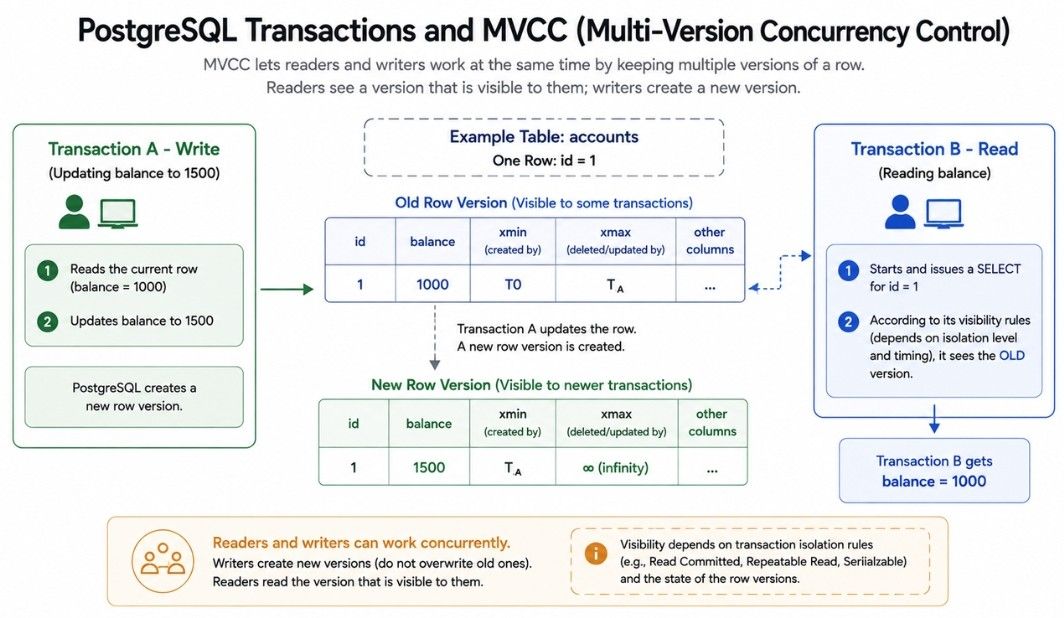
MVCC (Multi-Version Concurrency Control) is a core PostgreSQL feature that allows multiple transactions to work with the same data efficiently.
Instead of making every reader wait while a row is being changed, PostgreSQL maintains information about different row versions and uses transaction visibility rules to determine which version a transaction should see.
For example, suppose an account has:
balance = 1000One transaction updates it to:
balance = 1500Another transaction may still need to see the version that was visible to it when its transaction started.
MVCC helps PostgreSQL handle concurrent reads and writes while maintaining transaction consistency.
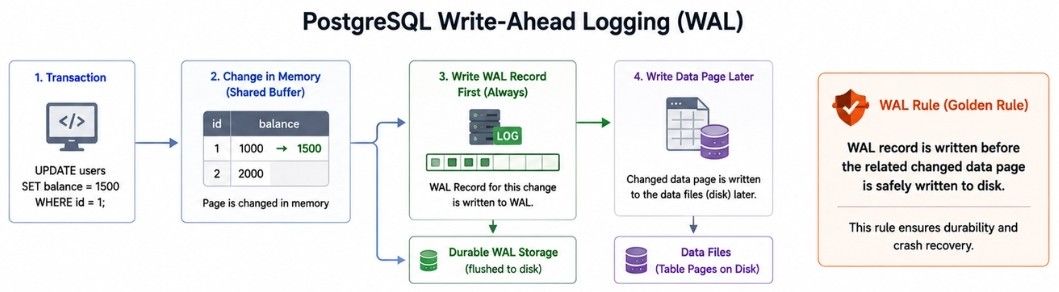
WAL stands for Write-Ahead Logging. It is a core PostgreSQL mechanism that helps provide durability and crash recovery.
The basic rule is:
PostgreSQL records changes in the WAL before the related data pages are safely written to disk.
For example, PostgreSQL may first record a change in the WAL and later write the updated table page to disk.
If the server crashes before the data page is written, PostgreSQL can use the WAL during recovery to restore the required changes.
A simplified flow is:
Transaction
    ↓
WAL Record
    ↓
Data Changes
    ↓
Commit
WAL is also important for:
Crash recovery
Streaming replication
Point-in-time recovery
Backup and restore
Because PostgreSQL uses MVCC, UPDATE and DELETE can leave behind old row versions. PostgreSQL needs to clean up these old versions, and this is where VACUUM and autovacuum are important.
VACUUM is a PostgreSQL command that cleans up dead row versions created by updates and deletes.
It makes the space used by those old versions available for reuse and helps keep tables healthy.
For example:
VACUUM users;You can also run:
VACUUM ANALYZE users;This also updates statistics that help the query planner make better decisions.
Autovacuum is PostgreSQL's automatic maintenance process.
It runs VACUUM and ANALYZE when tables need maintenance, based on PostgreSQL's configuration and table activity.
This is important because regularly running maintenance manually on every table would not be practical in a production database.
Without proper vacuuming, dead tuples can build up and cause:
Larger tables
Higher disk usage
More work during queries
Performance problems
In simple words:
VACUUMperforms the cleanup, while autovacuum automatically performs this maintenance when needed.
When multiple transactions access the same data, PostgreSQL uses locks to control conflicting operations.
A lock is a mechanism PostgreSQL uses to control access to data when multiple transactions are working at the same time.
For example, if Transaction A is updating a row, PostgreSQL may prevent another transaction from making a conflicting change to that row until Transaction A finishes.
Transaction A
     ↓
Locks Row 1
     ↓
Updates Row 1
     ↓
Commit

Transaction B
     ↓
Waits
     ↓
Gets access
In simple words: A lock helps prevent conflicting transactions from changing the same data at the same time.
A deadlock happens when two or more transactions are waiting for each other and none of them can continue.
For example:
Transaction A
     ↓
Locks Row 1
     ↓
Waits for Row 2

Transaction B
     ↓
Locks Row 2
     ↓
Waits for Row 1
Both transactions are now waiting for the other to release its lock.
PostgreSQL can detect the deadlock and abort one transaction so the other can continue.
A good approach is to make transactions acquire resources in a consistent order.
For example, if multiple transactions need to update two accounts, always lock the lower account ID first and the higher account ID second.
This reduces the chance of transactions waiting for each other in a circular pattern.
Applications need database connections to communicate with PostgreSQL.
Creating a new connection for every request can be expensive, so production applications commonly use connection pooling.
A connection pool keeps a set of reusable database connections.
Instead of creating and closing a connection for every request:
Request
  ↓
Create Connection
  ↓
Query
  ↓
Close Connection
the application can reuse existing connections:
Application
     ↓
Connection Pool
  ┌───┼───┐
  ↓   ↓   ↓
 DB  DB  DB
The application takes an available connection from the pool, runs the query, and returns the connection to the pool.
Too many connections can consume PostgreSQL resources, while too few can make requests wait for an available connection.
The right pool size depends on the application workload, query behavior, and PostgreSQL server capacity.
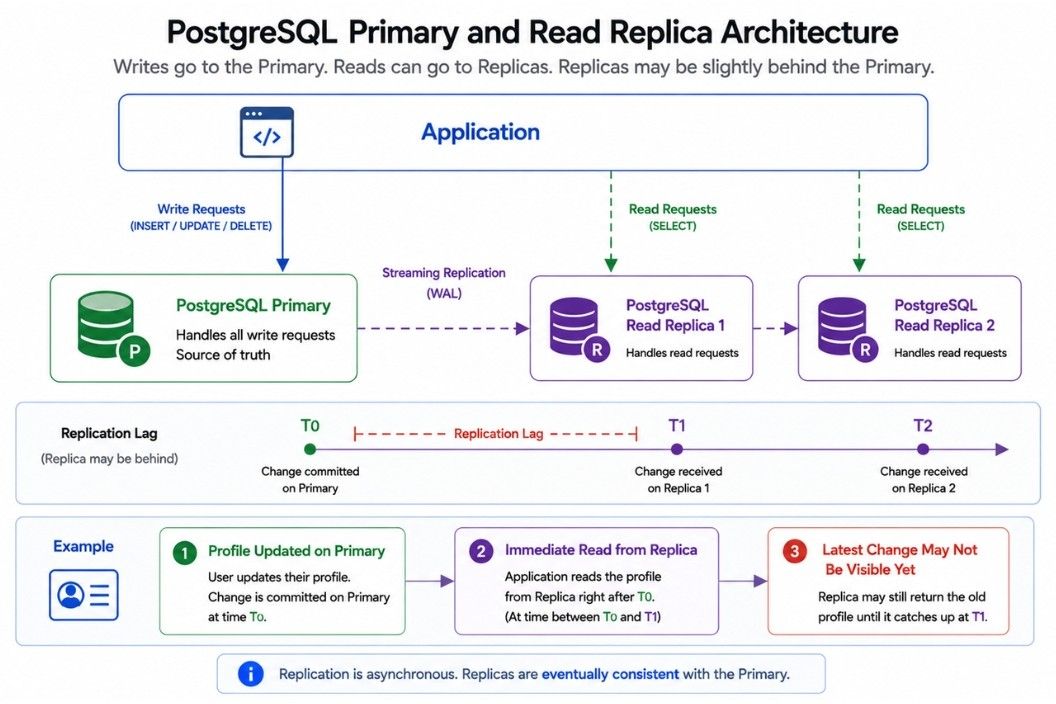
A read replica is another PostgreSQL server that receives replicated data from the primary server.
A simple setup looks like:
             Primary
                ↓
          Read Replica
                ↓
          Read Replica
The primary usually handles write operations, while replicas can handle some read requests.
Write Request
     ↓
Primary

Read Request
     ↓
Replica
This can reduce the read workload on the primary database.
Read replicas are commonly asynchronous, so a replica may be slightly behind the primary.
This delay is called replication lag.
For example, if a user updates their profile and immediately reads it from a replica, the latest change may not be available there yet.
So, if an application requires the latest committed data immediately, it needs to account for replication lag.
Partitioning means dividing one large logical table into smaller physical tables called partitions.
For example, a large orders table can be partitioned by year:
orders

2024 → Partition
2025 → Partition
2026 → Partition
The application can still work with the main orders table, while PostgreSQL manages the individual partitions.
Partitioning can be useful for very large tables because it can help with:
Managing old data
Removing old data
Organizing large datasets
Improving some queries through partition pruning
Maintaining large tables
Partitioning is not automatically faster. It works best when the partitioning strategy matches the application's data and query patterns.
As an application grows, PostgreSQL may need to handle more users, queries, data, connections, and writes.
There are several ways to scale PostgreSQL.
Increase the resources of the PostgreSQL server, such as:
CPU
RAM
Faster storage
Network capacity
This is often the simplest approach when more resources are available.
Read replicas can distribute read traffic across multiple servers.
                    → Replica 1
                   /
Application → Primary
                   \
                    → Replica 2
The primary can handle writes while replicas handle suitable read workloads.
Large tables can be divided into smaller partitions.
This can make large datasets easier to manage and can reduce the amount of data scanned for suitable queries.
Database load can also be reduced by improving the application:
Cache frequently used data
Remove unnecessary queries
Use efficient indexes
Batch related operations
Optimize slow SQL queries
In simple words: Scaling PostgreSQL is not only about adding more server resources. Efficient queries, indexing, caching, replicas, and partitioning can also help handle a growing workload.
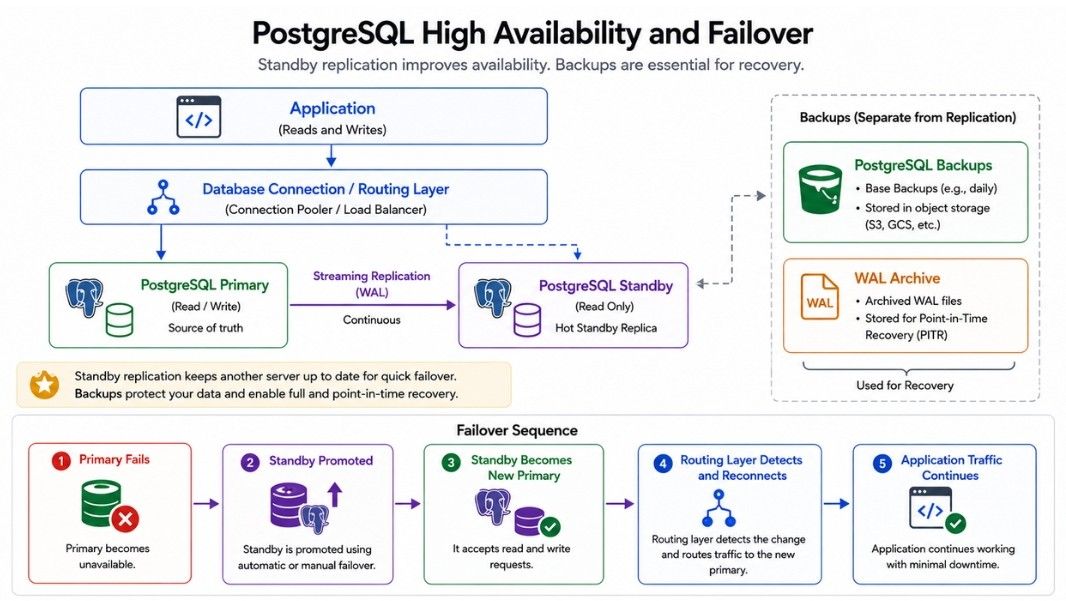
High availability means designing PostgreSQL so that the application can continue working even if the primary database server fails.
A simple setup looks like:
Application
     ↓
  Primary
     ↓
  Standby
The standby receives data from the primary through streaming replication.
Failover means switching from the failed primary to a standby server.
Primary fails
     ↓
Standby
     ↓
New Primary
PostgreSQL provides replication and standby features, but automatic failover usually requires additional tools or a managed database service.
A high-availability setup may include:
Primary and standby
Streaming replication
Health monitoring
Failover
Connection routing
Backup and recovery
In simple words: Replication keeps a copy of the database, while failover helps the application continue working when the primary fails.
Backups protect PostgreSQL data from problems such as:
Accidental deletion
Application bugs
Hardware failure
Database corruption
Security incidents
Infrastructure failure
A PostgreSQL backup strategy may include:
Logical backups
Physical backups
WAL archiving
Point-in-time recovery
Point-in-time recovery (PITR) allows you to restore the database to a specific point in time using a suitable backup and WAL data.
For example, if important data is accidentally deleted at 2:15 PM, you may be able to restore the database to a point before the deletion.
In simple words: A backup gives you a copy of your data, while PITR can help recover the database to a specific time.
Always test your backups by restoring them to make sure they actually work.
Missing Indexes – Large tables can become slow when frequently searched columns lack suitable indexes.
Too Many Indexes – Extra indexes use storage and can slow down write operations.
Slow Queries – Use EXPLAIN ANALYZE to find expensive scans, joins, and sorts.
Outdated Statistics – Poor statistics can lead to inefficient query plans.
Too Many Connections – Excessive connections consume resources. Connection pooling helps.
Long Transactions – They can prevent cleanup of old MVCC row versions.
Table Bloat – Dead row versions can increase table and index size.
Large OFFSET – Large offsets can be expensive; keyset pagination is often better.
Imagine you are building a large e-commerce application with an orders table:
orders

id | user_id | amount | created_at
---|---------|--------|------------
1  | 101     | 5000   | 2026-08-20
2  | 102     | 3000   | 2026-08-20
3  | 101     | 7500   | 2026-08-21
As the application grows:
Indexes help queries find data faster.
Transactions and MVCC help maintain consistency during concurrent operations.
Partitioning can help manage very large tables.
Read replicas can handle suitable read workloads.
EXPLAIN ANALYZE helps investigate slow queries.
Connection pooling helps manage database connections.
Replication and failover improve availability.
Backups and WAL help recover data after failures.
These concepts work together to help PostgreSQL handle large datasets, high traffic, concurrent operations, and failures.
PostgreSQL is a powerful relational database used to build reliable and scalable applications.
Indexes – Help PostgreSQL find data faster.
Transactions & MVCC – Keep data consistent when multiple operations run together.
WAL & Vacuum – Support recovery and database maintenance.
EXPLAIN ANALYZE – Helps find and understand slow queries.
Read Replicas & Partitioning – Help handle growing workloads and large datasets.
High Availability – Replication and failover help keep the database available during failures.
Backup & Recovery – Protect data and help restore it after failures or mistakes.
Performance – Good indexing, efficient queries, connection management, and proper maintenance are important for PostgreSQL performance.
