
Durgesh Tiwari
Author
Modern applications are expected to respond within milliseconds. However, fetching data from the database for every user request takes time and increases the load on the database. As the number of users grows, this can slow down the entire application.
To solve this problem, applications use Caching.
Caching stores frequently accessed data in a fast storage layer called a cache. Instead of querying the database every time, the application first checks the cache and returns the data quickly if it is available.
In System Design, caching is one of the most effective techniques for improving application performance, scalability, and user experience.
Caching is the process of storing frequently used data in a temporary, high-speed storage layer so it can be accessed quickly whenever it is needed again.
Whenever a user sends a request, the application first checks the cache. If the required data is available, it is returned immediately. If the data is not found, the application retrieves it from the database, stores it in the cache, and then returns the result.
In simple words, caching stores frequently used data so future requests can be served much faster without repeatedly accessing the database.
Example
Suppose thousands of users visit the homepage of an e-commerce website.
Without caching, every request retrieves product details from the database.
With caching, the product information is stored in memory, so future requests are served directly from the cache.
This reduces database load and delivers faster response times.
As an application grows, the number of user requests also increases. If every request goes directly to the database, response time becomes slower and the database has to work much harder.
Caching reduces this workload by serving frequently requested data from memory instead of the database.
It helps to:
Reduce response time.
Improve application performance.
Lower database load.
Support high user traffic.
Improve scalability.
Deliver a better user experience.
Large platforms like Amazon, Netflix, Facebook, and YouTube use caching extensively to serve millions of users with fast response times.
The caching process is simple and follows these steps:
A user sends a request.
The application checks the cache.
If the data is available (Cache Hit), it is returned immediately.
If the data is not available (Cache Miss), the application retrieves it from the database.
The retrieved data is stored in the cache.
Future requests for the same data are served directly from the cache.
User Request
      │
      ▼
Check Cache
      │
 ┌────┴────┐
 │         │
 ▼         ▼
Cache Hit  Cache Miss
 │          │
 ▼          ▼
Return    Read from
Data      Database
            │
            ▼
      Store in Cache
            │
            ▼
      Return Data
This process minimizes database queries and significantly improves application speed.
Using caching provides several advantages:
Faster response time.
Reduced database load.
Improved application performance.
Better scalability.
Lower infrastructure costs.
Better performance during high traffic.
Smoother user experience.
Different types of cache are used at different layers of an application to improve performance. Each type stores data closer to the user or application, reducing response time, database load, and server workload.

A Browser Cache stores static website files such as images, CSS, JavaScript, and fonts on the user's device.
When the user visits the same website again, the browser loads these files from local storage instead of downloading them again. This makes web pages load much faster and also reduces network usage.
Example
When you revisit a news website, its logo, icons, and design load quickly because they are already stored in your browser cache.
An Application Cache stores frequently accessed data within the application or on a dedicated caching server. Instead of querying the database repeatedly, the application retrieves data directly from the cache.
This reduces database requests and improves application performance.
Example
An e-commerce website caches popular product details so users can view them instantly without accessing the database every time.
A Database Cache stores the results of frequently executed database queries. When the same query is requested again, the cached result is returned instead of running the query again.
This reduces query execution time and improves database performance.
Example
The list of top-selling products on a homepage can be cached to avoid executing the same SQL query for every user.
A Distributed Cache stores cached data across multiple cache servers, allowing all application servers to access the same cached information.
It is commonly used in large-scale distributed applications where a single cache server is not enough.
Popular Distributed Cache Tools
Redis
Memcached
Example
A large e-commerce platform stores user session data in a distributed cache, allowing users to stay logged in even when their requests are handled by different application servers.
A CDN (Content Delivery Network) Cache stores static content such as images, videos, CSS, and JavaScript on servers located in different geographical regions.
When a user requests this content, it is delivered from the nearest CDN server instead of the main server. This reduces latency and improves website loading speed.
Example
Platforms like YouTube and Netflix use CDN caching to deliver videos quickly to users around the world.
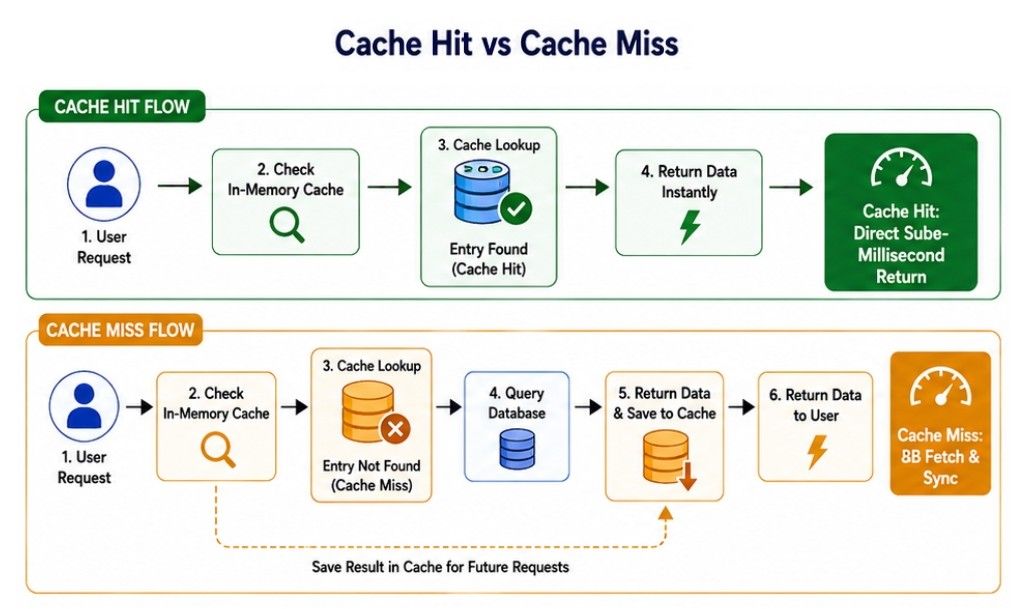
A Cache Hit occurs when the requested data is already available in the cache. Instead of accessing the database, the application retrieves the data directly from the cache, resulting in a much faster response.
In simple words, a Cache Hit means the requested data is found in the cache, so it is returned immediately without querying the database.
Example
Suppose a user opens the homepage of an e-commerce website, and the product list is already stored in the cache.
Instead of fetching the data from the database again, the application returns it directly from the cache.
User Request
      │
      ▼
Check Cache
      │
      ▼
Data Found ✓
      │
      ▼
Return Data from CacheFaster response time.
No database query is required.
Reduces database load.
Improves application performance.
Provides a better user experience.
A Cache Miss occurs when the requested data is not available in the cache. In this case, the application retrieves the data from the database, stores it in the cache, and then returns it to the user.
In simple words, a Cache Miss means the requested data is not found in the cache, so the application fetches it from the database before returning it.
Example
Suppose a user searches for a product that is not stored in the cache.
The application retrieves the product details from the database, stores the data in the cache, and then returns the result to the user.
User Request
      │
      ▼
Check Cache
      │
      ▼
Data Not Found ✗
      │
      ▼
Read from Database
      │
      ▼
Store in Cache
      │
      ▼
Return DataSlower response time.
Requires a database query.
Increases database load.
Uses more server resources.
Can affect application performance if cache misses occur frequently.
Whenever an application checks the cache, one of two situations occurs.
Cache Hit | Cache Miss |
|---|---|
Requested data is available in the cache. | Requested data is not available in the cache. |
Data is returned directly from the cache. | Data is fetched from the database first. |
No database query is required. | A database query is executed. |
Faster response time. | Slower response time. |
Reduces database workload. | Increases database workload. |
Improves overall application performance. | Adds extra processing time before the response is returned. |
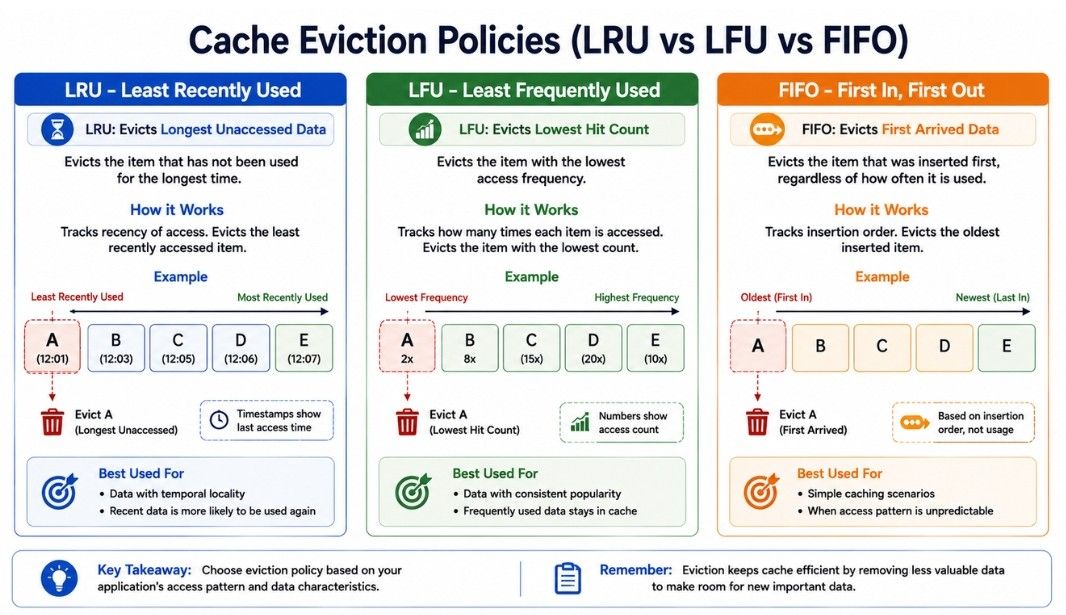
A cache has limited storage, so it cannot keep every piece of data forever. When the cache becomes full, the system needs to remove some old data to make space for new data. This process is called Cache Eviction.
The rules used to decide which cached data should be removed are known as Cache Eviction Policies.
Choosing the right eviction policy helps improve cache performance, reduce cache misses, and use memory more efficiently.
The three most commonly used cache eviction policies are:
LRU (Least Recently Used)
LFU (Least Frequently Used)
FIFO (First In, First Out)
LRU (Least Recently Used) removes the data that has not been used for the longest time. The idea is simple—if data has been used recently, there is a higher chance that it will be needed again, so it stays in the cache.
Example
Suppose the cache contains:
A → B → C → DIf A has not been accessed for the longest time and a new item needs to be added, A is removed first.
Best For: Applications where recently accessed data is likely to be requested again.
LFU (Least Frequently Used) removes the data that has been accessed the fewest number of times. Frequently used data remains in the cache, while rarely used data is removed.
Example
Access count:
Product A → 20 times
Product B → 15 times
Product C → 2 times
If the cache becomes full, Product C is removed because it has the lowest access count.
Best For: Applications where some data is accessed repeatedly over a long period.
FIFO (First In, First Out) removes the data that was added to the cache first. It does not consider how often or how recently the data has been used.
Example
Items are added in this order:
A → B → C → DWhen the cache becomes full, A is removed first because it entered the cache before the other items.
Best For: Simple caching systems where implementation needs to be fast and straightforward.
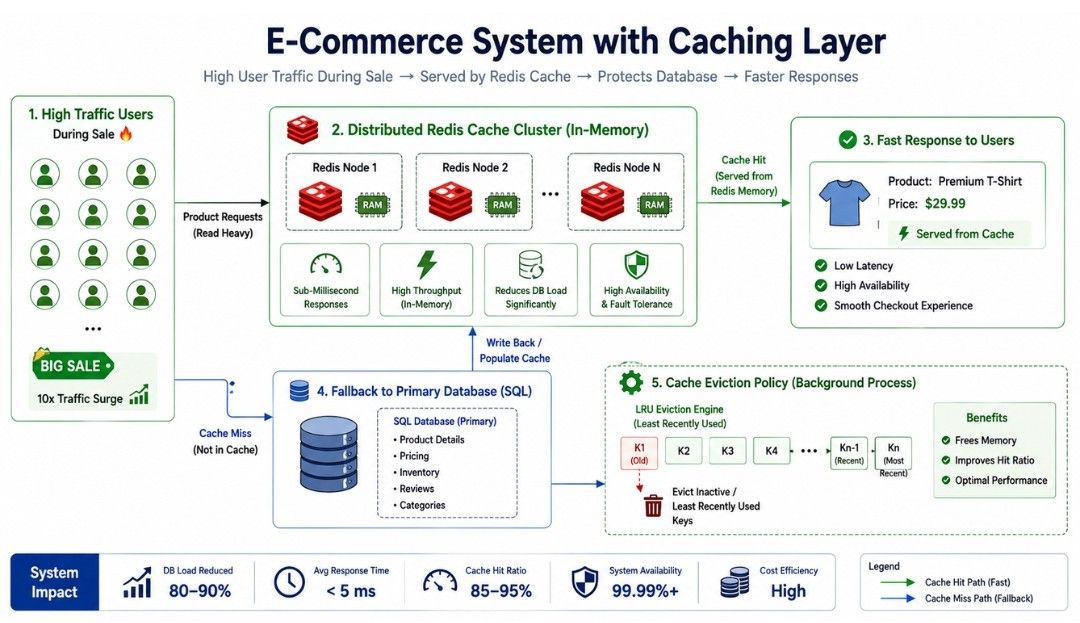
Consider an e-commerce application during a festive sale.
Thousands of users request the same product pages, category pages, and special offers at the same time. Instead of querying the database for every request, the application serves this frequently accessed data from the cache. When the cache becomes full, an eviction policy such as LRU removes the least recently used data to make space for new content.
This helps reduce database load, improve response time, and keep the application fast even during high traffic.
Caching stores frequently accessed data in a fast storage layer, reducing repeated database requests.
It helps improve application performance, reduce response time, and lower database load.
Different types of caching include Browser Cache, Application Cache, Database Cache, Distributed Cache, and CDN Cache, each serving a different purpose.
Cache Hit occurs when the requested data is found in the cache, while a Cache Miss requires the application to fetch data from the database.
Cache Eviction Policies such as LRU, LFU, and FIFO help manage limited cache space by deciding which data should be removed.
Choosing the right caching strategy improves application speed, supports high traffic, and enhances scalability.
Effective caching enables applications to deliver a fast, reliable, and smooth user experience.
