
Durgesh Tiwari
Author
Modern applications often run as many containers instead of one large application. A small application may use only a few containers, while a large system can run hundreds or thousands of containers across multiple servers.
Managing a large number of containers manually becomes difficult. Someone has to start containers, restart failed containers, distribute workloads, manage networking, scale applications, and deploy updates.
Container orchestration solves these problems by automatically managing containers across one or more servers.
In this article, we will learn what container orchestration is, why it is needed, what problems it solves, and how platforms such as Kubernetes help manage containerized applications.
Container orchestration is the process of automatically deploying, managing, scaling, networking, and monitoring containers across one or more servers.
An orchestration platform can help with:
Starting and stopping containers.
Restarting failed containers.
Scaling applications.
Distributing workloads across servers.
Managing container networking.
Managing persistent storage.
Performing application updates.
Handling container and server failures.
Maintaining the desired application state.
In simple words, container orchestration helps manage many containers automatically instead of managing each container manually.
Example
Imagine an online shopping application running 100 containers across several servers.
If one container crashes, an engineer should not have to manually find the failed container and restart it. An orchestration platform can detect the failure and create a replacement automatically.
Running one or two containers is usually simple.
The problem starts when an application has hundreds or thousands of containers running across multiple servers.
For example:
              E-Commerce Application
                       |
        --------------------------------
        |              |               |
     Server 1       Server 2        Server 3
        |              |               |
     Containers     Containers      Containers
        |              |               |
       API          Payments        Orders
Someone needs to manage:
Which server should run each container?
What happens if a container fails?
What happens if an entire server fails?
How many container instances are required?
How should containers communicate?
How should traffic reach the correct application?
How should new application versions be deployed?
How should CPU and memory resources be distributed?
Container orchestration automates many of these tasks.
Manual container management becomes difficult as the application grows.
Manual Scaling: If traffic increases, engineers may need to start additional containers manually.
Container Failures: A container may crash because of an application error or resource problem. Someone would need to detect the failure and restart it.
Server Failures: If an entire server goes down, containers running on that server may also become unavailable.
Networking Problems: Containers need to communicate with other containers and external users. Managing these connections manually becomes complicated.
Deployment Problems: Updating a large number of containers manually can cause downtime or configuration mistakes.
Resource Management: Containers require CPU and memory, so workloads need to be distributed across available servers.
Application Availability: The system needs to maintain enough running containers to keep the application available.
The larger the application becomes, the harder manual container management becomes.
Container orchestration provides several important benefits:
Automatic container management.
Automatic scaling.
Self-healing.
Service discovery.
Load balancing.
Rolling updates.
Rollbacks.
Resource management.
Better application availability.
Easier deployment.
Improved fault tolerance.
Example
Suppose an application normally needs 5 containers.
During a sale, traffic increases sharply.
The orchestration platform can increase the number of running containers to handle the additional traffic. When traffic decreases, the application can be scaled back to a smaller number of containers.
This allows resources to be used more efficiently while maintaining application availability.
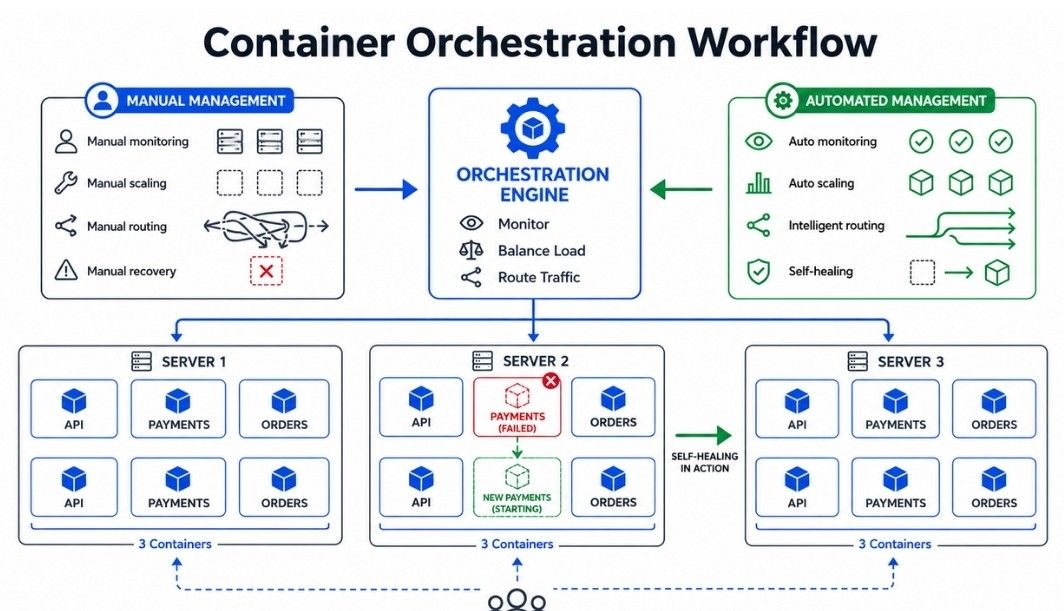
Several platforms can be used for container orchestration.
Kubernetes: Kubernetes is a widely used container orchestration platform. It automates container deployment, scaling, networking, service discovery, updates, and recovery.
Docker Swarm: Docker Swarm is Docker's native orchestration solution. It provides simpler container cluster management but has a smaller ecosystem than Kubernetes.
Amazon ECS: Amazon Elastic Container Service (ECS) is a managed container orchestration service provided by AWS.
Apache Mesos: Apache Mesos is a cluster management platform that can manage different types of workloads, including containerized applications.
For modern cloud-native applications, Kubernetes is one of the most commonly used container orchestration platforms.
Kubernetes is an open-source container orchestration platform used to deploy, manage, scale, and operate containerized applications.
Kubernetes can run containers across multiple servers and continuously monitor whether applications are running as expected.
In simple words, Kubernetes is a system that automatically manages containerized applications across multiple servers.
For example, Kubernetes can:
Start containers.
Restart failed containers.
Scale applications.
Route traffic to applications.
Manage application configuration.
Manage storage.
Perform rolling updates.
Roll back failed deployments.
Kubernetes becomes useful when applications grow and require reliable management of containers across multiple servers.
It helps teams manage:
Large numbers of containers.
Multiple servers.
Microservices.
Application scaling.
Application updates.
Service networking.
Persistent storage.
Application failures.
Example
An online food delivery application may have separate services for:
Users.
Restaurants.
Orders.
Payments.
Notifications.
Each service can run in containers managed by Kubernetes.
If the Order Service needs more capacity, Kubernetes can run additional Pods for that service.
Docker and Kubernetes are related but serve different purposes.
Feature | Docker | Kubernetes |
|---|---|---|
Primary Purpose | Builds and runs containers. | Orchestrates and manages containerized applications. |
Container Creation | Creates and runs containers. | Manages workloads that run containers. |
Scaling | Can run multiple containers manually or with additional tools. | Provides automated application scaling. |
Networking | Provides container networking features. | Manages networking between Pods and Services. |
Self-Healing | Basic container restart capabilities are available. | Automatically maintains desired application state and replaces failed workloads. |
Deployment | Runs individual containers or applications. | Supports controlled deployments, rolling updates, and rollbacks. |
Best For | Building, packaging, and running containers. | Managing containerized applications across clusters. |
Kubernetes provides several benefits for containerized applications:
Automation: Automates deployment and container management.
Scalability: Allows applications to scale according to workload requirements.
Self-Healing: Can replace failed Pods and maintain the desired state.
Load Balancing: Helps distribute traffic across application instances.
Service Discovery: Provides stable ways for services to find and communicate with each other.
Rolling Updates: Allows applications to be updated gradually.
Rollbacks: Makes it possible to return to a previous application version.
Resource Management: Helps distribute workloads across available resources.
High Availability: Multiple replicas can continue serving users when individual instances fail.
Kubernetes is commonly used for:
Microservices applications.
Cloud-native applications.
Large web applications.
API platforms.
Automated application deployments.
Applications that need frequent scaling.
Applications that require high availability.
Distributed systems.
Kubernetes Architecture explains how the Control Plane and Worker Nodes work together to manage and run containerized applications.
The Control Plane manages the overall Kubernetes cluster.
It receives requests, stores cluster information, schedules workloads, and makes sure the cluster stays in the desired state.
Important Control Plane components include:
API Server
etcd
Scheduler
Controller Manager
The Kubernetes API Server is the main communication point for the Kubernetes cluster.
Users, administrators, tools, and other Kubernetes components communicate with the cluster through the API Server.
For example, when you run:
kubectl get podsthe request is sent to the Kubernetes API Server, which processes the request and returns the required information.
In simple words, the API Server is the front door of the Kubernetes cluster.
etcd is a distributed key-value store used by Kubernetes to store important cluster information.
It stores information such as:
Pods
Deployments
Services
Configurations
Cluster state
Kubernetes uses the information stored in etcd to keep track of the cluster's configuration and state.
In simple words, etcd is the database that stores Kubernetes cluster state.
Because etcd contains critical cluster information, regular backups and proper security are important.
The Kubernetes Scheduler decides which worker node should run a newly created Pod.
It considers factors such as:
Available CPU
Available memory
Resource requests
Node restrictions
Scheduling rules
Example
Suppose there are three worker nodes:
Node 1 → 90% CPU
Node 2 → 30% CPU
Node 3 → 50% CPU
If a new Pod needs to be scheduled, the Scheduler evaluates the available nodes and selects a suitable node according to the scheduling requirements and rules.
The Controller Manager runs controllers that continuously compare the desired state with the current state of the cluster.
Example
Suppose a Deployment requires:
Desired Pods = 5
Current Pods = 4
A controller detects the difference and works to create another Pod so that the actual state moves toward the desired state.
This continuous process is called reconciliation.
In simple words, controllers continuously check the cluster and work to keep it in the desired state.
A Worker Node is a machine that runs application workloads.
A worker node commonly contains:
Kubelet
Container Runtime
Kube Proxy
Pods are scheduled onto worker nodes, and the containers belonging to those Pods run on the selected worker nodes.
             Control Plane
                  |
        ---------------------
        |        |          |
      API      Scheduler  Controller
     Server     Manager    Manager
        |
       etcd
        |
   -------------------------
   |                       |
Worker Node             Worker Node
   |                       |
  Pod                     Pod
   |                       |
Container ContainerThe Kubelet is an agent that runs on each worker node.
It communicates with the Kubernetes Control Plane and makes sure that the Pods assigned to the node are running as expected.
The Kubelet:
Starts and manages containers through the container runtime.
Monitors the state of Pods and containers.
Reports node and Pod information to the Control Plane.
Helps maintain the desired state of Pods assigned to the node.
In simple words, Kubelet is the worker-node agent that makes sure assigned Pods are running as expected.
The Container Runtime is the software responsible for running containers on a worker node.
Kubernetes communicates with the container runtime through the Container Runtime Interface (CRI).
A common container runtime is containerd.
The container runtime handles tasks such as:
Creating containers.
Starting containers.
Stopping containers.
Managing container execution.
In simple words, the Container Runtime is the software that actually runs the containers.
Kube Proxy runs on worker nodes and helps implement networking rules for Kubernetes Services.
It helps direct network traffic from a Service toward the appropriate Pods according to the Service configuration.
In simple words, Kube Proxy helps route Service traffic to the appropriate Pods.
Let's understand how Kubernetes components work together with a simple example.
Suppose a developer creates a Deployment that requires three Pods.
Developer
    ↓
API Server
    ↓
etcd
    ↓
Controller Manager
    ↓
Scheduler
    ↓
Worker Node
    ↓
Kubelet
    ↓
Container Runtime
    ↓
Pods
The basic process is:
The developer sends a request to the API Server.
The API Server processes the request.
Kubernetes stores the cluster state in etcd.
The Controller Manager works to create the required Pods.
The Scheduler selects suitable worker nodes for the Pods.
The Kubelet receives the Pod information on the selected worker node.
The Container Runtime starts the containers.
Kubernetes continuously checks the Pods and maintains the desired state.
In simple words, the API Server receives requests, etcd stores cluster information, the Controller Manager maintains the desired state, the Scheduler selects worker nodes, and the Kubelet and Container Runtime run the Pods.
A Pod is the smallest deployable unit in Kubernetes.
A Pod can contain one or more containers that share the same network and can share storage volumes.
Most applications use one main container per Pod. Multiple containers are used when they need to work closely together.
In simple words, a Pod is a Kubernetes unit that runs one or more closely related containers.
Example
A simple web application may run like this:
Pod
 |
 └── Web Application Container
A Pod with multiple containers may look like:
Pod
 |
 ├── Application Container
 |
└── Helper ContainerKubernetes uses Pods as the basic unit for running containers.
Containers inside the same Pod can:
Share the same network.
Communicate using localhost.
Share configured storage volumes.
Be scheduled together.
Example
An application container may need a helper container to collect logs.
Both containers can run inside the same Pod because they need to work closely together.
A Pod can contain:
One or more containers.
Shared networking.
Shared storage volumes.
Pod-level configuration.
Example:
                Pod
                 |
       --------------------
       |                  |
 Application          Helper
 Container            Container
       |                  |
       -------- Network ---
                 |
Shared StorageA single-container Pod contains one application container.
This is the most common Pod design.
Pod
 |
 └── Application Container
For example, a simple API can run in one container inside a Pod.
A multi-container Pod contains two or more containers that need to work closely together.
Pod
 |
 ├── Application Container
 |
 └── Sidecar Container
The containers share the Pod's network and can share storage volumes when configured.
A good rule is to keep containers in the same Pod only when they need to work closely together.
A Pod can move through different phases during its lifetime.
A simple flow is:
Pending
   ↓
Running
   ↓
Succeeded / FailedThe Pod has been accepted by Kubernetes but is not yet running successfully.
For example, Kubernetes may still be scheduling the Pod or pulling the required container image.
The Pod has been scheduled, and its containers are running or starting.
All containers in the Pod have completed successfully and will not restart.
All containers in the Pod have completed, and at least one container has failed.
Kubernetes cannot determine the current state of the Pod because it cannot obtain the required information.
Kubernetes uses restart policies to control what happens when containers inside a Pod stop.
The main restart policies are:
Always
OnFailure
Never
The container is restarted when it stops.
This is commonly used for long-running applications managed by Deployments.
The container is restarted when it exits with a failure.
Kubernetes does not restart the container after it exits.
This can be useful for short-running workloads that should not be restarted.
A Pod and a container are different concepts.
Feature | Pod | Container |
|---|---|---|
Managed By | Kubernetes | Container runtime |
Contains | One or more containers | Application process and dependencies |
Networking | Provides Pod-level network | Runs inside the Pod network |
Storage | Can share configured volumes | Can use mounted volumes |
Purpose | Kubernetes deployment unit | Runs application code |
In simple words, a container runs the application, while a Pod provides the Kubernetes environment in which one or more containers run.
A ReplicaSet ensures that a specified number of matching Pods are running.
For example, if a ReplicaSet is configured for 3 replicas, Kubernetes works to keep 3 matching Pods running.
ReplicaSets help provide:
Desired Pod count.
Basic self-healing.
Application availability.
Replacement of failed Pods.
Example
Suppose the desired number of replicas is 3 Pods.
Before:

Pod 1
Pod 2
Pod 3

Pod 2 fails

After:

Pod 1
Pod 3
New Pod
The ReplicaSet creates a replacement Pod to bring the number of running Pods back to 3.
A ReplicaSet continuously checks whether the current number of matching Pods matches the desired number.
For example:
Desired = 5
Current = 4
The ReplicaSet creates another Pod.
If:
Desired = 5
Current = 5
No additional Pod is required.
This continuous process is part of Kubernetes' reconciliation model.
Feature | Pod | ReplicaSet | Deployment |
|---|---|---|---|
Main Purpose | Runs application containers | Maintains the required number of Pods | Manages application deployments |
Manages | Containers | Pods | ReplicaSets |
Scaling | No | Yes — maintains the desired number of Pods | Yes — manages replica count through ReplicaSets |
Self-Healing | No — does not maintain replicas | Yes — replaces failed Pods | Yes — maintains application availability through ReplicaSets |
Rolling Updates | No — not responsible for updates | No — only maintains Pods | Yes — updates applications gradually |
Rollbacks | No — not a deployment controller | No — does not manage application versions | Yes — can roll back to a previous version |
Version Management | No — runs the assigned containers | No — focuses on Pod replicas | Yes — manages application revisions |
Common Use | Runs application workloads | Maintains Pod replicas | Preferred way to deploy applications |
A Deployment is a Kubernetes object used to manage the desired state of an application.
It helps manage:
Pod replicas.
Application updates.
Rolling deployments.
Rollbacks.
In simple words, a Deployment tells Kubernetes how many application Pods you want and how they should be updated.
Deployments make application updates safer and easier.
They can:
Maintain the desired number of Pods.
Create and manage ReplicaSets.
Perform rolling updates.
Roll back changes.
Manage application versions.
Kubernetes works heavily with the idea of desired state.
For example:
Desired:
3 application Pods

Current:
3 application Pods
Everything is correct.
If one Pod fails:
Desired:
3 application Pods

Current:
2 application Pods
Kubernetes works to bring the current state back to the desired state.
In simple words, Kubernetes continuously works to make the current state match the desired state.
A Deployment normally manages a ReplicaSet, which maintains the required number of Pods.
Deployment
     |
     ↓
ReplicaSet
     |
  ┌──┼──┐
  ↓  ↓  ↓
 Pod Pod Pod
When the application is updated, the Deployment can create a new ReplicaSet and gradually move the application to the new version.
A Deployment can define:
Application image.
Number of replicas.
Container ports.
Resource requirements.
Update strategy.
For example, a Deployment may specify:
Application Image: myapp:v2
Replicas: 3
Kubernetes then works to maintain this desired configuration.
A Rolling Update gradually replaces old Pods with new Pods.
For example:
Old Version

v1   v1   v1
During the update:
v2 v1 v1Then:
v2 v2 v1Finally:
v2 v2 v2This allows the application to continue running while the new version is being deployed.
In simple words, a Rolling Update replaces old Pods with new Pods gradually instead of replacing them all at once.
Sometimes a new application version may cause problems.
A Kubernetes Deployment can roll back to a previous working version.
Example
v1 → v2If v2 has a serious problem:
v2 → v1This helps reduce the impact of a failed deployment and allows the application to return to a previous version.
In simple words, a Rollback returns the application to a previous working version when a new version causes problems.
Different deployment strategies can be used depending on the application's requirements.
Rolling Deployment: Gradually replaces old Pods with new Pods while the application continues running.
Recreate: Stops the old version before starting the new version. This can cause temporary downtime during the update.
Blue-Green Deployment: Runs the old and new versions separately and switches traffic from the old version to the new version when the new version is ready.
Canary Deployment: Releases the new version to a small percentage of users first.
A Kubernetes Service provides a stable way to access a group of Pods.
Pods can be replaced, recreated, or moved to another node, so their IP addresses may change.
A Service provides a stable network endpoint for accessing those Pods.
In simple words, a Service gives applications a stable way to communicate with changing Pods.
Suppose an application has three Pods:
Pod A → 10.0.0.1
Pod B → 10.0.0.2
Pod C → 10.0.0.3
If Pod B is deleted and recreated, its IP address may change.
Instead of making clients track individual Pod IP addresses, they communicate with a Service.
Client
   ↓
Service
   ↓
┌─────────┬─────────┬─────────┐
↓         ↓         ↓
Pod A     Pod B     Pod C
The Service provides a stable way to reach the available Pods.
Kubernetes provides Service Discovery so applications can find Services using stable names.
For example:
order-serviceAn application can use the Service name instead of depending on changing Pod IP addresses.
Kubernetes DNS helps resolve Service names inside the cluster.
In simple words, Service Discovery allows applications to find other services using stable names instead of changing Pod IP addresses.
Kubernetes provides several common Service types.
ClusterIP exposes a Service inside the Kubernetes cluster.
It is commonly used for internal communication between applications and services.
Application
     ↓
ClusterIP Service
     ↓
Backend Pods
NodePort exposes a Service through a port on each node.
It allows external traffic to reach the Service through the node's IP address and the assigned port.
LoadBalancer exposes a Service using an external load balancer.
It is commonly used when Kubernetes is running on a cloud platform that provides load balancer integration.
This type is useful when an application needs external access.

Feature | Service | Pod |
|---|---|---|
Main Purpose | Provides stable network access to Pods | Runs application containers |
Network Access | Provides a stable endpoint | Has its own Pod IP |
Lifecycle | Provides stable access even when Pods change | Can be created, replaced, or deleted |
Traffic | Can route traffic to multiple matching Pods | Receives application traffic |
Service Discovery | Provides a stable name for applications to use | Does not provide stable access by itself |
In simple words, a Service provides stable network access, while a Pod runs the application.
A Service selects matching Pods using labels and selectors.
For example:
Service
Selector: app=payment
       ↓
┌──────────────┬──────────────┬──────────────┐
↓              ↓              ↓
Payment Pod 1  Payment Pod 2  Payment Pod 3
When traffic is sent to the Service, Kubernetes routes it to the selected backend Pods.
A Kubernetes Namespace provides a way to logically divide resources inside a Kubernetes cluster.
It is useful when multiple teams, applications, or environments share the same cluster.
In simple words, a Namespace helps organize and separate resources inside a Kubernetes cluster.
Namespaces can help organize:
Development resources.
Testing resources.
Production resources.
Team resources.
Application resources.
For example:
Kubernetes Cluster
       |
       ├── development
       ├── testing
└── productionNamespaces help separate resources logically inside a cluster.
They can also work with access control, resource quotas, and policies.
For example, a team may have permission to manage resources in the development namespace but not in the production namespace.
In simple words, Namespaces help control and organize resources for different teams and environments.
Feature | Cluster | Namespace |
|---|---|---|
Purpose | Provides the complete Kubernetes environment | Organizes resources inside the cluster |
Scope | Contains the entire Kubernetes environment | Exists inside a cluster |
Resources | Contains nodes and Kubernetes resources | Contains namespaced resources |
Use | Runs and manages applications | Separates teams, applications, or environments |
Namespaces are commonly used for:
Environment separation.
Team separation.
Application organization.
Access control.
Resource management.
A ConfigMap stores non-sensitive configuration data separately from application code.
Examples include:
Application settings.
Environment names.
Service URLs.
Feature flags.
Configuration values.
In simple words, a ConfigMap keeps normal application configuration outside the container image.
Without ConfigMaps, configuration values may need to be hard-coded into application images.
With ConfigMaps, the same application image can be used with different configuration values in different environments.
Example
Development
API_URL=dev.example.com

Production
API_URL=api.example.com
The application image can remain the same while the configuration changes.
Configuration can be provided to containers through:
Environment variables.
Mounted files.
The application can read these values when it starts or according to how the application is designed.
A ConfigMap can be used by a Pod through environment variables or mounted files.
This keeps application code separate from environment-specific configuration and makes configuration easier to manage.
A Secret is a Kubernetes object used to store sensitive configuration data.
Examples include:
Passwords.
API keys.
Tokens.
Certificates.
In simple words, Secrets are intended for sensitive configuration, while ConfigMaps are intended for non-sensitive configuration.
Sensitive values should not normally be placed directly inside application code or container images.
Secrets provide a Kubernetes mechanism for storing and supplying these values to applications.
Secrets can be provided to Pods through:
Environment variables.
Mounted files.
Access to Secrets should be controlled carefully.
Feature | ConfigMap | Secret |
|---|---|---|
Purpose | Stores non-sensitive configuration | Stores sensitive configuration |
Examples | Application settings, service URLs, feature flags | Passwords, API keys, tokens, certificates |
Typical Use | General application configuration | Credentials and other sensitive values |
Teams should:
Restrict access to Secrets.
Avoid exposing Secrets in logs.
Use appropriate encryption and access controls.
Rotate sensitive credentials when required.
Avoid committing Secret values to source code.
Important: A Secret is not automatically safe just because it is called a Secret. Proper access control, encryption, and secure secret management practices are still important.
Ingress is a Kubernetes resource used to define rules for routing external HTTP and HTTPS traffic to Services.
It can route requests based on:
Hostnames.
URL paths.
In simple words, Ingress helps route external web traffic to the correct Kubernetes Service.
Without Ingress, applications may need separate external access mechanisms for different Services.
Ingress allows multiple applications to share an entry point while using routing rules.
Example
example.com/users
       ↓
User Service

example.com/orders
       ↓
Order ServiceFeature | Service | Ingress |
|---|---|---|
Main Purpose | Provides stable access to Pods | Routes external HTTP/HTTPS traffic |
Traffic | Routes traffic to Pods | Routes traffic to Services |
Routing | Uses Service configuration and selectors | Can route using hostnames and URL paths |
Position | Works between clients and Pods | Usually sits before Services |
Example |
|
|
Host-based routing sends traffic to different Services based on the hostname.
Example:
users.example.com  → User Service
orders.example.com → Order ServicePath-based routing uses the URL path to decide which Service should receive the request.
Example:
example.com/users  → User Service
example.com/orders → Order ServiceAn Ingress resource contains routing rules, but an Ingress Controller is responsible for processing those rules and handling the traffic.
Examples of Ingress Controllers include:
NGINX Ingress Controller.
Traefik.
HAProxy-based controllers.
In simple words, the Ingress resource defines the routing rules, while the Ingress Controller applies those rules to incoming traffic.
Ingress can be configured to handle HTTPS traffic.
TLS termination means the encrypted HTTPS connection is terminated at the Ingress layer before the request is forwarded to backend Services, depending on the architecture.
This can allow centralized handling of TLS certificates for incoming web traffic.
Feature | Ingress | API Gateway |
|---|---|---|
Main Purpose | Routes external HTTP/HTTPS traffic to Kubernetes Services | Provides broader API management |
Routing | Host-based and path-based routing | Routing with additional API management features |
Authentication | Not its main purpose | Commonly supported |
Authorization | Not its main purpose | Commonly supported |
Rate Limiting | Limited/basic depending on controller | Commonly supported |
Request Transformation | Limited/depends on controller | Commonly supported |
API Policies | Limited/depends on controller | Supported |
API Analytics | Limited | Supported |
Application traffic can change over time.
For example:
Normal Traffic
      ↓
    5 Pods

High Traffic
      ↓
   20 Pods
Scaling allows Kubernetes applications to handle changes in traffic and workload demand.
Developers can manually change the number of replicas.
For example:
3 Pods
  ↓
6 Pods
Manual scaling can work for simple situations, but it is not ideal when traffic changes frequently.
The Horizontal Pod Autoscaler (HPA) automatically changes the number of Pods based on selected metrics.
Common metrics include:
CPU usage.
Memory usage.
Custom application metrics.
Example
Low Load
   ↓
5 Pods
   ↓
Traffic Increases
   ↓
HPA
   ↓
10 Pods
When demand decreases, HPA can reduce the number of replicas.
In simple words, HPA automatically increases or decreases the number of Pods based on workload demand.
Vertical scaling increases the resources available to a Pod, such as:
CPU.
Memory.
For example:
1 CPU + 2 GB RAM
        ↓
2 CPU + 4 GB RAM
Vertical scaling increases the resources available to the workload instead of increasing the number of Pods.
Sometimes there are not enough worker nodes to run new Pods.
Cluster Autoscaling can increase or decrease the number of worker nodes when supported by the environment.
More Pods Needed
      ↓
Not Enough Node Capacity
      ↓
Add Worker Nodes
In simple words, Cluster Autoscaling adds or removes worker nodes when the cluster needs more or less capacity.
Feature | Pod Scaling | Node Scaling |
|---|---|---|
What Changes? | Number of application Pods | Number of worker nodes |
Main Purpose | Handles application demand | Provides more cluster capacity |
Common Tool | HPA | Cluster Autoscaler |
Example | 5 Pods → 10 Pods | 3 Nodes → 5 Nodes |
Scaling is not simply about adding more Pods.
Teams should also consider:
Database capacity.
Network capacity.
CPU and memory limits.
Application startup time.
External API limits.
Cost.
Stateful workloads.
Cluster capacity.
Pods are temporary. A Pod can be deleted and recreated, and data stored only inside the Pod may not survive its lifecycle.
Applications such as databases need storage that can remain available even when Pods change.
Ephemeral storage is temporary storage associated with a Pod or container lifecycle.
It can be useful for:
Temporary files.
Caches.
Scratch data.
It should not normally be used as the only storage for important persistent data.
A Kubernetes Volume provides storage that can be mounted into containers.
The exact behavior depends on the type of Volume being used.
Volumes can help containers access or share data during their lifecycle.
A PersistentVolume (PV) represents storage available to the Kubernetes cluster.
The storage may come from different systems depending on the environment.
A PV has a lifecycle that is separate from an individual Pod.
A PersistentVolumeClaim (PVC) is a request for storage made by an application.
For example:
Application
     ↓
    PVC
     ↓
PersistentVolume
     ↓
Storage System
The application requests the storage it needs through the PVC instead of directly managing the underlying storage details.
A StorageClass defines how storage can be provisioned.
It allows Kubernetes to automatically create suitable storage when a PVC requests it, depending on the configured storage system.
This is commonly called dynamic provisioning.
Feature | Persistent Storage | Ephemeral Storage |
|---|---|---|
Purpose | Stores data that needs to remain available | Stores temporary data |
Lifecycle | Designed to survive Pod replacement | Closely tied to the workload lifecycle |
Common Use | Databases and important application data | Temporary files, caches, and scratch data |
Kubernetes Resources | Commonly uses PVs and PVCs | Commonly associated with Pods or containers |
Data After Pod Replacement | Can remain available | May be lost |
Kubernetes networking allows Pods, Services, and external clients to communicate with each other.
A Kubernetes application may need different types of communication:
Pod → Pod
Pod → Service
Service → Pod
External User → ServicePods often need to communicate with each other in distributed applications.
For example:
Order Pod
    ↓
Payment Pod
Kubernetes networking provides the network connectivity required for Pods to communicate across the cluster.
Applications usually communicate with a Service instead of directly depending on changing Pod IP addresses.
Application Pod
      ↓
Payment Service
      ↓
Payment Pods
The Service provides a stable endpoint and routes traffic to the appropriate Pods.
Microservices commonly communicate with each other through Services.
For example:
Order Service
      ↓
Payment Service
      ↓
Notification Service
Kubernetes DNS allows applications to find Services using stable DNS names.
Cluster Networking connects Pods and Services across worker nodes.
It allows workloads running on different nodes to communicate with each other.
The networking system must also follow the network rules configured for the cluster.
Network Policies control which network traffic is allowed between Pods and other network endpoints.
For example, a policy can allow:
Order Service
      ↓
Payment Service
while blocking unwanted traffic from another application.
Network Policies help improve network isolation and security when supported by the cluster's network implementation.
Kubernetes provides DNS-based service discovery.
Applications can use Service names instead of hard-coded Pod IP addresses.
For example:
payment-service
When Pods are created, deleted, or replaced, their IP addresses may change, but the Service name remains stable.
Kubernetes uses health probes to check whether Pods are healthy and ready.
The main probe types are:
Liveness Probe — Checks if the container is healthy.
Readiness Probe — Checks if the Pod is ready to receive traffic.
Startup Probe — Gives slow-starting applications time to start.
Kubernetes can automatically replace failed Pods to maintain the desired number of replicas.
Desired: 3 Pods
Current: 2 Pods
     ↓
Replacement Pod
     ↓
Current: 3 PodsKubernetes continuously compares the desired state with the actual state and takes action when they are different.
Kubernetes Scheduling is the process of deciding which Worker Node should run a new Pod.
The Scheduler considers:
Available CPU and memory
Resource requests
Node constraints
Taints and tolerations
Affinity rules
Requests tell Kubernetes how much CPU or memory a container needs for scheduling.
Limits define the maximum amount of a resource the container can use.
Example:
CPU Request: 500m
Memory Request: 512Mi

CPU Limit: 1
Memory Limit: 1Gi
These settings help Kubernetes make better scheduling and resource management decisions.
A Node Selector restricts a Pod to nodes with a specific label.
Example:
Node Label:
disk=ssd
A Pod can be configured to run only on nodes with disk=ssd.
A Taint prevents Pods from being scheduled on a node unless they have a matching Toleration.
Example:
Node
  ↓
Taint: special=true
  ↓
Only matching Pods
This is useful for reserving nodes for specific workloads.
Affinity helps Kubernetes place Pods near specific workloads or on suitable nodes.
Anti-Affinity helps keep certain Pods apart.
Example: Replicas can be placed on different nodes so that one node failure does not affect all replicas.
A typical Kubernetes application follows this workflow:
Container Image
      ↓
  Deployment
      ↓
    Pods
      ↓
   Service
      ↓
   Ingress
      ↓
    Users
Container Image: The application is packaged into a container image.
Deployment: A Deployment defines the container image and desired number of replicas. Kubernetes creates and manages the Pods.
Service: A Service provides stable network access to the Pods.
Configuration: ConfigMaps provide non-sensitive configuration, while Secrets provide sensitive configuration.
Ingress: Ingress routes external HTTP/HTTPS traffic to the appropriate Service.
Internet
   ↓
Ingress
   ↓
Service
   ↓
 Pods
Scaling: Applications can be scaled manually or automatically.
5 Pods → 10 PodsHPA can automatically adjust the number of Pods based on configured metrics.
Updates and Rollbacks: A Deployment can gradually replace old Pods with new ones during a rolling update. If the new version causes problems, Kubernetes can roll back to a previous version.
Kubernetes is a powerful platform for deploying, scaling, and managing containerized applications.
The key concepts covered in this chapter are:
Container Orchestration — Automatically manages containers across servers.
Kubernetes — Manages containerized applications and their workloads.
Control Plane — Manages the Kubernetes cluster and its desired state.
Worker Nodes — Run application workloads.
Pods — The basic unit used to run containers in Kubernetes.
ReplicaSets — Maintain the desired number of Pods.
Deployments — Manage application replicas, updates, and rollbacks.
Services — Provide stable network access to Pods.
Namespaces — Organize resources within a cluster.
ConfigMaps — Store non-sensitive application configuration.
Secrets — Store sensitive configuration.
Ingress — Routes external HTTP/HTTPS traffic to Services.
Scaling — Adjusts Pods or cluster capacity based on application needs.
Storage — Provides temporary and persistent storage for workloads.
Networking — Enables communication between Pods, Services, and external systems.
Health Probes — Help check application health and readiness.
Scheduling — Selects suitable worker nodes for Pods.
Deployment Workflow — Connects container images, Deployments, Pods, Services, Ingress, scaling, and updates into a complete application workflow.
