
Durgesh Tiwari
Author
Imagine you are building a service where users can upload photos, videos, PDFs, backups, and other files.
A user uploads:
profile-photo.jpgThey close the application and return six months later. The file should still be available.
Now scale this from one user to millions of users storing billions of files. Some files may be only a few kilobytes, while others can be tens of gigabytes or larger.
At this scale, storing files on the local disk of an application server is not enough. Servers and disks can fail, large uploads can be interrupted, storage requirements keep growing, and popular files may suddenly receive millions of download requests.
We need a distributed storage system that can scale across many machines while keeping files durable, available, secure, and efficient to access.
In this S3-like file storage system design, we will build such a system step by step. We will start with a simple architecture, identify its limitations, and gradually introduce concepts such as object storage, metadata, replication, multipart uploads, checksums, CDN caching, storage partitioning, and failure recovery.
We are designing an object storage service similar to Amazon S3 where users can upload, store, download, and manage files at scale.
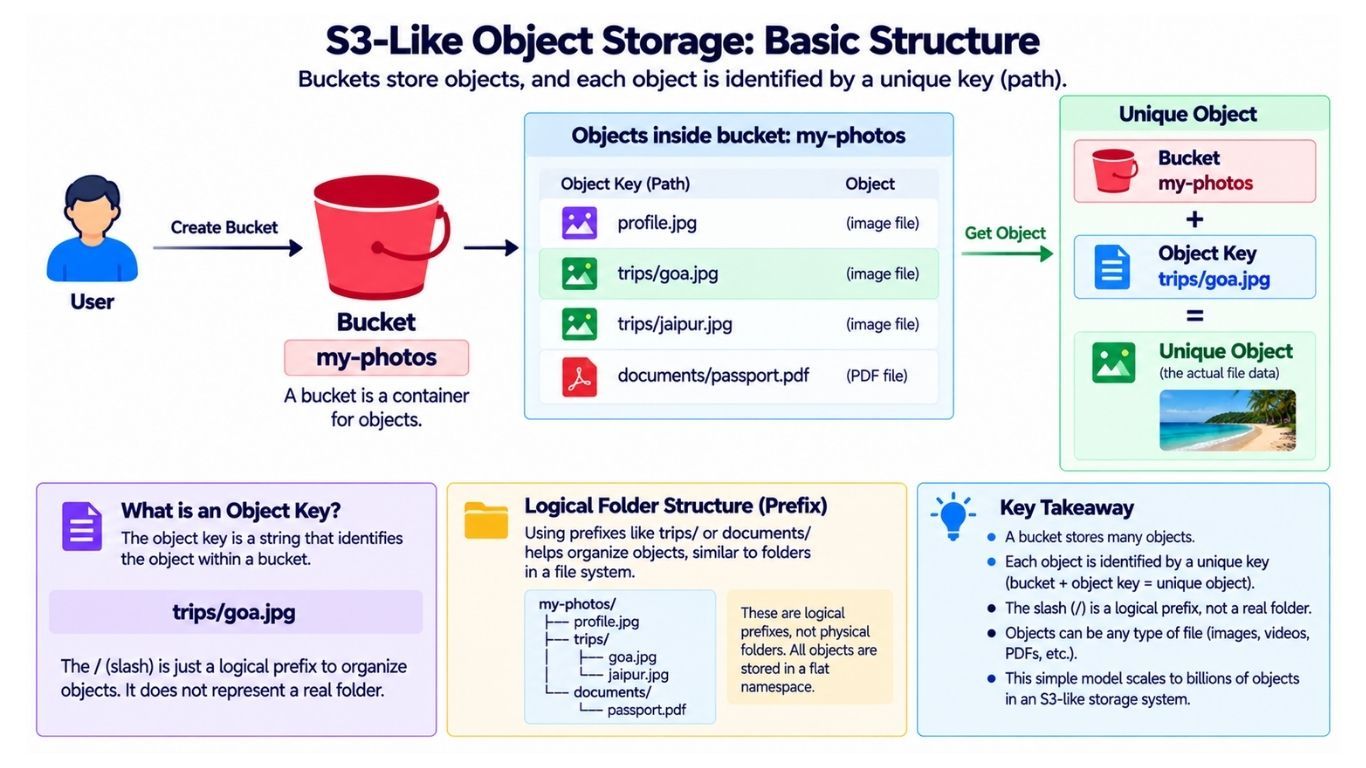
In object storage, files are stored as objects inside logical containers called buckets.
Suppose a user creates a bucket:
my-photosInside it, they upload:
profile.jpg
trips/goa.jpg
trips/jaipur.jpg
documents/passport.pdf
Each file is stored as an object, and every object has a unique object key within its bucket.
For example:
Bucket:
my-photos

Object Key:
trips/goa.jpg
Together, the bucket name and object key identify the object:
Bucket + Object Key → Object DataThe / characters in a key such as trips/goa.jpg may look like folders, but in object storage they can simply be part of the object key rather than representing a traditional directory structure.
Identifying an object is only the beginning. Our system must also store its data reliably, scale across many machines, and continue serving files when hardware fails.
A production cloud object storage service can support many features. For this system design, we will focus on the capabilities that expose the most important storage and distributed-system challenges.
Users should be able to:
Create a bucket to organize objects.
Upload an object to a bucket.
Download an object using its bucket and object key.
Delete an object when it is no longer needed.
View object metadata such as size, content type, checksum, and creation time.
List objects stored inside a bucket.
Upload large files reliably.
Keep multiple versions of an object when versioning is enabled.
Control access to buckets and objects.
These requirements give us enough scope to design the core of an S3-like object storage system without getting distracted by every feature offered by a real cloud storage platform.
Our object storage system must remain reliable, available, scalable, secure, and efficient even as the amount of stored data and traffic grows.
Uploaded objects should remain safe even if a disk or storage server fails.
The system should avoid keeping only one copy of an object.
Users should be able to upload and download objects even when some machines are unavailable.
Individual machine failures should not bring down the entire service.
The system should scale horizontally by adding more machines.
It should support growth from terabytes to petabytes or even exabytes.
The system should support objects ranging from a few KB to hundreds of GB.
Interrupted large uploads should be resumable instead of restarting from the beginning.
Object downloads should be fast and efficient.
Popular objects should handle sudden traffic spikes without overloading a single server.
Private objects should be accessible only to authorized users and applications.
Guessing an object key should not be enough to access private data.
Before choosing an architecture, estimate roughly how much data the system may need to store.
Suppose we have:
50 million active usersand each user stores an average of:
20 GBThe logical storage requirement becomes:
50,000,000 × 20 GB
= 1,000,000,000 GB
≈ 1 exabyte
The exact estimate is less important than the design implication: the storage layer must be distributed across a large number of machines.
The physical storage requirement will be even higher once we introduce replication and other durability mechanisms.
Suppose users upload:
40 million objects/dayand download:
200 million objects/dayAverage upload traffic is approximately:
40,000,000 / 86,400
≈ 463 uploads/second
Average download traffic is approximately:
200,000,000 / 86,400
≈ 2,315 downloads/second
Peak traffic can be several times higher, so average requests per second should not be treated as the required system capacity.
Request count also tells only part of the story. Compare:
Download A → 20 KB image
Download B → 8 GB video
Both are one request, but the second consumes far more network bandwidth.
For an object storage system, we therefore need to consider both requests per second and bytes transferred per second.
Instead of jumping directly to a complex distributed architecture, start with the smallest design that could work and improve it as new problems appear.
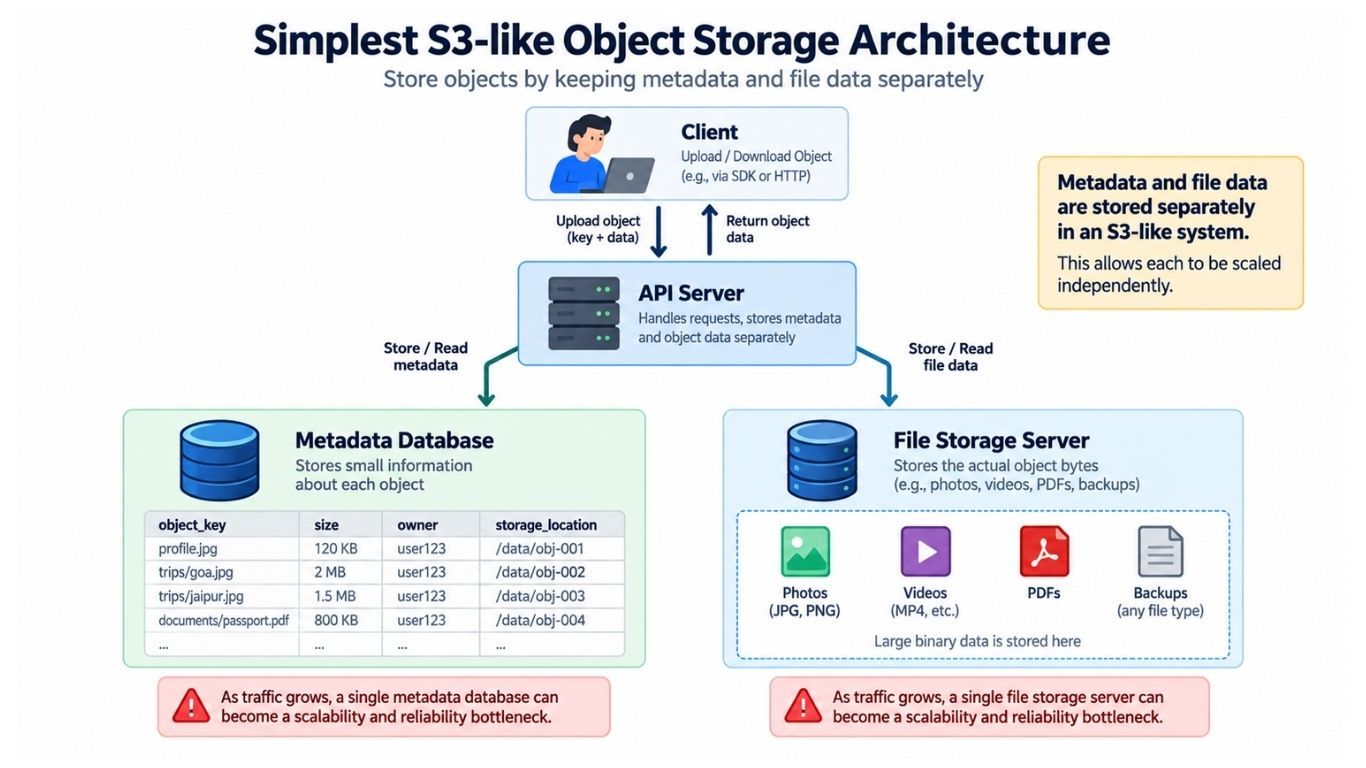
Our first version contains:
a Client that uploads and downloads objects;
an API Server that handles requests;
a Metadata Database that stores information about objects;
a Storage Server that stores the actual file data.
                 ┌─────────────┐
                 │   Client    │
                 └──────┬──────┘
                        │
                        ▼
                 ┌─────────────┐
                 │ API Server  │
                 └──────┬──────┘
                        │
              ┌─────────┴─────────┐
              │                   │
              ▼                   ▼
       ┌─────────────┐     ┌─────────────┐
       │ Metadata DB │     │File Storage │
       └─────────────┘     │   Server    │
                           └─────────────┘
Suppose a user uploads resume.pdf.
The metadata database might store:
object_key = resume.pdf
size       = 2.3 MB
owner      = user_123
location   = storage_server_7
The actual PDF bytes remain on the storage server.
This separation is fundamental to object storage system design: metadata is relatively small and frequently queried, while object data can be very large and requires a different storage strategy.
For a small application, this architecture can work. As the system grows, however, the single storage server and metadata database will become important scalability and reliability bottlenecks.
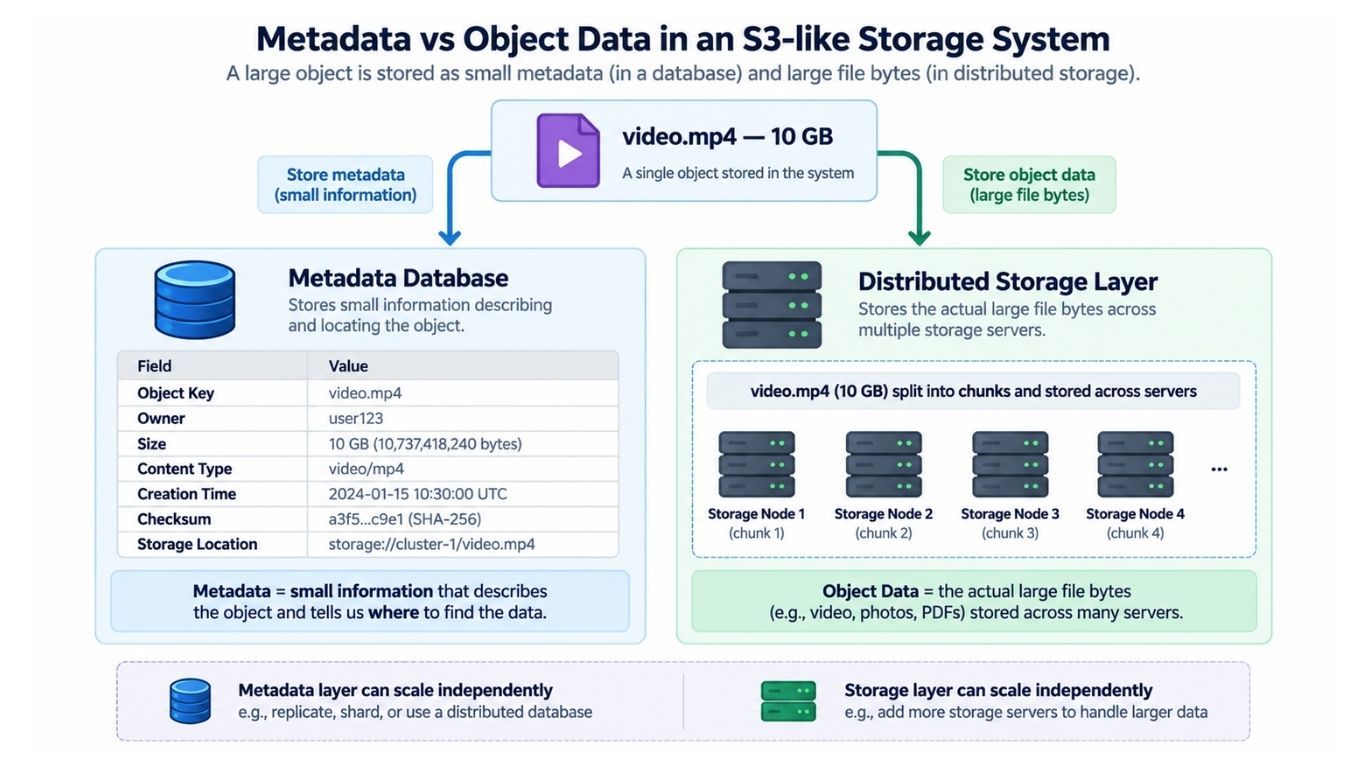
Suppose a user uploads a 10 GB video. The actual video is large, but its metadata requires only a small amount of space:
Object key
Owner
Size
Content type
Creation time
Checksum
Storage location
Metadata helps us answer questions such as whether an object exists, who owns it, how large it is, and where it is stored without reading the actual file.
For this reason, we separate metadata from object data:
Metadata Database
        │
        ├── Object key
        ├── Owner
        ├── Size
        ├── Checksum
        └── Storage location

Storage Layer
        │
        └── Actual object bytes
This separation also allows the metadata and storage layers to scale independently.
Our S3-like storage system needs a few core entities.
USER
----------------
user_id
name
created_atBUCKET
----------------
bucket_id
bucket_name
owner_id
created_atOBJECT
----------------
object_id
bucket_id
object_key
size
content_type
checksum
version
created_at
statusWe also need to track where object data is stored:
OBJECT_LOCATION
----------------
object_id
chunk_id
storage_node
The chunk_id becomes important when large objects are divided into smaller parts for storage and transfer.
Our object storage service needs a small set of core APIs for managing buckets and objects.
POST /v1/buckets
{
  "name": "user-photos"
}
PUT /v1/buckets/user-photos/objects/profile.jpgThe request contains the object data. A direct upload works well for small files, while large files require multipart or resumable uploads.
GET /v1/buckets/user-photos/objects/profile.jpgThe system verifies access permissions and returns the object data.
When the client needs object information without downloading the file:
HEAD /v1/buckets/user-photos/objects/profile.jpgThe response can include metadata such as:
Size
Content type
Creation time
Version
Checksum
DELETE /v1/buckets/user-photos/objects/profile.jpgGET /v1/buckets/user-photos/objects?prefix=trips/For buckets containing millions of objects, results should be paginated instead of returning the entire object list at once.
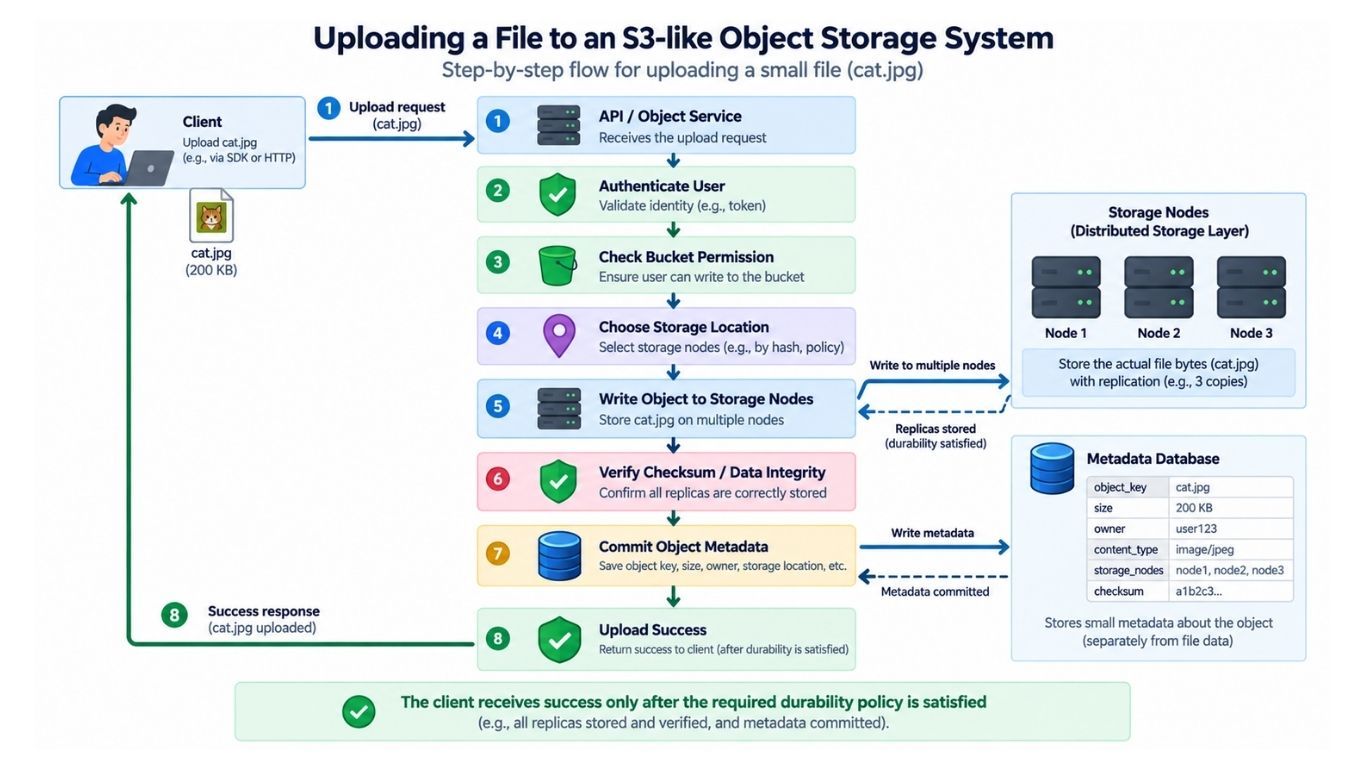
For a small object such as cat.jpg, the upload can follow a simple flow:
Client
   │
   │ Upload cat.jpg
   ▼
API Server
   │
   ├────► Authenticate user
   ├────► Check bucket permission
   │
   ▼
Storage Service
   │
   ├────► Choose storage location
   ├────► Write object data
   ├────► Verify data integrity
   │
   ▼
Metadata Database
   │
   └────► Save object metadata
During the upload:
The API server authenticates the user and checks write permission.
The storage service selects a suitable storage location and writes the object data.
The system verifies the stored data using an integrity check such as a checksum.
Object metadata is recorded after the required storage guarantees are satisfied.
The client receives a successful response only after the object reaches the durability level promised by the system.
This last point is important: an upload should not be reported as successful while the object is still vulnerable to a single failure.
Our initial design stores each object on a single storage server:
cat.jpg → Storage Node AIf that server or its disk fails, the object may be permanently lost. Adding more API servers or scaling the metadata database does not solve this problem because the only copy of the actual data is gone.
To improve durability, we need to store multiple copies of each object.
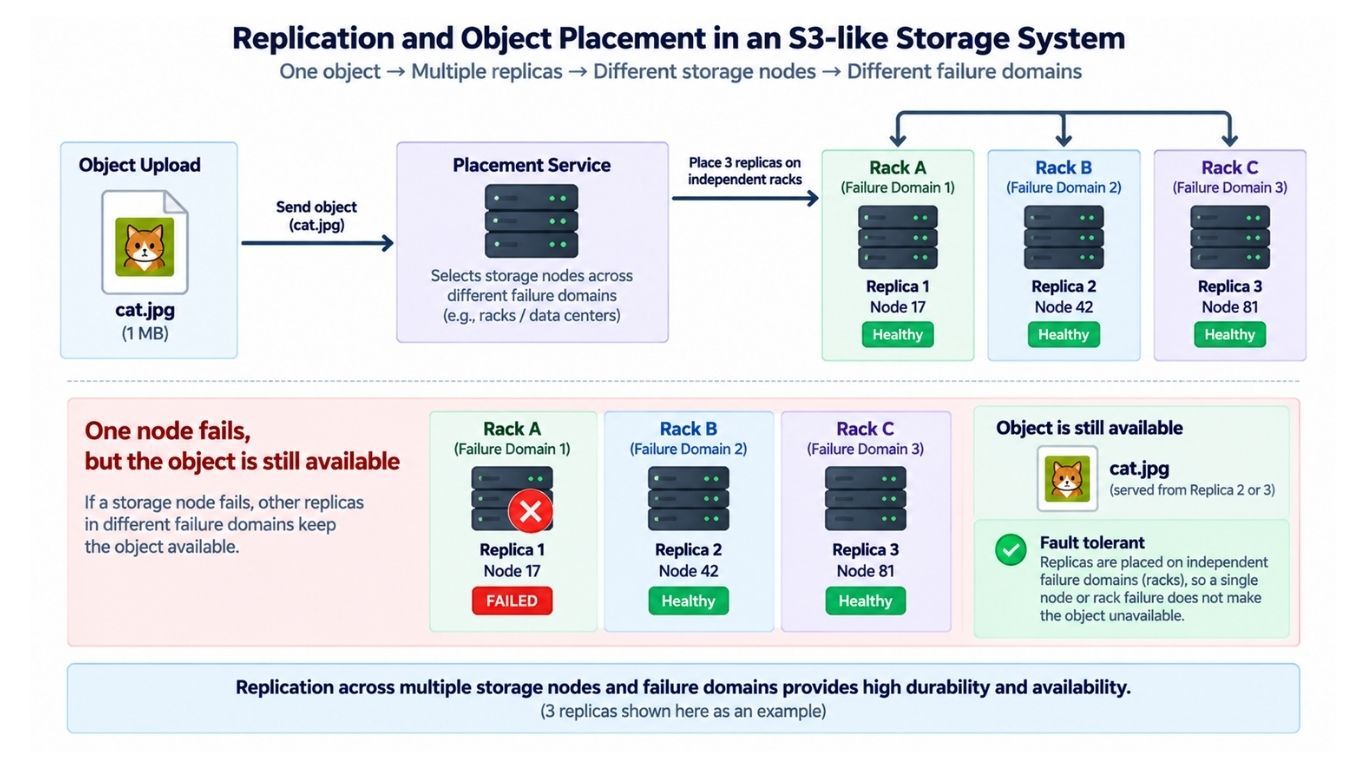
Suppose our S3-like storage system keeps three copies of an object:
                    cat.jpg
                       │
            ┌──────────┼──────────┐
            │          │          │
            ▼          ▼          ▼
         Node A     Node B     Node C
This gives us a replication factor of 3.
If one node fails, the remaining replicas can still serve the object while the system creates a replacement replica.
Keeping multiple copies is not enough if all of them can fail together.
For example, placing all three replicas in the same rack creates a shared failure point. A rack-level power or network failure could make every replica unavailable.
A better placement is:
Replica 1 → Rack A
Replica 2 → Rack B
Replica 3 → Rack C
For stronger fault tolerance, replicas can also be distributed across availability zones or other independent failure domains.
The key principle is:
Place replicas so that a single failure is unlikely to affect every copy.
Replication improves durability and availability, but increases storage and network costs.
For example:
Logical data    → 1 PB
Replication     → 3 copies
Raw storage     → approximately 3 PB
A higher replication factor generally means:
Better durability and availability
Higher storage cost
More network traffic during writes and recovery
Large-scale object storage systems can also use erasure coding to reduce storage overhead while maintaining fault tolerance. For our initial design, replication is simpler to understand and implement.
With many storage nodes, the system needs to decide where each replica should be stored.
A placement service can make this decision based on:
Available disk space
Node health
Current load
Rack or failure domain
Availability zone
Replication requirements
For example:
Object: cat.jpg

Replica 1 → Node 17 / Rack A
Replica 2 → Node 42 / Rack B
Replica 3 → Node 81 / Rack C
The metadata layer then records the locations of the object's replicas so they can be found during reads, recovery, and maintenance.
An upload can complete successfully at the network level while the stored data is corrupted because of a transmission, memory, or disk error.
To detect corruption, the system can calculate and store a checksum for the object or its individual parts.
Expected checksum → 7f83b165...
Stored checksum   → 7f83b165...
If the checksums do not match, that copy should not be considered healthy.
Checksums are also useful after the upload. Data can become corrupted months later because of hardware problems. A background data scrubbing process can periodically verify stored replicas.
For example:
Replica A → Healthy
Replica B → Corrupted
Replica C → Healthy
If Replica B is corrupted, the system can rebuild it from a healthy replica:
Healthy Replica
      │
      ▼
Create New Copy
      │
      ▼
Replace Corrupted Replica
This allows the storage system to detect and repair corrupted data before additional failures put the object at risk.
Uploading a 100 GB file in a single request creates a major reliability problem. If the connection fails after 97 GB, restarting the entire upload would waste time and bandwidth.
A better approach is multipart upload, where the client divides a large file into smaller parts:
100 GB File
     │
     ├── Part 1
     ├── Part 2
     ├── Part 3
     ├── ...
     └── Part N
A typical multipart upload works like this:
The client starts a multipart upload and receives an upload ID.
The file is divided into multiple parts.
Each part is uploaded independently.
Failed parts can be retried without restarting the entire upload.
Multiple parts can be uploaded in parallel for better throughput.
The client sends a completion request after all required parts are uploaded.
The system verifies the parts and makes the final object available.
For example, if 999 out of 1,000 parts are uploaded successfully, only the failed part needs to be retried.
Part 1 ─────────►
Part 2 ─────────► Storage
Part 3 ─────────►
Part 4 ─────────►
Multipart upload makes large-file transfers resumable, retry-friendly, and more efficient over unreliable networks.
A user may start a multipart upload, upload several parts, and never complete it. These unfinished parts consume storage even though no final object exists.
The system should treat them as temporary data and remove them after a configured expiration period.
Incomplete Upload
       │
       │ Expires
       ▼
Cleanup Worker
       │
       ▼
Delete Temporary Parts
This prevents abandoned uploads from wasting storage indefinitely.
Multipart upload solves the client-side transfer problem, but the storage layer may also divide large objects into internal chunks.
For example:
movie.mp4
   │
   ├── Chunk 1 → Nodes A, B, C
   ├── Chunk 2 → Nodes D, E, F
   ├── Chunk 3 → Nodes B, G, H
   └── Chunk 4 → Nodes A, D, I
Different chunks can be distributed and replicated independently across storage nodes.
Chunking helps with:
Parallel reads and writes
Smaller retries
Replication and repair
Distribution of large objects across nodes
However, smaller chunks create more metadata and management overhead. Chunk size is therefore a trade-off between flexibility and overhead.
When a client requests an object, the system first finds its metadata and then reads the data from healthy storage nodes.
Client
   │
   ▼
API Gateway
   │
   ▼
Object Service
   │
   ▼
Metadata Service
   │
   │ Find object and storage locations
   ▼
Storage Nodes
   │
   ▼
Stream Object
   │
   ▼
Client
The system checks access permissions, locates the object or its chunks, selects healthy replicas, and streams the data back to the client.
A storage server should never load an entire large object into memory before sending it.
Instead, data should be streamed using small buffers:
Disk
 │
 ▼
Small Buffer
 │
 ▼
Network
 │
 ▼
Client
This keeps memory usage bounded even when serving objects that are hundreds of gigabytes in size.
Clients may need only part of an object. For example, a video player may request a specific segment, or a download manager may resume an interrupted download.
A byte-range request could ask for:
Bytes 50,000,000–60,000,000Range requests are useful for:
Video and audio streaming
Resumable downloads
Large-file previews
Partial data processing
The system reads and returns only the requested portion instead of transferring the entire object.
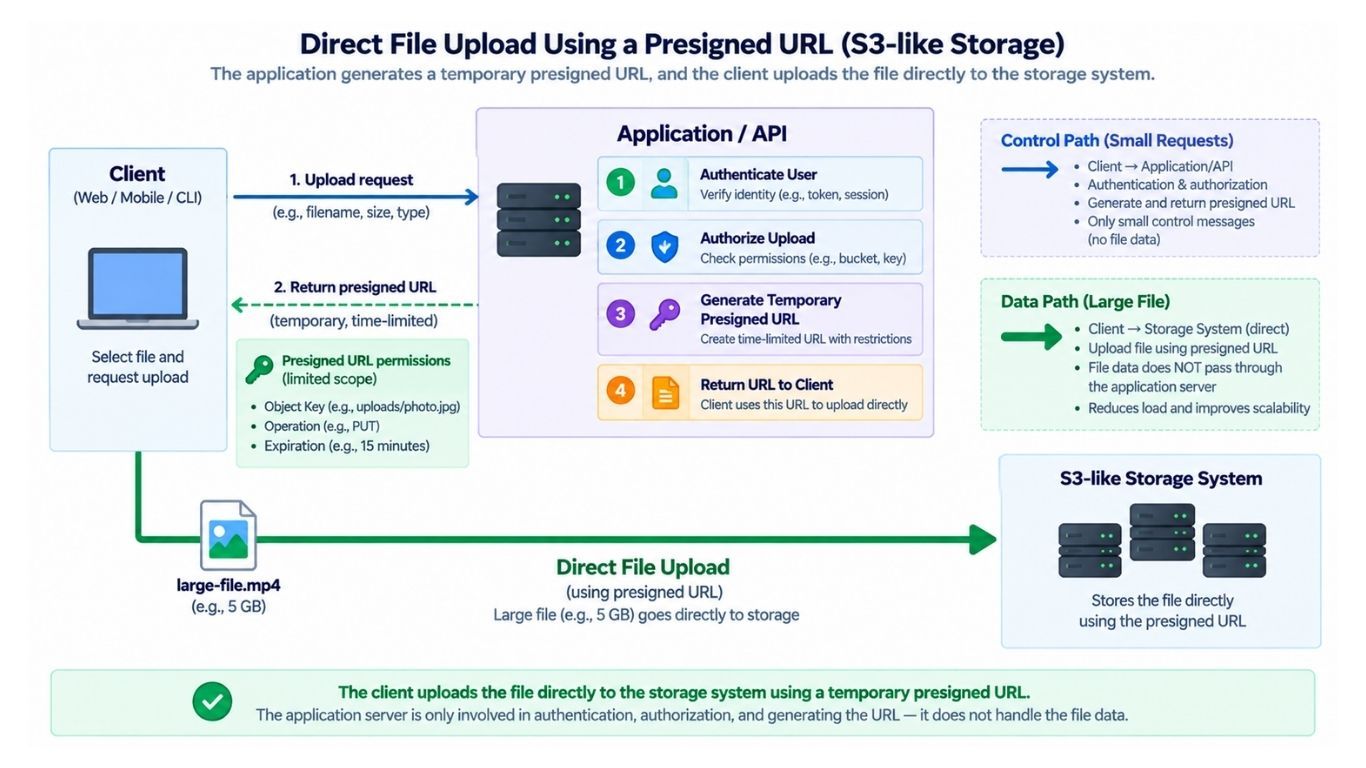
Passing large objects through the application server creates unnecessary overhead:
Client
   │
   │ 20 GB
   ▼
Application Server
   │
   │ 20 GB
   ▼
Storage Service
The application server becomes a data pipe, consuming network bandwidth, connections, CPU, and memory without needing to process the object bytes.
A better design is to keep the application server in the control path for authentication, authorization, and metadata operations while allowing large object data to move directly between the client and storage layer.
Large files should not unnecessarily pass through the application server. Instead, the application can generate a temporary presigned URL that allows the client to communicate directly with the storage system.
For an upload, the application first authenticates the user, checks permissions, and applies business rules. It then returns a time-limited presigned URL.
Client
   │
   │ Request upload
   ▼
Application
   │
   │ Authenticate + authorize
   │ Return presigned URL
   ▼
Client
   │
   │ Upload directly
   ▼
Storage System
This keeps large object data out of the application server, reducing bandwidth and connection overhead.
The presigned URL should be limited by properties such as object key, operation, permissions, and expiration time.
The same approach works for private downloads.
After verifying that the user can access an object, the application generates a temporary download URL. The client then downloads the object directly from storage.
Client → Application → Presigned URL
                         │
                         ▼
Client ─────────────► Storage System
Once the URL expires, it can no longer be used to authorize that request.
This keeps private objects protected while allowing the storage layer to handle large data transfers directly.
As the number of objects grows, the metadata layer must scale as well. Billions of objects can produce billions of metadata records, eventually exceeding the capacity of a single database server.
A common approach is to partition metadata across multiple shards.
For direct object lookups, a shard can be selected using a hash derived from the bucket and object key:
hash(bucket_id + object_key)
        │
        ├── Shard 1
        ├── Shard 2
        ├── Shard 3
        └── Shard 4
This distributes metadata and lookup traffic across multiple database servers.
However, hash-based partitioning is excellent for direct lookups but does not naturally support efficient ordered prefix listing. We will handle that requirement separately when designing object listing and key indexes.
Partitioning metadata only by bucket_id can create a scalability problem.
Suppose one bucket contains 2 billion objects. If all of its metadata is stored on the same shard, that shard may receive much more data and traffic than others, creating a hot partition.
Large buckets should therefore be distributable across multiple metadata partitions.
A good partitioning strategy should balance:
Data across shards
Read and write traffic
Large and small buckets
Efficient object lookup and listing
Reading a single object is usually a direct lookup:
Bucket + Object Key → Object MetadataListing objects is different. A client may request all objects with a prefix such as:
photos/2026/Matching keys might include:
photos/2026/january/a.jpg
photos/2026/january/b.jpg
photos/2026/february/a.jpg
photos/2026/march/a.jpg
The metadata layer needs an ordered index or similar structure that supports efficient prefix scans. This is important because a purely hash-based partitioning strategy is good for direct lookups but does not naturally preserve key order for prefix listing.
Large listings should also be paginated so the system never tries to return millions of object keys in a single response.
An object key such as:
photos/2026/goa/beach.jpglooks like a file-system path, but the storage system can treat it as a single key string.
The / characters provide a convenient way to organize objects by prefix without requiring physical directories.
When versioning is enabled, uploading a new object with the same key creates a new version instead of permanently replacing the previous data.
For example:
contract.pdf
      │
      ├── v1
      ├── v2
      └── v3 ← latest
A normal read can return the latest version, while a version-specific request can retrieve an older one.
Versioning is especially useful when an object is accidentally overwritten or corrupted. Instead of losing the previous data, the user can restore an earlier version.
The trade-off is higher storage cost, because older versions continue consuming storage until they are explicitly deleted or removed by a lifecycle policy.
When versioning is enabled, deleting an object does not always mean immediately removing all of its data.
A common approach is to add a delete marker as the latest version:
contract.pdf
      │
      ├── v1
      ├── v2
      ├── v3
      └── DELETE MARKER ← latest
Normal reads now treat contract.pdf as deleted, while older versions can remain available for recovery.
This is different from a hard delete, where object data is permanently removed.
Physical deletion does not need to happen during the user request. The system can first mark the object as deleted and remove unreferenced data asynchronously:
DELETE Request
      │
      ▼
Mark Object Deleted
      │
      ▼
Return Success
      │
      ▼
Garbage Collection
      │
      ▼
Remove Unused Data
This keeps delete requests fast while a background garbage collector safely removes object data that is no longer needed.
Not every object needs expensive, high-performance storage forever.
For example, a company may want to keep logs in fast storage for 30 days, move them to cheaper storage afterward, and delete them after one year.
Lifecycle rules automate these transitions:
Object age > 30 days  → Move to colder storage
Object age > 365 days → Delete
The storage system can provide different storage classes based on access frequency:
Hot Storage — frequently accessed objects with fast retrieval.
Cool Storage — infrequently accessed objects with lower storage cost.
Archive Storage — rarely accessed objects where slower retrieval is acceptable.
Background workers evaluate lifecycle policies and move or delete objects when their conditions are met.
The main trade-off is cost versus access performance: colder storage can reduce storage cost but may increase retrieval latency or retrieval cost.
Replication protects an object from failures, but it does not automatically solve extreme read traffic.
Suppose app-update.zip suddenly receives millions of download requests. Serving every request from its storage replicas can overload the storage nodes.
For popular objects, we need a way to serve cached copies closer to users and reduce traffic on the origin storage system.
For public or cacheable objects that receive heavy read traffic, we can place a Content Delivery Network (CDN) in front of the object storage system.
On the first request, the CDN may not have the object:
User
 │
 ▼
CDN
 │
 │ Cache Miss
 ▼
Object Storage
The CDN fetches the object from origin storage and caches it. Future requests can then be served directly from the CDN:
User
 │
 ▼
CDN
 │
 │ Cache Hit
 ▼
Cached Object
A CDN provides two major benefits:
Lower origin load — storage nodes do not serve every download.
Lower latency — users can receive objects from a nearby edge location.
CDNs are especially useful for images, videos, software downloads, website assets, and other frequently accessed content.
Large files create transfer challenges, but billions of tiny objects create a different problem.
Suppose the system stores:
5 billion objects
Average size = 2 KB
At this scale, metadata, indexes, and per-object storage overhead can become significant compared with the actual object data. Billions of individual objects can also result in inefficient disk operations.
Internally, the storage engine can pack multiple small objects into larger storage blocks or container files while still exposing them as independent objects to users.
This reduces storage and I/O overhead without changing the external object-storage API.
If many users upload identical content, deduplication can reduce storage usage by keeping one physical copy and referencing it from multiple logical objects.
User A ─┐
User B ─┼────► One Physical Copy
User C ─┘
A content hash such as SHA-256 can help identify objects that may contain identical data. The system should still verify equality appropriately rather than treating a hash match alone as absolute proof.
Deduplication introduces additional complexity:
The physical data cannot be deleted while other objects still reference it.
The system needs reference tracking or a similar ownership mechanism.
Cross-user or cross-tenant deduplication can introduce security and privacy concerns.
Metadata and garbage collection become more complicated.
Because of these trade-offs, deduplication should be used only when the expected storage savings justify the additional complexity.
At large scale, hardware failures are expected. The storage system should detect failed nodes automatically and restore the required number of healthy replicas.
Storage nodes can periodically send heartbeats to a health or cluster-management service:
Node A → Healthy
Node B → Healthy
Node C → Healthy
Node D → No heartbeat
After several missed heartbeats, Node D can be marked unhealthy and removed from new read and write operations.
Suppose an object has three replicas:
Replica 1 → Node A
Replica 2 → Node B
Replica 3 → Node C
If Node C fails, only two healthy replicas remain. A background repair worker can copy the object from a healthy replica to another suitable node:
Node A
  │
  │ Copy healthy replica
  ▼
Node D
The system now returns to the desired replication factor:
Replica 1 → Node A
Replica 2 → Node B
Replica 3 → Node D
Automatic re-replication prevents temporary hardware failures from gradually reducing data durability.
A large failure may trigger thousands of repair operations at once. Allowing these jobs to consume all available bandwidth could slow down normal uploads and downloads.
Repair traffic should therefore be prioritized and rate-limited. Critically under-replicated objects can receive higher repair priority, while less urgent repairs run with lower priority.
The goal is to restore durability without allowing recovery traffic to overload the system.
Replicas should be distributed across independent failure domains, not just different storage nodes.
For example, replicas can be placed across multiple availability zones:
Replica 1 → Zone A
Replica 2 → Zone B
Replica 3 → Zone C
If one availability zone becomes unavailable, replicas in the remaining zones can continue serving the object.
Some workloads also require protection against a complete regional outage. In that case, objects can be replicated to another geographic region:
Primary Region
Mumbai
     │
     │ Cross-Region Replication
     ▼
Secondary Region
Singapore
Multi-region replication can improve disaster recovery and geographic resilience, but it introduces important trade-offs:
Higher storage cost
Cross-region network cost
Replication lag
More complex consistency and failover
Because of these costs, multi-region replication does not need to be enabled for every bucket. It should depend on the application's durability, availability, recovery, and geographic requirements.
After an upload succeeds, users expect the newly written object to be available immediately.
PUT profile.jpg
       │
       ▼
Success
       │
       ▼
GET profile.jpg
       │
       ▼
Latest Object
Our S3-like system should clearly define its consistency guarantees. A useful design goal is strong read-after-write consistency, where a successful write is immediately visible to subsequent reads.
Two clients may update the same object at nearly the same time:
Client A ──► report.pdf
Client B ──► report.pdf
The system needs a clear conflict strategy, such as:
Last write wins
Create separate versions
Conditional writes
With versioning, concurrent writes can be preserved as separate object versions instead of immediately destroying older data.
For applications that must prevent accidental overwrites, we can support conditional writes.
Suppose a client reads version 17 and requests:
Update only if current version = 17If another client has already created version 18, the conditional write fails instead of overwriting the newer data.
This provides safer concurrency control when multiple clients modify the same object.
Knowing a bucket name and object key should never be enough to access a private object.
Every private request requires:
Authentication — Who is making the request?
Authorization — Is that user or application allowed to perform this operation?
Permissions can be defined at the bucket or object level and may allow operations such as:
Read
Write
Delete
List
Some objects may intentionally be public, but private access should be the safer default.
The authorization layer should verify the requested operation before allowing access to object data or issuing a presigned URL.
Object data should be protected both in transit and at rest.
Encryption in transit: Use HTTPS/TLS to protect data while it moves between clients and storage services.
Encryption at rest: Encrypt stored object data before it is written to physical storage.
Key management: Store and manage encryption keys securely, separately from the encrypted data.
Client
   │
   │ HTTPS / TLS
   ▼
Storage Service
   │
   │ Encrypt
   ▼
StorageThe system should prevent individual users or applications from consuming excessive resources.
Common limits include:
Storage quota
Upload and download rate
Request rate
Maximum object size
For example, if a user has a 10 GB storage quota, the system should reject uploads that would exceed the allowed capacity before accepting large amounts of data.
These controls help manage capacity, control costs, and protect the service from abuse.
Not every operation needs to run synchronously during an upload.
Tasks such as these can often be processed asynchronously:
Thumbnail generation
Malware scanning
Billing and usage processing
Analytics
Lifecycle transitions
Object Uploaded
      │
      ▼
 Event Queue
      │
 ┌────┼─────────┬──────────┐
 ▼    ▼         ▼          ▼
Scan Billing Analytics Thumbnail
Keeping non-critical work out of the upload path reduces latency and prevents slow background tasks from delaying successful uploads.
Background processing should be retryable and idempotent, because messages may be delivered more than once or workers may fail during processing.
A distributed object storage system needs continuous monitoring to detect failures before they affect durability or availability.
Important metrics include:
Upload and download latency
Request and error rates
Storage capacity and network bandwidth
Failed disks and storage nodes
Under-replicated objects
Repair queue size
Checksum failures
Metadata service latency
Under-replicated objects are especially important. If their number continues to increase, storage failures may be happening faster than the repair system can restore healthy replicas.
After solving each scalability, durability, performance, and security problem, our architecture looks like this:
                        ┌───────────────┐
                        │    Clients    │
                        └───────┬───────┘
                                │
                       ┌────────▼────────┐
                       │   CDN / Edge    │
                       │  Cached Reads   │
                       └────────┬────────┘
                                │
                                ▼
                       ┌─────────────────┐
                       │   API Gateway   │
                       └────────┬────────┘
                                │
                    ┌───────────▼───────────┐
                    │    Object Service     │
                    └──────┬────────┬───────┘
                           │        │
                           │        ▼
                           │  ┌──────────────┐
                           │  │  Placement   │
                           │  │   Service    │
                           │  └──────┬───────┘
                           │         │
                  ┌────────▼─────┐   │
                  │   Metadata   │   │
                  │   Service    │   │
                  └──────┬───────┘   │
                         │            │
                         ▼            ▼
                  ┌────────────┐  ┌───────────┐
                  │ Metadata DB│  │  Storage  │
                  │   Shards   │  │   Nodes   │
                  └────────────┘  └─────┬─────┘
                                        │
                                 Replicated Data
                                        │
                                        ▼
                                 ┌──────────────┐
                                 │ Event Queue  │
                                 └──────┬───────┘
                                        │
                    ┌───────────────────┼──────────────────┐
                    ▼                   ▼                  ▼
               Repair Worker      Lifecycle Worker   Billing / Audit
Each component solves a specific problem: the metadata layer locates objects, storage nodes hold the data, the placement service distributes replicas, the CDN handles popular reads, and background workers manage repair and lifecycle operations.
The result is an S3-like object storage architecture that can scale across many machines while providing durability, availability, security, and efficient access to large amounts of data.
Suppose a user wants to upload an 80 GB backup:
backup-2026.tar
Size: 80 GB
A large-object upload can flow through the system like this:
The application authenticates the user.
Bucket permissions, storage quota, and request limits are checked.
A multipart upload is created.
The client receives an upload ID and, when direct uploads are supported, presigned URLs for the parts.
The client divides the file into parts and uploads them directly to the storage layer.
The placement service selects healthy storage nodes across appropriate failure domains.
Parts are stored with the required durability policy.
Checksums verify data integrity.
Failed parts can be retried independently.
The client sends a completion request.
The system verifies that all required parts are present and valid.
Final object metadata is committed.
The object becomes available to readers.
An object-created event can trigger background processing.
Tasks such as analytics, lifecycle processing, reporting, and cleanup do not need to delay the critical upload path.
For a private object, the system first verifies access and then locates the stored data:
Client
   │
   ▼
Authenticate and Authorize
   │
   ▼
Find Object Metadata
   │
   ▼
Locate Healthy Replica
   │
   ▼
Stream Object Data
   │
   ▼
Client
Large objects should be streamed rather than loaded entirely into memory, and range requests can be used for partial or resumable downloads.
When presigned downloads are enabled, the application can authorize the request first and then allow the client to download directly from the storage layer.
For popular cacheable content, a CDN can serve the request without reaching origin storage:
User
  │
  ▼
CDN
  │
  ├── HIT ──► Return Object
  │
  └── MISS
        │
        ▼
Object StorageSuppose the system requires three replicas, but one write fails:
Node A → Success
Node B → Success
Node C → Failure
The system should follow its configured write durability policy rather than treating any single successful write as enough.
If three durable replicas are required before acknowledging the upload, the placement service can select another healthy node:
Node D → New ReplicaOnly after the required durability condition is satisfied should the system confirm the write as successful.
The key principle is simple: a successful upload means the object has reached the durability level promised by the storage service, not merely that its bytes reached one server.
Object data may still exist on storage nodes, but without metadata the system may not know:
Where an object is stored
Who owns it
Which version is current
Whether it has been deleted
The metadata layer is therefore a critical component and should be replicated with automatic failover.
Caching can reduce metadata read load, but it cannot replace durable metadata storage because caches may contain stale data or disappear entirely.
Suppose new-game.zip suddenly receives 10 million download requests. Sending every request to a small number of storage replicas could overload them.
For cacheable content, the CDN absorbs most repeated downloads:
                Object Storage
                      │
             ┌────────┼────────┐
             ▼        ▼        ▼
          Edge A   Edge B   Edge C
             │        │        │
             ▼        ▼        ▼
           Users    Users    Users
The object storage system remains the origin, while edge servers handle most end-user traffic.
A CDN purge, expiration, or cold start can cause many requests to miss the cache at the same time and hit origin storage.
This can create a cache miss storm and overload the origin.
Common protections include:
Request coalescing — combine concurrent requests for the same missing object.
Origin shielding — add another caching layer between edge servers and origin storage.
Rate limiting — prevent uncontrolled request spikes.
Gradual cache warming — populate frequently requested objects progressively.
Origin scaling — ensure the storage layer can absorb temporary increases in traffic.
A CDN should reduce normal origin traffic, but the storage system must still remain resilient when cache hit rates suddenly drop.
Replication is simple and provides fast recovery, but storing multiple full copies significantly increases storage cost.
For large-scale or less frequently accessed data, erasure coding can provide durability with lower storage overhead.
Instead of storing several complete replicas, the system divides data into fragments and generates additional recovery fragments:
Original Data
     │
     ├── Data Fragment A
     ├── Data Fragment B
     ├── Data Fragment C
     └── Recovery Fragments
If some fragments are lost, the system can reconstruct the original data from enough remaining fragments.
The trade-off is additional complexity and computation during reads, writes, and recovery.
A storage system may therefore choose different durability strategies based on workload:
Replication — simpler recovery and better suited to frequently accessed or latency-sensitive data.
Erasure coding — lower storage overhead and useful for large-scale, less frequently accessed data.
The exact choice depends on durability, performance, recovery time, and storage cost requirements.
As the object storage system grows, several components can become bottlenecks:
Metadata: Billions of objects require scalable partitioning, indexing, and replication.
Storage capacity: New storage nodes must be added before existing nodes approach capacity limits.
Network bandwidth: Uploads, downloads, replication, and repair traffic compete for network resources.
Hot objects: A small number of popular objects can generate disproportionate read traffic.
Repair traffic: Large hardware failures can trigger expensive re-replication or reconstruction work.
Small objects: Billions of tiny objects can create significant metadata and storage overhead.
Cross-region replication: Moving large amounts of data between regions increases bandwidth cost and may introduce replication lag.
At scale, the challenge is not only storing more data. It is ensuring that metadata, network capacity, failure recovery, and storage growth scale together.
A good object storage design is built around trade-offs. Improving durability, performance, or simplicity often increases cost or complexity somewhere else.
Design Choice | Trade-Off |
|---|---|
More Replicas | Higher durability and availability, but higher storage and network cost |
Large vs Small Chunks | Large chunks reduce metadata overhead; small chunks make retries and repairs more flexible |
Strong Consistency | Predictable read behavior, but distributed coordination can increase latency |
Direct Uploads | Reduce application-server bandwidth, but require secure presigned URLs and additional upload coordination |
Versioning | Protects against accidental overwrites and deletes, but increases storage usage |
Background Deletion | Keeps delete requests fast, but physical storage is reclaimed later |
Replication | Simple and fast, but requires more storage |
Erasure Coding | Reduces storage overhead, but increases reconstruction and operational complexity |
There is no single best configuration. The right choices depend on the system's durability, latency, scale, recovery, and cost requirements.
Metadata is small and frequently queried, while object data can be extremely large. Separating them allows each layer to scale and optimize independently.
Store redundant data across independent failure domains and automatically repair or reconstruct data when a copy is lost.
Use multipart upload. Divide the file into parts, upload them independently, retry failed parts, and complete the object after all required parts are successfully stored.
Checksums help detect data corruption during transfer and while objects remain stored.
Partition metadata across multiple shards, distribute large buckets across partitions, and maintain appropriate indexes for direct lookups and prefix-based listing.
Use a CDN or edge cache to absorb repeated downloads while maintaining enough origin capacity for cache misses.
Mark the node unhealthy, route requests to healthy replicas, identify under-replicated objects, and create replacement replicas or reconstruct missing data.
Presigned URLs allow authorized clients to upload or download directly from storage without sending large object data through application servers.
Use multipart uploads with an upload ID and track completed parts so only missing or failed parts need to be uploaded again.
Mark objects for deletion and use background garbage-collection workers to remove physical data asynchronously and in batches.
Move infrequently accessed objects to cheaper storage classes and consider erasure coding when its lower storage overhead justifies the additional complexity.
