
Durgesh Tiwari
Author
As an application grows, the amount of data and the number of database requests increase continuously. A single database server may eventually struggle to process all read and write operations efficiently. This can result in slow queries, higher response times, and even application downtime.
Database Scaling helps solve this problem by increasing the database's capacity to handle more users, larger datasets, and higher traffic without affecting performance. It is one of the most important concepts in System Design because it allows applications to continue growing while remaining fast, reliable, and highly available.
Database Scaling is the process of increasing a database's capacity so it can efficiently handle more users, more data, and a larger number of requests.
This is achieved by adding more resources or distributing the workload across multiple database servers, depending on the application's requirements.
In simple words, Database Scaling means increasing the database's capacity so it can manage growing traffic and data without slowing down.
As an application becomes more popular, its database must process thousands or even millions of requests every day. If the database cannot keep up with this growing workload, it becomes a performance bottleneck, affecting the entire application.
Database Scaling helps applications maintain fast performance, high availability, and a better user experience, even as traffic continues to grow.
Database Scaling provides several important benefits for modern applications.
Handles Growing User Traffic – Supports more users and requests without reducing performance.
Improves Query Performance – Processes database queries more efficiently.
Reduces Response Time – Returns data faster, improving the overall user experience.
Supports Large Datasets – Stores and manages increasing amounts of data effectively.
Increases High Availability – Helps keep the database accessible even during heavy traffic or server failures.
Improves Application Scalability – Allows the application to grow without database limitations.
Prevents Database Overload – Distributes the workload to avoid excessive pressure on a single database server.
Modern applications use different database scaling techniques based on whether they need to improve read performance, write performance, or both.
As an application grows, the number of read requests usually becomes much higher than the number of write requests. If every read request is sent to a single database server, the server can become overloaded and application performance may decrease.
Read Scaling is a database scaling technique that increases the database's ability to handle more read operations by distributing read requests across multiple database servers, known as read replicas.
In simple words, Read Scaling improves database performance by sharing read requests across multiple database servers instead of using only one.
Example
Suppose an e-commerce website receives thousands of users every minute who are browsing products.
Instead of sending every product search request to the primary database, the application sends read requests to multiple read replicas. This reduces the load on the primary database and allows users to receive faster responses.
Read Scaling provides several advantages for applications with a large number of read requests.
Improves Read Performance – Multiple servers process read requests simultaneously, resulting in faster responses.
Reduces Primary Database Load – The primary database can focus on handling write operations.
Supports Higher User Traffic – More users can access data at the same time without affecting performance.
Improves Scalability – Additional read replicas can be added as the application grows.
Increases Availability – If one read replica becomes unavailable, other replicas can continue serving read requests.
As the number of users grows, an application receives more read requests than write requests. Sending every read request to the primary database can increase its workload and reduce performance.
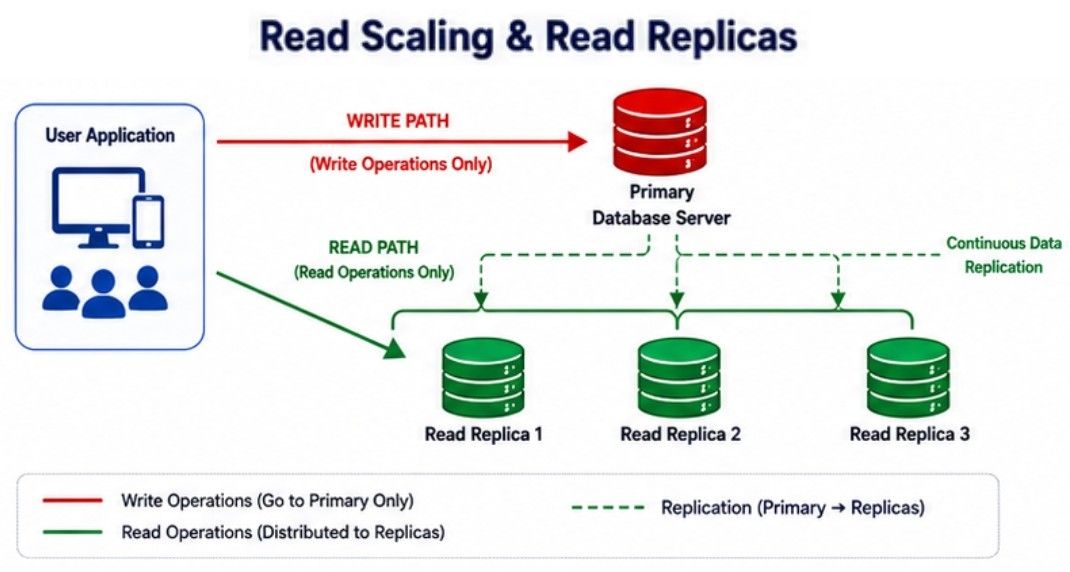
A Read Replica is a copy of the primary database that is used only for read operations. The primary database handles all write operations, while one or more read replicas handle read requests. The primary database continuously synchronizes its data with the replicas to keep them updated.
In simple words, a Read Replica is a copy of the primary database that serves read requests, allowing the primary database to focus on write operations.
Read Replicas follow a simple process:
Users send read and write requests to the application.
All write requests are sent to the primary database.
Read requests are routed to one of the available read replicas.
The primary database continuously synchronizes new data with all read replicas.
Users receive faster responses because read requests are shared across multiple databases.
                Users
                  │
        ┌─────────┴─────────┐
        │                   │
   Write Request      Read Request
        │                   │
        ▼                   ▼
  Primary Database    Read Replica 1
        │                   │
        ├──────────────► Read Replica 2
        │
└──────────────► Read Replica 3Read Replicas provide several benefits for applications with heavy read traffic.
Improves Read Performance – Multiple replicas process read requests simultaneously.
Reduces Primary Database Load – The primary database can focus on write operations.
Supports More Concurrent Users – Multiple users can access data at the same time without affecting performance.
Easy to Scale – New read replicas can be added as the number of users grows.
Improves Availability – If one replica becomes unavailable, other replicas can continue serving read requests.
Although Read Replicas improve read performance, they also have some limitations.
Replication Delay – Newly updated data may take a short time to appear on read replicas.
Does Not Improve Write Performance – All write operations still go to the primary database.
Higher Infrastructure Cost – Additional database servers require more storage, maintenance, and monitoring.
As an application grows, the number of write operations such as inserts, updates, and deletes also increases. If a single database handles all write requests, it can become a performance bottleneck and slow down the entire application.
Write Scaling is the process of increasing a database's ability to handle a large number of write operations while maintaining good performance and data consistency.
In simple words, Write Scaling allows a database to process more write requests efficiently as the application grows.
Unlike read operations, write operations change the data stored in the database. When multiple database servers handle write requests, they must keep the data accurate and consistent across the system.
Because of this, write scaling is more complex than read scaling and requires special techniques to distribute write operations safely.
One of the most common techniques used for Write Scaling is Database Sharding, where data is divided across multiple database servers.
Write Scaling introduces several challenges that developers must manage carefully.
Maintaining Data Consistency – All database servers should store accurate and up-to-date data.
Handling Transaction Conflicts – Multiple write operations on the same data can create conflicts.
Avoiding Performance Bottlenecks – A single database should not become overloaded with write requests.
Managing Complex Architectures – Distributing write operations across multiple servers requires careful planning and coordination.
As an application grows, storing all data in a single database can reduce performance. The database may become overloaded because it has to process a large number of read and write requests.
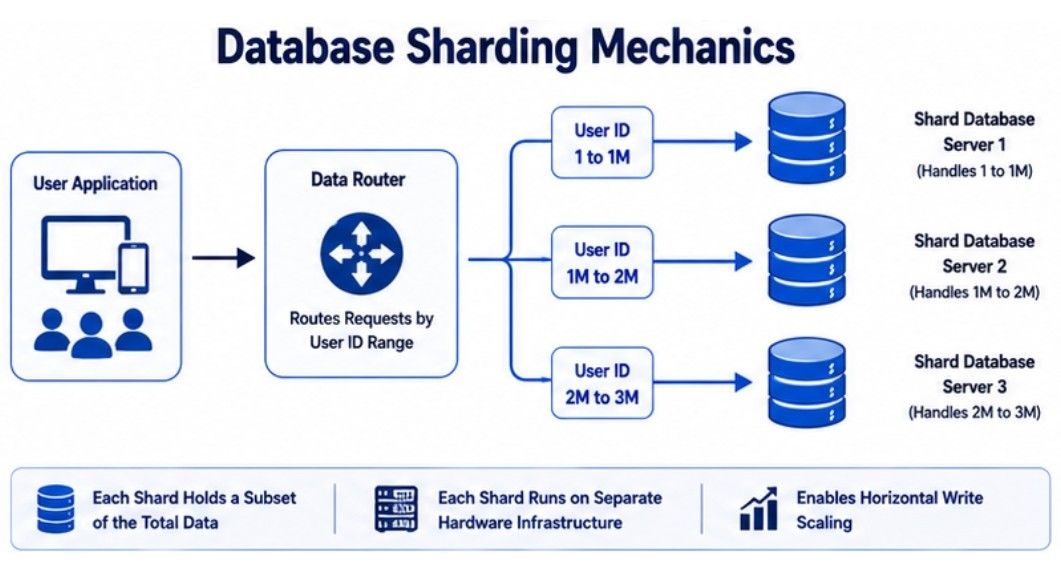
Database Sharding is a database scaling technique that divides a large database into multiple smaller databases called shards. Each shard stores only a portion of the total data and works independently, allowing the workload to be shared across multiple database servers.
In simple words, Database Sharding splits a large database into smaller databases so the workload is distributed across multiple servers.
Database Sharding follows a simple process:
The large database is divided into multiple shards.
Each shard stores a specific portion of the application's data.
When a request arrives, the application identifies the correct shard.
The selected shard processes the read or write request independently.
As the application grows, additional shards can be added to increase database capacity.
Example
Suppose an application stores customer information for millions of users.
Instead of storing all customer records in one database, the data is divided into multiple shards:
Shard 1: Customer IDs 1 – 1,000,000
Shard 2: Customer IDs 1,000,001 – 2,000,000
Shard 3: Customer IDs 2,000,001 – 3,000,000
When a customer request is received, the application sends it directly to the shard that contains that customer's data. This distributes the workload and improves database performance
Database Sharding provides several benefits for large-scale applications.
Improves Write Performance – Write operations are distributed across multiple database servers.
Supports Large Datasets – Makes it easier to store and manage massive amounts of data.
Reduces Database Load – Each shard handles only a portion of the total workload.
Improves Scalability – New shards can be added as the application and data continue to grow.
Supports Independent Expansion – Each shard can be managed and scaled separately when needed.
Although Database Sharding improves scalability, it also introduces additional complexity.
More Complex Architecture – Managing multiple database servers is more difficult than managing a single database.
Complex Query Processing – Queries that need data from multiple shards are harder to execute.
Data Rebalancing – Data may need to be redistributed when new shards are added.
Backup and Recovery Become More Complex – Each shard must be backed up and restored separately.
Application Logic Becomes More Complex – The application must know which shard contains the required data.
As the amount of data in a database grows, large tables can become slower to query and more difficult to manage. Searching through millions of rows in a single table can affect database performance.
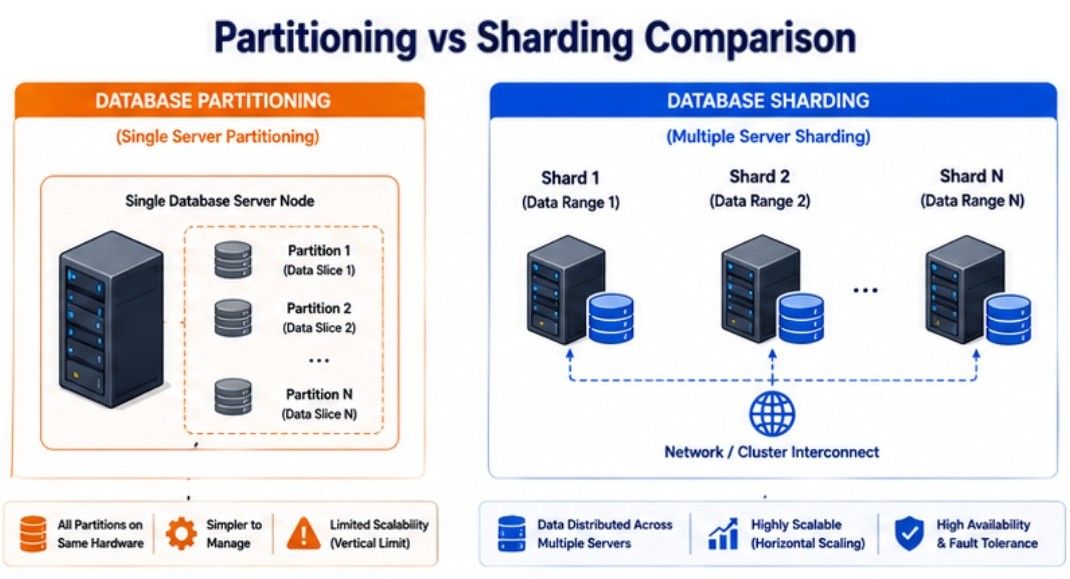
Database Partitioning is a technique that divides a large database table into smaller parts called partitions. All partitions remain within the same database, but each stores a portion of the table's data. This makes queries faster and simplifies database management.
In simple words, Database Partitioning splits a large table into smaller parts within the same database to improve performance and manage data more efficiently.
Database Partitioning follows a simple process:
A large table is divided into multiple partitions.
Each partition stores a specific portion of the table's data.
When a query is executed, the database searches only the relevant partition instead of the entire table.
This reduces the amount of data scanned and improves query performance.
Database Partitioning provides several benefits for large tables.
Improves Query Performance – Queries scan only the required partition instead of the entire table.
Simplifies Data Management – Large tables become easier to organize and maintain.
Supports Large Datasets – Efficiently manages tables containing millions of records.
Improves Maintenance Tasks – Backups, indexing, and data cleanup can be performed more efficiently.
Reduces Resource Usage – Smaller partitions require less processing for many queries.
Although Database Partitioning improves performance, it also has some limitations.
Works Within a Single Database – It does not distribute data across multiple database servers like sharding.
Requires Careful Partition Design – Choosing the wrong partition key can reduce performance.
Complex Queries May Be Slower – Queries that access multiple partitions can take more time.
Management Becomes More Complex – Large applications require proper planning to manage partitions effectively.
Database Partitioning can be implemented in different ways depending on how the data is organized. The two most common types are Horizontal Partitioning and Vertical Partitioning.
Horizontal Partitioning divides a table into multiple partitions based on its rows. Each partition contains the same columns but stores a different set of rows.
This approach is useful when a table contains a very large number of records.
In simple words, Horizontal Partitioning splits a table by rows, so each partition stores a different group of records.
Suppose an Orders table stores data for multiple years.
Instead of storing all records in one large table, the data is divided into separate partitions:
Orders_2023
Orders_2024
Orders_2025
When a query requests orders from 2025, the database searches only the Orders_2025 partition instead of scanning the entire table.
Vertical Partitioning divides a table based on its columns. Frequently used columns are kept together, while less frequently used columns are stored in separate tables.
This reduces the amount of unnecessary data read during queries and improves performance.
In simple words, Vertical Partitioning splits a table by columns, so only the required data is accessed during a query.
Suppose a Customers table contains the following columns:
Customer ID
Name
Phone Number
Profile Picture
Address
Frequently used columns like Customer ID, Name, and Email can be stored in one table, while less frequently used columns such as Profile Picture and Address can be stored in another table. This helps the database process queries more efficiently.
Database Partitioning | Database Sharding |
|---|---|
Divides a large table into smaller partitions within the same database. | Divides data across multiple independent databases (shards). |
Uses a single database server. | Uses multiple database servers. |
Mainly improves query performance and data management. | Mainly improves scalability and write performance. |
Easier to implement and maintain. | More complex to design and manage. |
Suitable for optimizing large tables within one database. | Suitable for applications with massive data and high traffic. |
Data remains inside the same database. | Data is distributed across different database servers. |
Does not significantly improve write capacity. | Distributes write operations across multiple servers, improving write capacity. |
There is no single database scaling technique that works for every application. The right approach depends on factors such as read traffic, write traffic, data size, and business requirements.
Let's understand when each database scaling technique is the best choice.
Choose Read Scaling if your application receives a large number of read requests compared to write requests.
It helps improve read performance by distributing read operations across multiple database servers.
Best suited for:
Applications with heavy read traffic.
Applications where data changes occasionally.
Applications that require fast data retrieval.
Examples:
News websites
Blog platforms
Product catalog applications
Choose Read Replicas when the primary database receives heavy read traffic and needs additional servers to handle read requests.
This improves database performance while allowing the primary database to focus on write operations.
Best suited for:
Applications with a large number of concurrent users.
Applications that require high availability.
Applications with frequent read operations.
Examples:
E-commerce websites
Social media platforms
Video streaming platforms
Choose Database Sharding when a single database server is no longer able to manage the growing amount of data or write traffic.
Sharding distributes data across multiple database servers, improving scalability and write performance.
Best suited for:
Very large databases.
Applications with high write traffic.
Large-scale distributed systems.
Examples:
X (formerly Twitter)
Choose Database Partitioning when individual database tables become very large and queries start taking more time to execute.
Partitioning improves query performance by dividing a large table into smaller partitions within the same database.
Best suited for:
Large tables containing millions of records.
Applications that frequently query specific data ranges.
Applications that require better query performance and easier data management.
Examples:
Banking transaction history
Sales reports
Audit logs
Consider an e-commerce platform that serves millions of customers every day.
The primary database handles important write operations such as customer orders, payments, and inventory updates. To reduce the load on the primary database, multiple Read Replicas serve product searches, product details, and order history requests.
As the number of customers and transactions continues to grow, the platform uses Database Sharding to divide customer data across multiple database servers. This distributes write operations and prevents a single database server from becoming overloaded.
The platform also uses Database Partitioning for large tables such as Order History, where data is divided by year. This allows the database to search only the required partition, resulting in faster queries and easier maintenance.
By combining Read Scaling, Read Replicas, Database Sharding, and Database Partitioning, the platform delivers fast performance, supports millions of users, and maintains high availability as the business grows.
Database Scaling is an essential part of System Design because it helps a database handle more users, larger datasets, and higher traffic without reducing performance. As applications grow, different database scaling techniques are used to improve read performance, write performance, and overall scalability.
Read Scaling improves database performance by distributing read requests across multiple database servers.
Read Replicas are copies of the primary database that handle read requests, reducing the load on the primary database.
Write Scaling increases the database's ability to process more write operations while maintaining data consistency.
Database Sharding distributes data across multiple database servers to improve write performance and support large-scale applications.
Database Partitioning divides large tables into smaller partitions within the same database, making queries faster and data easier to manage.
The right database scaling technique depends on factors such as read traffic, write traffic, data size, and application requirements.
