
Durgesh Tiwari
Author
Before designing any software system, engineers first need to understand what the system should do and how well it should perform.
These expectations are called system requirements, and they play a key role in every architecture decision.
In System Design, requirements are divided into two categories:
Functional Requirements
Non-Functional Requirements
Functional requirements define the features of the application, while non-functional requirements define its quality, performance, scalability, security, and reliability.
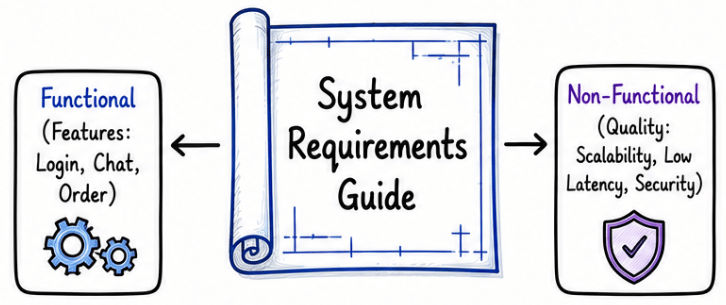
Understanding both types of requirements helps engineers design software that not only works correctly but also performs well as the system grows.
One of the biggest mistakes beginners make is discussing databases, caching, or microservices before understanding the problem.
Experienced engineers first clarify the application's requirements because they directly influence architecture decisions.
For example, a chat application for 1,000 users requires a very different architecture from one serving 100 million users, even if both provide the same messaging features.
This is why requirements are always discussed before choosing technologies or designing the system architecture.
Before designing any software application, engineers first identify what the system should do. These expected features and business capabilities are called Functional Requirements.
Functional requirements define the core features and user actions an application must support. In simple terms, they answer one important question:
What should this application be able to do?
They focus on the application's functionality rather than its performance, scalability, or security.
Functional requirements vary depending on the type of application. Here are some common examples.
Users can create an account.
Users can log in.
Users can search for products.
Users can add products to the cart.
Users can place an order.
Users can make online payments.
Users can track their orders.
Users can send and receive messages.
Users can create individual and group chats.
Users can share images, videos, and documents.
Users can make voice and video calls.
Users can upload videos.
Users can watch videos.
Users can search for videos.
Users can like and comment on videos.
Users can subscribe to channels.
These features represent the primary functionality that users expect from each application.
Good functional requirements should be:
Clear – Easy to understand without ambiguity.
Specific – Describe exactly what the system should do.
Testable – Can be verified through testing.
User-focused – Address real user needs.
Business-driven – Support the application's business goals.
Clear functional requirements help developers, testers, and stakeholders build the right solution with fewer misunderstandings.
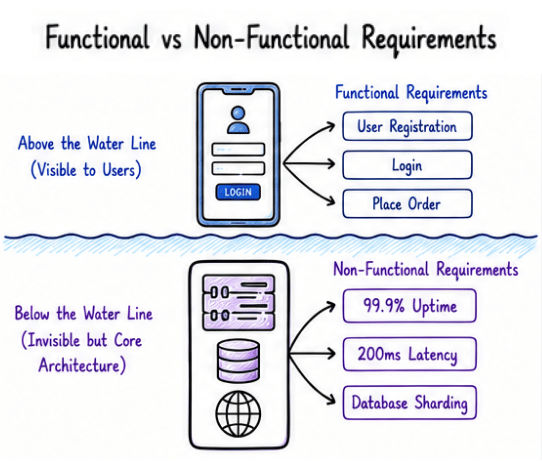
Functional requirements define what the application should do, while non-functional requirements define how well it should perform.
For example, if you're designing a food delivery application, the first step is to identify features such as user registration, restaurant search, order placement, online payment, and order tracking. Once these requirements are clear, designing the database, APIs, and overall architecture becomes much easier.
This is why experienced engineers always clarify functional requirements before discussing technologies or system architecture.
Not every feature needs to be included in the first version of an application.
In real-world software development and System Design interviews, engineers usually prioritize the most important features first.
These are the essential features that allow the application to perform its primary function.
Examples
User Registration
Login
Send Messages
Place Orders
These features improve the user experience but are not required for the initial release.
Examples
Stickers
Message Reactions
Dark Mode
Theme Customization
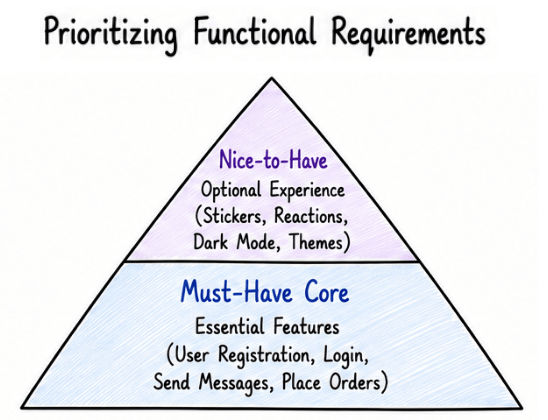
Prioritizing features helps teams focus on the core functionality first, reduces unnecessary complexity, and makes the System Design discussion more practical.
After defining what the system should do, the next step is to decide how well it should perform. These expectations are called Non-Functional Requirements.
Non-functional requirements define the quality of a system, such as its performance, scalability, reliability, security, and availability. Instead of describing features, they describe how the system should behave under different conditions.
They answer questions such as:
How fast should the system respond?
How many users should it support?
How reliable should it be?
How secure should it be?
Unlike functional requirements, non-functional requirements have the biggest impact on system architecture. For example, two chat applications may offer the same features, but an application serving 100 million users needs a very different architecture than one built for a small organization.
Non-functional requirements define the quality and behavior of a system. They help engineers decide how the application should perform as the number of users, requests, and data grows.
Depending on the application, different non-functional requirements become more important. Below are the most common ones discussed in System Design.
Scalability is the ability of a system to handle increasing users, requests, and data without reducing performance.
Example: An e-commerce application should support 10 million active users during a festive sale without slowing down.
Availability ensures that the application remains accessible whenever users need it, even during maintenance or server failures.
Example: An online banking application should remain available 24/7 so customers can access their accounts at any time.
Reliability ensures that the system continues to work correctly and consistently, even when some components fail.
Example: If one application server crashes, another server should continue handling user requests without interrupting the service.
Performance measures how quickly the application processes requests and returns responses.
Example: Most API requests should complete within 200 milliseconds to provide a smooth user experience.
Security protects the application and user data from unauthorized access, cyberattacks, and data breaches.
Example: Passwords should be hashed, sensitive data should be encrypted, and all communication should use HTTPS.
Consistency ensures that users always see accurate and up-to-date data across the system.
Example: After transferring money between two bank accounts, both account balances should immediately reflect the latest transaction.
Durability ensures that important data is safely stored and is not lost, even during hardware failures or unexpected crashes.
Example: Once a payment is completed, the transaction record should never be lost.
Fault tolerance allows the system to continue operating even when one or more components fail.
Example: If one server becomes unavailable, traffic should automatically be redirected to another healthy server.
Maintainability makes the application easier to update, test, debug, and improve over time.
Example: Developers should be able to add new features or fix bugs without affecting other parts of the application.
Functional Requirements | Non-Functional Requirements |
|---|---|
Define what the system should do | Define how well the system should perform |
Focus on features and business functionality | Focus on quality attributes and system behavior |
Describe user actions and application features | Describe performance, scalability, reliability, and security |
Usually visible to users | Mostly invisible to users |
Driven by business requirements | Driven by performance and operational goals |
Easier to identify during requirement gathering | Require technical planning and architecture decisions |
Example: User registration, login, place an order | Example: 99.9% uptime, 200 ms response time, support 10 million users |
Help define application features | Help design a scalable, secure, and reliable architecture |
Imagine you're asked the following question in a System Design interview:
Design WhatsApp.
A common mistake is to immediately start discussing databases, microservices, or message queues.
Instead, experienced engineers first clarify the requirements.
Users can send and receive messages.
Users can create individual and group chats.
Users can share images and documents.
Messages should be delivered with low latency.
The system should support millions of active users.
The application should remain highly available.
Messages should be delivered reliably.
Once these requirements are clear, you can confidently move on to designing the system architecture.
When discussing Non-Functional Requirements, you'll often come across the terms SLI, SLO, and SLA. These help define how a system is measured, what performance target it should achieve, and what level of service is promised to customers.
A simple way to remember them is:
Measure → Target → Promise
SLI = What is measured
SLO = The target to achieve
SLA = The commitment made to customers
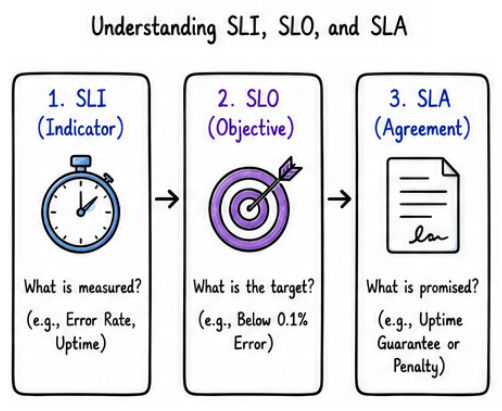
An SLI is a measurable metric used to monitor how a system is performing.
Common examples:
API response time
Request success rate
Error rate
System uptime
Latency
Think of an SLI as the answer to "What are we measuring?"
An SLO sets the target value for an SLI. It defines the performance goal that the engineering team aims to achieve.
Examples:
99.9% availability
API response time below 200 ms
Error rate below 0.1%
Think of an SLO as the answer to "What is our target?"
An SLA is a formal agreement between a service provider and its customers. It defines the minimum service level customers can expect.
If the agreed service level is not met, customers may receive compensation, such as service credits.
Example:
A cloud provider guarantees 99.9% monthly uptime to its customers.
Think of an SLA as the answer to "What have we promised our customers?"
Feature | SLI (Service Level Indicator) | SLO (Service Level Objective) | SLA (Service Level Agreement) |
|---|---|---|---|
Purpose | Measures system performance | Defines the target performance | Defines the service commitment to customers |
Answers | What are we measuring? | What is our target? | What have we promised customers? |
Used By | Engineering and Operations teams | Engineering teams | Business and customers |
Based On | Monitoring metrics | SLI measurements | One or more SLOs |
Example | API response time, uptime, latency | Response time below 200 ms, 99.9% availability | 99.9% monthly uptime guarantee |
If Not Met | Indicates current system performance | Internal performance target is missed | May result in penalties or service credits |
One of the biggest reasons for gathering requirements is that they directly influence your architecture decisions. Different non-functional requirements often require different design patterns and technologies.
The table below shows how common non-functional requirements affect the overall system architecture.
Requirement | Common Architecture Decisions |
|---|---|
Scalability | Horizontal Scaling, Load Balancing, Database Sharding |
Low Latency | Caching, CDN, In-Memory Databases |
High Availability | Replication, Failover, Multi-Region Deployment |
Reliability | Retry Mechanisms, Circuit Breaker, Message Queues |
Security | Authentication, Authorization, Encryption |
Durability | Database Replication, Backups, Persistent Storage |
Maintainability | Modular Architecture, Microservices, CI/CD Pipelines |
