
Durgesh Tiwari
Author
Storing data in a database is only the first step. To keep an application fast, reliable, and easy to maintain, the data must also be organized properly.
A poorly designed database can create problems such as duplicate data, slow queries, and difficult maintenance. As the application grows and more users start using it, these problems can affect both performance and scalability.
This is why Database Design is an important part of System Design.
Database Design is the process of organizing data into tables and defining the relationships between them. A well-designed database improves performance, maintains data consistency, and makes future development easier.
Whether you are building a small website or a large-scale application like Amazon or Netflix, good database design helps create scalable, reliable, and efficient systems.
Before creating a database, developers first decide how the data should be organized. They define the tables, the information each table will store, and the relationships between those tables.
This overall structure is called a Database Schema.
A Database Schema is the blueprint of a database. It defines the tables, columns, data types, relationships, and constraints that determine how data is stored and organized.
In simple words, a Database Schema is the blueprint or structure of a database that defines how data is stored and organized.
A database schema is usually created before data is stored in the database.
Example
Consider an online shopping application.
Its database may contain the following tables:
Customers
Products
Orders
Payments
Each table stores different information, and the tables are connected through relationships.
CustomerID | Name | Phone |
|---|
ProductID | ProductName | Price | Stock |
|---|
OrderID | CustomerID | ProductID | OrderDate |
|---|
Together, these tables and their relationships form the Database Schema of the application.
A well-designed database schema keeps data organized and makes the application easier to manage as it grows. It also improves performance and reduces common database problems.
A good database schema helps to:
Organize data efficiently.
Reduce data duplication.
Maintain data consistency.
Improve query performance.
Simplify database maintenance.
Make future development easier.
Support application scalability.
Without a proper schema, managing large amounts of data becomes more difficult, leading to slower performance and higher maintenance costs.
A well-designed database schema is the foundation of an efficient database. It keeps data organized, improves query performance, reduces redundancy, and makes the application easier to maintain as it grows.
Follow these best practices when designing a database schema.
Choose table names that clearly describe the data they store. Descriptive names make the database easier to understand and maintain.
Good examples:
Customers
Products
Orders
Employees
Avoid short or unclear names that can cause confusion.
Column names should clearly indicate the type of information they contain.
Good examples:
CustomerName
ProductPrice
OrderDate
EmailAddress
Using descriptive column names makes SQL queries easier to read and maintain.
Always select the most appropriate data type for the information being stored.
Examples:
INT for IDs
VARCHAR for names
DATE for dates
DECIMAL for prices
BOOLEAN for true or false values
Using the correct data type improves storage efficiency, data accuracy, and query performance.
Store the same information only once whenever possible.
Instead of repeating data across multiple tables, connect related tables using relationships. This reduces storage space and helps maintain data consistency.
Every table should have a Primary Key that uniquely identifies each record.
A primary key prevents duplicate records and allows the database to locate data more efficiently.
Example:
CustomerID (Primary Key) | Name |
|---|---|
101 | Rahul |
102 | Priya |
In this table, CustomerID uniquely identifies each customer.
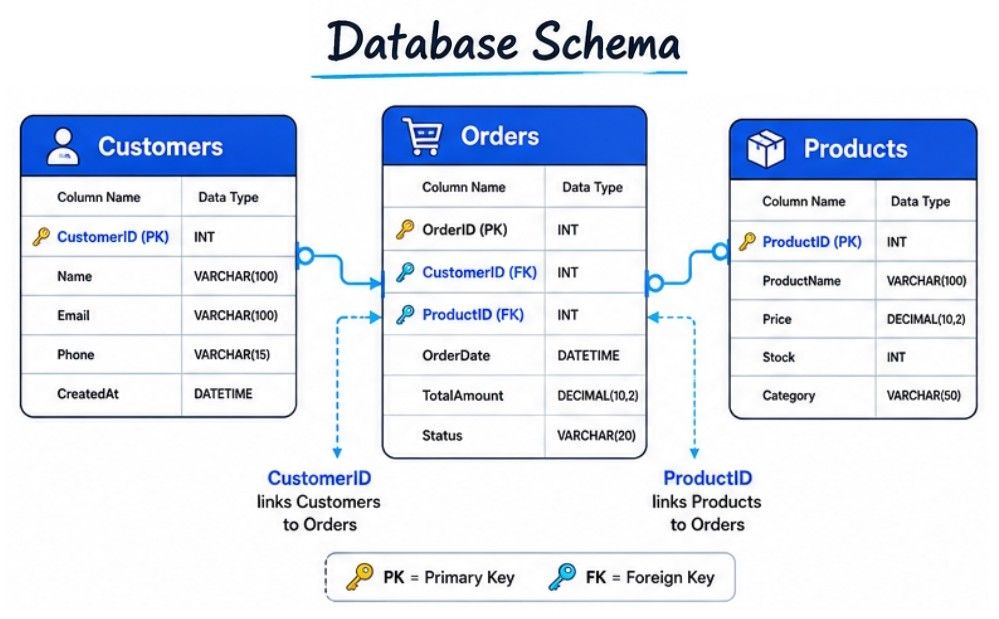
Instead of storing all information in a single table, organize related data into separate tables and connect them using Primary Keys and Foreign Keys.
This approach reduces duplicate data, improves consistency, and makes the database easier to manage.
Example:
Customers
Orders
Products
These tables are linked through relationships, allowing related data to be retrieved efficiently.
A simple schema is easier to understand, maintain, and scale.
Avoid creating unnecessary tables, columns, or overly complex relationships unless they are required by the application.
Applications evolve over time, so your database schema should be flexible enough to support new features and additional data without requiring major changes.
Planning ahead makes future development easier and reduces maintenance effort.
Use database constraints to ensure that only valid and consistent data is stored.
Common constraints include:
Primary Key
Foreign Key
UNIQUE
NOT NULL
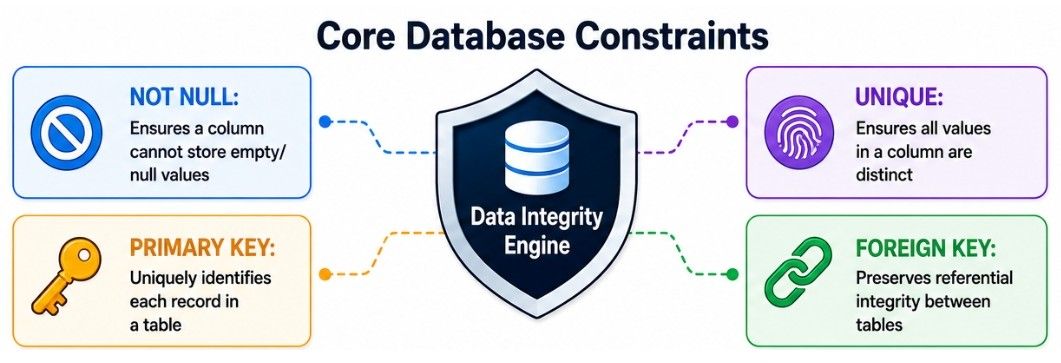
These constraints help prevent duplicate, missing, and invalid data.
Keep the database schema well documented so developers can easily understand the tables, relationships, and constraints.
Good documentation becomes especially valuable when multiple developers work on the same project.
Consider an online shopping application.
Instead of storing all information in one table, the data is divided into separate tables based on its purpose.
Customers
CustomerID | Name |
|---|
Products
ProductID | ProductName | Price |
|---|
Orders
OrderID | CustomerID | ProductID | OrderDate |
|---|
The Orders table links the Customers and Products tables using CustomerID and ProductID, creating relationships between them.
Reduces data duplication.
Maintains data consistency.
Simplifies updates and maintenance.
Improves query performance.
Supports future growth and scalability.
A well-designed database schema provides the foundation for a reliable, scalable, and easy-to-maintain application.
Before creating a database, developers need to understand what data will be stored and how different pieces of data are connected. This planning process is called Entity Relationship (ER) Modeling.
An Entity Relationship (ER) Model is a visual representation of a database. It identifies the entities, their attributes, and the relationships between them. ER Modeling helps developers design a database structure before creating tables.
In simple words, ER Modeling is a diagram that shows how data is organized and how different entities are related in a database.
ER Modeling is widely used during database design because it helps developers build an organized, consistent, and scalable database.
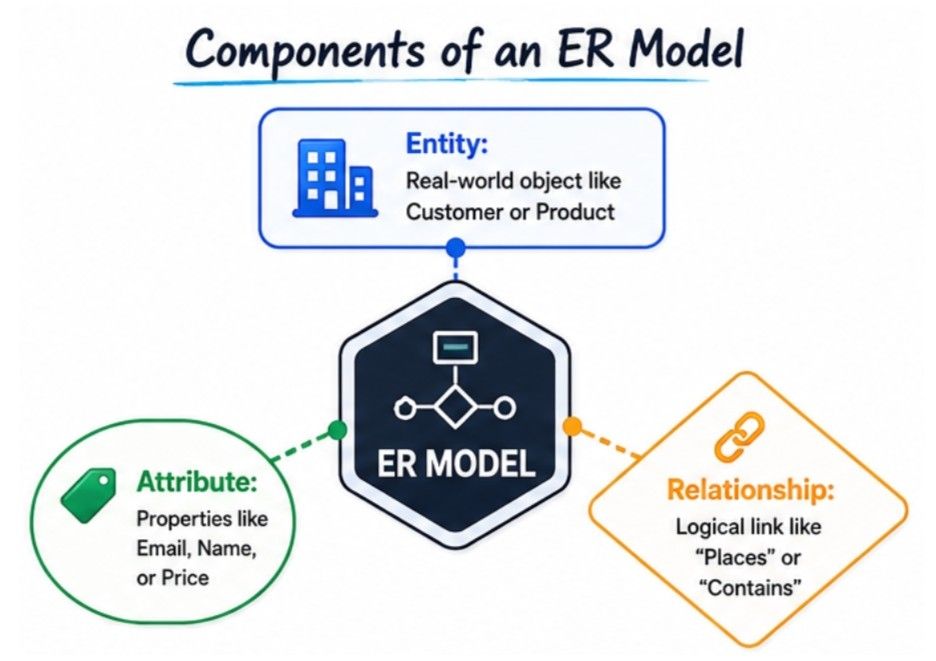
An Entity Relationship (ER) Model consists of three main components:
An Entity is a real-world object or concept about which information is stored in a database.
Examples:
Customer
Product
Employee
Student
Order
In a relational database, each entity usually becomes a table.
An Attribute describes the properties or characteristics of an entity.
For example, a Customer entity may have the following attributes:
CustomerID
Name
PhoneNumber
In a relational database, attributes become the columns of a table.
A Relationship defines how two or more entities are connected.
Examples:
A customer places an order.
An order contains products.
A student enrolls in courses.
Relationships help connect related data and reduce data duplication.
Consider an online shopping application.
It contains two entities:
Customer
Order
A customer can place multiple orders, creating a One-to-Many (1:M) relationship.
               Places
 Customer 1 ─────────────< M Order

+-------------------+      +-------------------+
| Customer          |      | Order             |
+-------------------+      +-------------------+
| CustomerID (PK)   |      | OrderID (PK)      |
| Name              |      | OrderDate         |
| Email             |      | Amount            |
|                   |      | CustomerID (FK)   |
+-------------------+      +-------------------+
In this example:
Customer and Order are Entities.
CustomerID, Name, Email, OrderID, and OrderDate are Attributes.
Places represents the Relationship between the two entities.
This ER Model helps developers understand how data is connected before creating the actual database tables.
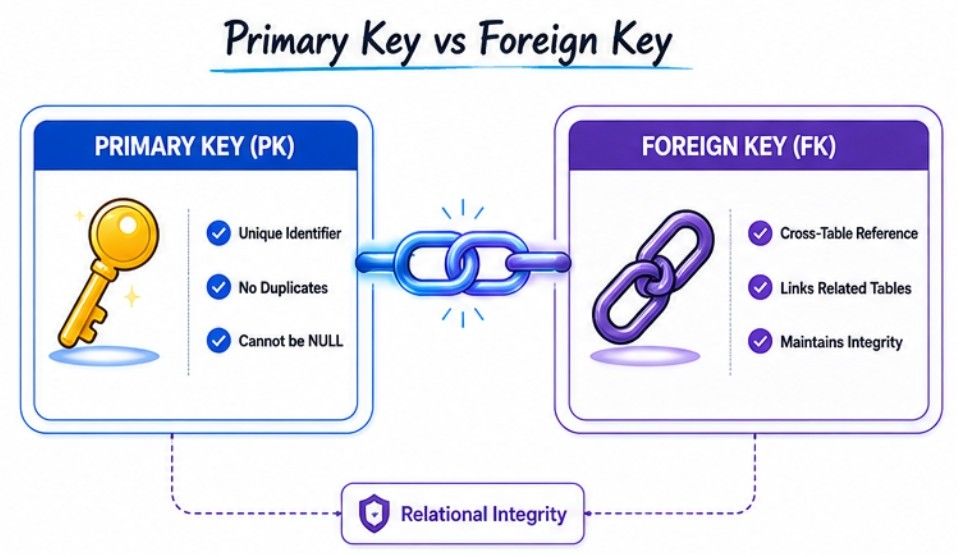
A Primary Key (PK) is a column, or a combination of columns, that uniquely identifies each record in a database table.
Every table should have a primary key because it ensures that each row can be identified without confusion.
A primary key must contain unique values and cannot contain NULL values.
In simple words, a Primary Key is a unique identifier that distinguishes every record in a table.
CustomerID (Primary Key) | Name | |
|---|---|---|
101 | Rahul | |
102 | Priya | |
103 | Aman |
Here, CustomerID is the Primary Key because each customer has a unique ID.
A Primary Key:
Uniquely identifies each record.
Cannot contain duplicate values.
Cannot contain NULL values.
There can be only one Primary Key in a table (it may consist of one or multiple columns).
A Primary Key is essential because it:
Uniquely identifies each record.
Prevents duplicate records.
Makes searching and updating data more efficient.
Helps create relationships between tables using Foreign Keys.
Maintains data integrity and consistency.
Without a Primary Key, it becomes difficult to uniquely identify records, especially when multiple rows contain similar information.
              Customers Table

+------------+--------+------------------+
| CustomerID | Name   | Email            |
+------------+--------+------------------+
| 101 (PK)   | Rahul  | [email protected]  |
| 102 (PK)   | Priya  | [email protected]  |
| 103 (PK)   | Aman   | [email protected]   |
+------------+--------+------------------+

PK = Primary Key (Unique Identifier)A Foreign Key (FK) is a column in one table that references the Primary Key (PK) of another table.
It is used to create relationships between tables and ensure that related data remains accurate and consistent.
In simple words, a Foreign Key connects two related tables.
CustomerID (Primary Key) | Name |
|---|---|
101 | Rahul |
102 | Priya |
OrderID | CustomerID (Foreign Key) | Product |
|---|---|---|
5001 | 101 | Laptop |
5002 | 102 | Mobile |
5003 | 101 | Headphones |
In this example:
CustomerID is the Primary Key in the Customers table.
CustomerID is the Foreign Key in the Orders table.
The Foreign Key links each order to the customer who placed it.
A Foreign Key helps to:
Create relationships between related tables.
Maintain data consistency and integrity.
Prevent invalid or orphan records.
Reduce duplicate data.
Keep the database organized.
For example, an order cannot reference a CustomerID that does not exist in the Customers table.
        Customers Table
+-------------------------+
| CustomerID (PK) | Name  |
+-------------------------+
| 101            | Rahul |
| 102            | Priya |
+-------------------------+
          │
          │ Referenced by
          ▼
        Orders Table
+-------------------------------------------+
| OrderID | CustomerID (FK) | Product       |
+-------------------------------------------+
| 5001    | 101             | Laptop        |
| 5002    | 102             | Mobile        |
| 5003    | 101             | Headphones    |
+-------------------------------------------+

PK = Primary Key
FK = Foreign Key
Primary Key | Foreign Key |
|---|---|
Uniquely identifies each record in a table. | References the Primary Key of another table. |
Must contain unique values. | Duplicate values are allowed. |
Cannot contain NULL values. | Can contain NULL values (depending on the database design). |
Only one Primary Key is allowed per table (it can consist of multiple columns). | A table can have multiple Foreign Keys. |
Ensures the uniqueness of records. | Creates relationships between tables and maintains referential integrity. |
Consider an online shopping application.
The Customers table stores customer information.
The Products table stores product details.
The Orders table stores order information.
When a customer places an order, the Orders table stores the customer's CustomerID as a Foreign Key. This links each order to the correct customer without storing the customer's details in every order record.
As a result, the database remains organized, consistent, and easy to maintain, while related information can be retrieved efficiently.
A Composite Key is a Primary Key that is made up of two or more columns. These columns work together to uniquely identify each record in a table.
A Composite Key is used when a single column cannot uniquely identify a record.
In simple words, a Composite Key combines multiple columns to uniquely identify each record in a table.
Consider a StudentCourses table where each student can enroll in multiple courses.
StudentID | CourseID | Semester |
|---|---|---|
101 | C101 | 1 |
101 | C102 | 1 |
102 | C101 | 1 |
In this table:
StudentID is not unique because one student can enroll in multiple courses.
CourseID is not unique because multiple students can enroll in the same course.
However, the combination of StudentID and CourseID uniquely identifies each record.
Therefore, (StudentID, CourseID) forms the Composite Key.
          Students                 StudentCourses                Courses
     +---------------+        +----------------------+      +--------------+
     | StudentID(PK) |◄──────►| StudentID (PK, FK)   |◄────►| CourseID(PK) |
     | Name          |        | CourseID (PK, FK)    |      | CourseName   |
     +---------------+        | Semester            |      +--------------+
                              +----------------------+

        Composite Key = (StudentID + CourseID)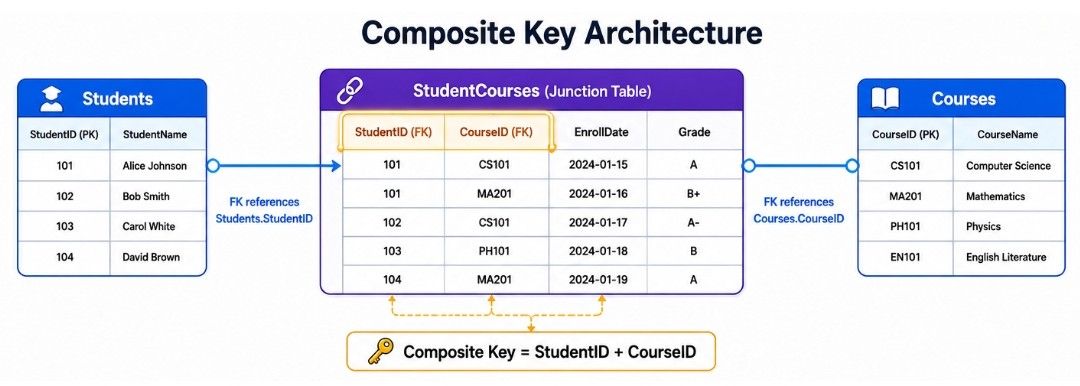
A Composite Key helps to:
Uniquely identify records using multiple columns.
Prevent duplicate records.
Represent many-to-many relationships.
Maintain data integrity.
Composite Keys are commonly used in junction (mapping) tables that connect two related tables.
A Unique Key is a column, or a combination of columns, that ensures every value in that column is unique within a table.
Unlike a Primary Key, a table can have multiple Unique Keys. A Unique Key prevents duplicate values but is not the primary identifier of the table.
In simple words, a Unique Key ensures that no two records have the same value in a specific column.
Employees Table
EmployeeID (Primary Key) | Email (Unique Key) | Phone |
|---|---|---|
101 | 9876543210 | |
102 | 9123456789 | |
103 | 9988776655 |
In this table:
EmployeeID is the Primary Key.
Email is a Unique Key because every employee must have a different email address.
If another employee is inserted with an existing email address, the database will reject the operation.
              Employees Table

+------------+--------------------+------------+
| EmployeeID | Email              | Phone      |
+------------+--------------------+------------+
| 101 (PK)   | [email protected]    | 9876543210 |
| 102 (PK)   | [email protected]    | 9123456789 |
| 103 (PK)   | [email protected]     | 9988776655 |
+------------+--------------------+------------+
                   ▲
                   │
              UNIQUE KEY
(Duplicate values not allowed)A Unique Key helps to:
Prevent duplicate values.
Maintain data accuracy.
Enforce business rules.
Improve data integrity.
It is commonly used for fields such as:
Email Address
Phone Number
Username
Employee Code
Passport Number
Primary Key (PK) | Unique Key |
|---|---|
Uniquely identifies each record in a table. | Ensures that values in a column remain unique. |
Only one Primary Key is allowed per table. | A table can have multiple Unique Keys. |
Cannot contain NULL values. | May allow NULL values (depending on the database system). |
Used as the main identifier of the table. | Used to enforce uniqueness on specific columns. |
Can be referenced by a Foreign Key. | Can also be referenced by a Foreign Key if it has a UNIQUE constraint (DBMS-dependent). |

Normalization is the process of organizing data into multiple related tables to reduce data redundancy and improve data consistency.
Instead of storing the same information repeatedly, normalization stores each piece of data only once and connects related tables using Primary Keys and Foreign Keys.
In simple words, Normalization organizes data into related tables so that duplicate data is reduced and data remains accurate and consistent.
Normalization is performed using a series of rules called Normal Forms (1NF, 2NF, 3NF, and beyond).
Suppose an online shopping application stores customer and order information in a single table.
CustomerID | CustomerName | Product | CustomerPhone |
|---|---|---|---|
101 | Rahul | Laptop | 9876543210 |
101 | Rahul | Mouse | 9876543210 |
101 | Rahul | Keyboard | 9876543210 |
Here, the customer's name and phone number are repeated in every row.
This leads to:
Duplicate data
Wasted storage space
Difficult updates
Increased risk of inconsistent data
The data is divided into separate tables.
Customers
CustomerID | CustomerName | Phone |
|---|---|---|
101 | Rahul | 9876543210 |
Orders
OrderID | CustomerID | Product |
|---|---|---|
5001 | 101 | Laptop |
5002 | 101 | Mouse |
5003 | 101 | Keyboard |
The Orders table stores only the CustomerID, which references the Customers table.
As a result:
Customer information is stored only once.
Duplicate data is eliminated.
Updates become easier.
Data remains accurate and consistent.
          Before Normalization

+------------------------------------------------------+
| CustomerID | Name  | Phone      | Product            |
+------------------------------------------------------+
| 101        | Rahul | 9876543210 | Laptop             |
| 101        | Rahul | 9876543210 | Mouse              |
| 101        | Rahul | 9876543210 | Keyboard           |
+------------------------------------------------------+
          ❌ Duplicate Customer Data

                    │
                    │ Normalize
                    ▼

             After Normalization

Customers Table                 Orders Table

+---------------------+          +--------------------------+
| CustomerID | Name   |          | OrderID | CustomerID | Product |
+---------------------+          +--------------------------+
| 101        | Rahul  |          | 5001    | 101        | Laptop  |
|            |        |          | 5002    | 101        | Mouse   |
| Phone      |9876543210|        | 5003    | 101        | Keyboard|
+---------------------+          +--------------------------+

✅ No Duplicate Customer InformationNormalization helps to:
Reduce duplicate data.
Improve data consistency.
Save storage space.
Simplify database maintenance.
Make updates easier.
Improve data integrity.
Normalization is especially useful in applications where data is updated frequently, such as banking systems, e-commerce platforms, and inventory management systems.
Normalization is carried out in multiple stages called Normal Forms (NFs). Each normal form solves a specific type of data redundancy and dependency problem, making the database more organized and consistent.
The three most commonly used normal forms are:

A table is in First Normal Form (1NF) if:
Each column contains a single (atomic) value.
There are no repeating groups or multiple values in a single column.
Each row is unique.
Goal: Eliminate repeating data and organize information into a tabular format.
A table is in Second Normal Form (2NF) if:
It already satisfies 1NF.
All non-key columns depend on the entire Primary Key.
Partial dependencies are removed.
Goal: Eliminate data redundancy caused by partial dependency.
A table is in Third Normal Form (3NF) if:
It already satisfies 2NF.
Non-key columns depend only on the Primary Key.
Transitive dependencies are removed.
Goal: Store related data in the correct table and improve data consistency.
Denormalization is the process of combining data from multiple tables to reduce JOIN operations and improve query performance.
Unlike Normalization, which removes duplicate data, Denormalization intentionally stores some duplicate data to make data retrieval faster.
In simple words, Denormalization improves read performance by storing related data together, even if some data is duplicated.
Denormalization is useful for applications where read operations are much more frequent than write operations.
It helps to:
Reduce complex JOIN operations.
Improve query performance.
Speed up data retrieval.
Support high-traffic and large-scale applications.
It is commonly used in:
Data warehouses
Reporting systems
Analytics platforms
High-traffic web applications
Customers
CustomerID | CustomerName |
|---|---|
101 | Rahul |
Orders
OrderID | CustomerID | Product |
|---|---|---|
5001 | 101 | Laptop |
To display the customer's name with the order, the database must perform a JOIN between the Customers and Orders tables.
OrderID | CustomerID | CustomerName | Product |
|---|---|---|---|
5001 | 101 | Rahul | Laptop |
Here, CustomerName is stored directly in the Orders table.
This eliminates the need for a JOIN, making read queries faster. However, the same customer information is stored in multiple rows, increasing data redundancy.
Faster read queries.
Fewer JOIN operations.
Better performance for reporting and analytics.
Useful for read-heavy applications.
Increases duplicate data.
Uses more storage space.
Makes updates more complex because the same data exists in multiple places.
Normalization | Denormalization |
|---|---|
Reduces duplicate data. | Introduces some duplicate data. |
Improves data consistency. | Improves read performance. |
Uses multiple related tables. | Combines data into fewer tables. |
Requires more JOIN operations. | Reduces the number of JOIN operations. |
Saves storage space. | Uses more storage space. |
Best for transactional (OLTP) applications. | Best for reporting, analytics, and read-heavy (OLAP) applications. |
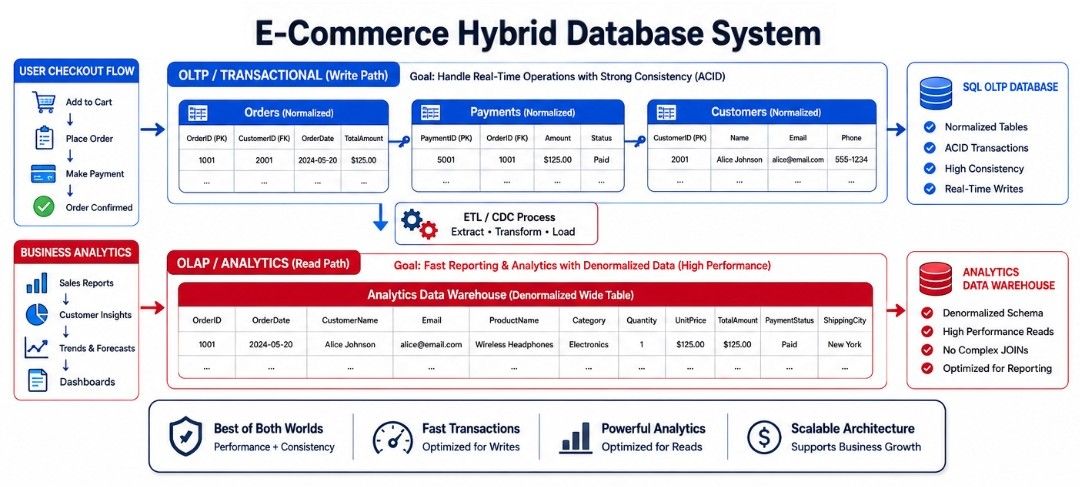
Consider an e-commerce application.
The database stores data in separate tables such as Customers, Products, Orders, and Payments. Each table has a Primary Key, and related tables are connected using Foreign Keys.
The transactional database is normalized to reduce duplicate data and maintain consistency. For reporting, analytics, and dashboards, some data may be denormalized to reduce JOIN operations and improve query performance.
This approach provides the right balance between data consistency, performance, and scalability.
Database Schema defines the structure of a database.
ER Modeling helps visualize entities, attributes, and relationships before creating a database.
Primary Key, Foreign Key, Composite Key, and Unique Key help organize data and maintain relationships between tables.
Normalization reduces data redundancy and improves consistency.
Denormalization improves read performance by reducing complex JOIN operations.
A well-designed database improves performance, data integrity, maintainability, and scalability, making it easier to build efficient applications.
These concepts provide a strong foundation for advanced System Design topics such as Database Indexing, Replication, Sharding, and Distributed Databases.
