
Durgesh Tiwari
Author
Modern applications such as Amazon, Netflix, Google, Facebook, and Flipkart handle millions of user requests every day. As traffic grows, a single server cannot process every request efficiently. If all requests are sent to one server, it can become overloaded, leading to slow response times or downtime.
To solve this problem, distributed systems use Load Balancing. It distributes incoming requests across multiple servers, helping applications remain fast, scalable, and highly available.
Load Balancing is the process of distributing incoming requests across multiple servers so that no single server handles all the workload.
A Load Balancer sits between users and application servers. It receives incoming requests and forwards each request to the most appropriate server using a load-balancing algorithm.
In simple words, Load Balancing distributes user requests across multiple servers to improve performance, availability, and reliability.
Suppose an online shopping website has three web servers.
Without Load Balancing
Users
   │
   ▼
Server A
All requests go to Server A. As traffic increases, the server may become overloaded, causing slow performance or downtime.
With Load Balancing
             Users
                │
                ▼
         Load Balancer
         ┌────┼────┐
         ▼    ▼    ▼
     Server A Server B Server C
The Load Balancer distributes requests across all three servers, allowing the application to handle more users efficiently.
As applications grow, the number of users and requests increases. Load balancing ensures that incoming traffic is shared across multiple servers instead of relying on a single server.
This improves application performance, availability, and scalability, while keeping the system responsive even during high traffic.
Prevents server overload.
Improves application performance.
Reduces response time.
Increases availability.
Supports horizontal scaling.
Improves fault tolerance.
Handles traffic spikes efficiently.
Provides a better user experience.
During events such as Amazon Prime Day or Flipkart Big Billion Days, millions of users visit the websites simultaneously. Load balancers distribute requests across hundreds or thousands of servers, allowing the applications to remain fast and available even during peak traffic.
A Load Balancer acts as the entry point for incoming user requests. Instead of connecting directly to an application server, users first send their requests to the Load Balancer.
It then selects an available server using a load-balancing algorithm and forwards the request. After processing the request, the selected server sends the response back to the user through the Load Balancer.
Workflow
User
 │
 │ Request
 ▼
Load Balancer
 │
 │ Selects an Available Server
 ▼
Application Server
 │
 │ Process Request
 ▼
Response
 │
 ▼
User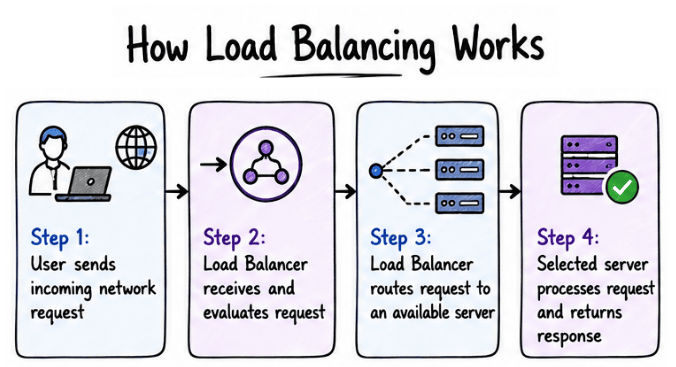
If a server becomes unavailable, the Load Balancer automatically routes new requests to the remaining healthy servers, helping the application stay available with minimal interruption.
Load balancers can be classified based on how they are deployed and managed. The three most common types are:
Hardware Load Balancer
Software Load Balancer
Cloud Load Balancer
Each type is designed for different environments and application requirements.
A Hardware Load Balancer is a dedicated physical device that distributes incoming traffic across multiple servers. It is installed in an organization's data center and is designed to handle high volumes of network traffic with low latency.
Hardware load balancers are commonly used by large enterprises that manage their own infrastructure.
In simple words, a Hardware Load Balancer is a physical device that distributes traffic across multiple servers.
High performance.
Low network latency.
Reliable for enterprise environments.
Handles large volumes of traffic.
Expensive to purchase and maintain.
Difficult to scale compared to cloud-based solutions.
Requires dedicated hardware and maintenance.
Example
Large banks, telecom companies, and enterprise data centers often use hardware load balancers to distribute traffic reliably across their servers.
A Software Load Balancer is a software application that distributes incoming traffic across multiple servers. It runs on a server, virtual machine, or container instead of dedicated hardware.
Unlike hardware load balancers, software load balancers are more flexible, cost-effective, and widely used in modern web applications.
In simple words, a Software Load Balancer is a software application that distributes traffic across multiple servers.
NGINX
HAProxy
Traefik
Envoy Proxy
Cost-effective.
Easy to install and configure.
Highly flexible.
Ideal for cloud and container-based applications.
Performance depends on the underlying server.
May require additional configuration for large-scale deployments.
Example
A startup hosting its application on virtual machines can use NGINX as a software load balancer to distribute user requests across multiple application servers.
A Cloud Load Balancer is a managed load balancing service provided by cloud platforms such as AWS, Microsoft Azure, and Google Cloud Platform (GCP). It automatically distributes incoming traffic across multiple servers without requiring organizations to manage the underlying infrastructure.
In simple words, a Cloud Load Balancer is a cloud-managed service that automatically distributes traffic across multiple servers.
Automatically scales with traffic.
High availability.
Easy integration with cloud services.
No hardware maintenance.
Pay only for the resources used.
Ongoing usage costs.
Depends on the cloud provider's services.
Example
An e-commerce application hosted on AWS can use Elastic Load Balancing (ELB) to automatically distribute traffic across multiple EC2 instances.
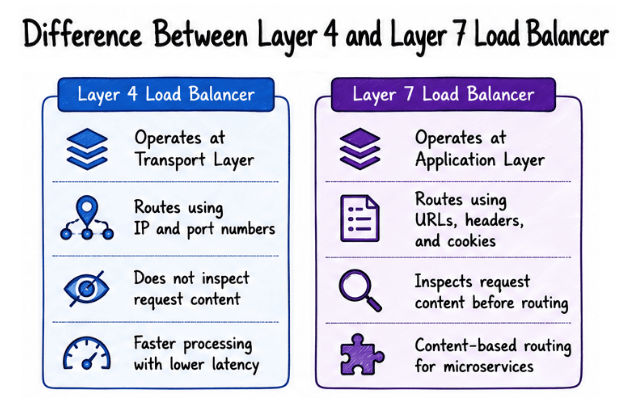
A Layer 4 Load Balancer operates at the Transport Layer (Layer 4) of the OSI model. It distributes traffic based on network information such as the IP address, TCP port, and UDP port, without inspecting the actual request data.
In simple words, a Layer 4 Load Balancer routes traffic using connection details like IP addresses and port numbers.
Fast request processing.
Low latency.
Supports TCP and UDP traffic.
Handles a large number of connections efficiently.
Example
A gaming application that handles thousands of TCP connections every second can use a Layer 4 Load Balancer to distribute traffic quickly and efficiently.
A Layer 7 Load Balancer operates at the Application Layer (Layer 7) of the OSI model. It inspects HTTP and HTTPS requests and routes them based on the request content instead of only using IP addresses or port numbers.
In simple words, a Layer 7 Load Balancer routes requests based on application-level information such as URLs, headers, cookies, and host names.
It can route requests using:
URL path
HTTP headers
Cookies
Request method
Host name
Example
Consider an online shopping application.
A Layer 7 Load Balancer can route requests like this:
/products   → Product Service
/orders     → Order Service
/payments   → Payment Service
This type of routing is commonly used in microservices architectures, where different services handle different requests.
Content-based routing.
Better traffic management.
Supports SSL termination.
Ideal for REST APIs and microservices.
Slightly slower than Layer 4 because it inspects request content.
More complex to configure.
Layer 4 Load Balancer | Layer 7 Load Balancer |
|---|---|
Operates at the Transport Layer (Layer 4). | Operates at the Application Layer (Layer 7). |
Routes traffic using IP addresses and port numbers. | Routes traffic using URLs, headers, cookies, and request content. |
Does not inspect the request content. | Inspects the request content before routing. |
Faster request processing. | More intelligent and flexible routing. |
Lower latency. | Slightly higher latency. |
Best suited for TCP and UDP traffic. | Best suited for HTTP and HTTPS applications. |
A Load Balancing Algorithm is a set of rules that determines how a Load Balancer distributes incoming requests across multiple servers. The goal is to distribute the workload efficiently so that no server becomes overloaded while others remain underutilized.
In simple words, a Load Balancing Algorithm decides which server should handle the next incoming request.
The choice of algorithm depends on factors such as traffic patterns, server capacity, and application requirements.
Round Robin
Weighted Round Robin
Least Connections
Least Response Time
IP Hash
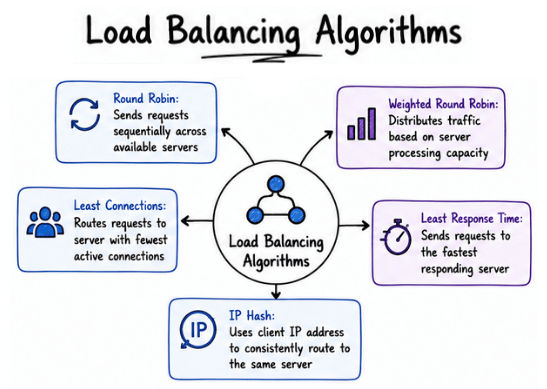
Round Robin is one of the simplest and most commonly used load balancing algorithms. It distributes incoming requests sequentially across all available servers.
Each new request is forwarded to the next server in the list. After the last server receives a request, the Load Balancer starts again from the first server.
In simple words, Round Robin sends each new request to the next available server in a fixed order.
Suppose there are three servers:
Server A
Server B
Server C
The requests are distributed as follows:
Request | Assigned Server |
|---|---|
Request 1 | Server A |
Request 2 | Server B |
Request 3 | Server C |
Request 4 | Server A |
Request 5 | Server B |
Request 6 | Server C |
Simple to implement.
Distributes requests evenly.
Works well when all servers have similar capacity.
Does not consider the current server workload.
Not suitable when servers have different processing capacities.
Weighted Round Robin is an improved version of the Round Robin algorithm. In this algorithm, each server is assigned a weight based on its processing capacity. Servers with higher weights receive more requests, while servers with lower weights receive fewer requests.
In simple words, Weighted Round Robin distributes more requests to powerful servers and fewer requests to less powerful servers.
Example
Suppose three servers have the following weights:
Server | Weight |
|---|---|
Server A | 5 |
Server B | 3 |
Server C | 2 |
Since Server A has the highest weight, it receives more requests than Server B and Server C.
Better resource utilization.
Suitable for servers with different capacities.
Improves overall performance.
Requires proper weight configuration.
Does not consider the current server load.
The Least Connections algorithm sends each new request to the server with the fewest active connections. This helps distribute the workload more efficiently, especially when some requests take longer to process than others.
In simple words, Least Connections always sends the next request to the server with the fewest active connections.
Example
Suppose the servers currently have the following active connections:
Server | Active Connections |
|---|---|
Server A | 30 |
Server B | 15 |
Server C | 8 |
The next request is sent to Server C because it has the fewest active connections.
Distributes workload efficiently.
Suitable for applications with long-running requests.
Prevents server overload.
Requires continuous monitoring of active connections.
More complex than Round Robin.
The Least Response Time algorithm sends each new request to the server with the lowest response time. Instead of considering only the number of active connections, it also measures how quickly each server responds to requests.
In simple words, Least Response Time always sends the next request to the fastest responding server.
Example
Suppose the servers have the following response times:
Server | Response Time |
|---|---|
Server A | 18 ms |
Server B | 9 ms |
Server C | 25 ms |
The next request is sent to Server B because it has the lowest response time.
Improves application performance.
Reduces user waiting time.
Automatically favors faster servers.
Requires continuous performance monitoring.
Slightly higher processing overhead.
The IP Hash algorithm uses the client's IP address to determine which server will handle the request. As a result, requests from the same client are usually routed to the same server unless that server becomes unavailable.
In simple words, IP Hash uses the client's IP address to consistently route requests to the same server.
Example
Suppose a user with the IP address 192.168.1.10 sends multiple requests. The Load Balancer consistently routes those requests to the same server, helping maintain the user's session.
Maintains user sessions.
Provides consistent request routing.
Suitable for session-based applications.
Traffic may become uneven if many users share similar IP ranges.
Less flexible when servers are added or removed.
A Load Balancer is a critical part of the infrastructure. If it becomes unavailable, users may not be able to access the application even if all backend servers are running properly.
Load Balancer Failover is a mechanism in which a backup load balancer automatically takes over when the primary load balancer fails, ensuring that user requests continue without interruption.
In simple words, Load Balancer Failover automatically switches traffic from a failed load balancer to a backup load balancer.
The primary load balancer receives and distributes incoming requests.
The backup load balancer continuously monitors the primary load balancer.
If the primary load balancer fails, the backup load balancer automatically takes over.
User requests continue with little or no interruption.
Example
Suppose an online banking application uses two load balancers:
Primary Load Balancer
Backup Load Balancer
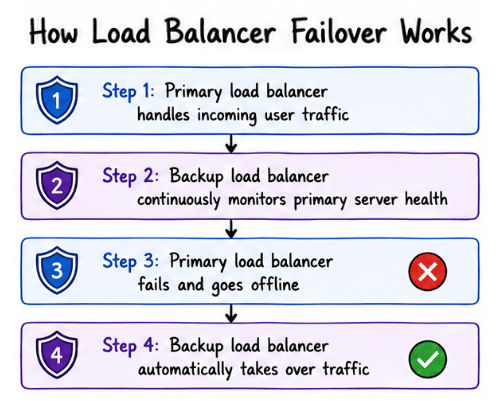
If the primary load balancer fails due to a hardware or network issue, the backup load balancer automatically starts handling incoming requests. Users can continue using the application without interruption.
Load balancing provides several benefits that help applications remain fast, scalable, and highly available.
Distributes traffic evenly across multiple servers.
Improves application performance and response time.
Prevents server overload.
Supports horizontal scaling.
Increases availability.
Improves fault tolerance.
Reduces downtime during server failures.
Provides a better user experience.
Although load balancing improves performance and availability, it also introduces some challenges.
Additional infrastructure cost.
Configuration and maintenance complexity.
Uneven traffic distribution if an inappropriate algorithm is used.
Health checks require proper configuration.
The Load Balancer itself can become a Single Point of Failure (SPOF) if failover is not configured.
Load Balancing is an essential concept in System Design that distributes incoming requests across multiple servers to improve performance, scalability, availability, and reliability. Different types of load balancers and algorithms, such as Round Robin, Weighted Round Robin, Least Connections, Least Response Time, and IP Hash, help distribute traffic efficiently based on application requirements.
Modern load balancing solutions also support features such as Load Balancer Failover, ensuring that applications remain available even if a load balancer fails. Together, these techniques help build scalable, reliable, and highly available applications capable of serving millions of user requests efficiently.
