
Durgesh Tiwari
Author
A Web Crawler is a distributed system that automatically discovers, downloads, and revisits web pages across the internet.
At first, web crawling looks very simple:
Start with URL
     ↓
Download Page
     ↓
Extract Links
     ↓
Add New URLs
     ↓
Repeat
However, things become much more challenging when the system needs to crawl millions or even billions of web pages.
The crawler must answer important questions such as:
Which URL should be crawled next?
How can duplicate crawling be avoided?
How often should a page be revisited?
How can the crawler respect website limits?
How should failures and retries be handled?
How can crawler traps be detected and avoided?
This is why a modern web crawler is much more than a simple HTTP downloader.
A large-scale web crawler is a distributed scheduling system that decides what to crawl, when to crawl it, and how to crawl it efficiently without overwhelming websites.
A Web Crawler, also known as a Spider or Web Bot, is a program that automatically explores websites by following links from one page to another.
The process usually starts with a small list of URLs called Seed URLs.
Seed URLs
    ↓
URL Frontier
    ↓
Fetcher
    ↓
Web Page
    ↓
Link Extractor
    ↓
New URLs
    ↓
Normalize + Deduplicate
    ↓
URL Frontier
Let's understand this with a simple example.
Suppose the crawler starts with:
<https://example.com>After downloading the page, it finds the following links:
/products
/blog
/about
These newly discovered URLs are added to the crawl queue and become candidates for future crawling.
The same process continues again and again as more pages reveal more links.
This is how a crawler gradually discovers a large portion of the web.
Many people think a web crawler and a search engine are the same thing, but they are different systems.
A crawler discovers and collects content, while a search engine helps users find that content.
Web Crawler | Search Engine |
|---|---|
Finds web pages | Searches indexed pages |
Downloads page content | Processes and indexes content |
Discovers new links | Matches user queries |
Decides when to revisit pages | Ranks search results |
Maintains crawl freshness | Serves search requests |
A simplified search architecture looks like this:
Web
 ↓
Crawler
 ↓
Document Processing
 ↓
Indexer
 ↓
Search Index
 ↓
Query + Ranking
 ↓
Search Results
In simple words, the crawler collects information, and the search engine uses that information to answer user searches.
A web crawler should support the following core features:
Accept seed URLs.
Download web pages.
Extract links from pages.
Normalize URLs.
Avoid duplicate crawling.
Respect robots.txt rules.
Apply crawl limits for each website.
Retry temporary failures.
Store page content and crawl metadata.
Prioritize important URLs.
Recrawl pages when needed.
As the system grows, additional features may be required:
Sitemap processing.
Content deduplication.
Crawler trap detection.
JavaScript rendering for dynamic websites.
These features help improve crawl quality and efficiency.
A production-grade web crawler must be scalable, reliable, and respectful toward external websites.
Important requirements include:
High throughput.
Horizontal scalability.
Fault tolerance.
Durable crawl state.
Efficient bandwidth usage.
Crawl politeness.
Fresh content discovery.
Duplicate prevention.
Security.
Monitoring and observability.
The goal is not to crawl the internet as fast as possible.
The real goal is:
Download useful content efficiently while avoiding duplicate work and respecting website limits.
Before designing the architecture, it is useful to estimate the scale of the system.
Assume we want to crawl:
10 Billion Pagesand refresh the entire dataset every:
30 DaysAverage crawl rate:
10,000,000,000
----------------
30 × 24 × 3600

≈ 3,858 Pages/Second
We can round this to:
≈ 4,000 Pages/SecondNow assume the average page size is:
500 KBRequired download bandwidth:
4,000 × 500 KB

≈ 2 GB/Second
Daily downloaded data:
≈ 173 TB/DayIn reality, the required capacity will be even higher because:
Some requests fail and require retries.
Redirects increase traffic.
New URLs continuously appear.
Important pages need more frequent recrawling.
Traffic is not evenly distributed.
This tells us something important very early in the design process.
A large-scale web crawler is both network-intensive and storage-intensive, so bandwidth, storage, and scheduling become key design considerations.
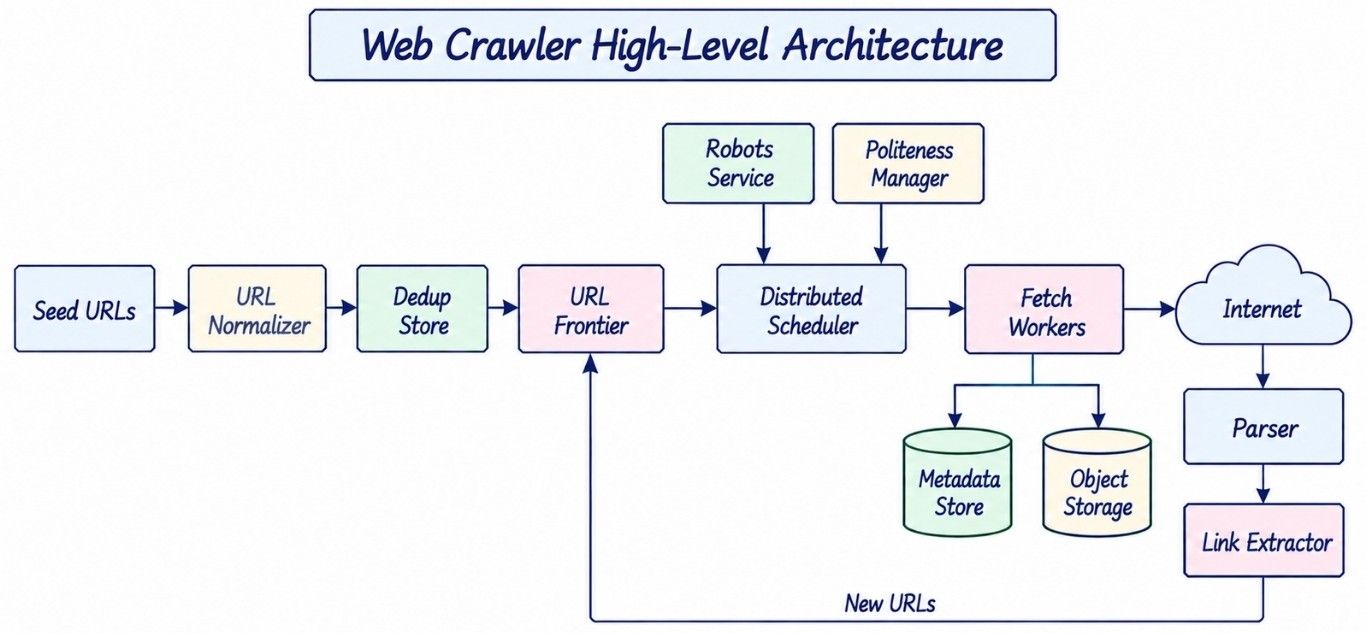
A large-scale web crawler works better when URL scheduling and page downloading are handled separately. The scheduler decides what should be crawled next, while fetch workers download the actual pages.
                     SEED URLS
                         |
                         v
                  URL NORMALIZER
                         |
                         v
                   URL DEDUP STORE
                         |
                         v
                    URL FRONTIER
                         |
                         v
                DISTRIBUTED SCHEDULER
                         |
              +----------+----------+
              |                     |
              v                     v
        ROBOTS SERVICE       POLITENESS MANAGER
              |                     |
              +----------+----------+
                         |
                         v
                    FETCH WORKERS
                         |
                         v
                      INTERNET
                         |
                         v
                    HTTP RESPONSE
                         |
              +----------+----------+
              |                     |
              v                     v
        CONTENT STORAGE           PARSER
                                    |
                                    v
                              LINK EXTRACTOR
                                    |
                                    v
                               NEW URLs
                                    |
                                    v
                              URL FRONTIER
The flow starts with seed URLs. Each URL is normalized and checked for duplicates before entering the URL Frontier.
The distributed scheduler then decides when a URL can be fetched. Before sending the request, it checks robots.txt rules and host-level crawl limits.
Fetch workers download the page. The content can be stored for later processing, while the parser extracts new links. Those links go through the same normalization and deduplication process before entering the frontier.
Other supporting components include a DNS cache, retry scheduler, metadata store, content deduplication, monitoring, and recrawl scheduler.
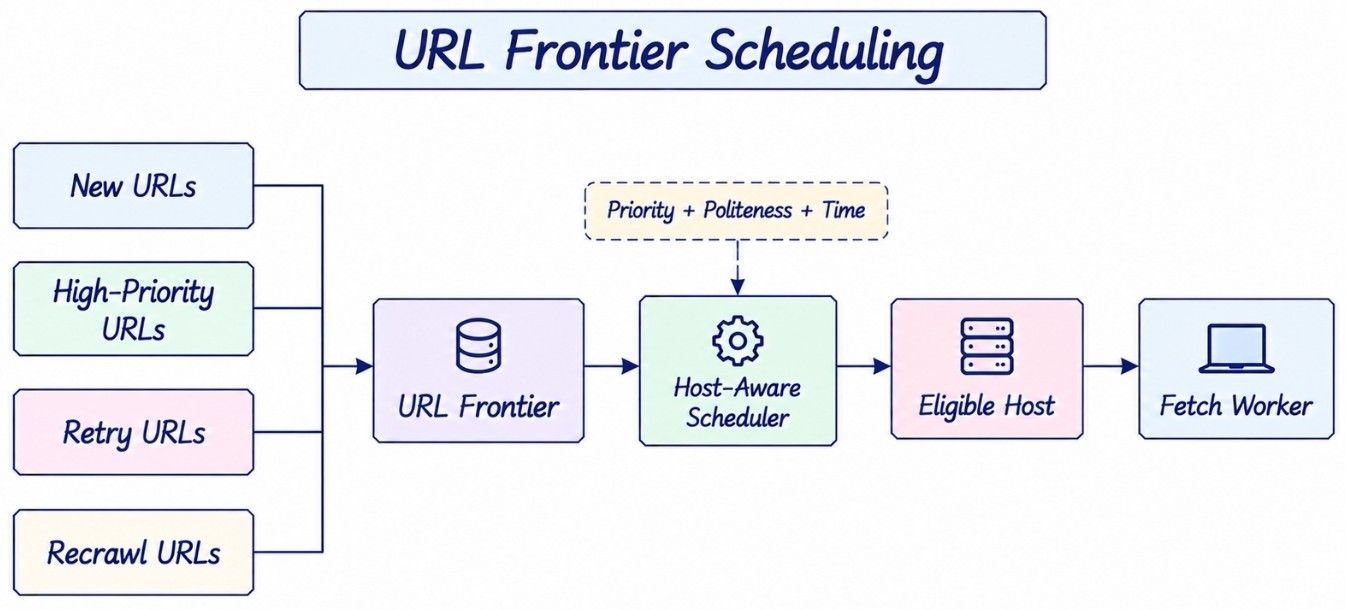
The URL Frontier is one of the most important parts of a web crawler system design. It stores URLs waiting to be crawled and decides when each URL should become ready for fetching.
A normal queue is not enough because every URL does not have the same priority or crawl time.
The frontier may consider:
URL priority.
Host or domain.
Politeness delay.
Retry time.
Page freshness.
Crawl budget.
Previous failures.
Recrawl time.
Conceptually, the frontier may contain different types of work:
URL Frontier
    |
    +-- New URLs
    |
    +-- High-Priority URLs
    |
    +-- Recrawl URLs
    |
    +-- Retry URLs
For example, a failed URL may need to wait before another attempt, while an important news page may need to be crawled sooner.
So, the URL Frontier is not just a FIFO queue. It acts as the scheduling layer of the web crawler.
A simple FIFO queue processes URLs in the same order in which they were added.
Suppose the queue contains:
example.com/a
example.com/b
example.com/c
example.com/d
other.com/a
The crawler may send several requests to example.com within a very short time.
For a small website, this could create unnecessary load.
A better crawl order might look like:
example.com/a
other.com/a
news.com/x
example.com/b
blog.com/y
Now requests are spread across different websites.
This is why a scalable web crawler needs host-aware scheduling. The scheduler must consider both URL priority and the crawl limit of each host.
A web crawler sends requests to websites it does not own. It should therefore avoid sending too many requests to the same website at once.
This behavior is known as crawler politeness.
For each host, the crawler can maintain information such as:
HostState
---------
hostname
next_allowed_fetch_at
crawl_delay
active_requests
crawl_budget
failure_rate
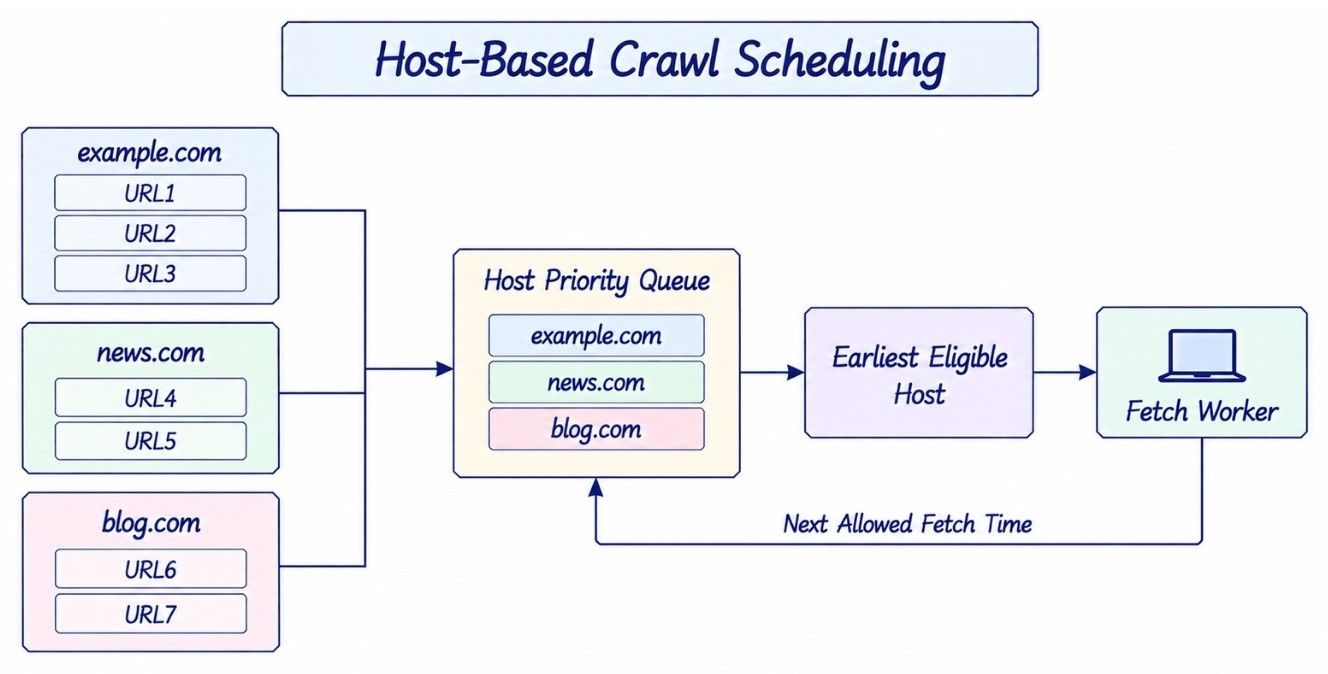
URLs can also be grouped into separate host queues:
example.com → [URL1, URL2, URL3]
news.com    → [URL4, URL5]
blog.com    → [URL6, URL7]
Suppose example.com should not receive another request until 10:00:05. Even if its next URL has high priority, the scheduler should wait until that time.
A priority queue can track which host becomes available next:
Host Priority Queue
        |
        v
Earliest Eligible Host
        |
        v
Fetch URL
        |
        v
Calculate Next Allowed Time
        |
        v
Return Host to Queue
This approach allows the crawler to process many websites in parallel without sending too much traffic to a single website.
A website can publish crawl instructions in a robots.txt file. The crawler should check these rules before fetching pages from that site.
Crawler
   |
   v
robots.txt Cache
   |
   +-- Allowed
   |
   +-- Disallowed
Downloading robots.txt before every page request would create unnecessary network traffic.
A better approach is to fetch the file, parse its rules, cache them, and refresh them when needed.
The scheduler can then check the cached rules before giving a URL to a fetch worker.
This makes robots.txt part of the normal crawl flow rather than a separate check added later.
After downloading an HTML page, the crawler parses it and extracts links.
HTML
 ↓
Parser
 ↓
Link Extractor
 ↓
Candidate URLs
Some links are relative rather than complete URLs.
For example:
Current Page:
<https://example.com/shop/index.html>

Found Link:
../about

Resolved URL:
<https://example.com/about>
The crawler first resolves the relative link and then normalizes the final URL.
Common URL normalization steps include:
Convert the hostname to lowercase.
Remove default ports.
Resolve . and .. path segments.
Remove URL fragments.
Normalize encoding when it is safe.
The crawler must be careful not to change the meaning of a URL.
For example:
/product?id=10
/product?id=20
These URLs may point to two different products.
So query parameters should not be removed blindly during URL normalization.
The same URL may be discovered from many different pages.
For example:
Page A → Page C
Page B → Page C
Page D → Page C
Without URL deduplication, Page C could be added to the URL Frontier many times.
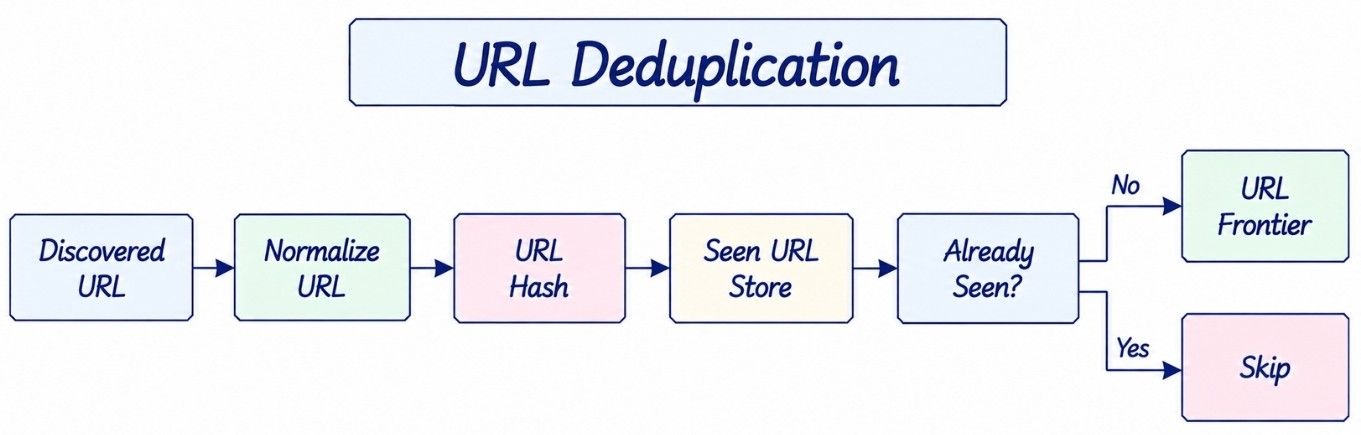
A simple deduplication flow looks like this:
Normalized URL
      ↓
     Hash
      ↓
Seen URL Store
      ↓
    New?
  ┌────┴────┐
 Yes        No
  ↓          ↓
Enqueue     Skip
For a small crawler, an in-memory hash set may be enough.
For an internet-scale or distributed web crawler, the number of discovered URLs can become very large. A single machine cannot keep every URL in memory.
The seen-URL store therefore needs to be distributed or partitioned across multiple machines.
A Bloom filter is a memory-efficient data structure that can help reduce expensive lookups in the main URL deduplication store.
For a URL, it can tell us:
Definitely not seenor:
Probably seenThe word probably is important.
Bloom filters can produce false positives. This means a new URL may sometimes appear as if it has already been seen.
If the crawler blindly skips that URL, it may miss a valid page.
A safer flow is:
URL
 ↓
Bloom Filter
 ↓
Persistent Seen Store
The Bloom filter can reduce unnecessary lookups, while the persistent store can provide an exact check when crawl coverage matters.
So, a Bloom filter is mainly an optimization for URL deduplication, not always the final source of truth.

URL deduplication and content deduplication solve two different problems.
URL Deduplication | Content Deduplication |
|---|---|
Checks whether a URL was already discovered | Checks whether the same content was already downloaded |
Happens before or around scheduling | Usually happens after fetching |
Reduces duplicate crawl work | Reduces duplicate content processing or storage |
Uses normalized URLs or URL hashes | Uses content hashes or similarity methods |
For example, these URLs are different:
/article?id=100
/print/article?id=100
But both may return the same article.
URL deduplication sees them as different URLs. Content deduplication can detect that their downloaded content is the same.
For exact duplicates, the crawler can calculate a content hash.
For pages that are almost the same, techniques such as SimHash, MinHash, or shingling can be used when near-duplicate detection is needed.
The Fetcher Service is responsible for downloading web pages selected by the scheduler.
A fetch worker handles:
DNS resolution.
TCP/TLS connection setup.
HTTP requests.
Redirects.
Timeouts.
Response-size limits.
Content-type checks.
Compression handling.
Failure and retry classification.
For example:
Scheduler
    ↓
Fetch Worker
    ↓
DNS Resolution
    ↓
HTTP Request
    ↓
Website
    ↓
HTTP Response
Fetch workers should remain mostly stateless.
Important crawl information should be stored in durable systems such as the URL Frontier, metadata store, and lease system.
This way, if one fetch worker crashes, another worker can continue the crawl without losing important state.
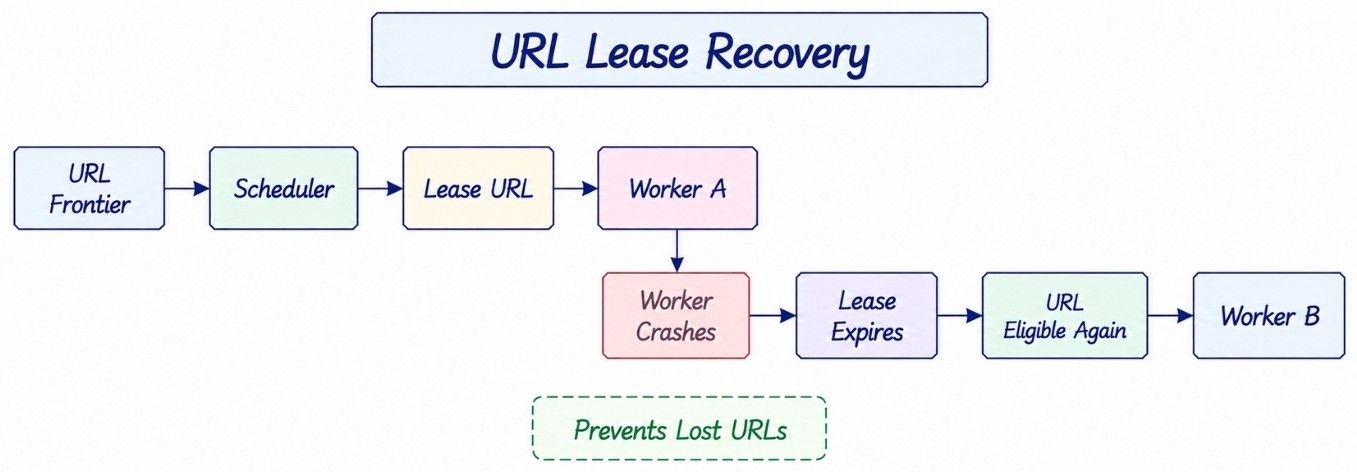
A fetch worker can crash after receiving a URL but before completing the request.
If we remove that URL from the frontier immediately, the URL may be lost forever.
To prevent this, the scheduler gives the worker a temporary lease.
URL100
status = IN_PROGRESS
lease_owner = Worker A
lease_until = T
If Worker A finishes the fetch, it marks the task as complete.
If Worker A crashes:
Worker A Crashes
      ↓
Lease Expires
      ↓
URL Becomes Eligible Again
      ↓
Worker B Retries
The URL is not lost. Another worker can pick it up after the lease expires.
This simple lease model makes worker failure easy to recover from.
In a distributed web crawler, guaranteeing that every page is fetched exactly once is difficult and usually not necessary.
A more practical design uses:
At-Least-Once Scheduling
          +
        Leases
          +
        Retries
          +
     Deduplication
          +
 Idempotent Processing
With this model, the same page may occasionally be fetched more than once.
That is usually acceptable.
Fetching a page twice is safer than permanently losing an important URL.
Deduplication and idempotent processing help reduce the effect of repeated work.
Not every failed request should be retried in the same way.
The crawler should first understand the type of failure and then decide what to do.
Failure | Typical Action |
|---|---|
Timeout | Retry with backoff |
HTTP 503 | Retry later |
HTTP 429 | Slow down and retry later |
Temporary DNS failure | Retry |
HTTP 404 | Usually do not retry immediately |
Unsupported content | Skip |
For temporary failures, the crawler can use exponential backoff with jitter.
For example:
Retry 1 → Wait about 2 seconds
Retry 2 → Wait about 4 seconds
Retry 3 → Wait about 8 seconds
The delay grows after each failure.
Jitter adds a small random delay. This prevents thousands of failed requests from retrying at the same moment.
A fixed crawl delay is easy to implement, but the same delay may not work well for every website.
The scheduler can adjust its crawl rate based on signals such as:
Response latency.
Error rate.
429 responses.
503 responses.
robots.txt rules.
Previous crawl behavior.
For example, if a website starts returning many 429 Too Many Requests responses, the crawler should slow down.
If the website remains healthy, the crawler may carefully use more available capacity while still following its crawl limits.
This is called adaptive crawler politeness.
A large web crawler may make millions of network requests, so repeating the full network setup for every request would waste time and resources.
Fetch workers can use a DNS cache to avoid unnecessary DNS lookups while still respecting DNS TTLs.
They can also use:
HTTP keep-alive.
Connection pooling.
TCP connection reuse.
TLS connection reuse where supported.
For example:
Without Reuse:

DNS → TCP → TLS → Request
DNS → TCP → TLS → Request

With Reuse:

DNS → TCP → TLS
            ↓
         Request
         Request
         Request
Connection reuse improves network efficiency, but it must never bypass host-level crawl limits.
Web pages often redirect to another URL.
For example:
A → B → CThis is normal.
But a redirect loop can look like:
A → B → C → AWithout a limit, the fetcher could keep following the same redirects.
The crawler should therefore:
Set a maximum redirect count.
Track redirect targets during the request.
Validate each new destination.
Stop when a redirect loop is detected.
The crawler should also check the response before doing expensive processing.
Useful checks include:
Content type.
Response size.
Compression.
Decompressed size.
For example, if the crawler only needs web documents, there is no reason to fully process a huge video file.
These limits also protect the crawler because content from external websites should be treated as untrusted input.
Most pages can be downloaded using a normal HTTP request.
However, some websites load important content only after JavaScript runs.
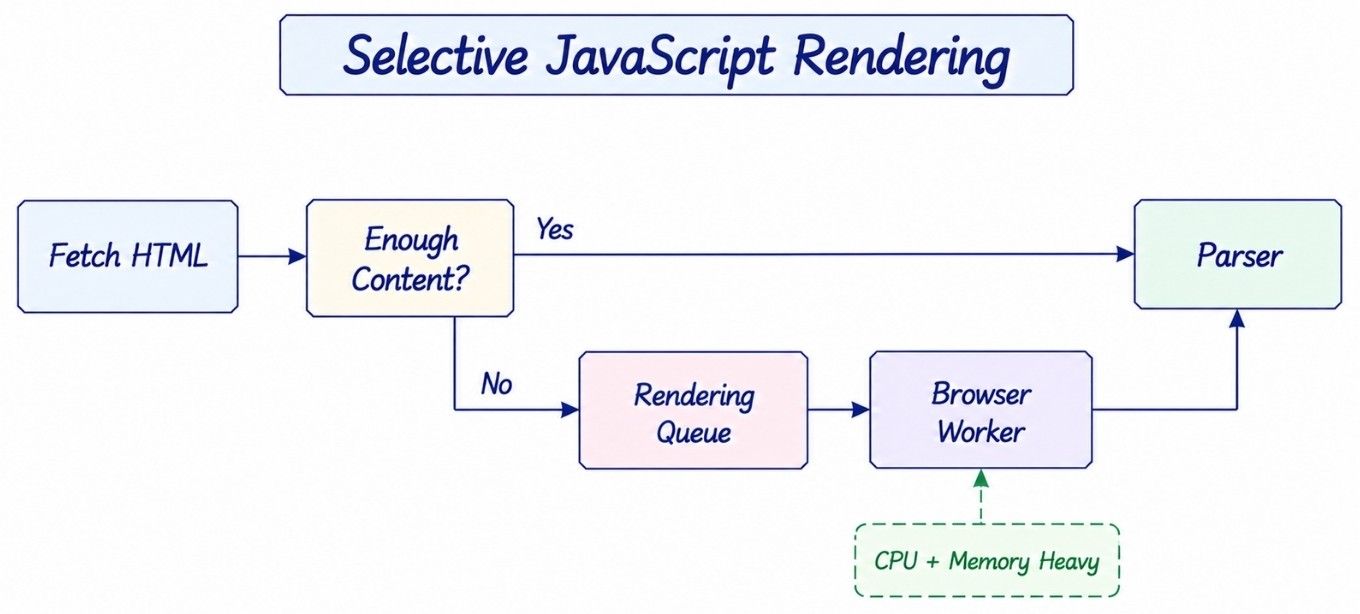
A crawler can handle this with two different paths:
Fetch HTML
    ↓
Enough Useful Content?
  ┌────┴────┐
 Yes        No
  ↓          ↓
Parse     Rendering Queue
              ↓
       Browser Workers
Normal HTTP fetching is much cheaper and faster.
Browser rendering can discover JavaScript-generated content, but it needs much more CPU, memory, and time.
For this reason, a large web crawler should not render every page in a browser.
Instead, JavaScript rendering should use a separate worker pool and only process pages that actually need it.
Some websites can generate a nearly unlimited number of URLs.
A calendar is a simple example:
/calendar/2026/01
/calendar/2026/02
...
/calendar/9999/12
A crawler could keep discovering new calendar URLs for a very long time without finding much useful new content.
This is known as a crawler trap.
Common crawler-trap signals include:
Very deep URL paths.
Fast URL growth from one host.
Repeated query parameter combinations.
Session IDs in URLs.
Very low unique-content ratio.
Many URLs returning almost the same content.
The crawler can also set a crawl budget for each host.
A crawl budget may limit:
Requests per period
Concurrent requests
Downloaded bytes
Discovered URLs
This prevents one website or crawler trap from consuming too much crawler capacity.
Not every page has the same importance.
The URL Frontier can give priority based on:
Page importance.
Freshness needs.
Link popularity.
Distance from the seed URL.
Historical change rate.
Previous crawl success.
For example, a frequently changing news homepage may need higher priority than an old page that rarely changes.
But priority creates another problem.
If the crawler always chooses high-priority URLs, low-priority URLs may wait forever. This is called starvation.
The scheduler can improve fairness using:
Priority bands.
Weighted scheduling.
Age-based priority boosts.
Per-domain crawl budgets.
The crawler must also divide its capacity between two types of work:
Discovery
→ Find new pages

Freshness
→ Revisit known pages
The right balance can change over time.
If too much capacity goes to discovery, known pages become stale. If too much goes to recrawling, the crawler discovers fewer new pages.
Web pages do not all change at the same speed.
A news homepage may change every few minutes, while an old documentation page may remain unchanged for months.
The crawler can keep information such as:
last_crawled_at
change_frequency
page_priority
next_crawl_at
A page that changes often can be scheduled sooner.
A stable page can wait longer before the next crawl.
The crawler can also use HTTP validators such as ETag and Last-Modified.
For example:
If-None-Match: previous-etagIf the content has not changed, the server may return:
304 Not ModifiedThe crawler still makes a network request, but it may avoid downloading the full page again.
This saves bandwidth and makes large-scale recrawling more efficient.
Following links is not the only way to discover pages.
Websites may also provide sitemaps containing URLs that they want crawlers to discover.
A simple sitemap flow is:
Sitemap
   ↓
Parser
   ↓
Candidate URLs
   ↓
Normalize
   ↓
Deduplicate
   ↓
URL Frontier
Sitemaps are useful for discovering pages that may be difficult to reach through normal links.
However, sitemap URLs should still go through the normal validation, normalization, and deduplication process.
A web crawler stores two very different types of data: crawl metadata and downloaded page content.
These usually have different storage needs.
Aspect | Crawl Metadata | Raw Content |
|---|---|---|
Examples | URL, status, timestamps, hash, retry count | HTML, PDF, document bytes |
Size | Small | Can be large |
Access Pattern | Frequent reads and updates | Mostly large reads and writes |
Storage | Metadata database | Object/blob storage |
Main Concern | Scheduling and crawl state | Capacity and bandwidth |
A metadata record may look like this:
URLRecord
---------
url_id
normalized_url
host
crawl_status
last_fetch_at
next_fetch_at
status_code
content_hash
etag
last_modified
content_pointer
retry_count
The metadata database helps the crawler answer questions such as:
Was this URL already crawled?
When should it be crawled again?
Did the last request fail?
Where is the downloaded content stored?
Large HTML pages, PDFs, and other downloaded files should normally go into scalable object storage rather than the scheduler database.
This keeps scheduling data small and makes large content storage easier to scale.
A single machine cannot crawl billions of web pages at a useful speed.
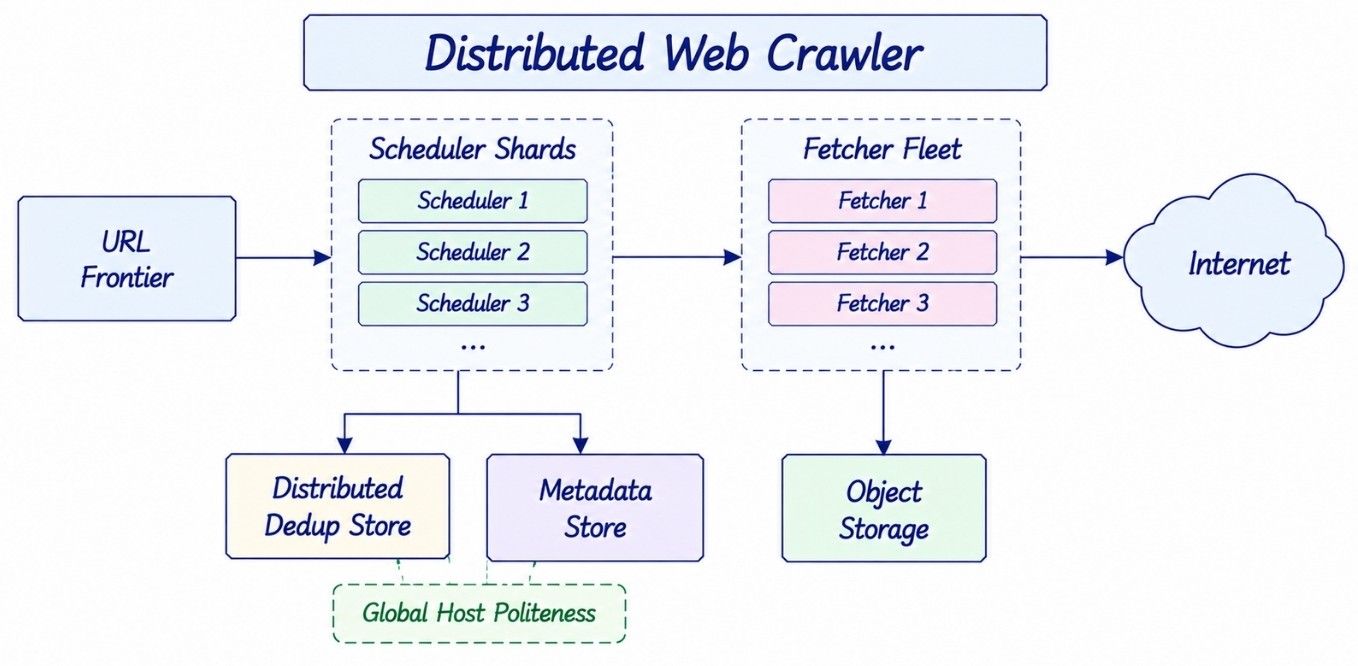
At large scale, we need a distributed web crawler architecture.
A simplified design looks like:
Scheduler Shards
       |
       v
Fetcher Fleet

Distributed Dedup Store

Metadata Store

Object Storage
Adding more fetch workers gives us more network capacity, but the workers still need shared coordination.
Suppose:
Worker A → example.com
Worker B → example.com
Worker C → example.com
If every worker controls its own crawl rate, all three may send requests to example.com at the same time.
Individually they may look safe, but together they could exceed the website's crawl limit.
This is why host-level politeness must be coordinated across the distributed crawler.
One useful scheduling strategy is to partition URLs by hostname.
For example:
partition = hash(hostname) % NURLs belonging to the same host are sent to the same logical scheduler owner.
This keeps important host-level information together, such as:
Host queues.
Next allowed fetch time.
Retry state.
Crawl budget.
Politeness limits.
The scheduler controls when a URL can be fetched.
The actual fetch can still be performed by any available worker.
This gives us distributed execution without losing host-level coordination.
Some websites can contain millions or even billions of pages.
If every URL from a huge website is stored in one physical scheduler partition, that partition can become overloaded. This is called a hot shard.
A better design separates host-level control from URL storage:
Large Host
    ↓
Host Coordinator
    |
    +-- URL Bucket A
    +-- URL Bucket B
    +-- URL Bucket C
             |
             v
       Fetch Workers
The URL data can be spread across several buckets.
The Host Coordinator still controls the total request rate for that website.
This allows storage and fetch execution to scale while keeping one place responsible for overall host politeness.
The scheduler contains important information about pending crawl work.
That state should not exist only in memory.
Important durable state includes:
Frontier entries.
Host scheduling state.
URL leases.
Retry timestamps.
Crawl budgets.
Suppose one scheduler shard crashes.
Another scheduler instance should be able to take ownership and continue processing its URLs.
Leases, leader ownership, or fencing tokens can help make sure that two schedulers do not control the same shard at the same time.
This prevents split ownership during failover.
After a page is downloaded, several systems may need to process it.
The crawler can publish events such as:
PageFetched
PageChanged
NewURLsDiscovered
FetchFailed
PageDeleted
Different consumers can process these events:
Indexer
Link Graph Builder
Content Deduplicator
Analytics
Freshness Model
The fetch worker should not wait for all these systems to finish before moving to the next URL.
Instead, it can publish an event to a durable event stream.
This keeps crawling separate from indexing, analytics, link processing, and other downstream work.
Each part can then scale at its own speed.
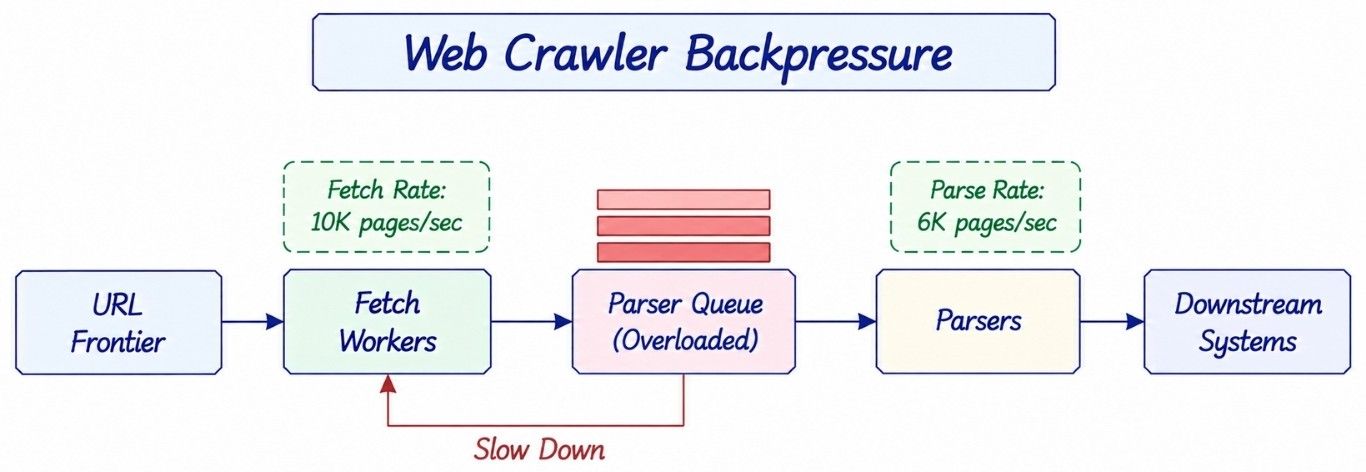
A fast crawler can create problems if downstream systems cannot process pages at the same speed.
Suppose fetch workers download:
10,000 pages/secondbut parsers can process only:
6,000 pages/secondThat leaves:
4,000 extra pages/secondwaiting in the queue.
If this continues, the backlog will keep growing.
The crawler should monitor:
Queue depth.
Oldest queued item.
Consumer throughput.
Storage usage.
Parser capacity.
Downstream health.
When downstream systems start falling behind, upstream crawling should slow down.
The real crawl rate should be based on the capacity of the complete pipeline, not only on how fast fetch workers can download pages.
A web crawler opens URLs found on external websites. Because these URLs are controlled by other users, the crawler should treat every destination and response as untrusted.
One major risk is Server-Side Request Forgery (SSRF). An attacker may create a URL that tries to make the crawler access an internal service instead of a public website.
For example:
Crawler
   ↓
Untrusted URL
   ↓
Private IP / Internal Service / Cloud Metadata
To protect the fetch layer, the crawler should:
Block private and protected network ranges.
Block access to cloud metadata endpoints.
Validate the destination before making a request.
Revalidate the destination after redirects.
Protect against DNS rebinding.
Set response-size limits.
Set decompression limits.
Limit the number of redirects.
Set CPU and memory limits.
Isolate risky parsing and browser rendering.
Use safe HTTP retrieval methods.
Redirect validation is important because a public URL may redirect the crawler to a private or protected address.
A public web crawler should also avoid automatically submitting forms or performing actions that can change data.
The simple rule is:
Treat every URL, redirect, and downloaded response as untrusted input.
A very large distributed web crawler may run in multiple geographic regions.
However, having every region crawl the same website creates duplicate work and makes host-level politeness harder to manage.
A simpler design gives each host or crawl partition a home region.
Host
 ↓
Home Crawl Region
For example, if Region A owns example.com, requests for that host are normally scheduled from Region A.
If Region A fails, another region can take ownership through a controlled failover process.
Region A Owns Host
       ↓
Region A Fails
       ↓
Transfer Ownership
       ↓
Region B Continues Crawling
This keeps crawl ownership clear and reduces duplicate requests.
The same URL should be fetched from multiple regions only when the product needs location-specific content or another clear geographic requirement.
Failures are normal in a distributed web crawler. Workers can crash, websites can become slow, storage can fail, and downstream services can fall behind.
The design should recover from these failures without silently losing crawl work.
Failure | How the Crawler Handles It |
|---|---|
Fetch worker crashes | Let the lease expire and make the URL available again |
Scheduler crashes | Recover the durable frontier and scheduler ownership |
Dedup store becomes unavailable | Pause discovery or use a controlled degraded mode |
Content store becomes unavailable | Apply backpressure and reduce fetching |
Parser backlog grows | Slow down upstream fetch workers |
Website becomes slow | Use per-host limits, timeouts, and backoff |
Temporary network error | Retry with exponential backoff and jitter |
Duplicate event | Process the event idempotently |
For example, if a fetch worker crashes after receiving a URL, the URL lease eventually expires. Another worker can then retry it.
This may sometimes create duplicate work, but that is usually safer than losing the URL completely.
A crawler should prefer recoverable duplicate work over permanently lost crawl work.
A large web crawler needs monitoring to answer two questions:
Is the crawler working correctly?
Is it crawling external websites responsibly?
Useful web crawler monitoring metrics include:
Pages fetched per second.
Bytes downloaded per second.
Fetch success rate.
HTTP status distribution.
Fetch latency.
DNS latency.
Retry rate.
URL Frontier size.
Oldest eligible URL age.
Queue lag.
Duplicate URL rate.
Duplicate content rate.
Page change rate.
429 and 503 response rates.
robots.txt denials.
Host politeness violations.
Scheduler shard load.
Content storage errors.
For example, a sudden increase in 429 Too Many Requests responses may mean the crawler is sending requests too quickly.
A growing URL Frontier may mean URLs are being discovered faster than the crawler can process them.
A growing parser queue may show that fetching is faster than downstream processing.
So monitoring should not focus only on the number of downloaded pages.
A healthy web crawler makes steady progress while respecting crawl rules, website limits, and the capacity of its own downstream systems.
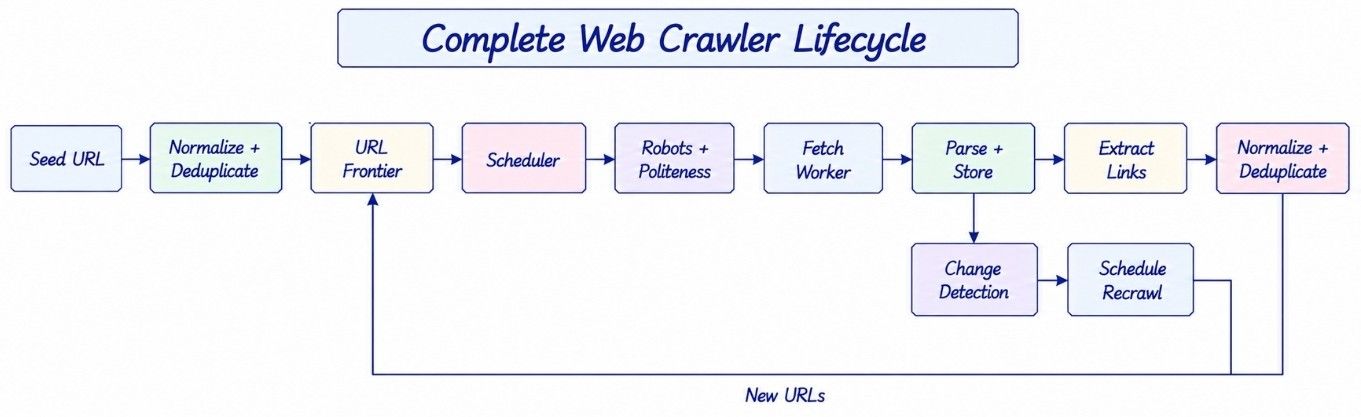
Now that we have covered the main components, let us connect them and see how a URL moves through the complete web crawler system.
Seed URL
   ↓
Normalize URL
   ↓
Check URL Deduplication
   ↓
Determine Host
   ↓
Check robots.txt
   ↓
Add to URL Frontier
   ↓
Wait Until Host Is Eligible
   ↓
Acquire URL Lease
   ↓
Resolve DNS
   ↓
Fetch Page
   ↓
Validate Response
   ↓
Store Metadata + Raw Content
   ↓
Parse Page
   ↓
Extract Links
   ↓
Resolve + Normalize New URLs
   ↓
Deduplicate New URLs
   ↓
Add New URLs to Frontier
   ↓
Content Hash / Change Detection
   ↓
Publish Downstream Events
   ↓
Calculate next_crawl_at
   ↓
Schedule Recrawl
The same cycle continues as the crawler discovers new pages and revisits old pages.
The important point is that crawling is a loop. A downloaded page can produce new URLs, and previously crawled pages can return to the URL Frontier when it is time to check them again.
In a Web Crawler High-Level Design (HLD), we focus on the major services and how data moves between them.
                         SEED SOURCES
                              |
                              v
                       URL NORMALIZER
                              |
                              v
                        DEDUP STORE
                              |
                              v
                        URL FRONTIER
                              |
                              v
                   DISTRIBUTED SCHEDULER
                              |
                 +------------+------------+
                 |                         |
                 v                         v
          ROBOTS SERVICE            POLITENESS
                 |                         |
                 +------------+------------+
                              |
                              v
                        FETCH WORKERS
                              |
                              v
                           INTERNET
                              |
                              v
                        HTTP RESPONSE
                              |
               +--------------+--------------+
               |                             |
               v                             v
         METADATA STORE                OBJECT STORAGE
                                             |
                                             v
                                           PARSER
                                             |
                               +-------------+-------------+
                               |                           |
                               v                           v
                         CONTENT HASH                LINK EXTRACTOR
                               |                           |
                               v                           v
                        CONTENT DEDUP               URL NORMALIZER
                                                           |
                                                           v
                                                      DEDUP STORE
                                                           |
                                                           v
                                                      URL FRONTIER

PageFetched / PageChanged
           |
           v
      EVENT STREAM
           |
     +-----+------+----------+
     |            |          |
     v            v          v
  INDEXER     LINK GRAPH   ANALYTICS
At the HLD level, we do not need to explain every field or internal class.
The main areas to discuss are:
URL Frontier — stores and schedules pending URLs.
Distributed Scheduler — decides which URL can be fetched next.
Robots Service — applies robots.txt rules.
Politeness Manager — controls traffic sent to each host.
Fetch Workers — download pages from the internet.
Metadata Store — keeps crawl state and page information.
Object Storage — stores downloaded page content.
Parser — processes downloaded documents.
Link Extractor — discovers new URLs.
Dedup Store — prevents repeated URL processing.
Event Stream — sends crawl results to downstream systems.
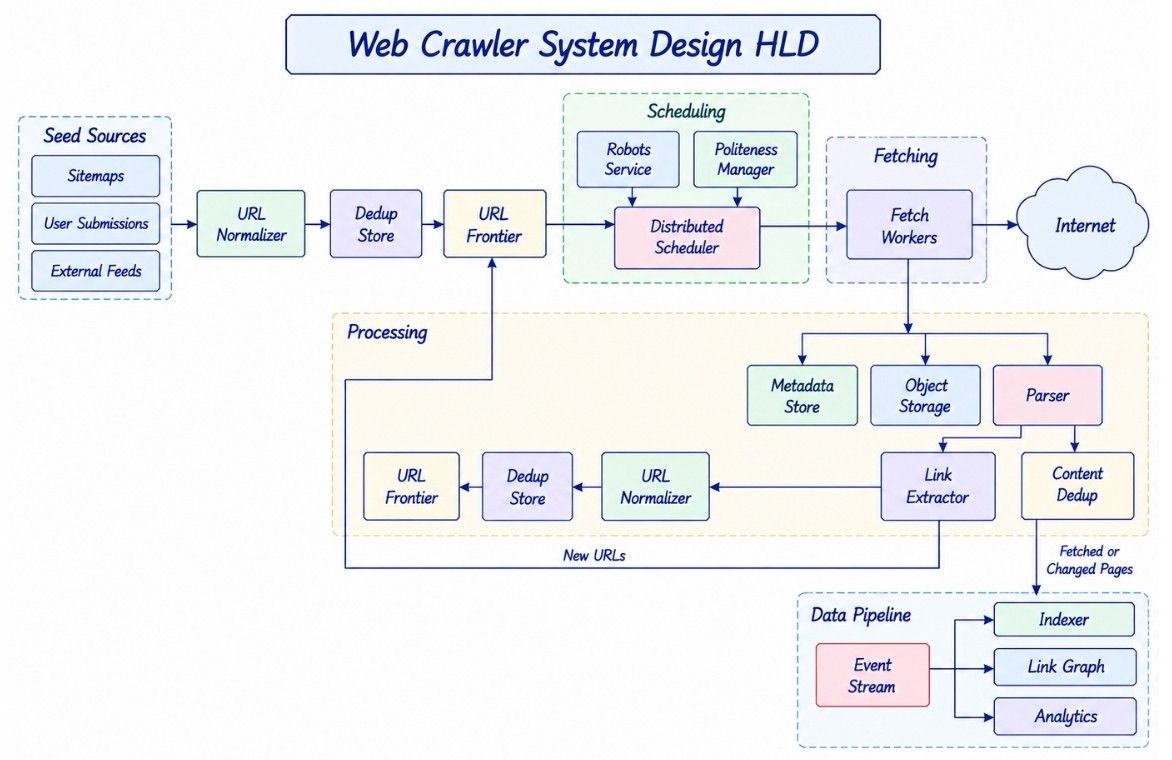
For a web crawler system design interview, the most useful HLD deep dives are usually the URL Frontier, politeness, deduplication, retries, recrawling, and failure recovery.
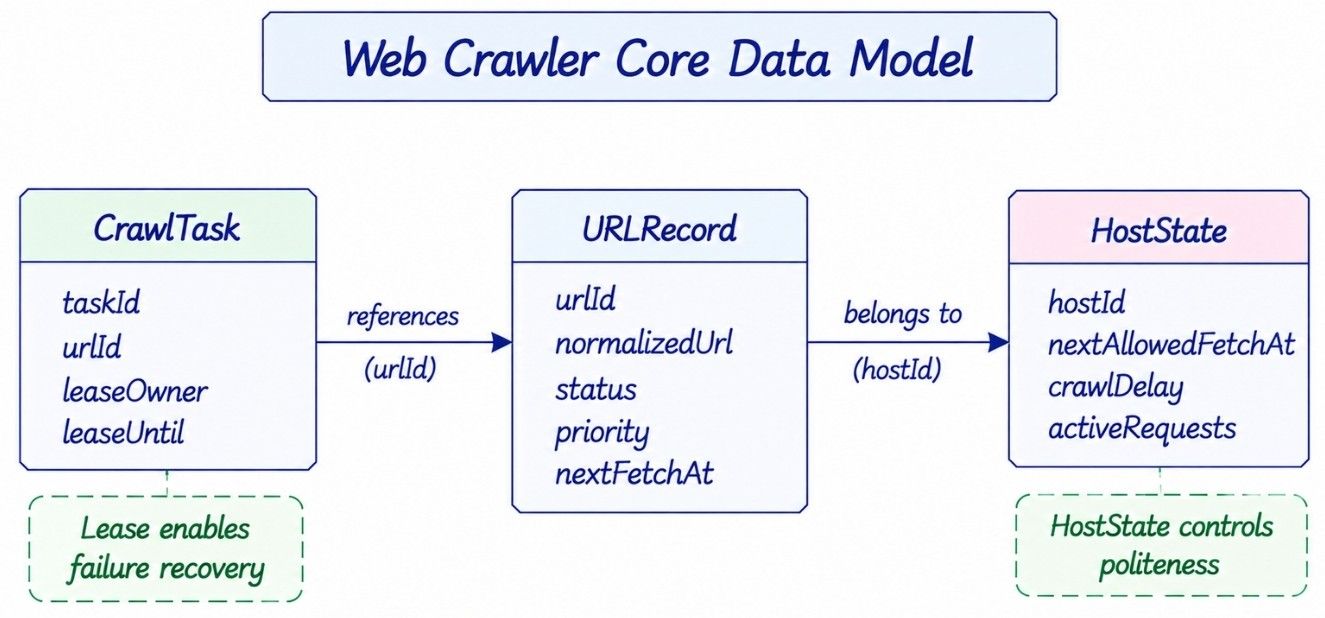
The Web Crawler Low-Level Design (LLD) focuses on the important data models and rules that keep crawling correct.
We do not need a large class diagram. A few core records are enough to explain the design.
URLRecord keeps the crawl state of a discovered URL.
URLRecord
---------
urlId
normalizedUrl
hostId
status
priority
lastFetchAt
nextFetchAt
retryCount
contentHash
For example, nextFetchAt tells the scheduler when the page should become eligible for recrawling.
HostState keeps the information needed to crawl one host safely.
HostState
---------
hostId
nextAllowedFetchAt
crawlDelay
activeRequests
robotsPolicy
dailyBudget
For example, nextAllowedFetchAt prevents workers from sending requests to the same host too quickly.
CrawlTask represents a URL currently assigned to a worker.
CrawlTask
---------
taskId
urlId
leaseOwner
leaseUntil
attempt
If the worker crashes, leaseUntil helps the scheduler decide when another worker can retry the task.
The design should maintain these important rules:
A URL assigned to a failed worker must become eligible again.
Host-level politeness must apply across all workers.
Duplicate discovery should not create uncontrolled duplicate crawling.
Retry state must survive worker and scheduler failures.
Important crawl state should not exist only in process memory.
Downstream event processing should be idempotent.
Untrusted URLs must not give the crawler access to protected internal networks.
These rules are more important than having a large number of classes in the LLD.
A web crawler does not need every distributed component from day one.
A better approach is to start simple and add new parts when scale, reliability, or crawl quality requires them.
For a small crawling job, we can start with:
Queue
 ↓
Fetcher
 ↓
Parser
 ↓
Hash Set
The queue stores pending URLs, the fetcher downloads pages, the parser finds links, and the hash set prevents basic duplicate crawling.
This works well for small datasets.
When losing crawl progress becomes a problem, add:
Persistent URL Frontier.
Crawl metadata.
Retry handling.
URL leases.
Now the crawler can recover more safely from process or worker failures.
When crawling many external websites, add:
robots.txt handling.
Host queues.
Politeness scheduling.
DNS caching.
Response limits.
These features help the crawler interact with websites more safely.
When one machine is no longer enough, add:
Scheduler shards.
Fetcher fleet.
Distributed deduplication.
Object storage.
Durable shard ownership.
Now scheduling, fetching, and storage can scale across multiple machines.
For search-engine-style crawling, add:
Priority crawling.
Adaptive recrawling.
Content deduplication.
Sitemap processing.
Link graph processing.
Indexing pipeline.
At this stage, the crawler must balance new page discovery with keeping known pages fresh.
At very large scale, add:
Crawler-trap detection.
Adaptive crawl budgets.
Hot-domain handling.
Multi-region ownership.
Backpressure.
Selective JavaScript rendering.
The main lesson is simple:
Start with the simplest crawler that solves the current problem, then add complexity when a real bottleneck appears.
There is no single best design for every web crawler. Each decision depends on scale, freshness, crawl coverage, cost, and system complexity.
Decision | Simple Choice | Advanced Choice | Main Trade-Off |
|---|---|---|---|
URL scheduling | FIFO queue | Priority + host-aware frontier | Simplicity vs scheduling control |
URL deduplication | Exact set | Bloom filter + persistent store | Accuracy vs memory and I/O |
Page fetching | Static HTTP | Browser rendering | Lower cost vs dynamic content coverage |
Politeness | Fixed delay | Adaptive limits | Simplicity vs better capacity use |
Recrawling | Fixed interval | Adaptive freshness | Simplicity vs fresher content |
Scheduling | Centralized | Partitioned | Easy coordination vs scalability |
URL discovery | Open discovery | Crawl budgets + trap detection | Coverage vs resource safety |
Execution | Exactly-once goal | At-least-once + idempotency | Complexity vs easier recovery |
For example, browser rendering gives better coverage for JavaScript-heavy websites, but it costs much more CPU and memory.
Similarly, adaptive recrawling keeps important pages fresher, but it needs more metadata and scheduling logic.
The right choice depends on what the crawler actually needs.
Many designs work for a small crawler but start failing when the system becomes distributed.
Common mistakes include:
Treating the URL Frontier as a simple FIFO queue.
Ignoring per-host crawl limits and politeness.
Keeping all discovered URLs in one in-memory set.
Treating Bloom filter results as always correct.
Retrying every failed request immediately.
Removing query parameters without understanding their meaning.
Running JavaScript rendering for every page.
Keeping important frontier state only inside workers.
Adding more fetch workers without checking downstream capacity.
Ignoring SSRF, crawler traps, response limits, and other untrusted-input risks.
Most of these mistakes come from the same problem: designing only for page downloading instead of thinking about scheduling, recovery, safety, and the complete crawl pipeline.
These questions cover the main decisions an interviewer usually expects you to explain clearly.
I would start with seed URLs, normalize and deduplicate them, and place them in a URL frontier.
The scheduler would select URLs based on priority, host politeness, retries, and recrawl time. Distributed fetch workers would download pages, store the content, and send them for parsing.
The parser would extract new links, which would again go through normalization and deduplication before entering the frontier.
I would keep crawl state durable, use leases for worker failures, and use at-least-once execution with idempotent processing rather than trying to guarantee exactly-once fetching.
A URL frontier stores URLs waiting to be crawled and decides when each URL should be fetched.
It is more than a queue because it also handles priority, host politeness, retries, crawl budgets, and recrawl timing.
At large scale, I would partition the frontier by host or another host-aware key so that politeness decisions for the same website stay coordinated.
A FIFO queue does not understand website boundaries.
If many URLs from one website appear together, it could send too many requests to that website at once.
It also does not naturally handle delayed retries, URL priorities, recrawl times, or per-host limits. That is why a real crawler needs a scheduling-aware frontier.
I would first normalize the URL and then check it against a distributed seen-URL store.
At very large scale, a Bloom filter can reduce expensive lookups, but I would be careful about using it as the only source of truth because false positives can cause legitimate URLs to be skipped.
I would maintain host-level scheduling state and enforce limits such as minimum crawl delay, maximum concurrent requests, and crawl budgets.
I would also respect robots.txt and slow down when a website returns signals such as 429 or 503.
The important point is that politeness must be enforced across all crawler workers together, not independently by each worker.
I would partition scheduling by host, run a large fleet of stateless fetch workers, shard the deduplication and metadata stores, and keep large downloaded content in object storage.
The scheduler would own crawl policy and host timing, while workers would mainly execute fetch tasks.
This lets us scale fetch execution without losing host-level coordination.
I would assign URLs using leases.
When a worker receives a URL, the task stays in an in-progress state until the lease expires or the worker acknowledges completion.
If the worker crashes, the lease eventually expires and another worker can retry the URL.
This may occasionally cause duplicate fetching, which is acceptable compared with permanently losing the URL.
Usually no.
Exactly-once network fetching is difficult and does not provide enough benefit for most crawlers.
I would use at-least-once scheduling with leases, retries, deduplication, and idempotent downstream processing. Fetching a page twice occasionally is normally much safer than losing an important page permanently.
I would first classify the failure.
Temporary failures such as timeouts, 503, or temporary DNS problems can be retried using exponential backoff with jitter.
For 429, I would reduce the crawl rate and respect applicable retry guidance.
Permanent failures or unsupported content should not be retried aggressively.
For exact duplicates, I would calculate a hash of the normalized page content.
If two different URLs have the same content hash, they may contain the same document.
For near-duplicate pages, techniques such as SimHash or MinHash can be used if the product needs that level of detection.
I would monitor patterns such as very deep URLs, rapidly growing query combinations, session IDs, infinite calendars, and many URLs returning almost identical content.
I would also enforce per-host crawl budgets, path-depth limits, URL limits, and query-pattern controls.
The challenge is to stop infinite URL spaces without blocking legitimate large websites.
I would not use the same interval for every page.
I would look at the page's previous change frequency, importance, HTTP cache metadata, crawl budget, and historical errors.
Frequently changing pages should be revisited sooner, while stable pages can be crawled less often.
If the server provides ETag or Last-Modified, I would also use conditional requests to reduce unnecessary data transfer.
The final design connects discovery, scheduling, fetching, processing, and recrawling into one continuous loop.
                         SEED SOURCES
                              |
                              v
                         NORMALIZER
                              |
                              v
                         DEDUP STORE
                              |
                              v
                         URL FRONTIER
                              |
                              v
                    DISTRIBUTED SCHEDULER
                              |
                   ROBOTS + POLITENESS
                              |
                              v
                        FETCH WORKERS
                              |
                              v
                           INTERNET
                              |
                              v
                     RESPONSE PROCESSING
                              |
               +--------------+--------------+
               |                             |
               v                             v
        METADATA STORE                OBJECT STORAGE
                                             |
                                             v
                                           PARSER
                                             |
                                             v
                                      LINK EXTRACTOR
                                             |
                                             v
                                       URL NORMALIZER
                                             |
                                             v
                                        DEDUP STORE
                                             |
                                             v
                                        URL FRONTIER

                       RECRAWL LOOP

Metadata / Change History
          |
          v
    Freshness Model
          |
          v
    next_crawl_at
          |
          v
      URL Frontier
The central principle is:
A scalable web crawler is a distributed scheduling system first and a page-downloading system second.
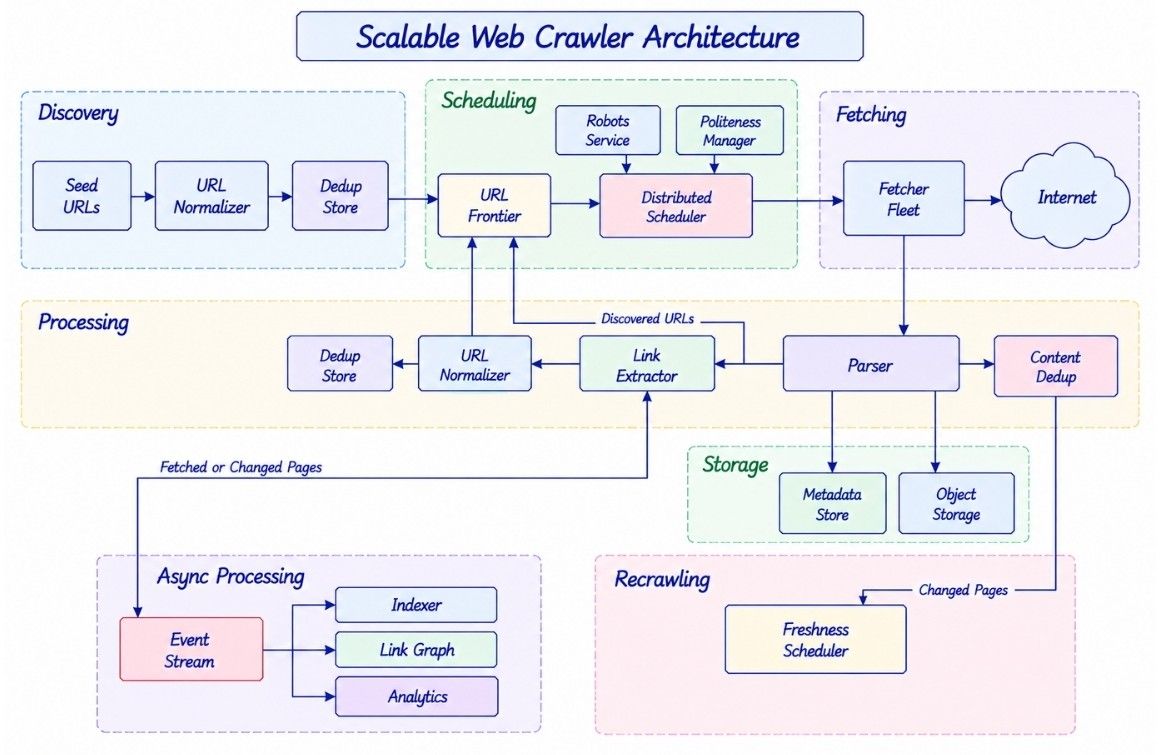
The URL frontier decides what should be crawled, politeness controls when it is safe to crawl, workers perform the fetch, deduplication prevents unnecessary work, and the recrawl system keeps important content fresh.
Once these responsibilities are separated clearly, the system can scale without losing reliability, crawl quality, or responsible behavior toward external websites.
