
Durgesh Tiwari
Author
A computer network is not just made of computers and cables. It is a combination of devices and structures that work together to move data efficiently from one system to another.
Network devices control how data moves, while network topologies define how devices are arranged and connected.
Understanding both is important because they form the foundation of real-world networking, cloud systems, and System Design.
Network devices are hardware components that help in sending, receiving, and managing data across a network. Whenever you use the internet, your data passes through multiple devices before reaching its destination.
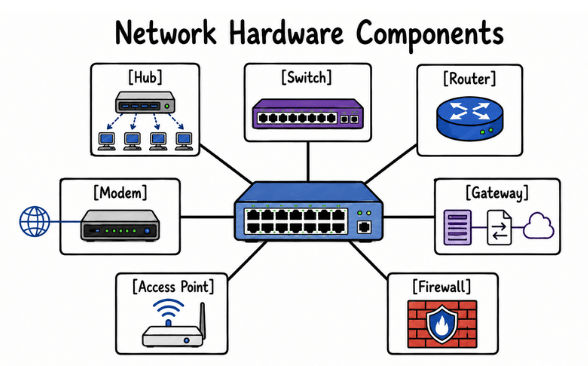
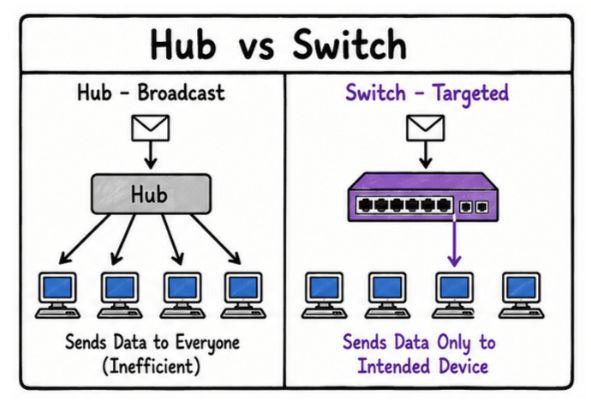
A Hub is the simplest network device. It connects multiple devices and sends incoming data to all of them.
It does not check the destination—it just forwards everything.
This creates unnecessary traffic and reduces efficiency.
Simple and low cost
Easy to set up
Sends data to all connected devices
Today, hubs are rarely used because they are inefficient.
A Switch is an improved version of a hub. It connects devices within a LAN and sends data only to the intended device.
It uses MAC addresses to identify devices, which makes communication faster and more efficient.
Sends data only to the correct device
Reduces network traffic
Improves speed and performance
Switches are widely used in homes, offices, and data centers.
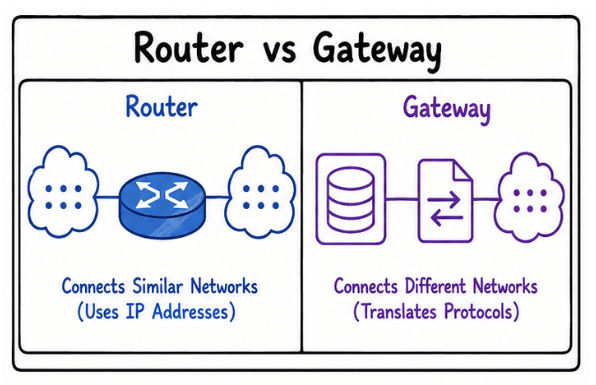
A Router connects different networks, such as your home network and the internet.
It uses IP addresses to decide where data should go and selects the best path for delivery.
Connects multiple networks
Enables internet access
Routes data efficiently between networks
Routers are essential in both home and enterprise environments.
A Gateway connects two different networks that use different protocols.
It acts as a translator so both systems can understand each other.
Enables communication between different systems
Converts protocols when required
Used in enterprise and complex networks
A Modem connects your home or office network to your Internet Service Provider (ISP).
It converts digital signals into a format that can travel over communication lines and converts incoming signals back into digital form.
Provides internet connectivity
Converts signals between ISP and local network
Works together with a router
An Access Point allows devices to connect to a network wirelessly using Wi-Fi.
It extends network coverage so multiple devices can connect without cables.
Provides wireless connectivity
Expands Wi-Fi coverage
Used in large buildings and public spaces
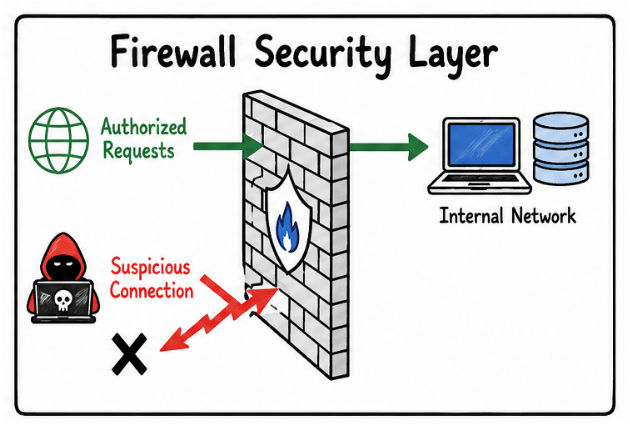
A Firewall is a security device that monitors and controls network traffic.
It allows safe traffic while blocking unauthorized or harmful connections.
Improves network security
Blocks unauthorized access
Filters suspicious traffic
Firewalls are a key part of modern network security systems.
A network topology describes how devices are arranged and connected in a network. It defines the structure of communication and decides how data moves between systems.
In simple terms, topology is the layout of a network.
Different topologies are used depending on cost, reliability, and scale requirements.
The most common types are Bus, Star, Ring, Mesh, Tree, and Hybrid.
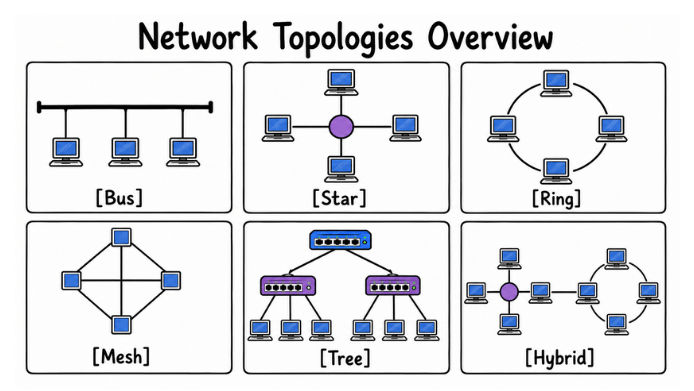
In a Bus Topology, all devices share a single communication line called a backbone.
Data travels through this single cable and is received by all devices, but only the intended device processes it.
This topology was used in early networks but is rarely used today.
Simple and low cost to set up
Requires less cable
Easy for small setups
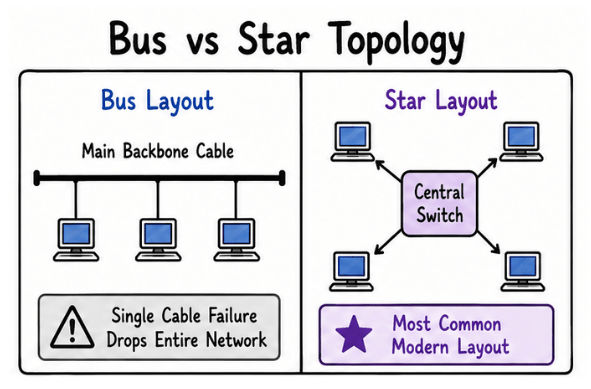
However, if the main cable fails, the entire network stops working. Performance also drops when too many devices are added.
A Star Topology connects all devices to a central device like a switch.
All communication goes through this central point.
This is the most common topology used today in homes, offices, and data centers.
Easy to manage and expand
Failure of one device does not affect others
Easy to troubleshoot issues
The only major risk is the central device—if it fails, the whole network goes down.
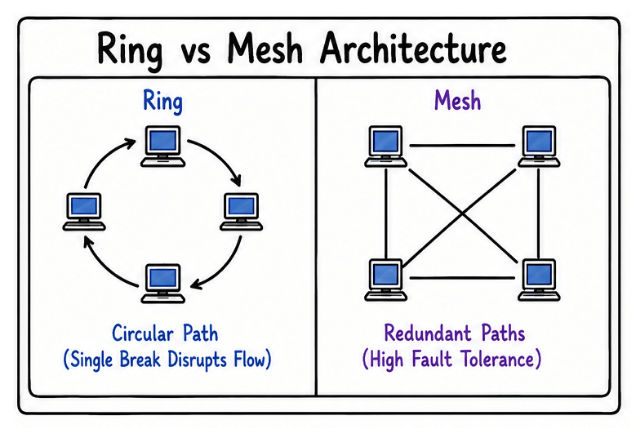
In a Ring Topology, each device is connected to two other devices, forming a circular path.
Data moves in one direction (or sometimes both) until it reaches its destination.
Predictable data flow
Fewer chances of data collision
But a single break in the ring can disrupt the entire network unless backup paths are available.
This topology is mostly used in specialized or legacy systems.
In a Mesh Topology, every device is connected to multiple other devices.
If one path fails, data can take another route, making the network highly reliable.
Very high reliability
Multiple paths for data
Strong fault tolerance
However, it is expensive and complex because it requires a large number of connections.
This is used in systems where uptime is critical, such as cloud infrastructure and financial systems.
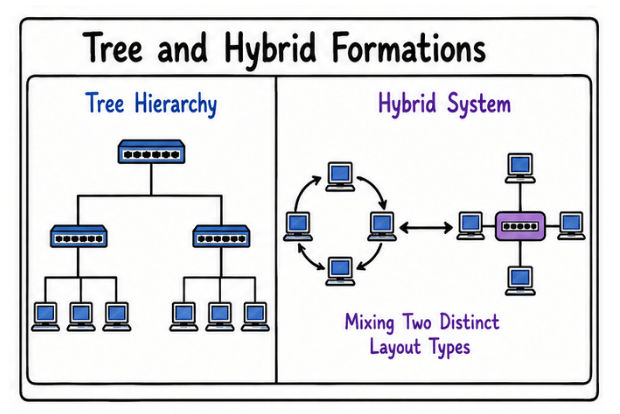
A Tree Topology is a combination of star networks arranged in a hierarchy.
Smaller star networks connect to a main backbone, forming a tree-like structure.
Easy to scale for large organizations
Good for structured network management
Supports departmental separation
If the main backbone fails, multiple parts of the network can be affected.
A Hybrid Topology is a mix of two or more different topologies.
For example, a company might use a star topology inside each office and connect all offices using a tree structure.
Flexible and scalable
Suitable for large systems
Combines advantages of multiple topologies
But it is more complex and expensive to design and manage.
In real-world systems, network devices and topologies work together to build a complete communication setup.
For example, in a large organization:
Switches connect computers within office floors
Routers connect different offices and handle internet traffic
Firewalls secure the internal network from external threats
Access points provide wireless connectivity across the building
At the same time, the network structure is also carefully designed:
Each office floor may use a Star Topology for simplicity
Different departments may be connected using a Tree Topology
Critical systems like databases may use a Mesh Topology for high reliability
By combining different devices and topologies, organizations build networks that are secure, scalable, and reliable while still maintaining good performance.
