
Durgesh Tiwari
Author
Modern applications such as Amazon, Netflix, Instagram, and Flipkart serve millions of users every day. As the number of users, requests, and data continues to grow, the application must maintain fast performance and remain available without slowing down or crashing.
This ability is called Scalability. It is one of the most important concepts in System Design because it allows an application to grow smoothly as demand increases. A scalable system can support more users, process more requests, and manage larger amounts of data simply by adding the required resources.
Scalability is the ability of a system to handle an increasing workload by adding resources while maintaining good performance, reliability, and availability.
As user traffic grows, a scalable system can expand its computing resources, such as CPU, memory, storage, or servers, without affecting the user experience.
In simple words, Scalability means a system can grow and handle more users or requests without slowing down or failing.
Example
Suppose an e-commerce website receives around 10,000 visitors every day.
During a festive sale, the number of visitors suddenly increases to 500,000. If the application continues to respond quickly by adding more servers or other resources, it is considered a scalable system.
As an application becomes more popular, the number of users, requests, and transactions also increases. Without proper scalability, the application may become slow, unavailable, or even crash during periods of heavy traffic.
A scalable system helps businesses grow while continuing to deliver a smooth and reliable user experience.
Scalability provides several important benefits for modern applications:
Handles Growing User Traffic – Supports more users and requests without affecting performance.
Maintains High Performance – Keeps the application fast even during periods of heavy traffic.
Supports Business Growth – Allows applications to grow as the business and user base expand.
Improves Availability – Reduces the risk of downtime during traffic spikes.
Provides a Better User Experience – Ensures users receive fast and reliable responses.
Optimizes Resource Usage – Makes efficient use of computing resources by adding capacity only when needed.
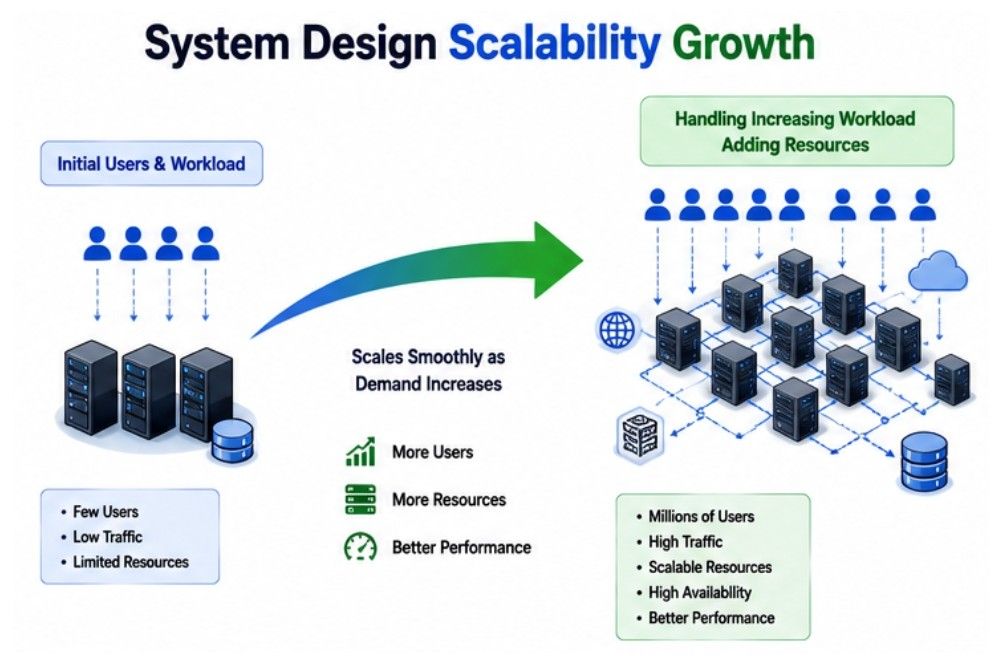
Today, most cloud-based applications are designed with scalability in mind so they can efficiently handle changing workloads and unexpected traffic spikes.
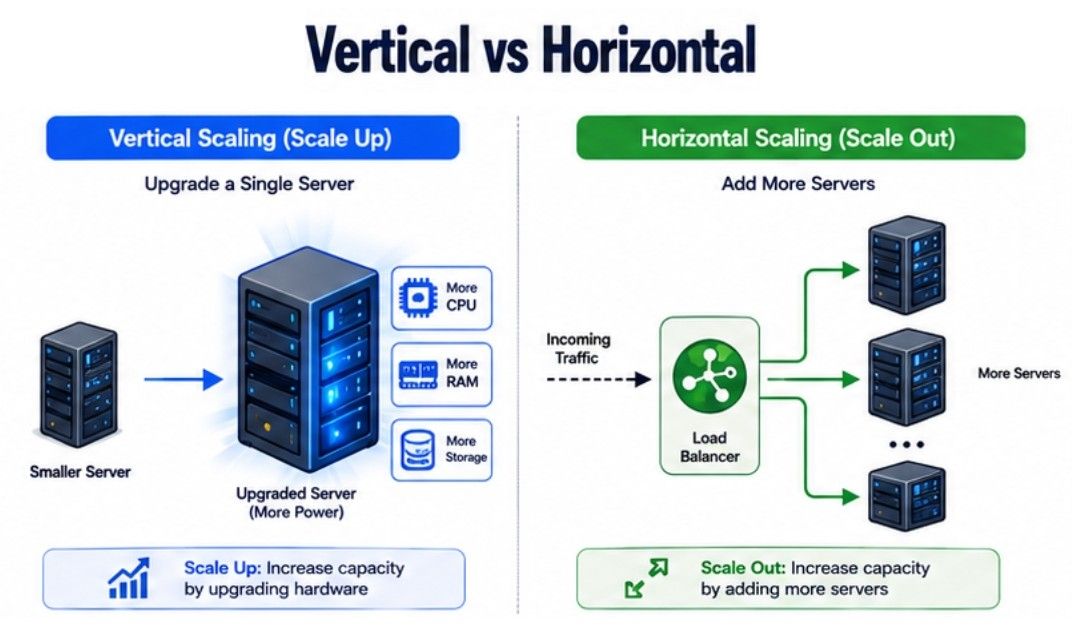
There are two main ways to scale a system as the number of users and requests grows:
Vertical Scaling (Scale Up)
Horizontal Scaling (Scale Out)
Both approaches increase the system's capacity, but they do it in different ways. Choosing the right approach depends on your application's requirements, traffic, budget, and future growth.
Vertical Scaling, also called Scale Up, means increasing the capacity of an existing server by upgrading its hardware resources. Instead of adding more servers, you make the current server more powerful.
Common hardware upgrades include:
Increasing CPU cores
Adding more RAM
Expanding storage capacity
Upgrading to faster hardware
In simple words, Vertical Scaling means making one server more powerful so it can handle more work.
Example
Suppose a web server is running with:
8 GB RAM
4 CPU cores
As the number of users increases, the server is upgraded to:
32 GB RAM
16 CPU cores
The application can now process more user requests using the same server.
Vertical Scaling offers several benefits, especially for smaller applications.
Easy to Implement – Upgrading a single server is simple and requires minimal changes.
No Major Architecture Changes – The application continues running on the same server.
Simple to Manage – Managing one powerful server is easier than managing multiple servers.
Suitable for Small and Medium Applications – Works well when the application does not receive extremely high traffic.
Although Vertical Scaling is simple, it has some limitations.
Hardware Has a Maximum Limit – A server cannot be upgraded indefinitely.
Higher Hardware Cost – Powerful servers are significantly more expensive.
Single Point of Failure – If the server fails, the entire application becomes unavailable.
Possible Downtime During Upgrades – Hardware upgrades may require temporarily stopping the server.
Horizontal Scaling, also called Scale Out, means increasing system capacity by adding more servers instead of upgrading a single one.
A Load Balancer distributes incoming requests across all available servers, allowing them to share the workload efficiently.
In simple words, Horizontal Scaling means adding more servers so the workload is shared instead of increasing the power of one server.
Example
Suppose an application initially runs on one web server.
As user traffic grows, the application is deployed on five web servers. A Load Balancer distributes incoming requests evenly across all servers. If traffic continues to increase, additional servers can be added without affecting the existing system.
Horizontal Scaling is widely used for modern cloud-based and distributed applications because it provides several important benefits.
Handles Very High Traffic – Supports millions of users by distributing requests across multiple servers.
Improves High Availability – If one server fails, other servers continue serving requests.
Eliminates a Single Point of Failure – The application does not depend on a single server.
Easy to Expand – New servers can be added as demand grows.
Ideal for Distributed Systems – Works well with cloud platforms and microservices architectures.
Horizontal Scaling also introduces additional complexity.
More Complex Architecture – Managing multiple servers is more challenging than managing one server.
Requires a Load Balancer – Incoming requests must be distributed efficiently among servers.
Data Synchronization Can Be Challenging – Keeping data consistent across multiple servers requires additional mechanisms.
Higher Infrastructure Management – More servers require monitoring, maintenance, and configuration.
Vertical Scaling (Scale Up) | Horizontal Scaling (Scale Out) |
|---|---|
Increases the capacity of a single server by upgrading its hardware. | Increases system capacity by adding more servers. |
Limited by the maximum hardware capacity of one server. | Can continue scaling by adding additional servers as needed. |
Easier to implement and manage. | More complex because it requires multiple servers and load balancing. |
Usually has a lower initial setup cost. | May require a higher initial investment due to additional infrastructure. |
Has a single point of failure because the application depends on one server. | Provides better fault tolerance since multiple servers share the workload. |
Best suited for small and medium-sized applications. | Best suited for large-scale and cloud-based applications. |
Scaling usually requires upgrading the existing server. | Scaling is achieved by simply adding new servers to the system. |
Downtime may be required during hardware upgrades. | New servers can often be added with little or no downtime. |
Scalability | Elasticity |
|---|---|
Increases the system's capacity to handle a growing workload. | Automatically increases or decreases resources based on the current workload. |
Focuses on supporting long-term application growth. | Focuses on handling short-term or unpredictable changes in demand. |
Resources are usually added manually or through planned scaling. | Resources are added or removed automatically without manual intervention. |
Helps the application support more users, requests, and data over time. | Helps the application respond quickly to traffic spikes and reduced demand. |
Commonly used in both on-premises and cloud environments. | Primarily used in cloud computing environments. |
Scaling can be permanent or long-term. | Resource changes are temporary and adjust dynamically as demand changes. |
Best suited for applications with steady business growth. | Best suited for applications with fluctuating or unpredictable traffic. |
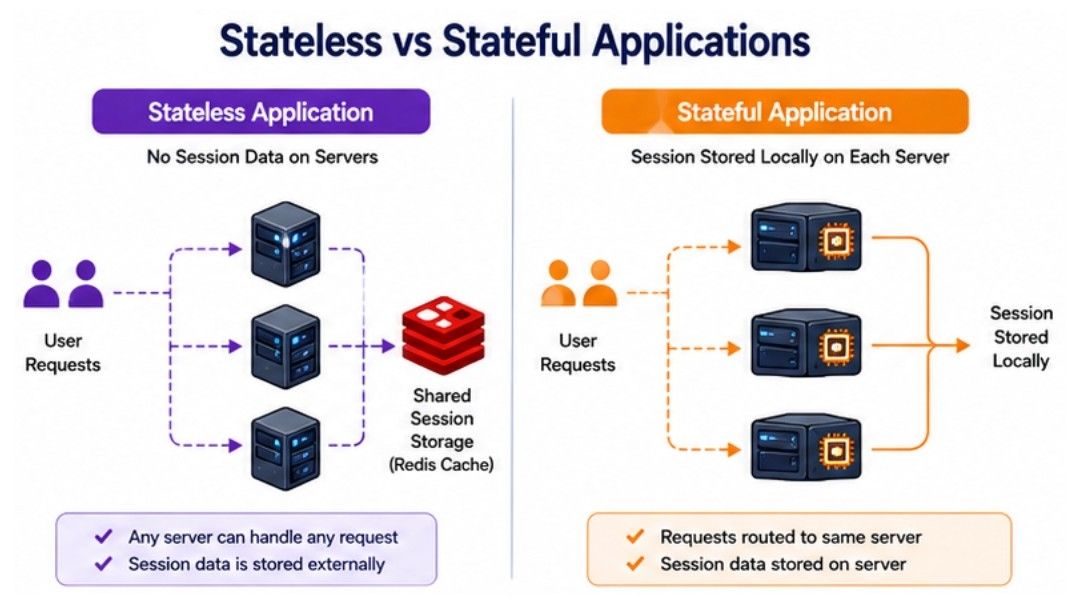
A Stateless Application does not store user session information on the application server. Every request is processed independently, and the server does not remember anything about previous requests.
Since each request contains all the information needed to complete it, any available server can handle the request. This makes stateless applications easy to scale and ideal for modern distributed systems.
In simple words, a Stateless Application treats every user request as a new request without remembering previous interactions.
Example
A weather application is a good example of a stateless application.
When a user searches for the weather in London, the request includes the city name. The server returns the weather information without needing any data from previous requests.
If the next request is processed by a different server, the result remains the same because every request is independent.
Stateless applications are widely used because they are simple to scale and manage.
Easy to Scale Horizontally – New servers can be added easily to handle more traffic.
Supports Better Load Balancing – Any server can process any request.
Improves Reliability – If one server fails, another server can immediately handle incoming requests.
Simplifies Server Management – Servers can be added, removed, or replaced without affecting user requests.
Although stateless applications are highly scalable, they also have some limitations.
No Session Data is Stored – User-specific information must be stored externally if needed.
Every Request Must Include Required Information – The server cannot rely on data from previous requests.
May Require External Storage – User sessions are often stored in databases or distributed caches like Redis.
A Stateful Application stores user session information on the application server. The server remembers previous interactions, so future requests from the same user must usually be processed by the same server.
Because the server maintains session data, managing multiple servers becomes more challenging.
In simple words, a Stateful Application remembers previous user requests by storing session information on the server.
Example
An online banking application is a common example of a stateful application.
After a user logs in, the server stores the user's session. During the session, all requests should reach the same server. If the request is sent to another server without session sharing, the user may need to log in again.
Stateful applications are useful when user information needs to be maintained during an active session.
Simplifies Session Management – The server keeps track of user sessions automatically.
Supports Continuous User Interaction – Ideal for applications where users perform multiple related actions.
Provides Personalized Experiences – The server can remember user-specific information throughout the session.
Stateful applications are generally harder to scale than stateless applications.
Difficult to Scale Horizontally – User requests often need to reach the same server.
Requires Session Synchronization – Multiple servers must share session data if requests are distributed.
More Complex Load Balancing – Load balancers may need sticky sessions or shared session storage.
Stateless Application | Stateful Application |
|---|---|
Does not store user session data on the application server. | Stores user session data on the application server. |
Every request is processed independently. | Future requests depend on information stored from previous requests. |
Any available server can process the request. | Requests usually need to reach the same server or use shared session storage. |
Easy to scale horizontally by adding more servers. | More difficult to scale because session management is required. |
Supports simple and efficient load balancing. | Requires sticky sessions or session synchronization for load balancing. |
Provides better fault tolerance because another server can handle requests if one fails. | A server failure may interrupt the user session if sessions are not shared. |
Commonly used in REST APIs, microservices, and cloud-native applications. | Commonly used in banking systems, shopping carts, and traditional web applications. |
Easier to manage and maintain in distributed systems. | More complex to manage due to session handling across multiple servers. |
As an application grows, handling more users and data becomes more challenging. Developers must solve these issues to keep the system fast, reliable, and scalable.
Traffic Spikes: A sudden increase in user requests can overload servers and slow down the application.
Database Bottlenecks: A single database may struggle to handle a large number of read and write requests.
Session Management: Managing user sessions becomes more difficult when requests are handled by multiple servers.
Data Consistency: Keeping data synchronized across multiple servers is essential to ensure users always see the latest information.
Load Balancing: User requests should be distributed evenly across servers to prevent overloading.
Infrastructure Cost: Adding more servers and resources increases the overall cost of running the application.
Monitoring and Maintenance: Large-scale systems require continuous monitoring to detect issues and maintain reliable performance.
Consider Netflix, one of the world's largest video streaming platforms. Every day, millions of users watch movies and TV shows from different devices and locations.
When a popular movie or series is released, user traffic increases rapidly. Netflix handles this growth using Horizontal Scaling, where additional servers are added to distribute the workload. Load Balancers ensure that incoming requests are shared evenly across all available servers.
Netflix also uses Stateless Services, allowing any server to process user requests without relying on previous sessions. During sudden traffic spikes, cloud infrastructure can automatically add or remove resources, demonstrating Elasticity. This combination helps Netflix deliver fast, reliable, and uninterrupted streaming even during peak traffic.
Scalability is a fundamental concept in System Design that enables applications to handle increasing users, requests, and data without affecting performance. As applications continue to grow, choosing the right scaling approach helps maintain high availability, reliability, and a smooth user experience.
Scalability allows a system to support increasing workloads by adding computing resources.
Vertical Scaling (Scale Up) improves the capacity of a single server by upgrading its hardware.
Horizontal Scaling (Scale Out) increases system capacity by adding multiple servers to share the workload.
Stateless Applications are easier to scale because each request is processed independently.
Stateful Applications store user session data, making horizontal scaling more complex.
Scalability focuses on handling long-term growth, while Elasticity automatically adjusts resources based on changing workloads.
Building scalable systems also requires handling challenges such as traffic spikes, database bottlenecks, session management, data consistency, load balancing, infrastructure costs, and system monitoring.
