
Durgesh Tiwari
Author
Imagine you are building an API used by thousands or millions of clients.
At first, traffic is manageable. Then one client suddenly starts sending:
50,000 requests per secondIt could be a bug, a bot, or an attack.
If every request reaches the backend, application servers, databases, and downstream services can quickly become overloaded.
A rate limiter controls how many requests a client can send within a given period.
For example:
100 requests per minute per user
10 login attempts per minute per IP
1,000 API calls per hour per API key
When a client exceeds the configured limit, the system can reject the extra requests, usually before they reach expensive backend services.
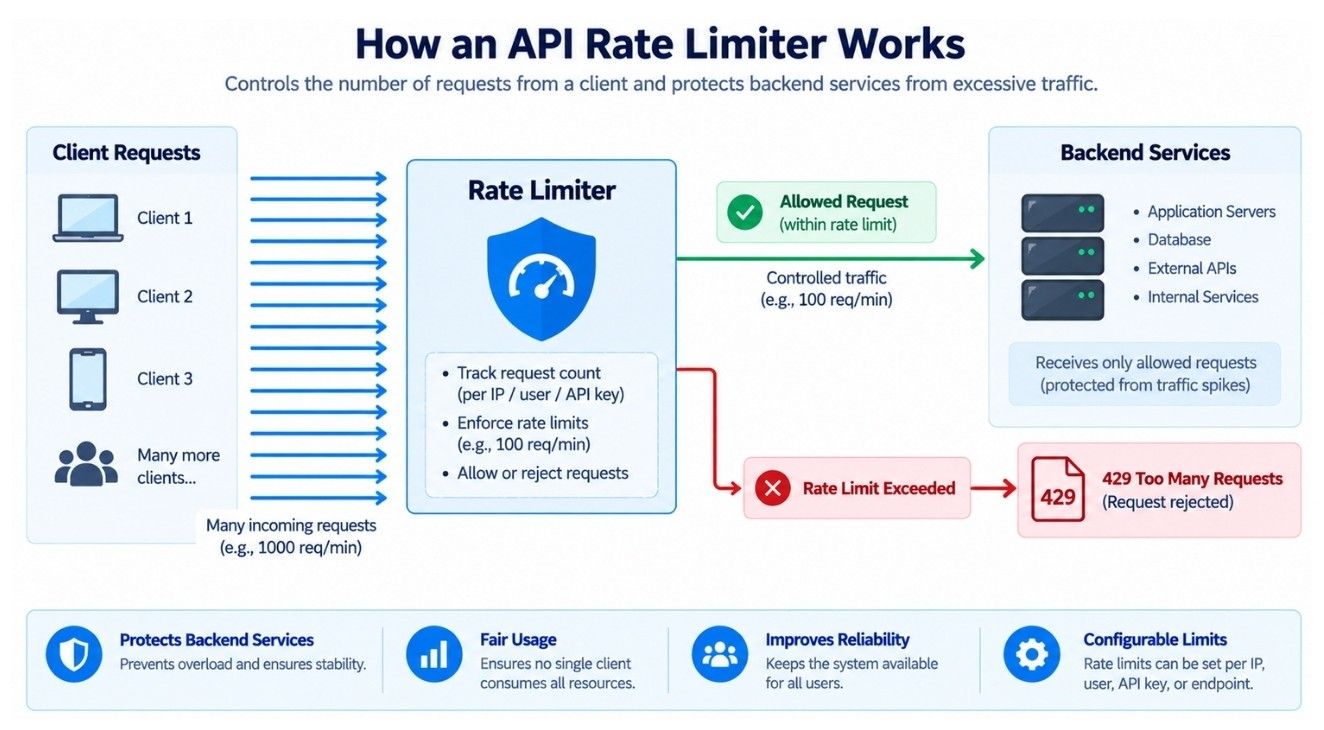
In this case study, we will design a distributed rate limiter step by step. We will begin with a simple in-memory solution, identify where it fails as the system scales, and evolve it into a design that works across many servers under high traffic.
We need a rate limiter that decides whether an incoming request should be allowed or rejected based on a configured rule.
Suppose the rule is:
5 requests per minute per userIf User A sends five requests within a minute, all five are allowed. A sixth request within the same limit period is rejected.
Request 1 → Allow
Request 2 → Allow
Request 3 → Allow
Request 4 → Allow
Request 5 → Allow
Request 6 → Reject
Once enough time passes according to the rate-limiting algorithm, the user can send requests again.
The basic decision is simple. The real challenge is making it work efficiently when:
millions of users are active
requests are distributed across many servers
many requests arrive concurrently
servers or shared state stores fail
traffic reaches millions of requests per second
Our goal is to design a rate limiter that can handle these conditions without adding significant latency to every request.
A rate limiter prevents a client from consuming more resources than the system is prepared to handle.
It helps protect against:
API abuse
bots and automated traffic
brute-force attempts
accidental traffic spikes
excessive use of expensive endpoints
unfair resource usage
For example, suppose an API endpoint performs an expensive database query. Without rate limiting, one client could call it thousands of times and consume resources needed by other users.
Rate limiting protects shared infrastructure while helping keep API usage fair and predictable.
The rate limiter should support:
Request limits: Enforce rules such as 100 requests per minute.
Different identities: Limit by user ID, IP address, API key, device, organization, or endpoint.
Different limits: Support different quotas for different users or plans.
Endpoint-specific limits: Apply stricter limits to expensive operations.
Over-limit handling: Reject excess HTTP requests with 429 Too Many Requests and optionally provide retry information.
For example:
Client Type | Rate Limit |
|---|---|
Free User | 100 requests/minute |
Pro User | 1,000 requests/minute |
Internal Service | 10,000 requests/minute |
The rate limiter sits directly in the request path, so it should provide:
Low latency: Add minimal delay to each request.
High availability: Continue operating despite individual component failures.
Scalability: Handle millions of decisions per second by scaling horizontally.
Concurrency safety: Prevent concurrent requests from significantly exceeding configured limits.
Configurability: Allow rate-limit rules to change without modifying application code.
Suppose our API receives 2 million requests per second. Since every request needs a rate-limit check, the rate limiter must also handle 2 million decisions per second.
The critical path is simple:
Read/Update Counter
        ↓
 Make Decision
        ↓
 Return Result
Now assume we track 50 million active identities. If each record uses about 100 bytes, the active state is roughly 5 GB of memory.
The key takeaway is that throughput is usually the bigger challenge than storage. A rate limiter must process millions of decisions with minimal latency.
The placement of a rate limiter depends on what you want to protect.
Client
   ↓
API Gateway
   ↓
Rate Limiter
   ├── Allow → Application
   └── Reject
This blocks abusive traffic before it reaches backend services.
API Gateway
   ↓
Payment Service
   ↓
Rate Limiter
This protects individual services and their expensive endpoints.
In large systems, it's common to use both: a global limit at the API gateway and service-specific limits for critical operations.
Suppose our application is running on only one server.
The easiest solution is to keep a request counter in memory.
For example:
user_123 → 42 requestsAssume the rule is:
100 requests per minuteWhen a request arrives:
Read the user's current counter.
Increase the counter by one.
If the count is 100 or less, allow the request.
If the count is more than 100, reject it.
At the start of the next minute, we reset the counter.
This simple design works well when the application is running on a single server.
Now suppose our application grows and we add more servers.
Server A
Server B
Server C
A load balancer sends incoming requests to different servers.
Suppose User 123 sends requests and each server keeps its own local counter:
Server A → 40 requests
Server B → 35 requests
Server C → 30 requests
The user has actually sent:
40 + 35 + 30 = 105 requestsBut each server sees fewer than 100 requests.
So every server may continue allowing requests even though the user has already crossed the limit.
The problem is that each server has only part of the rate-limit information.
To make the limit work across many servers, we need a shared rate-limit state.
The problem with local counters is that each server sees only part of the user's traffic.
To fix this, we can store all rate-limit counters in a shared store.
A Redis-like in-memory store is a common choice because it is fast and supports atomic counter updates.
                 ┌──────────────┐
                 │    Client    │
                 └──────┬───────┘
                        │
                        ▼
                 ┌──────────────┐
                 │ API Gateway  │
                 └──────┬───────┘
                        │
                        ▼
                 ┌──────────────┐
                 │ Rate Limiter │
                 └──────┬───────┘
                        │
                        ▼
                 ┌──────────────┐
                 │ Shared Store │
                 │   (Redis)    │
                 └──────────────┘
Now all servers use the same rate-limit state.
If User 123 sends requests through different application servers, they still update the same counter in the shared store.
This solves the problem of separate counters on different servers.
Now we need to decide how to count requests over time.
The simplest rate-limiting algorithm is the Fixed Window Counter.
Suppose our rule is:
100 requests per minuteWe divide time into fixed one-minute windows:
10:00:00 → 10:00:59
10:01:00 → 10:01:59
10:02:00 → 10:02:59
For each user, we keep a separate counter for each time window.
For example:
rate:user_123:10_00 → 57This means User 123 has made 57 requests during the 10:00 minute window.
When a new request arrives:
Find the counter for the current window.
Increase it by one.
If the counter is within the limit, allow the request.
If it goes above 100, reject the request.
When the next minute starts, we use a new counter for the new window.
This approach is simple and fast, but it has an important problem around the boundary between two windows. We will see that next.
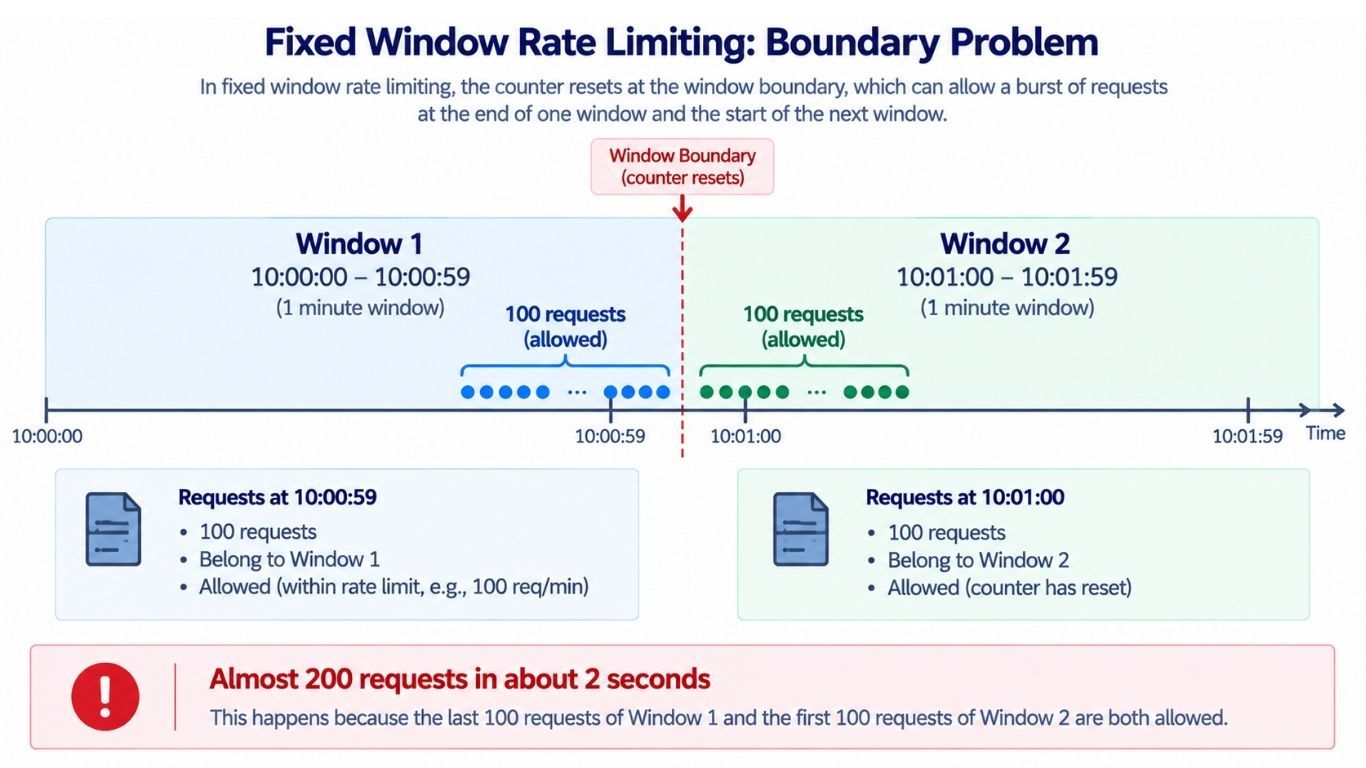
Suppose the limit is 100 requests per minute.
User A sends 99 requests between 10:00:00 and 10:00:59.
The user is still within the limit.
At 10:01:00, a new window starts.
The counter starts again for the new window.
User A can now send up to another 100 requests.
This looks fine, but there is a problem near the boundary between two windows.
Imagine this happens:
User A sends 100 requests between 10:00:59 and 10:01:00.
At 10:01:00, a new window starts.
User A immediately sends another 100 requests between 10:01:00 and 10:01:01.
Both sets of requests are allowed because they belong to different windows.
So the system may allow almost:
200 requests in about 2 secondsEach fixed window follows the 100 requests per minute rule, but the user can still create a large burst around the window boundary.
This is the main weakness of the Fixed Window Counter.
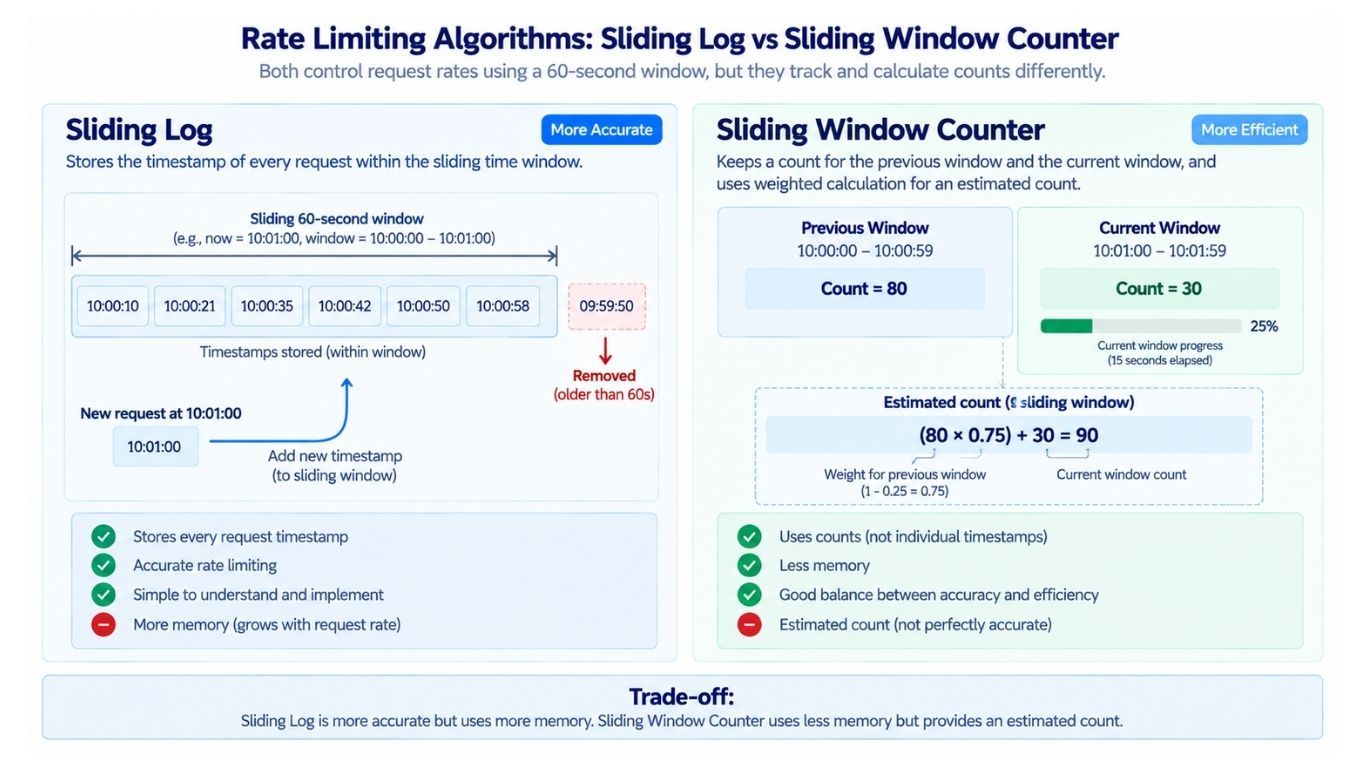
The Sliding Log algorithm solves the boundary problem of the Fixed Window Counter.
Instead of keeping only a counter, it stores the timestamp of every request.
Suppose the limit is 5 requests per 60 seconds.
User A has already sent requests at:
10:00:10
10:00:20
10:00:30
10:00:40
10:00:50
Now another request arrives at 10:01:00.
The rate limiter:
Looks back at the last 60 seconds.
Removes timestamps that are outside this time range.
Counts the requests that are still inside the range.
If 5 requests already exist, it rejects the new request.
Because the algorithm always checks the previous 60 seconds from the current time, it avoids the Fixed Window boundary problem.
Sliding Log is accurate, but it stores a timestamp for every request.
For example, if one client sends 100,000 requests per hour, the system may need to store many timestamp entries for that client.
For every new request, the system may also need to:
remove old timestamps
count the remaining timestamps
add the new timestamp
Across millions of users, this can require a lot of memory.
So, Sliding Log provides good accuracy, but uses more memory and requires more work per request.
To reduce the memory cost of Sliding Log, we can use a Sliding Window Counter.
Instead of storing every request timestamp, we keep counters for the previous window and the current window and use them to estimate recent traffic.
Suppose the limit is 100 requests per minute:
Previous minute → 80 requests
Current minute → 30 requests
We are 25% into the current minute.
Since we are 25% into the current minute, about 75% of the previous minute overlaps with the last 60 seconds.
So the estimated request count is:
(80 × 0.75) + 30
= 60 + 30
= 90 requests
The estimated count is 90, which is still below the limit of 100.
The Sliding Window Counter is not perfectly exact, but it uses much less memory than Sliding Log and handles window boundaries better than a Fixed Window Counter.
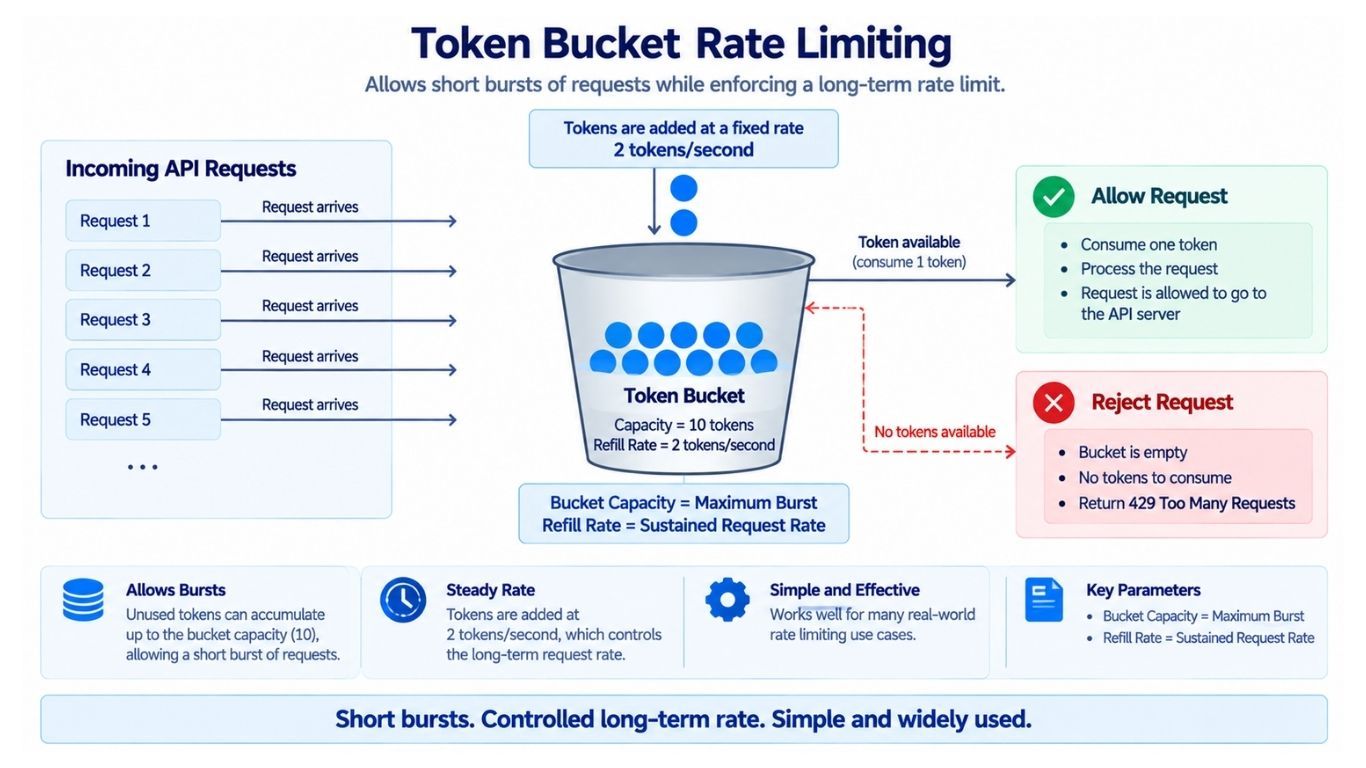
The Token Bucket is one of the most common rate-limiting algorithms.
Think of it as a bucket that holds tokens.
Each request needs one token:
If a token is available, remove one token and allow the request.
If the bucket is empty, reject the request.
New tokens are added to the bucket at a fixed rate.
The bucket can hold only a limited number of tokens.
Suppose:
Bucket capacity = 10 tokens
Refill rate = 2 tokens per second
At the beginning, the bucket is full with 10 tokens.
Now:
The client sends 6 requests → 6 tokens are used.
4 tokens remain.
The client sends 4 more requests → the bucket becomes empty.
Another request arrives immediately → it is rejected.
After 1 second, 2 tokens are added back.
The client can now send 2 more requests.
So the bucket capacity controls the maximum burst, while the refill rate controls how quickly new requests can be allowed over time.
Token Bucket allows short bursts of traffic while still controlling the long-term request rate.
For example, if a user does not send requests for some time, the bucket can fill up. The user can then send several requests quickly using those saved tokens.
Once the tokens are used, new requests are limited by the refill rate.
This makes Token Bucket a good choice for APIs where some burst traffic is acceptable, but continuous heavy traffic should be limited.
The Leaky Bucket algorithm is used when we want to turn bursty traffic into a more steady flow.
Think of requests entering a bucket or queue.
Requests are processed at a fixed rate:
Incoming Traffic → Bucket/Queue → Steady Output
     Bursty                       Fixed Rate
For example, suppose the system can process 10 requests per second:
Requests may arrive very quickly.
They wait in the bucket.
The system processes only 10 requests per second.
If the bucket becomes full, new requests are rejected.
The main difference from Token Bucket is:
Token Bucket allows controlled bursts.
Leaky Bucket smooths bursts into a steady output rate.
Leaky Bucket is useful when the downstream system should receive traffic at a more predictable rate.
There is no single best rate-limiting algorithm. The right choice depends on what the system needs.
Algorithm | Main Advantage | Main Limitation |
|---|---|---|
Fixed Window | Simple and cheap | Can allow bursts at window boundaries |
Sliding Log | Very accurate | Uses more memory |
Sliding Window Counter | Good balance of accuracy and memory | Uses an estimated request count |
Token Bucket | Allows controlled bursts | Requires token state and refill calculation |
Leaky Bucket | Produces a steady request rate | Bursts may need to wait or be rejected |
For our rate limiter, we will use the Token Bucket because it is simple, efficient, and allows controlled bursts while still limiting long-term traffic.
Now let's use the Token Bucket algorithm in our rate limiter.
Suppose each user has:
Bucket capacity = 100 tokens
Refill rate = 10 tokens per second
For each user, we need to store two values:
current_tokens
last_refill_time
For example:
user_123
tokens = 73
last_refill_time = 10:30:15.420
We do not need a background job to add tokens every second.
Instead, when a new request arrives, we calculate how many tokens should have been added since the last refill.
Suppose the stored state is:
tokens = 20
last_refill_time = 10:00:00
The refill rate is:
10 tokens per secondNow a request arrives at 10:00:03.
Three seconds have passed, so we add:
3 × 10 = 30 tokensThe new token count becomes:
20 + 30 = 50 tokensIf this value is greater than the bucket capacity, we cap it at the maximum capacity.
Then we consume one token for the current request.
This approach is called lazy refill because tokens are calculated only when a request arrives instead of being added continuously in the background.
Now suppose two requests for the same user arrive at almost the same time.
The stored state is:
tokens = 1Both requests may do this:
Request A reads 1 token.
Request B also reads 1 token.
Both think a token is available.
Both allow the request.
Now two requests have been allowed even though only one token was available.
This is a race condition.
To solve this problem, the complete rate-limit check and token update must happen as one atomic operation.
To avoid race conditions, the complete rate-limit operation should happen as one atomic operation.
It includes:
Read state
    ↓
Calculate refill
    ↓
Check available tokens
    ↓
Consume token
    ↓
Save updated state
While this operation is running, another request should not be able to change the same state in the middle.
A Redis-like store can support this using atomic operations, transactions, or server-side scripts.
Without a server-side script, the application might perform several operations:
GET tokens
GET last_refill_time
Calculate new tokens
SET tokens
SET last_refill_time
This creates multiple network calls, and another request could update the same data between these steps.
Instead, we can send the complete token-bucket logic to Redis in a server-side script, such as a Lua script.
Redis executes the script atomically, which gives us:
fewer network round trips
safe updates under concurrency
better performance
This prevents the read-modify-write race we saw earlier.
The rate-limit key tells us what we are limiting.
For example:
User:
rate:user:123

IP address:
rate:ip:203.0.113.25

API key:
rate:api_key:abc123

Endpoint:
rate:user:123:POST:/payments

Organization:
rate:org:555
Good key design is important because it decides which requests share the same rate-limit state.
Later, when we scale the state across multiple nodes, key design also affects how traffic is distributed.
A single request may need to pass more than one rate limit.
Suppose User 123 calls:
POST /paymentsWe may apply:
User limit: 1,000 requests per hour
Payment endpoint limit: 20 requests per minute per user
Global payment limit: 50,000 requests per minute
The request is allowed only if all required limits pass.
Large systems can also organize limits at different levels:
Global Limit
     ↓
Organization Limit
     ↓
User Limit
     ↓
Endpoint Limit
This gives protection at different levels. A user cannot consume too many organization resources, an organization cannot overload the whole system, and expensive endpoints can have stricter limits.
We should not hard-code rate limits inside every application.
Instead, we can store them in a configuration store.
A rule may contain:
plan       = free
endpoint   = /search
limit      = 100
window     = 60 seconds
algorithm  = token_bucket
The rate limiter can keep these rules in a local memory cache so it does not need to read the configuration store for every request.
Suppose we change the Free plan from:
100 requests/minuteto:
150 requests/minuteWe should not need to restart every rate-limiter instance.
Instead:
The rule is updated in the configuration store.
The change is distributed to rate-limiter instances.
Each instance refreshes its local rule cache.
This allows us to change rate limits dynamically without changing application code.
So far, our rate limiter needs two main types of data:
Rate-limit rules — such as limits, refill rates, and plans
Rate-limit state — such as current tokens and last refill time
A high-level design looks like this:
                     ┌───────────────┐
                     │    Client     │
                     └───────┬───────┘
                             │
                             ▼
                     ┌───────────────┐
                     │  API Gateway  │
                     └───────┬───────┘
                             │
                             ▼
                   ┌───────────────────┐
                   │   Rate Limiter    │
                   └──────┬──────┬─────┘
                          │      │
                          │      ▼
                          │  ┌──────────────┐
                          │  │  Rule Cache  │
                          │  └──────┬───────┘
                          │         │
                          ▼         ▼
                   ┌────────────┐ ┌──────────────┐
                   │ Rate State │ │ Config Store │
                   │   Redis    │ │              │
                   └────────────┘ └──────────────┘
                          │
                       Allow
                          │
                          ▼
                   ┌──────────────┐
                   │ Application  │
                   └──────────────┘
The rules are cached in memory for fast access, while the changing token or counter state is stored in a shared Redis-like store.
There are two common ways to run the rate-limit logic.
Applications can call a separate rate-limiter service:
Application
    ↓
Rate Limiter Service
    ↓
Shared State
This gives us:
one central implementation
easier maintenance
consistent rate-limit logic
The downside is an extra network call for every request.
Another option is to run the rate-limit logic directly inside the API gateway or application:
API Gateway
    │
    ├── Rate Limit Logic
    │
    ▼
Shared State
This reduces network calls and latency, but the rate-limit code must be maintained across the places where it runs.
For our design, a practical choice is:
Rate-limit logic in API Gateway
            +
     Shared Redis state
            +
   Central configuration
This keeps the request path fast while still sharing state across gateway instances.
A single Redis node may eventually become a bottleneck.
Suppose our system needs to handle 2 million rate-limit checks per second.
We can divide the rate-limit state across multiple Redis nodes, called shards.
For example, we can hash the rate-limit key:
hash(rate_limit_key) → shardThis may distribute keys like:
rate:user:123 → Shard A
rate:user:456 → Shard C
rate:user:789 → Shard B
Now both traffic and rate-limit state are spread across multiple nodes.
If our application is responsible for deciding which node owns a key, consistent hashing can be useful.
When a node is added or removed:
simple modulo hashing may move many keys
consistent hashing usually moves fewer keys
This can reduce unnecessary state movement.
However, rate-limit state is usually short-lived, so consistent hashing is not always required. Some systems can use simpler partitioning provided by their distributed state store.
The best partitioning strategy depends on the architecture.
Sharding spreads different rate-limit keys across multiple nodes, but it does not solve every scaling problem.
Suppose we have a global key:
rate:global:/loginNow imagine:
The system receives 1 million login requests per second.
Every request updates the same rate-limit key.
The same key is stored on one Redis shard.
That shard must handle all those updates.
Other shards may have very little traffic.
This key becomes a hot key.
So, adding more Redis shards does not automatically solve the problem. If millions of requests use the same key, that key can still overload one shard.
Global limits are especially likely to create hot keys because many requests share the same counter.
Suppose the global limit is:
100,000 requests per secondInstead of updating one shared counter for every request, we can divide the quota across rate-limiter instances.
For example:
We have 10 rate-limiter instances.
The global limit is 100,000 requests per second.
Each instance temporarily receives 10,000 requests per second.
Each instance keeps a small local token bucket.
Most requests are checked locally.
When an instance needs more quota, it requests another batch from a shared coordinator.
This reduces:
network calls to the shared state store
pressure on a single global key
latency for each rate-limit check
A coordinator can also adjust the quotas when traffic changes.
There is a trade-off.
Suppose the configured limit is:
100 requests per minuteFor many APIs:
occasionally allowing 101 requests may be acceptable
allowing 10,000 requests would not be acceptable
Why not make the limit perfectly exact?
Because an exact distributed limit may require servers to coordinate on every request.
More coordination usually means:
higher latency
lower throughput
more system complexity
So, at very large scale, we may accept a small amount of error in exchange for much better performance.
Now suppose our service runs in multiple regions:
Mumbai
Singapore
Frankfurt
Virginia
A user may send requests through different regions.
Suppose the global limit for one user is:
100 requests per minuteIf every region keeps its own separate counter:
Mumbai may allow 100 requests.
Singapore may allow another 100.
Frankfurt may allow another 100.
Virginia may allow another 100.
So the user could send close to:
400 requests per minuteBut our intended global limit is only 100.
This is the main challenge with multi-region rate limiting: all regions need to respect the same global limit.
There are a few ways to solve this.
The first option is to keep one global rate-limit state that all regions use.
Mumbai ──────┐
Singapore ───┤
Frankfurt ───┼──→ Global Rate-Limit Store
Virginia ────┘
When a request arrives:
The region checks the global rate-limit state.
All regions use the same state.
So the global limit can be enforced more accurately.
But there is a problem.
Suppose a request arrives in Mumbai, but the global rate-limit store is far away.
Mumbai may need to make a cross-region network call before allowing the request.
This can cause:
higher latency
more cross-region network traffic
dependency on one global system
For a high-traffic API, making a cross-region call for every request can be expensive and slow.
Instead of sharing one global counter, we can divide the global quota between regions.
Suppose the global limit is:
100 requests per minuteWe could divide it like this:
Mumbai    → 40
Singapore → 20
Frankfurt → 20
Virginia  → 20
Now:
Mumbai can allow 40 requests.
Singapore can allow 20.
Frankfurt can allow 20.
Virginia can allow 20.
Each region checks its own quota locally.
This is fast because we do not need a cross-region call for every request.
But what happens if most traffic goes to Mumbai?
Mumbai uses all 40 requests.
The other regions still have 60 unused requests.
Mumbai cannot use those requests.
The user gets blocked in Mumbai even though the full global quota has not been used.
So this approach is fast, but fixed quotas can waste capacity when traffic is not evenly distributed.
We can improve the previous approach by allowing regions to request more quota when needed.
For example:
Mumbai
   │
   │ Uses most of its quota
   ▼
Requests more tokens
   │
   ▼
Global Quota Manager
   │
   ▼
Gets more quota
The process works like this:
Each region starts with some local quota.
Requests are checked locally, so they are fast.
If a region starts running low, it asks the global quota manager for more.
The global quota manager checks whether unused global quota is available.
If quota is available, it gives more to that region.
For example, Mumbai may start with 40 requests. If Mumbai needs more and other regions are not using their quotas, some of that unused capacity can be moved to Mumbai.
This gives us:
fast local rate-limit checks
better use of the global quota
fewer cross-region calls
The downside is that the system becomes more complex because it must track and redistribute quota between regions.
For a large multi-region system, this is often a useful balance between speed and global accuracy.
Our rate limiter stores token information in a shared store such as Redis.
But Redis can fail or become temporarily unavailable.
If that happens, the rate limiter cannot check:
how many tokens are available
whether the request is within the limit
whether the token state should be updated
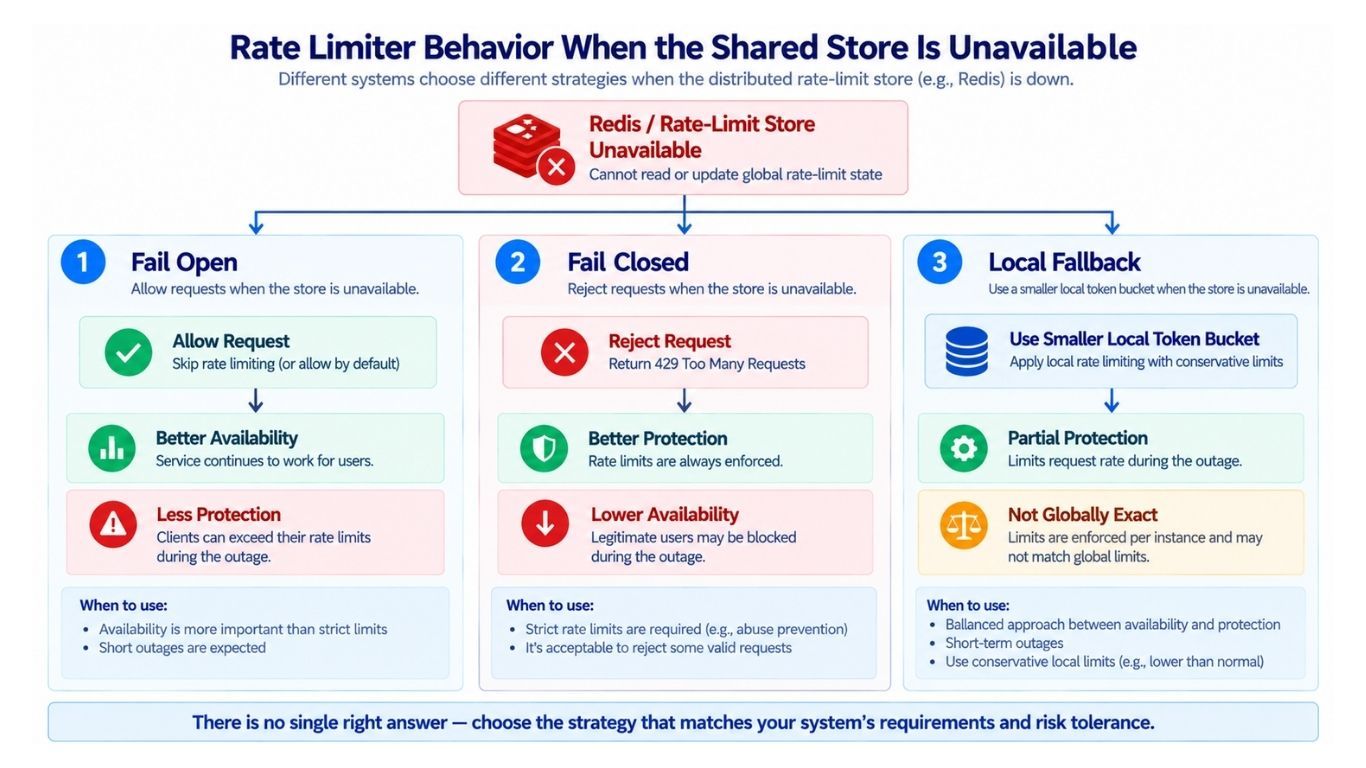
Now the rate limiter has to make a decision:
Should we allow the request or reject it?
There are two common approaches.
Fail open means we allow the request when the rate limiter cannot check the limit.
Rate-limit store unavailable
            ↓
      Allow request
Advantage:
The application remains available to users.
Risk:
Abusive traffic may also get through because the rate limit cannot be checked.
Fail open can be useful for less sensitive endpoints, such as:
GET /news-feedFor a news feed, keeping the service available may be more important than enforcing the exact rate limit during a short failure.
Fail closed means we reject the request when the rate limiter cannot check the limit.
Rate-limit store unavailable
            ↓
      Reject request
Advantage:
The backend stays protected because requests cannot bypass the rate limit.
Risk:
Normal users may also be blocked until the rate-limit store recovers.
Fail closed can be useful for sensitive operations such as:
POST /login-attempt
POST /password-reset
POST /payment
For example, if the login rate limiter is unavailable, allowing unlimited login attempts could make brute-force attacks easier.
We do not have to use the same failure policy for every endpoint.
For example:
News feed → may fail open to keep the service available.
Login attempts → may use a stricter policy to prevent abuse.
Password reset → may use a stricter policy because it is security-sensitive.
Payment → may also need stronger protection depending on the system.
So, the failure policy can be configured per endpoint or per rate-limit rule.
The main trade-off is:
Fail Open   → Better availability, less protection during failure

Fail Closed → Better protection, lower availability during failure
The right choice depends on how important availability and protection are for that endpoint.
Fail open and fail closed are not our only choices. We can also use a temporary local rate limit when the shared store is unavailable.
Suppose Redis becomes unreachable.
Instead of completely removing rate limiting, each gateway can use a smaller local token bucket.
For example:
Normal distributed limit:
100 requests/minute

Temporary local limit:
50 requests/minute
During the failure:
The gateway stops depending on Redis for every rate-limit check.
It creates or uses a local token bucket.
Requests are checked against the smaller local limit.
When Redis becomes available again, the gateway can return to the normal distributed limit.
This local limit is not perfectly accurate because every gateway has its own state.
For example, if two gateways each allow 50 requests, the total could be higher than 50.
But it still provides some protection during a temporary Redis failure.
Many rate-limiting algorithms depend on time.
For example:
Token Bucket uses time to calculate how many tokens should be refilled.
Sliding Window uses time to decide which requests belong to the current window.
Sliding Log uses timestamps to decide which old requests should be removed.
Now suppose two servers have different clocks:
Server A → 10:00:00
Server B → 10:00:07
Their clocks are different by 7 seconds.
This can cause incorrect rate-limit calculations, especially when requests for the same user are handled by different servers.
To reduce this problem:
Keep server clocks reasonably synchronized.
Avoid depending on badly different application-server clocks.
When appropriate, use the state store's server time for important calculations.
The main idea is simple: servers that make time-based rate-limit decisions should have a consistent view of time.
When a client reaches its rate limit, returning only an error is not always enough.
The server can also give the client useful information.
For example:
429 Too Many Requests

Limit: 100
Remaining: 0
Retry-After: 25 seconds
This tells the client:
the request was rejected because of rate limiting
what the limit is
how many requests are remaining
when it should try again
The exact header names depend on the API design.
Suppose a client has reached its limit.
Instead of repeatedly sending requests, the server can tell it:
Retry-After: 25 secondsA well-behaved client can wait before trying again.
This reduces unnecessary requests while the client is already rate limited.
There is one more problem.
Suppose 100,000 clients are rate limited at the same time, and all of them are told:
Retry after 60 secondsThen:
all clients wait for 60 seconds
all clients retry at almost the same time
the server suddenly receives another large traffic spike
This is called a retry storm.
Clients can reduce this problem by adding a small random delay, called jitter.
Instead of every client retrying at exactly 60 seconds, they could retry at slightly different times:
Client A → 61 seconds
Client B → 64 seconds
Client C → 68 seconds
Client D → 63 seconds
Now the retry traffic is spread over time instead of arriving all at once.
So a good retry strategy is:
Rate limited
     ↓
Wait
     ↓
Add small random delay (jitter)
     ↓
Retry
This helps prevent another traffic spike after the original rate-limit event.
Login endpoints need special care because attackers may try many username and password combinations.
Suppose we limit login attempts only by IP address:
10 attempts per minute per IPThis helps, but an attacker may use many different IP addresses and continue the attack.
What if we limit only by account?
10 attempts per minute per accountNow an attacker could repeatedly try to log in to someone else's account and cause that account to be blocked.
So, using only one limit is often not enough.
A better design can combine multiple checks:
IP limit
    +
Account limit
    +
IP + Account limit
    +
Other risk signals
For example:
IP limit controls how many login attempts come from one IP.
Account limit controls attempts against one account.
IP + account limit tracks attempts from a specific IP against a specific account.
Risk signals can detect other suspicious behavior.
The main idea is that login protection should not depend on only one counter.
Real abuse-prevention systems usually combine multiple signals and protections.
Not every API request costs the same amount of resources.
For example:
GET /profilemay be cheap.
But:
POST /export-all-datamay:
read a large amount of data
create a background job
use significant CPU or memory
put extra load on databases and storage
Because of this, expensive operations may need much stricter limits.
For example:
Normal API requests → 1,000 requests/hour

Data exports        → 3 requests/day
So, rate limits should consider the cost of an operation, not only the number of requests.
Another way to handle different request costs is to make some requests consume more tokens.
For example:
GET /profile → 1 token
GET /search  → 2 tokens
POST /report → 20 tokens
Suppose a user's bucket contains 100 tokens:
A profile request uses 1 token.
A search request uses 2 tokens.
A report request uses 20 tokens.
This means expensive operations use the available quota faster.
Weighted limits give us better control when different requests use very different amounts of system resources.
Sometimes one rate limit is not enough.
We may want to control both:
how fast a client can send requests right now
how many requests it can send over a longer period
For example:
Burst limit:
20 requests/second

Sustained limit:
500 requests/minute
This means a client can send a short burst of traffic, but it cannot continue sending at that high rate for a long time.
We can enforce this using two token buckets:
Request
   │
   ▼
Short-Term Bucket
20 requests/second
   │
   ▼
Long-Term Bucket
500 requests/minute
   │
   ▼
Allowed
The request must have enough tokens in both buckets.
For example:
If the short-term bucket is empty → reject the request.
If the long-term bucket is empty → reject the request.
If both buckets have enough tokens → allow the request.
This protects the system from both sudden traffic bursts and continuous heavy traffic.
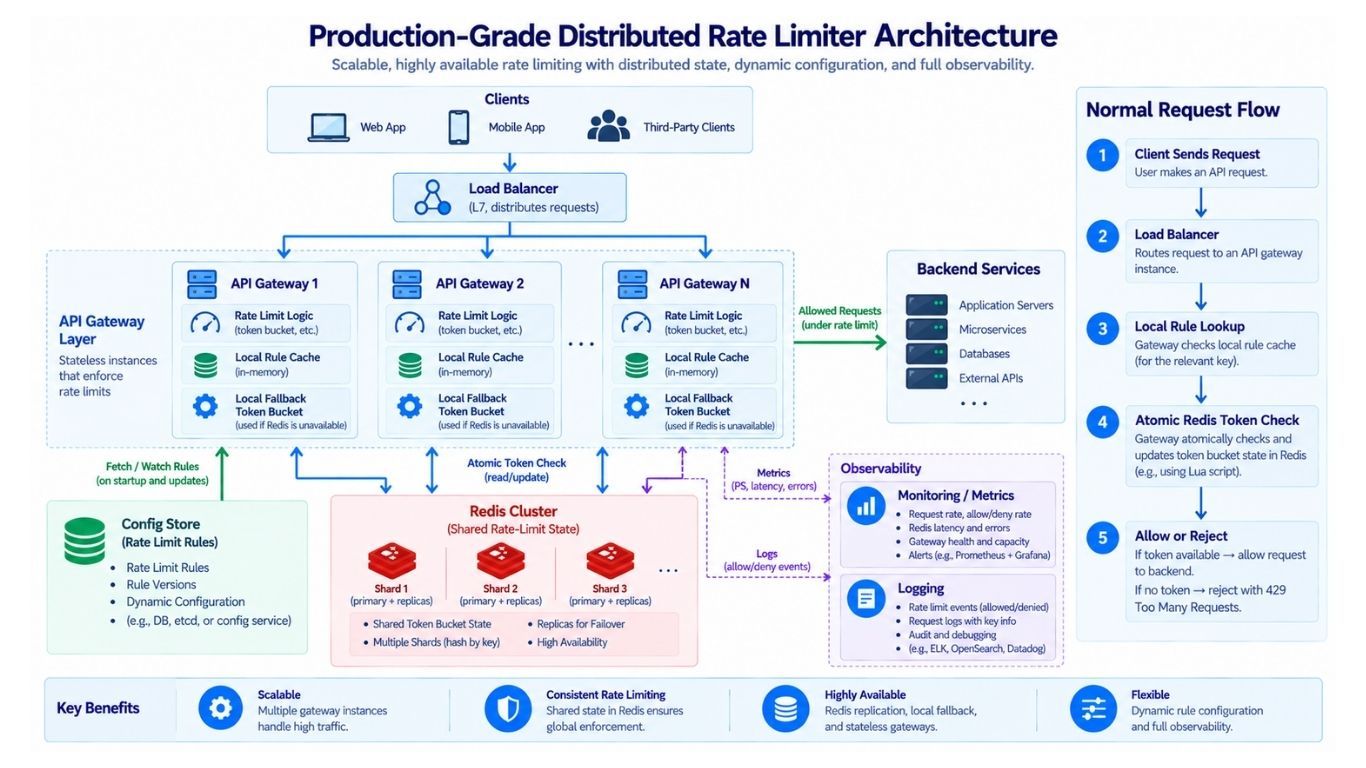
Now let's see how everything works together for a normal request.
Suppose User 123 sends:
GET /searchThe request flows like this:
The request reaches the API Gateway.
The gateway identifies the user as 123.
It finds the matching rate-limit rule from its local rule cache.
It builds the rate-limit key:
rate:user:123:searchThe gateway sends an atomic Token Bucket operation to the correct Redis shard.
Redis calculates how many tokens should be refilled.
Redis checks whether enough tokens are available.
If a token is available:
Redis consumes the token.
The request is allowed to continue to the backend.
If no token is available:
The request is rejected.
The gateway returns:
429 Too Many RequestsThe important point is that the refill, check, and token update happen atomically. Two requests should not be able to consume the same token.
This entire rate-limit check should be very fast because it runs before the request reaches the backend.
Now we can put the main parts of our rate limiter together:
                         ┌───────────────┐
                         │    Clients    │
                         └───────┬───────┘
                                 │
                                 ▼
                         ┌───────────────┐
                         │ Load Balancer │
                         └───────┬───────┘
                                 │
                                 ▼
                    ┌─────────────────────────┐
                    │      API Gateways       │
                    │                         │
                    │  • Rate-Limit Logic     │
                    │  • Local Rule Cache     │
                    │  • Local Fallback       │
                    └───────┬─────────┬───────┘
                            │         │
              Rate State    │         │ Rules
                            │         │
                            ▼         ▼
                  ┌───────────────┐  ┌──────────────┐
                  │ Redis Cluster │  │ Config Store │
                  │               │  │              │
                  │ Token State   │  │ Limit Rules  │
                  └───────────────┘  └──────────────┘
                            │
                     Request Allowed
                            │
                            ▼
                    ┌───────────────┐
                    │    Backend    │
                    │   Services    │
                    └───────────────┘
The main idea is simple:
API Gateway runs the rate-limit logic.
Local Rule Cache keeps frequently used rules close to the gateway.
Config Store stores the rate-limit rules.
Redis Cluster stores changing token-bucket state.
Local Fallback provides temporary protection if Redis is unavailable.
Backend Services receive the request only after the required rate-limit checks pass.
For most requests, the gateway needs:
Local rule
     +
Shared rate-limit state
     ↓
Allow or Reject
This gives us fast rule lookup while keeping rate-limit state shared across gateway instances.
Our Redis state is divided across multiple shards.
For example:
Shard A → Some rate-limit keys
Shard B → Some rate-limit keys
Shard C → Some rate-limit keys
Now suppose Shard B fails.
Only the rate-limit keys stored on Shard B are affected.
There are a few possible responses:
Fail over to a replica if one is available.
Use a temporary local fallback limit while the shard recovers.
Follow the configured fail-open or fail-closed policy if the state cannot be recovered.
If some temporary rate-limit state is lost, a few counters or token buckets may reset.
For many rate-limiting use cases, this may be acceptable because rate-limit state is usually temporary and can be rebuilt as new requests arrive.
For example, losing a user's current token count is very different from losing permanent data such as:
payment records
account information
user-generated data
So our system should try to recover rate-limit state, but it should not treat temporary rate-limit data exactly like critical permanent business data.
We can replicate rate-limit state so the system can continue working if one Redis node fails.
For example:
Primary Redis
    ↓
Replica Redis
But replication is not always instant.
Suppose the primary currently has:
99 requestswhile the replica has only:
95 requestsNow imagine the primary fails before the replica receives the latest updates.
If we switch to the replica:
the replica thinks only 95 requests have happened
the real count was already 99
a few extra requests may be allowed
So replication improves availability, but it may slightly reduce accuracy during failover.
For many APIs, this small difference may be acceptable.
This is another important trade-off:
More availability
      ↕
Perfect accuracyThe rate limiter must also survive large traffic spikes.
Suppose normal traffic is:
500,000 requests/secondSuddenly, traffic increases to:
5 million requests/secondIf the rate limiter itself crashes, it cannot protect the backend.
So the rate-limiting system should be designed to handle very high traffic.
We can use:
Horizontal scaling — run more API gateway or rate-limiter instances.
Sharded state — spread rate-limit keys across multiple Redis shards.
Local token buckets — avoid remote state calls for every request.
Batch quota allocation — give servers a group of tokens instead of requesting one token at a time.
Load shedding — reject some traffic early when the system is overloaded.
The main idea is simple:
The rate limiter should protect the system without becoming the first bottleneck itself.
Suppose the rate limiter and backend are both close to their maximum capacity.
If we continue accepting every request:
queues become longer
requests wait longer
more requests time out
servers use more memory and connections
the whole system may become slow
Instead, we can reject some requests early.
For example:
429 Too Many Requestsmay be used when the client has exceeded a rate limit.
503 Service Unavailablemay be used when the service itself is temporarily overloaded or unavailable.
Rejecting work early can be better than allowing every request to enter the system and fail slowly.
This technique is called load shedding.
Too Much Traffic
       ↓
Reject Some Requests Early
       ↓
Protect Remaining Capacity
       ↓
Keep System Responsive
The goal of load shedding is not to serve every request. The goal is to keep the overall system healthy during extreme traffic.
A rate limiter is part of the critical request path, so we need to know whether it is working correctly.
We should monitor metrics such as:
Requests checked per second — how much traffic the rate limiter is handling.
Allowed requests — how many requests pass the rate limit.
Rejected requests — how many requests are blocked.
Decision latency — how long a rate-limit check takes.
Redis latency — how long Redis operations take.
Redis errors — how often the shared state store fails.
Hot keys — whether some rate-limit keys receive too much traffic.
Rule-cache hit rate — how often rules are found in the local cache.
Fail-open events — how often requests are allowed because the limiter is unavailable.
Fail-closed events — how often requests are blocked because the limiter is unavailable.
429 rate — how often clients receive 429 Too Many Requests.
We should also monitor rejection rates by endpoint, rule, and customer.
For example, suppose the normal rejection rate for /search is 2%, but it suddenly increases to 40%.
This could mean:
an attack is happening
a client has a bug and is sending too many requests
a rate-limit rule was configured incorrectly
traffic has suddenly increased
Good monitoring helps us find these problems quickly.
Metrics tell us what is happening. Logs help us understand why it happened.
We usually do not need to log every allowed request because a high-traffic system could generate a huge amount of log data.
Rejected requests are often more useful to log because they can help with:
debugging
security investigations
abuse analysis
customer support
A rejection log may contain:
timestamp
rule_id
identity
endpoint
limit
decision
For example:
timestamp = 10:30:15
rule_id   = search_free_user
identity  = user_123
endpoint  = /search
limit     = 100 requests/minute
decision  = rejected
We should be careful with sensitive information. Passwords, access tokens, API secrets, and other sensitive values should never be added to rate-limit logs unnecessarily.
The rate limiter may work perfectly, but a bad configuration can still cause a major outage.
Suppose the correct limit is:
10,000 requests/minuteSomeone accidentally changes it to:
10 requests/minuteIf this rule applies to every customer:
many valid requests may be rejected
customers may start receiving 429 errors
the API may appear unavailable even though the backend is healthy
So rate-limit configuration should have safety controls such as:
Validation — reject clearly invalid or dangerous values.
Staged rollout — apply a new rule to a small amount of traffic first.
Versioning — keep previous versions of rules.
Audit logs — record who changed a rule and when.
Rollback — quickly return to the previous working configuration.
The main lesson is simple:
A rate limiter is only as safe as the rules given to it.
That is why the configuration system is an important part of the overall rate-limiting design.
Before enforcing a new rate-limit rule, we can first test it using shadow mode.
Suppose we want to introduce this new rule:
100 requests per minuteIn shadow mode, the rule is checked, but requests are not actually rejected.
Instead, the system records something like:
This request would have been rejected.For example:
A request arrives.
The new rule checks the request.
The request is over the new limit.
The system records that it would have rejected the request.
But the request is still allowed to continue.
After running in shadow mode for some time, we can check:
How many requests would be rejected?
Which customers would be affected?
Are normal users being blocked too often?
Is the new limit too strict?
If the results look good, we can start enforcing the rule.
Shadow mode helps us test new limits safely before they affect real users.
As traffic grows, different parts of the rate limiter can become bottlenecks.
If every request performs an atomic update in Redis, the state store may receive a very large number of operations.
To reduce this load, we can:
shard the rate-limit state
use local token buckets
allocate tokens in batches
A global limit may cause millions of requests to update the same key.
This creates a hot key.
To reduce this problem, we can:
divide global quotas across servers
perform more checks locally
periodically coordinate with a global quota manager
If every request needs a remote Redis call, network latency becomes part of every rate-limit decision.
We can reduce these calls by:
running rate-limit logic inside the API Gateway
using local token buckets where appropriate
requesting tokens in batches
Reading the configuration store for every request would put too much load on it.
Instead:
store rules in a central configuration system
cache frequently used rules locally
refresh the cache when rules change
This keeps rule lookup fast.
Global limits become harder when requests come from multiple regions.
Checking one global state for every request can add high cross-region latency.
Instead, we may use:
regional quotas
local checks
periodic quota rebalancing
This improves performance, but the global limit may become slightly less exact.
There is no perfect rate-limiter design. Every choice has advantages and disadvantages.
Trade-Off | Choice 1 | Choice 2 |
|---|---|---|
Accuracy vs Speed | Exact limits give better accuracy but need more coordination. | Approximate limits are faster and easier to scale. |
Local vs Shared State | Local state is fast but less accurate across servers. | Shared state gives better consistency but requires network calls. |
Fail Open vs Fail Closed | Fail open keeps the service available but may allow extra traffic. | Fail closed protects the backend but may block normal users. |
Fixed Window vs Token Bucket | Fixed Window is simple and cheap but has a boundary problem. | Token Bucket handles controlled bursts better but needs more logic. |
Central Service vs Embedded Logic | A central service gives one implementation but adds a network hop. | Embedded logic reduces network calls but must be maintained across gateways or services. |
Global vs Regional Limits | Global limits give better global control but need more coordination. | Regional limits are faster but may be less accurate globally. |
The important lesson is that system design is about choosing the right trade-off for the requirements.
For our design, we prefer:
Token Bucket for controlled bursts
shared Redis-like state when servers need a common view
local rule caching for fast configuration lookup
atomic updates for safe concurrent requests
sharding for higher throughput
local or regional quotas when exact global coordination becomes too expensive
different failure policies depending on how sensitive the endpoint is
These choices give us a practical balance between speed, scalability, availability, and accuracy.
Here are some common questions you may be asked in a Rate Limiter system design interview.
A common place is the API Gateway.
This allows us to reject requests before they reach backend services and consume expensive resources.
For a general API, Token Bucket is a strong choice.
It allows controlled bursts while also limiting the long-term request rate.
In a distributed system, requests can go to different application servers.
If every server keeps its own counter, no server sees the user's total traffic.
A shared state store gives all servers a common view of the rate-limit state.
A Redis-like in-memory store is a practical choice because it provides:
low-latency reads and writes
atomic operations
support for short-lived state
high throughput
This works well for counters and Token Bucket state.
The complete rate-limit operation should be atomic.
For example:
Read state
    ↓
Calculate refill
    ↓
Check tokens
    ↓
Consume token
    ↓
Save state
A server-side script, such as a Redis Lua script, can perform these steps as one atomic operation.
We can scale the system using:
multiple API Gateway instances
sharded rate-limit state
local rule caching
local token buckets when appropriate
batch quota allocation to reduce remote calls
The goal is to avoid making one server or one state-store node handle all the traffic.
Instead of updating one global counter for every request, we can divide the global quota across multiple servers or regions.
Most checks can then happen locally, with periodic coordination or quota rebalancing.
This reduces pressure on the hot key.
We can choose between:
Fail open — allow requests.
Fail closed — reject requests.
Local fallback — temporarily use a smaller local rate limit.
The right choice depends on the endpoint and how much protection it needs.
Common approaches include:
one central global state
fixed quotas for each region
regional quotas with dynamic rebalancing
The main trade-off is between global accuracy and low latency.
For an HTTP API, a common response is:
429 Too Many RequestsThe response can also include retry information, such as Retry-After, so the client knows when to try again.
The most important trade-offs are:
accuracy vs speed
availability vs strict enforcement
local state vs shared state
global limits vs regional limits
simple algorithms vs more flexible algorithms
A good design does not try to maximize everything. It chooses the right balance based on the system's requirements.
