
Durgesh Tiwari
Author
Elasticsearch is widely used when applications need to search and analyze large amounts of data quickly.
Imagine an online shopping website with millions of products. A customer searches:
"black running shoes under ₹5,000"
The system needs to find relevant products quickly while also considering keywords, price, category, and other filters.
Traditional databases can support search, but advanced full-text search, relevance ranking, filtering, and search analytics often require specialized search capabilities.
This is where Elasticsearch is useful.
Elasticsearch is designed for search, filtering, and analytics across large amounts of data.
In this Elasticsearch deep dive, we will cover how data is stored, searched, distributed, scaled, and managed in a cluster.
Elasticsearch is a distributed search and analytics engine designed to store, search, filter, and analyze data.
It is especially useful for full-text search, where users search using words or phrases rather than exact values.
For example, consider a product catalog:
Product 1: Nike Black Running Shoes
Product 2: Adidas White Sports Shoes
Product 3: Black Leather Office Shoes
A user searches:
black running shoesElasticsearch can find matching documents and rank them based on their relevance to the search query.
It can also apply structured filters such as:
Category = Shoes
Price < ₹5,000
Brand = Nike
In addition to search, Elasticsearch supports aggregations for analyzing data, such as:
Products by brand
Average product price
Orders by city
Requests by status codeElasticsearch is commonly used for:
Website and application search.
Product search.
Document search.
Log analysis.
Monitoring and observability.
Security analytics.
Data exploration.
In simple words, Elasticsearch helps applications quickly search, filter, and analyze large amounts of data.
Elasticsearch uses a distributed architecture, which means data and workloads can be distributed across multiple nodes instead of relying on a single server.
A simplified structure is:
Elasticsearch Cluster
        ↓
      Nodes
        ↓
     Indices
        ↓
     Shards
        ↓
    Documents
The main components are:
Cluster — A group of Elasticsearch nodes working together.
Node — A running Elasticsearch instance that belongs to a cluster.
Index — A logical collection of related documents.
Shard — A part of an index that distributes its data.
Document — A searchable unit of data stored in an index.
For example:
Product Index
      ↓
   Shards
   ↙  ↓  ↘
 S1  S2  S3
 ↓   ↓   ↓
Documents
Dividing an index into shards allows Elasticsearch to distribute data and search workloads across nodes.
In simple words, an Elasticsearch cluster contains nodes, indices organize documents, and shards distribute index data across the cluster.
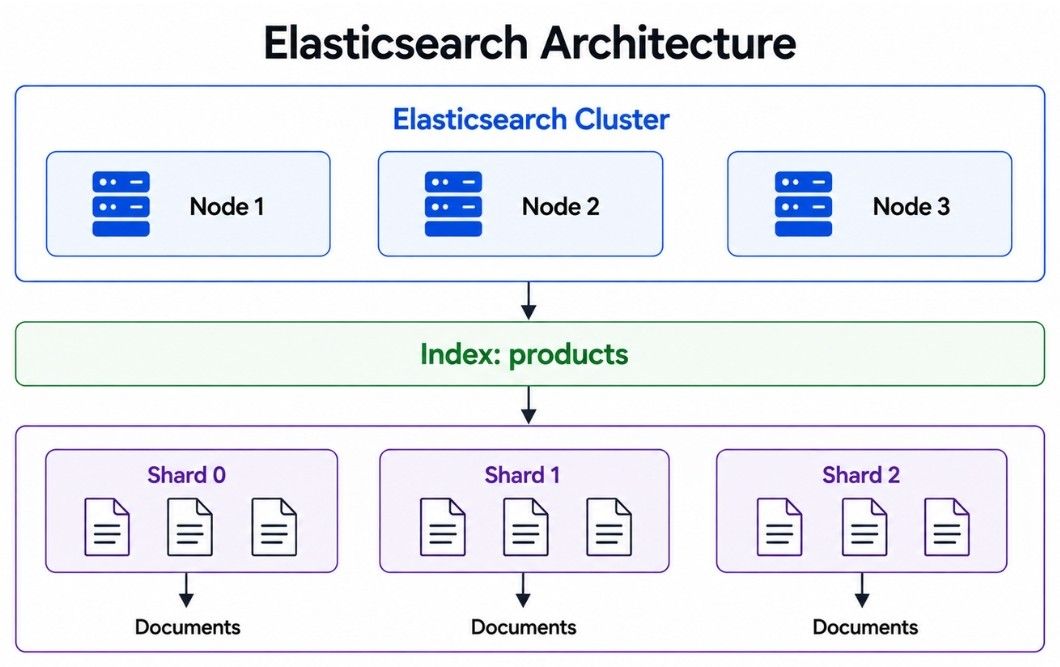
A node is a single running Elasticsearch instance. Multiple nodes can work together to form an Elasticsearch cluster.
Elasticsearch Cluster
        │
   ┌────┼────┐
   ↓    ↓    ↓
Node 1 Node 2 Node 3
The cluster can distribute data and search workloads across its nodes.
For example, if an application stores millions of documents, keeping everything on one machine can eventually create storage and performance limitations.
With multiple nodes, Elasticsearch can distribute the workload:
Node 1 → Part of the data
Node 2 → Part of the data
Node 3 → Part of the data
This distributed architecture helps Elasticsearch handle larger datasets and workloads.
Multiple nodes can provide:
More storage capacity.
More processing capacity.
Higher search throughput.
Better availability.
Support for failure recovery.
However, adding more nodes also increases operational complexity. A small application does not automatically need a large Elasticsearch cluster.
In simple words, a node is one Elasticsearch instance, while a cluster is a group of nodes that work together to store data and process requests.
An index is a logical collection of related documents in Elasticsearch.
For example, an online store may have separate indices for:
products
orders
customers
The products index stores product-related documents, while the orders index stores order-related documents.
A document inside the products index may look like:
{
  "id": 101,
  "name": "Black Running Shoes",
  "brand": "Nike",
  "price": 4500
}
An Elasticsearch index is sometimes compared to a table in a relational database, but they are not exactly the same. Elasticsearch uses a different data storage and search model.
In simple words, an index organizes related documents so Elasticsearch can store and search them efficiently.
A document is a single record stored in an Elasticsearch index.
Documents are represented in JSON format and contain fields with their corresponding values.
For example:
{
  "product_id": 101,
  "name": "Black Running Shoes",
  "category": "Shoes",
  "brand": "Nike",
  "price": 4500
}
Here, product_id, name, category, brand, and price are fields of the document.
Another product can be stored as a separate document:
{
  "product_id": 102,
  "name": "White Sports Shoes",
  "category": "Shoes",
  "brand": "Adidas",
  "price": 3800
}products index
├── Document 101
├── Document 102
├── Document 103
└── Document 104Elasticsearch indexes suitable document fields so their values can be searched efficiently.
In simple words, an index contains related documents, and each document represents one searchable record.
A shard is a smaller part of an Elasticsearch index.
Instead of storing a large index as a single unit, Elasticsearch can divide it into multiple shards and distribute them across the cluster.
For example:
products index
     ↓
 ┌───┼───┐
 ↓   ↓   ↓
Shard 0  Shard 1  Shard 2
Suppose the products index contains millions of documents. Elasticsearch distributes those documents across its shards.
Shard 0 → Part of the documents
Shard 1 → Part of the documents
Shard 2 → Part of the documents
These shards can be placed on different nodes:
Node 1 → Shard 0
Node 2 → Shard 1
Node 3 → Shard 2
This allows Elasticsearch to distribute storage and processing work across multiple nodes.
Shards help with:
Distributed storage — Data can be spread across multiple nodes.
Parallel processing — Searches can run across multiple shards.
Horizontal scaling — Workloads can be distributed as the cluster grows.
Large datasets — Large indices do not have to depend on a single shard.
More shards do not automatically improve performance.
Having too many small shards can increase resource usage and management overhead. The number and size of shards should therefore match the amount of data and workload.
In simple words, shards divide an Elasticsearch index into smaller parts so its data and workload can be distributed across the cluster.
A replica is a copy of a primary shard in Elasticsearch.
For example:
Primary Shard 0
       ↓
Replica Shard 0
Elasticsearch places the primary shard and its replica on different nodes when possible.
Node 1 → Primary Shard 0
Node 2 → Replica Shard 0
If the node containing the primary shard fails, Elasticsearch can promote a replica to become the new primary shard. This helps keep the data available.
Replica shards can also handle search requests, which can increase search capacity when the cluster has enough resources.
Replicas mainly provide:
High availability — Copies of shard data are available on other nodes.
Failure recovery — A replica can be promoted if a primary shard becomes unavailable.
Search capacity — Search requests can be distributed across primary and replica shards.
Primary Shards | Replica Shards |
|---|---|
Hold the primary copy of shard data | Hold copies of primary shards |
Used to distribute index data | Used for availability and additional search capacity |
Each document belongs to one primary shard | Copies the documents from its primary shard |
Required for storing index data | Number of replicas can be configured |
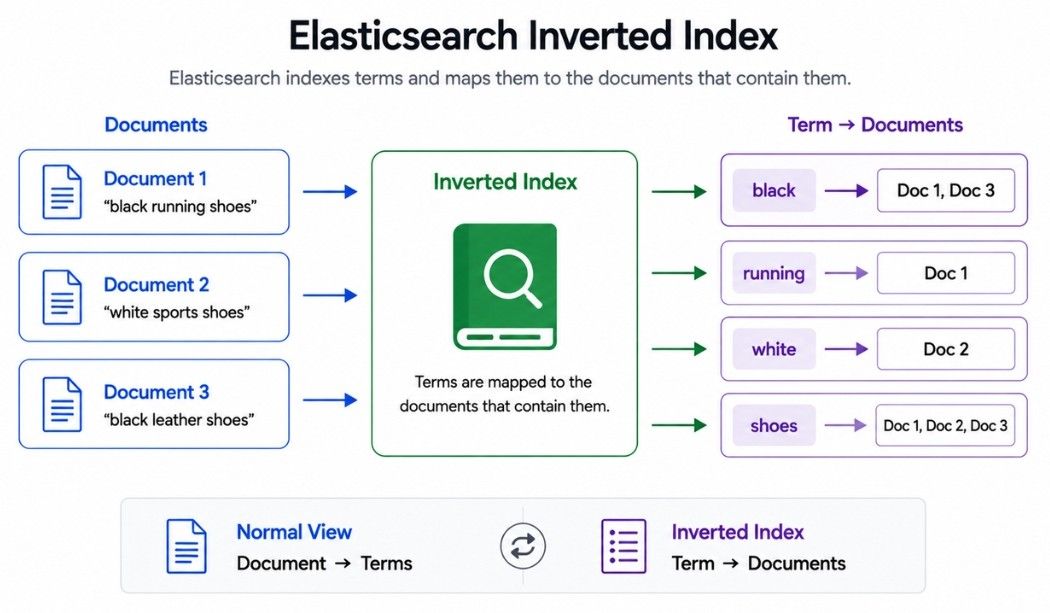
An inverted index is a data structure that helps Elasticsearch perform fast full-text searches.
Suppose an index contains three documents:
Document 1 → black running shoes
Document 2 → white sports shoes
Document 3 → black leather shoes
Elasticsearch can organize searchable terms in a structure similar to this:
black   → Document 1, Document 3
running → Document 1
white   → Document 2
sports  → Document 2
leather → Document 3
shoes   → Document 1, Document 2, Document 3
Instead of scanning every document for each search, Elasticsearch can use this structure to quickly identify which documents contain particular terms.
For example, if a user searches:
black shoesElasticsearch can use the inverted index to find documents associated with black and shoes.
The easiest way to understand the name is:
Normal View:
Document → Terms

Inverted Index:
Term → Documents
The relationship is inverted because the index maps terms back to the documents that contain them.
An inverted index helps Elasticsearch:
Find text efficiently.
Avoid scanning every document for each search.
Support full-text search.
Identify documents containing specific terms.
In simple words, an inverted index maps searchable terms to the documents that contain them, allowing Elasticsearch to find text quickly.
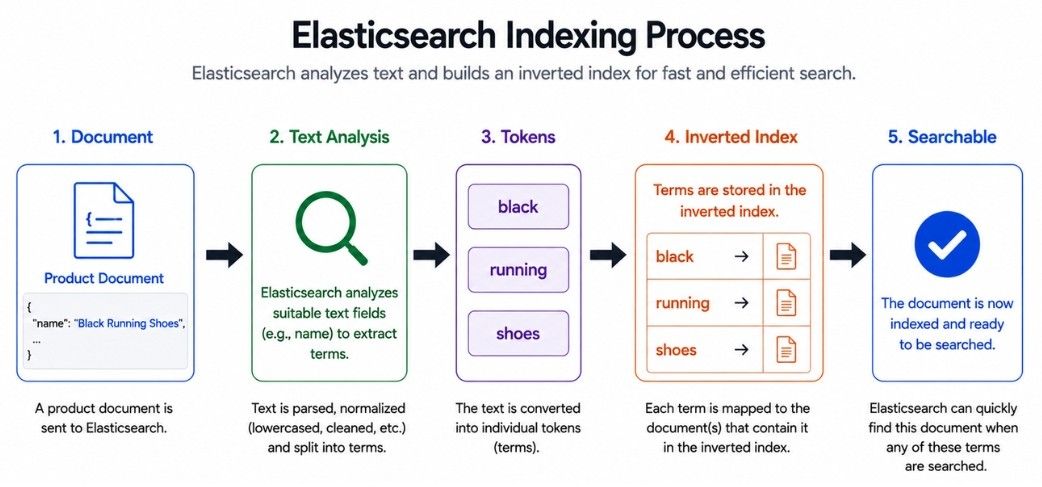
Indexing is the process of adding or updating a document so its data can be searched in Elasticsearch.
Suppose you add this document:
{
  "name": "Black Running Shoes",
  "brand": "Nike"
}
Elasticsearch stores the document and prepares suitable fields for search.
For a text field, a simplified indexing process looks like this:
Document
   ↓
Text Analysis
   ↓
Tokens
   ↓
Inverted Index
   ↓
Searchable Data
For example, the text:
"Black Running Shoes"may be analyzed into terms such as:
black
running
shoes
These terms are then added to the inverted index, allowing Elasticsearch to find the document when users search for related terms.
For text fields, Elasticsearch uses an analyzer to process the text before indexing it.
An analyzer can perform steps such as:
Breaking text into tokens.
Converting terms to lowercase.
Applying other configured text-processing rules.
The exact output depends on the field mapping and analyzer configuration.
A document in Elasticsearch can go through several stages during its lifecycle.
Create
   ↓
Index
   ↓
Search
   ↓
Update
   ↓
DeleteA new document is added to an Elasticsearch index.
Elasticsearch stores the document and prepares its searchable data.
Users or applications can search for the indexed document using queries.
An existing document can be updated when its data changes.
For example, a product price may change:
₹4,500 → ₹4,000Elasticsearch processes the updated version so the new data can be searched.
A document can be deleted when it is no longer needed.
Elasticsearch uses immutable Lucene segments, which means existing segments are not directly modified.
Because of this, updates and deletes are handled internally rather than simply changing data in place. Old data may remain in existing segments until Elasticsearch removes it during later segment merges.
For beginners, the key idea is:
A document can be created, indexed, searched, updated, and deleted while Elasticsearch manages the underlying search structures automatically.
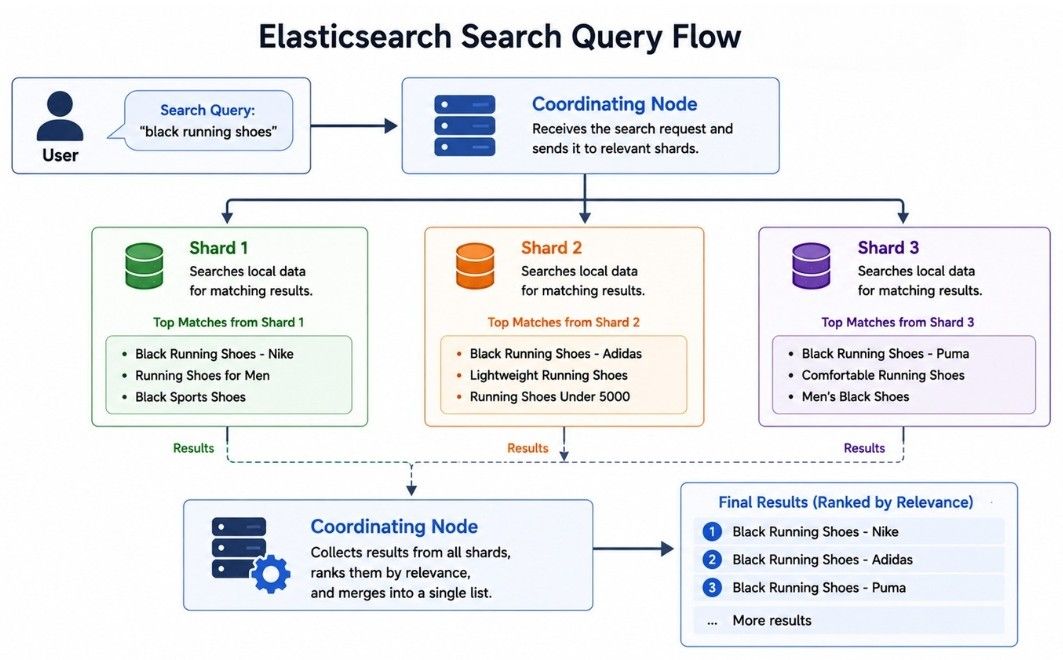
Query processing is the process Elasticsearch uses to search for matching documents and return the most relevant results.
Suppose a user searches:
black running shoesA simplified search flow looks like this:
User Query
    ↓
Coordinating Node
    ↓
Relevant Shards
    ↓
Search Each Shard
    ↓
Collect Results
    ↓
Rank and Merge Results
    ↓
Return Response
Because an index can be distributed across multiple shards, Elasticsearch may need to search several shards for a single query.
Each shard searches its own data and returns matching results. The coordinating node collects these results, combines them, and returns the final response to the application.
Elasticsearch search commonly involves two main phases:
Query Phase — Relevant shards find and rank matching documents.
Fetch Phase — Elasticsearch retrieves the required documents for the final results.
Query
  ↓
Find and Rank Matches
  ↓
Fetch Documents
  ↓
Final ResultsQueries that search across many shards can require more processing and coordination.
This is one reason why shard design can affect Elasticsearch search performance.
Full-text search allows Elasticsearch to search human-readable text using analyzed terms rather than requiring an exact stored value.
For example, suppose a product document contains:
Comfortable black running shoes for menA user searches:
black running shoesElasticsearch can analyze the search query and compare its terms with the indexed text to find relevant documents.
Full-text search is different from an exact-value lookup.
Full-Text Search | Exact Match |
|---|---|
Searches analyzed text | Looks for a specific value |
Can work with individual terms | Usually requires the expected exact value |
Useful for human-readable text | Useful for structured values |
Can rank results by relevance | Usually focuses on whether the value matches |
Full-text search is commonly used for:
Product names and descriptions.
Blog articles.
News content.
Support documents.
Website search.
Customer reviews.
Knowledge bases.
When multiple documents match a search query, Elasticsearch needs to decide which results should appear first.
This is called relevance scoring.
For example, suppose a user searches:
black running shoesThree products match:
Product A → Black Running Shoes
Product B → Black Shoes
Product C → Running Shoes for Men
All three documents match some part of the query, but Product A is likely to be more relevant because it closely matches all the search terms.
Elasticsearch calculates a relevance score for matching documents. In queries that use scoring, documents with higher scores generally appear higher in the search results.
Relevance can be influenced by factors such as:
Term matches — Which search terms appear in the document.
Term frequency — How often a term appears.
Term rarity — Less common terms can provide a stronger relevance signal.
Field importance — Matches in important fields can be given more weight.
Query structure — Different queries can calculate relevance differently.
Boosting — Specific fields or terms can be given more importance.
Good relevance helps users find the most useful results first, not just every document that contains matching terms.
Search relevance should be tested using real user queries because a search system can return technically matching results without ranking them in the most useful order.
A filter is used to find documents that match specific conditions.
For example:
brand = Nike
price < 5000
category = Shoes
Filters usually do not need relevance scoring. A document either matches the condition or it does not.
Suppose a user searches for:
running shoesand applies these filters:
Brand: Nike
Price: Under ₹5,000
Elasticsearch can use the text as a search query and the structured conditions as filters.
Search
  ↓
running shoes

Filters
  ↓
brand = Nike
price < 5000
Search Query | Filter |
|---|---|
Finds relevant text | Checks specific conditions |
Can calculate relevance scores | Usually does not calculate relevance scores |
Useful for words and phrases | Useful for exact values, ranges, and categories |
Example: | Example: |
Filters are useful for narrowing search results based on conditions such as:
Brand.
Category.
Price range.
Availability.
Date range.
Status.
This combination of full-text search and filtering is commonly used in e-commerce and other search applications.
Aggregations allow Elasticsearch to calculate and summarize information across multiple documents.
For example, suppose the products index contains thousands of products. You want to know how many products belong to each brand.
The result might look like:
Nike   → 2,500
Adidas → 2,100
Puma   → 1,200
Elasticsearch aggregations can also calculate:
Average price.
Maximum and minimum price.
Products by category.
Orders by city.
Requests by status.
Sales by category.
Aggregations can perform different types of analysis:
Aggregation Type | Example |
|---|---|
Bucket | Group products by brand or category |
Metric | Calculate average, minimum, maximum, or total values |
For example:
Products
    ↓
Group by Brand
    ↓
Nike   → 2,500
Adidas → 2,100
Puma   → 1,200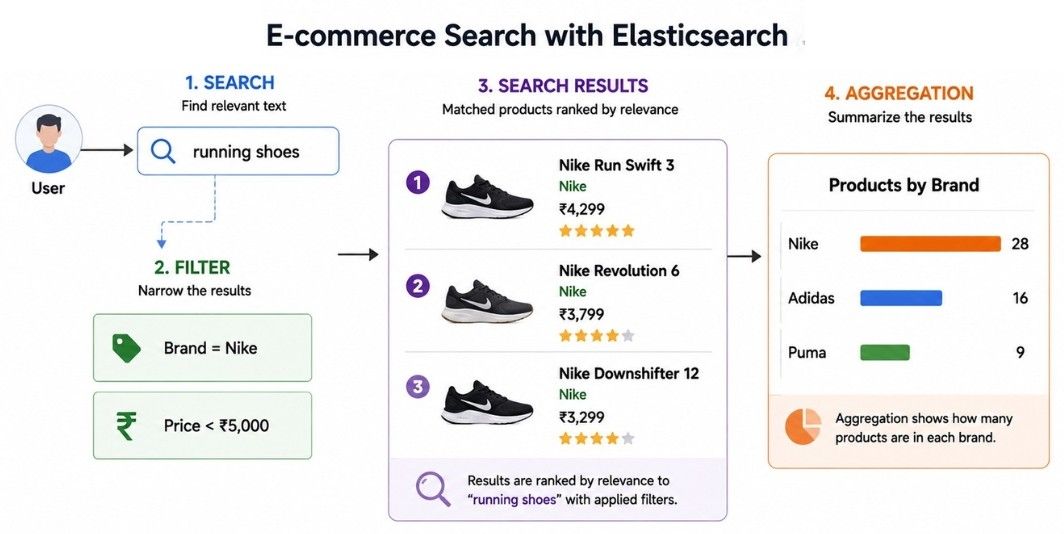
Elasticsearch can combine search, filters, and aggregations in the same request.
For example:
Search for running shoes under ₹5,000 and show how many matching products belong to each brand.
In this case:
Search      → running shoes
Filter      → price < ₹5,000
Aggregation → products grouped by brand
This makes aggregations useful for search interfaces, reports, and analytics dashboards.
In simple words, aggregations summarize Elasticsearch data by grouping documents or calculating values such as counts, averages, minimums, and maximums.
As data and traffic grow, an Elasticsearch cluster may need to handle:
More documents.
More search requests.
More indexing operations.
More storage.
More analytics workloads.
Elasticsearch supports horizontal scaling, which means adding more nodes to increase cluster capacity.
For example:
Before:
Node 1
Node 2

After Scaling:
Node 1
Node 2
Node 3
Node 4
Elasticsearch can distribute shards across the available nodes to use the additional resources.
Replica shards can handle search requests along with primary shards. Adding replicas can increase search capacity when enough nodes and resources are available.
Primary Shard
      +
Replica Shards
      ↓
More Search CapacityPrimary shards distribute an index's data across the cluster.
As storage requirements grow, additional nodes can provide more disk capacity for distributing shards.
Index
  ↓
Shards
  ↓
Multiple NodesAdding nodes does not automatically solve every Elasticsearch performance problem.
Performance can still be affected by:
Poor shard design.
Expensive queries.
Very large documents.
Incorrect or inefficient mappings.
Slow storage.
These issues should be identified before adding more cluster resources.
Shard allocation is the process of deciding which nodes in an Elasticsearch cluster should hold each shard.
For example, suppose a cluster has three nodes and an index has three primary shards and three replica shards.
A simplified allocation might look like:
Node 1 → Primary 0, Replica 1
Node 2 → Primary 1, Replica 2
Node 3 → Primary 2, Replica 0
Elasticsearch distributes shards across suitable nodes according to its allocation rules.
A primary shard and its replica are not placed on the same node. This helps keep a copy of the data available if one node fails.
Proper shard allocation helps with:
Balanced storage — Distributes data across nodes.
Balanced workload — Prevents one node from handling too much work.
High availability — Keeps primary and replica copies on different nodes.
Failure recovery — Allows shards to be reassigned when nodes become unavailable.
When nodes are added, removed, or become unavailable, Elasticsearch may rebalance shards across the cluster.
Cluster Changes
      ↓
Shard Rebalancing
      ↓
Shards Redistributed
      ↓
Balanced Cluster
This helps prevent individual nodes from becoming overloaded as the cluster changes.
In simple words, shard allocation decides where shards are stored, while rebalancing redistributes them when the cluster changes.
Index Lifecycle Management (ILM) helps automate how Elasticsearch indices are managed as their data gets older.
This is especially useful for time-based data, such as application logs, where recent data may be searched frequently while older data is used less often.
A simplified lifecycle looks like:
New Data
   ↓
Frequently Used
   ↓
Older Data
   ↓
Rarely Used
   ↓
Delete When No Longer Needed
Instead of managing old indices manually, ILM can apply predefined policies automatically.
Depending on the lifecycle policy, ILM can help with:
Rollover — Create a new index when certain conditions are reached.
Data placement — Move data according to configured storage and allocation rules.
Retention — Control how long data should be kept.
Deletion — Remove indices that are no longer needed.
Suppose Elasticsearch stores application logs.
A lifecycle policy may manage them like this:
Recent Logs   → Frequently searched
Older Logs    → Less frequently accessed
Very Old Logs → Deleted
This helps automate the management of growing data and reduces the need to manually maintain old indices.
Elasticsearch is a near real-time (NRT) search engine, which means newly indexed or updated documents usually become searchable after a short delay rather than instantly.
When a document is indexed, Elasticsearch needs to refresh the index before the latest changes become visible to search.
A simplified process looks like this:
Document Indexed
      ↓
Short Delay
      ↓
Index Refresh
      ↓
Document SearchableElasticsearch periodically performs a refresh to make recent changes available to search.
Because there can be a short delay between indexing a document and seeing it in search results, Elasticsearch is described as near real-time rather than real-time.
Suppose an application adds a new product:
New Product
    ↓
Indexed
    ↓
Refresh
    ↓
Visible in Search
If the application immediately searches for the product, it may not appear until a refresh makes it searchable.
This does not necessarily mean the document was lost. It may simply not be visible to search yet.
Failures can happen in any distributed system. An Elasticsearch node may become unavailable because of:
Hardware problems.
Network failures.
Disk issues.
Software failures.
Cloud infrastructure problems.
Elasticsearch uses replica shards to help keep data available when a node fails.
For example:
Node 1 → Primary Shard 0
Node 2 → Replica Shard 0
If Node 1 fails, Elasticsearch can promote the replica on Node 2 to become the new primary shard.
Node 1 → Failed
       ↓
Node 2 → Replica Promoted
       ↓
Node 2 → New Primary Shard 0
When another suitable node becomes available, Elasticsearch can create a new replica to restore the configured number of shard copies.
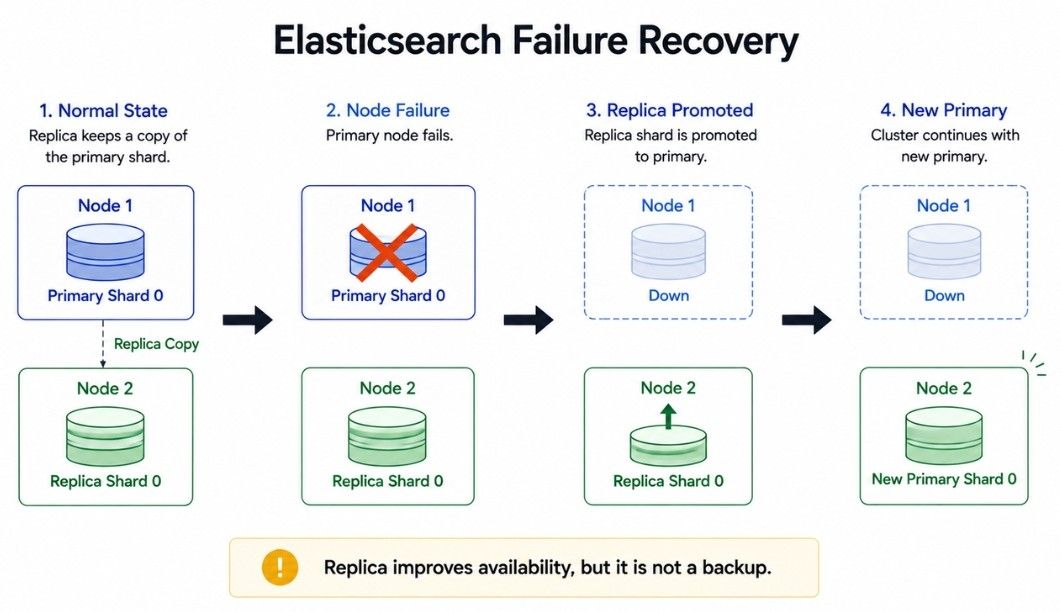
Replica shards improve availability, but they are not a replacement for backups.
Replicas | Snapshots |
|---|---|
Maintain additional copies of shards | Create backups of Elasticsearch data |
Help with node failures | Help recover data after data loss |
Part of the active cluster | Stored separately from the active cluster |
Replicated changes can include accidental deletions | Can restore data from an earlier backup |
A production Elasticsearch system should consider:
Replica configuration.
Regular snapshots.
Cluster monitoring.
Available disk capacity.
Cluster health.
Recovery testing.
Elasticsearch is commonly used for:
E-Commerce Search — Search products and filter results by brand, price, size, rating, or category.
Website Search — Search across articles, pages, products, documentation, and FAQs.
Log Analysis — Search application logs to find errors, warnings, and other events.
Application Monitoring — Analyze API latency, error counts, request status, and service activity.
Security Analytics — Search login attempts, access records, security events, and suspicious activity.
Document Search — Search large collections of documents using titles, content, tags, and metadata.
Elasticsearch performance can be affected by poor shard design, expensive queries, incorrect mappings, and resource problems.
Too Many Shards — A large number of small shards increases resource and management overhead.
Very Large Shards — Large shards can take longer to search, move, recover, and rebalance.
Expensive Queries — Broad searches, complex scripts, large aggregations, and queries across many shards can use significant CPU and memory.
Poor Field Mappings — Incorrect field types or mappings can increase storage usage and reduce search efficiency.
Unnecessary Indexing — Indexing fields that are never searched can waste disk space, memory, CPU, and indexing time.
Very Large Documents — Large documents require more storage, network transfer, and processing.
Deep Pagination — Requesting results using very large offsets can become expensive because Elasticsearch may need to process many earlier results.
Large Aggregations — Aggregations over large datasets or fields with many unique values can consume significant memory and CPU.
Poor Cluster Monitoring — Unassigned shards, disk pressure, high memory usage, slow searches, heavy indexing, and node failures can affect cluster performance.
Performance problems should be identified using realistic workloads and cluster monitoring rather than solved by simply adding more nodes.
Focus on:
Appropriate shard sizing.
Efficient queries.
Correct field mappings.
Necessary fields only.
Suitable pagination methods.
Cluster health and resource monitoring.
Let's connect the main Elasticsearch concepts with a simple e-commerce search example.
First, a product document is added:
{
  "id": 101,
  "name": "Black Running Shoes",
  "brand": "Nike",
  "price": 4500
}
The document is stored in the products index and assigned to a primary shard. A replica shard can maintain another copy.
For searchable text, Elasticsearch analyzes the content and adds the resulting terms to the inverted index.
"Black Running Shoes"
        ↓
black
running
shoes
        ↓
Inverted Index
Later, a user searches for:
running shoesand applies filters:
brand = Nike
price < 5000
A simplified search flow is:
Search Request
      ↓
Relevant Shards
      ↓
Full-Text Search + Filters
      ↓
Relevance Scoring
      ↓
Combine Results
      ↓
Final Results
Elasticsearch searches the relevant shards, applies the filters, ranks matching documents, and returns the results to the application.
Product Document
      ↓
products Index
      ↓
Primary Shard + Replica
      ↓
Text Analysis
      ↓
Inverted Index
      ↓
User Search + Filters
      ↓
Relevant Shards
      ↓
Matching + Relevance Scoring
      ↓
Final Search ResultsElasticsearch is a distributed engine for fast search and analytics.
Nodes and clusters distribute data and workloads across multiple servers.
Indices and documents organize and store searchable data.
Shards and replicas distribute data and improve availability.
Inverted indexes enable fast full-text search.
Full-text search, filtering, and relevance scoring help return useful search results.
Aggregations summarize and analyze data.
Scaling and shard allocation help manage growing workloads.
ILM manages indices as data ages.
Near real-time search makes indexed changes searchable after a short delay.
Replicas and recovery mechanisms help handle node failures.
Good performance depends on proper shard design, mappings, queries, and monitoring.
