
Durgesh Tiwari
Author
A Notification Service looks simple at first:
Application → Send Notification → UserBut at scale, a platform may need to send millions of emails, SMS messages, push notifications, and in-app alerts every day.
Now the design becomes harder. What happens when traffic spikes? What if a provider is down? How do we respect user preferences, prioritize OTPs over marketing messages, retry failures, and prevent duplicates?
In this Notification Service System Design, we will start with a simple solution and improve it step by step as these problems appear.
A Notification Service is a centralized system that sends messages to users through channels such as:
Push notifications
SMS
In-app notifications
For example, an e-commerce platform may send an order confirmation through push, an invoice through email, and a delivery update through SMS.
Instead of every backend service integrating with these channels independently, they send notification requests to one common service:
Order Service
     ↓
Notification Service
   ↙    ↓    ↘
Email  SMS  Push
The Notification Service handles the delivery process for each channel.
Many backend services may need to communicate with users:
Order Service
Payment Service
Delivery Service
Account Service
Marketing Service
        ↓
Notification Service
Without a centralized service, we may end up with duplicated templates, inconsistent retries, different provider integrations, and incorrect handling of user preferences.
A common Notification Service can handle:
Multi-channel delivery
User preferences
Templates
Scheduling
Retries
Rate limiting
Provider selection
Delivery tracking
It also allows notification delivery to scale independently from the services that generate notifications.
Our Notification Service should support:
Multiple channels: Email, SMS, push, and in-app notifications.
Immediate delivery: Time-sensitive messages such as OTPs and fraud alerts.
Scheduled delivery: Reminders and messages that should be sent later.
Bulk notifications: Campaigns targeting large audiences.
User preferences: Respect channel and notification-type preferences for optional messages.
Delivery tracking: Track whether a notification is queued, sent, delivered, or failed.
A simplified lifecycle is:
CREATED → QUEUED → SENT → DELIVERED
             ↓       ↓
           RETRY   FAILED
SENT means the provider accepted the notification. DELIVERED means delivery was confirmed, when the provider supports it.
Temporary failures may enter a retry flow before eventually succeeding or being marked FAILED.
The system should provide:
Scalability: Handle millions of notifications and sudden traffic spikes.
Reliability: Avoid losing accepted notifications and recover from temporary failures.
High availability: Avoid single points of failure.
Low latency: Critical messages such as OTPs should be processed within seconds.
Not every notification needs the same latency. An OTP is more urgent than a marketing email, so we will later need traffic isolation and prioritization.
Assume:
500 million notifications/dayAverage traffic is:
500,000,000 / 86,400
≈ 5,800 notifications/second
Peak traffic may be 10–20× higher during campaigns or major events.
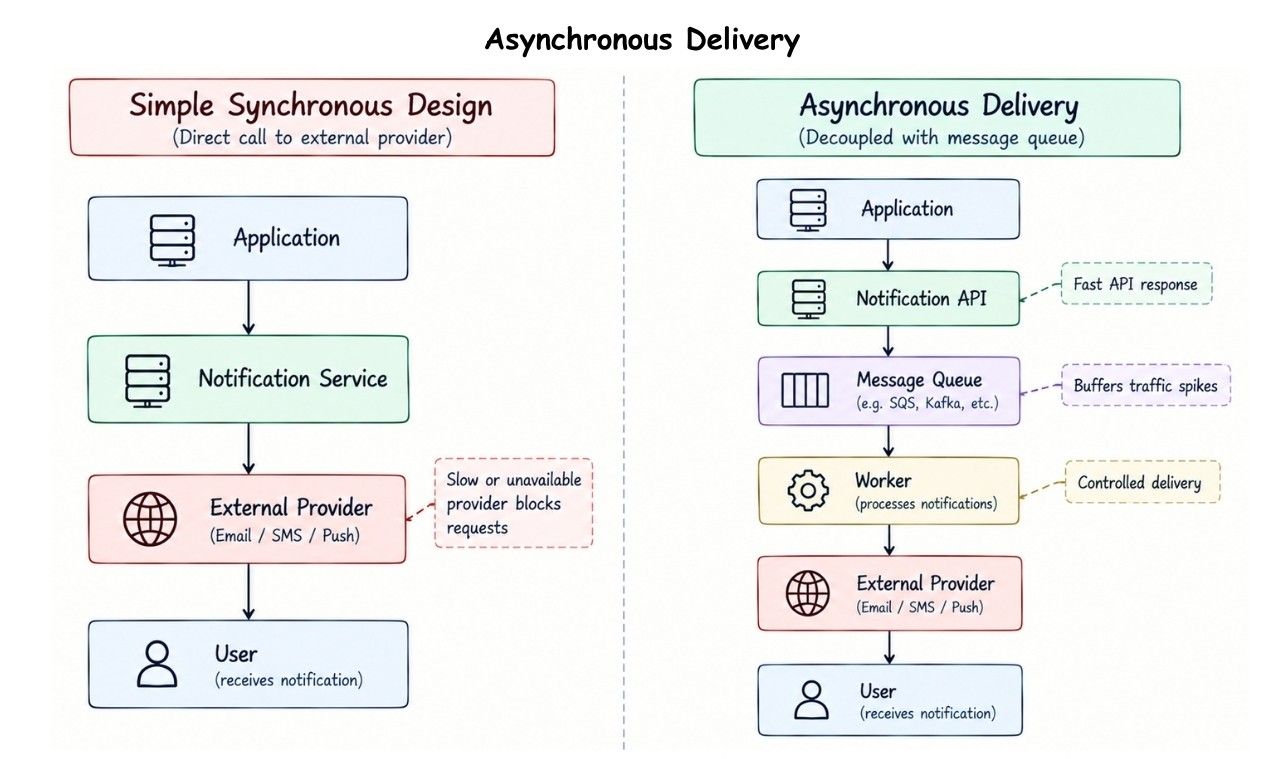
If the Notification Service directly calls external providers for every request, these bursts can overwhelm both our servers and the providers.
A basic design could be:
Application
    ↓
Notification Service
    ↓
External Provider
    ↓
User
This works at small scale, but our API is directly dependent on the provider.
If the provider becomes slow or unavailable, notification requests also become slow or fail.
We need to separate accepting a notification from delivering it.
Introduce a durable message queue:
Application
    ↓
Notification API
    ↓
Message Queue
    ↓
Worker
    ↓
External Provider
    ↓
User
The API accepts the request and places delivery work in the queue. Workers consume jobs and call external providers.
This gives us three important benefits:
The API does not wait for provider delivery.
The queue absorbs traffic spikes.
Workers can process notifications at a controlled rate.
We now have a simple foundation that can scale as new requirements appear.
Backend services can create notifications through an API such as:
POST /v1/notificationsExample request:
{
  "user_id": "user_123",
  "notification_type": "ORDER_SHIPPED",
  "channels": ["push", "email"],
  "template_id": "order_shipped",
  "priority": "normal",
  "data": {
    "order_id": "ORD-1001"
  }
}
The API validates the request and durably accepts it for asynchronous processing.
It can then return:
{
  "notification_id": "ntf_89101",
  "status": "QUEUED"
}
The caller gets a fast response without waiting for email, SMS, or push delivery.
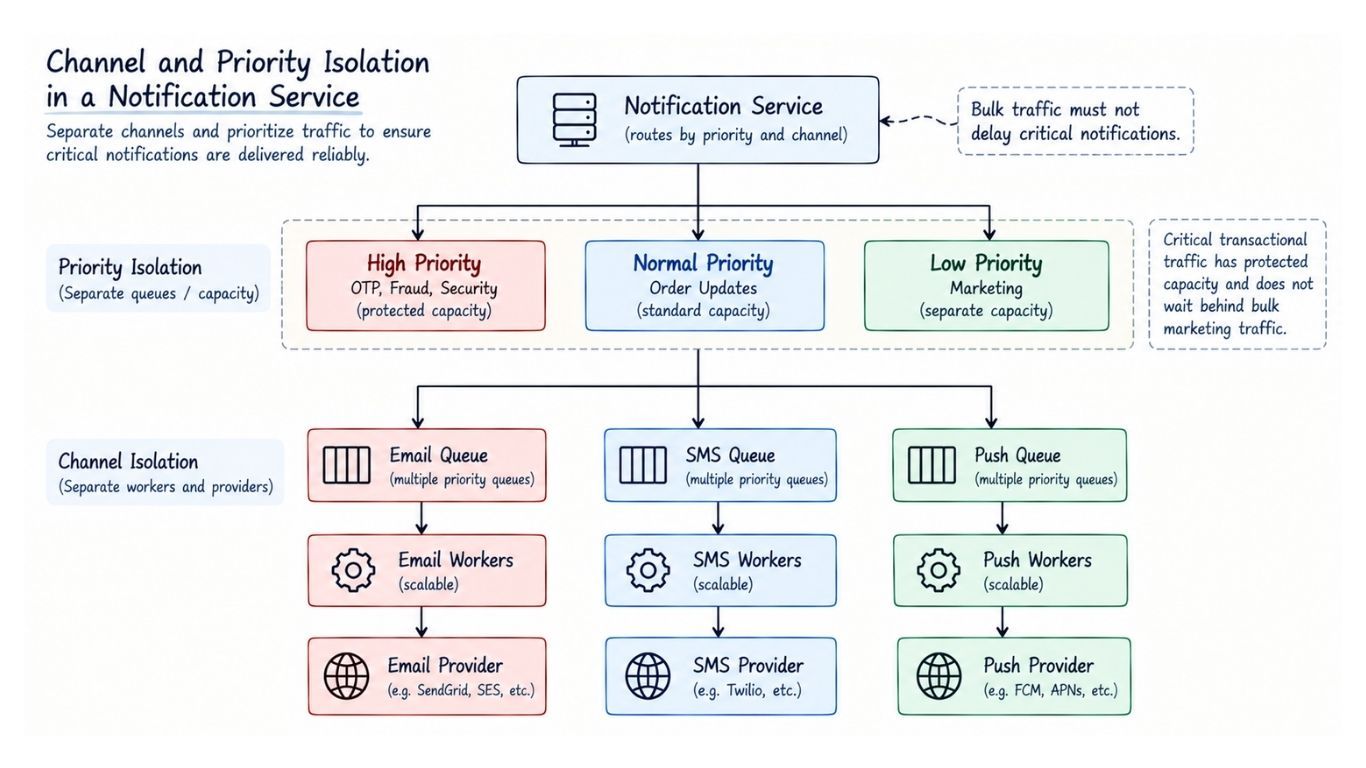
Using one queue for every notification creates another problem: email, SMS, and push providers have different throughput and rate limits.
We can isolate them:
             Notification Service
                    ↓
        ┌───────────┼───────────┐
        ↓           ↓           ↓
   Email Queue   SMS Queue   Push Queue
        ↓           ↓           ↓
 Email Workers  SMS Workers  Push Workers
        ↓           ↓           ↓
Email Provider SMS Provider Push Provider
Now each channel can scale independently. A spike in push notifications does not require scaling the SMS workers.
Channel separation alone is not enough.
Suppose millions of marketing messages are queued while an OTP arrives. The OTP should not wait behind promotional traffic.
We can separate notifications by priority:
High Priority
→ OTPs, fraud alerts, security alerts

Normal Priority
→ Order and delivery updates

Low Priority
→ Marketing and promotions
Another option is to use separate pipelines for transactional and promotional traffic.
The goal is isolation: bulk traffic should never delay critical notifications. The system should also prevent low-priority traffic from being starved indefinitely.
Workers consume jobs and deliver them through the appropriate provider.
A typical worker flow is:
Read Job
   ↓
Check Preferences
   ↓
Load Template
   ↓
Apply Rate Limit
   ↓
Call Provider
   ↓
Update Status
Workers should remain mostly stateless so they can scale horizontally:
More Traffic
    ↓
Add More Workers
Email, SMS, push, and in-app workers can scale independently based on their queue load.
Before sending optional notifications, the system should check whether the user has enabled that notification type and channel.
A simple preference model is:
user_id
notification_type
channel
enabled
For example:
user_123 | ORDER_UPDATE | PUSH  | true
user_123 | MARKETING    | EMAIL | false
If marketing email is disabled, the worker skips that delivery.
At large scale, checking the preference database for every notification can create heavy read traffic.
Frequently accessed preferences can be cached:
Worker
  ↓
Preference Cache
  ↓ cache miss
Preference Database
The trade-off is freshness.
If a user disables marketing notifications, a stale cached value could still allow a message to be sent. Preference updates should therefore invalidate the relevant cache entry or use a suitably short TTL.
Templates and provider configuration can also be cached when their freshness requirements allow it.
For sensitive preference changes, correctness should take priority over a higher cache hit rate.
Producers should not own the final notification text.
Instead of sending:
"Hello John, order ORD-1001 has shipped."the producer can send a template ID with dynamic data:
template_id = ORDER_SHIPPED
order_id = ORD-1001
delivery_date = Thursday
The Template Service stores channel-specific templates:
Your order {{order_id}} has shipped.
Expected delivery: {{delivery_date}}.
The worker renders the final message before delivery.
Templates provide centralized management, localization, personalization, and different formatting for email, SMS, and push notifications.
Some notifications should be delivered in the future.
A simple design is:
Notification API
       ↓
Scheduled Notification DB
       ↓
Scheduler
       ↓
Delivery Queue
       ↓
Worker
The scheduler finds due notifications:
scheduled_at <= current_time
AND status = 'SCHEDULED'
and publishes them to the normal delivery queue.
At larger scale, repeatedly scanning a large table becomes expensive. Scheduled notifications can instead be organized into time buckets, so the scheduler only checks jobs that are becoming due.
A delayed-message system or distributed scheduler is another option when the scale requires it.
A campaign may need to notify millions of users. Creating millions of delivery jobs at once could overwhelm queues, workers, databases, and external providers.
Instead, generate jobs in controlled batches:
Campaign
   ↓
Audience Service
   ↓
Batch Generator
   ↓
Campaign Queue
   ↓
Workers
This lets us throttle campaign traffic according to available system and provider capacity.
Campaign jobs can use isolated capacity so they do not consume resources reserved for critical transactional traffic.
One logical notification may be delivered through multiple channels, so we should separate the notification from its individual deliveries.
Notification
-------------------------
notification_id
user_id
notification_type
template_id
priority
scheduled_at
created_at
Each channel gets its own delivery record:
Delivery
-------------------------
delivery_id
notification_id
channel
status
provider_message_id
attempt_count
sent_at
delivered_at
For example, one ORDER_SHIPPED notification may create separate push and email deliveries, each with its own status and retry history.
Other supporting data includes:
UserPreference
→ user_id, notification_type, channel, enabled

Device
→ user_id, platform, push_token, status

Template
→ template_id, channel, language, content, version

Campaign
→ campaign_id, template_id, audience_id, scheduled_at, status
The exact schema should follow the system's access patterns and retention requirements.
A relational database is a reasonable starting point because notification metadata, preferences, templates, and campaigns are structured.
As notification history grows to very high write volumes, distributed storage may become useful for workloads that need:
High write throughput
Horizontal scaling
Large data volumes
Simple key-based access
The database choice should follow the access patterns, consistency requirements, and expected scale, rather than choosing a technology only because it is known to scale.
Email, SMS, and push notifications use the same basic pipeline:
Queue → Worker → Provider → UserHowever, each channel has a few specific requirements.
Push workers send messages through platform push providers rather than directly to user devices:
Push Worker
    ↓
Push Provider
    ↓
User Device
Each device has a device token, and one user may have multiple tokens. Invalid or expired tokens should be removed when providers report them.
Email workers send messages through an external email provider.
Providers may later report events such as delivered, bounced, rejected, or complained through webhooks. These events can update delivery status and analytics.
SMS workers send messages through an SMS provider and mobile network.
SMS is typically more expensive and may have stricter provider limits than push, making rate limiting especially important.
External providers usually limit how quickly we can send requests.
If an SMS provider supports 5,000 requests per second, workers should not send 20,000 requests per second directly.
SMS Queue
    ↓
SMS Worker
    ↓
Rate Limit Check
    ↓
SMS Provider
If capacity is unavailable, excess work remains buffered rather than overwhelming the provider.
Limits may be applied per provider, tenant, user, application, or notification type.
External providers can become slow or unavailable.
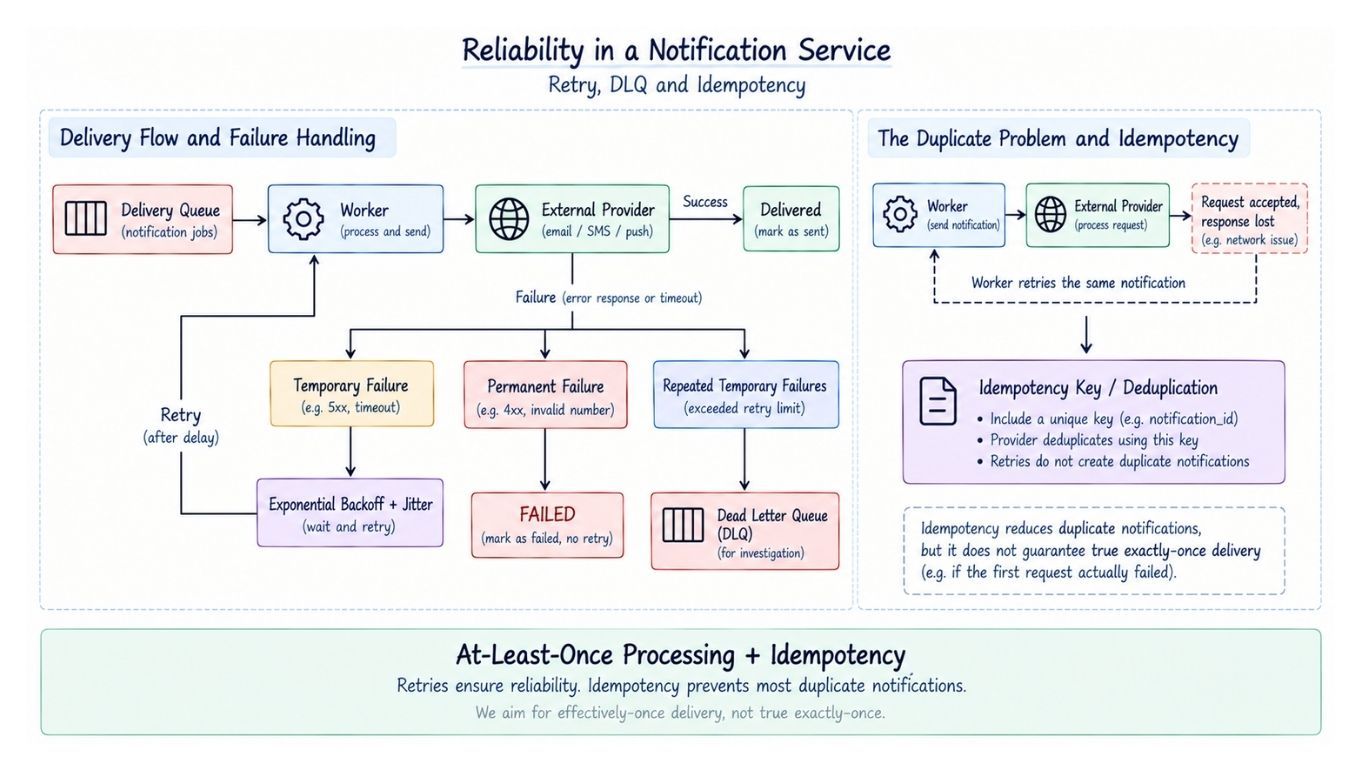
For temporary failures, such as a 503 Service Unavailable, retry the notification using exponential backoff with jitter:
Failure
   ↓
Wait
   ↓
Retry
   ↓
Longer Wait
   ↓
Retry
Jitter prevents many workers from retrying at exactly the same time.
Not every failure should be retried:
Temporary Failure → Retry
Permanent Failure → Mark FAILED
For example, a server outage may be temporary, while an invalid phone number is unlikely to succeed after another attempt.
For critical notifications, the system may also fail over to a backup provider:
Worker
  ↓
Primary Provider
  ↓ failure
Backup Provider
Multiple providers improve availability but add routing, cost, monitoring, and duplicate-delivery complexity. They should be introduced when reliability requirements justify that complexity.
Failed notifications should not be retried forever.
After a configured number of attempts, move them to a Dead Letter Queue (DLQ):
Delivery Queue
     ↓
   Worker
     ↓ failure
Retry Queue
     ↓ repeated failure
    DLQ
The DLQ isolates problematic jobs for investigation. After the underlying issue is fixed, suitable messages can be replayed.
Retries can create duplicates.
For example, a provider may accept an SMS but its response may be lost:
Worker → Provider
          ↓
      SMS accepted
          ↓
     Response lost
          ↓
     Worker retries
The user could now receive the message twice.
To reduce duplicates, producers should send an idempotency key for each logical notification:
idempotency_key = payment_89201_successIf the same request is submitted again, the Notification Service can recognize it instead of creating another notification.
Workers should also make repeated processing safe where possible. If a provider supports idempotency keys, those should be used for provider requests as well.
The common delivery models are:
At-most-once: Avoids retries but may lose notifications.
At-least-once: Retries failures but may produce duplicates.
Exactly-once: Difficult to guarantee end-to-end when external providers are involved.
For most Notification Services, a practical goal is:
At-Least-Once Processing
        +
Idempotency / Deduplication
This provides strong reliability without assuming that external email, SMS, or push providers can guarantee true exactly-once delivery.
The API should not report success until the notification has been durably accepted.
Otherwise:
API returns success
       ↓
Server crashes before persistence
       ↓
Notification lost
Important notifications should therefore be persisted in durable storage or a durable queue before the API acknowledges them.
Retries and idempotency handle failures that occur later in the delivery pipeline.
A reliability problem can occur when a business service updates its database and publishes an event separately.
For example:
1. Mark order as SHIPPED
2. Publish ORDER_SHIPPED event
If the database update succeeds but event publishing fails, the Notification Service never receives the event.
The Transactional Outbox Pattern solves this by writing both changes in one database transaction:
Database Transaction
       ├── Update Order
       └── Insert Outbox Event
A separate publisher reads the outbox and sends the event to the message broker. If publishing fails, it can retry without losing the business event.
The outbox belongs to the service that owns the business transaction. It is not required for every notification request.
Notification traffic can be bursty. A major event or campaign may suddenly produce many times the normal traffic.
The queue provides a buffer:
Incoming Traffic
       ↓
Message Queue
       ↓
Autoscaled Workers
       ↓
Providers
Workers can scale as the backlog changes.
Useful autoscaling signals include:
Queue depth
Oldest message age
Processing rate
Delivery latency
Provider capacity
CPU alone is not enough. Workers may have low CPU usage while millions of notifications are waiting in the queue.
Provider limits must also cap scaling. Adding workers does not help if the downstream provider cannot accept more traffic.
At very high scale, queues and notification data may need to be partitioned.
A partition key may be derived from user_id, tenant_id, order_id, or another high-cardinality field that matches the required distribution or ordering pattern.
A good key distributes traffic evenly. A poor choice can create hot partitions.
Partitioning can also help when ordering matters:
Order Confirmed
      ↓
Order Shipped
      ↓
Order Delivered
We usually do not need global ordering.
Related events can use the same partition key, such as order_id, to help preserve processing order for that entity. Retries and external providers can still affect the order ultimately observed by the user.
For a global service, a single region may eventually become a latency, availability, or regulatory limitation.
When required, the notification pipeline can run across multiple regions:
        Global Traffic
        ↙     ↓     ↘
   Region A Region B Region C
      ↓        ↓        ↓
 API/Queue  API/Queue  API/Queue
      ↓        ↓        ↓
  Workers   Workers   Workers
Traffic can be routed to an appropriate healthy region.
Multi-region deployment introduces complexity around:
Data replication
Failover
Duplicate processing
Preference consistency
Regional provider availability
Data residency and compliance
It should be introduced only when availability, latency, or regulatory requirements justify the added complexity.
A Notification Service must track both system health and delivery performance.
Important metrics include:
Request and processing rate
Queue depth and oldest message age
Delivery latency and success rate
Retry and failure rate
Provider latency and errors
DLQ size
These metrics should also be tracked by channel and provider so failures can be isolated quickly.
Each notification should have a unique notification_id that can be followed across the pipeline:
API Accepted
     ↓
Queued
     ↓
Worker Processing
     ↓
Provider Request
     ↓
Provider Response
Structured logs and distributed tracing help investigate why a notification was delayed or failed.
Notification systems handle sensitive data such as OTPs, email addresses, phone numbers, and device tokens.
Important protections include:
Authenticate and authorize producer services.
Encrypt sensitive data and provider credentials.
Avoid storing OTPs and secrets in logs.
Restrict access to templates and sensitive notification types.
Rate-limit abusive clients.
Verify signatures on provider webhooks.
The service should prevent unauthorized applications from sending arbitrary notifications.
Delivery cost varies by channel, with SMS often costing more than push notifications.
Cost can be controlled through user preferences, campaign throttling, duplicate prevention, appropriate channel selection, and provider routing.
However, the cheapest option should not automatically win. Channel selection must still satisfy product and reliability requirements.
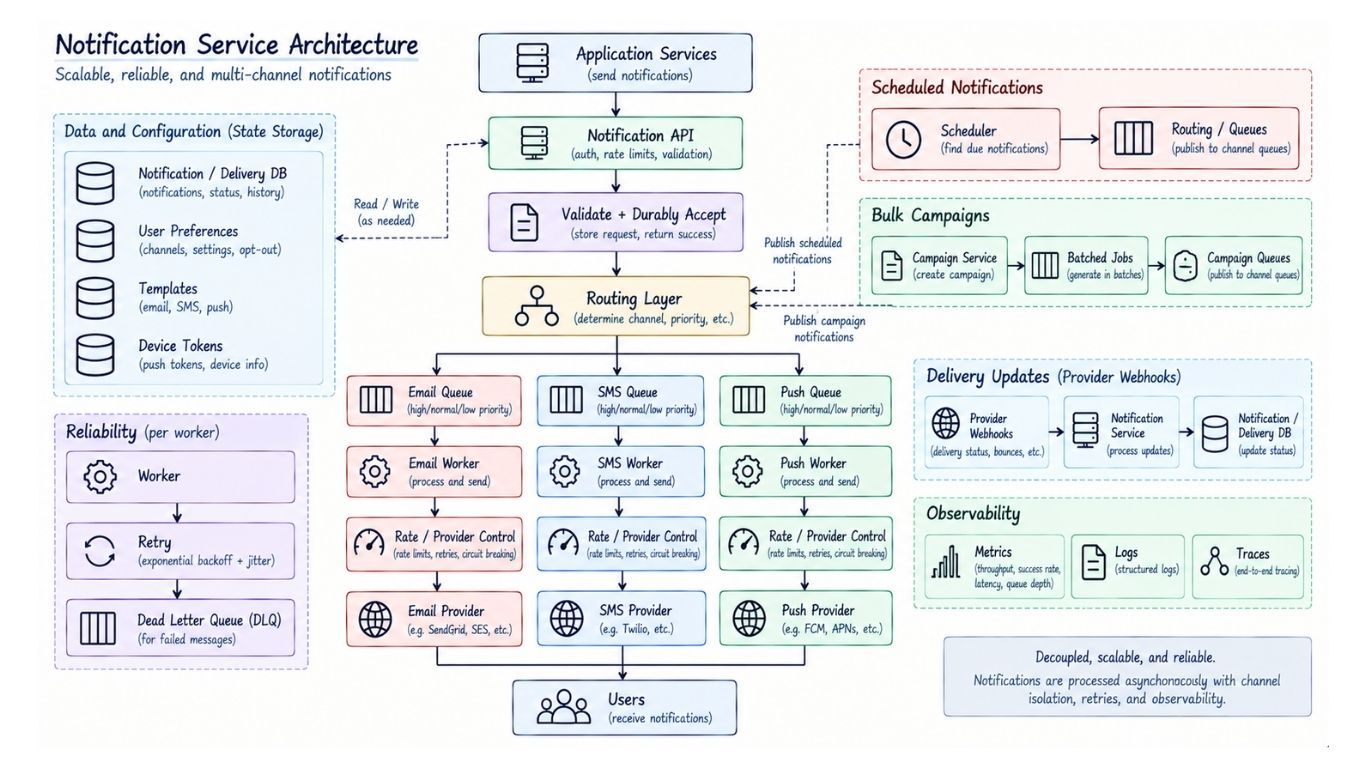
Putting the design together:
                    Application Services
                            ↓
                     Notification API
                            ↓
                 Validate + Durably Accept
                            ↓
                      Routing Layer
                  ↙         ↓         ↘
            Email Queue   SMS Queue   Push Queue
                 ↓          ↓           ↓
           Email Worker  SMS Worker  Push Worker
                 ↓          ↓           ↓
             Rate / Provider Control
                 ↓          ↓           ↓
          Email Provider SMS Provider Push Provider
                  ↘         ↓         ↙
                         Users

State and Supporting Data
────────────────────────────────────
Notification / Delivery DB
Preferences • Templates • Device Tokens

Scheduled Notifications
Scheduler → Routing / Queues

Bulk Campaigns
Campaign Service → Batched Jobs → Campaign Queues

Failures
Worker → Retry → DLQ

Delivery Updates
Provider Webhooks → Notification Service → Delivery DB

Observability
Metrics • Logs • Traces
The main delivery path remains simple:
Producer
   ↓
Notification API
   ↓
Queue
   ↓
Worker
   ↓
Provider
   ↓
User
The supporting components solve specific problems:
Channel and priority isolation protect critical traffic.
Preferences and templates control what is sent and how it is rendered.
Schedulers and campaign pipelines support delayed and bulk delivery.
Rate limits, retries, and DLQs handle provider constraints and failures.
Idempotency and durable acceptance reduce duplicates and notification loss.
Provider webhooks update delivery status.
Queues and worker pools can scale independently, allowing the system to absorb traffic spikes without scaling every component at the same rate.
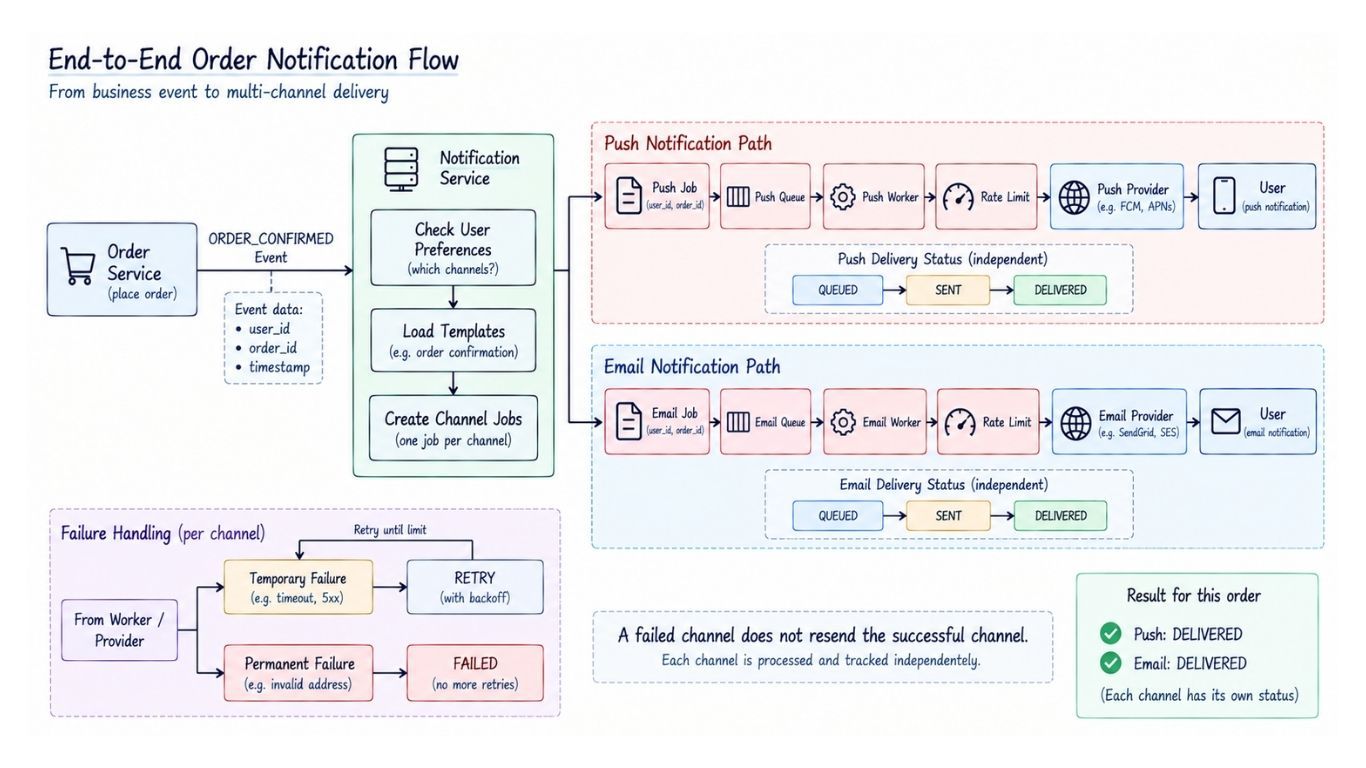
Consider an order confirmation.
The Order Service publishes:
ORDER_CONFIRMED
→ user_id
→ order_id
→ timestamp
The Notification Service determines that the user should receive push and email notifications.
ORDER_CONFIRMED
       ↓
Notification Service
       ↓
Check Preferences
       ↓
Load Templates
       ↓
Create Channel Jobs
     ↙         ↘
Push Job     Email Job
    ↓            ↓
Push Queue    Email Queue
    ↓            ↓
Push Worker   Email Worker
    ↓            ↓
Rate Limit + Provider Call
    ↓            ↓
Push Provider Email Provider
     ↘          ↙
          User
Each channel is processed independently. If one channel fails, its retry flow does not resend the successful channel.
Each delivery maintains its own status:
QUEUED → SENT → DELIVERED

Temporary failure → RETRY
Permanent failure → FAILED
SENT means the provider accepted the notification. If the provider later confirms delivery through a callback or webhook, the status can move to DELIVERED.
Synchronous:  API → Provider → Response
Asynchronous: API → Queue → Worker → Provider
Synchronous delivery is simpler but makes the API depend on provider latency and availability.
Asynchronous delivery adds infrastructure but provides buffering, retries, and independent scaling. For a large Notification Service, it is usually the better fit.
A single queue is simpler to operate, but different channels and priorities can interfere with each other.
Multiple queues provide better isolation and independent scaling at the cost of additional operational complexity.
Use separate queues when channel limits or priority requirements justify the isolation.
One provider keeps routing and operations simple.
Multiple providers can improve resilience and regional coverage but increase cost and complexity. Add provider redundancy when availability requirements justify it.
Keeping notification history indefinitely improves auditing and analytics but increases storage cost.
A common approach is:
Recent Data → Operational Storage
Older Data  → Archive / Analytics Storage
Retention periods should follow product, audit, and compliance requirements.
Use an asynchronous architecture:
Producers
   ↓
Notification API
   ↓
Queues
   ↓
Channel Workers
   ↓
External Providers
Keep workers horizontally scalable and isolate channels or priorities when their throughput and latency requirements differ.
A queue separates request acceptance from delivery. It absorbs traffic spikes, lets workers scale independently, and enables retries when workers or providers fail.
Use priority queues or separate transactional and promotional pipelines.
Critical notifications should have dedicated capacity so campaigns cannot delay OTPs, fraud alerts, or security messages.
Acknowledge requests only after they are durably accepted, and use at-least-once processing with idempotency.
Idempotency keys help deduplicate repeated logical requests, while retries recover from temporary failures. True end-to-end exactly-once delivery is difficult with external providers.
Classify the error first:
Temporary Failure → Backoff + Jitter → Retry
Permanent Failure → Mark FAILED
Repeated Failure  → DLQ
For critical channels, a secondary provider may be used when the reliability requirement justifies the additional complexity.
Buffer excess work in queues and scale workers using signals such as queue depth and oldest message age.
Workers must still respect provider capacity. Adding more workers does not help when the downstream provider is already at its rate limit.
Store the notification with a scheduled_at timestamp. A scheduler finds due jobs and publishes them to the delivery queues.
At larger scale, time buckets or distributed scheduling mechanisms can avoid repeatedly scanning a large table.
Resolve the audience and generate delivery jobs in controlled batches.
Use throttling and isolated campaign capacity so promotional traffic cannot overwhelm providers or interfere with transactional notifications.
Start from the access patterns and consistency requirements.
Relational storage is a reasonable starting point for structured notification metadata, preferences, templates, and campaigns. At very large scale, distributed storage may be useful for high-volume notification history and simple key-based access.
Avoid global ordering unless it is explicitly required.
When related notifications need ordering, route them using the same partition key, such as order_id or user_id. This helps preserve processing order for that entity, although retries and external providers may still affect the final delivery order.
