
Durgesh Tiwari
Author
As an application grows, there comes a time when the existing system is no longer enough. You may need to upgrade the application, move to a new database, migrate to the cloud, or replace an old legacy system.
However, moving everything at once is risky. It can lead to downtime, data loss, or service interruptions, which directly affect users and the business.
This is where Migration Patterns become important.
Migration Patterns are proven approaches that help developers move from one system to another safely and step by step. They reduce risk, improve reliability, and allow users to continue using the application while the migration is happening.
In simple words, Migration Patterns help you move from an old system to a new system without affecting users.
These patterns are widely used in cloud migration, microservices migration, database migration, and application modernization.
Migrating a system is not just about moving data or code. Large applications often serve thousands or even millions of users, so even a small mistake can cause serious problems.
Migration Patterns help developers make this process safer and more reliable.
They help by:
Reducing application downtime.
Minimizing the risk of data loss.
Supporting gradual system upgrades.
Improving application reliability.
Making rollback easier if something goes wrong.
Providing a better user experience during migration.
Migration Patterns are design techniques used to move an application, database, or service from an existing system to a new one in a controlled and reliable way.
Instead of replacing the entire system at once, these patterns allow developers to migrate step by step while keeping the application available for users.
This reduces risk and makes it easier to identify and fix problems during the migration process.
In simple words, Migration Patterns provide a safe and planned way to upgrade or replace an application without causing major disruptions.
Imagine an e-commerce application that is moving from a monolithic application to a microservices architecture.
Instead of migrating every feature at once, the development team moves one service at a time, such as Product Catalog, then Order Management, and finally Payment Processing.
During the migration, customers can continue shopping without noticing major changes, while the new system is gradually introduced.
When a large application becomes old, replacing the entire system at once can be risky. It may cause downtime, unexpected bugs, or service interruptions.
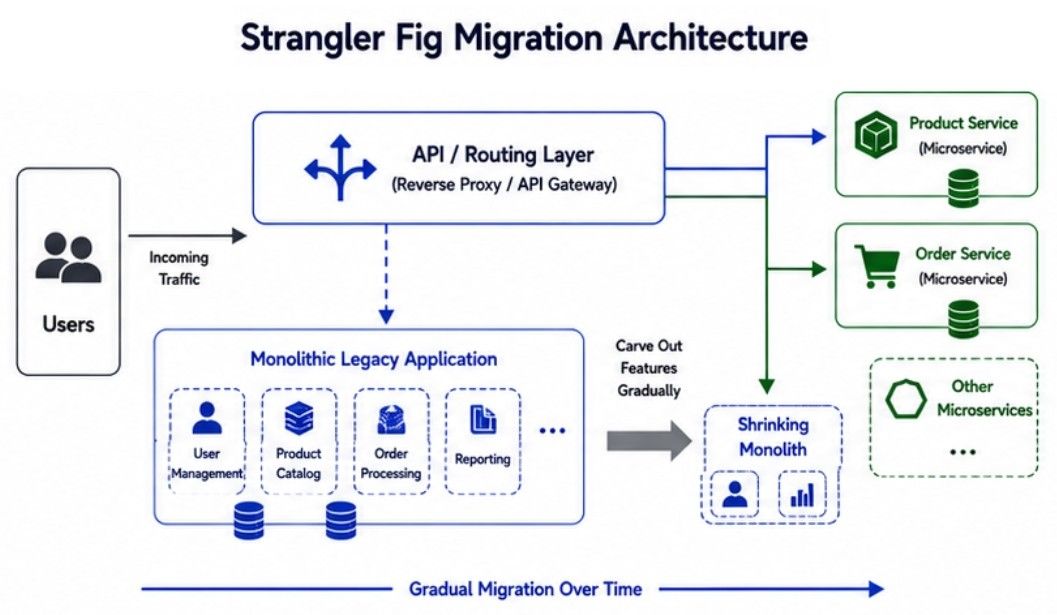
The Strangler Fig Pattern solves this problem by replacing the old system gradually instead of rebuilding everything at once.
With this approach, new features are developed in the new system, while the old system continues to run the remaining features. As more functionality is moved, the old system becomes smaller until it is no longer needed.
In simple words, the Strangler Fig Pattern replaces an old application one feature at a time instead of replacing everything together.
The migration process happens step by step:
The existing application continues running.
A new feature or module is built in the new system.
Requests for that feature are redirected to the new system.
More features are migrated one by one.
After all features are moved, the old application is removed.
This approach allows the application to stay available while the migration is in progress.
Strangler Fig Pattern
        Users
          │
          ▼
    Routing Layer
      │         │
      ▼         ▼
 New Service   Old System
      │
More Features Move
      │
      ▼
Old System RemovedImagine an e-commerce application that needs to move from a monolithic application to a microservices architecture.
Instead of rebuilding the entire application, the development team migrates one feature at a time.
First, the Product Catalog is moved to the new system.
Next, User Accounts are migrated.
Then, Payment Processing is moved.
Finally, Order Management is migrated.
After every feature has been transferred successfully, the old application is retired.
The Strangler Fig Pattern offers several benefits:
Reduces Migration Risk – Small changes are easier to manage than one large migration.
Supports Gradual Migration – Features can be moved one by one.
Keeps the Application Available – Users can continue using the application during migration.
Makes Testing Easier – Each migrated feature can be tested independently.
Simplifies Rollback – If a problem occurs, only the migrated feature needs to be rolled back.
The Strangler Fig Pattern also has some challenges:
Old and New Systems Run Together – Both systems must be maintained during migration.
Request Routing Becomes More Complex – The application must decide whether a request goes to the old or new system.
Migration Takes More Time – Moving features one by one is slower than replacing the entire application at once.
When releasing a new version of an application, stopping the existing application can cause downtime and affect users. Developers need a way to deploy updates safely without interrupting the service.
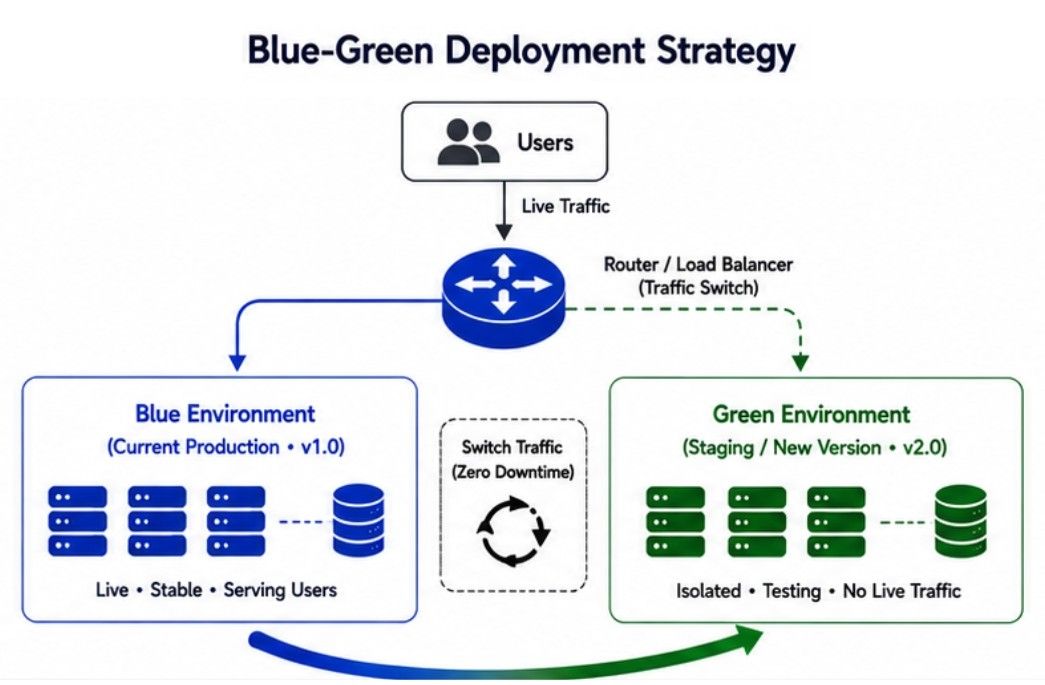
The Blue-Green Migration pattern solves this problem by using two identical application environments.
Blue Environment – The current version that users are using.
Green Environment – The new version that is ready for deployment.
The new version is first deployed and tested in the Green Environment. Once everything works correctly, user traffic is switched from Blue to Green. If any issue is found after deployment, traffic can quickly be switched back to the Blue Environment.
In simple words, Blue-Green Migration lets you release a new application version with almost no downtime and allows a quick rollback if needed.
The migration process is simple:
The Blue Environment serves all user requests.
The new application version is deployed to the Green Environment.
The Green Environment is tested completely.
After successful testing, user traffic is redirected from Blue to Green.
If everything works correctly, Green becomes the new production environment.
If any problem occurs, traffic is immediately switched back to the Blue Environment.
This approach helps release new versions without affecting users.
2. Blue-Green Migration
        Users
          │
          ▼
 Blue Environment
(Current Production)
          │
 Deploy New Version
          ▼
 Green Environment
          │
      Testing
          │
   Switch Traffic
          ▼
 Green Becomes
ProductionImagine an e-commerce application that is launching a new version before a big sale.
The new version is deployed to the Green Environment, while customers continue shopping on the Blue Environment.
After the new version passes all tests, user traffic is redirected to the Green Environment. If an unexpected issue appears after deployment, the team can quickly switch traffic back to the Blue Environment, keeping the application available for users.
The Blue-Green Migration pattern provides several benefits:
Almost No Downtime – Users experience little or no service interruption.
Fast Rollback – Traffic can quickly return to the previous version if needed.
Safer Deployments – The new version is tested before users access it.
Easy Production Testing – The Green Environment can be fully verified before switching traffic.
The Blue-Green Migration pattern also has some challenges:
Requires Duplicate Infrastructure – Two identical environments must be maintained.
Higher Deployment Cost – Running both environments increases infrastructure costs.
Database Changes Need Careful Planning – Database updates must work correctly with both application versions during the migration.
When an application grows, developers may need to move data to a new database, upgrade the existing database, or change the database technology. During this process, users should be able to continue using the application without losing data.
This process is called Database Migration.
Different Database Migration Strategies are used depending on the size of the database, application traffic, and business requirements.
In simple words, Database Migration Strategies help move data safely from one database to another with minimum risk and downtime.
In Big Bang Migration, all data is moved from the old database to the new database in one operation. After the migration is complete, the old database is replaced immediately.
This approach is simple but requires careful planning because the entire migration happens at once.
Best for:
Small applications
Small databases
Short maintenance windows
Challenge:
Higher Migration Risk – If the migration fails, the entire application may be affected.
In Phased Migration, data is moved step by step instead of all at once. Both the old and the new databases remain active until the migration is complete.
This approach allows developers to monitor the migration and fix issues before moving the next batch of data.
Best for:
Large databases
Applications with continuous user traffic
Large-scale systems
Benefit:
Lower Migration Risk – Data is migrated gradually, making the process safer and easier to monitor.
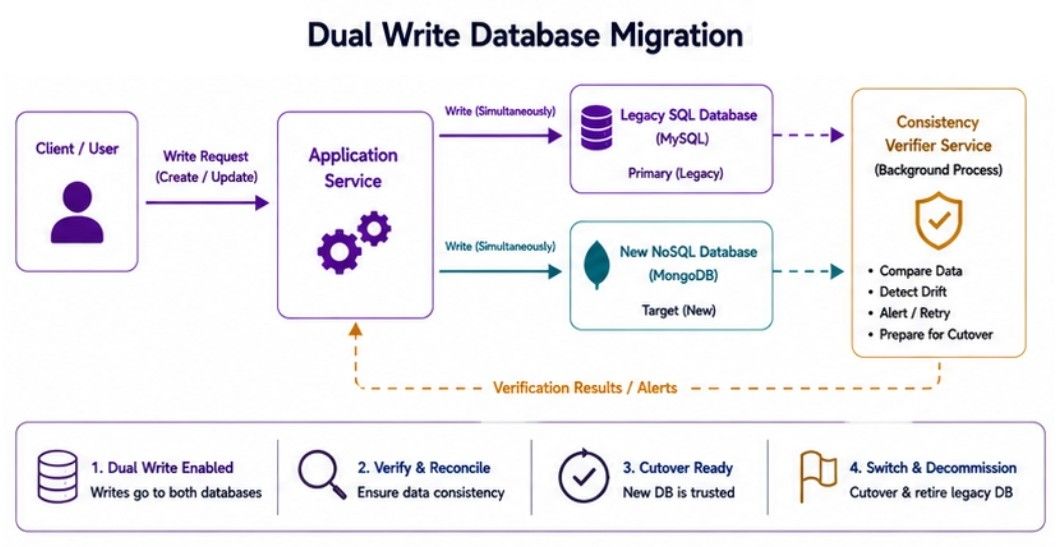
In the Dual Write Strategy, the application writes every new record to both the old database and the new database during the migration.
After confirming that the new database is working correctly, the old database is removed.
This approach helps keep both databases synchronized while the migration is in progress.
Benefit:
Smooth Migration – Both databases stay updated, reducing the risk of missing new data during migration.
Using the right Database Migration Strategy provides several advantages:
Reduces Migration Risk – Makes database upgrades safer.
Protects Data – Helps prevent data loss during migration.
Supports Gradual Upgrades – Allows migration without affecting users.
Improves System Reliability – Keeps the application stable throughout the migration process.
When upgrading an application, stopping the service can interrupt users and affect the business. For applications that serve thousands or millions of users, even a few minutes of downtime can create a poor user experience.
The Zero-Downtime Migration pattern solves this problem by allowing the application to stay online while the migration is happening.
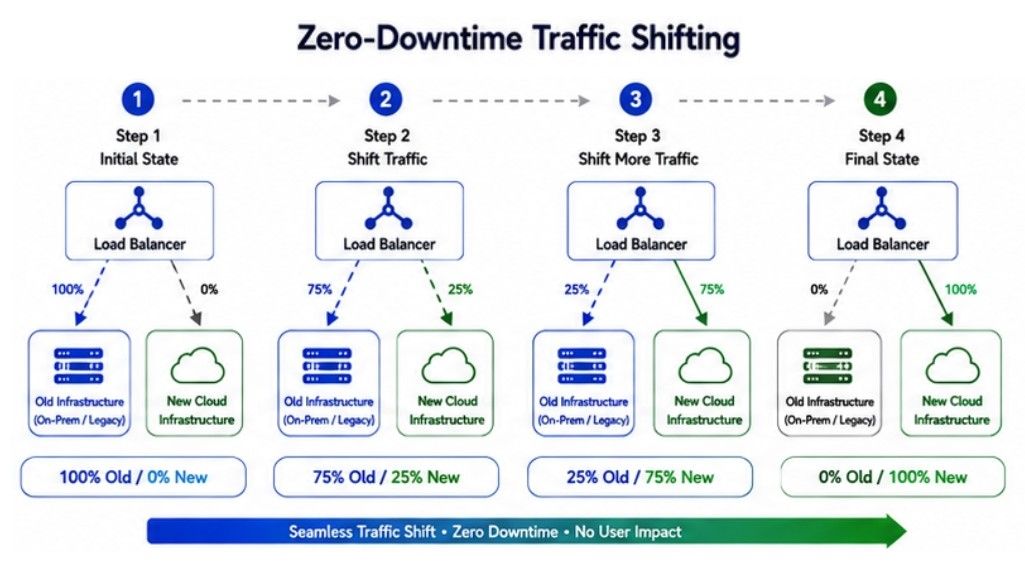
Instead of shutting down the application, developers migrate services, databases, or infrastructure in small steps. Users can continue using the application throughout the migration process.
In simple words, Zero-Downtime Migration lets users keep using the application while the system is being upgraded.
The migration process happens gradually:
The existing application continues serving users.
The new service, database, or infrastructure is prepared.
Data is synchronized between the old and the new system.
User traffic is gradually redirected to the new system.
After confirming everything works correctly, the old system is removed.
This approach keeps the application available during the entire migration.
Zero-Downtime Migration
 Existing System
        │
        ▼
 Prepare New System
        │
        ▼
 Synchronize Data
        │
        ▼
 Gradually Shift Traffic
        │
        ▼
Remove Old SystemImagine a video streaming platform that needs to upgrade its database servers.
Instead of taking the platform offline, the team sets up new database servers and synchronizes the data with the existing servers. User traffic is then moved gradually to the new database.
During the entire migration, users continue watching videos without noticing any interruption.
The Zero-Downtime Migration pattern provides several benefits:
No Service Interruption – Users can continue using the application during the migration.
Improves User Experience – Customers are not affected by system upgrades.
Supports Continuous Deployment – New versions can be released without stopping the application.
Reduces Business Impact – Business operations continue without downtime.
Suitable for Large-Scale Applications – Works well for applications with high traffic and millions of users.
The Zero-Downtime Migration pattern also has some challenges:
Requires Careful Planning – Every migration step must be planned properly.
Data Synchronization Can Be Complex – The old and new systems must remain consistent during the migration.
May Require Additional Infrastructure – Extra servers or resources are often needed while both systems run together.
Imagine an online banking application that is upgrading its old infrastructure to a modern cloud platform without affecting customers.
The migration starts with the Strangler Fig Pattern, where developers replace one service at a time instead of rebuilding the entire application. This reduces migration risk and allows the old and new systems to work together during the transition.
When a new version of the application is ready, the team uses Blue-Green Migration. The new version is deployed in the Green Environment and fully tested before user traffic is switched from the Blue Environment. If any issue is detected, traffic can quickly be redirected back to the previous version.
At the same time, customer data is moved using a Phased Database Migration, where data is migrated in smaller batches instead of all at once. This makes the migration safer and easier to monitor.
Throughout the entire upgrade, the application follows a Zero-Downtime Migration approach, allowing customers to continue checking balances, transferring money, and making payments without experiencing any service interruption.
By combining these Migration Patterns, the banking application can upgrade its system safely, protect customer data, reduce migration risk, and keep services available during the entire migration process.
Migration Patterns help developers move applications, databases, and infrastructure from an old system to a new one safely. They reduce migration risk, minimize downtime, and keep applications available while upgrades are in progress.
Strangler Fig Pattern replaces an old application gradually by moving one feature at a time.
Blue-Green Migration uses two identical environments to release new versions with minimal downtime and quick rollback.
Database Migration Strategies provide different ways to move data safely based on the application's size and requirements.
Zero-Downtime Migration allows users to continue using the application while services, databases, or infrastructure are being upgraded.
