
Durgesh Tiwari
Author
Almost every website, mobile app, and online service needs a secure way to identify users and protect their data.
When someone logs in, the application first verifies their identity. After that, it decides what they are allowed to access or do inside the system.
This is why authentication and authorization are two important parts of application security.
Authentication confirms the user's identity, while authorization controls the permissions they receive after logging in. Modern applications use methods like Session-Based Authentication, JWT Authentication, OAuth 2.0, and OpenID Connect (OIDC) to provide secure access to websites, web applications, and APIs.
Authentication is the process of verifying the identity of a user, device, or application before giving access to a system.
In simple words, authentication means proving that you are the person you claim to be.
When you enter your username and password, OTP, fingerprint, or another login method, the system checks your information. If everything matches the stored records, it confirms your identity and allows you to access your account.
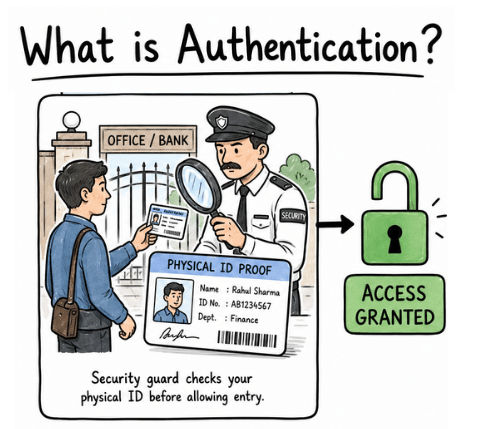
Imagine you are entering a bank.
Before you can go inside, a security guard asks for your ID card and checks whether it belongs to you.
Your ID card proves your identity.
The guard verifies your details.
If everything is correct, you are allowed to enter the bank.
Authentication works in the same way for websites and applications. Your password, OTP, fingerprint, or other login credentials act as your digital identity, helping the system confirm who you are before granting access.
Applications use different authentication methods to verify a user's identity and keep accounts secure. The right method depends on the application's security needs and user experience.
The most common authentication methods used in websites, mobile apps, and APIs are:
Username and Password Authentication
Multi-Factor Authentication (MFA)
Biometric Authentication
Token-Based Authentication
Each method works differently, but they all have the same goal—to make sure only authorized users can access an account or system.
Let's explore each authentication method one by one in a simple and easy-to-understand way.
Username and Password Authentication is the most common way to verify a user's identity.
In this method, the user enters:
Username or email address
Password
The application compares these details with the stored user records. If the username and password are correct, the user is successfully logged in and can access their account.
This authentication method is widely used in websites, mobile apps, online banking, social media platforms, and business applications.
You use this authentication method every time you sign in to services such as:
Gmail
Online banking websites
Shopping apps
After entering your email (or username) and password, the system verifies your identity before giving you access.
A password is the first layer of security, so it should be strong and difficult to guess. Follow these simple tips to keep your account safe:
Use a strong and unique password.
Never reuse the same password on multiple websites.
Update your password if you think it has been compromised.
Enable Multi-Factor Authentication (MFA) for an extra layer of protection.
Using a strong password along with good security practices helps protect your account from unauthorized access.
Multi-Factor Authentication (MFA) is a security method that requires users to verify their identity using two or more authentication factors before they can access an account.
In simple terms, MFA adds an extra layer of security. Even if someone knows your password, they still need another verification method to log in successfully.
Many websites, banking systems, email services, and business applications use MFA to provide better account protection.
Some popular Multi-Factor Authentication methods include:
Password + One-Time Password (OTP)
Password + Fingerprint
Password + Authentication App Code
Password + Security Key
Each additional verification step makes it more difficult for attackers to access your account.
Imagine you are signing in to your online banking account.
You enter your username and password.
The bank sends a One-Time Password (OTP) to your registered mobile number.
You enter the OTP on the login page.
After both steps are verified, you can access your account.
Even if someone steals your password, they still cannot log in without the second verification factor. This is why Multi-Factor Authentication (MFA) is one of the most effective ways to improve account security.
Biometric Authentication is a security method that verifies a user's identity using unique physical or biological characteristics.
Unlike passwords, biometric data is unique to each person, making this authentication method both secure and convenient. Users can access their accounts or devices without remembering complex passwords.
Some widely used biometric authentication methods are:
Fingerprint scanning
Face recognition
Voice recognition
Iris or eye scanning
Each of these methods uses a person's unique features to confirm their identity.
Biometric authentication is commonly used in everyday devices and applications. For example:
You unlock your smartphone using your fingerprint.
Face recognition allows you to access your device without entering a password.
Banking apps let you sign in using your fingerprint or facial recognition for secure access.
Because it is fast, easy to use, and highly secure, Biometric Authentication is widely used in smartphones, banking applications, access control systems, and many modern authentication solutions.
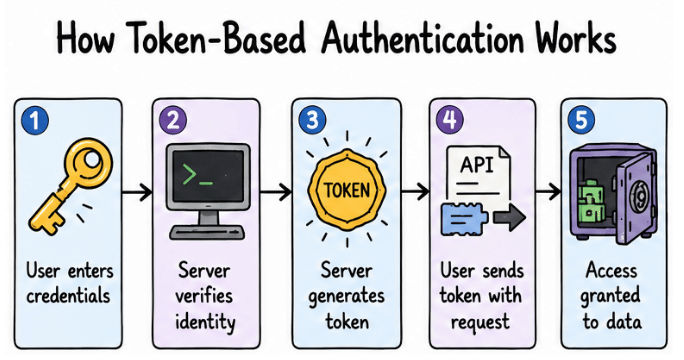
Token-Based Authentication is a modern authentication method used in web applications, mobile apps, and APIs.
After a user logs in successfully, the server generates a secure authentication token. Instead of sending the username and password with every request, the application sends this token to prove the user's identity.
Unlike session-based authentication, the server does not need to store session information for every logged-in user. This makes token-based authentication a popular choice for modern applications and API-based systems.
The authentication process usually follows these steps:
The user logs in using their username and password.
The server verifies the user's credentials.
After successful verification, the server generates an authentication token.
The application stores the token and sends it with future requests.
The server validates the token and allows access to protected resources if it is valid.
A common example is a mobile application communicating with a backend API.
After the user logs in, the API returns an authentication token. Every time the app requests user data or performs an action, it includes this token in the request. The server verifies the token before providing access.
One of the most widely used token formats is JWT (JSON Web Token). It is commonly used in modern web applications, REST APIs, and mobile applications because it provides a secure and efficient way to authenticate users.
Authorization is the process of determining what an authenticated user is allowed to access or perform within a system.
In simple words, authorization decides what you are allowed to do after logging in.
Authentication verifies your identity first, while authorization defines your permissions based on your role or access level. This ensures that users can only access the resources and features they are permitted to use.
After a user logs in, different users may have different permissions:
A regular user can view and update their own profile.
A manager can approve requests and manage team activities.
An administrator (Admin) can create, update, or delete user accounts.
These permissions are controlled by authorization rules, which help protect sensitive data and prevent unauthorized actions.
Authentication | Authorization |
|---|---|
Verifies user identity | Controls user access and permissions |
Happens before authorization | Happens after successful authentication |
Uses passwords, OTP, biometrics, or tokens | Uses roles, permissions, and access rules |
Example: User login | Example: Admin panel access |
Real-World Example
Imagine an office building:
Authentication: Showing your employee ID card at the entrance to prove your identity.
Authorization: Getting permission to enter only those rooms you are allowed to access.
In applications, authentication confirms who you are, while authorization decides what you can do.
Session-Based Authentication is one of the most widely used authentication methods in traditional web applications. It allows a website to remember a user after they log in, so they do not need to authenticate again while browsing.
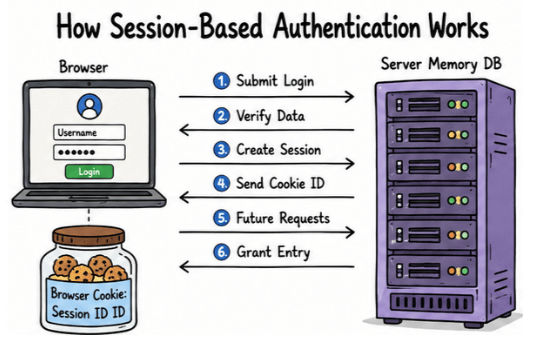
In this method, the server creates a session after a successful login and stores the user's session information. The browser receives a unique Session ID, usually through a cookie, and sends it with every future request. The server uses this Session ID to identify the user and keep them logged in.
This authentication method is commonly used in traditional websites, e-commerce platforms, and many business applications.
The process is simple and follows these steps:
The user enters their username and password.
The server verifies the login credentials.
If the credentials are valid, the server creates a new session.
A unique Session ID is sent to the user's browser and stored in a cookie.
The browser automatically includes the Session ID with every new request.
The server validates the Session ID and grants access to protected resources.
As long as the session remains active, the user can continue using the application without logging in again.
Suppose you log in to an online shopping website.
You sign in using your email and password.
The website creates a session for your account.
As you browse products, add items to your cart, or visit different pages, you stay logged in.
You only need to log in again after you sign out or when the session expires.
This provides a smooth and convenient user experience.
Easy to implement and manage.
Keeps users logged in while they browse the website.
The server can easily end a user's session by logging them out.
Well suited for traditional web applications.
The server must store session data for every logged-in user.
Managing a large number of sessions can increase server load.
If Session IDs are not properly protected, attackers may attempt Session Hijacking to gain unauthorized access.
JWT (JSON Web Token) Authentication is a modern token-based authentication method used to secure web applications, mobile apps, and APIs.
Instead of creating and storing user sessions on the server, the server generates a JWT token after a successful login. The client sends this token with future requests to prove the user's identity.
JWT authentication is widely used in:
REST APIs
Mobile applications
Single-Page Applications (SPAs)
Modern web applications
It is especially useful when the frontend and backend are separate because it provides a simple and scalable way to authenticate users.
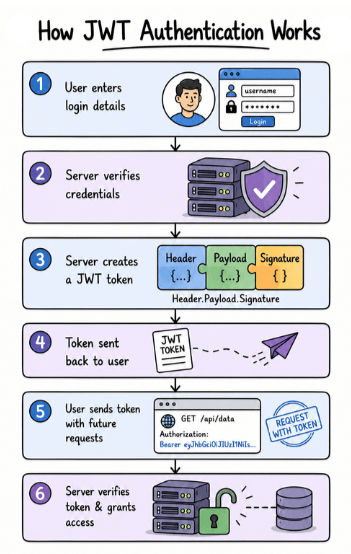
The JWT authentication process follows these steps:
The user logs in with a username and password.
The server verifies the user's credentials.
If the login is successful, the server generates a JWT token.
The token is sent to the client.
The client includes the token in future API requests.
The server validates the token before allowing access to protected resources.
A JWT token is usually sent in the HTTP Authorization header like this:
Authorization: Bearer your_tokenThe Bearer keyword tells the server that the request includes a valid authentication token.
A JWT consists of three parts separated by dots:
Header.Payload.SignatureEach part has a specific purpose.
The Header contains basic information about the token, such as its type (JWT) and the algorithm used to create the digital signature.
The Payload stores claims or information about the user. It may include:
User ID
Username
User roles or permissions
Token expiration time
The payload should never contain sensitive information such as passwords or confidential data because it can be decoded.
The Signature protects the token from being modified. It allows the server to verify that the JWT was created by a trusted source and has not been tampered with.
JWT authentication offers several benefits:
Ideal for REST APIs and modern applications.
Works smoothly with both web and mobile apps.
Does not require server-side session storage.
Supports scalable and distributed applications.
Makes authentication faster and easier across multiple services.
Follow these best practices to use JWT securely:
Always use HTTPS to encrypt data during transmission.
Set a short expiration time for access tokens.
Never store passwords or other sensitive data in the token payload.
Store JWT tokens securely on the client side.
Use strong secret keys or public/private key pairs to sign tokens.
JWT Authentication is one of the most popular authentication methods for modern applications because it provides a secure, flexible, and scalable way to protect APIs and user accounts.
OAuth 2.0 is an authorization framework that allows an application to access a user's data from another service without asking for the user's password.
Instead of sharing login credentials, the user grants permission, and the application receives an access token that allows limited access to specific resources.
OAuth 2.0 is widely used for third-party application access, API authorization, and social login.
A common example of OAuth 2.0 is the "Continue with Google" option.
When you choose this option:
Google verifies your identity.
Google asks whether you want to share certain information with the application.
If you approve, Google issues an access token.
The application uses this token to access only the permitted information.
Your Google password is never shared with the application.
This makes the login process both secure and convenient.
The OAuth 2.0 process typically follows these steps:
The user opens an application that requests access to another service.
The application redirects the user to the authorization server.
The user logs in (if required) and grants permission.
The authorization server issues an access token.
The application uses the access token to access the approved resources.
The access token acts as temporary permission, allowing the application to access only the data that the user has approved.
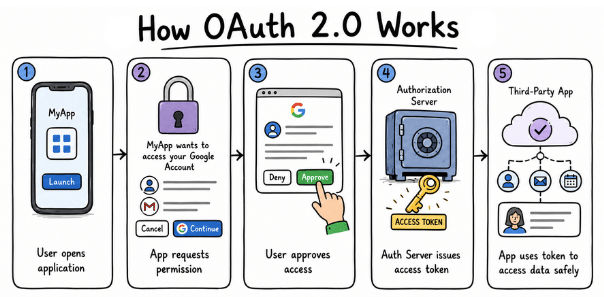
OAuth 2.0 is commonly used in:
Social login systems
API authorization
Mobile applications
Cloud services
Third-party application integration
Because users do not need to share their passwords with every application, OAuth 2.0 improves both security and user experience.
You use OAuth 2.0 whenever you:
Sign in with Google
Sign in with Microsoft
Allow a third-party application to access your account through an API
OAuth 2.0 enables secure data sharing between applications while keeping user credentials private. It has become one of the most widely used authorization frameworks for modern web and mobile applications.
OpenID Connect (OIDC) is an authentication protocol built on top of OAuth 2.0. It helps applications verify a user's identity and provide secure login access.
OAuth 2.0 is mainly used for authorization, while OpenID Connect is used for authentication.
In simple words:
OAuth 2.0 tells what a user can access.
OpenID Connect tells who the user is.
OpenID Connect is commonly used for secure login systems where users can sign in without creating separate usernames and passwords for every application.
The OpenID Connect authentication process works in these simple steps:
The user tries to log in to an application.
The application redirects the user to an identity provider (such as Google or Microsoft).
The user completes the authentication process.
The identity provider verifies the user's identity and sends user information back to the application.
The application confirms the identity and provides access.
This process helps applications verify users securely without storing their passwords.
OpenID Connect is widely used in modern login systems, including:
Sign in with Google
Sign in with Microsoft
Enterprise Single Sign-On (SSO)
For example, when you use "Sign in with Google" on a website, OpenID Connect helps the website confirm your identity and securely log you in.
Authentication and authorization are important parts of building secure websites, applications, and APIs.
Authentication verifies the identity of a user.
Authorization controls what actions and resources a user can access.
Session-based authentication stores user session information on the server to keep users logged in.
JWT authentication uses secure tokens to provide access to APIs and modern applications.
OAuth 2.0 allows applications to access user data securely without sharing passwords.
OpenID Connect helps applications verify user identity and provide secure login.
Understanding these authentication concepts helps developers create secure applications, protect user data, and prevent unauthorized access.
