
Durgesh Tiwari
Author
Every time you open a website, stream a YouTube video, send a WhatsApp message, or make an online payment, your device exchanges data with another device over a network.
This communication happens in just a few milliseconds, but many networking technologies work together behind the scenes to make it possible.
Learning how devices connect and exchange data is called Computer Networking. It is one of the most important foundations of System Design because every modern application relies on networks to communicate with users, servers, databases, and cloud services.
A computer network is a group of devices connected together so they can exchange data and share resources.
A network can connect different types of devices, including:
Computers
Smartphones
Servers
Routers
Printers
IoT devices
These devices communicate through wired connections like Ethernet cables or wireless technologies such as Wi-Fi and mobile networks.
When you open www.google.com, your laptop sends a request through your Wi-Fi router to the internet. The request reaches Google's servers, which process it and send the webpage back to your browser—all within a fraction of a second.
This entire process is possible because multiple networking technologies work together to deliver data quickly and reliably.
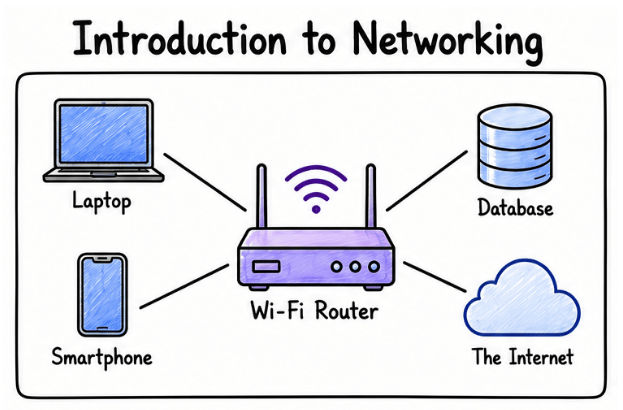
Computer Networking helps you understand how data travels between devices and how internet-based applications work.
By learning networking, you will be able to:
Understand how requests travel from users to servers.
Build reliable backend applications.
Diagnose and fix common network-related issues.
Learn System Design concepts with greater confidence.
Understand communication in distributed systems.
Perform better in backend development and System Design interviews.
Interview Tip: Many System Design interview questions assume you understand networking basics such as IP addresses, DNS, HTTP, TCP, and load balancing.
Whenever you open a website, use a mobile app, or send a message, your device communicates with another device over a network.
The communication usually follows these steps:
The client sends a request.
The request travels through the network.
The server receives the request.
The server processes the request.
The response is sent back to the client.
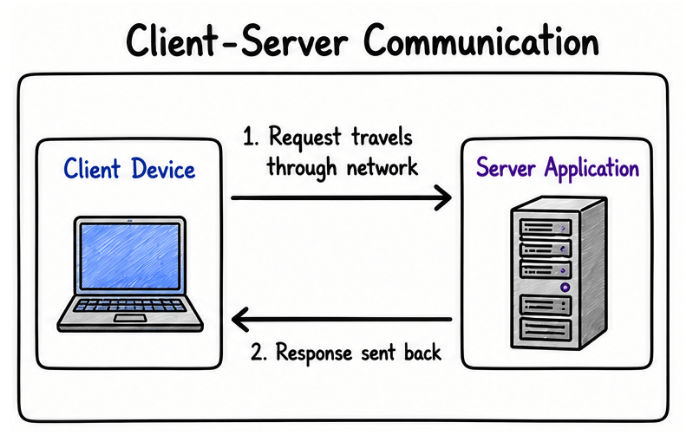
A computer network is built from several components that work together to transfer data between devices. Each component has a specific role, and understanding these basics will make advanced networking and System Design concepts much easier to learn.
A client is the device or application that starts communication by requesting data or a service from a server.
Common examples of clients include:
Web browsers
Mobile applications
Desktop applications
For example, when you open a website in your browser or use an app on your phone, your device acts as the client by sending a request to the server.
A server is a computer or software application that receives requests from clients, processes them, and returns the appropriate response.
Some common types of servers are:
Web servers
Database servers
File servers
Email servers
For example, when you watch a video on YouTube, YouTube's servers receive your request, find the requested video, and send it back to your device.
A network is the communication medium that allows clients and servers to exchange data. It can connect devices within a small area or across the entire world.
The most common types of networks are:
LAN (Local Area Network): Connects devices within a limited area, such as a home, office, or school.
WAN (Wide Area Network): Connects devices across multiple cities, countries, or continents.
Internet: The world's largest public network that connects millions of devices globally.
Devices connected to a network must follow a common set of rules to communicate correctly. These rules are known as network protocols.
Some of the most commonly used protocols include:
IP – Identifies devices and helps route data to the correct destination.
TCP – Delivers data reliably and in the correct order.
UDP – Sends data quickly without guaranteeing delivery.
HTTP – Transfers web pages and other web content.
HTTPS – A secure version of HTTP that encrypts communication.
DNS – Converts domain names (such as google.com) into IP addresses.
Real-World Connection: When you open a website, DNS first finds the server's IP address, IP routes the request, TCP ensures the data is delivered correctly, and HTTP or HTTPS transfers the webpage to your browser.
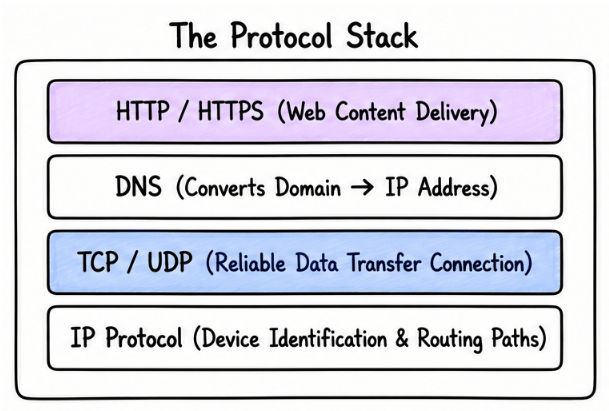
Interview Tip: A common interview question is, "What happens when you type a URL into a browser?" The answer involves several networking components working together, including the client, DNS, IP, TCP, and HTTP/HTTPS. You'll explore this complete flow later in the course.
The network you use at home is very different from the one that connects users across the world. Some networks are designed for a single person, while others are built to connect entire cities or even countries.
To make them easier to understand, computer networks are classified according to the area they cover. As the coverage area increases, the number of connected devices and users also increases.
A Personal Area Network (PAN) is the smallest type of computer network. It connects devices that belong to a single person and are located nearby.
For example, when your smartphone connects to a smartwatch or Bluetooth earbuds, both devices communicate through a PAN.
You'll commonly see PANs used with:
Smartwatches
Bluetooth headphones
Wireless keyboards and mice
Mobile hotspots
Because the devices are very close to each other, PANs are simple, fast, and ideal for everyday personal use.
A Local Area Network (LAN) connects devices within a small location, such as a home, office, school, or computer lab.
If you've ever connected your laptop and phone to the same Wi-Fi router at home, you've already used a LAN.
Since all devices are in the same location, data can travel quickly, making LANs one of the fastest types of networks.
Some common examples are:
Home Wi-Fi
Office networks
School computer labs
Internet cafés
A Campus Area Network (CAN) is created by connecting multiple LANs within a single organization.
Imagine a university with separate buildings for classrooms, the library, administration, and hostels. Each building may have its own LAN, but when all of them are connected together, they form a CAN.
The same idea is used in:
Universities
Corporate campuses
Research centers
Large hospitals
A CAN covers more area than a LAN but is still managed by one organization.
A Metropolitan Area Network (MAN) connects multiple networks within a city.
It is used when different offices or buildings in the same city need to stay connected and share data easily.
Common examples include:
Banks connecting branches in one city
Large companies with multiple offices
City-level government networks
Internet service providers within a region
A MAN is larger than a LAN but smaller than a WAN.
A Wide Area Network (WAN) connects networks over large distances such as different cities, countries, or continents.
It is used when systems need to communicate across very large geographical areas.
Common examples include:
The Internet
Global cloud services
International banking systems
Multinational companies connecting offices worldwide
A WAN is the largest type of network and can cover the entire world.
A Storage Area Network (SAN) is a high-speed network designed to connect servers with storage devices. Instead of storing data on individual servers, a SAN provides centralized storage that multiple servers can access.
SANs are commonly used in:
Data centers
Cloud platforms
Enterprise applications
Banking systems
Because SANs are built for high performance and reliability, they are ideal for applications that handle large amounts of data.
A Virtual Private Network (VPN) creates a secure and encrypted connection between a user's device and a private network over the internet.
A VPN protects data from unauthorized access and helps users connect securely from different locations.
Common use cases include:
Remote work
Secure access to company networks
Protecting data on public Wi-Fi
Improving online privacy

Interview Tip: A common interview question is, "What is the difference between LAN, MAN, and WAN?" The easiest way to answer is by comparing their coverage area, ownership, and real-world use cases instead of only memorizing their definitions.
Imagine you open the Instagram app to check your feed.
Your phone sends a request to Instagram's servers. The servers retrieve your personalized feed and send the data back over the internet. Within a few seconds, photos, videos, and stories appear on your screen.
Although it looks simple, this process depends on multiple networking technologies working together to deliver data quickly and reliably.
