
Durgesh Tiwari
Author
A cloud storage and file sync system like Dropbox or Google Drive looks simple from the outside:
Upload File
    ↓
Store in Cloud
    ↓
Access from Any Device
But storing a file is only the beginning.
Imagine the same project/report.pdf exists on a laptop, phone, tablet, and web client. The laptop updates it while the phone is offline. Meanwhile, the tablet renames the file and the user deletes it from the web.
When every device reconnects, what should the final state be?
That is the real system-design problem.
A Dropbox or Google Drive-like system must store large files reliably and keep file-system state synchronized across multiple devices despite offline clients, concurrent edits, retries, failures, and unreliable networks.
The architecture needs to solve several problems together:
Large File Storage
        +
Reliable Upload and Download
        +
File Versioning
        +
Cross-Device Synchronization
        +
Conflict Handling
        +
Sharing and Permissions
The hardest part is not storing bytes. It is making sure devices eventually converge toward the correct state without silently losing user changes.
Cloud storage keeps files on remote infrastructure so users can access them from different devices. File synchronization keeps those devices updated when something changes.
Suppose a user edits design.pdf on a laptop:
Laptop
  ↓
design.pdf Modified
  ↓
Sync Client Detects Change
  ↓
Upload New Version
  ↓
Cloud Metadata Updated
  ↓
Other Devices Learn About Change
  ↓
Download Latest Version
Eventually:
Laptop  → Version 7
Phone   → Version 7
Tablet  → Version 7
Cloud   → Version 7
A device does not need to receive every update immediately. A phone can remain on Version 6 while offline and receive Version 7 when it reconnects.
The important requirement is eventual convergence: once communication resumes and any conflicts are resolved, devices should be able to reach the correct synchronized state.
Cloud storage and cloud backup both keep data remotely, but they solve different primary problems.
Aspect | Cloud Storage / File Sync | Cloud Backup |
|---|---|---|
Primary goal | Access and synchronize files | Recover lost data |
Multi-device sync | Core capability | Usually secondary |
Changes | Propagate across devices | Primarily retained for recovery |
Sharing | Common | Usually secondary |
Version history | Often supported | Common for recovery |
Main concern | Keeping files accessible and synchronized | Restoring data after loss |
A Dropbox-like system-design problem mainly focuses on:
Storage + Synchronization + SharingVersion history, trash, and disaster recovery overlap with backup systems, but synchronization remains the central problem.
The system should support the core operations expected from a cloud-based file storage and synchronization service.
Upload and download files.
Create, rename, move, and delete files and folders.
Synchronize changes across devices.
Share files and folders.
Support large and resumable file transfers.
Maintain file versions and detect conflicts.
Synchronize offline changes after reconnecting.
The main technical deep dives are large-file uploads, chunking, resumable transfers, delta sync, versioning, conflict handling, and offline synchronization.
A production file-sync platform needs strong durability and reliable synchronization while operating at large scale.
Durability: committed file data should survive infrastructure failures.
Availability: users should normally be able to access and synchronize files.
Scalability: support large numbers of users, devices, files, and storage capacity.
Low sync latency: changes should reach connected devices quickly.
Bandwidth efficiency: avoid transferring unchanged data unnecessarily.
Reliability: transfers should survive retries and temporary failures.
Security: protect file content, metadata, and permissions.
Eventual convergence: devices should reach the correct synchronized state after reconnecting.
A short synchronization delay is acceptable. Losing a committed file or silently overwriting a concurrent edit is not.
Cross-device visibility can be eventually consistent, but committed file data must be durable and synchronization must not silently lose user changes.
Before choosing databases or storage systems, we need a rough idea of the workload.
Assume a hypothetical service has:
100 million daily active users
1 GB average logical storage per user
20 file operations per user per day
Total logical storage:
100M × 1 GB
≈ 100 PB
Average file-operation traffic:
100M × 20
= 2 billion operations/day
≈ 23,000 operations/second
Peak traffic can be several times higher.
However, QPS alone does not describe this workload. One operation may update a few kilobytes of metadata, while another may transfer a 20 GB video.
So the system must scale across several dimensions:
Metadata QPS
+
Storage Capacity
+
Network Bandwidth
+
Large File Transfers
+
Synchronization Events
This distinction matters because metadata operations and file transfers have very different storage, consistency, and scaling requirements.
The data model should separate logical file identity, file versions, devices, permissions, and physical file content.
The main entities are:
User
Device
File
Folder
FileVersion
Chunk
UploadSession
SharePermission
ChangeEvent
A File represents the logical identity and metadata of a file:
File
----
file_id
owner_id
parent_folder_id
name
mime_type
size
current_version
created_at
updated_at
deleted_at
A FileVersion represents one committed version of its content:
FileVersion
-----------
version_id
file_id
base_version
size
content_hash
storage_manifest
created_at
created_by_device
The storage_manifest points to the chunks or objects that make up that version rather than storing the file bytes directly in the metadata record.
A Device keeps the synchronization state needed to recover missed remote changes:
Device
------
device_id
user_id
last_sync_cursor
last_seen_at
The file should have a stable file_id independent of its path.
For example:
/docs/report.pdf
        ↓ rename
/docs/final-report.pdf
Both paths still refer to the same logical file:
file_id = FILE123This distinction becomes important during synchronization because a rename or move should update metadata rather than be incorrectly interpreted as deleting one file and creating another.
One of the most important early design decisions is separating file metadata from the actual file content because they have very different storage and access patterns.
Aspect | File Metadata | File Bytes |
|---|---|---|
Contains | Name, owner, folder, permissions, versions, deletion state | PDF, image, video, ZIP, and other binary content |
Typical size | Small, usually KB-level records | Can range from KBs to many GBs |
Storage | Metadata database | Object / blob storage |
Access pattern | Frequent reads and updates | Large sequential uploads and downloads |
Consistency need | Often requires transactional updates | Mostly immutable after a version is committed |
Scaling concern | Query rate, indexes, transactions | Storage capacity and network bandwidth |
Example |
| Actual bytes or chunks of the file |
The metadata database should therefore store a reference to the content rather than the large binary object itself:
file_id     = FILE123
version     = V7
storage_key = blocks/8f/8f7a...
The corresponding bytes are stored separately in object storage.
This separation keeps metadata operations small and transactional while allowing large file content to scale independently.
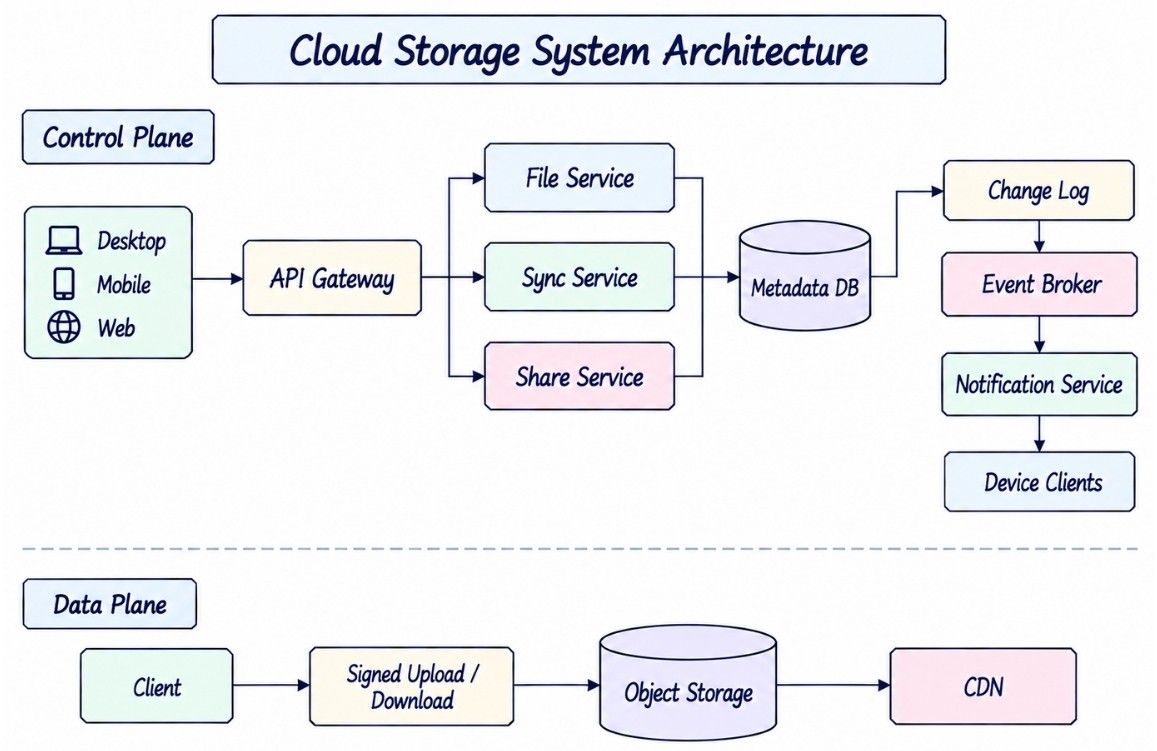
With metadata and file content separated, the architecture can use dedicated services for file operations, synchronization, sharing, and large-file transfer.
                    CLIENTS
             Desktop / Mobile / Web
                       |
                       v
                  API GATEWAY
                       |
        +--------------+--------------+
        |              |              |
        v              v              v
  FILE SERVICE    SYNC SERVICE    SHARE SERVICE
        |              |              |
        +--------------+--------------+
                       |
                       v
                  METADATA DB
                       |
               +-------+-------+
               |               |
               v               v
           CHANGE LOG         CACHE
               |
               v
          EVENT BROKER
               |
               v
      NOTIFICATION SERVICE
               |
               v
             CLIENTS

FILE DATA PATH

Client
  |
  | Signed Upload / Download
  v
Object Storage
  |
  v
File Objects / Chunks
  |
  v
CDN
The architecture can be understood as two logical planes:
Control plane
Handles operations that decide what should happen:
Authentication and Authorization
Metadata
File Versions
Permissions
Upload Sessions
Sync State
Change History
Data plane
Handles the actual movement and storage of file content:
File Uploads
File Downloads
Chunks
Object Storage
CDN Delivery
For example, when a user uploads a large file, the backend authenticates the request, checks permissions, and coordinates the upload. The file bytes can then move directly between the client and object storage instead of passing through the application servers.
This separation keeps metadata services focused on coordination and consistency while the storage layer handles bandwidth-heavy file transfers.
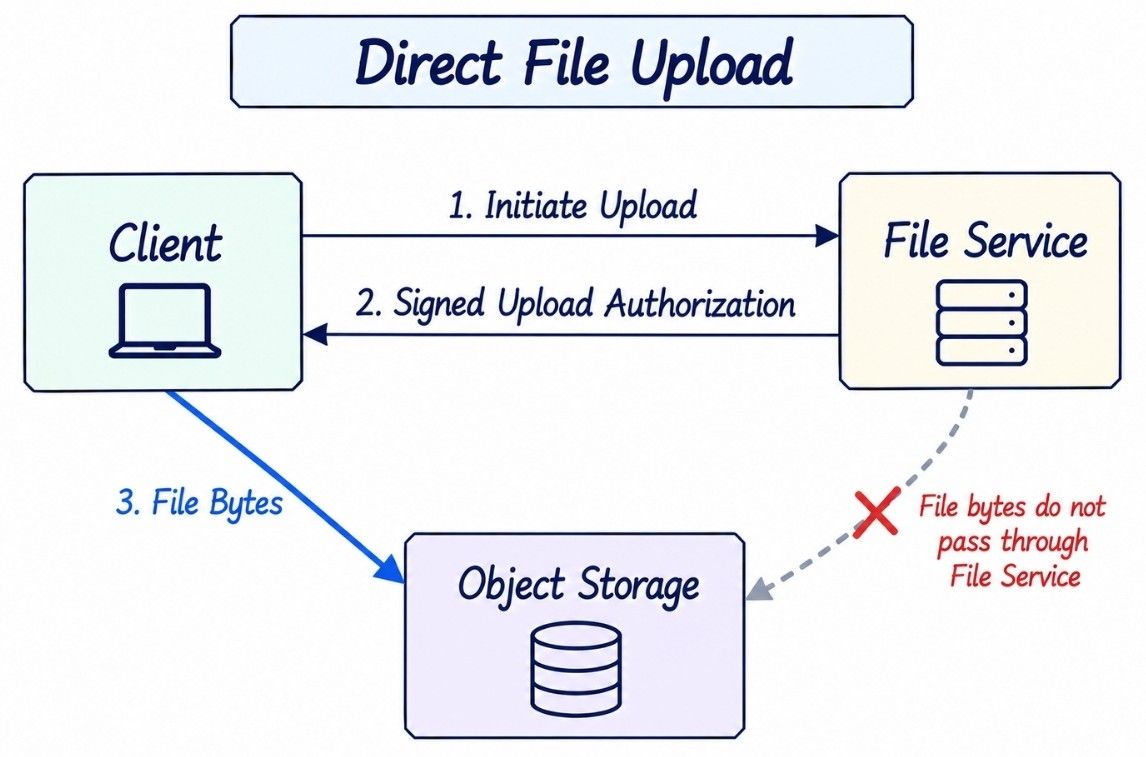
Large file transfers should avoid passing through application servers when the backend only needs to authorize and coordinate the operation.
A naive upload sends the entire file through the application service:
Client
  |
  | 20 GB File
  v
File Service
  |
  | 20 GB File
  v
Object Storage
This consumes application-server bandwidth, keeps connections open for a long time, and increases infrastructure cost.
A better design uses direct upload:
Client
  |
  | 1. Initiate Upload
  v
File Service
  |
  | 2. Signed Upload Authorization
  v
Client
  |
  | 3. Upload File Bytes
  v
Object Storage
The backend authenticates the user, checks permissions, creates an upload session, and returns short-lived upload authorization. The client then transfers the file bytes directly to object storage.
Conceptually:
POST /v1/uploadsRequest:
{
  "name": "design.pdf",
  "parent_folder_id": "F123",
  "size": 524288000
}
Response:
{
  "upload_id": "UP900",
  "file_id": "FILE100",
  "status": "UPLOADING"
}
The upload_id gives the transfer a stable identity for retries, resumability, status tracking, and completion.
The important principle is:
The backend controls authorization and metadata, while object storage handles the heavy file-transfer path.
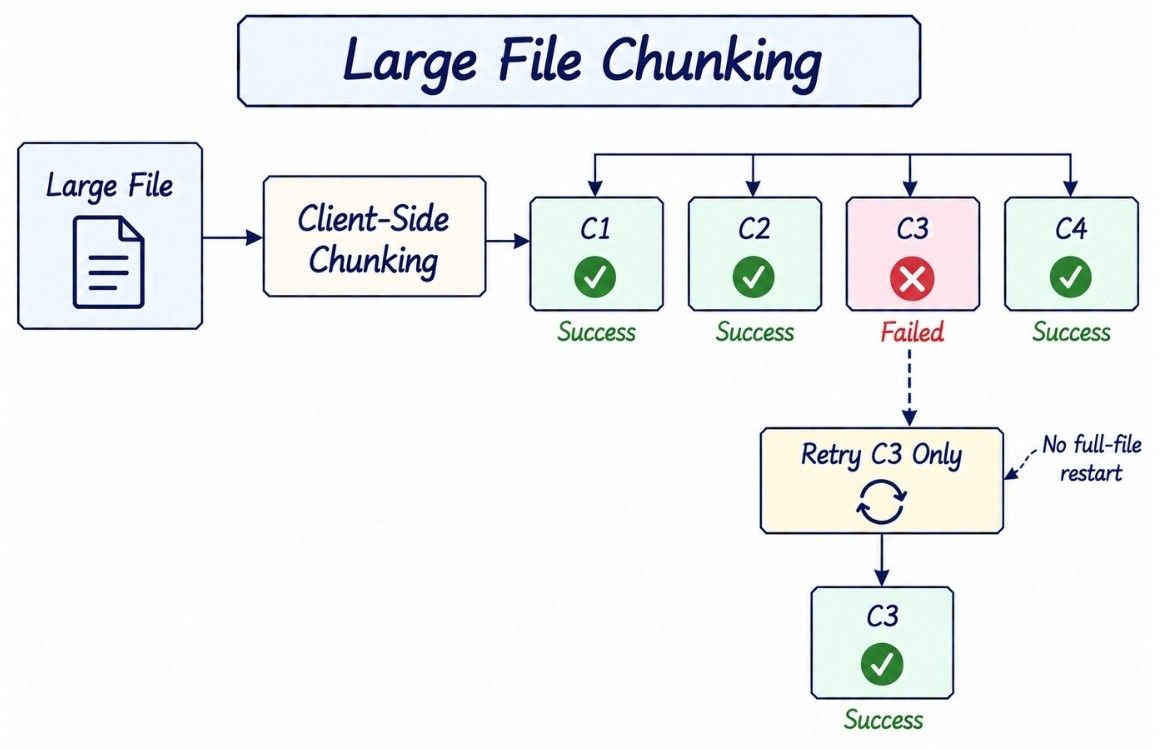
Direct upload removes application servers from the data path, but uploading a very large file as one request is still fragile.
Suppose a user uploads a 50 GB file and the network fails after 49.8 GB. Restarting from byte zero would waste almost the entire transfer.
Instead, the client splits the file into smaller chunks:
Large File
   |
   +── C1
   +── C2
   +── C3
   +── C4
   +── ...
For example:
1 GB File
   ↓
8 MB Chunks
   ↓
≈ 128 Chunks
If C79 fails:
C1  ✓
C2  ✓
...
C78 ✓
C79 ✗
C80 ✓

Retry → C79
Only the failed or missing chunk needs to be transferred again.
Chunking should happen on the client. If the complete 50 GB file must first reach an application server before being divided into chunks, we have not solved the unreliable client-to-server transfer problem.
Chunking gives the system several useful capabilities:
Resumable uploads.
Independent chunk retries.
Bounded parallel uploads.
Integrity verification.
Reuse of unchanged chunks.
Delta synchronization between file versions.
The next decision is how those chunk boundaries should be chosen.
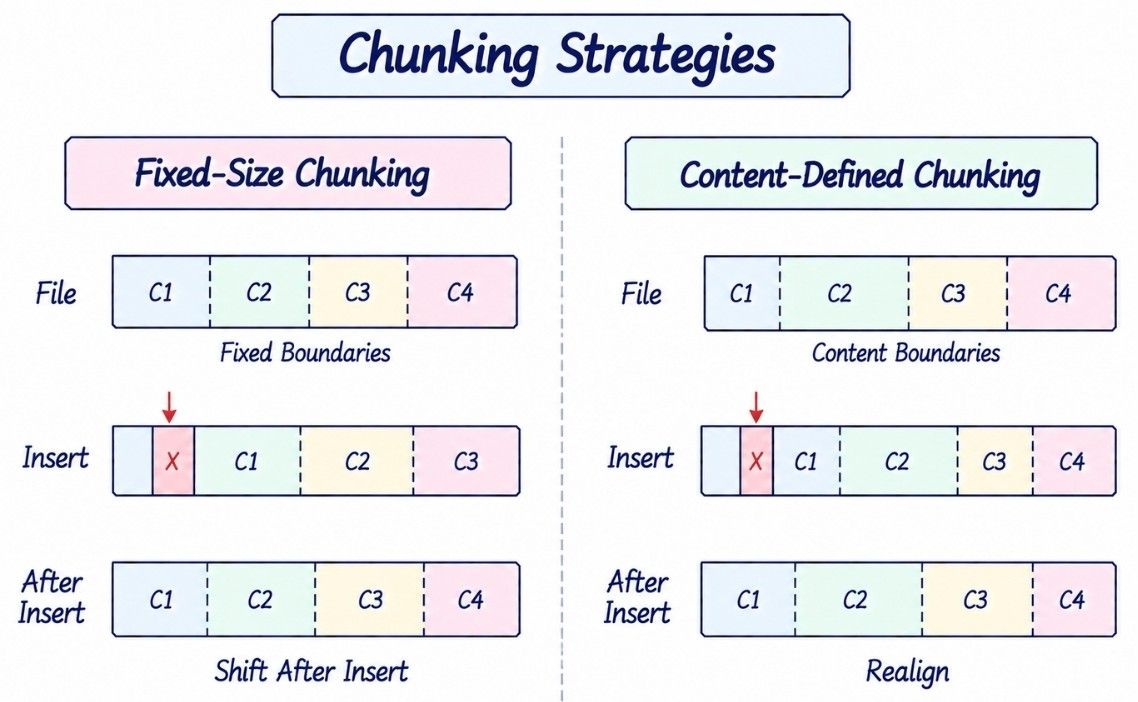
There are two useful approaches to dividing files into reusable chunks: fixed-size chunking and content-defined chunking.
Aspect | Fixed-Size Chunking | Content-Defined Chunking |
|---|---|---|
Boundary | Fixed byte offsets | Determined by file content |
Implementation | Simple | More complex |
Client CPU cost | Lower | Higher |
Predictability | High | Lower |
Insertions near beginning | Can shift many later chunks | Boundaries can realign |
Chunk reuse | Good for localized replacements | Better for insertions/deletions |
Best starting point | Yes | Usually an optimization |
With fixed-size chunking:
File
 ↓
8 MB
8 MB
8 MB
8 MB
...
Each chunk can be identified using a cryptographic hash:
chunk_hash = SHA-256(chunk_bytes)A file version can then reference a manifest of chunks:
Version 7
---------
[A, B, C, D]
The main weakness of fixed-size chunking appears when bytes are inserted near the beginning of a file. The fixed offsets shift, so many later chunks may receive different hashes even though most of their underlying content is unchanged.
Content-defined chunking chooses boundaries based on the content itself. After an insertion or deletion, boundaries can eventually realign, allowing more existing chunks to be reused.
That can improve delta synchronization, but it adds client-side CPU cost and implementation complexity.
For an initial Dropbox or Google Drive-like system design, fixed-size chunking is the simpler starting point. Content-defined chunking can be introduced later when reducing bandwidth and improving chunk reuse becomes important.
Once files are split into immutable chunks, each chunk can be identified by a cryptographic hash of its content.
Chunk Bytes
    ↓
SHA-256
    ↓
Chunk Hash
The hash can act as a content identifier and also help verify integrity.
Suppose two file versions have these manifests:
V1 → [A, B, C, D, E]
V2 → [A, B, C, X, E]
Only chunk X is new. The remaining chunks can be reused rather than stored and uploaded again.
This creates an opportunity for deduplication:
Same Chunk Content
       ↓
Same Hash
       ↓
Reuse Existing Chunk
However, deduplication becomes more complicated across users or organizations. Revealing that a particular hash already exists can leak information about content stored by another user, and shared physical chunks also complicate authorization, quota accounting, and deletion.
A safer starting point is to deduplicate within an account or tenant boundary, or avoid cross-tenant deduplication until those security and privacy concerns are explicitly addressed.
Content identity does not imply authorization. Knowing a chunk hash must never grant access to that chunk.
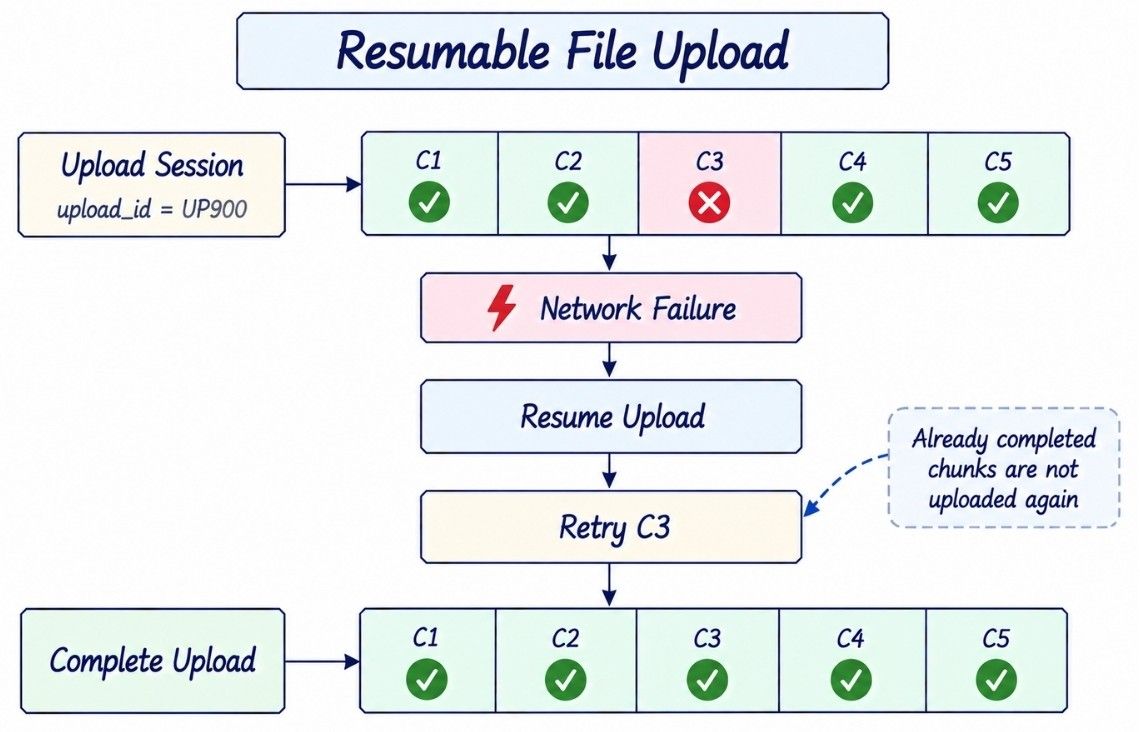
Chunking becomes especially useful when the upload session remembers which parts have already been stored.
A large upload can progress independently across chunks:
Create Upload Session
        ↓
C1 ✓
C2 ✓
C3 ✗
C4 ✓
C5 ✓
        ↓
Retry C3
        ↓
Complete Upload
The upload session tracks information such as:
upload_id
file_id
expected_chunks
received_chunks
expires_at
status
If the network disconnects or the client crashes, the client does not restart the complete file. It reloads the upload_id, checks which chunks already exist, and uploads only the missing pieces.
For better throughput, independent chunks can also be uploaded in parallel:
        +──→ C1
        |
Client  +──→ C2
        |
        +──→ C3
        |
        +──→ C4
Parallelism should be bounded rather than unlimited. Too many simultaneous uploads can increase memory usage, network congestion, battery consumption, and object-storage throttling.
The client can dynamically control concurrency based on network conditions and server limits.
Uploading all chunks does not automatically mean the new file version should become visible.
After the required chunks are available, the client explicitly asks the server to finalize the upload:
POST /v1/uploads/{uploadId}/completeThe server verifies that the expected chunks exist and match the upload manifest.
It then creates an immutable file version:
FileVersion V7
      ↓
Manifest
[A, B, C, D, E]
and atomically updates the logical file:
File.current_version

V6 → V7
Only after this metadata commit should other devices treat V7 as the current version.
This gives us an important invariant:
Other devices must never observe a committed file version whose required content is incomplete.
Upload completion must also be idempotent.
Suppose the server successfully creates V7, but the response is lost:
Client
  |
  | Complete UP900
  v
Server
  |
  | Creates V7 ✓
  |
  X Response Lost
The client may retry:
Complete UP900 AgainThe server should recognize that UP900 has already been completed and return the existing V7 instead of creating V8.
The metadata database and object storage are separate systems, so they normally cannot participate in one large ACID transaction.
For example:
Chunks Uploaded ✓
       ↓
Metadata Commit ✗
The object storage now contains data that no committed file version references.
The reverse ordering is more dangerous:
Metadata Published ✓
       ↓
Required Content Missing ✗
Other devices could discover a version they cannot actually download.
A safer workflow is:
Create Upload Session
        ↓
Upload Required Chunks
        ↓
Verify Content
        ↓
Commit FileVersion
        ↓
Mark Version READY
Explicit states make partial failures easier to recover from:
UPLOADING
    ↓
PROCESSING
    ↓
READY

Failure → FAILED / EXPIRED
If chunks are uploaded but metadata publication fails, they remain unreferenced temporarily. A reconciliation or garbage-collection process can remove them later after a safe grace period.
Do not immediately delete suspicious unreferenced chunks because a delayed or retrying metadata operation may still reference them.
The key publication rule is:
Store and verify the required file content first; publish the new version only when that content is safely available.
Downloads follow the same control-plane/data-plane separation used for uploads.
The backend decides whether the user is allowed to access the file, while the CDN or object storage handles the large byte transfer.
Client
  |
  | Request FILE100
  v
File Service
  |
  | Authenticate
  | Authorize
  | Resolve Version
  | Generate Short-Lived Access
  v
Client
  |
  | Download Bytes
  v
CDN
  |
  v
Object Storage
A typical flow is:
The client requests a file or specific version.
The File Service authenticates the user.
It verifies file permissions.
It resolves the required FileVersion and storage objects.
It returns short-lived download authorization.
The client downloads the bytes through the CDN or directly from object storage.
Large downloads should support HTTP range requests:
Range: bytes=104857600-If a download fails after 100 MB, the client can continue from that point instead of restarting the entire transfer.
A CDN can reduce download latency and origin-storage bandwidth for frequently accessed content. For private files, however, CDN caching must still respect authorization and access revocation.
The same principle applies in both directions:
Control Plane → Decides who can access what
Data Plane → Transfers the actual file bytesUploading and downloading files is only half of the system. The harder problem is keeping multiple devices synchronized when they can modify files independently or remain offline for long periods.
Suppose Device A modifies report.pdf. Devices B and C need to determine:
What changed?
Which version do I have?
Which version exists remotely?
What data should I download?
Repeatedly comparing every local file with every cloud file would be expensive.
Instead, we need a synchronization protocol that tracks local changes, records committed remote changes, and lets each device resume from its last known state.
A simplified flow is:
Local Change
     ↓
Detect and Upload
     ↓
Commit New Version
     ↓
Record Change
     ↓
Other Devices Discover Change
     ↓
Download Required Data
     ↓
Update Local State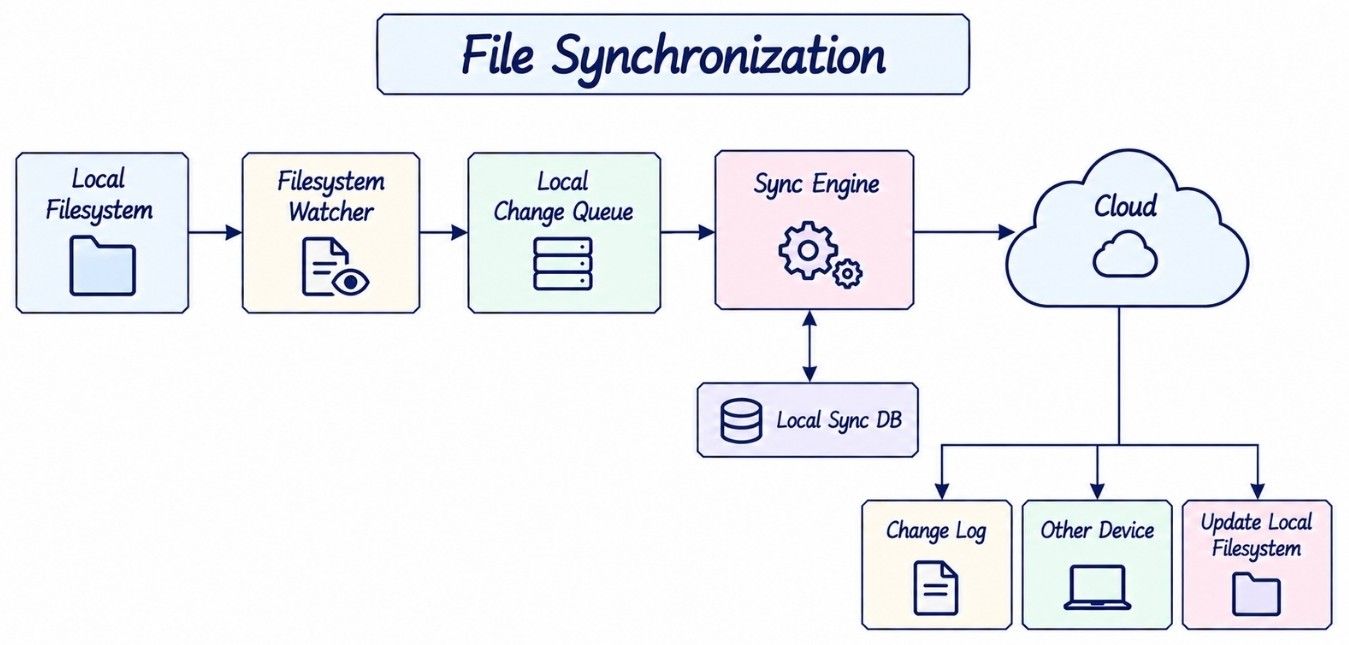
A desktop client typically runs a local synchronization engine that watches the filesystem and coordinates changes with the cloud.
Local Filesystem
       ↓
Filesystem Watcher
       ↓
Local Change Queue
       ↓
Sync Engine
       ↓
Cloud
The filesystem watcher detects operations such as:
CREATE
MODIFY
RENAME
MOVE
DELETE
However, one logical edit can generate many low-level filesystem events.
For example, an application may write a temporary file, rename it, update metadata, and then replace the original file. Uploading after every event would create unnecessary versions and network traffic.
The client should therefore debounce and coalesce related events before synchronizing them.
The sync agent also maintains a small local database containing the last known synchronization state.
LocalEntry
----------
file_id
local_path
local_hash
remote_version
sync_status
last_seen_cursor
This allows the client to compare:
Current Local State
        vs
Last Synchronized State
and determine whether a file has changed locally, remotely, or on both sides.
Filesystem watchers are useful for fast detection, but they are not perfectly reliable. Events can be missed because of crashes, queue overflow, filesystem remounts, or application bugs.
The client should therefore periodically perform reconciliation:
Current Filesystem
        vs
Local Sync Database
Event-driven detection provides speed, while periodic reconciliation provides recovery.
Synchronization should track files using stable IDs rather than treating the file path as permanent identity.
Suppose:
/docs/report.pdf
        ↓ rename
/docs/final-report.pdf
The logical file remains:
FILE123

name:
report.pdf → final-report.pdf
Because FILE123 remains unchanged, the sync engine understands that this is a rename rather than a delete followed by an unrelated upload.
Folders can use the same stable-node model:
Root
 |
 +-- Documents
 |      |
 |      +-- report.pdf
 |
 +-- Photos
Each node stores:
node_id
parent_id
name
type
A rename changes name, while a move changes parent_id.
Rename → update name
Move   → update parent_id
The actual file bytes do not need to move in object storage simply because the logical path changes.
Once a change is committed in the cloud, other devices need an efficient way to discover it.
Comparing the complete file tree on every synchronization cycle would become expensive for users with hundreds of thousands of files.
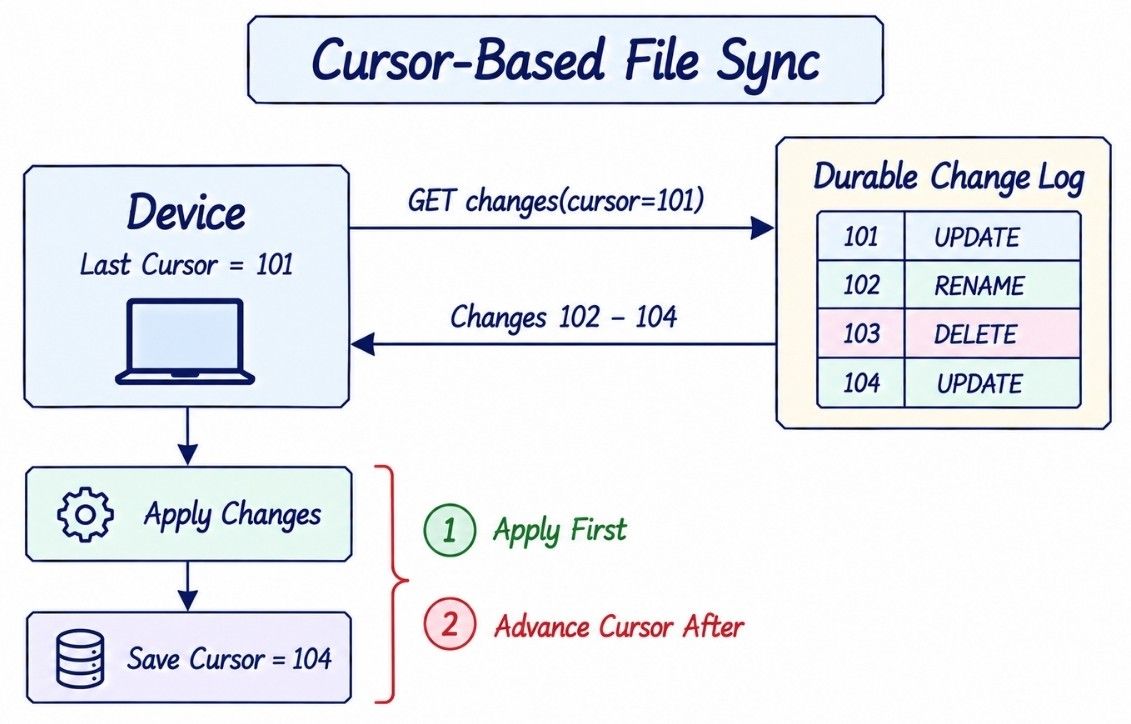
Instead, the server maintains a durable change log containing committed metadata changes.
101  FILE1  UPDATED
102  FILE7  RENAMED
103  FILE9  DELETED
104  FILE1  UPDATED
A device remembers how far it has processed the log:
last_cursor = 101It then requests everything after that position:
GET /v1/changes?cursor=101The server returns the next batch:
{
  "changes": [
    {
      "type": "FILE_RENAMED",
      "file_id": "FILE7"
    },
    {
      "type": "FILE_DELETED",
      "file_id": "FILE9"
    },
    {
      "type": "FILE_UPDATED",
      "file_id": "FILE1",
      "version": 7
    }
  ],
  "next_cursor": "abc140",
  "has_more": false
}
The client applies those changes locally and advances its cursor.
The important rule is:
Persist the new cursor only after the corresponding change batch has been safely applied.
Otherwise, consider this failure:
Fetch Changes 102–104
        ↓
Save Cursor = 104
        ↓
Apply Changes
        ↓
Client Crashes Before Applying 103
After restart, the client believes it has already processed everything through 104 and may permanently skip change 103.
The safer order is:
Fetch Batch
    ↓
Apply Changes Safely
    ↓
Persist Local State
    ↓
Advance Cursor
Processing should also be idempotent so retrying a partially processed batch does not corrupt local state.
Using timestamps may look simpler:
GET /v1/changes?since=2026-09-18T10:00:00but timestamps introduce several edge cases:
Client Clock Skew
Equal Timestamps
Timestamp Precision
Pagination Boundaries
Concurrent Changes
For example, two changes may receive the same timestamp. If pagination stops between them, deciding whether the next request should use > or >= becomes error-prone.
A server-issued opaque cursor avoids exposing these ordering details to the client.
Aspect | Timestamp Sync | Cursor-Based Sync |
|---|---|---|
Client clock dependency | Can become a problem | No |
Equal-value boundaries | Ambiguous | Handled by server |
Pagination | More error-prone | Natural |
Internal ordering exposed | Often yes | Hidden |
Resume after disconnect | Harder to reason about | Straightforward |
Recommended for durable sync | Usually no | Yes |
The cursor does not need to be a simple integer. It can encode whatever internal state the server needs for partitioning and pagination.
The client only needs one contract:
Give me every committed change
after my last durable cursor.
That becomes the foundation for reliable cross-device synchronization.
The change log gives us reliable synchronization, but continuously polling it would waste network and server resources. Push notifications can provide faster change detection.
A strong design combines both mechanisms:
Metadata Commit
      ↓
Durable Change Log
      ↓
Push: "Changes Available"
      ↓
Device
      ↓
GET /changes?cursor=X
The push notification does not need to contain the complete change. It only tells the device that new changes may be available.
The device then fetches authoritative updates from the change feed using its last durable cursor.
This distinction is important because push delivery is not guaranteed. Notifications may be delayed, duplicated, arrive out of order, or be missed while a device is offline.
That does not affect synchronization correctness because the change log remains the source of truth.
Push provides freshness; the durable change log provides synchronization correctness and recovery.
A file-sync system must continue working when devices remain disconnected for hours, days, or even weeks.
Suppose a laptop goes offline with:
Device Cursor = 500while cloud activity continues:
Cloud Cursor = 10,000When the laptop reconnects, it requests changes after its last durable cursor:
GET /changes?cursor=500
        ↓
Apply Missing Changes
        ↓
Advance Cursor
This is incremental synchronization and is normally the cheapest recovery path.
However, the server may retain change-log entries for only a limited period. If the device remains offline longer than that retention window, cursor 500 may no longer be usable.
The server can return:
CURSOR_TOO_OLDThe client then performs a full reconciliation:
Fetch Current Cloud Metadata
          ↓
Compare with Local Sync State
          ↓
Resolve Differences
          ↓
Receive Fresh Cursor
          ↓
Resume Incremental Sync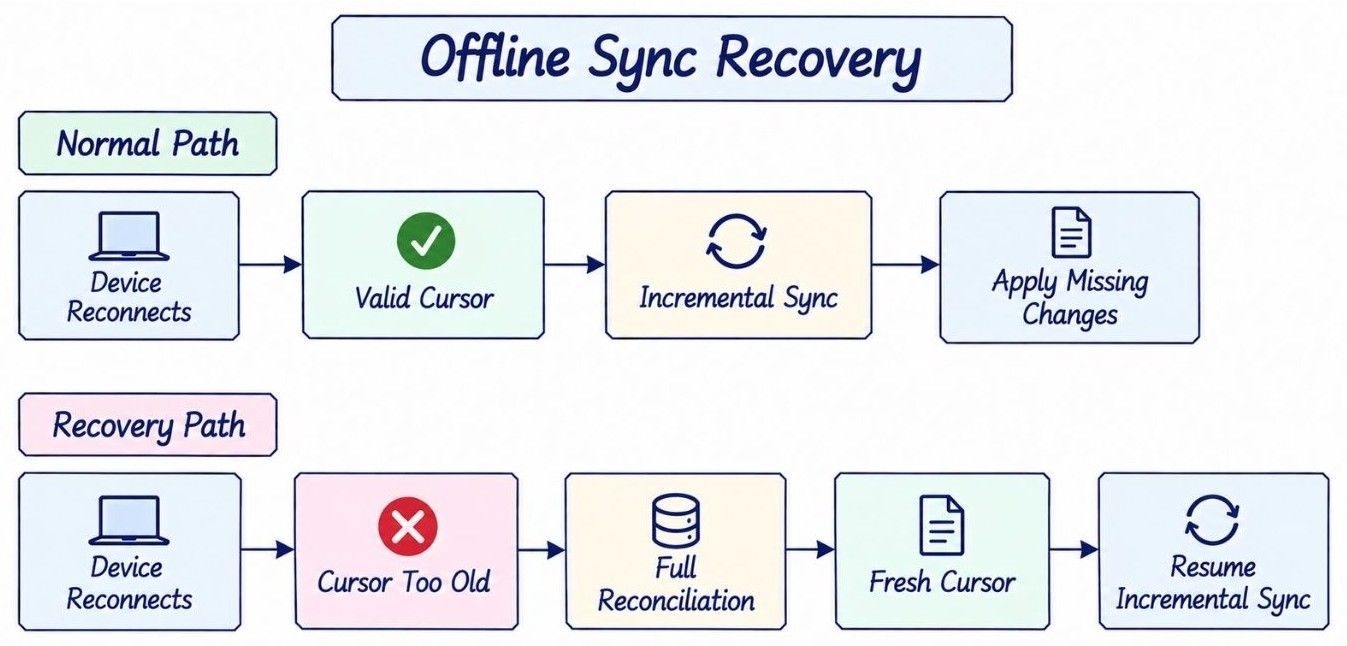
The synchronization protocol therefore has two recovery modes:
Mode | When Used | Purpose |
|---|---|---|
Incremental sync | Cursor is still valid | Fetch only changes since the last sync |
Full reconciliation | Cursor expired or local state is uncertain | Rebuild synchronization state from authoritative metadata |
Full reconciliation is more expensive, so it should be a recovery mechanism rather than the normal synchronization path.
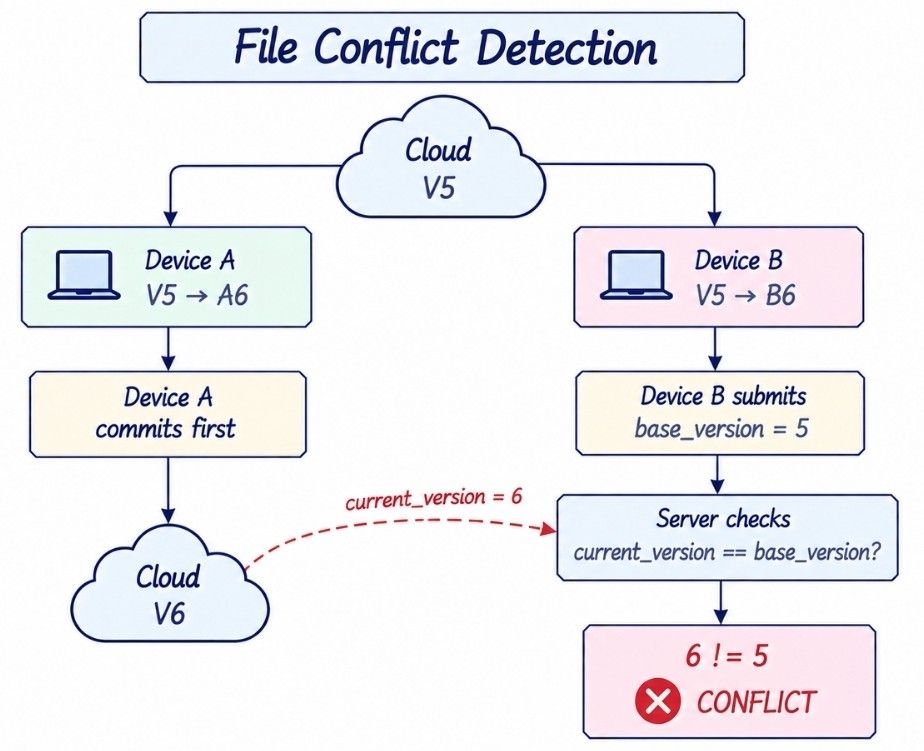
Offline synchronization creates another problem: two devices may modify the same file independently.
Suppose both devices start from Version 5:
Cloud = V5

Device A: V5 → A6
Device B: V5 → B6
Device A reconnects first and successfully publishes its update:
Cloud

V5 → V6
Device B later reconnects with an edit that was also based on V5.
If the server simply accepts whichever update arrives last, Device A's work could be silently overwritten.
Every update should therefore include the version on which the edit was based:
file_id      = FILE100
base_version = 5
The server performs an optimistic concurrency check:
Accept update only if:

current_version == base_version
For Device A:
current_version = 5
base_version    = 5

→ Accept
For Device B:
current_version = 6
base_version    = 5

→ Conflict
This is conflict detection using optimistic version checking.
The important point is that the system detects the concurrent modification instead of silently deciding that the latest arrival should overwrite everything else.
Once a conflict has been detected, the system needs a policy for preserving or resolving the competing changes.
For arbitrary user files, simple last-write-wins is dangerous because it can silently destroy valid work.
A safer default is to preserve both versions:
Conflict Detected
       ↓
Preserve Both Versions
For example:
report.docx
report (Device B conflicted copy).docx
The user can then decide which version to keep or merge manually.
Automatic semantic merging is possible for some application-specific data. Collaborative text editors, for example, may use techniques such as CRDTs or Operational Transformation (OT).
A generic cloud file-storage system cannot safely apply those techniques to arbitrary content such as:
ZIP archives
PSD files
Videos
Binary databases
Encrypted files
For those formats, preserving both versions is usually safer than guessing how to merge them.
Other concurrent operations also require explicit product policies:
Delete vs Edit
Rename vs Rename
Move vs Delete
Rename vs Delete
The exact user experience can vary, but the architectural requirement remains the same:
Detect concurrent operations explicitly rather than silently resolving them based only on arrival time.
Conflict handling becomes much easier when file content is represented as immutable versions instead of being overwritten in place.
A logical file can point to a history of versions:
FILE100
   |
   +── V1
   +── V2
   +── V3
   +── V4
The File metadata identifies the currently active version:
current_version = V4When the user edits V4, the system does not modify V4 itself.
Instead:
V4
 ↓ edit
V5 created
 ↓
current_version = V5
This gives us an important invariant:
A committed
FileVersionis immutable.
Creating a new version and atomically moving the current-version pointer simplifies several parts of the architecture:
Conflict detection and recovery.
Retry and idempotency handling.
Version history and restore.
Caching and replication.
Integrity verification.
Safe synchronization across devices.
Version history also does not necessarily mean storing a complete duplicate of the file every time.
For example:
V6 → [A, B, C, D, E]
V7 → [A, B, C, X, E]
Only the changed chunk X needs to be new. The unchanged chunks can be referenced by both versions.
This connects immutable file versioning with the chunk-based storage model introduced earlier, while keeping logical versions independent from their physical storage representation.
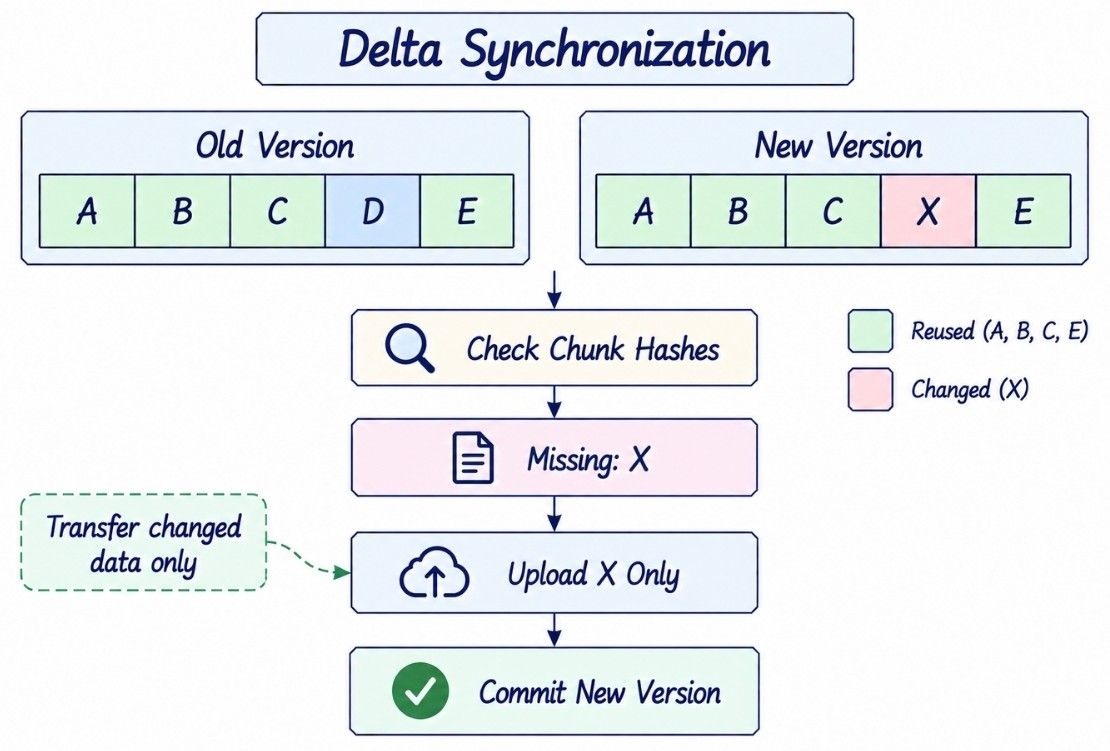
Chunking and immutable versions allow the system to synchronize only the parts of a file that actually changed.
Suppose a 1 GB file changes by only a few megabytes:
Old Version → [A, B, C, D, E, F]
New Version → [A, B, C, X, E, F]
Instead of uploading the complete file again, the client calculates the new chunk hashes and asks the server which chunks are missing.
Conceptually:
POST /v1/chunks/check
{
  "hashes": ["A", "B", "C", "X", "E", "F"]
}
Response:
{
  "missing": ["X"]
}
The client uploads only X and then commits the new version manifest:
Calculate Chunk Hashes
        ↓
Check Existing Chunks
        ↓
Upload Missing Chunks
        ↓
Commit New Manifest
Chunk-existence checks should be batched rather than making one request per chunk. For files containing thousands of chunks, per-chunk API calls would create unnecessary network round trips and server load.
This is delta synchronization: transfer only the data required to construct the new version rather than retransmitting the entire file.
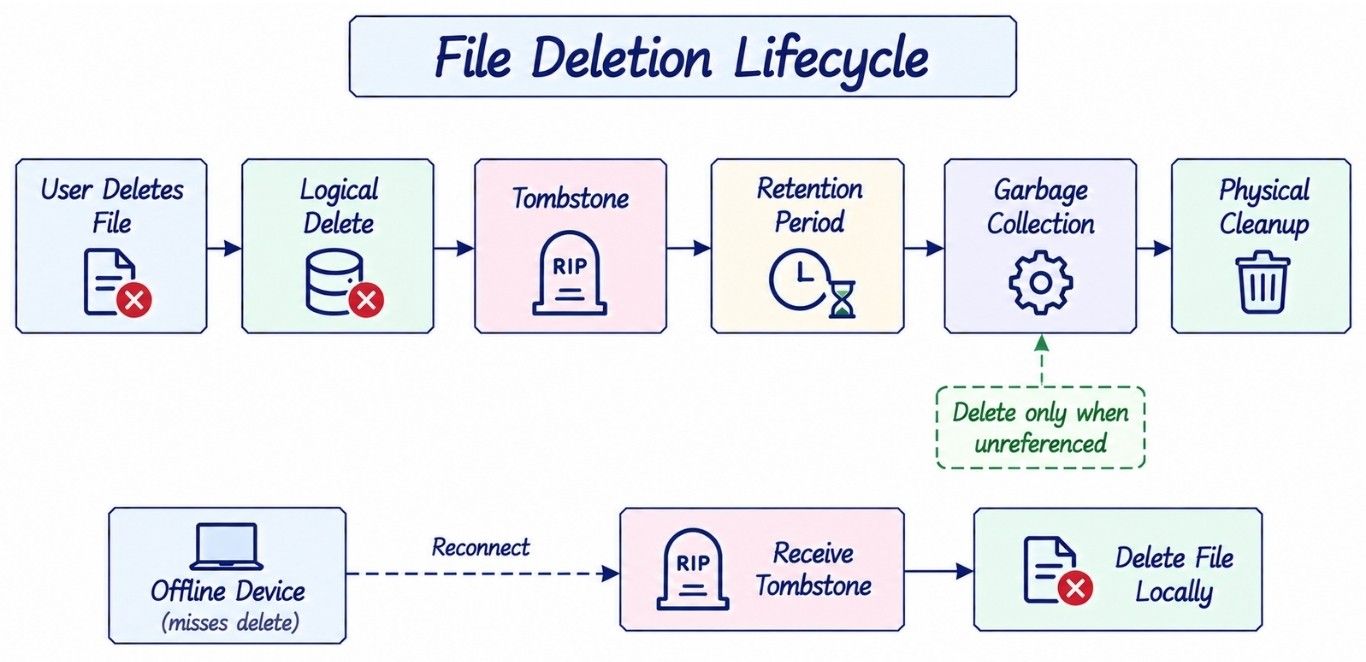
Deletion in a multi-device file-sync system cannot immediately mean removing the underlying bytes. Offline devices still need to learn that the file was intentionally deleted.
The first step is therefore a logical metadata change:
FILE100
deleted = true
The system also records a change:
FILE_DELETED
file_id = FILE100
This deletion marker acts as a tombstone.
Without a tombstone, an old device reconnecting with a local copy may not know whether:
The file was intentionally deleted remotely

or

The cloud has never seen this local file
That ambiguity could cause a deleted file to be uploaded again.
A safer lifecycle is:
User Deletes File
       ↓
Logical Delete
       ↓
Tombstone
       ↓
Recycle Bin / Retention Period
       ↓
Version Expiration
       ↓
Garbage Collection
       ↓
Physical Storage Cleanup
Tombstones must remain available long enough for offline devices and reconciliation processes to observe them.
Physical chunks require even more care because one chunk may still be referenced by another version or manifest:
V7 ──→ Chunk A
V8 ──→ Chunk A
       Chunk B
Deleting V7 does not make Chunk A safe to delete if V8 still references it.
Garbage collection should therefore remove a chunk only when it is no longer reachable from any retained version and the configured safety period has passed.
This can be implemented using reference tracking, reachability analysis, or another conservative garbage-collection strategy.
Keeping an unused chunk slightly longer costs storage; deleting a live chunk destroys user data.
Cloud storage also needs an authorization model that allows files and folders to be shared without exposing the underlying storage directly.
A simple permission record can map a principal to a resource:
FilePermission
--------------
resource_id
principal_id
role
Typical roles include:
OWNER
EDITOR
VIEWER
For folders, permissions can be inherited by descendants rather than eagerly copying ACL records to every file.
A private download still follows the normal authorization path:
User
  ↓
File Service
  ↓
Authenticate
  ↓
Check Permission
  ↓
Generate Short-Lived Access
  ↓
CDN / Object Storage
A shareable link can use a securely generated, high-entropy token associated with permissions, expiration, and optional revocation state.
The storage identifier itself must never become the security boundary:
Knowing a
file_id, object key, or chunk hash does not grant permission to access the underlying content.
Cloud storage can be much larger than the disk available on an individual device, so clients should not require every cloud file to exist locally.
Instead, the client can keep metadata or placeholders for files whose content has not been downloaded:
Cloud File
    ↓
Local Placeholder
    ↓
User Opens File
    ↓
Download Content
    ↓
Local Cached Copy
This supports selective sync and on-demand file access while reducing local storage usage.
If local disk space becomes constrained, downloaded content may also be evicted from the local cache:
Local Cached File
       ↓
Cache Eviction
       ↓
Local Placeholder

Cloud File Remains Intact
This creates an important distinction:
User Delete
    ≠
Local Cache Eviction
A user deletion is a synchronization operation that should propagate to other devices. Cache eviction is only a local storage-management decision.
The sync client must never interpret automatic local eviction as an instruction to delete the cloud file.
The metadata database stores the authoritative state of files, folders, versions, permissions, upload sessions, device sync state, and deletion tombstones.
A relational database is a strong starting point because file namespaces, permissions, version updates, and other metadata operations benefit from transactions and structured consistency.
Common access patterns include:
List folder children
Get file by ID
Get current version
List files owned by a user
List files shared with a user
Useful indexes might include:
(parent_id, normalized_name)
(owner_id)
(principal_id, resource_id)
(file_id, version_number)
For example, (parent_id, normalized_name) supports efficient folder listing and can also help enforce filename uniqueness within a folder when required.
Large folders should use cursor-based pagination rather than returning thousands of entries in one response.
A metadata cache can reduce database load for frequently accessed records:
Client
  ↓
Metadata Service
  ↓
Cache
  ↓ miss
Metadata Database
However, cached authorization data requires careful invalidation. A stale filename may be inconvenient, but stale permission data could allow access after that permission has been revoked.
For security-sensitive authorization decisions, correctness is more important than maximizing cache hit rate.
A cloud file-sync system must handle filesystem differences across Windows, macOS, and Linux.
For example:
Report.txt
report.txt
may represent distinct files on one filesystem but conflict on another.
The service therefore needs explicit rules for:
Case sensitivity
Unicode normalization
Reserved filenames
Illegal characters
Path-length limits
Filename-length limits
These rules should be enforced consistently so a namespace created on one platform can still synchronize safely to another.
Stable file IDs are especially valuable here because logical identity remains independent of platform-specific path and filename behavior.
The synchronization system does not need one globally ordered change log for every user and file in the platform.
It needs meaningful ordering within a synchronization boundary, such as an account or workspace.
For example:
101  CREATE FILE100
102  UPDATE FILE100
103  RENAME FILE100
104  DELETE FILE100
These operations should be observed in a consistent order by devices synchronizing that namespace.
The change log can therefore be partitioned using a key such as:
account_id

or

workspace_id
Conceptually:
Account A → Partition A → Ordered Changes
Account B → Partition B → Ordered Changes
Account C → Partition C → Ordered Changes
Unrelated accounts can then scale independently without requiring expensive global ordering.
Shared folders make the boundary more interesting because a mutation may need to become visible to several authorized users.
One approach is to model a shared folder or team space as a shared namespace/workspace:
Shared Workspace
      |
      +── User A
      +── User B
      +── User C
      |
      └── Ordered Change Stream
This preserves one logical history for the shared namespace instead of creating independent physical copies of every change for every member.
A synchronization system must also remain stable when large numbers of clients reconnect or generate changes simultaneously.
Suppose the service recovers from an outage and millions of devices immediately request their missing changes:
Service Recovers
      ↓
Millions of Devices Reconnect
      ↓
GET /changes
GET /changes
GET /changes
...
      ↓
Thundering Herd
Clients should spread recovery traffic using:
Exponential Backoff
Jitter
Reconnect Spreading
Rate Limiting
Load Shedding
The client itself is part of the distributed system and should participate in protecting the backend.
Backpressure is also needed in the opposite direction. Local applications may generate changes faster than the network can upload them.
A durable local queue can absorb that difference:
Filesystem Changes
       ↓
Durable Local Queue
       ↓
Coalesce Updates
       ↓
Bounded Upload Workers
       ↓
Cloud
The client can retry transient failures, combine redundant updates, and limit concurrent uploads instead of creating unlimited work.
Cloud files and their metadata may contain highly sensitive information, so security must apply across both the control plane and data plane.
Important controls include:
Strong authentication and authorization.
Encryption in transit and at rest.
Short-lived signed upload and download access.
Least-privilege service permissions.
Secure key and secret management.
Audit logging for sensitive operations.
Rate limiting and abuse protection.
Malware scanning where appropriate.
Storage identifiers must never act as credentials. Knowing a file_id, object key, signed-outdated URL, or chunk hash should not bypass authorization.
Metadata deserves the same protection as file content. Filenames, folder structures, ownership, and sharing relationships can reveal sensitive information even when the underlying bytes remain encrypted.
Integrity verification ensures that the bytes stored by the system are the same bytes that were intended to be uploaded.
Each chunk can include a cryptographic hash:
Client Chunk
     ↓
SHA-256
     ↓
Expected Hash

Uploaded Chunk
     ↓
SHA-256
     ↓
Actual Hash

Expected == Actual
A complete file version can also maintain a digest or verified manifest for end-to-end integrity checks.
Integrity and encryption solve different problems:
Mechanism | Purpose |
|---|---|
Hash / checksum | Detect corruption or unexpected modification |
Encryption | Protect confidentiality |
Malware scanning | Detect potentially harmful content |
Integrity verification does not tell us whether validly uploaded content is safe.
Files can therefore enter an asynchronous malware-scanning workflow:
UPLOADED
   ↓
SCANNING
   ↓
   +── Clean ─────→ READY
   |
   └── Suspicious → QUARANTINED
Scanning asynchronously avoids keeping a large upload connection open while expensive inspection runs.
The product must define what operations are permitted while a file is in SCANNING. For example, it may allow the uploader to see the file metadata while preventing download or sharing until the file reaches READY.
The important distinction is:
Integrity checks verify that the stored bytes are correct; malware scanning determines whether those bytes are safe to distribute.
At large scale, storage cost becomes a major architectural concern. Not every file or version needs the same storage performance.
Frequently accessed content can remain in hot storage, while older or rarely accessed content can move to cheaper storage tiers:
Recently Accessed
       ↓
   Hot Storage

Older / Rarely Accessed
       ↓
   Cold Storage
Cold storage reduces cost but usually increases retrieval latency, so lifecycle policies should consider access frequency and product expectations.
Deduplication makes physical storage accounting less intuitive.
Suppose two versions reference the same chunks:
V1 → [A, B, C, D]
V2 → [A, B, C, X]
Their logical sizes may total 2 GB even though the physical storage consumed is much smaller because several chunks are shared.
For user-facing quotas, logical file size is often easier to understand and enforce than physical deduplicated storage.
Garbage collection reclaims storage that is no longer needed, including:
Abandoned Upload Chunks
Expired Upload Sessions
Temporary Objects
Expired File Versions
Unreferenced Chunks
Because chunks may be shared across versions, physical deletion should happen only after the system is confident that no retained manifest still references the object.
Garbage collection should therefore favor safety over aggressive reclamation.
A global cloud-storage platform may serve users from many regions, but metadata and file bytes have different replication requirements.
Aspect | Metadata | File Bytes |
|---|---|---|
Size | Small | Potentially very large |
Update pattern | Frequent mutations | Mostly immutable after commit |
Ordering | Important | Usually less ordering-sensitive |
Consistency | Often requires coordinated updates | Can replicate asynchronously |
Main scaling concern | Transactions and synchronization | Capacity and bandwidth |
A practical design can assign each account or workspace a home metadata region:
Account / Workspace
        ↓
Home Metadata Region
        ↓
Authoritative Metadata Writes
        ↓
Change Log
This gives operations within the namespace a clear authority for version updates, ordering, permissions, and synchronization state.
File bytes can follow a different strategy:
Client
   ↓
Nearby Storage Region
   ↓
Object Storage
   ↓
Cross-Region Replication
   ↓
Other Regions / CDN
Because committed file versions are largely immutable, their content can be replicated independently and asynchronously where product requirements allow.
This separation lets the system keep metadata coordination relatively simple while placing large file content closer to users.
Active-active metadata writes to the same logical namespace across several regions are possible, but they introduce significantly harder ordering, conflict-resolution, and consistency problems.
For an initial design, a home-region model for authoritative metadata is usually easier to reason about.
Durability protects committed files from infrastructure failures, while disaster recovery helps the system recover from larger operational and logical failures.
Object storage should protect file content across independent failure domains using techniques such as replication or erasure coding.
Long-lived objects can also be protected using background integrity verification:
Stored Object
     ↓
Checksum Verification
     ↓
Corruption Detected?
     ↓ Yes
Healthy Replica
     ↓
Repair
Disaster recovery must handle more than hardware failure:
Region Failure
Metadata Corruption
Software Bugs
Operator Mistakes
Accidental Mass Deletion
Useful protection mechanisms include:
Cross-region replication where required.
Metadata backups.
Point-in-time database recovery.
File version history and recycle-bin retention.
Audit logs.
Delayed physical garbage collection.
Tested restoration procedures.
Replication and backup solve different problems.
For example:
Accidental Delete
      ↓
Replicated to Region B
      ↓
Replicated to Region C
Every replica may now contain the same incorrect state.
Replication protects availability and durability against infrastructure failure; backups and version history help recover from logical corruption and accidental changes.
A file-sync platform needs observability across uploads, downloads, synchronization, storage, and correctness.
Important signals include:
Area | Useful Signals |
|---|---|
Transfers | Upload/download latency, success rate, throughput, chunk retries |
Upload sessions | Abandoned and expired sessions |
Synchronization | Sync lag, change-feed latency, devices behind cursor |
Recovery | Reconnects and full reconciliations |
Conflicts | Conflict detection rate |
Storage | Logical/physical usage, GC backlog |
Integrity | Corruption detection and repair failures |
Delivery | CDN hit rate and download failures |
Security | Authorization failures and suspicious access patterns |
Service-level metrics alone are not enough.
For example:
Upload API → 200 OK
Change Feed → 200 OK
Download API → 200 OK

But Device B Still Has V6
While Cloud Has V7
Every individual request may appear healthy while synchronization is still failing from the user's perspective.
The system should therefore measure end-to-end signals such as:
Time from Commit → Other Device Visibility
Devices Unable to Advance Cursor
Repeated Sync Failures
Full-Reconciliation Frequency
Version Convergence Lag
The most valuable observability answers a higher-level question:
Are users' files durable, accessible, and converging to the correct state across their devices?
A reliable file-sync system should recover from durable state rather than assuming every request and notification succeeds.
Failure | Recovery |
|---|---|
Client crashes during upload | Resume using |
Chunks upload but metadata commit fails | Leave unreferenced data temporarily; reconcile/GC later |
Metadata commits but push fails | Device catches up through change feed |
Duplicate event | Apply idempotently using stable identity/version |
Notifications arrive out of order | Use durable cursor-based feed as authority |
Object storage temporarily unavailable | Retry transfers; do not corrupt metadata |
Metadata database unavailable | Stop authoritative version publication |
Client misses filesystem events | Periodic local reconciliation |
Device stays offline too long | Full reconciliation when cursor expires |
One particularly important distinction is:
Push Notification
      ≠
Source of Truth
Notifications can be lost, duplicated, delayed, or reordered. The durable change feed exists so the system can recover from all of those cases.
Now we can connect the upload, versioning, change-log, notification, and synchronization mechanisms into one end-to-end flow.
LOCAL FILE CHANGE
       |
       v
FILESYSTEM WATCHER
       |
       v
LOCAL CHANGE QUEUE
       |
       v
HASH + CHUNK FILE
       |
       v
CHECK MISSING CHUNKS
       |
       v
UPLOAD MISSING CHUNKS
       |
       v
FINALIZE UPLOAD
       |
       v
COMMIT NEW FILE VERSION
       |
       v
METADATA DB
       |
       v
DURABLE CHANGE LOG
       |
       +------------------+
       |                  |
       v                  v
PUSH WAKE-UP        ASYNC SERVICES
       |
       v
OTHER DEVICE
       |
       v
GET CHANGES(cursor)
       |
       v
APPLY NEW METADATA
       |
       v
DOWNLOAD REQUIRED CHUNKS
       |
       v
UPDATE LOCAL FILESYSTEM
       |
       v
ADVANCE LOCAL CURSOR
The important ordering is:
Upload Content
      ↓
Verify Content
      ↓
Commit Version
      ↓
Record Change
      ↓
Notify Devices
      ↓
Devices Fetch Authoritative Changes
      ↓
Apply Changes
      ↓
Advance Cursor
Push notifications make synchronization faster, but the durable change log and cursor allow devices to recover from missed notifications, temporary failures, and offline periods.
This is the core of a Dropbox or Google Drive-like file synchronization architecture.
At a high level, the system separates metadata coordination and synchronization from bandwidth-heavy file transfers.
                 DESKTOP / MOBILE / WEB
                           |
                           v
                      API GATEWAY
                           |
          +----------------+----------------+
          |                |                |
          v                v                v
     FILE SERVICE     SYNC SERVICE     SHARE SERVICE
          |                |                |
          +----------------+----------------+
                           |
                           v
                      METADATA DB
                           |
                 +---------+---------+
                 |                   |
                 v                   v
             CHANGE LOG            CACHE
                 |
                 v
             EVENT BROKER
                 |
                 v
        NOTIFICATION SERVICE
                 |
                 v
             DEVICE CLIENTS

LARGE FILE UPLOAD PATH

Client
  |
  v
Hash + Chunk
  |
  v
Check Missing Chunks
  |
  v
Request Upload Authorization
  |
  v
Signed Direct Upload
  |
  v
OBJECT STORAGE
  |
  v
Immutable Chunks

DOWNLOAD PATH

Client
  |
  v
File Service
  |
  | Authenticate + Authorize
  | Resolve File Version
  v
Short-Lived Download Access
  |
  v
CDN / Object Storage
The architecture has two clear responsibilities:
Plane | Responsibility | Main Components |
|---|---|---|
Control Plane | Identity, metadata, permissions, versions, synchronization, and coordination | File Service, Sync Service, Share Service, Metadata DB, Change Log |
Data Plane | Store and transfer large file content efficiently | Object Storage, CDN, chunks, direct upload/download |
Application services decide who can perform an operation and which version should become authoritative. Object storage and the CDN handle the bandwidth-heavy movement of file bytes.
The key architectural principle is:
Treat file bytes as large immutable data, metadata as versioned authoritative state, and synchronization as a recoverable change-log protocol.
The low-level design should capture the entities, states, and invariants that make file synchronization reliable rather than focusing on getters, setters, or framework-specific classes.
FileNode represents the stable logical identity and metadata of a file or folder.
FileNode
--------
id
ownerId
parentId
name
type
currentVersion
metadataVersion
deleted

rename()
move()
delete()
The id remains stable across renames and moves, while metadataVersion can help detect concurrent metadata operations.
FileVersion represents one immutable committed version of a file's content.
FileVersion
-----------
versionId
fileId
baseVersion
manifest
size
contentHash
createdAt
The manifest references the chunks or objects required to reconstruct that version.
UploadSession tracks an in-progress resumable upload.
UploadSession
-------------
uploadId
fileId
expectedBaseVersion
status
expiresAt
chunks

complete()
abort()
expectedBaseVersion connects upload completion with optimistic concurrency control. Even if all chunks upload successfully, the new version should not silently replace a newer concurrent version.
Device maintains the synchronization position of a client.
Device
------
deviceId
userId
lastCursor
lastSeenAt
The device advances lastCursor only after the corresponding remote changes have been safely applied.
The most important part of the LLD is preserving system correctness across retries, crashes, concurrent edits, and offline devices.
1. A committed FileVersion is immutable.

2. File identity survives rename and move.

3. A version is published only after all required content exists.

4. An upload completion is idempotent for the same uploadId.

5. A device advances its cursor only after safely applying changes.

6. Concurrent updates are detected using expected/base version state.

7. Deletion remains discoverable through tombstones.

8. Knowing a storage key or chunk hash never implies authorization.
These invariants are more important than the exact class structure because they define what must remain true when parts of the distributed system fail.
A strong system design does not begin with dozens of services. It evolves as new scalability, reliability, and synchronization problems appear.
Start with the minimum architecture needed for basic file storage:
Client
  ↓
Backend
  ↓
SQL DB + Object Storage
Store file metadata in the database.
Store file bytes in object storage.
Support basic upload, download, and file-management operations.
As file traffic grows, remove application servers from the heavy byte-transfer path:
Client
  ↓
Signed Upload / Download
  ↓
Object Storage
Backend handles authentication, authorization, and metadata.
Client transfers file bytes directly to object storage.
Reduces application-server bandwidth and long-lived connections.
Split large files into chunks.
Support resumable transfers and chunk-level retries.
Verify uploaded data using hashes or checksums.
Use bounded parallel uploads for better throughput.
Add a local sync agent and filesystem watcher.
Record committed changes in a durable change log.
Track each device using a synchronization cursor.
Use push notifications to wake connected devices.
Track the base version used for each edit.
Detect concurrent updates instead of silently overwriting them.
Preserve deletions using tombstones.
Use full reconciliation when the previous cursor is no longer valid.
Hash chunks to identify unchanged content.
Upload only missing or modified chunks.
Apply deduplication where appropriate.
Consider content-defined chunking when improved reuse justifies the additional complexity.
Partition metadata by account or workspace.
Assign authoritative metadata regions where appropriate.
Replicate file content across regions independently.
Use CDNs for global file delivery.
Move rarely accessed content to colder storage tiers.
Use conservative garbage collection for unreferenced data.
Add architectural complexity only when it solves a real scalability, reliability, performance, or correctness problem.
A cloud file-sync architecture involves several decisions where improving one property usually adds cost or complexity elsewhere.
Decision | Simpler Choice | More Advanced Choice | Main Trade-Off |
|---|---|---|---|
Upload | Whole-file upload | Chunked upload | Simplicity vs resumability |
Chunk boundaries | Fixed-size | Content-defined | Simplicity/CPU vs chunk reuse |
Sync discovery | Polling | Push + durable change feed | Simplicity vs latency and scale |
Conflict policy | Last-write-wins | Preserve conflicting versions | Simplicity vs protection from silent data loss |
Cross-device visibility | Strong coordination | Eventual convergence | Coordination cost vs scalability |
Deduplication | None/account-local | Cross-tenant | Simplicity/privacy vs storage savings |
Deletion | Immediate physical deletion | Tombstone + delayed GC | Fast reclamation vs recovery and safety |
Metadata regions | Multi-region writers | Home/authoritative region | Write locality vs simpler ordering |
There is no single design choice that fits every cloud-storage product. The important requirement is to make the consistency guarantees, failure behavior, and resulting trade-offs explicit.
Even a reasonable cloud-storage design can fail if it ignores synchronization correctness and large-file behavior.
Storing large file blobs directly in the metadata database.
Proxying every large upload and download through application servers.
Uploading huge files as one non-resumable request.
Chunking only after the complete file reaches the application server.
Using file paths as permanent file identity instead of stable IDs.
Using timestamps alone to track synchronization progress.
Treating push, WebSocket, or SSE notifications as the synchronization source of truth.
Silently using last-write-wins for concurrent file edits.
Physically deleting chunks without checking retained versions and references.
Ignoring tombstones, offline devices, idempotency, or the difference between user deletion and local cache eviction.
The biggest conceptual mistake is reducing the architecture to:
Client → Server → DatabaseThe real challenge is coordinating:
Large Immutable File Data
          +
Versioned Metadata
          +
Intermittently Connected DevicesThe complete Dropbox or Google Drive-like architecture can be understood through three connected flows: metadata coordination, file transfer, and cross-device synchronization.
                    USER DEVICES
             Desktop / Mobile / Web
                        |
                        v
                   API GATEWAY
                        |
        +---------------+---------------+
        |               |               |
        v               v               v
   FILE SERVICE     SYNC SERVICE    SHARE SERVICE
        |               |               |
        +---------------+---------------+
                        |
                        v
                   METADATA DB
                        |
                        v
                    CHANGE LOG
                        |
                        v
                   EVENT BROKER
                        |
                        v
               NOTIFICATION SERVICE
                        |
                        v
                  DEVICE CLIENTS
File transfer path
Large file bytes bypass application servers and move directly to scalable object storage.
Local File
    ↓
Chunk + Hash
    ↓
Check Missing Chunks
    ↓
Direct Signed Upload
    ↓
Object Storage
    ↓
Immutable Chunks
Version model
A logical file points to immutable versions, while unchanged chunks can be reused across versions.
FILE100
   |
   +── V1 → [A B C D]
   |
   +── V2 → [A B X D]
   |
   +── V3 → [A Y X D]
Remote synchronization path
Committed changes enter the durable change log. Push wakes devices quickly, while cursor-based synchronization provides correctness and recovery.
Metadata Commit
      ↓
Durable Change Log
      ↓
Push Wake-up
      ↓
Device
      ↓
GET /changes?cursor=X
      ↓
Apply Metadata Changes
      ↓
Download Required Data
      ↓
Update Local Filesystem
      ↓
Advance Cursor
The entire architecture can be summarized by one principle:
Treat file bytes as large immutable data, metadata as versioned authoritative state, and synchronization as a recoverable change-log protocol rather than a stream of unreliable notifications.
Once these three ideas are clear, the major design decisions around large-file uploads, delta sync, versioning, conflicts, offline synchronization, deletion, and multi-device convergence follow naturally.
Separate metadata from file bytes. Store large binary content in object storage and metadata in a database. Use direct client transfers, chunked and resumable uploads, immutable file versions, a durable change feed with device cursors, push wake-ups, sharing permissions, and explicit conflict detection.
Key takeaway: Storage is only one part of the problem; reliable synchronization is the difficult part.
Large binary files belong in scalable object or blob storage. The metadata database stores file identity, names, folders, ownership, permissions, versions, and references to stored content.
Key takeaway: Metadata and file bytes have different workloads and should be stored separately.
Large transfers consume application-server bandwidth and connections unnecessarily. The backend should authenticate and authorize the operation, then let the client transfer bytes directly to object storage or a CDN using temporary authorization.
Chunk the file on the client, create an upload session, upload chunks independently with bounded parallelism, retry only failed pieces, and publish the new version only after every required chunk has been verified.
Persist an upload_id and the uploaded-part state. After reconnecting, the client queries which chunks already exist and sends only the missing pieces.
Maintain a durable server-side change feed. Every device stores a cursor representing the last safely applied change and requests everything after that cursor.
A server-generated cursor avoids client clock skew, equal timestamp boundaries, and pagination ambiguity. The client only needs to ask for everything after its last cursor.
Push improves latency by waking the client quickly. The durable change feed provides correctness and recovery when push messages are missed, duplicated, delayed, or reordered.
Nothing permanent. When the device polls or reconnects, it requests every committed change after its last durable cursor.
Use operating-system filesystem notifications for fast detection, combined with periodic local reconciliation because filesystem events can occasionally be missed.
Each update includes its base version. If the cloud version has advanced since that base, detect a conflict instead of blindly overwriting the newer state.
It is simple, but it can silently lose user data. For arbitrary files, preserving a conflicted copy is often safer because the storage system may not understand how to merge the file contents.
Split files into chunks, identify them using hashes, compare the new manifest with reusable chunks, upload only missing blocks, and commit a new immutable version manifest.
It chooses chunk boundaries based on file content rather than fixed offsets. This can preserve more reusable chunks after insertions, at the cost of additional CPU and implementation complexity.
Keep versions immutable. A new edit creates a new manifest, and the system atomically changes the file's current-version pointer after the required content has been safely stored.
Publish a deletion tombstone to the durable change feed. An offline device receives that tombstone when it reconnects and knows the remote file was intentionally deleted.
Chunks may still be referenced by retained versions or other manifests. Use conservative garbage collection after determining the data is unreachable.
Store permissions that map users or groups to resources and roles. Verify authorization before issuing temporary upload or download access.
Use permission inheritance rather than immediately writing duplicate ACL entries to every descendant. This reduces write amplification for large directory trees.
Clients should reconnect gradually using exponential backoff, jitter, rate limiting, and reconnect spreading. Otherwise they can create a thundering herd against the sync service.
Use durable blob storage with replication or erasure coding across failure domains, checksums, repair mechanisms, backups/version history, and disaster-recovery procedures.
Hash chunks and determine which authorized reusable chunks already exist before uploading. Cross-user deduplication requires additional privacy and authorization care.
Give every logical file a stable ID independent of its path. Rename changes the file's metadata while preserving its identity.
Reliable synchronization across intermittently connected devices: detecting missed changes, preserving ordering where required, handling concurrent edits, recovering after failures, and eventually converging without silently losing user data.
Key takeaway: The strongest Dropbox/Google Drive design is not simply a scalable object store. It is a reliable synchronization protocol built around durable versions and recoverable state.
