
Durgesh Tiwari
Author
Apache Kafka is a distributed event streaming platform used to move, store, and process events between applications.
At first, Kafka can seem confusing because you will come across terms such as brokers, topics, partitions, producers, consumers, consumer groups, offsets, replication, leader replicas, follower replicas, retention, rebalancing, and delivery semantics.
But the basic idea is easy to understand.
An application creates an event and sends it to Kafka. Kafka stores the event, and other applications can read it when they need it.
For example:
Customer places an order → Kafka stores the order event → Payment, Inventory, and Notification services process it.
This approach is useful when several services need to react to the same event.
In this guide, we will learn Apache Kafka from the basics to advanced concepts using simple English and practical examples.
Apache Kafka is a distributed event streaming platform.
It allows applications to publish, store, read, and process events.
An event is simply a record of something that happened.
For example:
A customer placed an order.
A payment was completed.
A user logged in.
A product was updated.
A shipment was delivered.
Kafka stores these events so that different applications can process them when needed.
Imagine you are building an online shopping application.
A customer buys a phone. The shopping application creates an event:
Order Created

Order ID: 5001
Customer ID: 101
Product: Smartphone
Amount: ₹30,000
The application sends this event to Kafka.
Different services can then read the event:
                    → Payment Service
                   /
Shopping App → Kafka → Inventory Service
                   \
                    → Notification Service
The Shopping App does not need to send the same event separately to every service.
Kafka keeps the event available so that the required services can read and process it.
This is useful in event-driven applications, where different services need to react to the same event.
A common question is:
"Why use Kafka when applications can simply call each other?"
Direct communication can work well when an application has only a few services.
But as the system grows, more services may need to exchange information.
For example:
Order Service
      ↓
Payment Service
      ↓
Inventory Service
      ↓
Shipping Service
      ↓
Notification Service
With many services, these direct connections can become difficult to manage.
Kafka provides another way:
                    → Payment Service
                   /
Order Service → Kafka → Inventory Service
                   \
                    → Shipping Service
                     \
                      → Notification Service
The Order Service publishes the event once.
The other services can read that event independently and perform their own work.
High-throughput event processing
Communication between services
Event-driven applications
Data pipelines
Log and event collection
Real-time data processing
Storing events for later processing
Allowing multiple applications to read the same events
Kafka is especially useful when many events need to move through a system continuously and multiple applications need to process them.
To understand Kafka, first understand its main building blocks.
A simple Kafka setup looks like this:
Producer
   ↓
Topic
   ↓
Partitions stored on Brokers
   ↓
Consumer Group
   ↓
Consumers
The main Kafka concepts are:
Brokers — Kafka servers that store and serve data.
Topics — Named streams where events are stored.
Partitions — Sections of a topic that store events in order.
Producers — Applications that send events to Kafka.
Consumers — Applications that read events from Kafka.
Consumer Groups — Groups of consumers that work together to process partitions.
Offsets — Numbers that show the position of an event inside a partition.
Replication — Keeps copies of partitions on different brokers.
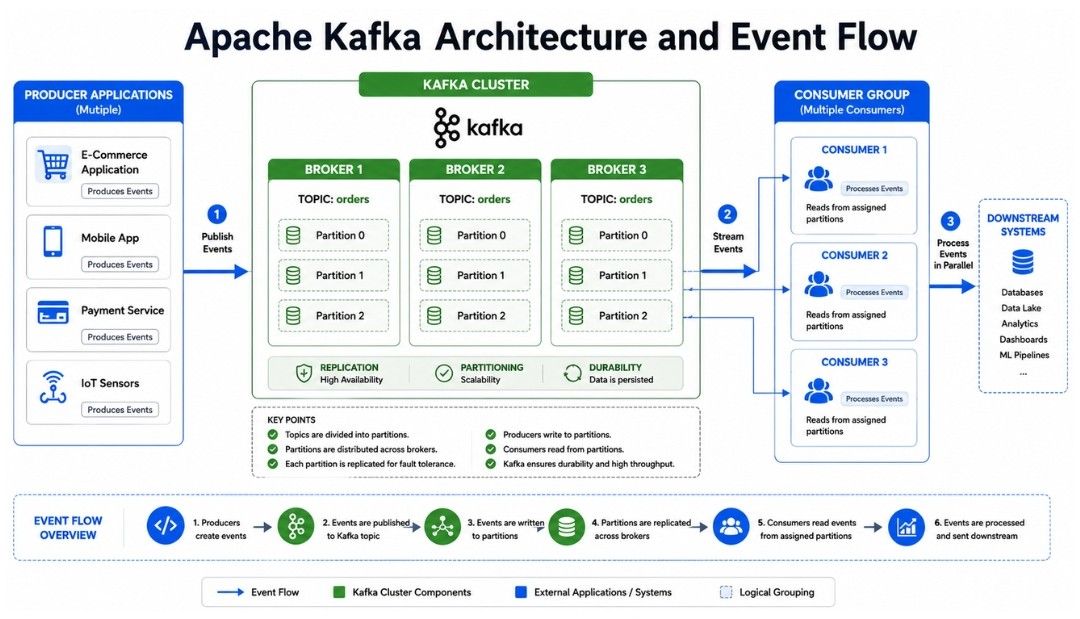
Let's understand each one.
A Kafka broker is a Kafka server.
A Kafka cluster can have multiple brokers working together.
For example:
Kafka Cluster

Broker 1
Broker 2
Broker 3
Kafka stores topic partitions across these brokers.
For example:
orders topic

Broker 1 → Partition 0
Broker 2 → Partition 1
Broker 3 → Partition 2
This allows Kafka to spread data and workload across multiple servers.
If the system has a large amount of data or traffic, multiple brokers can provide more storage and processing capacity.
A topic is a named stream where Kafka stores events.
You can think of a topic as a category for related events.
For example, an online shopping application may have:
orders
payments
shipments
user-events
An order event goes into the orders topic, while a payment event goes into the payments topic.
For example:
orders topic

Order 101
Order 102
Order 103
Order 104
Consumers can read events from a topic.
A topic can have multiple partitions, which allows Kafka to handle more data and process events in parallel.
A partition is a section of a Kafka topic.
A topic can have multiple partitions:
orders topic

Partition 0
Partition 1
Partition 2
Each partition is an ordered sequence of events.
For example:
Partition 0

0 → Order A
1 → Order D
2 → Order G
3 → Order J
The numbers are called offsets. They identify the position of events within that partition.
Partitions allow Kafka to process data in parallel.
Suppose a topic has one partition:
Partition 0
     ↓
Consumer 1
Only one consumer in the same consumer group can actively process that partition at a time.
Now suppose the topic has four partitions:
Partition 0 → Consumer 1
Partition 1 → Consumer 2
Partition 2 → Consumer 3
Partition 3 → Consumer 4
The consumer group can process the partitions at the same time.
This is one of the main ways Kafka handles high workloads.
A producer is an application that sends events to Kafka.
For example:
Order Service
     ↓
Producer
     ↓
orders topic
The producer creates an event such as:
Order ID: 1001
Customer ID: 25
Amount: ₹5,000
The producer sends this event to a Kafka topic.
Kafka can use a key to decide which partition should receive the event.
For example:
customer_id = 101When the same key is mapped consistently to the same partition, events for that customer can remain in order within that partition.
A consumer is an application that reads events from Kafka.
For example:
Kafka
  ↓
Consumer
  ↓
Payment Service
The consumer reads an event and processes it.
For example:
Order Created → Consumer reads the event → Payment Service starts payment processing.
Consumers keep track of their reading position using offsets.
A consumer group is a group of consumers that work together to process messages from one or more Kafka topics.
Suppose a topic has four partitions:
orders topic

Partition 0
Partition 1
Partition 2
Partition 3
And a consumer group has four consumers:
Consumer 1 → Partition 0
Consumer 2 → Partition 1
Consumer 3 → Partition 2
Consumer 4 → Partition 3
Each partition is assigned to at most one consumer within the same consumer group.
This allows multiple consumers to process different partitions in parallel.
Suppose a topic has four partitions but the consumer group has eight consumers:
Partition 0 → Consumer 1
Partition 1 → Consumer 2
Partition 2 → Consumer 3
Partition 3 → Consumer 4

Consumer 5 → No partition
Consumer 6 → No partition
Consumer 7 → No partition
Consumer 8 → No partition
Only four consumers can actively process the four partitions at the same time.
The extra consumers remain idle until the partition assignment changes.
In simple words, the maximum number of actively processing consumers in a consumer group for a topic is limited by the number of partitions.
An offset is a number that identifies the position of a record within a Kafka partition.
For example:
Partition 0

Offset 0 → Order A
Offset 1 → Order B
Offset 2 → Order C
Offset 3 → Order D
Each partition has its own sequence of offsets.
A consumer keeps track of which records it has processed by maintaining its consumer position and committed offset.
For example:
Offset 0 → Processed
Offset 1 → Processed
Offset 2 → Processed
Offset 3 → Next
If the consumer restarts, it can use its committed offset to continue reading from the appropriate position.
Offsets allow consumers to:
Track their progress
Resume processing after a restart
Reprocess messages when required
Control where they start reading from
In simple words, an offset tells a consumer where it is in a Kafka partition.
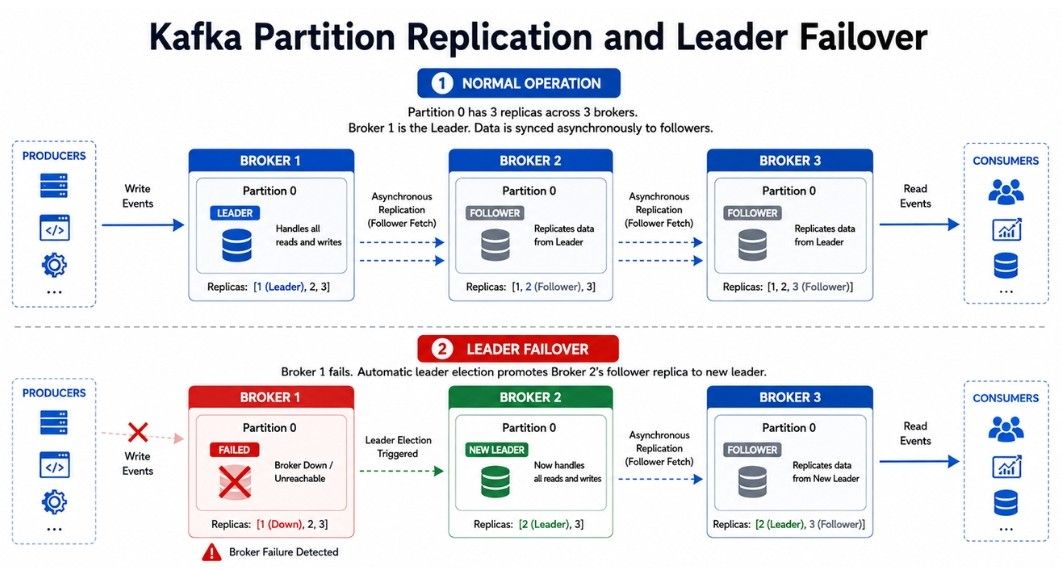
Replication means keeping multiple copies of a Kafka partition across different brokers.
For example, suppose a partition has a replication factor of 3:
Partition 0

Broker 1 → Replica
Broker 2 → Replica
Broker 3 → Replica
One replica acts as the leader, while the other replicas act as followers.
             Partition 0
                  ↓
               Leader
                  ↓
        ┌─────────┴─────────┐
        ↓                   ↓
   Follower 1          Follower 2
Producers and consumers normally interact with the partition's leader, while follower replicas keep copies of the data.
If the leader broker fails, Kafka can elect an eligible follower as the new leader.
Replication helps provide:
Fault tolerance
Higher availability
Protection against broker failures
Data redundancy
For example, if a partition has three replicas and one broker fails, the other replicas can continue to provide the partition's data, assuming the cluster has sufficient healthy replicas.
In simple words, replication keeps copies of Kafka data on multiple brokers so that a single broker failure does not necessarily make the data unavailable.
For each Kafka partition, there is normally one leader replica and one or more follower replicas.
For example:
Partition 0

Broker 1 → Leader
Broker 2 → Follower
Broker 3 → Follower
The leader replica handles requests for the partition, while follower replicas replicate the partition's data from the leader.
If the leader broker fails, Kafka can elect an eligible follower as the new leader.
Example
Initially:
Partition 0

Leader   → Broker 1
Follower → Broker 2
Follower → Broker 3
If Broker 1 fails:
Partition 0

Leader   → Broker 2
Follower → Broker 3
This helps Kafka continue serving the partition when a broker fails.
In simple words, the leader handles the partition's requests, while followers maintain copies that can be used if the leader fails.
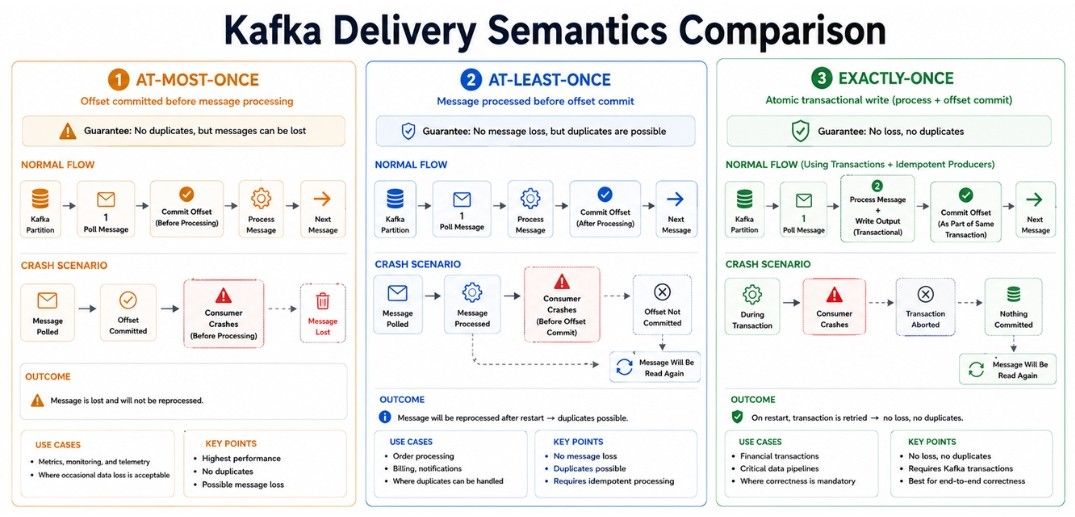
When Kafka messages are produced and consumed, an important question is:
"What happens if a message is processed more than once or fails during processing?"
Kafka-based systems commonly discuss three delivery semantics:
At-most-once
At-least-once
Exactly-once
These describe how messages may be processed when failures occur.
At-most-once means a message is processed zero or one time. The system prioritizes avoiding duplicate processing, even if a message may be lost.
For example:
Message
   ↓
Offset Commit
   ↓
Process Message
If the consumer commits the offset before successfully processing the message and then crashes, Kafka may not deliver that message again.
In simple words, a message is not processed more than once, but message loss can happen.
At-least-once means the system tries to ensure that a message is not lost, but the same message may be processed more than once.
For example, suppose a payment event is being processed:
Message
   ↓
Consumer Processes
   ↓
Consumer Crashes
   ↓
Offset Not Committed
   ↓
Message Read Again
After restarting, the consumer may process the same payment event again. If the application is not designed carefully, this could cause duplicate actions.
For this reason, at-least-once processing often requires idempotent processing.
In simple words, the system prefers not to lose messages, even if a message may be processed more than once.
Exactly-once means the system is designed so that the intended processing result occurs once from the application's point of view, despite certain failures.
Kafka provides exactly-once capabilities for supported Kafka workflows through features such as transactions and idempotent producers.
For example:
Read Message
     ↓
Process
     ↓
Write Result
     ↓
Commit Transaction
If the transaction fails, the intended result is not treated as successfully completed.
However, exactly-once does not automatically guarantee exactly-once behavior in every external system. If a Kafka consumer updates an external database, you also need to consider that database's transaction and failure behavior.
In simple words, exactly-once requires the entire processing workflow to be designed correctly; Kafka alone cannot make every external operation exactly-once.
Kafka provides ordering within a partition.
For example:
Partition 0

Offset 0 → Event A
Offset 1 → Event B
Offset 2 → Event C
Kafka preserves the order of records within that partition.
However, Kafka does not guarantee a single global order across all partitions of a topic.
Suppose an order produces these events:
Order Created
Payment Completed
Order Shipped
If these events must be processed in order, you need to choose the partitioning strategy carefully.
Using the same order ID as the partition key can ensure that events for that order are sent to the same partition, where their order can be maintained.
Retention defines how long Kafka keeps messages in a topic before they become eligible for deletion.
For example:
A topic may keep messages for 7 days.
After the retention period, Kafka can delete older data according to the topic's retention settings.
Kafka can use different retention rules, such as:
Time-based retention — Keep messages for a specific period.
Size-based retention — Keep messages until the topic reaches a configured size limit.
Importantly, Kafka does not normally delete a message just because a consumer has read it. Consumers track their position using offsets, while Kafka manages message deletion according to retention settings.
Kafka partitions are divided into smaller files called log segments.
For example:
Partition 0

Segment 1 → Older records
Segment 2 → Recent records
Segment 3 → Newer records
Segment 4 → Active segment
Kafka writes new records to the active segment. When it reaches the configured size or time limit, Kafka creates a new segment.
Older segments can be deleted when they are no longer needed according to the topic's retention policy.
Log segments help Kafka efficiently store, manage, and remove large amounts of event data.
In simple words, log segments divide a partition into smaller files so Kafka can manage event data efficiently.
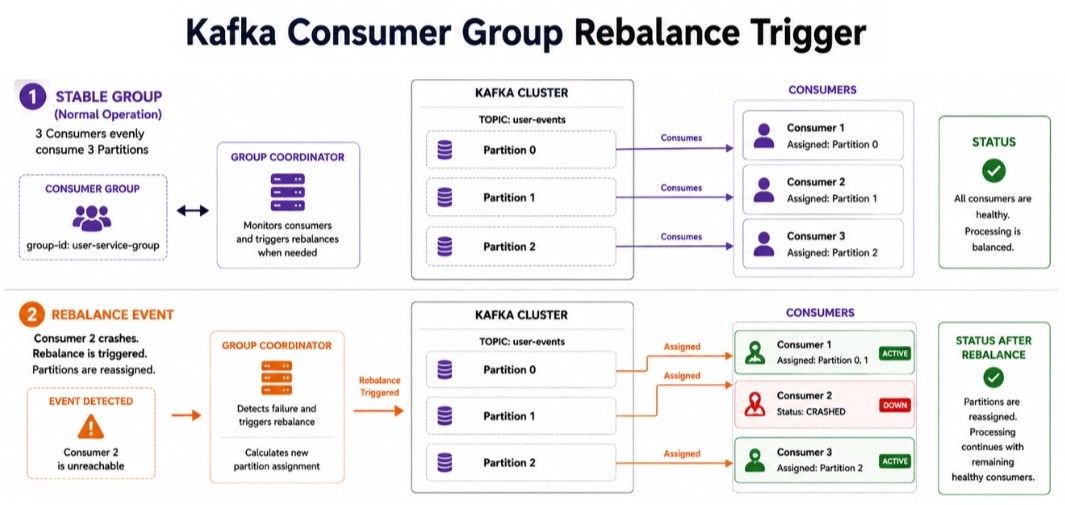
Consumer rebalancing happens when Kafka changes the assignment of partitions among consumers in a consumer group.
For example:
Partition 0 → Consumer A
Partition 1 → Consumer B
Partition 2 → Consumer C
If Consumer B crashes, Kafka can redistribute its partition:
Partition 0 → Consumer A
Partition 1 → Consumer C
Partition 2 → Consumer A
The exact assignment depends on the consumer group and partition assignment strategy.
Rebalancing can occur when:
A consumer joins the group.
A consumer leaves the group.
A consumer crashes or is considered unavailable.
Partition assignments change.
Consumer group membership changes.
Rebalancing helps maintain parallel processing and fault tolerance, but frequent rebalancing can temporarily affect consumer performance.
Kafka can handle high volumes of events, but performance depends on proper configuration and system design.
Partitions: More partitions allow more parallel processing, but too many increase complexity and resource usage.
Consumer Parallelism: A consumer group can actively process up to one consumer per partition.
Producer Batching: Groups multiple records together to improve throughput.
Compression: Reduces network traffic and storage usage but uses additional CPU.
Broker Resources: CPU, memory, disk, network, message size, and replication affect performance.
Kafka uses several mechanisms to handle failures:
Replication — Keeps copies of partition data.
Leader Election — Selects a new leader when the current leader fails.
Consumer Rebalancing — Redistributes partitions when consumers change.
Producer Retries — Retries failed producer requests.
Offset Tracking — Helps consumers continue from their recorded position.
Example:
Leader → Broker 1
Follower → Broker 2

Broker 1 fails
      ↓
Broker 2 → New LeaderEvent-Driven Architecture — Services communicate through events.
Microservices Communication — Reduces direct dependencies between services.
Real-Time Processing — Processes continuous streams of events.
Log Collection — Collects and distributes application logs.
Data Pipelines — Moves data between databases, processing systems, and warehouses.
Activity Tracking — Tracks logins, clicks, searches, purchases, and other user events.
Kafka is powerful, but incorrect design can create performance and reliability problems.
Treating Kafka like a traditional queue: Reading a message does not automatically delete it. Kafka keeps messages according to retention settings.
Using too few partitions: Limits consumer parallelism and can reduce processing capacity.
Creating too many partitions: Increases resource usage and operational complexity.
Ignoring message ordering: Ordering is guaranteed within a partition, so choose partition keys carefully when order matters.
Ignoring consumer lag: Growing lag means consumers are falling behind producers and may indicate a processing problem.
Using very large messages: Large messages increase network, memory, and processing costs.
Ignoring replication: Proper replication is important for fault tolerance and broker failures.
Forgetting idempotency: At-least-once processing can cause duplicate processing, so consumers should handle retries safely.
Ignoring consumer rebalancing: Frequent rebalancing can affect consumer performance.
Using Kafka for everything: Kafka is not the right solution for every messaging or storage requirement.
Imagine an online store receives:
100,000 order events per minute.
A single consumer may not be able to process all events quickly enough.
You can divide the topic into multiple partitions:
orders topic

Partition 0
Partition 1
Partition 2
Partition 3
Partition 4
Partition 5
A consumer group can then process these partitions in parallel:
Consumer 1 → Partition 0
Consumer 2 → Partition 1
Consumer 3 → Partition 2
Consumer 4 → Partition 3
Consumer 5 → Partition 4
Consumer 6 → Partition 5
This allows multiple consumers to process events at the same time.
If consumers cannot keep up, you can investigate processing bottlenecks or scale the consumer group, as long as enough partitions are available.
Apache Kafka is a distributed event streaming platform used to move, store, and process large amounts of event data.
Topics & Partitions — Store and organize events while enabling parallel processing.
Producers & Consumers — Producers send events, and consumers read them.
Consumer Groups & Offsets — Manage parallel consumption and track processing position.
Replication — Provides fault tolerance by keeping copies of data.
Delivery & Ordering — Covers message processing guarantees and ordering within partitions.
Retention & Rebalancing — Manage event storage and consumer group changes.
Scaling & Performance — Depend on partitions, consumers, batching, compression, and system resources.
Use Cases — Include event-driven systems, microservices, real-time processing, and data pipelines.
