
Durgesh Tiwari
Author
RabbitMQ is a popular message broker used to send messages between applications and services.
In a microservices application, one service may create some work while another service needs to process it.
For example:
Order Service
     ↓
  RabbitMQ
     ↓
Payment Service
The Order Service does not need to wait for the Payment Service to finish. It can send a message to RabbitMQ, and the Payment Service can process it when it is ready.
This is useful when an application has multiple services, background jobs, or tasks that need to run asynchronously.
In this RabbitMQ deep dive, we will learn about RabbitMQ architecture, producers, consumers, exchanges, queues, routing keys, acknowledgements, message durability, retries, dead-letter exchanges, prefetch, scaling, clustering, high availability, and RabbitMQ vs Kafka.
RabbitMQ is an open-source message broker.
Its main job is to receive messages from applications and deliver them to other applications or services.
A simple flow looks like this:
Producer
   ↓
RabbitMQ
   ↓
Consumer
For example, an e-commerce application may use RabbitMQ like this:
Order Service
     ↓
  RabbitMQ
     ↓
Email Service
When a customer places an order, the Order Service can send a message:
Order Created
Order ID: 1001
Customer ID: 25
RabbitMQ receives and routes the message. The Email Service can then process it and send an order confirmation email.
RabbitMQ is useful for:
Asynchronous communication
Background task processing
Microservices communication
Work queues
Message routing
Reliable message delivery
Retry and failure handling
In simple words: One application sends a message, RabbitMQ manages and routes it, and another application processes it.
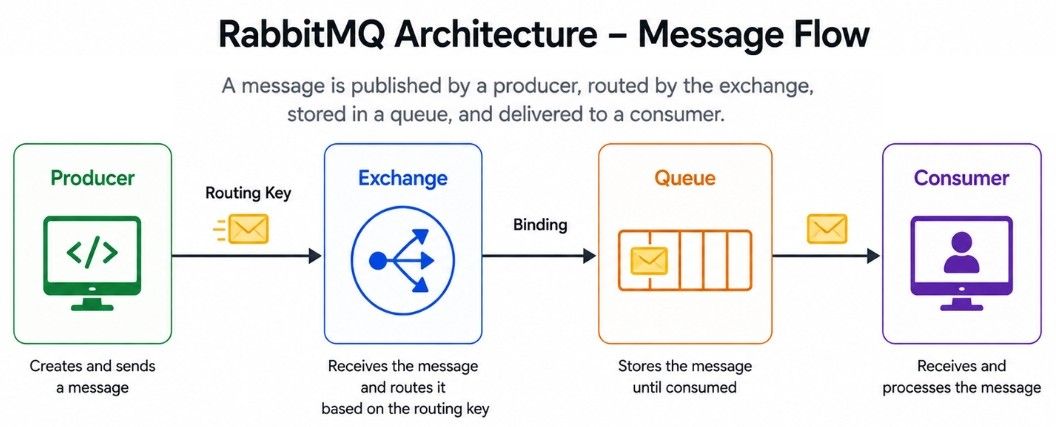
RabbitMQ has several important components that work together to deliver messages.
A simple flow looks like this:
Producer
   ↓
Exchange
   ↓
Binding
   ↓
Queue
   ↓
Consumer
Each component has a specific job:
Producer sends messages to RabbitMQ.
Exchange decides where the message should go.
Binding connects an exchange to a queue.
Queue stores messages until they are processed.
Consumer receives and processes messages.
Routing key gives the exchange information that can be used to route a message.
A producer is an application that sends messages to RabbitMQ.
A consumer is an application that receives and processes those messages.
For example:
Order Service
     ↓
  Producer
     ↓
  RabbitMQ
     ↓
  Consumer
     ↓
Email Service
In RabbitMQ, a producer normally does not send a message directly to a queue.
Instead, it publishes the message to an exchange. The exchange then routes the message to one or more queues.
This is an important part of how RabbitMQ works.
An exchange receives messages from producers and decides which queues should receive them.
Think of an exchange as a traffic controller.
Producer
   ↓
Exchange
  ↙   ↓   ↘
Q1   Q2   Q3
The exchange uses information such as the routing key and bindings to decide where the message should go.
RabbitMQ provides four main exchange types:
Direct Exchange
Topic Exchange
Fanout Exchange
Headers Exchange

Each exchange type uses a different routing method.
A Direct Exchange routes messages using an exact routing key.
For example:
orders   → order.created
payments → payment.created
If the producer sends a message with:
routing key = order.createdthe exchange routes it to the orders queue.
order.created   → orders queue
payment.created → payments queue
Direct exchanges are useful when messages need simple and exact routing.
A Topic Exchange uses routing-key patterns, making it useful for more flexible routing.
For example:
order.created
order.cancelled
payment.created
payment.failed
A queue can use a pattern such as:
order.*This can match:
order.created
order.cancelled
The # pattern can match multiple words in a routing key.
In simple words: A topic exchange allows messages to be routed using patterns instead of requiring an exact routing-key match.
A Fanout Exchange sends a message to all queues bound to it.
It does not use the routing key for routing.
                 → Email Queue
                /
Producer → Fanout Exchange → Notification Queue
                \
                 → Analytics Queue
For example, when an order is created, the same event may need to reach:
Email Service
Notification Service
Analytics Service
A fanout exchange can send the message to all three queues.
A Headers Exchange routes messages using message headers instead of routing keys.
For example, a message may contain:
department = billing
region = india
priority = high
The exchange can use this information to decide which queue should receive the message.
Headers exchanges are less common than direct, topic, and fanout exchanges in many applications.
A queue stores messages until consumers receive and process them.
For example:
Exchange
   ↓
Orders Queue
   ↓
Consumer
Suppose a producer sends five messages:
Order 1
Order 2
Order 3
Order 4
Order 5
If the consumer is busy, the messages can stay in the queue until the consumer is ready to process them.
This allows producers and consumers to work at different speeds.
Imagine the Order Service suddenly receives 10,000 orders.
The Email Service may not be able to process all 10,000 messages immediately.
RabbitMQ can keep the messages in the queue while consumers process them.
So, a queue acts as a buffer between producers and consumers.
A binding connects an exchange to a queue.
For example:
Exchange
    ↓
 Binding
    ↓
 Queue
A binding can include routing information.
For example:
Exchange
   ↓
Binding: order.created
   ↓
Orders Queue
When a message matches the binding rules, the exchange can route it to the queue.
A routing key is a value attached to a message when a producer publishes it.
The exchange uses the routing key, along with its exchange type and bindings, to decide where the message should go.
For example:
routing key = payment.failedA Direct Exchange can match this exact routing key.
A Topic Exchange can use a pattern such as:
payment.*This can match:
payment.failed
payment.created
In simple words: The producer sends the routing key, and the exchange uses it to route the message according to its exchange type and bindings.
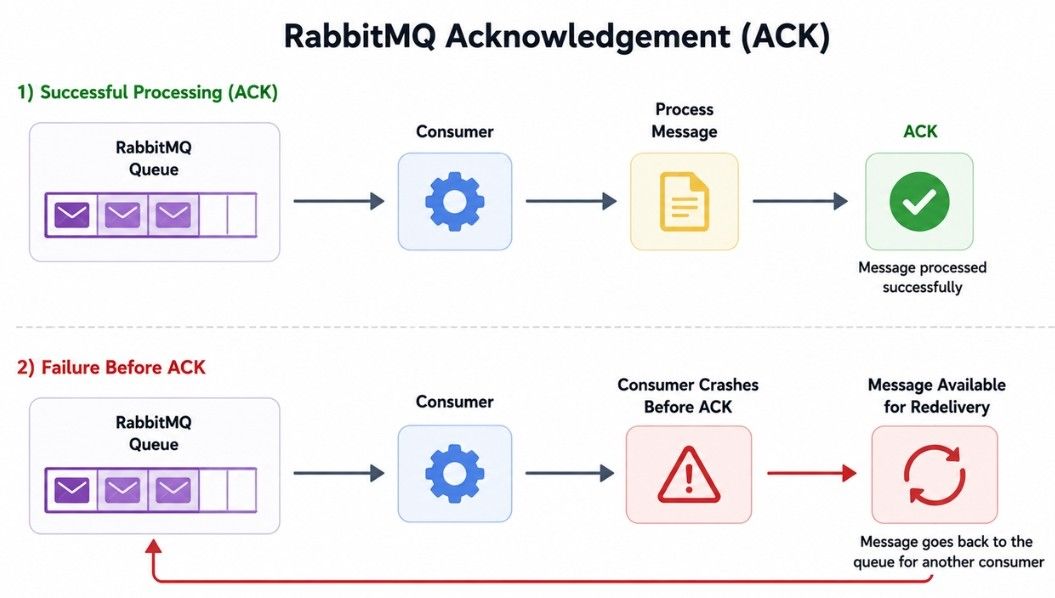
An acknowledgement, or ack, tells RabbitMQ that a consumer has successfully processed a message.
A simple flow looks like this:
RabbitMQ
   ↓
Consumer
   ↓
Process Message
   ↓
ACK
After receiving the ACK, RabbitMQ knows that the message was successfully handled.
Suppose the consumer receives a message but crashes before sending the ACK:
RabbitMQ
   ↓
Consumer receives message
   ↓
Consumer crashes
Because the message was not acknowledged, RabbitMQ can make it available for redelivery, depending on the queue and consumer configuration.
This helps prevent messages from being lost when a consumer fails.
Suppose a consumer receives:
Order ID: 1001The consumer processes the order successfully and then sends:
ACKRabbitMQ can then consider the message successfully processed and remove it from the queue.
Message durability means configuring RabbitMQ so that queues and messages can survive a broker restart.
There are two important things to understand:
Durable queues
Persistent messages
They are related, but they are not the same.
A durable queue can survive a broker restart, but this alone does not make every message persistent.
For durable messaging, you generally need to use a durable queue and publish messages as persistent.
In simple words: Queue durability protects the queue, while message persistence helps protect the messages stored in it.
A message can be published as persistent.
This tells RabbitMQ to store the message using its durable storage mechanisms so it can survive a broker restart when the queue is also durable.
A common setup looks like this:
Durable Exchange
      ↓
Durable Queue
      ↓
Persistent Message
However, persistent messages alone do not guarantee complete message safety.
Reliable message delivery may also require:
Publisher confirms
Durable queues
Persistent messages
Consumer acknowledgements
Replication or high availability
Reliable storage
In simple words: Message persistence is one part of reliable messaging. The complete message path must be configured correctly.
Sometimes a message cannot be processed successfully.
For example:
Message
   ↓
Consumer
   ↓
Processing Fails
   ↓
Retry
   ↓
Fails Again
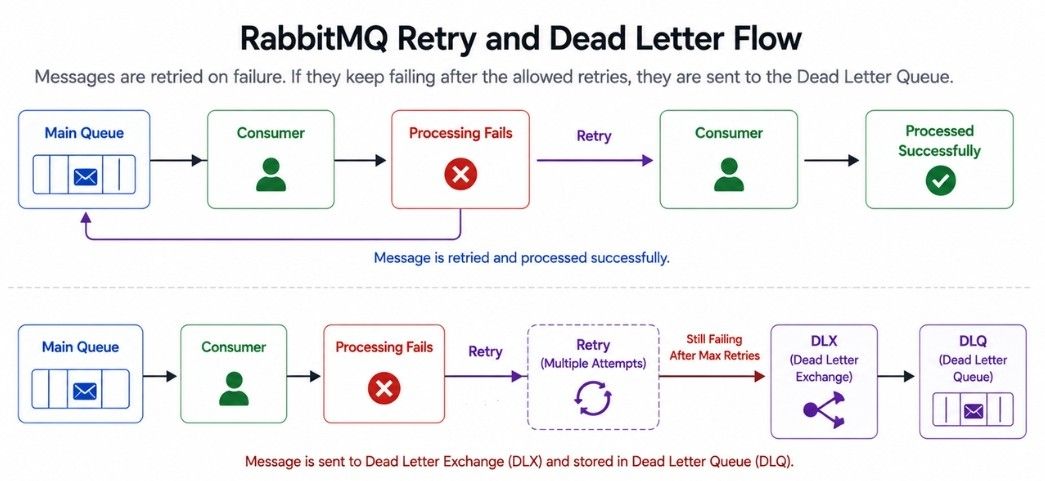
If the message keeps failing, you may not want it to be retried forever.
RabbitMQ provides Dead Letter Exchanges (DLX) to handle such messages.
A simple setup looks like:
Main Queue
    ↓
Processing Fails
    ↓
Dead Letter Exchange
    ↓
Dead Letter Queue
The Dead Letter Queue (DLQ) stores messages that could not be processed successfully.
You can inspect these messages later to find the problem or process them separately.
In simple words: A DLX helps move failed messages away from the main queue so they do not block normal message processing.
Messages can fail for different reasons, such as:
A database is temporarily unavailable.
An external API is down.
The message contains invalid data.
A service has a temporary problem.
A common approach is to retry the message.
A simple flow looks like:
Main Queue
    ↓
Consumer
    ↓
Failure
    ↓
Retry
    ↓
Consumer
However, retrying forever is usually not a good idea.
A better approach is to limit the number of attempts:
Attempt 1
   ↓
Failure
   ↓
Attempt 2
   ↓
Failure
   ↓
Attempt 3
   ↓
Failure
   ↓
Dead Letter Queue
RabbitMQ systems can use retry queues or delayed-message patterns to control when a failed message should be tried again.
If a message is delivered to a consumer but is not successfully acknowledged, RabbitMQ may deliver it again.
This is called redelivery.
Consumers should therefore be designed to handle possible duplicate deliveries safely when the application requires it.
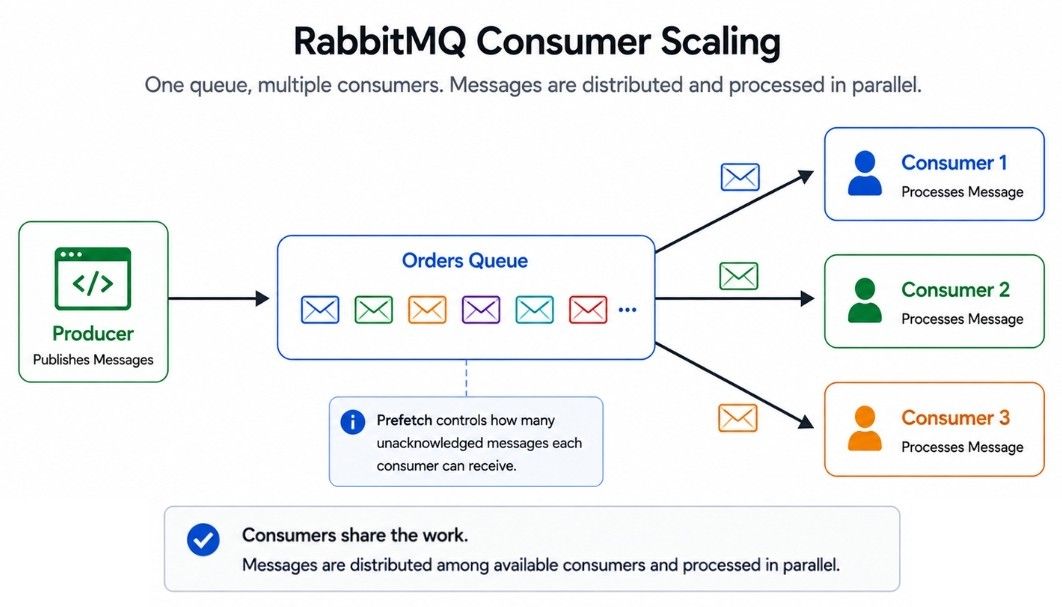
Prefetch controls how many unacknowledged messages RabbitMQ can deliver to a consumer at a time.
For example:
Prefetch = 1The consumer receives one message and RabbitMQ waits for its acknowledgement before delivering another message to that consumer.
With a larger value:
Prefetch = 10the consumer can receive more messages before acknowledging them.
Too low: The consumer may not use its full processing capacity.
Too high: One consumer may receive too many messages while other consumers have less work.
The right prefetch value depends on the processing speed, message size, and workload of the consumer.
RabbitMQ can scale message processing by running multiple consumers for the same queue.
For example:
             Orders Queue
            /     |      \
           ↓      ↓       ↓
      Consumer 1 Consumer 2 Consumer 3
The consumers can share messages from the queue, allowing multiple messages to be processed in parallel.
For example:
1000 Emails
     ↓
Email Queue
     ↓
Consumer 1
Consumer 2
Consumer 3
Consumer 4
This is useful for background jobs and workloads where messages can be processed independently.
However, adding more consumers does not always make the system faster.
The actual bottleneck may be:
Database capacity
External APIs
CPU
Network
Message processing time
Scale consumers according to the actual bottleneck, not simply by adding more consumers.
A RabbitMQ cluster is a group of multiple RabbitMQ nodes that work together.
For example:
RabbitMQ Cluster

Node 1
Node 2
Node 3
Clustering can help support larger deployments and improve the overall availability of the RabbitMQ system.
However, a cluster does not mean that every queue automatically has a complete copy of its messages on every node.
Queue storage and replication depend on the queue type and configuration.
This distinction is important when designing a reliable and highly available RabbitMQ system.
High availability means designing RabbitMQ so that the messaging system can continue operating even if a broker node or other infrastructure component fails.
Modern RabbitMQ deployments commonly use quorum queues when replicated and highly available queues are required.
A simplified setup looks like:
        Queue
       /     \
   Node 1   Node 2
       \     /
        Node 3
The exact behavior depends on the queue type and cluster configuration.
A high-availability setup should consider:
Queue replication
Node failures
Network failures
Consumer recovery
Publisher confirms
Monitoring
Backup and recovery
Important: Running multiple RabbitMQ nodes alone does not automatically make every message highly available.
RabbitMQ and Kafka are both used for messaging and event-driven systems, but they are designed for different use cases.
Feature | RabbitMQ | Kafka |
|---|---|---|
Main model | Message broker | Event streaming platform |
Main concept | Exchanges and queues | Topics and partitions |
Routing | Strong routing support | Topic and partition based |
Message handling | Messages are acknowledged and removed after successful processing | Consumers track offsets |
Replay | Not the main focus | Major feature |
Ordering | Depends on queue and consumer design | Ordered within a partition |
Work queues | Excellent fit | Also possible |
Complex routing | Strong | More limited compared with RabbitMQ |
Event retention | Queue-based | Configurable retention |
Consumer scaling | Multiple consumers can share a queue | Consumer groups share partitions |
RabbitMQ is commonly used for asynchronous communication and background processing.
Microservices Communication — Services communicate through messages.
Background Jobs — Tasks are processed asynchronously by workers.
Email Processing — Email jobs are placed in a queue and processed by workers.
Order Processing — Different services can process payment, inventory, and notifications.
Payment Processing — Payment tasks can be handled by dedicated consumers with proper retry and idempotency handling.
Delayed Work — Tasks can be processed after a delay when the architecture supports it.
A simple order-processing flow looks like this:
Order Service
      ↓
   Producer
      ↓
   Exchange
      ↓
   Binding
      ↓
    Queue
      ↓
   Consumer
Producer sends the message.
Exchange routes the message.
Binding connects the exchange to the queue.
Queue stores the message.
Consumer processes the message.
ACK confirms successful processing.
If processing fails:
Consumer
   ↓
Failure
   ↓
Retry
   ↓
Success → ACK
If the message keeps failing:
Repeated Failure
       ↓
Dead Letter Exchange
       ↓
Dead Letter QueueRabbitMQ is a message broker that helps applications communicate asynchronously through messages.
Important concepts:
RabbitMQ Architecture — Producer → Exchange → Queue → Consumer.
Producer — Sends messages to an exchange.
Consumer — Receives and processes messages from a queue.
Exchange — Routes messages to queues.
Direct Exchange — Routes using an exact routing key.
Topic Exchange — Routes using routing-key patterns.
Fanout Exchange — Sends messages to all bound queues.
Queue — Stores messages until they are processed.
Acknowledgement (ACK) — Confirms that a message was successfully processed.
Message Durability & Persistence — Help protect messages and queues across broker restarts.
Retry & Redelivery — Handle messages that fail processing.
Dead Letter Exchange (DLX) — Handles messages that repeatedly fail.
Prefetch — Controls how many unacknowledged messages a consumer can receive.
Consumer Scaling — Multiple consumers can process messages from the same queue.
