
Durgesh Tiwari
Author
Modern applications are expected to run 24×7 and serve thousands or even millions of users. Even a small issue, such as a server failure, database problem, network outage, or software bug, can affect users and business operations.
To manage these production issues in a structured way, organizations use Incident Management.
Incident Management provides a well-defined process that helps teams handle incidents efficiently, minimize service disruption, and maintain application availability.
In simple words, Incident Management is a structured process for handling production issues and keeping applications available.
Modern applications are built using multiple services that work together. If one service fails, it can affect the performance of the entire application.
Without a proper process, teams may take longer to identify the issue, restore the service, and communicate with users.
Incident Management provides a clear approach for responding to production problems, reducing downtime, and minimizing their impact on users and the business.
It helps organizations:
Detect incidents quickly.
Restore services faster.
Reduce application downtime.
Minimize business impact.
Improve customer experience.
Prevent similar incidents in the future.
Incident Management is the process of handling unexpected incidents that affect the normal operation of an application or service.
It follows a structured lifecycle that begins when an incident is detected and continues until the service is restored and the incident is reviewed. This process ensures that production issues are handled consistently and efficiently.
In simple words, Incident Management is a step-by-step process for detecting, fixing, and learning from production issues.
Imagine an online shopping application that suddenly becomes unavailable during a major sale.
The monitoring system detects the outage and immediately sends an alert to the operations team.
The team investigates the issue, restores the service, identifies the root cause, and later reviews the incident to improve the system and prevent similar problems in the future.
Application Issue
        │
        ▼
Incident Detected
        │
        ▼
Alert Generated
        │
        ▼
Team Investigates
        │
        ▼
Service Restored
        │
        ▼
Root Cause Analysis
        │
        ▼
Lessons LearnedA well-defined Incident Management process provides several important benefits:
Reduces Downtime – Restores services quickly after an incident.
Improves Customer Experience – Minimizes the impact of service interruptions.
Reduces Business Risk – Keeps critical applications available.
Speeds Up Recovery – Provides a structured approach for resolving incidents.
Supports Continuous Improvement – Helps teams learn from incidents and improve the system over time.
In a distributed system, problems such as high CPU usage, increased error rates, low disk space, or service failures can occur at any time. If these issues are not detected quickly, they may lead to application downtime or poor user experience.
Alerting is the process of automatically notifying the operations team whenever a predefined condition indicates that something is wrong.
In simple words, Alerting immediately informs the team when a problem is detected so they can respond quickly.
The Alerting process typically follows these steps:
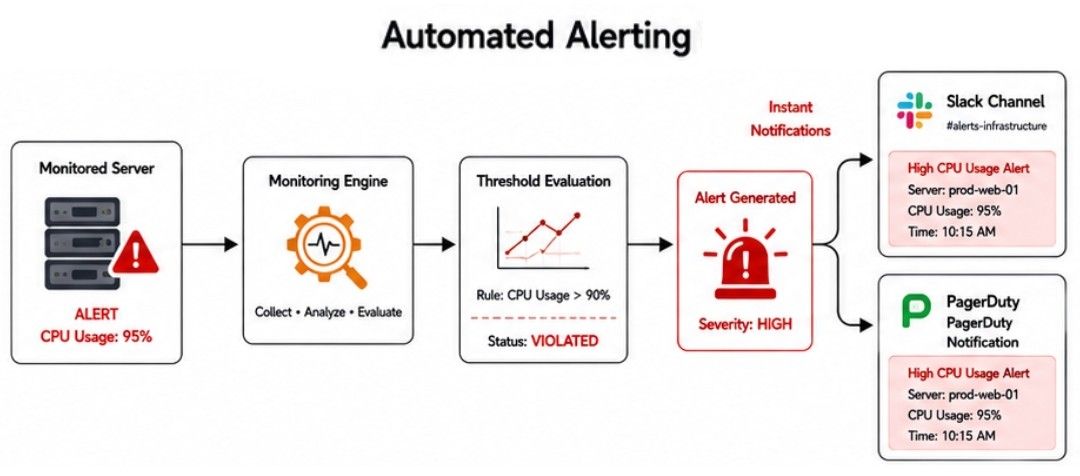
Monitoring tools continuously collect application and infrastructure metrics.
Predefined alert rules check whether any metric crosses its threshold.
If a threshold is exceeded, an alert is generated.
The alert is sent to the responsible team through channels such as Email, Slack, or PagerDuty.
The team investigates and resolves the issue.
Imagine an online shopping application running on multiple servers.
The monitoring system detects that the CPU usage on one server has reached 95%, which is above the configured threshold.
An alert is immediately sent to the operations team through Slack and PagerDuty, allowing them to investigate the issue before it affects customers.
Alerting provides several advantages:
Detects Problems Early – Identifies issues before they become major failures.
Reduces Response Time – Notifies the team immediately.
Prevents Major Outages – Helps resolve problems before users are affected.
Improves Application Availability – Keeps services reliable and continuously available.
In a production environment, incidents can occur at any time, including nights, weekends, or holidays. Since applications are expected to be available 24×7, someone must always be ready to respond to production issues.
On-Call Engineering is the process of assigning engineers to monitor production systems and respond to incidents outside regular working hours.
An on-call engineer investigates alerts, fixes issues when possible, or coordinates with the appropriate teams to restore the service.
In simple words, an On-Call Engineer is responsible for handling production issues whenever they occur.
The On-Call process typically follows these steps:
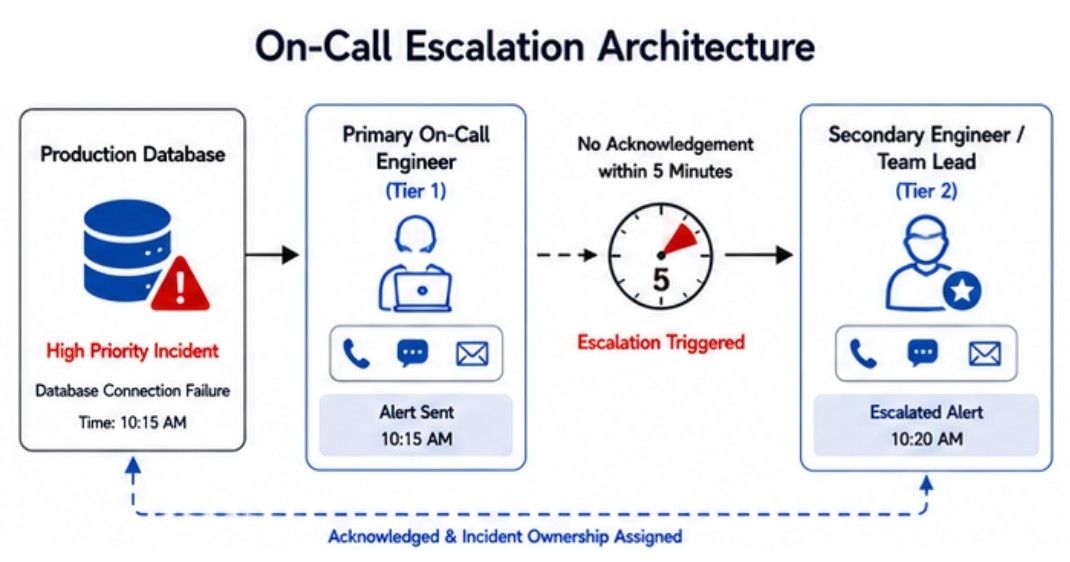
Monitoring tools detect a production issue.
An alert is generated.
The alert is sent to the on-call engineer.
The engineer investigates the incident.
The issue is resolved or escalated to another team if needed.
Once the service is restored, the incident is documented for future analysis.
Imagine an online payment application where the Payment Service suddenly stops working at 2:00 AM.
The monitoring system immediately sends an alert to the on-call engineer through PagerDuty.
The engineer investigates the issue, restarts the failed service, verifies that payments are working again, and restores normal operation without waiting until business hours.
On-Call Engineering provides several advantages:
Ensures 24×7 Support – Engineers are available at any time.
Speeds Up Incident Resolution – Problems are handled immediately.
Reduces Downtime – Services are restored more quickly.
Improves Service Reliability – Keeps production systems available for users.
When an incident occurs, simply detecting it is not enough. The engineering team must investigate the problem, restore the service, and ensure that the application returns to normal operation as quickly as possible.
Incident Response is the structured process of detecting, investigating, resolving, and monitoring an incident until the system is fully restored.
In simple words, Incident Response is the step-by-step process of handling a production issue and restoring normal service.
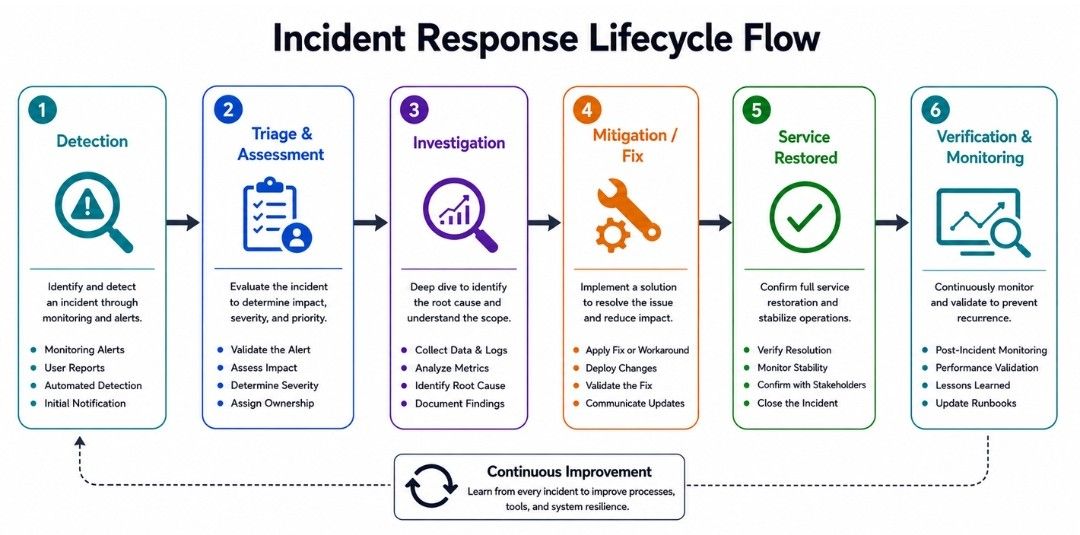
A typical Incident Response process includes:
Detect the incident.
Assess the impact.
Assign the incident to the appropriate team.
Investigate the root cause.
Fix the problem.
Verify that the service is working normally.
Continue monitoring to ensure the issue does not occur again.
Imagine an online banking application where customers start receiving payment errors.
The monitoring system detects the issue and alerts the operations team.
The engineering team investigates the incident, discovers that the primary database server has failed, switches traffic to a backup database, and verifies that payment processing is working normally again.
The application continues to be monitored to ensure the service remains stable.
Incident Response provides several advantages:
Faster Recovery – Restores services as quickly as possible.
Better Team Coordination – Provides a structured process for handling incidents.
Reduces Customer Impact – Minimizes downtime and service disruption.
Improves System Stability – Ensures the application returns to normal operation safely.
After an incident has been resolved, simply restoring the service is not enough. The engineering team must understand why the incident happened so that it does not occur again.
Root Cause Analysis (RCA) is the process of identifying the actual cause of an incident instead of only fixing its visible symptoms.
In simple words, Root Cause Analysis (RCA) helps answer the question: "Why did this incident happen?"
A typical RCA process includes these steps:
Collect information about the incident.
Analyze logs, metrics, and traces.
Identify the actual root cause.
Implement a permanent solution.
Verify that the issue cannot occur again.
Document the findings for future reference.
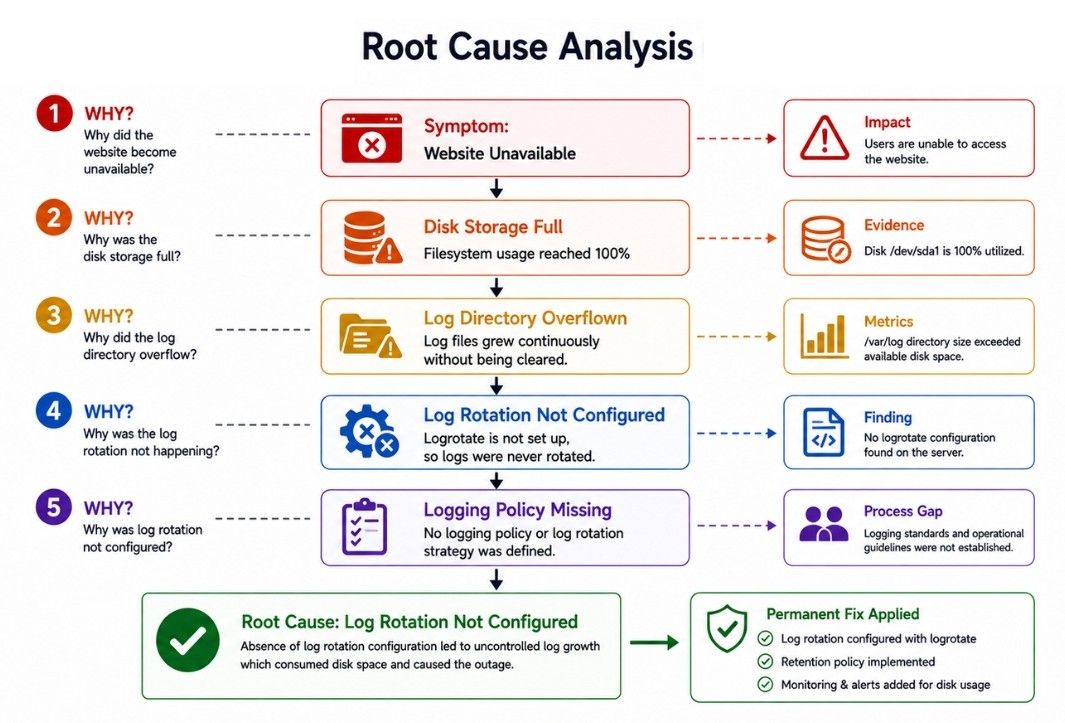
Imagine an online shopping application where the website suddenly becomes unavailable.
The engineering team quickly restores the service by increasing the database storage.
During the Root Cause Analysis, they discover that automatic log cleanup was not configured, causing log files to grow until the storage became full.
The permanent solution is to configure automatic log rotation and cleanup, preventing the same incident from happening again.
Root Cause Analysis provides several advantages:
Prevents Repeated Incidents – Eliminates the actual cause of the problem.
Improves System Reliability – Makes the application more stable.
Identifies System Weaknesses – Reveals hidden issues before they cause future incidents.
Supports Continuous Improvement – Helps teams improve systems and operational processes.
After an incident has been resolved and the service is running normally again, the work is not complete. The engineering team reviews the incident to understand what happened, how it was handled, and how similar incidents can be prevented in the future.
Postmortem Analysis is a structured review conducted after an incident has been resolved. Its goal is to identify lessons learned and improve the system, processes, and incident response.
A good postmortem focuses on improving the system rather than blaming individuals.
In simple words, Postmortem Analysis helps teams learn from incidents and prevent them from happening again.
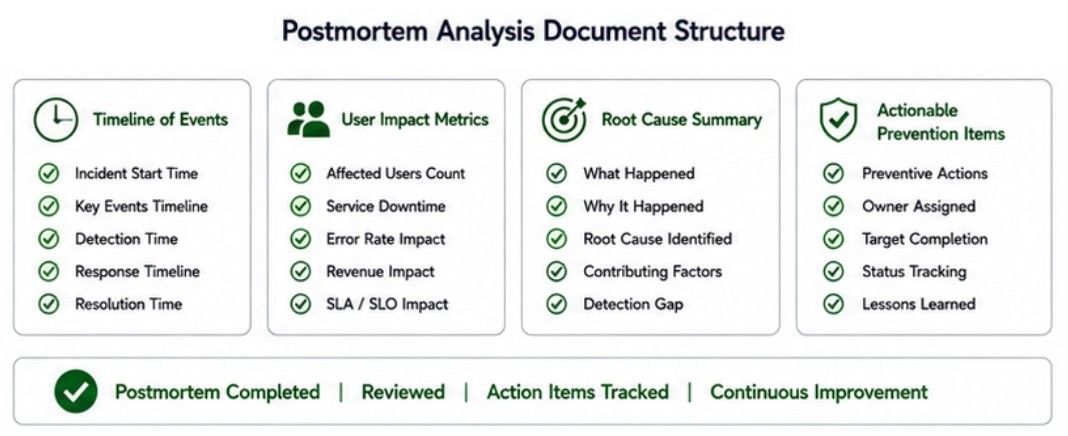
A typical postmortem contains:
Incident summary
Timeline of events
Root cause
Actions taken to resolve the incident
Impact on users and business
Lessons learned
Future improvements
Imagine an online payment application where the payment service becomes unavailable for 20 minutes.
After restoring the service, the engineering team conducts a Postmortem Analysis. They document the incident timeline, identify the root cause, review how the incident was handled, and decide to add better monitoring and alerts to detect similar issues earlier.
The findings are shared with the team so future incidents can be handled more effectively.
Postmortem Analysis provides several advantages:
Improves Future Incident Handling – Helps teams respond more effectively.
Identifies Process Improvements – Reveals weaknesses in systems and workflows.
Encourages Continuous Learning – Shares lessons learned across the team.
Builds More Reliable Systems – Reduces the likelihood of similar incidents in the future.
Imagine an online banking application where the Payment Service suddenly becomes unavailable during peak business hours.
The monitoring system detects the issue and immediately generates an alert, which is sent to the on-call engineer.
The engineer begins the incident response process by investigating the problem and discovers that the primary database server has failed. Traffic is quickly redirected to a backup database, restoring the payment service with minimal disruption.
After the service is restored, the engineering team performs a Root Cause Analysis (RCA) and finds that a hardware failure caused the database outage.
Finally, the team conducts a Postmortem Analysis, documents the incident timeline, reviews the response process, and decides to improve hardware monitoring and automatic failover mechanisms to reduce the chances of similar incidents in the future.
This structured Incident Management process helps the application recover quickly, minimize user impact, and continuously improve system reliability.
Incident Management helps organizations detect, respond to, resolve, and learn from production incidents. It ensures that application services are restored quickly while minimizing the impact on users and business operations.
Alerting detects problems and notifies the team, On-Call Engineering provides 24×7 incident support, Incident Response restores services as quickly as possible, Root Cause Analysis (RCA) identifies the actual cause of an incident, and Postmortem Analysis documents lessons learned and drives continuous improvement.
Together, these practices help organizations reduce downtime, improve system reliability, prevent repeated incidents, and build highly available, resilient applications.
