
Durgesh Tiwari
Author
Redis is a popular in-memory data store used in many modern applications.
You may have heard that Redis is very fast. That is true, but speed is only one part of Redis.
To use Redis properly in real applications, you should understand how Redis stores data, how its data structures work, how data survives a restart, how memory is managed, and how Redis handles failures.
You should also understand important topics such as Redis replication, Redis Sentinel, Redis Cluster, Redis sharding, Redis high availability, Redis eviction policies, and Redis TTL.
This guide explains Redis step by step in simple and easy English.
If you are learning Redis for backend development, system design, caching, distributed systems, or production applications, this guide will help you build a strong foundation.
Redis is an in-memory data store that can be used as a cache, database, message broker, and more.
Redis mainly keeps active data in RAM, which allows it to read and write data very quickly.
For example, imagine an online shopping website.
When a user logs in, the application needs to remember the user's session. Instead of checking the main database for every request, the application can store the session information in Redis.
The application can then quickly read the session from Redis.
Redis is commonly used for:
Caching
User sessions
Counters
Leaderboards
Queues
Rate limiting
Temporary data
Real-time applications
Redis can also save data to disk, so it is not limited to temporary cache data.
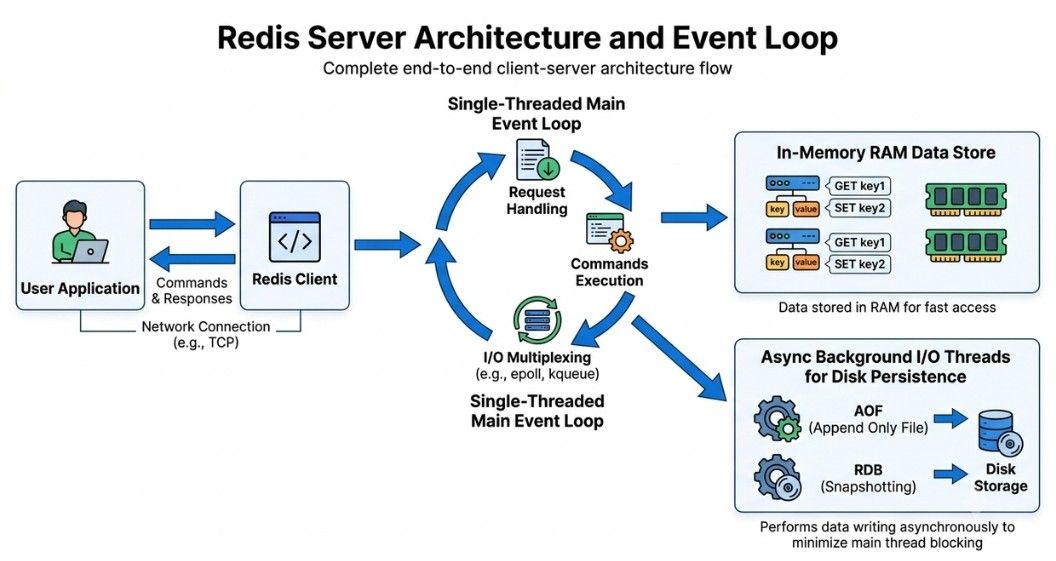
Redis uses a client-server architecture.
A simple Redis setup looks like this:
Application
     ↓
Redis Client
     ↓
Redis Server
     ↓
Data in Memory
     ↓
Response
The application sends a command to the Redis server. Redis processes the command and sends the result back.
For example:
SET user:101 "Rahul"Redis stores the value.
Later, the application can send:
GET user:101Redis returns:
RahulIn a production system, Redis can also use persistence, replication, Sentinel, Cluster, sharding, and monitoring depending on the application's needs.
Redis has traditionally used a single main event loop for processing commands. This design helps Redis handle many operations with low latency.
However, some newer Redis features can use additional threads for specific tasks.
The important lesson for developers is simple:
Avoid commands that do a very large amount of work in one operation.
A slow command can delay other requests, so Redis commands should be chosen carefully when building high-traffic applications.
One of the main strengths of Redis is its built-in data structures.
Redis is not limited to storing simple key-value pairs. It provides different data structures for different types of tasks.
Common Redis data structures include:
Strings
Lists
Sets
Sorted Sets
Hashes
Streams
Bitmaps
Bitfields
HyperLogLog
Geospatial indexes
Let's understand the most commonly used ones.
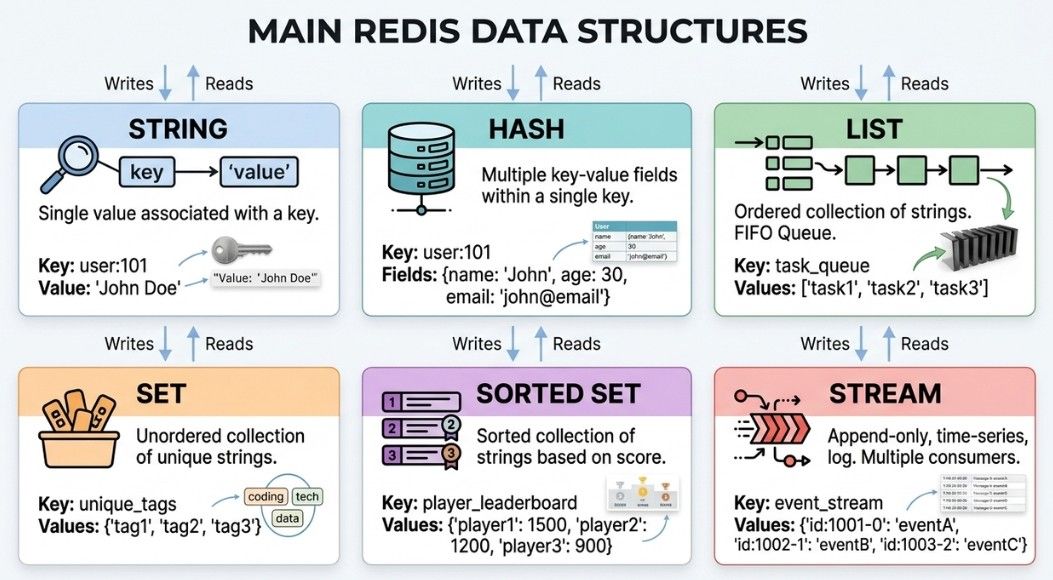
A Redis String stores a simple value.
For example:
SET name "Rahul"
GET name
The result is:
RahulStrings can store text, numbers, serialized data, and binary data.
Redis Strings are commonly used for:
Cache values
Counters
Session IDs
Tokens
Flags
Small pieces of application data
You can use Redis Strings to create a counter:
SET page_views 100
INCR page_views
The value becomes:
101This is useful when you need to quickly increase or decrease a number, such as page views, likes, downloads, or active users.
A Redis Hash stores multiple fields and their values under one key.
For example:
HSET user:101 name "Rahul" age 25 city "Lucknow"You can get one field:
HGET user:101 nameOr get all fields:
HGETALL user:101A hash is useful for storing an object with several related fields.
For example:
user:101
    name = Rahul
    age = 25
    city = Lucknow
This is often cleaner than creating a separate Redis key for every field.
A Redis List is an ordered collection of values.
You can add items to the beginning or end of the list.
For example:
LPUSH tasks "Task 1"
LPUSH tasks "Task 2"
Lists can be useful when you need to process items in order.
Redis Lists are commonly used for:
Simple queues
Task processing
Activity feeds
Recent items
For more advanced messaging and event-processing needs, Redis Streams may be a better choice.
A Redis Set is a collection of unique values. Unlike a list, a set does not keep items in a specific order.
For example:
SADD skills "Java"
SADD skills "Python"
SADD skills "Java"
The second "Java" is not added because it already exists in the set.
Redis Sets are useful for:
Unique visitors
User interests
Tags
Membership checks
Group relationships
A Redis Sorted Set stores unique members along with a score.
For example:
ZADD leaderboard 100 user1
ZADD leaderboard 200 user2
ZADD leaderboard 150 user3
Redis keeps the members ordered by their scores.
Sorted Sets are useful for:
Leaderboards
Rankings
Priority systems
Score-based lists
For example, an online game can use a Sorted Set to keep players ranked by their scores.
Redis Streams are used to store and process ordered messages or events.
They are useful when an application needs to:
Record events
Process messages
Build event-driven systems
Use consumer groups
Track message IDs
For example:
User Places Order
       ↓
Redis Stream
       ↓
Order Processing Service
Redis Streams provide more features for message processing than a basic Redis List.
Redis provides commands for creating, reading, updating, and deleting data.
Some commonly used Redis commands are:
SET
GET
DEL
EXISTS
EXPIRE
TTL
INCR
DECR
HSET
HGET
HGETALL
LPUSH
RPUSH
LPOP
RPOP
SADD
SMEMBERS
ZADD
ZRANGE
You do not need to memorize every Redis command. The more important thing is to understand which Redis data structure and command fit your use case.
For a simple value:
SET user:name "Rahul"
GET user:name
For an object with multiple fields:
HSET user:101 name "Rahul" city "Lucknow"For a ranking:
ZADD scores 500 user101For temporary data:
SET otp:101 "123456" EX 300Here, Redis stores the OTP for 300 seconds and then removes it automatically.
Redis mainly keeps data in memory, so you may wonder:
"What happens if the Redis server restarts?"
Redis provides persistence to save data to disk. This allows data to be recovered after a restart or failure.
The two main Redis persistence methods are:
RDB (Redis Database Backup)
AOF (Append Only File)
You can also use both together, depending on your application.
Persistence is especially important when Redis stores data that should survive a restart.
RDB (Redis Database Backup) saves snapshots of the current Redis data at specific times.
For example:
Save a snapshot every few minutes.
The data is stored in an RDB file.
Advantages of RDB
RDB provides:
Smaller and compact backup files
Fast recovery in many cases
Easy backup and data transfer
Less continuous disk activity
Disadvantage of RDB
If Redis crashes between two snapshots, you may lose the changes made after the latest snapshot.
AOF (Append Only File) records Redis write operations.
For example, if Redis receives:
SET user:101 "Rahul"The write operation can be recorded in the AOF file.
When Redis restarts, it can replay these operations to rebuild the data.
Advantages of AOF
AOF provides:
More frequent data saving
Better protection for recent changes
Different options for controlling when writes are saved to disk
Disadvantage of AOF
AOF files can become larger than RDB files and may require more disk activity.
Both RDB and AOF help Redis save data to disk, but they save data in different ways.
Feature | RDB | AOF |
|---|---|---|
How it saves data | Takes periodic snapshots | Records write operations |
File size | Usually smaller | Usually larger |
Restart recovery | Usually faster | May take longer for large files |
Recent changes | Changes since the last snapshot may be lost | Can protect more recent changes |
Backup | Good for backups | Also useful for recovery |
Disk usage | Usually lower | Usually higher |
Best suited for | Backups and faster recovery | Better protection of recent writes |
Memory is one of the most important resources in Redis because Redis keeps active data in RAM.
So, when running Redis in production, you need to keep track of:
How much RAM the server has
How much memory Redis is using
How much memory is still available
Imagine a Redis server has:
16 GB RAM
You should not use all 16 GB for Redis data. The operating system and other applications also need memory.
Redis allows you to set a maximum memory limit using:
maxmemoryWhen Redis reaches this limit, it follows the configured eviction policy to decide what data should be removed.
An eviction policy tells Redis what to remove when it reaches its memory limit.
Common policies include:
noeviction — Does not remove keys. New write operations may fail.
allkeys-lru — Removes less recently used keys. Useful for caching.
volatile-lru — Removes less recently used keys that have an expiration time.
allkeys-lfu — Removes less frequently used keys.
volatile-ttl — Removes keys with expiration times based on their remaining TTL.
Redis allows you to set an expiration time for a key. This is called TTL (Time To Live).
For example:
SET session:101 "active" EX 3600The key will expire after 3,600 seconds.
You can check the remaining time using:
TTL session:101Redis returns the remaining time in seconds.
TTL is useful for temporary data such as:
Login sessions
OTPs
Cache entries
Verification codes
Temporary locks
Short-lived results
Example
For a temporary OTP, you can use:
SET otp:user101 "123456" EX 300The OTP will expire after 5 minutes. This saves the application from having to delete expired OTPs manually.
Redis replication means keeping copies of the same Redis data on other Redis servers.
A common setup looks like:
Primary Redis
      ↓
Replica Redis
The primary usually handles write operations, while the replica keeps a copy of the primary's data.
Replication can help with:
High availability
Handling more read requests
Keeping backup copies
Disaster recovery
For example, if an application has many read requests, some reads can be handled by replicas.
Redis replication is generally asynchronous, so a replica may not receive every update immediately. The short delay between the primary and replica is called replication lag.
Redis Sentinel helps monitor and manage a Redis setup with a primary and one or more replicas.
A common setup looks like:
        Primary
        /     \
       ↓       ↓
 Replica 1  Replica 2
If the primary fails, Sentinel can detect the failure and help promote a replica to become the new primary.
Sentinel can provide:
Monitoring
Failure detection
Automatic failover
Configuration information
Notifications about Redis changes
Sentinel is useful when you need high availability but do not need to split your data across multiple Redis servers.
Redis Cluster allows Redis data to be distributed across multiple Redis nodes.
Instead of storing the complete dataset on one server, different parts of the data are stored on different nodes.
For example:
Redis Cluster
     ↓
Node 1 → Part of the data
Node 2 → Part of the data
Node 3 → Part of the data
Redis Cluster can also use replicas to improve availability.
Redis Cluster is useful when:
One server does not have enough memory.
One server cannot handle the workload.
You need to distribute data across multiple servers.
You need higher capacity and availability.
Redis Cluster is more complex to set up and manage than a single Redis server or a Sentinel-based setup.
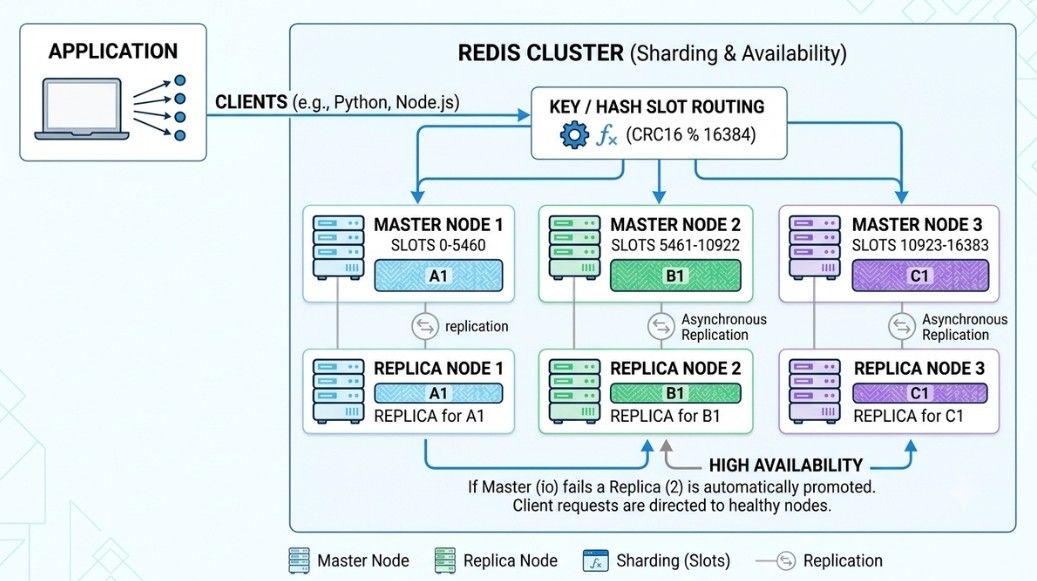
Sharding means dividing Redis data across multiple servers.
For example, if you have one million users, you can distribute the data across several Redis servers:
Server 1 → Users 1–300,000
Server 2 → Users 300,001–600,000
Server 3 → Users 600,001–1,000,000
Redis Cluster uses hash slots to decide which node should store each key.
Sharding can help with:
More available memory
Higher throughput
Larger datasets
Horizontal scaling
The main drawback is added complexity. Operations that need data from multiple shards can be harder to design and manage.
High availability means keeping Redis available even when a server or other component fails.
With only one Redis server, a server failure can make the application unavailable.
A high-availability setup can use:
Replicas
Sentinel
Redis Cluster
Monitoring
Automatic failover
Backups
For example:
       Primary Redis
            ↓
       Replica Redis
            ↑
         Sentinel
If the primary fails, Sentinel can detect the failure and help promote the replica.
For larger applications, Redis Cluster can distribute data across multiple nodes and use replicas for better availability.
Redis can fail in production because of:
Hardware or network problems
High memory usage
Software issues
Configuration mistakes
Cloud infrastructure failures
Your application should know what to do when Redis is unavailable.
Example
If Redis is being used only for caching, the application can fall back to the main database:
Try Redis → Redis unavailable → Read from Database → Continue
This prevents Redis from becoming a single point of failure.
Retries can help when a failure is temporary. But too many retries can make the problem worse.
For example, if 10,000 requests retry at the same time, Redis may receive even more traffic.
Use:
Limited retries
Timeouts
Backoff
Circuit breakers
Fallbacks
The right approach depends on how Redis is used in your application.
Redis is used in many types of applications.
Caching: Stores frequently used data so the application does not need to query the database every time.
User Sessions: Stores temporary login session data. TTL can automatically remove old sessions.
Rate Limiting: Redis counters can help limit API requests, such as 100 requests per minute per user.
Leaderboards: Redis sorted sets can store scores and keep player rankings ordered.
Queues: Redis Lists and Streams can help with task and message processing.
Counters: Useful for fast counters such as page views, likes, downloads, and API requests.
Distributed Locks: Can help prevent multiple servers from processing the same task at the same time.
Redis is fast, but the way you use it can still affect performance.
Important areas to watch include:
Avoid very large values: Huge JSON documents or large objects can make updates and data transfers expensive.
Avoid expensive commands: Commands that process a large amount of data can slow down Redis. For large keyspaces, SCAN is generally safer than commands that inspect everything at once.
Monitor memory: Keep an eye on memory usage, fragmentation, evictions, expired keys, and cache hit/miss rates.
Use connection pooling: Reusing Redis connections is usually more efficient than creating a new connection for every request.
Choose the right data structure: Use strings for simple values, hashes for objects, sets for unique values, and sorted sets for rankings.
Redis is easy to start with, but a few common mistakes can cause problems in production.
Treating Redis as unlimited storage: Redis uses RAM, so memory is limited. Monitor usage and plan enough capacity.
Storing everything in Redis: Permanent data does not always belong in Redis. Use it where caching, temporary data, or Redis data structures are useful.
Forgetting TTL: Temporary data such as sessions, OTPs, and cache entries can fill memory if they never expire.
Choosing the wrong eviction policy: A policy that works for caching may remove data you wanted to keep. Choose it based on your workload.
Skipping monitoring: Watch memory, latency, connections, evictions, and replication health.
Ignoring persistence: If Redis stores important data, decide how much data loss you can accept and choose RDB, AOF, both, or another design accordingly.
Using one Redis server for everything: A single server can become a single point of failure. For important workloads, consider replication, Sentinel, or Redis Cluster.
Using expensive operations on large data: Large operations can slow down other requests. Choose commands carefully for large collections.
Ignoring replication lag: Replicas can temporarily be behind the primary. Keep this in mind when your application needs the latest data.
Adding Redis without a clear reason: Redis adds another system to manage. Before using it, ask: "What problem am I solving with Redis?"
Imagine you are building a large online shopping application. Redis can support different parts of the system.
Product Cache: Frequently requested product data can be stored in Redis to reduce repeated database queries.
Product ID → Product DataUser Sessions: Temporary login information can be stored with a TTL.
Session ID → User IDRate Limiting: Redis can count API requests and help enforce request limits.
user:101:requests → 50Shopping Data: Some temporary shopping information can be stored in Redis, depending on the application design.
Leaderboards: Sorted sets can keep reward points or user rankings in order.
Background Jobs: Redis Streams or other suitable queue systems can help process background tasks.
High Availability: Replication and failover can help keep Redis available when a server fails.
Scaling: If one server cannot handle the data or traffic, Redis Cluster can distribute data across multiple nodes.
At this point, Redis is no longer just a place to run commands. You are using it as one part of a larger application architecture.
Redis is more than just a cache. It is an in-memory data store that can handle caching, sessions, counters, queues, rankings, temporary data, and many other workloads.
Here is what each topic means:
What Is Redis? Redis is an in-memory data store used for fast data access, caching, sessions, counters, and more.
Redis Architecture: Explains how an application connects to Redis and how Redis handles requests and data.
Redis Data Structures: Includes strings, hashes, lists, sets, sorted sets, Streams, and other structures.
Redis Commands and Operations: Commands used to store, read, update, delete, and expire data.
Redis Persistence: Saves Redis data to disk so it can be recovered after a restart.
RDB vs AOF: Compares Redis snapshots with append-only logging.
Redis Memory Management: Covers how Redis uses and controls memory.
Redis Eviction Policies: Decide which keys Redis can remove when memory is full.
Redis Expiration and TTL: Automatically removes keys after a set amount of time.
Redis Replication: Keeps copies of Redis data on other servers.
Redis Sentinel: Monitors Redis and helps with automatic failover.
Redis Cluster: Distributes data across multiple Redis nodes.
Redis Sharding: Splits data across servers to increase capacity and handle more traffic.
Redis High Availability: Uses replicas, failover, monitoring, and clustering to reduce downtime.
Redis Failure Handling: Helps applications deal with Redis failures, network problems, and temporary outages.
Common Redis Use Cases: Includes caching, sessions, rate limiting, queues, counters, leaderboards, and temporary data.
Redis Performance: Covers memory usage, expensive commands, large values, connections, and choosing the right data structure.
Common Redis Mistakes: Includes using too much memory, forgetting TTL, choosing the wrong eviction policy, ignoring persistence, and treating Redis as unlimited storage.
Together, these topics help you understand how Redis works, where to use it, and how to use it safely in production.
