
Durgesh Tiwari
Author
Modern software applications need to be developed, tested, and released quickly and reliably. When these activities are performed manually, deployments can become slow, error-prone, and difficult to manage.
CI/CD helps teams automate software integration, testing, and delivery. Deployment strategies provide different ways to release new application versions while reducing downtime and deployment risk.
Together, CI/CD and deployment strategies help teams deliver software faster, more consistently, and more safely.
CI/CD stands for Continuous Integration and Continuous Delivery/Continuous Deployment.
It is a set of practices and automation processes used to build, test, and deliver software frequently.
Continuous Integration (CI) focuses on frequently integrating code changes and automatically building and testing them.
Continuous Delivery (CD) keeps software ready for release through an automated delivery process.
Continuous Deployment automatically releases successfully tested changes to production.
In simple words, CI/CD automates the journey of code from development to testing and deployment.
Example
A developer changes the login functionality and pushes the code to a Git repository.
The CI/CD pipeline can automatically run:
Developer
    ↓
Git Repository
    ↓
Build
    ↓
Automated Tests
    ↓
Quality Checks
    ↓
Artifact
    ↓
Deployment
    ↓
Production Verification
This reduces manual work and makes the release process more consistent.
Without CI/CD, teams may need to manually build, test, and deploy applications. This can lead to:
Slow releases.
Manual errors.
Delayed feedback.
Inconsistent environments.
Higher deployment risk.
CI/CD helps teams:
Release software faster.
Detect problems earlier.
Automate repetitive tasks.
Improve software quality.
Reduce deployment errors.
Create consistent release processes.
Support frequent application updates.
Feature | Traditional Software Delivery | CI/CD |
|---|---|---|
Build | Manual Build | Automated Build |
Testing | Manual Testing | Automated Testing |
Deployment | Manual Deployment | Automated Deployment |
Feedback | Slower | Faster |
Process | Harder to repeat consistently | More predictable and consistent |
Release Flow | Development → Build → Test → Deploy → Production | Code Push → Build → Test → Artifact → Deploy → Verify |
Modern applications are updated frequently with new features, bug fixes, and security updates.
CI/CD helps teams automate repetitive tasks such as:
Building applications.
Running tests.
Creating artifacts.
Deploying applications.
Verifying releases.
CI/CD is commonly used with cloud platforms, containers, microservices, and DevOps practices.
A CI/CD Pipeline is an automated sequence of steps used to build, test, package, and deploy an application.
In simple words, a CI/CD Pipeline is an automated workflow that moves code from a repository toward production.
A typical CI/CD pipeline looks like:
Source Code
     ↓
Build
     ↓
Test
     ↓
Artifact Creation
     ↓
Deployment
     ↓
Production Verification
The pipeline automatically moves the application through these stages and helps teams release software faster and more consistently.
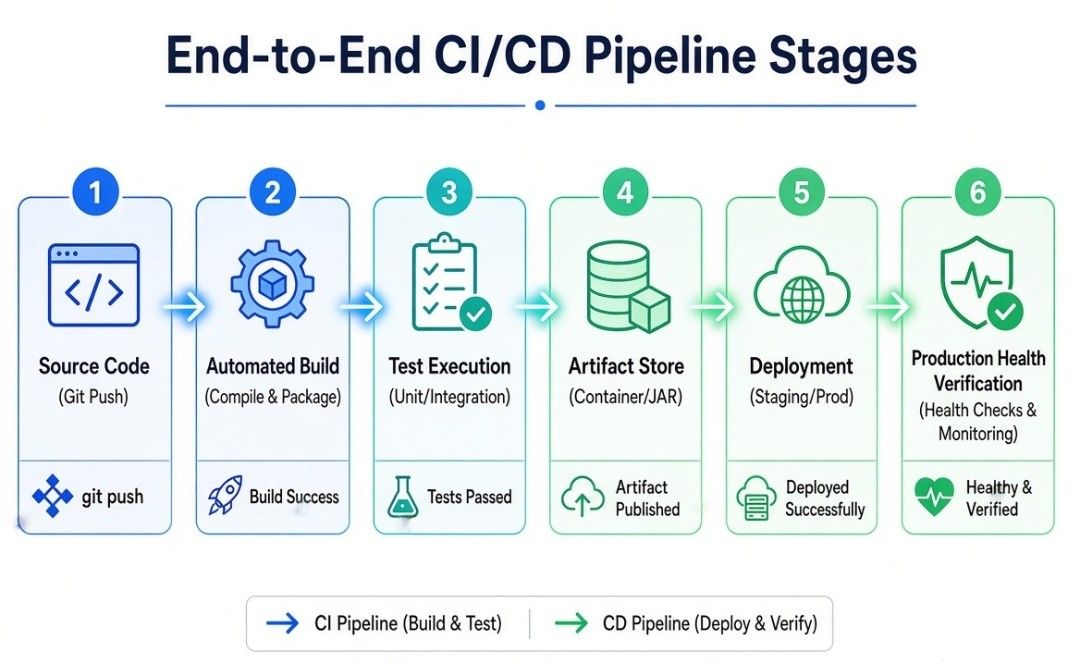
The process starts when developers push code to a version control system such as Git.
Developer
    ↓
Git Repository
The pipeline can be triggered automatically when new code is pushed or when a pull request is created.
The Build stage converts source code into a runnable application or package.
This stage may include:
Compiling source code.
Installing dependencies.
Building application packages.
Creating container images.
Example
A Java application may be compiled into a JAR file.
A Node.js application may have its dependencies installed and application assets built.
The main goal of this stage is to create a usable application package that can be tested and deployed.
The Test stage checks whether the application works correctly and helps find problems early.
Common types of tests include:
Unit tests.
Integration tests.
Functional tests.
End-to-end tests.
Automated testing helps detect bugs before the application reaches production.
If important tests fail, the pipeline can stop before moving to the next stage.
An Artifact is a packaged output produced by the build process.
Examples include:
JAR files.
ZIP packages.
Compiled binaries.
Container images.
Artifacts can be stored in an artifact repository or container registry and used later during deployment.
Using a build artifact also helps ensure that the same tested output is used for deployment.
The Deployment stage releases the application to an environment.
Common environments include:
Development
     ↓
Testing
     ↓
Staging
     ↓
Production
Deployment can be automated or may require manual approval, depending on the organization's release process.
For example, teams may automatically deploy changes to a testing environment but require approval before deploying to production.
After deployment, the application should be checked to make sure it is working correctly.
Verification may include:
Health checks.
Smoke tests.
Application monitoring.
Error-rate checks.
Availability checks.
If serious problems are detected, the deployment can be stopped or rolled back.
This helps reduce the impact of failed releases.
CI/CD pipelines automate repetitive software delivery tasks.
For example:
Code Push
   ↓
Automatic Build
   ↓
Automated Tests
   ↓
Create Artifact
   ↓
Deploy
   ↓
Health Check
Automation reduces manual work, provides faster feedback, and creates a repeatable software delivery process.
In simple words, a CI/CD pipeline takes code, builds and tests it, creates a deployable artifact, and helps move it safely toward production.
Continuous Integration (CI) is the practice of frequently integrating code changes into a shared repository and automatically building and testing those changes.
Instead of keeping code changes separate for a long time and integrating them at the end, developers integrate their changes regularly.
In simple words, CI means frequently combining code changes and automatically checking whether they work.
A typical CI process is:
Developer Changes Code
        ↓
Push to Git
        ↓
CI Pipeline Starts
        ↓
Build
        ↓
Automated Tests
        ↓
Code Quality Checks
        ↓
Feedback
If a test or quality check fails, developers receive feedback and can fix the problem before the changes move further through the delivery process.
CI systems automatically build the application when configured code changes occur.
The build process may:
Compile code.
Install dependencies.
Generate application packages.
Build container images.
Automated builds help ensure that the application can be built consistently from the source code.
Automated tests run without requiring developers to manually execute every test.
Common tests include:
Unit tests.
Integration tests.
API tests.
End-to-end tests.
Automated testing helps detect defects early and provides faster feedback to developers.
CI pipelines can also perform code quality checks.
These may include:
Static code analysis.
Formatting checks.
Linting.
Security scanning.
Code coverage checks.
These checks help maintain consistent, reliable, and maintainable code.
CI provides several benefits:
Early bug detection.
Faster developer feedback.
Smaller and easier-to-review changes.
Automated testing.
More reliable builds.
Fewer integration problems.
Better software quality.
Continuous Delivery is the practice of automatically building, testing, and preparing software so that it is always ready to be released.
The production release may still require manual approval.
Code
 ↓
Build
 ↓
Test
 ↓
Artifact
 ↓
Ready for Production
 ↓
Manual Approval
 ↓
Production
In simple words, Continuous Delivery keeps software ready for release, but production deployment may require approval.
Continuous Deployment goes one step further.
When the code passes all required automated checks, it is automatically deployed to production without manual production approval.
Code
 ↓
Build
 ↓
Test
 ↓
Artifact
 ↓
Automatic Deployment
 ↓
Production
In simple words, Continuous Deployment automatically releases successful changes to production.
Feature | Continuous Delivery | Continuous Deployment |
|---|---|---|
Release process | Software is always ready for release | Successful changes are automatically released |
Production approval | May require manual approval | No manual production approval is required |
Automation level | High, but production release may be manual | Fully automated through production deployment |
Release control | More human control | Faster and more automated releases |
Best suited for | Environments that require release approval | Teams with strong automated testing and monitoring |
A CI/CD release process can include:
Build
 ↓
Test
 ↓
Security Checks
 ↓
Artifact
 ↓
Deploy
 ↓
Verify
Automating these steps reduces manual work and makes software releases more consistent and repeatable.
Organizations may require approval before deploying an application to production.
Approval can be useful when:
Production changes require review.
Regulations require controlled releases.
Business teams need to approve releases.
High-risk applications require additional verification.
For example:
Automated Tests
      ↓
Staging
      ↓
Approval
      ↓
ProductionGitOps is an approach to managing application and infrastructure deployment using Git as the central source of truth.
The desired state of applications and infrastructure is stored in Git, and automated systems work continuously to make the actual environment match that desired state.
In simple words, GitOps uses Git to define how applications and infrastructure should be configured and managed.
In GitOps, configuration files that describe the desired system are stored in a Git repository.
For example:
Git Repository
     ↓
Desired Configuration
     ↓
GitOps Tool
     ↓
Kubernetes / Infrastructure
Changes are made through Git commits and pull requests.
This provides a clear history of what was changed, who made the change, and when it was made.
A typical GitOps workflow is:
Developer
    ↓
Change Configuration
    ↓
Git Commit / Pull Request
    ↓
Review
    ↓
Merge
    ↓
GitOps Tool Detects Change
    ↓
Environment Updated
After the change is merged, the GitOps tool detects the updated configuration and works to apply it to the target environment.
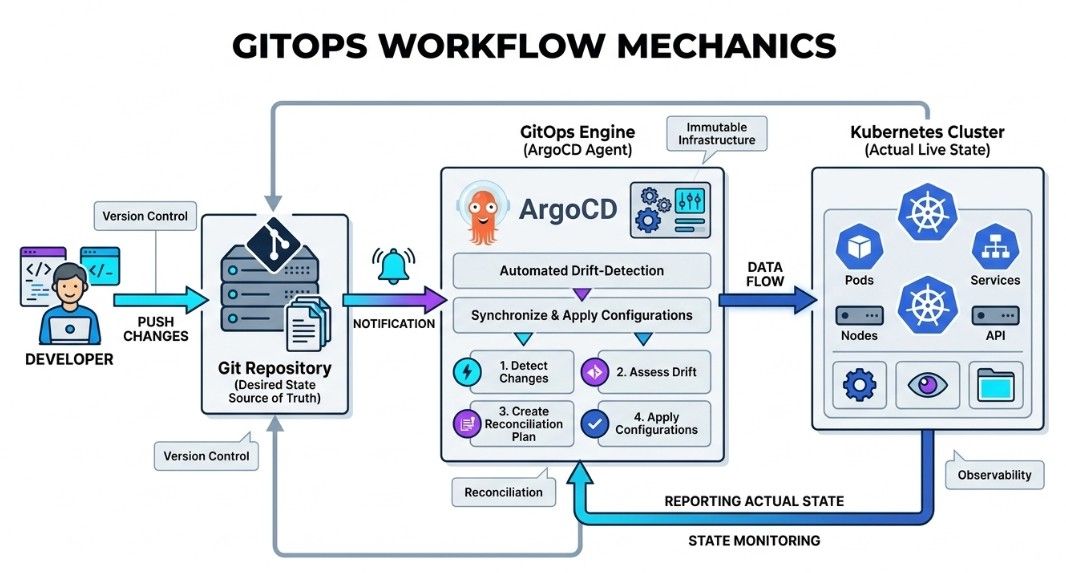
GitOps commonly uses a declarative approach.
Instead of defining every step required to create an environment, you define the desired final state.
For example:
Desired:
3 application replicas
The system determines what actions are needed to make the actual environment match the desired state.
This makes configuration easier to manage and reproduce.
GitOps provides several benefits:
Version-controlled infrastructure.
Auditable changes.
Easier rollbacks.
Automated deployments.
Better collaboration.
Clear change history.
More consistent environments.
Feature | Traditional Deployment | GitOps |
|---|---|---|
Configuration source | May use multiple sources | Git repository |
Deployment process | Manual or CI-based | GitOps tool applies Git state |
Change tracking | Depends on the deployment system | Git history |
Rollbacks | May require manual steps | Can use previous Git versions |
Desired state | May not be centrally defined | Stored in Git |
Feature Flags are configuration controls that allow teams to enable or disable application features without necessarily deploying a new application version.
In simple words, a Feature Flag works like an on/off switch for an application feature.
For example:
New Payment Feature
       ↓
Feature Flag
       ↓
ON / OFFAn application contains a feature that is controlled by a flag.
Feature Flag = ON
       ↓
Show New Feature

Feature Flag = OFF
       ↓
Show Existing Feature
The feature can be enabled for specific users, groups, or environments.
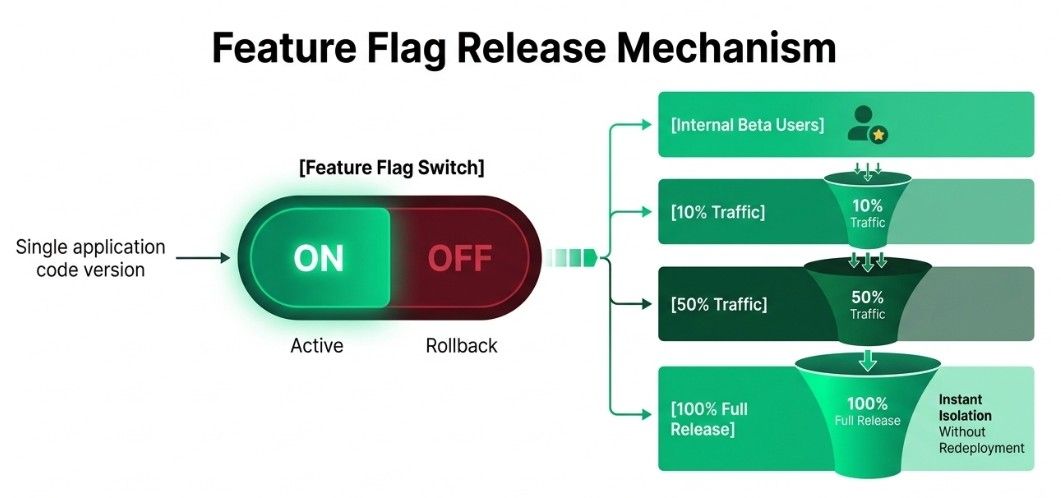
Feature flags allow teams to deploy application code without immediately making a new feature available to everyone.
For example:
Application Version → Deployed
New Feature → OFF
After testing:
New Feature → ONThis separates code deployment from feature release.
Teams can gradually enable a feature for more users.
Internal Users
      ↓
5%
      ↓
10%
      ↓
25%
      ↓
50%
      ↓
100%
Teams can monitor the feature at each stage and stop or reduce the rollout if problems occur.
Feature | Feature Flags | Deployment Strategies |
|---|---|---|
Main purpose | Control feature availability | Control how application versions are released |
Controls | Application functionality | Application deployment |
User targeting | Can target selected users | Usually controls traffic or application versions |
Example | Enable a new payment feature | Rolling, Blue-Green, or Canary deployment |
Feature Flags and Deployment Strategies can also be used together.
For example, a team can use a Canary Deployment to release a new application version gradually and use a Feature Flag to enable a specific feature only for selected users.
Feature flags should be managed carefully.
Teams should:
Use clear flag names.
Document the purpose of each flag.
Monitor flag usage.
Remove outdated flags.
Restrict access to sensitive flags.
Too many old or unused feature flags can make application logic harder to understand and maintain.
Infrastructure as Code (IaC) is the practice of defining and managing infrastructure using configuration files or code instead of creating and configuring resources manually.
Infrastructure can include:
Servers.
Networks.
Databases.
Storage.
Kubernetes resources.
Cloud services.
In simple words, IaC allows infrastructure to be created and managed using code.
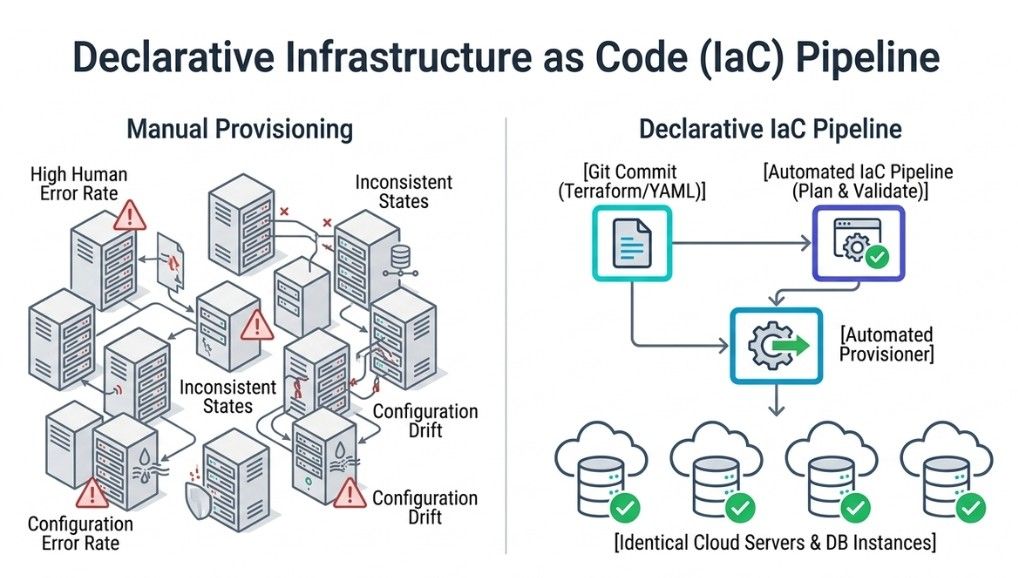
Managing infrastructure manually can lead to:
Configuration differences.
Human errors.
Difficult recovery.
Slow provisioning.
Poor documentation.
IaC helps provide:
Repeatable infrastructure.
Faster provisioning.
Version control.
Automation.
Consistent configurations.
In a declarative approach, you define what the final state should be.
For example:
Desired:
3 Servers
The IaC system determines the actions required to reach that desired state.
In an imperative approach, you define the steps required to create and configure the infrastructure.
For example:
1. Create server
2. Configure server
3. Install software
Declarative approaches are commonly used in modern infrastructure management because they focus on the desired state.
Feature | Declarative | Imperative |
|---|---|---|
Approach | Defines what the final infrastructure state should be | Defines how the infrastructure should be created |
Focus | Desired state | Steps or actions |
Example | “I want 3 servers.” | “Create a server, configure it, then install software.” |
Management | System determines required changes | User defines the required steps |
Common use | Modern IaC and configuration management | Scripts and step-by-step automation |
IaC files can be stored in Git along with other source code.
This provides:
Change history.
Code review.
Collaboration.
Rollbacks.
Auditing.
A typical workflow can look like:
Developer
    ↓
IaC Change
    ↓
Git
    ↓
Review
    ↓
Pipeline
    ↓
Infrastructure
This makes infrastructure changes easier to track and review.
CI/CD pipelines can automatically validate and apply infrastructure changes.
For example:
IaC Code
   ↓
Validation
   ↓
Plan
   ↓
Approval
   ↓
Apply
   ↓
Infrastructure Updated
Automation reduces manual infrastructure work and makes provisioning more repeatable.
IaC can be integrated directly into CI/CD pipelines.
A pipeline may:
Validate infrastructure code.
Run security checks.
Generate an infrastructure plan.
Request approval when required.
Apply the approved changes.
This allows infrastructure changes to follow a controlled and repeatable workflow.
CI/CD pipelines can access source code, cloud resources, production systems, and sensitive credentials.
Therefore, pipeline security is important to protect the software delivery process.
Common security practices include:
Strong authentication.
Access control.
Secrets management.
Dependency scanning.
Artifact verification.
Secure pipeline configuration.
CI/CD pipelines may require sensitive information such as:
API keys.
Cloud credentials.
Database passwords.
Tokens.
Certificates.
These values should not be hard-coded in source code or pipeline configuration.
Instead, teams should use secure secret-management systems provided by the CI/CD platform or dedicated secret-management solutions.
Only authorized users and systems should be allowed to:
Modify pipelines.
Access production systems.
Read secrets.
Approve deployments.
Change infrastructure.
The principle of least privilege should be followed, giving users and systems only the permissions they need.
Applications often depend on external libraries and packages.
CI/CD pipelines should scan dependencies for known security vulnerabilities before they are used in releases.
Build artifacts should also be protected from unauthorized modification.
Common security checks include:
Dependency scanning.
Container image scanning.
Artifact verification.
Software composition analysis.
Common CI/CD security risks include:
Stolen credentials.
Malicious dependencies.
Compromised build systems.
Unauthorized pipeline changes.
Exposed secrets.
Malicious code injection.
Compromised artifacts.
Because CI/CD pipelines can control application releases and production systems, they should be treated as critical infrastructure.
Software Supply Chain Security protects the complete process through which software is developed, built, and delivered.
Source Code
    ↓
Dependencies
    ↓
Build
    ↓
Artifact
    ↓
Deployment
    ↓
Production
Security should be considered at every stage to reduce the risk of compromised code, dependencies, builds, and artifacts reaching production.
CI/CD pipelines should be monitored to find problems in the software delivery process.
Monitoring helps teams detect:
Failed builds.
Failed tests.
Slow pipelines.
Deployment failures.
Infrastructure problems.
Release issues.
This helps teams quickly find problems and fix them before they affect the application.
A build can fail for several reasons, such as:
Compilation errors.
Missing dependencies.
Incorrect configuration.
Dependency conflicts.
Infrastructure problems.
Pipeline logs should provide useful information so developers can understand the error and fix the problem.
A deployment can fail because of:
Configuration errors.
Infrastructure problems.
Application bugs.
Resource limitations.
Networking issues.
Failed health checks.
A deployment is not successful just because the deployment command finishes without an error. The application should also be checked after deployment.
After deployment, teams should verify that the application is working correctly.
Common checks include:
Application availability.
Error rate.
Response time.
Health endpoints.
Smoke tests.
Resource usage.
A simple release verification process is:
Deploy
  ↓
Health Check
  ↓
Healthy → Continue
Unhealthy → Stop / Rollback
If the application is unhealthy, the release can be stopped or rolled back.
If a new release causes serious problems, the deployment system can automatically roll back to a previous working version.
For example:
v1 → v2
     ↓
Health Check Failed
     ↓
Rollback
     ↓
v1
Automated rollbacks help reduce the time needed to recover from deployment failures.
CI/CD metrics help teams measure the speed, reliability, and performance of the software delivery process.
Important metrics include:
Deployment Frequency — How often the team deploys changes.
Lead Time for Changes — How long it takes for a change to move from development to deployment.
Change Failure Rate — The percentage of deployments that cause failures or require recovery.
Time to Restore Service — How long it takes to recover from a failed change.
Build Duration — How long the build process takes.
Test Failure Rate — How often automated tests fail.
Deployment Success Rate — The percentage of deployments completed successfully.
These metrics help teams find bottlenecks and improve the reliability and efficiency of CI/CD pipelines.
GitHub Actions is a CI/CD automation platform integrated with GitHub.
It can automate tasks such as:
Building applications.
Running tests.
Deploying applications.
Performing code quality checks.
Managing infrastructure workflows.
Workflows are commonly defined using YAML files.
GitLab CI/CD is the CI/CD system provided by GitLab.
It supports:
Automated builds.
Automated testing.
Application deployment.
Security scanning.
Pipeline automation.
Pipeline configuration is commonly defined in a GitLab CI configuration file.
Jenkins is an open-source automation server widely used for CI/CD.
It can automate:
Builds.
Testing.
Deployment.
Custom workflows.
Jenkins also supports a large ecosystem of plugins, which can extend its capabilities and integrate it with different tools.
CircleCI is a cloud-based CI/CD platform used to automate application builds, testing, and deployment.
It supports:
Automated pipelines.
Parallel jobs.
Automated testing.
Container-based workflows.
Deployment automation.
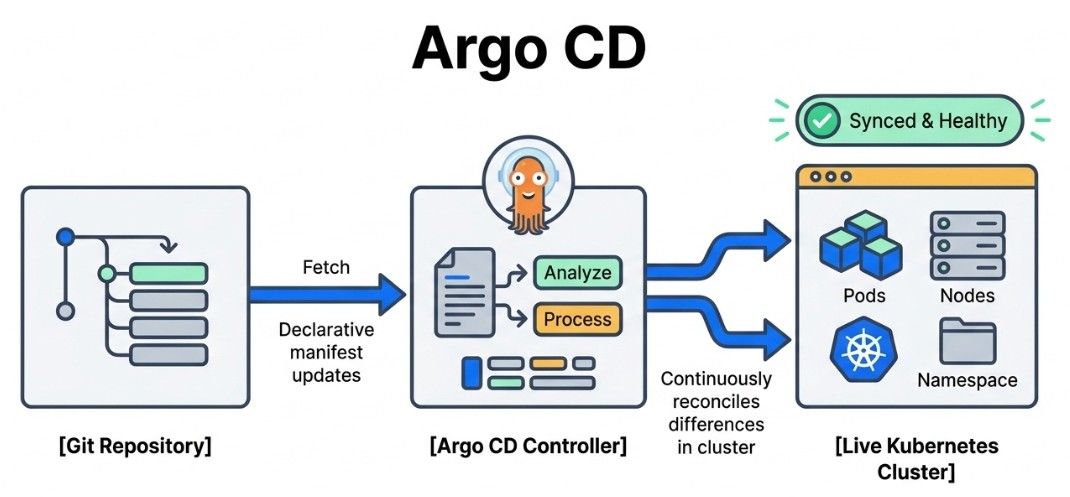
Argo CD is a GitOps continuous delivery tool designed primarily for Kubernetes.
It monitors application configuration stored in Git and synchronizes the desired state with the Kubernetes cluster.
Git Repository
      ↓
   Argo CD
      ↓
Kubernetes Cluster
      ↓
 Application
In simple words, Argo CD keeps Kubernetes applications synchronized with the configuration stored in Git.
Important: Argo CD mainly focuses on continuous delivery and GitOps, especially for Kubernetes. It is not a complete CI system by itself.
CI/CD automates software integration, testing, delivery, and deployment.
Continuous Integration (CI) focuses on frequently integrating code changes and automatically building and testing them.
Continuous Delivery keeps software ready for production release, often with a manual approval step.
Continuous Deployment automatically releases successfully tested changes to production.
A CI/CD Pipeline moves code through stages such as source, build, test, artifact creation, deployment, and verification.
GitOps uses Git as the source of truth for application and infrastructure configuration.
Deployment Strategies define how new application versions are released.
Rolling, Blue-Green, and Canary Deployments provide different ways to control deployment risk.
Feature Flags allow teams to control feature availability separately from application deployment.
Infrastructure as Code (IaC) manages infrastructure using version-controlled code and automation.
CI/CD Security protects source code, pipelines, credentials, dependencies, artifacts, and the software supply chain.
Monitoring and Reliability help teams detect build and deployment problems and recover quickly.
Popular CI/CD tools include GitHub Actions, GitLab CI/CD, Jenkins, CircleCI, and Argo CD.
