
Durgesh Tiwari
Author
Nginx is widely used in modern web and backend systems to handle HTTP traffic efficiently.
It can:
Serve static files.
Work as a reverse proxy.
Distribute traffic across backend servers.
Handle SSL/TLS termination.
Cache HTTP responses.
Apply rate limiting.
Route requests to different services.
For example, instead of users connecting directly to application servers, Nginx can act as the entry point:
Users
  ↓
Nginx
  ↓
Application Servers
Nginx receives incoming requests and either handles them directly or forwards them to the appropriate backend server.
In simple words, Nginx sits in front of web applications and helps manage incoming traffic efficiently.
Nginx is a web server, reverse proxy, and load balancer commonly used in production web applications.
When a request reaches Nginx, it can either serve the requested content itself or forward the request to another server.
For static content:
Browser
   ↓
Nginx
   ↓
Static File
For application requests:
Browser
   ↓
Nginx
   ↓
Backend Application
   ↓
Nginx
   ↓
Browser
This allows Nginx to act as a central entry point between users and backend applications.
Nginx is commonly used for:
Web serving.
Reverse proxying.
Load balancing.
SSL/TLS termination.
Static file serving.
HTTP caching.
Rate limiting.
Traffic routing.
Application servers such as Node.js can receive HTTP requests directly, which may be enough during development.
Browser
   ↓
Application Server
In production, an application may need to handle HTTPS, multiple backend servers, static files, caching, traffic routing, and large numbers of connections.
Nginx can handle these responsibilities before requests reach the application.
              ┌→ App Server 1
              │
Users → Nginx ├→ App Server 2
              │
              └→ App Server 3
This allows backend servers to focus mainly on application logic.
In simple words, Nginx provides a traffic-management layer between users and backend applications.
Nginx uses an event-driven architecture designed to handle many network connections efficiently.
A simplified architecture looks like:
             Master Process
                   ↓
       ┌───────────┼───────────┐
       ↓           ↓           ↓
    Worker 1    Worker 2    Worker 3
       ↓           ↓           ↓
          Client Connections
The main components are:
Master Process — Manages configuration, worker processes, and other Nginx operations.
Worker Processes — Handle client connections and requests.
Event Loop — Allows workers to manage multiple connections efficiently.
Unlike architectures that use a separate process or thread for every connection, Nginx workers can handle many connections using an event-driven approach.
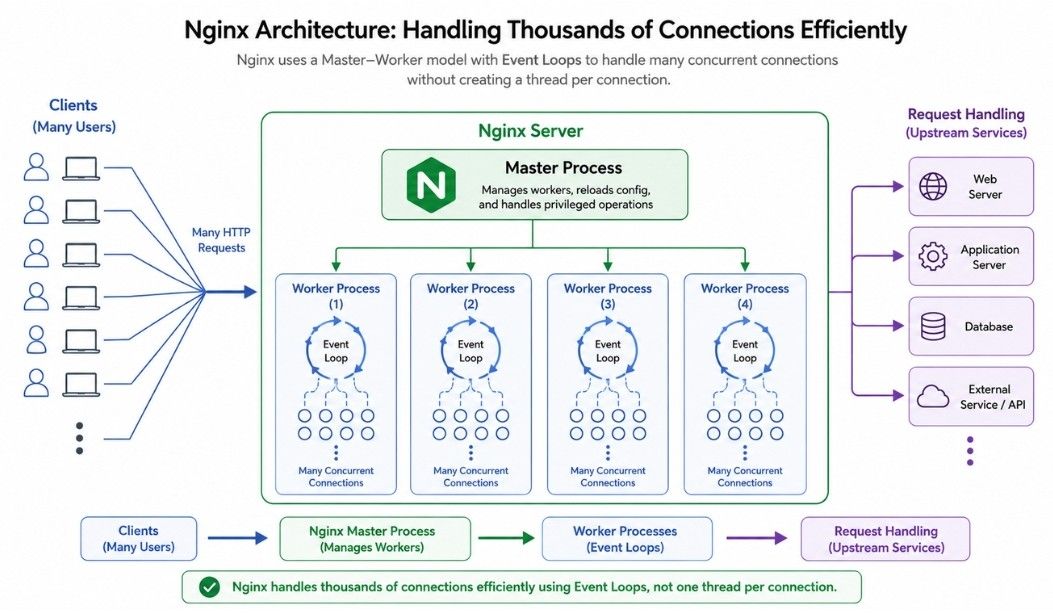
Nginx uses an event-driven architecture to handle many network connections efficiently.
Instead of creating a separate thread for every connection, a worker process can manage many connections through an event loop.
Worker Process
      ↓
Event Loop
      ↓
Multiple Connections
The event loop monitors connections and processes them when they are ready for work.
Suppose a worker is managing three client connections:
Client A → Waiting
Client B → Data Ready
Client C → Waiting
Instead of actively waiting for every client, the worker can process Client B when its data is ready while continuing to monitor the others.
This approach allows a worker to handle many concurrent connections without requiring a separate thread for each one.
Nginx uses worker processes to handle client connections and requests.
A simplified structure looks like:
Master Process
      ↓
 ┌────┼────┬────┐
 ↓    ↓    ↓    ↓
W1   W2   W3   W4
Each worker can handle many connections using Nginx's event-driven architecture.
The master process manages Nginx rather than handling normal client requests.
Its main responsibilities include:
Reading and validating configuration.
Starting worker processes.
Reloading configuration.
Managing worker processes.
Client requests are normally handled by the worker processes.
Multiple workers allow Nginx to make effective use of multiple CPU cores.
A simplified example is:
CPU Core 1 → Worker 1
CPU Core 2 → Worker 2
CPU Core 3 → Worker 3
CPU Core 4 → Worker 4
The operating system handles the actual scheduling, so a worker is not necessarily permanently assigned to one CPU core.
Nginx can also be configured to automatically choose the number of worker processes based on available CPU resources.
A reverse proxy receives client requests and forwards them to one or more backend servers.
This is one of the most common uses of Nginx.
User
 ↓
Nginx
 ↓
Backend Server
The user communicates with Nginx, while Nginx communicates with the backend application. This means the backend does not need to be directly exposed to users.
Suppose a backend application runs internally on:
localhost:3000Nginx can receive requests for the public website and forward them to the backend:
example.com
    ↓
Nginx
    ↓
localhost:3000
The user interacts with the public domain, while Nginx handles communication with the backend server.
A reverse proxy can provide:
Load balancing — Distribute requests across multiple backend servers.
SSL/TLS termination — Handle HTTPS connections before forwarding requests.
Caching — Cache responses to reduce backend work.
Request routing — Send requests to different services based on routing rules.
Security controls — Apply access and traffic rules before requests reach the backend.
Backend isolation — Keep internal backend addresses hidden from clients.
In simple words, Nginx acts as an intermediary between users and backend servers, receiving requests and forwarding them to the appropriate application.
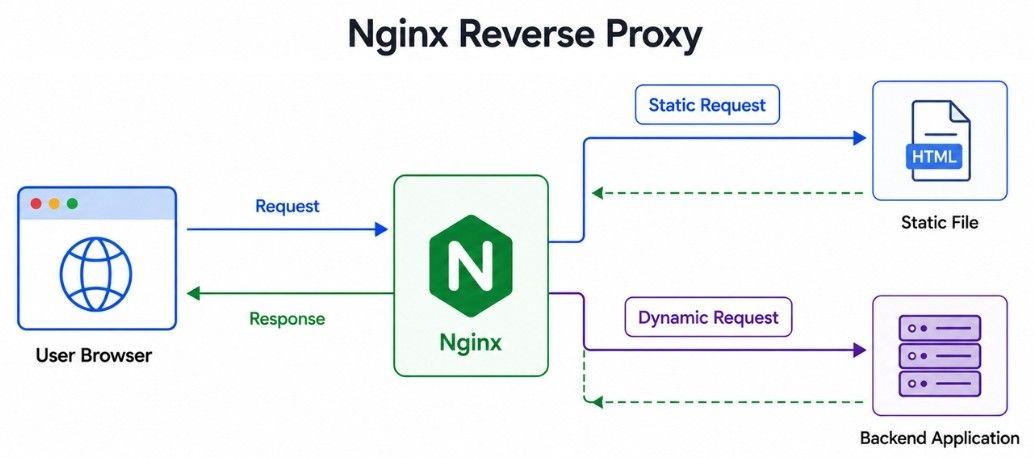
Nginx can serve static files directly without sending the request to the backend application.
Common static files include:
HTML.
CSS.
JavaScript.
Images.
Fonts.
Downloadable files.
For example, if a user requests:
/images/logo.pngNginx can read and return the file directly:
User
 ↓
Nginx
 ↓
logo.pngIf every static file request goes through the backend, the application performs work that may not require application logic.
A simpler request flow is:
Static Request  → Nginx → Static File

Dynamic Request → Nginx → Backend Application
Serving static files directly can reduce unnecessary backend requests and help the application focus on dynamic processing.
Load balancing distributes incoming requests across multiple backend servers.
For example, suppose an application runs on three servers:
              ┌→ App Server 1
              │
Users → Nginx ├→ App Server 2
              │
              └→ App Server 3
Instead of sending every request to a single server, Nginx can distribute traffic across the available backend servers.
Load balancing can help with:
Traffic distribution — Spread requests across multiple servers.
Resource utilization — Share workloads instead of overloading one server.
Horizontal scaling — Add more backend servers as traffic grows.
Availability — Reduce dependence on a single application server.
Failure handling — Route traffic to healthy backends when configured to detect or avoid failures.
This allows multiple application servers to work together to handle larger workloads.
Nginx supports different load balancing algorithms for choosing which backend server should receive a request.
Round Robin distributes requests across backend servers in sequence.
Request 1 → Server A
Request 2 → Server B
Request 3 → Server C
Request 4 → Server A
The cycle continues as new requests arrive. This is the default load balancing method in Nginx when no other method is specified.
Least Connections sends a request to the server with the fewest active connections.
Server A → 20 connections
Server B → 5 connections
Server C → 15 connections
In this example, the next request would typically go to Server B.
This method can be useful when requests have different processing times.
IP Hash uses the client's IP address to help route requests from the same client to the same backend server.
User A → Server 1
User B → Server 2
User A → Server 1
This can be useful when an application needs session persistence.
However, relying on session data stored only on individual backend servers can make scaling and failure recovery more difficult. Using shared or centralized session storage can reduce this dependency.
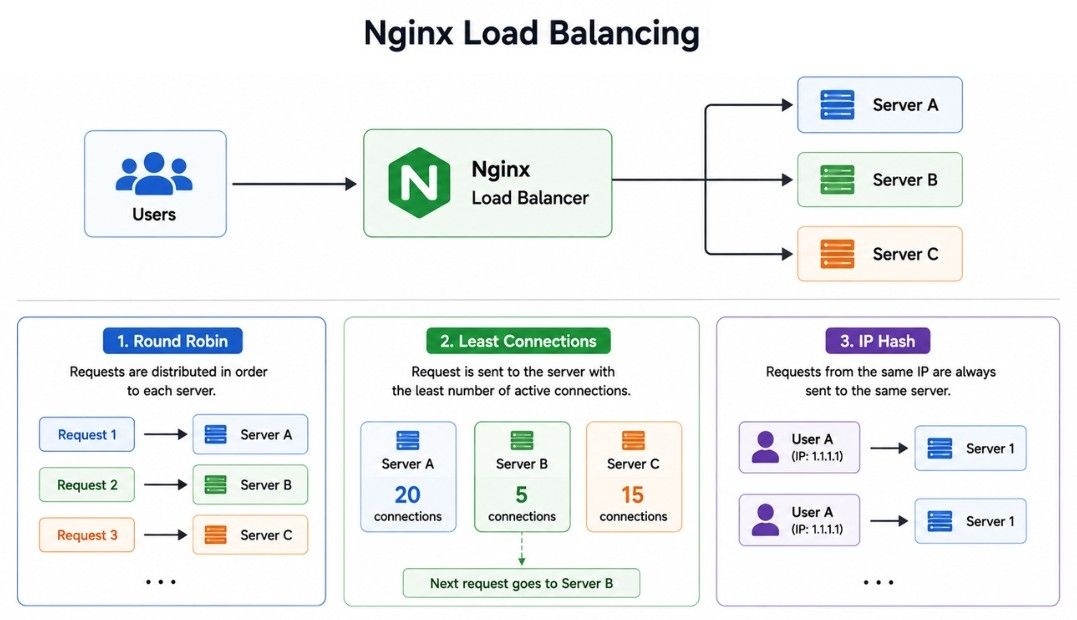
The main difference between these Nginx load balancing methods is how they choose a backend server for each incoming request.
Difference | Round Robin | Least Connections | IP Hash |
|---|---|---|---|
Server Selection | Selects servers in sequence | Selects the server with the fewest active connections | Selects a server based on the client's IP address |
Traffic Distribution | Distributes requests across servers one after another | Distributes requests according to current connection load | Requests from the same client are generally sent to the same server |
Load Awareness | Does not directly consider active connection count | Considers the number of active connections | Does not primarily select servers based on current load |
Session Persistence | Does not naturally keep a client on the same server | Does not naturally keep a client on the same server | Helps maintain client-to-server persistence |
Best Suited For | Similar backend servers and balanced workloads | Requests with different processing times | Applications where repeated client requests should reach the same backend |
Main Advantage | Simple and easy to use | Better adapts to uneven connection loads | Useful for session persistence |
SSL/TLS termination means Nginx handles the HTTPS connection and then forwards the request to the backend application.
A simplified flow looks like:
Browser
   ↓
HTTPS
   ↓
Nginx
   ↓
Backend Application
Nginx can handle:
TLS certificates.
HTTPS connections.
Encryption and decryption.
The connection between Nginx and the backend can use HTTP or HTTPS depending on the application's security requirements.
Without centralized TLS termination, multiple backend servers may require their own public-facing certificate and TLS configuration.
With Nginx:
               ┌→ Backend 1
               │
HTTPS → Nginx ─┼→ Backend 2
               │
               └→ Backend 3
Nginx provides a central place to manage the public HTTPS layer, which can simplify certificate and TLS configuration.
For systems that require end-to-end encryption, traffic between Nginx and backend services can also use HTTPS.
HTTP caching allows Nginx to store responses and reuse them for later requests instead of sending every request to the backend.
Without caching:
Request
   ↓
Nginx
   ↓
Application
   ↓
Database
   ↓
Response
When a valid cached response is available:
Request
   ↓
Nginx Cache
   ↓
Cached Response
This can reduce backend requests and improve response times.
Caching works well for content that:
Is requested frequently.
Does not change often.
Can safely be reused.
Is expensive to generate.
Common examples include:
Public web pages.
Public API responses.
Images.
Static assets.
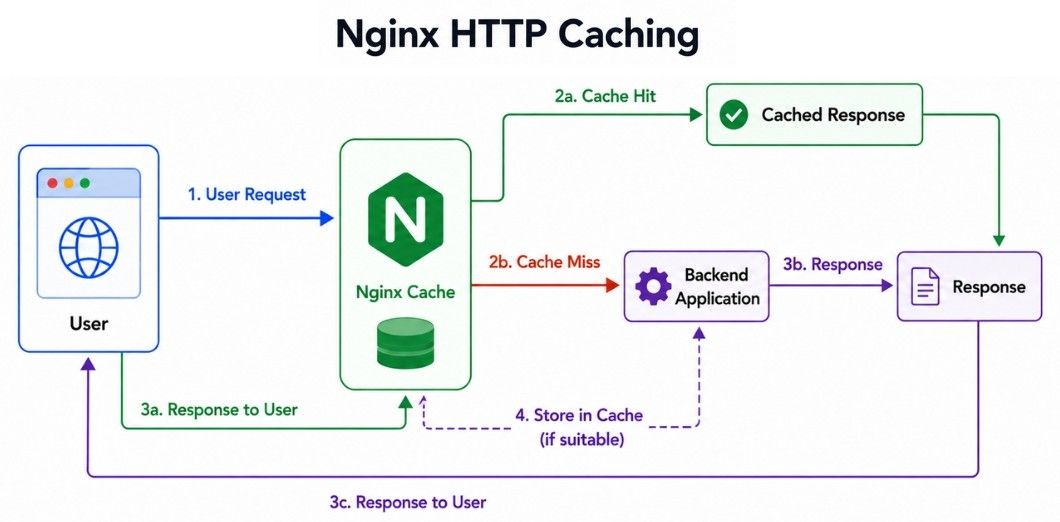
A cache hit occurs when the requested response is available in the Nginx cache, while a cache miss occurs when Nginx needs to retrieve the response from the backend.
Difference | Cache Hit | Cache Miss |
|---|---|---|
Response Availability | Response exists in the cache | Response is not available in the cache |
Backend Request | Usually not required | Request is forwarded to the backend |
Response Source | Nginx cache | Backend application |
Response Time | Usually faster | Usually slower than a cache hit |
Backend Load | Reduces backend processing | Requires backend processing |
Nginx is designed to handle many concurrent connections efficiently.
For example, some clients may have slow network connections and take longer to receive a response.
Slow Client
    ↓
Nginx
    ↓
Backend Application
As a reverse proxy, Nginx can manage client-side connections while communicating with backend servers separately. This can reduce some connection-related pressure on the application.
Keep-alive allows an HTTP connection to be reused for multiple requests instead of creating a new connection for every request.
Client
  ↓
Connection Open
  ↓
Request 1
Request 2
Request 3
  ↓
Connection Closed
Reusing connections can reduce repeated connection setup and improve network efficiency.
Nginx provides configuration options to control keep-alive timeouts, connection limits, and connection reuse.
Rate limiting controls how frequently a client can send requests to an application.
For example, an API may allow:
100 requests per minuteIf a client sends requests too quickly, Nginx can limit them before they reach the backend.
Client Request
      ↓
Nginx Rate Limit
      ↓
Allowed → Backend
Limited → Delay / RejectRate limiting can help with:
API protection — Prevent excessive requests from reaching an API.
Traffic control — Manage sudden or unusually high request rates.
Abuse reduction — Limit clients that send excessive requests.
Backend protection — Reduce unnecessary load on application servers.
Fair usage — Prevent one client from consuming too many resources.
Rate limiting is one layer of protection and should be used alongside other security and traffic-management controls.
Nginx can route incoming requests to different backend services based on the URL path, hostname, or other configured rules.
Suppose an application has three backend services:
/api/users    → User Service
/api/orders   → Order Service
/api/payments → Payment Service
Users can access a single public domain while Nginx routes each request to the appropriate internal service.
api.example.com
       ↓
     Nginx
       ↓
 ┌─────┼─────┐
 ↓     ↓     ↓
User  Order  Payment
Service Service ServiceNginx can also route requests based on the hostname.
api.example.com   → API Application
admin.example.com → Admin Application
www.example.com   → Website
This is useful when multiple applications or services share the same Nginx entry point.
Nginx can also act as a lightweight API gateway between clients and backend services.
                 ┌→ User Service
                 │
Client → Nginx ──┼→ Order Service
                 │
                 └→ Payment Service
Instead of exposing each service directly, clients communicate with Nginx, which provides a common entry point for the backend APIs.
As an API gateway, Nginx can combine capabilities already discussed, such as:
Request routing.
Load balancing.
Rate limiting.
SSL/TLS termination.
Caching.
Access controls.
Header management.
Nginx can handle many common API gateway functions, but a full API management platform may provide additional capabilities such as:
Developer portals.
API key management.
API products and usage plans.
Advanced authentication and authorization.
Detailed API analytics.
Nginx can be a good choice when an application needs common gateway and traffic-management features without a larger API management platform.
If all traffic passes through a single Nginx server, it can become a single point of failure.
Users
  ↓
Nginx
  ↓
Backend Applications
If Nginx becomes unavailable, users may not be able to reach the application even if the backend servers are still running.
For high availability, multiple Nginx instances can be used:
             ┌→ Nginx 1 ─┐
Users → Traffic Layer     ├→ Backend Applications
             └→ Nginx 2 ─┘
Traffic can be directed to healthy Nginx instances using a load balancer, virtual IP, cloud traffic service, DNS-based approach, or another failover design.
Multiple Nginx instances — Avoid relying on a single Nginx server.
Health checks — Detect unavailable instances and backends.
Failover — Redirect traffic when an instance fails.
Configuration consistency — Keep Nginx instances configured correctly and consistently.
Monitoring — Track availability, errors, and system health.
Certificate management — Keep TLS certificates available and updated across instances.
Backend availability — Ensure the services behind Nginx are also highly available.
High availability should cover the complete request path, not just Nginx. Removing one single point of failure is not enough if another critical component can still stop the application.
Nginx is designed for high-performance networking, but the right configuration is still important.
Key areas for improving Nginx performance include:
Configure Worker Processes Properly — Match worker settings to available CPU resources and workload. More workers do not automatically mean better performance.
Use Keep-Alive Connections — Reuse connections to reduce repeated TCP and TLS connection setup.
Cache Suitable Responses — Cache frequently requested public content to reduce backend and database workload.
Serve Static Files Directly — Let Nginx serve static assets instead of sending unnecessary requests to the backend.
Use Compression When Appropriate — Compress suitable content to reduce network transfer, while considering the additional CPU usage.
Configure Timeouts Carefully — Avoid timeouts that are unnecessarily long or too short for valid requests.
Monitor Backend Response Time — Check whether performance problems come from Nginx, the application, or the database.
For example:
Nginx       → 10 ms
Application → 3 seconds
Database    → 2.5 seconds
In this case, optimizing Nginx will not solve the main problem. The actual bottleneck is likely in the application or database.
Performance optimization should focus on the real bottleneck rather than changing Nginx settings without measuring the system first.
Nginx is commonly used for:
Web Server — Serve static content such as HTML, CSS, JavaScript, images, and other files.
Reverse Proxy — Receive client requests and forward them to backend applications.
Load Balancer — Distribute incoming traffic across multiple backend servers.
SSL/TLS Termination — Handle HTTPS connections and TLS certificates.
API Gateway — Provide a common entry point and route API requests to backend services.
HTTP Caching — Cache suitable responses to reduce latency and backend workload.
Microservices Routing — Route requests to different services in a microservices architecture.
Let's connect the main Nginx concepts using an e-commerce application.
Suppose a user requests:
<https://shop.example.com/products/101>The request first reaches Nginx, where HTTPS and routing can be handled.
If a valid cached response exists, Nginx can return it directly. Otherwise, the request is forwarded to a backend server.
A simplified request flow looks like:
User Request
     ↓
Nginx
     ↓
TLS Termination
     ↓
Rate Limiting
     ↓
Request Routing
     ↓
Cache Check
   ↙       ↘
Cache Hit   Cache Miss
   ↓            ↓
Response    Load Balancing
                ↓
          Backend Server
                ↓
             Database
                ↓
          Backend Response
                ↓
              Nginx
                ↓
               User
Depending on the application, Nginx can handle several responsibilities in the same request path:
HTTPS connections.
Rate limiting.
Request routing.
Load balancing.
Connection handling.
HTTP caching.
This allows Nginx to act as a central traffic-management layer between users and backend services.
Nginx is a web server, reverse proxy, and traffic-management tool commonly used in production systems.
Event-driven architecture and worker processes allow Nginx to handle many concurrent connections efficiently.
Reverse proxying forwards client requests to backend applications, while static file serving can return files directly.
Load balancing distributes traffic across multiple backend servers using methods such as Round Robin and Least Connections.
SSL/TLS termination allows Nginx to manage HTTPS connections and certificates.
HTTP caching can reduce response time and backend workload by reusing suitable responses.
Rate limiting and request routing help control traffic and direct requests to the correct services.
API gateway capabilities allow Nginx to provide a common entry point for multiple backend APIs.
High availability uses multiple Nginx instances and failover mechanisms to reduce single points of failure.
Good Nginx performance depends on suitable worker settings, connection handling, caching, timeouts, compression, and backend performance.
Common use cases include web serving, reverse proxying, load balancing, API routing, caching, and microservices traffic management.
