
Durgesh Tiwari
Author
A YouTube-like application looks simple from the user's perspective:
Creator uploads video
        ↓
System processes and stores video
        ↓
Viewer clicks Play
        ↓
Video starts playing
At large scale, however, video platforms introduce difficult engineering problems.
What happens if a creator uploads a 20 GB video and the network disconnects at 95%? How should the same video work across different devices and network speeds? How can millions of viewers watch a viral video without overwhelming origin storage? How should playback adapt when bandwidth suddenly drops?
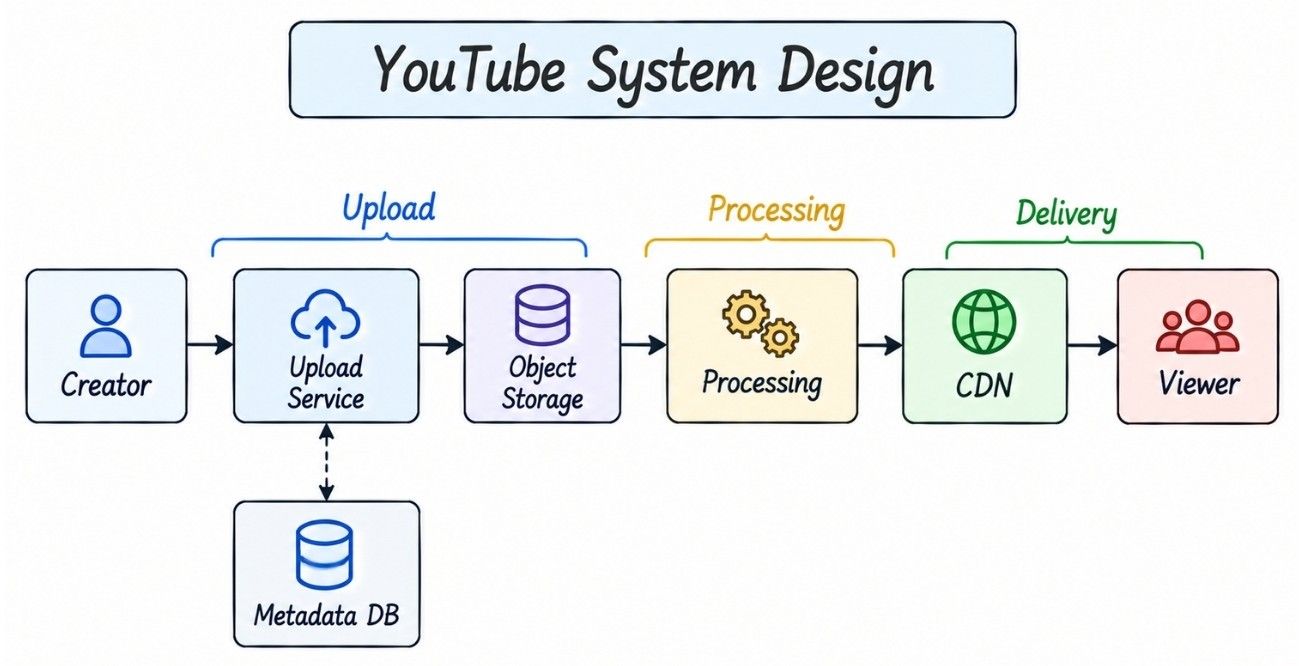
This article designs a scalable YouTube-like video sharing and streaming platform. The goal is to understand the architecture and engineering trade-offs rather than reproduce YouTube's private internal implementation.
Before designing the architecture, define the core product scope and the system qualities that matter most.
The core system should allow users to:
Upload large videos
Resume interrupted uploads
Stream uploaded videos
Play videos across different network conditions
Retrieve video metadata
Seek and resume playback
Secondary features can include search, likes, comments, subscriptions, channels, recommendations, watch history, playlists, Shorts, live streaming, view counts, and notifications.
A large-scale video platform should provide:
High availability
Low playback startup latency
Durable video storage
Massive read scalability
Reliable large-file uploads
Adaptive streaming
Global video delivery
Fault tolerance
Horizontal scalability
Cost-efficient storage and bandwidth
Small delays in counters or recommendations are usually acceptable, but video upload and playback should remain reliable.
Scale estimation helps identify whether storage, bandwidth, processing, or API traffic will become the main bottleneck.
Assume:
Metric | Estimate |
|---|---|
Video uploads | 1 million/day |
Video views | 100 million/day |
Average upload rate | ~12 uploads/sec |
Average view rate | ~1,157 views/sec |
Peak traffic can be several times higher than these averages.
For video platforms, bandwidth is often more important than request count. If each view delivers an average of 100 MB of video data:
100M views × 100 MB
≈ 10 PB/day
This means the main scaling challenges are:
Video storage
Network bandwidth
CDN delivery
Video processing
Viral-content traffic
YouTube-scale systems are not just high-QPS systems—they are storage-, compute-, and bandwidth-intensive systems.
The high-level architecture separates metadata, large video files, processing, and playback so each workload can scale independently.
                    Web / Mobile Clients
                            |
                            v
                       API Gateway
                            |
              +-------------+-------------+
              |                           |
              v                           v
        Video Service               Upload Service
              |                           |
              v                           v
         Metadata DB                Object Storage
                                          |
                                          v
                                   Processing Queue
                                          |
                                          v
                                  Transcoding Workers
                                          |
                                          v
                                   Processed Storage
                                          |
                                          v
                                         CDN
                                          |
                                          v
                                       Viewers
Supporting systems may include authentication, search, recommendations, subscriptions, comments, likes, view aggregation, moderation, analytics, and monitoring.
These components should be introduced when a requirement or bottleneck justifies them rather than added automatically.
The data model stores video metadata and upload state, while the actual video files remain in object storage.
The main entities are:
Entity | Important Fields | Purpose |
|---|---|---|
User |
| Stores creator or viewer information |
Video |
| Stores video metadata |
VideoAsset |
| Represents a processed video rendition |
UploadSession |
| Tracks a resumable upload |
A single Video can have multiple VideoAsset records, such as 360p, 720p, and 1080p renditions.
The main APIs manage video upload, metadata retrieval, and playback.
API | Purpose |
|---|---|
| Create a resumable upload session |
| Finalize the uploaded video |
| Retrieve video metadata |
| Retrieve playback information or manifest access |
A create-upload response may look like:
{
  "upload_id": "upload_123",
  "video_id": "video_456",
  "upload_target": "...",
  "expires_at": "..."
}
The exact upload and playback contract can vary depending on the object-storage provider and streaming protocol.
Video metadata and actual video files have very different storage requirements, so they should be stored separately.
Aspect | Metadata Database | Object Storage |
|---|---|---|
Stores | Title, creator, duration, status, thumbnail | Original and processed video files |
Data Size | Small structured records | Large binary objects |
Access Pattern | Queries and metadata updates | Upload and media delivery |
Example |
|
|
Primary Goal | Fast structured queries | Durable, scalable media storage |
A video's media objects may look like:
video_123/original/...
video_123/360p/...
video_123/720p/...
video_123/1080p/...
A multi-gigabyte video should not be stored as an ordinary database row.
Object storage is better suited to large, mostly immutable, bandwidth-intensive video files.
It provides:
High durability
Massive storage capacity
Cost-efficient blob storage
Independent scaling
Easy CDN integration
The database remains focused on small structured metadata, while object storage handles the actual video bytes.
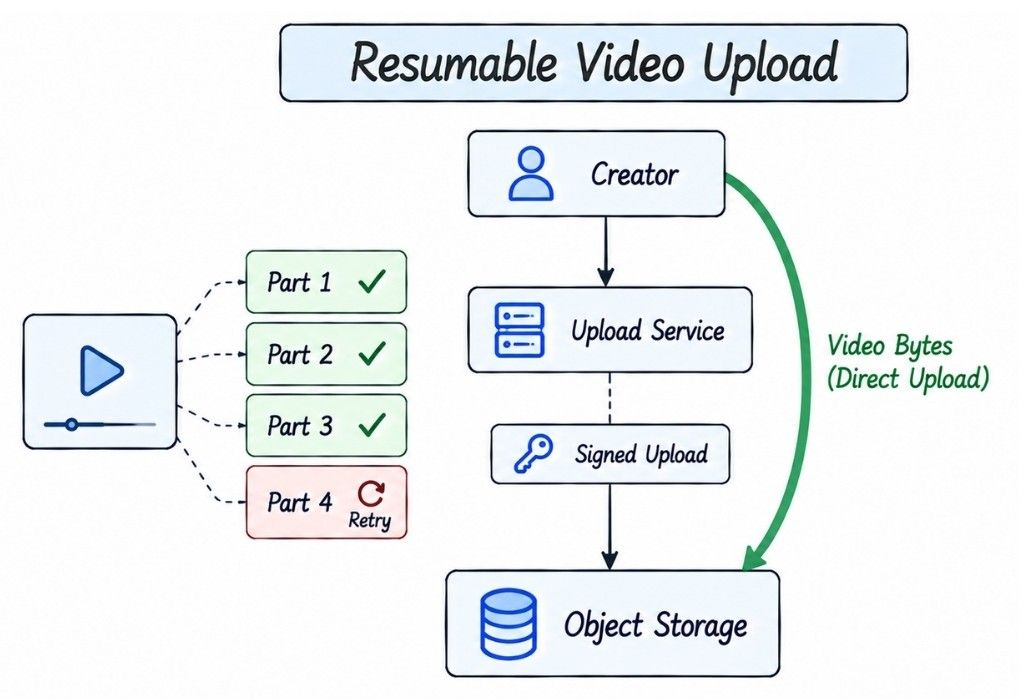
Large video files should be uploaded directly to object storage instead of passing through application servers.
A naive design is:
Creator
   ↓
API Server
   ↓
Object Storage
For a 20 GB video, the API server would proxy the entire file, consuming application-server bandwidth and keeping connections open for a long time.
A better design separates the control plane from the data plane:
Control Plane

Creator
   ↓ Create Upload Session
Upload Service
   ↓ Signed Upload Instructions
Creator

Data Plane

Creator
   ↓ Direct Video Upload
Object Storage
The Upload Service handles authentication, authorization, upload-session creation, and signed upload instructions. The actual video bytes travel directly from the client to object storage.
This keeps large media traffic away from application servers and allows the upload path to scale independently.
Large video uploads must survive network failures without forcing the creator to restart the entire upload.
For example, if a 20 GB video fails after 19 GB has already been uploaded, restarting from zero would waste significant time and bandwidth.
Multipart upload divides a large video into independently uploadable parts.
20 GB Video
     |
     +── Part 1  ✓
     +── Part 2  ✓
     +── Part 3  ✓
     +── Part 4  ✗
     +── Part 5  ✗
After reconnection, the client uploads only the missing or failed parts.
This provides:
Resumable uploads
Per-part retries
Parallel uploads
Better large-file reliability
The system tracks successfully uploaded parts until the upload is finalized.
Once all required parts are uploaded, the system finalizes the original video and starts asynchronous processing.
Complete Upload
      ↓
Validate Parts
      ↓
Finalize Video
      ↓
VideoUploaded Event
      ↓
Video Processing
Upload completion should be idempotent, so retrying the completion request does not create duplicate videos or duplicate processing workflows.
Incomplete uploads should not consume storage forever.
Upload sessions can have an expiration time. A background cleanup process removes expired sessions and orphaned multipart data:
Expired Upload Sessions
          ↓
Find Orphaned Parts
          ↓
Cleanup Storage
This prevents abandoned large uploads from creating unnecessary storage costs.
The uploaded original is usually not suitable for every device or network condition. A high-bitrate 4K video, for example, may not play smoothly on a mobile device with a slow connection.
Video processing happens asynchronously and creates multiple playback-ready versions of the uploaded video.
Original Video
      ↓
Processing Queue
      ↓
Transcoding Workers
      ↓
┌─────┼─────┬──────┐
↓     ↓     ↓      ↓
360p  720p  1080p  4K
      ↓
Processed Storage
Metadata extraction and thumbnail generation can also run as part of this processing pipeline.
Transcoding converts the original video into multiple renditions optimized for different devices and network conditions.
Each rendition can use a different:
Resolution
Bitrate
Codec
Streaming format
For example, the same video may have 360p, 720p, and 1080p renditions. The player can then choose the most suitable version during playback.
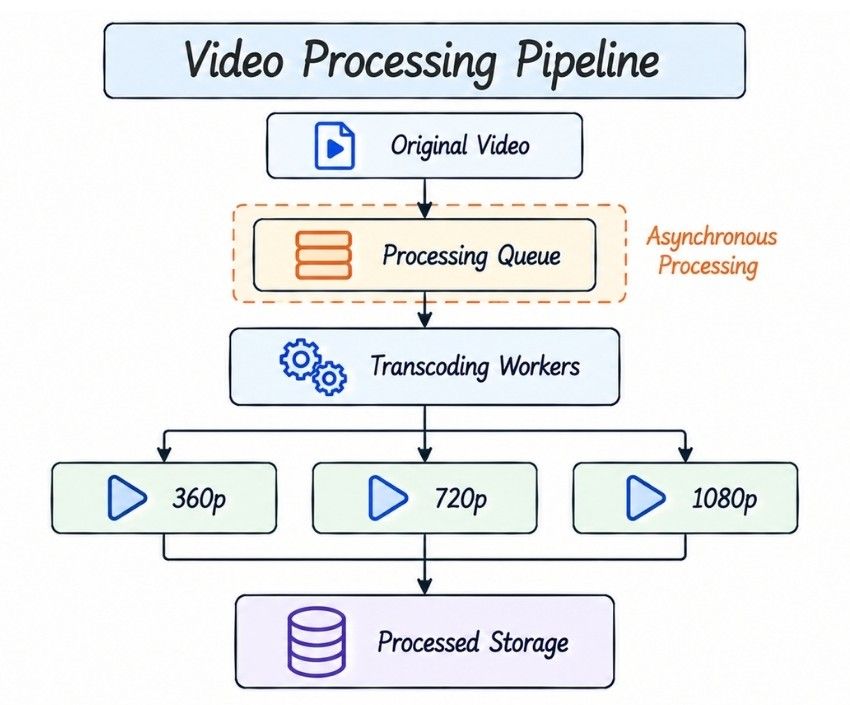
Transcoding can take seconds or minutes, so the upload request should not wait for all renditions to finish.
After upload completion, the video typically moves through:
UPLOADING
    ↓
PROCESSING
   /      \
  ↓        ↓
READY    FAILED
The system may make the video playable once essential renditions are ready while higher-quality versions continue processing in the background.
Video processing can be parallelized to reduce the time between upload completion and the video becoming playable.
Independent work can run concurrently across different renditions, processing stages, or video segments where dependencies allow.
Uploaded Video
      ↓
Processing Queue
      ↓
┌─────────┼─────────┐
↓         ↓         ↓
360p     720p      1080p
Worker   Worker     Worker
For very large videos, some processing can also be divided into independent segments and executed across multiple workers.
Not every output needs to be generated with the same priority. The system can produce the assets required for playback first.
A practical order is:
Initial Playable Rendition
          ↓
Thumbnail
          ↓
Common Resolutions
          ↓
Higher Resolutions
          ↓
Optional Processing
Prioritizing essential assets reduces upload-to-playable latency, while expensive high-resolution or optional processing continues in the background.
Video-processing workers must safely handle retries, duplicate job delivery, and worker crashes.
If a worker crashes before acknowledging a job, the queue's lease or visibility timeout expires and another worker can retry it.
Use deterministic output paths such as:
video_123/720p/segment_001along with job-state or idempotency tracking. This makes at-least-once delivery safe without creating duplicate or inconsistent video assets.
A failure in one rendition does not always require making the entire video unavailable.
360p   READY
720p   READY
1080p  RETRYING
The system can serve available qualities while retrying the failed rendition.
Persistent failures should use:
Bounded retries
Exponential backoff
Dead-letter handling
Failure monitoring
Processed videos are divided into small media segments instead of being delivered as one large file.
720p Rendition
      |
      +── Segment 1
      +── Segment 2
      +── Segment 3
      +── Segment 4
      ...
Each rendition has its own sequence of segments.
Segmentation enables:
Adaptive quality switching
Seeking
CDN caching
Playback buffering
Efficient segment retries
It is the foundation for adaptive video streaming.
Adaptive bitrate streaming (ABR) allows the player to change video quality during playback according to current network and device conditions.
For example:
Strong Network       Slow Network

   1080p
     ↓
    720p
     ↓
    360p
If bandwidth drops, the player requests future segments at a lower bitrate instead of restarting the video. When conditions improve, it can switch back to a higher-quality rendition.
Before requesting media segments, the player downloads a small manifest describing the available renditions and segment locations.
Manifest
   |
   +── 360p  → segments
   +── 720p  → segments
   +── 1080p → segments
The player selects future segments using signals such as:
Estimated bandwidth
Buffer health
Device capability
Viewport
Recent throughput
HLS and MPEG-DASH are common adaptive streaming approaches.
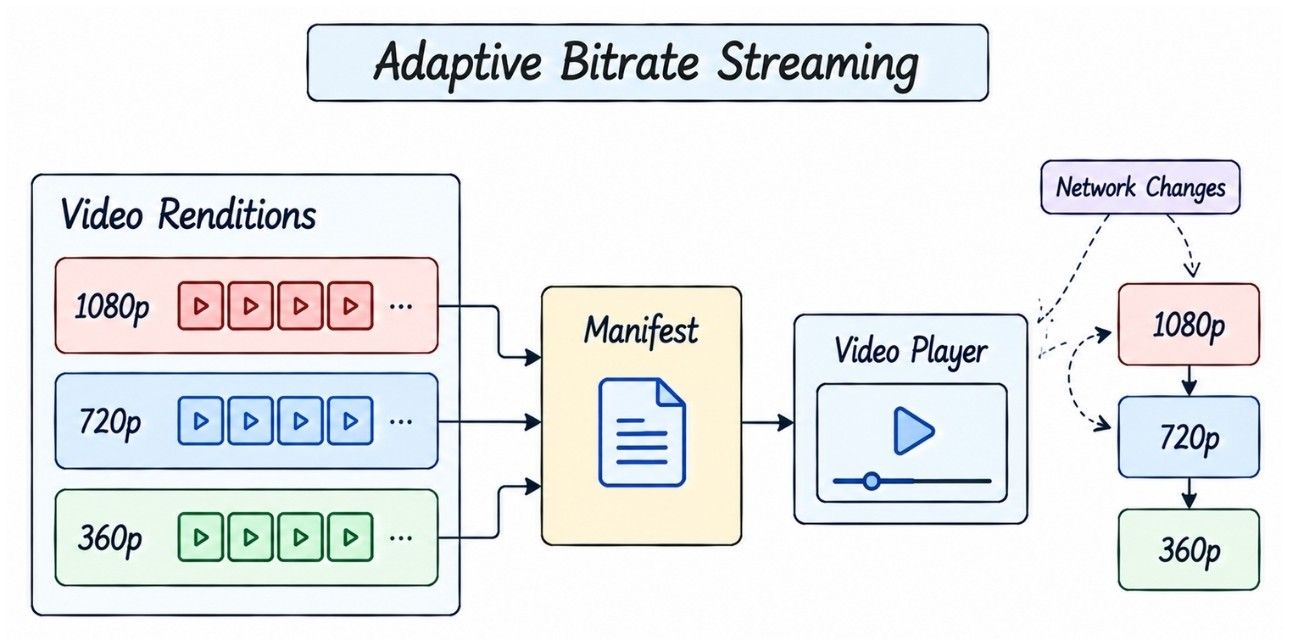
Segment size affects both streaming efficiency and how quickly the player can react to changing network conditions.
Shorter Segments | Longer Segments |
|---|---|
Faster quality adaptation | Slower quality adaptation |
Lower amount of media per request | More media per request |
More requests and overhead | Fewer requests and lower request overhead |
Useful for responsive playback | Can be more efficient but less responsive |
There is no universal best segment duration. It depends on the desired balance between latency, adaptability, buffering, and delivery efficiency.
The backend coordinates metadata and authorization, while the actual video segments are delivered through the CDN.
Viewer
   ↓
Video Metadata Service
   ↓
Authorization
   ↓
Playback / Manifest Access
   ↓
CDN
   ↓
Manifest
   ↓
Player Selects Rendition
   ↓
Video Segments
   ↓
Playback Buffer
   ↓
Playback
The application server does not continuously stream the video. The player fetches media segments from the CDN and can switch renditions as network conditions change.
A CDN is essential for large-scale video streaming because media delivery consumes far more bandwidth than normal API traffic.
Without a CDN, millions of viewers could repeatedly fetch the same popular video segments from origin storage.
With a CDN:
                Origin Storage
                      ↓
                     CDN
               /      |      \
              ↓       ↓       ↓
           Edge A   Edge B   Edge C
              ↓       ↓       ↓
           Viewers  Viewers  Viewers
Popular segments are cached close to viewers, providing:
Lower playback latency
Lower origin bandwidth
Higher delivery throughput
Global content distribution
Better viral-video scalability
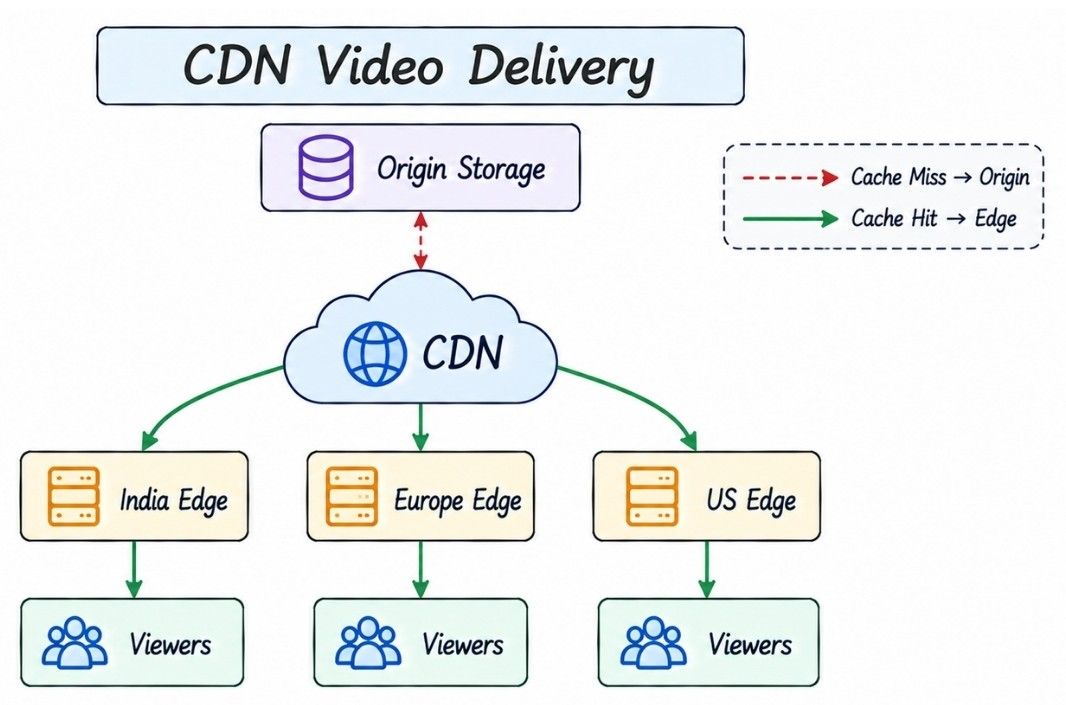
The CDN serves a segment from the edge when it is cached. Otherwise, it retrieves the segment from origin and caches it for later requests.
Viewer
   ↓
CDN Edge
   |
   ├── Cache Hit  → Serve Segment
   |
   └── Cache Miss → Origin Storage
                         ↓
                    Cache at Edge
                         ↓
                    Serve Segment
As more viewers request the same popular segments, most requests can be served directly from edge caches instead of repeatedly reaching origin storage.
Traffic distribution is highly skewed: a small number of videos can receive enormous traffic while most videos receive relatively little.
A viral video can create pressure on:
Video metadata
CDN origin fetches
View counters
Comments
Likes
Recommendation systems
Media traffic should primarily be absorbed by the CDN.
Popular metadata can use:
Distributed caches
Read replicas where appropriate
Hot-key replication
Request coalescing
Suppose a popular metadata cache entry expires while hundreds of thousands of requests arrive.
Without protection:
Many Cache Misses
       ↓
Metadata Database
Mitigations include:
Request coalescing
Jittered TTL
Stale-while-revalidate
Background refresh
Popular content requires explicit hot-key protection.
Metadata storage should be designed around its main access patterns.
Common queries include:
Get video by video_id
Get creator's videos
Update video metadata
Check processing statusIf the dominant lookup is:
GET video_123a strategy such as:
hash(video_id)can distribute records evenly.
Benefits include:
Good point lookups
Even write distribution
Straightforward horizontal scaling
However, retrieving all videos from one creator then requires a secondary index or dedicated read model.
Maintain an access path optimized for creator pages:
creator_id
   |
   +── video_100
   +── video_90
   +── video_70
This avoids scanning the entire video dataset when loading a channel.
Search and recommendations are important product features, but they should remain separate from the critical upload and playback paths.
Do not scan the primary metadata database for full-text search across billions of videos.
Use an asynchronous indexing pipeline:
Video Published
      ↓
Search Indexer
      ↓
Search Index
Searchable fields may include:
Title
Description
Channel
Tags
Transcript
Search indexing can usually be eventually consistent.
Recommendations can be treated as a separate candidate-generation and ranking system.
Viewer
  ↓
Candidate Generation
  ├── Subscriptions
  ├── Similar Videos
  ├── Watch History
  └── Trending
  ↓
Ranking
  ↓
Recommended Videos
A YouTube system-design interview should not turn entirely into an ML recommendation discussion unless that is the requested focus.
Updating one database row for every video view creates a hot-write bottleneck for viral videos.
Avoid:
UPDATE videos
SET views = views + 1
WHERE video_id = ?;
for every playback event.
Instead:
View Events
    ↓
Event Stream
    ↓
Distributed Aggregators
    ↓
Persistent Aggregate
Different partitions can count independently:
Shard A → 12,000
Shard B → 15,000
Shard C → 11,000
Then aggregate them:
38,000 viewsDisplayed view counts can normally be eventually consistent.
Playback start and a valid counted view are not necessarily the same event.
A valid-view pipeline may consider:
Minimum watch duration
Bot detection
Duplicate filtering
Fraud detection
The playback path can emit events while an analytics pipeline determines which events qualify for metrics.
Secondary engagement features should scale independently and should not become dependencies of core video playback.
Use separate logical services or storage paths for likes and comments.
Viewer
  |
  +── Video Playback
  |
  +── Like Service
  |
  +── Comment Service
A comments outage should not prevent video playback.
Playback events can update watch history asynchronously.
video_started
progress_updated
video_completed
A logical history record may contain:
user_id
video_id
last_position
last_watched_at
If the viewer stops at:
18:42and later opens another device, the system can retrieve that position and resume from the corresponding segment.
Authentication identifies the user, while authorization determines whether that user can upload or watch a particular video.
For private, paid, or restricted videos, playback access should be validated before media is delivered.
Viewer
   ↓
Video API
   ↓
Authorization Check
   ↓
Short-Lived Signed Playback Access
   ↓
CDN
   ↓
Video Segments
The CDN should not expose restricted video assets through permanent public URLs. Short-lived, scoped access limits unauthorized sharing and reuse.
Before creating an upload session, the system should validate:
Creator authentication
Upload permission
File-size and account quota
Supported file format
Rate limits
Signed upload access should be short-lived and scoped to the specific upload session or expected object path.
This keeps large-file transfer direct while the backend remains responsible for access control.
Uploaded videos may require automated or manual safety checks before they become publicly available.
The moderation pipeline may include:
Malware scanning
Policy and abuse detection
Copyright-related checks
Metadata validation
Content safety analysis
A simplified lifecycle can be:
PROCESSING
     ↓
MODERATION
   /     \
  ↓       ↓
PUBLISHED  REJECTED
Some videos may also enter a manual review flow when automated checks cannot make a confident decision.
Deleting a video should make it unavailable quickly, even if physical cleanup across all systems takes longer.
First, update the authoritative video state:
Video.status = DELETEDPlayback authorization should then reject new requests immediately.
Physical cleanup can happen asynchronously across:
Original and processed video assets
Search indexes
Recommendations
Analytics and secondary data
For cached or restricted media, the system may also use:
CDN cache purge or invalidation
Short-lived playback tokens
Authorization-aware media access
The key principle is that logical deletion happens first for correctness, while physical cleanup can happen asynchronously. Security-sensitive deletion should not rely only on eventual CDN cache expiration.
Video storage becomes expensive because one uploaded video can generate multiple renditions and segments.
Original Video
     ↓
360p / 480p / 720p / 1080p / 4K
Storage policies can therefore depend on video popularity and access frequency.
Content | Typical Strategy |
|---|---|
Hot videos | Frequently requested segments remain highly cacheable through CDN and active storage |
Cold videos | Rarely accessed assets may move to cheaper storage tiers where retrieval latency is acceptable |
Lifecycle policies can automatically move older or rarely accessed assets to lower-cost storage when product requirements allow it.
The main trade-off is storage cost vs retrieval latency: keeping more assets immediately accessible improves playback responsiveness but increases infrastructure cost.
Video players prefetch upcoming segments to maintain smooth playback and reduce interruptions.
Playing
Segment 20
    ↓
Buffered
Segment 21
Segment 22
The player continuously balances buffer health with estimated network throughput.
Too little buffering → higher risk of playback stalls
Too much buffering → wasted bandwidth and slower adaptation to network changes
The goal is to keep enough upcoming video buffered for smooth playback without downloading unnecessary data too far in advance.
A video should start playing quickly after the viewer presses Play, making startup latency a critical user-experience metric.
Click Play
    ↓
Metadata + Authorization
    ↓
Manifest
    ↓
Initial Segment
    ↓
First Frame
Important playback metrics include:
Time to first frame
Rebuffer rate
Startup failure rate
Playback error rate
Average delivered bitrate
For a video platform, these playback-quality metrics are often more meaningful than API latency alone.
Backpressure protects the transcoding pipeline when uploads arrive faster than workers can process them.
Video Uploads
     ↓
Processing Queue
     ↓
Worker Pool
     ↓
Processed Videos
Important signals include:
Queue depth
Oldest job age
Processing throughput
Failure rate
CPU/GPU utilization
The queue can absorb temporary traffic bursts, but it should not be treated as unlimited capacity.
If the backlog continues growing, the system can:
Autoscale processing workers
Prioritize essential renditions
Delay optional processing
Apply admission control
Throttle new work when necessary
The goal is to keep the processing system stable instead of allowing an increasing backlog to overload downstream infrastructure.
A production video platform should isolate failures so that problems in one component do not unnecessarily break core video playback.
Failure | Expected Recovery |
|---|---|
Transcoding worker crashes | Let the lease/visibility timeout expire and retry the idempotent job on another worker |
CDN edge fails | Route requests to another healthy edge or fallback delivery path |
Metadata service fails | Use replicated instances, cached metadata, controlled retries, and database replicas where appropriate |
Search or recommendations fail | Degrade gracefully without blocking playback |
Comments or analytics fail | Process or recover independently while video playback continues |
For example, transcoding recovery can follow:
Worker Crashes
      ↓
Lease Expires
      ↓
Another Worker Retries
The key principle is failure isolation: optional systems such as search, comments, recommendations, and analytics should not become hard dependencies of the core playback path.
A global video platform uses regional infrastructure and CDN edges to reduce latency while avoiding unnecessary replication of large video assets.
Creators
   ↓
Nearest Upload Region
   ↓
Object Storage + Processing
   ↓
Global CDN
  /    |    \
 ↓     ↓     ↓
India Europe  US
Edge   Edge   Edge
CDN edges provide most of the media-delivery locality. Video processing can happen in the upload region or dedicated processing regions depending on compute capacity, data-transfer cost, and compliance requirements.
Metadata can be replicated across regions for availability and regional reads.
Video assets also need durable storage, but keeping a hot copy of every video in every region is usually unnecessary. Object-storage replication policies and CDN caching can provide the required durability and delivery performance.
More replication generally improves availability and latency, but increases storage and data-transfer cost.
Different operations need different consistency guarantees.
Eventual Consistency Is Usually Acceptable | Stronger Correctness Is More Important |
|---|---|
View counts | Video ownership |
Like counts | Privacy and access control |
Search indexing | Upload completion |
Recommendations | Deletion authorization |
Analytics | Creator entitlements |
Notifications | Security-sensitive state |
The key principle is to choose consistency based on the operation rather than forcing the entire platform to use the same consistency model.
The database stores authoritative state, while caches improve read performance for frequently accessed data.
Database | Cache |
|---|---|
Source of truth | Temporary performance layer |
Stores durable state | Stores frequently accessed data |
Correctness depends on it | System should tolerate cache loss |
Examples: video metadata, ownership, status | Examples: popular metadata, channel data, trending lists |
Useful cache candidates include popular video metadata, channel metadata, playback configuration, and trending lists.
The key principle is: cache loss should cause performance degradation, not data loss or correctness failure.
Short-form and live video can reuse parts of the core video platform, but they have different delivery and latency requirements.
Shorts can reuse the existing upload, transcoding, object storage, CDN, and playback infrastructure.
The main differences are greater emphasis on:
Very low startup latency
Aggressive prefetching
Recommendation-driven discovery
Vertical-feed ranking
So Shorts are mainly an extension of the core video architecture rather than a completely separate upload system.
Live streaming is different because video must be processed and delivered continuously while the creator is broadcasting.
Creator
   ↓
Live Ingest
   ↓
Real-Time Transcoding
   ↓
Segment Generation
   ↓
CDN
   ↓
Viewers
Unlike uploaded video, which can be processed before playback, live streaming has much stricter end-to-end latency requirements.
For a standard YouTube system design, live streaming should usually remain a high-level extension unless the interviewer specifically asks for its detailed architecture.
Observability should measure the complete user journey—from video upload and processing to CDN delivery and playback quality.
Area | Important Metrics |
|---|---|
Upload | Upload success rate, throughput, chunk retry rate, completion latency, abandoned uploads |
Processing | Queue depth, oldest job age, transcoding latency, failure rate, upload-to-ready latency |
Playback | Time to first frame, rebuffer ratio, playback errors, delivered bitrate, segment latency |
CDN | Cache hit ratio, origin traffic, CDN errors |
Infrastructure | API P95/P99 latency, cache hit ratio, database latency, storage errors, regional availability |
The most important principle is to monitor user-facing playback quality alongside infrastructure health. A system can have healthy servers while users still experience slow startup, buffering, or playback failures.
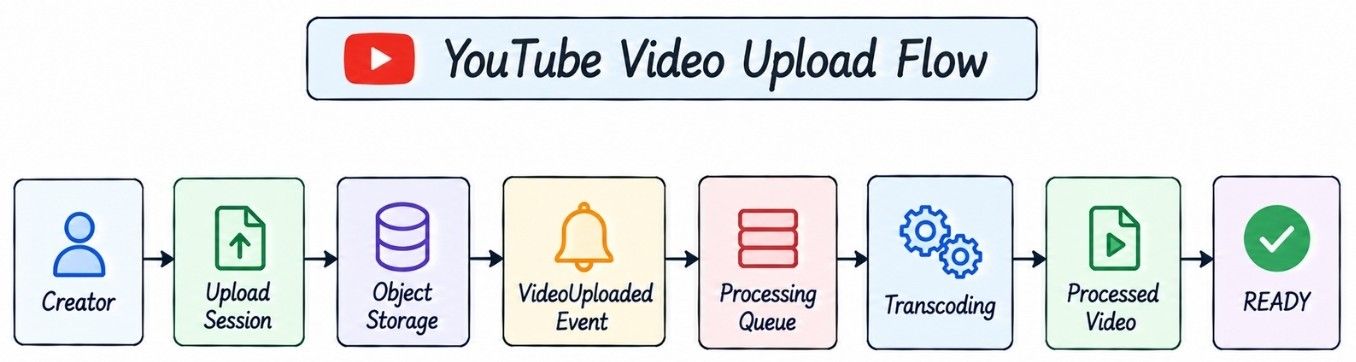
The complete upload flow separates large-file transfer from application APIs and processes uploaded videos asynchronously.
Creator
   ↓
Create Upload Session
   ↓
Upload Service
   ↓
Signed Multipart Upload
   ↓
Object Storage
   ↓
Complete Upload
   ↓
VideoUploaded Event
   ↓
Processing Queue
   ↓
Transcoding Workers
   ├── 360p
   ├── 720p
   ├── 1080p
   └── Thumbnail
   ↓
Processed Object Storage
   ↓
Video Status = READY
This keeps large video bytes away from application servers while allowing upload and processing capacity to scale independently.
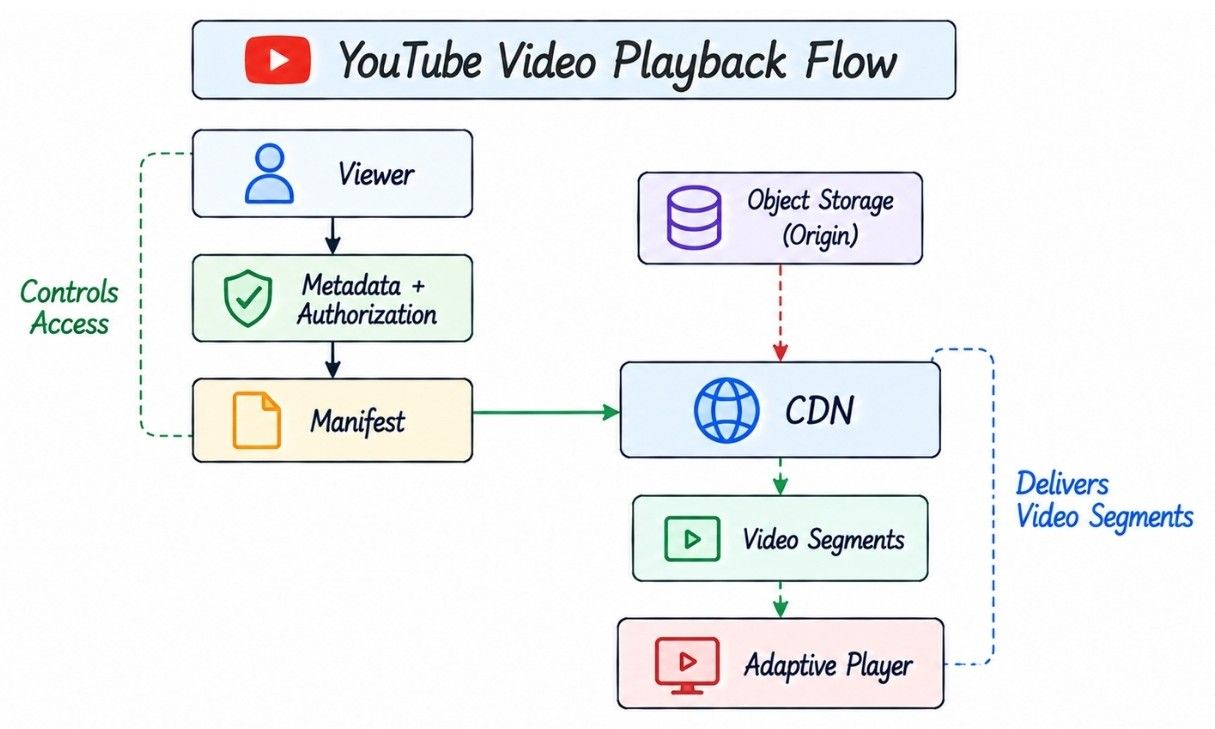
The playback flow keeps the backend responsible for metadata and authorization, while the CDN handles bandwidth-heavy media delivery.
Viewer
   ↓
Video Metadata Service
   ↓
Authorization
   ↓
Playback / Manifest Access
   ↓
CDN
   ↓
Manifest
   ↓
Select Rendition
   ↓
Fetch Video Segments
   ↓
Playback Buffer
   ↓
Playback
During playback, the player continuously evaluates bandwidth and buffer health and requests future segments at the appropriate bitrate.
The key separation is: backend services control playback access, while CDN infrastructure delivers the actual video data.
The final architecture separates metadata and access control, video upload and processing, media delivery, and asynchronous supporting systems.
                       Web / Mobile Clients
                               |
                               v
                          API Gateway
                               |
              +----------------+----------------+
              |                                 |
              v                                 v
        Video Service                     Upload Service
              |                                 |
              v                                 v
         Metadata DB                      Object Storage
                                                |
                                                v
                                         Processing Queue
                                                |
                                                v
                                        Transcoding Workers
                                                |
                                                v
                                         Processed Storage
                                                |
                                                v
                                               CDN
                                                |
                                                v
                                             Viewers

Video / Playback Events
          |
          +── Search Indexer
          +── Recommendation Pipeline
          +── View Aggregator
          +── Analytics
          +── Notifications
The architecture has three main responsibilities:
Control plane: API Gateway, Video Service, Upload Service, metadata, authentication, and authorization
Processing pipeline: Object Storage → Processing Queue → Transcoding Workers → Processed Storage
Delivery path: Processed Storage → CDN → Viewers
Search, recommendations, view aggregation, analytics, and notifications consume events asynchronously and should not become hard dependencies of core video playback.
The key principle is: application services coordinate the video lifecycle, asynchronous workers process media, and the CDN handles bandwidth-heavy video delivery.
HLD focuses on the overall system architecture, while LLD explains how individual components are designed internally.
Aspect | HLD | LLD |
|---|---|---|
Focus | Overall distributed architecture | Internal component design |
Level | System and service level | Class, object, and component level |
Examples | Upload Service, CDN, Object Storage, Processing Queue |
|
Main Question | How does the platform work and scale? | How is each component implemented? |
Interview Usage | Discussed first | Explored when implementation details are requested |
For a typical “Design YouTube” interview, start with HLD and move into LLD only when deeper implementation details are required.
A strong system design starts simple and introduces distributed components only when scale or reliability creates a real bottleneck.
Stage | Architecture Change | Why It Is Added |
|---|---|---|
Early Product | App Server + SQL + Object Storage | Simple architecture for initial traffic |
Large Uploads | Direct + Multipart Uploads | Reliable and resumable large-file uploads |
Growing Playback | CDN + Caching | Reduce playback latency and origin bandwidth |
Video Processing Scale | Queue + Distributed Transcoding Workers | Process videos asynchronously and scale workers independently |
Better Streaming | Segmentation + Adaptive Bitrate Streaming | Support different devices and changing network conditions |
Large Platform | Search + View Aggregation + Hot-Key Protection | Scale independent workloads and viral traffic |
Global Scale | Multi-Region + Global CDN + Regional Uploads | Improve global availability and latency |
The key principle is: evolve the architecture based on actual bottlenecks instead of introducing distributed-system complexity from the beginning.
These questions cover the design decisions and trade-offs most likely to appear in a YouTube-style system design interview.
Separate video metadata from large media blobs. Upload videos directly to object storage using resumable multipart uploads, process them asynchronously into multiple renditions, segment the outputs, and distribute them through a CDN using adaptive bitrate streaming.
Store video bytes in durable object storage and structured video metadata in a database.
Large video blobs have very different storage, bandwidth, replication, and delivery requirements from structured metadata. Object storage is better suited to large media files.
Use multipart/resumable upload. Split the file into chunks, track completed parts, retry only failed chunks, and finalize after all required parts arrive.
It prevents application servers from proxying huge binary transfers and reduces bandwidth and connection pressure on the API layer.
Resume from the missing chunks rather than restarting the complete file.
Different devices and network conditions require different resolutions, bitrates, codecs, and playback formats.
Generate multiple renditions and divide them into segments. The player chooses future segments according to estimated bandwidth, buffer health, and device capability.
Segments enable seeking, buffering, CDN caching, efficient retries, parallel processing, and adaptive quality switching.
Video traffic is bandwidth-heavy. A CDN serves cached segments close to viewers, reducing latency and origin traffic while handling viral content.
Use CDN for media delivery and distributed caches, hot-key protection, and request coalescing for popular metadata.
Publish processing jobs to a durable queue and use horizontally scalable workers for transcoding, thumbnails, metadata extraction, and other processing.
Retry idempotent processing jobs with bounded retries and backoff. Preserve already successful renditions and use dead-letter handling for persistent failures.
Parallelize work across renditions and, where practical, independent video segments.
Emit view events and aggregate them asynchronously instead of updating one hot database row for every playback.
Publish video metadata into an asynchronous indexing pipeline and query a dedicated search index.
Treat recommendations as a separate candidate-generation and ranking system based on signals such as watch history, subscriptions, similarity, and popularity.
Authorize the viewer before playback and provide short-lived, scoped access to CDN assets instead of exposing unrestricted media URLs.
Mark the authoritative video unavailable immediately, block future playback, invalidate security-sensitive cached access, and clean secondary copies asynchronously.
There is no universal answer. Choose storage according to access patterns, consistency, and scale. Video bytes belong in object storage, while metadata, counters, search, and analytics can use different specialized stores.
Use replicated stateless services, durable object storage, asynchronous queues, CDN distribution, retries, caches, and multi-region deployment where required.
Video playback should continue. Recommendations can degrade to cached, trending, or subscription-based content.
Track upload success, upload-to-ready latency, processing failures, time to first frame, rebuffer rate, playback errors, CDN hit ratio, origin traffic, and service P95/P99 latency.
Live streaming continuously ingests, transcodes, segments, and distributes media while the creator is broadcasting, making end-to-end latency much more important.
A major trade-off is playback quality and availability versus storage, compute, bandwidth, and latency cost. More renditions and replication improve user experience but increase infrastructure cost.
These mistakes usually make a YouTube system design inefficient, unreliable, or unnecessarily complex.
Storing large video files in the metadata database
Routing large uploads through application servers
Ignoring resumable or multipart uploads
Serving only the original uploaded video
Processing videos synchronously during upload
Forgetting segmentation and adaptive bitrate streaming
Serving large-scale video traffic directly from origin instead of a CDN
Updating one hot database row for every video view
Ignoring retries, idempotency, abandoned uploads, and processing backpressure
Making search, recommendations, comments, or analytics hard dependencies of playback
Do not add technologies such as Kafka, Redis, Cassandra, Elasticsearch, or Kubernetes unless you can explain the specific requirement or bottleneck they solve.
A scalable YouTube-like platform can be understood through three major paths.
Path | Core Flow |
|---|---|
Upload & Processing | Direct Upload → Object Storage → Queue → Transcoding → Segmented Assets |
Playback | Metadata & Authorization → Manifest → CDN → Video Segments → Adaptive Player |
Supporting Systems | Events → Search, Recommendations, View Aggregation, Analytics, Notifications |
The most important design decisions are to:
Upload large videos directly and resumably
Process videos asynchronously
Generate multiple streaming renditions
Use segmentation and adaptive bitrate streaming
Deliver media through a CDN
Keep secondary systems independent from core playback
Design retries and processing operations to be idempotent
Scale storage, compute, and bandwidth independently
Upload the original once, process it asynchronously into streaming-friendly formats, and serve video segments from the edge instead of repeatedly sending huge videos from backend servers.
