
Durgesh Tiwari
Author
Modern applications such as Amazon, Google, Netflix, and Facebook serve millions of users every day. Behind these applications is a strong infrastructure that keeps them fast, secure, reliable, and available.
Infrastructure is one of the core building blocks of System Design. It provides the resources required to build, deploy, and run applications efficiently. Whether an application runs on physical servers or cloud platforms, its performance and reliability largely depend on its infrastructure.
Infrastructure is the collection of hardware, software, servers, networks, storage, databases, and cloud resources required to build, deploy, and run an application.
In simple words, infrastructure is the complete environment that allows an application to run and deliver services to users.
Consider an online shopping website.
When a customer opens the website:
A web server receives the request.
A database retrieves product information.
A storage system loads product images.
A load balancer distributes traffic across multiple servers.
A cloud platform provides computing resources.
A monitoring system tracks application performance.
Together, these components form the application's infrastructure.
Every application depends on infrastructure to run efficiently. As the number of users and the amount of data increase, the infrastructure must handle higher traffic while keeping the application fast, reliable, and secure.
A well-designed infrastructure helps organizations:
Handle large numbers of user requests.
Scale resources as traffic grows.
Improve application performance.
Reduce downtime.
Protect user data.
Support business continuity.
For example, during events like Amazon Prime Day or Flipkart Big Billion Days, millions of users access these platforms at the same time. A scalable infrastructure helps them handle the increased traffic without affecting performance.
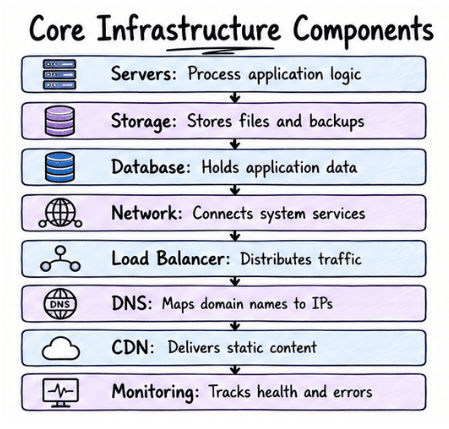
Infrastructure consists of several components that work together to run an application efficiently.
Servers: Servers process user requests and run applications or services. Large applications use multiple servers to improve performance and availability.
Storage: Storage is used to store application files, images, videos, backups, and logs. Modern applications commonly use cloud storage because it is scalable and reliable.
Database: A database stores application data such as users, orders, and payments. The choice of database depends on the application's requirements.
Network: A network connects users, servers, databases, and services, allowing them to communicate with each other.
Load Balancer: A Load Balancer distributes incoming requests across multiple servers. This improves performance, availability, and prevents any single server from becoming overloaded.
DNS (Domain Name System): DNS converts domain names into IP addresses so users can access websites using names instead of numerical IP addresses.
CDN (Content Delivery Network): A CDN stores copies of static files on servers in different locations and delivers them from the nearest server, reducing latency and improving loading speed.
Monitoring and Logging: Monitoring tracks the health and performance of applications, while logging records events and errors to help identify and fix issues.
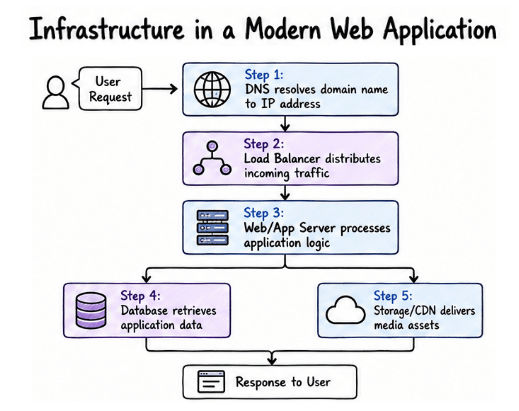
Modern web applications rely on multiple infrastructure components to process user requests efficiently. Instead of depending on a single server, they use web servers, databases, load balancers, storage systems, and cloud services to deliver fast, secure, and reliable services.
When a user visits a website, the request passes through several infrastructure components before the application returns the response.
User
   │
   ▼
DNS
   │
   ▼
Load Balancer
   │
   ▼
Web Server / Application Server
   │
   ▼
Database
   │
   ▼
Storage / Cache
Example
Suppose a customer opens an online shopping website.
The user enters the website URL.
DNS converts the domain name into an IP address.
The request reaches the Load Balancer.
The Load Balancer forwards the request to an available application server.
The application server processes the request.
The database retrieves the required product information.
Product images are loaded from storage or a CDN.
The application sends the response back to the user.
This entire process usually takes only a few milliseconds.
As an application grows, the number of users and requests also increases. To maintain performance and availability, the infrastructure must be able to handle the additional workload efficiently.
A scalable infrastructure allows applications to use more resources whenever required, ensuring they continue to perform well even during high traffic.
For example, an e-commerce website may receive thousands of visitors on normal days but millions during festive sales. A scalable infrastructure helps the application handle this increased traffic without slowing down or becoming unavailable.
Some common techniques used to support scalability include:
Adding more application servers.
Using load balancers to distribute requests.
Scaling databases horizontally or vertically.
Using a CDN to deliver static content.
Enabling auto scaling in cloud environments.
Using caching to reduce database load.
These techniques help applications handle increasing traffic while maintaining good performance and availability.
A good infrastructure should support the application's current and future needs. It should handle increasing traffic, remain available during failures, deliver consistent performance, and protect user data.
The following are the key design goals of a modern infrastructure:
Scalability: Ability to handle increasing workloads without affecting performance.
High Availability: Ensures the application remains accessible with minimal downtime.
Reliability: Delivers correct and consistent results over time.
Performance: Processes requests quickly and provides fast responses.
Security: Protects applications and user data from unauthorized access and cyber threats.
Traditional Infrastructure | Cloud Infrastructure |
|---|---|
Uses physical servers owned by the organization. | Uses virtual resources provided by cloud providers. |
High initial hardware cost. | Pay only for the resources you use. |
Manual hardware upgrades. | Resources can be scaled automatically. |
Limited scalability. | Highly scalable and flexible. |
Requires dedicated IT teams for maintenance. | Infrastructure maintenance is handled by the cloud provider. |
Suitable for organizations with strict data control requirements. | Suitable for startups, enterprises, and modern web applications. |
Infrastructure can be deployed in two main ways: Physical Infrastructure and Virtual Infrastructure. The main difference lies in how computing resources are provided and managed.
Physical Infrastructure consists of actual hardware installed in a data center, such as physical servers, storage devices, networking equipment, and power systems.
Organizations are responsible for purchasing, maintaining, upgrading, and securing the hardware.
Complete control over hardware.
Better customization.
Suitable for highly sensitive applications.
High setup cost.
Requires regular maintenance.
Difficult to scale quickly.
Virtual Infrastructure uses virtualization technology to create multiple Virtual Machines (VMs) on a single physical server. Each virtual machine behaves like an independent computer with its own operating system and resources.
This approach improves resource utilization, simplifies management, and makes it easier to scale applications. Most modern cloud platforms use virtual infrastructure.
Better resource utilization.
Lower operational cost.
Easy deployment.
Faster scaling.
Simplified management.
Example
A cloud provider can run multiple virtual machines on a single physical server. Each virtual machine operates independently, allowing multiple applications to share the same hardware efficiently.
As applications grow, infrastructure becomes more complex to manage. To keep the system fast, reliable, and available, developers must address several infrastructure challenges.
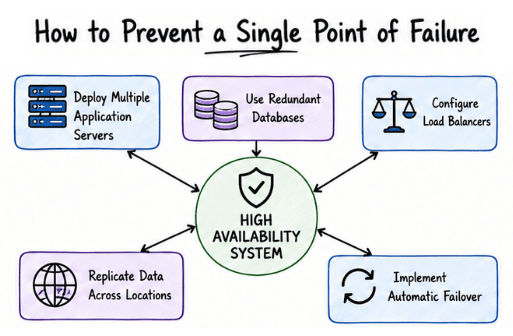
A Single Point of Failure (SPOF) is a component whose failure can cause the entire system, or a critical part of it, to stop working.
In simple words, a Single Point of Failure is any component that can bring down the system if it fails.
Example
Suppose an application uses only one database server. If that server crashes, the application cannot process user requests because there is no backup database available.
Deploy multiple application servers.
Use redundant databases.
Configure load balancers.
Replicate data across multiple locations.
Implement automatic failover.
Eliminating Single Points of Failure improves system availability, reliability, and fault tolerance.
Downtime is the period during which an application or service is unavailable to users.
In simple words, downtime is the time when users cannot access or use an application.
Downtime can occur due to:
Hardware failures
Software bugs
Network issues
Power outages
Planned maintenance
Even a few minutes of downtime can affect the user experience and may result in financial losses for businesses.
Use redundant servers.
Configure automatic failover.
Continuously monitor system health.
Keep software updated.
Maintain regular data backups.
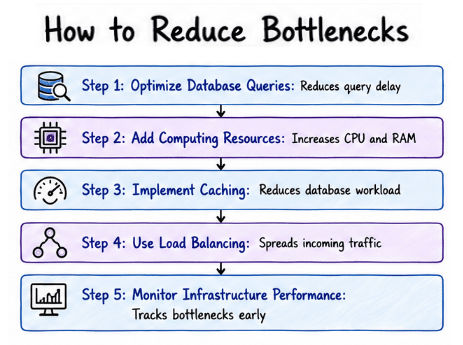
A bottleneck is a component that cannot handle the current workload efficiently, causing the overall performance of the application to slow down.
In simple words, a bottleneck is the part of a system that limits its overall performance.
Slow database queries.
Limited CPU or memory.
Network congestion.
Slow storage performance.
Overloaded application servers.
Example
Suppose an online shopping website has five web servers but only one database server. During a festive sale, the database receives more requests than it can handle, while the web servers remain underutilized. In this case, the database server becomes the bottleneck.
Optimize database queries.
Add more computing resources.
Implement caching.
Use load balancing.
Monitor infrastructure performance regularly.
Traffic spikes are sudden increases in the number of users or requests received by an application within a short period.
In simple words, a traffic spike is a sudden surge in user traffic that puts extra load on the application.
Festival sales
Product launches
Flash sales
Sporting events
Breaking news
Ticket bookings
If the infrastructure is not prepared, users may experience slow response times, errors, or even service outages.
Auto Scaling
Load Balancing
Content Delivery Network (CDN)
Caching
Cloud Infrastructure
These techniques help applications handle sudden increases in traffic while maintaining good performance and availability.
Infrastructure is the foundation of every software application. It provides the resources needed to run applications efficiently, handle user requests, store data, and keep services available.
A well-designed infrastructure helps applications scale with increasing traffic, maintain high availability, deliver consistent performance, and protect user data. By understanding concepts such as Scalability, High Availability, Reliability, Performance, Security, Cloud Infrastructure, Virtualization, and common infrastructure challenges, developers can build applications that are fast, reliable, and ready for future growth.
