
Durgesh Tiwari
Author
Modern applications receive thousands or even millions of user requests every day. During events like festive sales, ticket bookings, or product launches, traffic can increase suddenly within a few seconds. If the system is not prepared, servers may become overloaded, response times may increase, or the application may even become unavailable.
Traffic Management helps solve this problem by controlling how requests enter and move through the system. It ensures that applications remain fast, stable, and available, even during periods of heavy traffic.
Traffic Management is the process of controlling, distributing, and regulating incoming requests so that an application can handle traffic efficiently without affecting performance or stability.
In simple words, Traffic Management helps a system handle user requests smoothly, even when a large number of users access the application at the same time.
Suppose an e-commerce website receives millions of visitors during a festive sale.
Instead of sending all requests to a single server, the system distributes and manages the traffic across multiple servers. This prevents server overload and keeps the website running smoothly.
As an application grows, the number of users and requests also increases. Without proper traffic management, servers may become overloaded, causing slow responses or downtime.
Traffic Management is important because it helps to:
Prevents Server Overload – Distributes requests to avoid excessive load on a single server.
Improves Application Performance – Helps the application respond faster, even during peak traffic.
Maintains System Stability – Keeps the application running smoothly under heavy workloads.
Reduces Downtime – Prevents server failures caused by sudden traffic spikes.
Ensures Fair Resource Usage – Prevents a small number of users from consuming excessive system resources.
Improves User Experience – Provides faster responses and a more reliable application.
Modern platforms such as Amazon, Netflix, Google, and Paytm use Traffic Management techniques to handle millions of requests every day while maintaining high performance and availability.
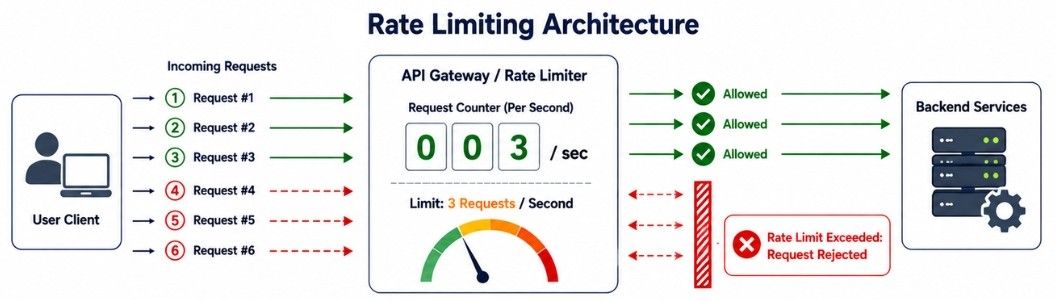
As an application becomes more popular, some users or automated programs may send too many requests in a short time. If every request is accepted, the server can become overloaded, affecting the performance for all users.
Rate Limiting is a traffic management technique that controls how many requests a user, client, or IP address can make within a specific time period. It helps protect the application from excessive traffic and ensures that system resources are used fairly.
In simple words, Rate Limiting limits the number of requests a user can make within a fixed time to protect the application from overload.
Rate Limiting follows a simple process:
A user sends a request to the application.
The system counts how many requests the user has made within a specific time period.
If the request limit has not been reached, the request is processed normally.
If the user exceeds the allowed limit, additional requests are temporarily blocked or rejected.
Once the time window resets, the user can send requests again.
Suppose an API allows each user to make 100 requests per minute.
If a user sends 95 requests, all requests are processed successfully. However, if the user sends more than 100 requests within the same minute, the extra requests are temporarily rejected until the time limit resets.
Rate Limiting provides several benefits for modern applications.
Prevents API Abuse – Stops users or bots from sending excessive requests.
Protects Against DDoS and Brute-Force Attacks – Reduces the impact of malicious traffic.
Reduces Server Load – Prevents unnecessary requests from overloading the server.
Ensures Fair Resource Usage – Gives every user a fair share of system resources.
Improves Application Stability – Helps the application remain responsive during high traffic.
Although Rate Limiting improves system reliability, it also has some limitations.
May Block Legitimate Users – Heavy users may temporarily exceed the allowed request limit.
Requires Proper Configuration – Setting limits too low or too high can affect performance or user experience.
Cannot Stop All Attacks – It reduces excessive traffic but should be combined with other security techniques for better protection.
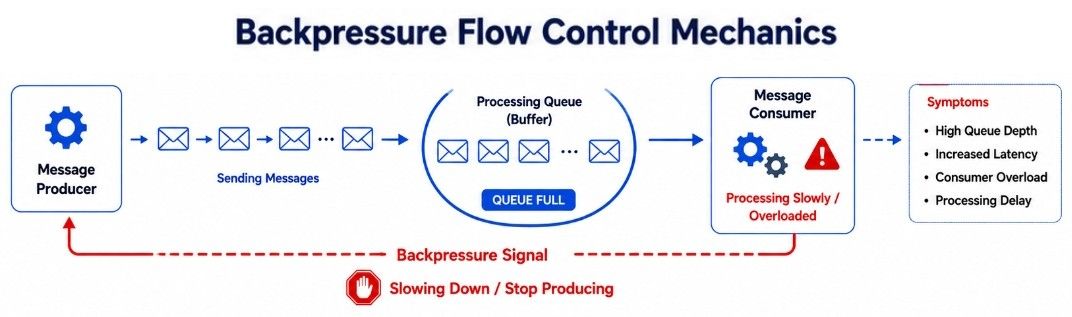
Sometimes an application receives requests faster than it can process them. If new requests keep arriving continuously, the system can become overloaded, leading to high memory usage, slow performance, or even crashes.
Backpressure is a traffic management technique that controls the flow of incoming requests when the system is under heavy load. Instead of accepting unlimited requests, the system signals the sender to slow down until it can process the existing requests.
In simple words, Backpressure tells the sender to reduce the request rate when the system is too busy to handle more requests.
Backpressure follows a simple process:
The application starts receiving incoming requests.
The system monitors how quickly it can process those requests.
If requests arrive faster than they can be processed, the system detects the overload.
The system signals the sender to reduce or pause the request rate.
Once the workload returns to normal, the sender can continue sending requests at a regular speed.
Suppose a message processing service receives 10,000 messages per second, but it can process only 5,000 messages per second.
Instead of allowing the remaining messages to keep piling up, the system uses Backpressure to tell the sender to slow down. This gives the service enough time to process the existing messages before accepting more.
Backpressure offers several benefits for high-traffic applications.
Prevents System Overload – Stops the system from accepting more requests than it can handle.
Reduces Memory Usage – Prevents large queues from consuming excessive memory.
Maintains Application Stability – Keeps the application responsive during heavy traffic.
Improves Resource Management – Allows the system to process requests at a manageable rate.
Prevents System Failures – Reduces the risk of crashes caused by excessive request volume.
Although Backpressure improves system reliability, it also has some limitations.
May Increase Response Time – Some requests may wait longer during heavy traffic.
Requires System Support – Both the sender and receiver must support the backpressure mechanism.
Not Suitable for Every System – Some real-time applications cannot delay incoming requests.
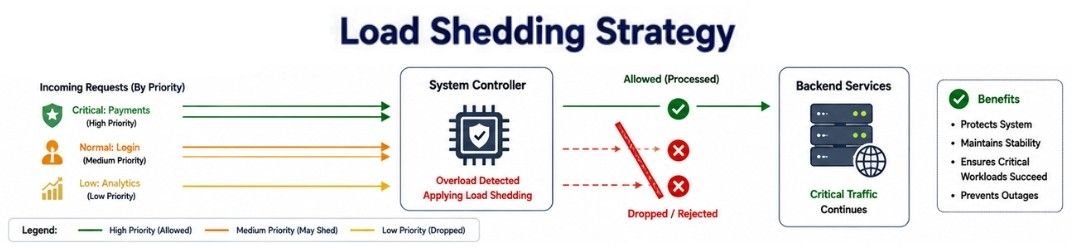
When an application receives more requests than it can handle, trying to process every request can overload the system. This may slow down the application or even cause it to stop working.
Load Shedding is a traffic management technique that intentionally drops or rejects low-priority requests when the system is under heavy load. This allows important services to continue running without interruption.
In simple words, Load Shedding protects the application by rejecting less important requests during periods of high traffic.
Load Shedding follows a simple process:
The application continuously monitors its workload.
When the system detects heavy traffic, it identifies low-priority requests.
These low-priority requests are temporarily rejected or delayed.
High-priority requests continue to be processed normally.
Once the traffic returns to normal, the application starts processing all requests again.
Suppose an e-commerce platform experiences a huge increase in traffic during a festive sale.
To keep important services running smoothly, the platform temporarily disables product recommendations and personalized suggestions. Meanwhile, essential features such as user login, product search, orders, and payments continue to work without interruption.
Load Shedding provides several benefits during periods of heavy traffic.
Prevents System Failure – Protects the application from crashing under excessive load.
Keeps Critical Services Running – Gives priority to important features such as payments and order processing.
Improves System Availability – Ensures the application remains accessible during peak traffic.
Reduces Response Time – Processes high-priority requests more quickly by reducing unnecessary workload.
Improves User Experience – Allows users to continue using essential features even when traffic is very high.
Although Load Shedding helps protect the system, it also has some limitations.
Some Requests Are Rejected – Users may not be able to access non-essential features during heavy traffic.
Requires Priority Rules – The application must correctly identify which requests are critical and which can be dropped.
May Affect User Experience – Some features may be temporarily unavailable until the system load decreases.
When an application receives different types of network traffic, not every request is equally important. Some requests, such as video streaming or online payments, require immediate processing, while others can wait for a short time.
Traffic Shaping is a traffic management technique that controls the speed, priority, and flow of network traffic. It gives higher priority to important requests and delays less critical traffic when necessary. This helps the system use network resources more efficiently.
In simple words, Traffic Shaping manages the flow of network traffic by prioritizing important requests and slowing down less important ones.
Traffic Shaping follows a simple process:
The application receives different types of network requests.
The system identifies the priority of each request.
High-priority traffic is processed immediately.
Low-priority traffic may be delayed or processed at a slower rate.
As network traffic decreases, delayed requests are processed normally.
Suppose a video streaming platform is handling millions of users.
To provide smooth video playback, the platform gives higher priority to video streaming traffic. Less important tasks, such as background analytics or log uploads, are processed later. This ensures users enjoy uninterrupted streaming even when the network is busy.
Traffic Shaping provides several benefits for applications that handle heavy network traffic.
Optimizes Bandwidth Usage – Uses available network bandwidth more efficiently.
Prioritizes Important Traffic – Ensures critical requests are processed first.
Improves Application Performance – Keeps important services running smoothly during heavy traffic.
Reduces Network Congestion – Prevents unnecessary traffic from overwhelming the network.
Enhances User Experience – Delivers faster responses for high-priority requests.
Although Traffic Shaping improves network performance, it also has some limitations.
Low-Priority Requests May Be Delayed – Some requests may take longer to process during busy periods.
Requires Proper Traffic Classification – The system must correctly identify which traffic should receive higher priority.
More Complex to Configure – Setting traffic priorities and bandwidth rules requires careful planning.
Technique | What It Does | Best Used For |
|---|---|---|
Rate Limiting | Limits the number of requests a user or client can make within a specific time period. | APIs, login systems, public services |
Backpressure | Slows down incoming requests when the system cannot process them fast enough. | Message queues, event-driven systems, streaming platforms |
Load Shedding | Rejects or drops low-priority requests to keep critical services running during heavy traffic. | High-traffic web applications, e-commerce platforms |
Traffic Shaping | Controls and prioritizes network traffic to improve bandwidth usage and application performance. | Video streaming platforms, cloud applications, enterprise networks |
Consider Netflix, where millions of users start streaming a newly released movie at the same time.
To keep the platform fast and reliable, Netflix uses multiple Traffic Management techniques together:
Rate Limiting prevents users or automated bots from sending too many API requests within a short period.
Backpressure slows down incoming requests when video processing or streaming services are already handling heavy workloads.
Load Shedding temporarily delays or disables non-essential features, such as recommendations or background tasks, so core streaming services continue to work smoothly.
Traffic Shaping gives higher priority to video streaming traffic while delaying lower-priority tasks like analytics, logging, or report generation.
By combining these traffic management techniques, Netflix can efficiently handle millions of requests, maintain high availability, and deliver a smooth streaming experience even during peak traffic.
Traffic Management is an important concept in System Design because it helps applications manage incoming requests efficiently, even during periods of heavy traffic. By controlling how requests are processed, applications can remain fast, stable, and highly available while providing a better user experience.
The key concepts covered in this chapter include:
Traffic Management controls and regulates incoming requests to improve system performance and stability.
Rate Limiting restricts the number of requests a user or client can make within a specific time period.
Backpressure slows down incoming requests when the system is processing requests more slowly than they are arriving.
Load Shedding protects critical services by rejecting low-priority requests during periods of heavy traffic.
Traffic Shaping prioritizes important network traffic and delays less critical requests to optimize resource usage.
The right traffic management technique depends on the application's workload, traffic patterns, and performance requirements.
