
Durgesh Tiwari
Author
A database stores and retrieves application data. As an application grows, the amount of data, users, and database requests also increases. If the database cannot process these requests efficiently, the entire application becomes slow.
Database Performance refers to how quickly and efficiently a database processes queries, stores data, and returns results. Good database performance helps applications handle large workloads while delivering a fast and reliable user experience.
In System Design, database performance is important because it directly affects an application's speed, scalability, reliability, and user experience. Even a powerful database can become a bottleneck if it is not properly optimized.
As data grows and more users access an application, the database must handle thousands or even millions of read and write operations. Without proper optimization, queries become slower, response times increase, and server resources are used inefficiently.
A well-optimized database helps to:
Execute queries faster.
Reduce application response time.
Support more concurrent users.
Optimize CPU, memory, and storage usage.
Scale efficiently as traffic grows.
Deliver a better user experience.
Improve overall system reliability.
Large platforms such as Amazon, Google, Netflix, and Facebook continuously optimize their databases to deliver fast and reliable services to millions of users.
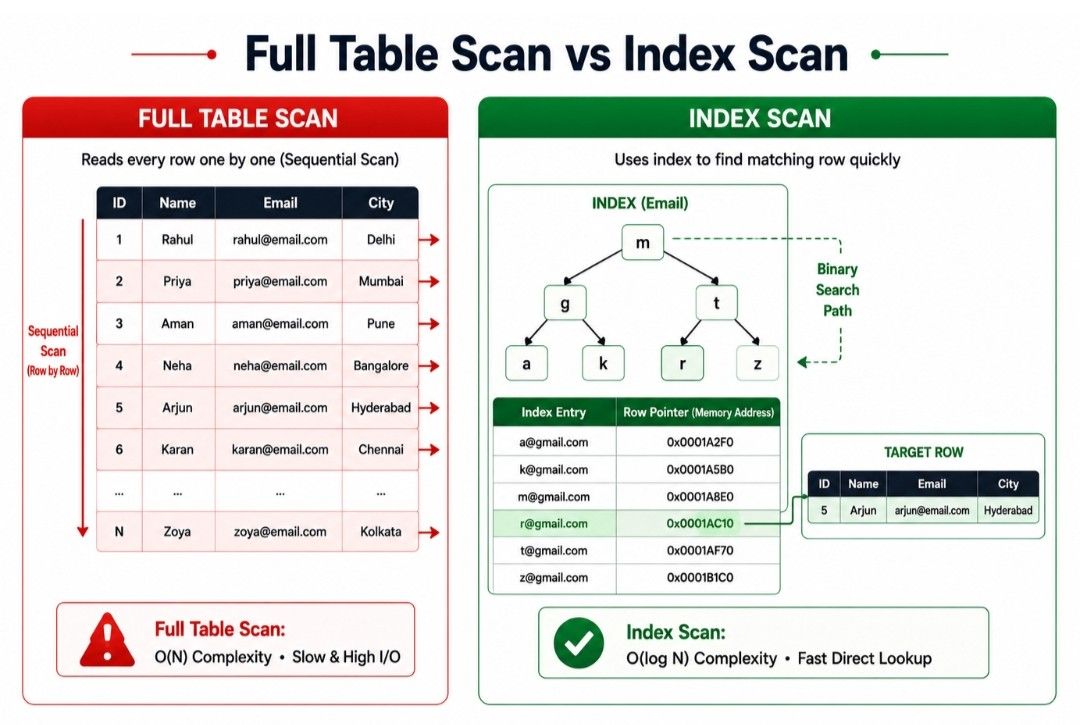
As the amount of data in a database grows, searching for a specific record becomes slower. Without an index, the database may need to scan every row in a table to find the required data. This process, called a Full Table Scan, can reduce query performance.
To solve this problem, databases use Indexing.
Indexing is a database optimization technique that creates a special data structure called an Index. It helps the database locate records quickly without scanning the entire table.
In simple words, an Index works like the index of a book. Instead of reading every page, you use the index to jump directly to the page containing the required information. A database uses an index in the same way to find records faster.
Because fewer rows need to be scanned, indexing significantly improves query performance, especially in large databases.
When an index is created on a column, the database builds a separate data structure that stores:
Indexed values
A pointer to the corresponding row in the table
When a query searches for a value, the database first looks in the index. After finding the matching entry, it directly retrieves the required row instead of scanning the entire table.
                   User Query
                        │
                        ▼
               Search the Index
                        │
                        ▼
             Matching Entry Found
                        │
                        ▼
         Fetch the Required Record
This approach is much faster than performing a Full Table Scan, making indexing one of the most effective ways to improve database performance.
Suppose the Customers table contains 1 million records, and you want to find a customer using their CustomerID.
The database can retrieve the record in two ways.
Without an Index
Without an index, the database checks each row one by one until it finds the matching record. This process is known as a Full Table Scan.
Customers Table

101  Rahul
102  Priya
103  Aman
104  Neha
105  Karan

Searching for CustomerID = 104

Database checks:

101 → 102 → 103 → 104 ✓
For large tables, this approach becomes slower because the database may need to scan every row before finding the required record.
With an Index
When an index exists on the CustomerID column, the database first searches the index and then directly accesses the required row.
Index

101 → Row 1
102 → Row 2
103 → Row 3
104 → Row 4
105 → Row 5

Searching for CustomerID = 104

Search Index
      │
      ▼
Find 104
      │
      ▼
Go directly to Row 4 ✓
Instead of scanning the entire table, the database uses the index to locate the record immediately. This reduces query execution time and improves application performance, especially for large databases.
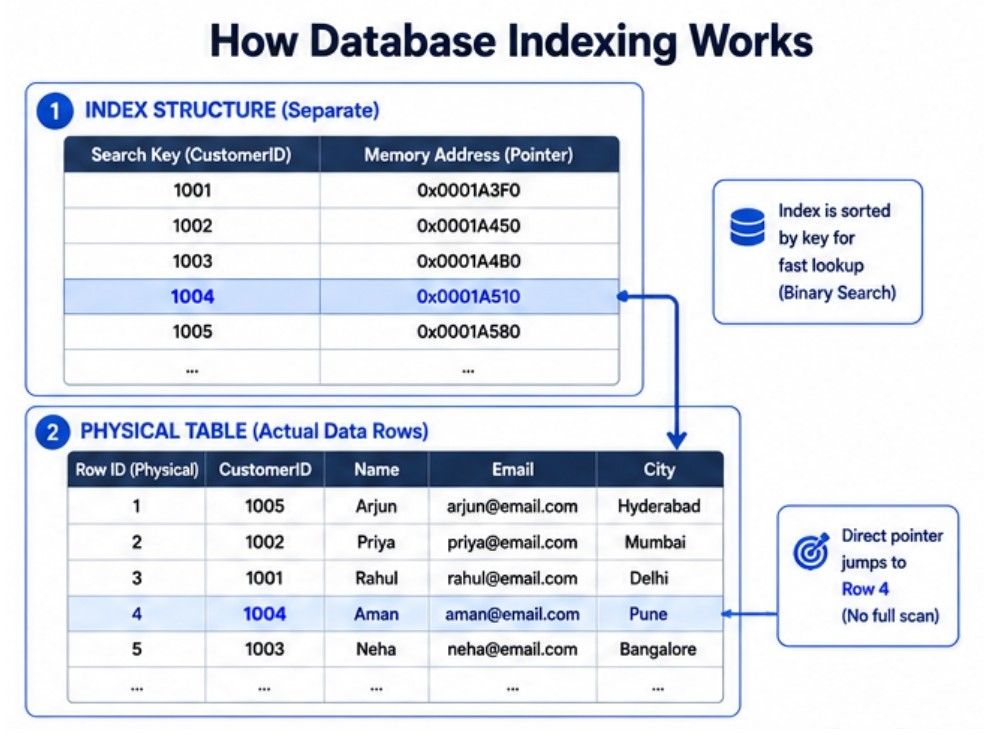
An Index helps the database retrieve data faster by reducing the number of rows it needs to scan. This improves query speed and overall database performance.
A well-designed index helps to:
Speed up data retrieval.
Reduce query execution time.
Improve search performance.
Reduce disk I/O operations.
Improve overall database performance.
Make WHERE, ORDER BY, GROUP BY, and JOIN queries faster.
Indexes provide the greatest benefit on columns that are searched, filtered, sorted, or joined frequently.
Create an Index on columns that are frequently used in queries. Choosing the right columns helps the database find records faster and improves overall query performance.
You should create indexes on:
Primary Key columns.
Foreign Key columns.
Frequently searched columns.
Columns used in WHERE clauses.
Columns used in ORDER BY clauses.
Columns used in GROUP BY clauses.
Columns frequently used in JOIN operations.
Indexes are not beneficial in every situation. Since every index must be maintained whenever data changes, too many indexes can reduce write performance.
Avoid creating indexes on:
Small tables with very few records.
Columns that are updated frequently.
Columns with very few unique values.
Tables with frequent INSERT, UPDATE, or DELETE operations.
Use indexes only where they provide a measurable performance improvement.
A well-designed database index helps the database retrieve data more efficiently.
Some key advantages are:
Speeds up data retrieval.
Improves query execution speed.
Reduces response time.
Makes searching, filtering, and sorting faster.
Improves JOIN performance.
Enhances overall database performance.
Supports better scalability for large datasets.
Although indexing improves read performance, it also has some limitations.
Some common disadvantages are:
Requires additional storage space.
Slows down INSERT operations.
Slows down UPDATE operations.
Slows down DELETE operations.
Requires regular maintenance as the data grows.
Different applications have different query patterns, so a single type of index cannot optimize every query. To improve database performance, databases provide different types of indexes based on how data is stored and accessed.
The two most commonly used database indexes are:
Clustered Index
Non-Clustered Index
                    Database Indexes
                           │
            ┌──────────────┴──────────────┐
            │                             │
            ▼                             ▼
   ┌─────────────────┐           ┌────────────────────┐
   │ Clustered Index │           │ Non-Clustered Index│
   ├─────────────────┤           ├────────────────────┤
   │ Sorts table data│           │ Separate index     │
   │ Data stored in  │           │ Points to table    │
   │ index order     │           │ data               │
   │ One per table   │           │ Multiple allowed   │
   └─────────────────┘           └────────────────────┘
A Clustered Index stores table data in sorted order, while a Non-Clustered Index stores a separate index that points to the actual data.
A Clustered Index is a type of database index that stores the actual table data in the same order as the indexed column. In other words, the rows in the table are physically sorted based on the indexed values.
Since the table data is stored in sorted order, a table can have only one Clustered Index.
In simple words, a Clustered Index arranges the actual table data based on the indexed column, helping the database locate records faster.
When a Clustered Index is created, the database rearranges the table data based on the indexed column. This keeps related records together, making searches and range queries faster.
Example
Consider the following Students table.
StudentID | Name | Course |
|---|---|---|
101 | Rahul | BCA |
102 | Priya | MCA |
103 | Aman | |
104 | Neha | BCA |
If a Clustered Index is created on StudentID, the database stores the records in ascending order.
           Clustered Index on StudentID

        Table Data (Physically Sorted)

101  Rahul   BCA
102  Priya   MCA
103  Aman    B.Tech
104  Neha    BCA
Now, when the database searches for StudentID = 103, it can quickly locate the required record because the data is already sorted.
Stores the actual table data in sorted order.
Physically organizes rows based on the indexed column.
Improves range-based searches.
Only one Clustered Index is allowed per table.
Commonly created on the Primary Key.
Faster data retrieval.
Excellent performance for range queries.
Faster sorting.
Efficient searching using the indexed column.
Improves query performance.
Only one Clustered Index is allowed per table.
Updating indexed values may require reorganizing the table.
Random INSERT operations can be slower because the data must remain sorted.
A Non-Clustered Index stores indexed values separately from the actual table data. Instead of rearranging the table rows, it creates a separate index that contains the indexed values along with pointers to the corresponding records.
Since the table data remains unchanged, a table can have multiple Non-Clustered Indexes.
In simple words, a Non-Clustered Index creates a separate lookup structure that helps the database locate records without changing the physical order of the table.
When a Non-Clustered Index is created, the database builds a separate structure that stores indexed values and pointers to the corresponding rows. During a search, the database first checks the index and then retrieves the required record from the table.
Example
Consider the following Students table.
StudentID | Name | Course |
|---|---|---|
101 | Rahul | BCA |
102 | Priya | MCA |
103 | Aman | |
104 | Neha | BCA |
Suppose a Non-Clustered Index is created on the Name column.
        Students Table

101  Rahul   BCA
102  Priya   MCA
103  Aman    B.Tech
104  Neha    BCA

      Non-Clustered Index

Aman   → Row 3
Neha   → Row 4
Priya  → Row 2
Rahul  → Row 1
When searching for Aman, the database first finds the value in the index and then follows the pointer to retrieve Row 3.
Stores indexed values separately from the table data.
Uses pointers to locate records.
Does not change the physical order of the table.
Multiple Non-Clustered Indexes can be created on a table.
Speeds up searches on indexed columns.
Supports multiple indexes on the same table.
Improves filtering and sorting.
Improves query performance.
Ideal for frequently searched columns.
Requires additional storage space.
Slows down INSERT, UPDATE, and DELETE operations because the index must also be updated.
May be slightly slower than a Clustered Index because it performs an extra lookup.
Although both indexes improve database performance, they work differently.
Clustered Index | Non-Clustered Index |
|---|---|
Stores the actual table data in sorted order. | Stores indexed values separately from the table. |
Changes the physical order of rows. | Does not change the physical order of rows. |
Only one Clustered Index per table. | Multiple Non-Clustered Indexes per table. |
Faster for range queries. | Faster for searching specific columns. |
Usually created on the Primary Key. | Commonly created on frequently searched columns. |
Requires less pointer lookup. | Uses pointers to locate records. |
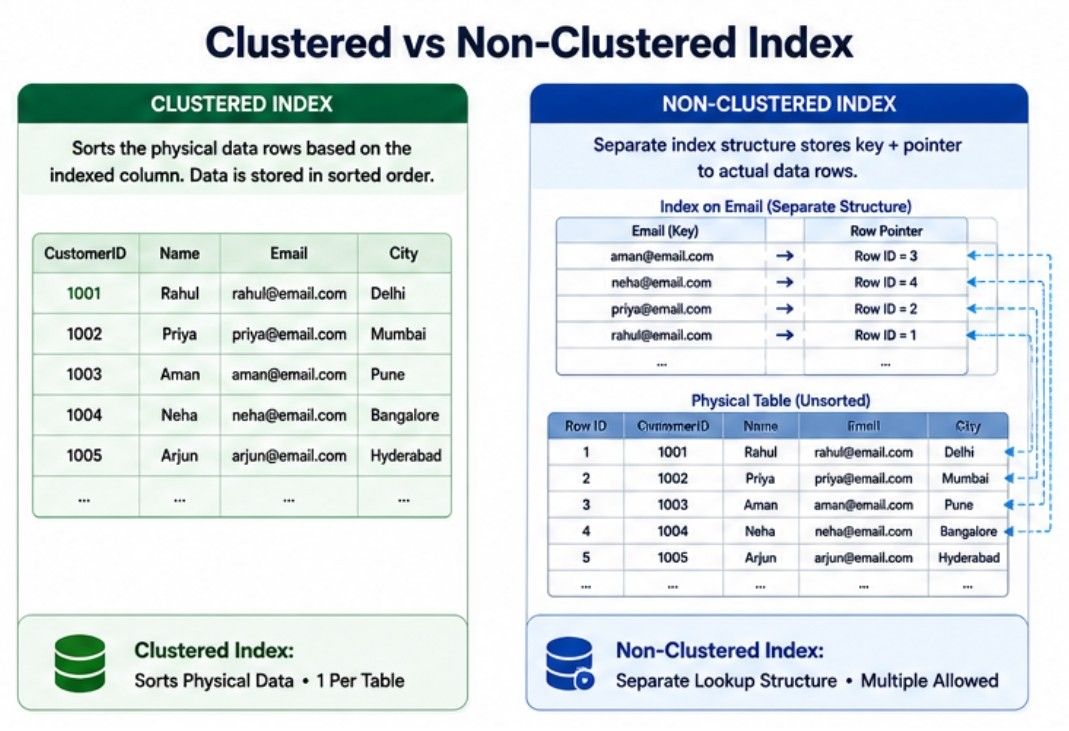
A Clustered Index is ideal when data is frequently retrieved in a sorted order. Since it stores the table data in sorted order, it is highly efficient for range queries and ordered results.
Use a Clustered Index when:
The column is the Primary Key.
Records are frequently retrieved in sorted order.
The application performs range-based queries.
Data is read more often than it is updated.
Common Examples:
CustomerID
OrderID
EmployeeID
InvoiceID
A Non-Clustered Index is ideal for columns that are searched frequently but do not need to determine the physical order of the table. It improves search performance by creating a separate index.
Use a Non-Clustered Index when:
Columns are searched frequently.
Columns are used in WHERE clauses.
Columns are used in ORDER BY queries.
Columns are frequently used in JOIN operations.
Common Examples:
Email Address
Mobile Number
Product Name
Username
City
As a database grows, SQL queries can take longer to execute if they are not written efficiently. Slow queries increase response time, consume more server resources, and reduce application performance.
This is where Query Optimization becomes important.
Query Optimization is the process of improving SQL queries so they retrieve data faster while using fewer CPU, memory, and storage resources.
In simple words, Query Optimization means writing efficient SQL queries to improve database and application performance.
A well-optimized query returns results faster, even when working with large datasets. It improves user experience and helps the application handle more users efficiently.
Query Optimization helps to:
Execute queries faster.
Reduce query response time.
Lower CPU and memory usage.
Minimize disk I/O operations.
Improve database performance.
Support more concurrent users.
Reduce server workload.
Developers use different techniques to improve query performance and reduce database workload. Some of the most common techniques are:
Indexes help the database find records quickly without scanning the entire table.
For example, creating an index on the Email column allows the database to locate a customer much faster.
Avoid selecting unnecessary columns from a table.
Instead of:
SELECT * FROM Customers;Use:
SELECT Name, Email FROM Customers;Retrieving only the required columns reduces the amount of data processed and improves query performance.
Filter records as early as possible to reduce the number of rows the database processes.
For example:
SELECT * FROM Orders WHERE CustomerID = 101;If only a few records are needed, avoid retrieving the entire table.
For example:
SELECT * FROM Products LIMIT 10;Returning fewer rows improves query performance.
Use JOINs only when required and ensure the joining columns are properly indexed. This reduces query execution time, especially for large tables.
When using JOINs, ensure the joining columns are properly indexed to improve query performance.
Use proper database design and normalization to reduce duplicate data and improve query efficiency.
Regularly updating table and index statistics helps the query optimizer choose a more efficient execution plan.
Before executing a query, the database evaluates different ways to retrieve the required data and chooses the most efficient one. This process is called a Query Execution Plan.
A Query Execution Plan shows how a query will be executed, including whether the database will use an index or perform a full table scan.
In simple words, a Query Execution Plan is the roadmap the database follows to execute a query efficiently.
A Query Execution Plan helps developers:
Understand how a query is executed.
Check whether indexes are being used.
Identify full table scans.
Find slow or expensive queries.
Improve overall database performance.
Example
Consider the following query:
SELECT Name FROM Customers
WHERE Email = '[email protected]';
If an index exists on the Email column, the database uses it to find the matching record quickly.
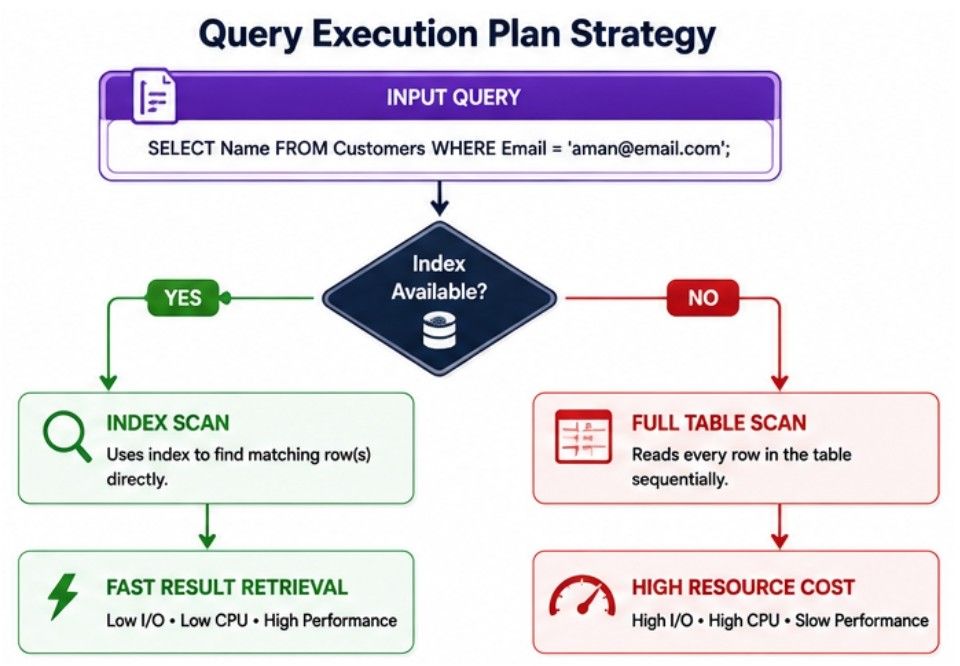
Using an index reduces query execution time, while a Full Table Scan checks every row before returning the required result.
When executing a query, the database generally retrieves data in one of two ways.
Full Table Scan | Index Scan |
|---|---|
Reads every row in the table. | Reads only indexed records. |
Slower for large tables. | Faster for large tables. |
No index required. | Requires an index. |
Uses more CPU and disk I/O. | Uses fewer system resources. |
Suitable for very small tables. | Best for frequently searched columns. |
For large tables, an Index Scan is usually much more efficient than a Full Table Scan.
A Transaction is a group of one or more database operations executed as a single unit of work.
It ensures that either all operations are completed successfully or none of them are applied. This keeps the database accurate and consistent, even if a failure occurs.
In simple words, a Transaction ensures that all operations succeed together or fail together.
Example
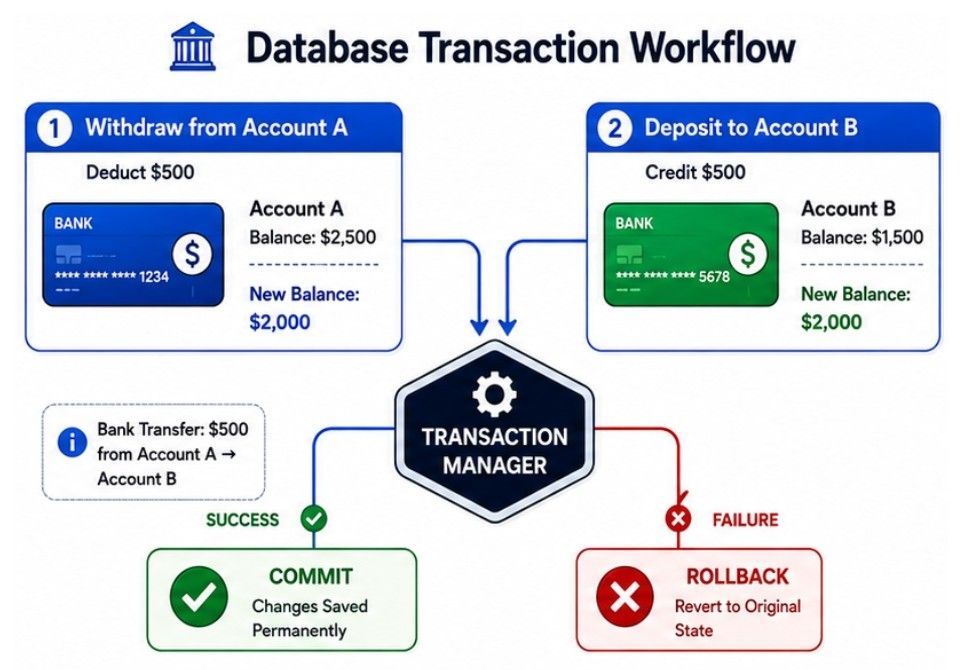
Consider an online banking application where £500 is transferred from Account A to Account B.
The transaction includes two operations:
Deduct £500 from Account A.
Add £500 to Account B.
        Transfer £500
              │
      ┌───────┴────────┐
      ▼                ▼
 Deduct from A     Add to B
      │                │
      └───────┬────────┘
              ▼
         Transaction
      ┌────────┴────────┐
      ▼                 ▼
   Success          Failure
      │                 │
    Commit          Rollback
If both operations succeed, the transaction is committed. If any operation fails, it is rolled back, and the database returns to its previous state.
Transactions help:
Maintain data consistency.
Prevent partial updates.
Recover safely from failures.
Preserve data integrity.
Transactions are commonly used in:
Banking systems
Online payment gateways
E-commerce websites
Airline reservation systems
Hospital management systems
A transaction passes through different states from the moment it starts until it is either successfully completed or rolled back.
              Start
                │
                ▼
        ┌─────────────┐
        │   Active    │
        └──────┬──────┘
               │
               ▼
   ┌──────────────────────┐
   │ Partially Committed  │
   └──────┬────────┬──────┘
          │        │
     Success     Failure
          │        │
          ▼        ▼
   ┌──────────┐ ┌────────┐
   │Committed │ │ Failed │
   └──────────┘ └────┬───┘
                     │
                     ▼
              ┌────────────┐
              │ Rolled Back│
              └────────────┘
Active: The transaction is currently executing one or more database operations.
Partially Committed: All operations have been completed, but the changes have not yet been permanently saved to the database.
Committed: The transaction completes successfully, and all changes are permanently stored in the database.
Failed: The transaction encounters an error and cannot continue.
Rolled Back: The database reverses all changes made by the transaction and restores the previous state, ensuring the database remains consistent.
When multiple users access a database at the same time, transactions must execute correctly without losing or corrupting data. Even if a system failure occurs, the database should remain accurate and consistent.
To achieve this, Relational Databases follow a set of rules known as the ACID Properties.
ACID stands for:
Atomicity
Consistency
Isolation
Durability
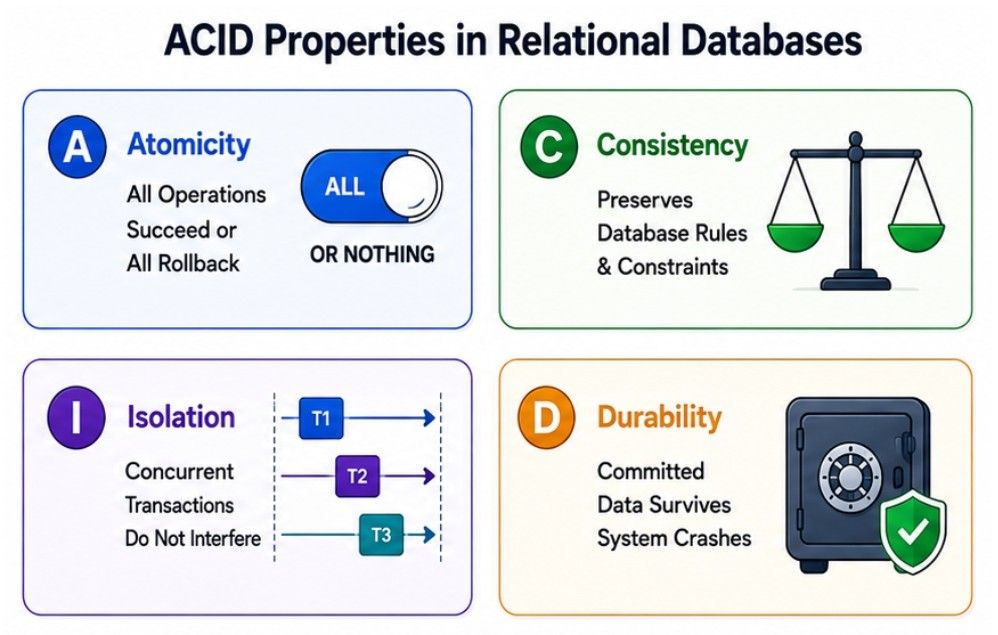
Together, these properties ensure that transactions are reliable, consistent, and fault-tolerant.
Atomicity ensures that a transaction is completed entirely or not at all. If any operation fails, the entire transaction is rolled back.
In simple words, either every operation succeeds or none of them are applied.
Example
A customer transfers £500 from Account A to Account B.
Transfer £500
      │
      ▼
 Deduct from A
      │
      ▼
 Add to B
      │
 ┌────┴────┐
 │ Success │
 └────┬────┘
      ▼
   Commit

If any step fails
        ▼
    Rollback
If the second operation fails, the entire transaction is rolled back, ensuring that no money is lost.
Consistency ensures that every transaction moves the database from one valid state to another by following all rules and constraints.
In simple words, a transaction cannot leave the database in an invalid state.
Example
If a bank account does not allow overdrafts, a transaction that would make the balance negative is rejected.
Balance = £1,000
Withdraw = £1,500

❌ Transaction Rejected
Database remains consistent.
Isolation ensures that multiple transactions running at the same time do not interfere with each other.
In simple words, each transaction behaves as if it is running alone.
Example
Two customers try to purchase the last available product simultaneously.
Customer A ──► Buy Product
                     │
                     ▼
                Database
                     ▲
                     │
Customer B ──► Buy Product

Only one transaction succeeds.
This prevents conflicts and keeps the data consistent.
Durability ensures that once a transaction is committed, its changes are permanently saved.
In simple words, committed data is never lost, even after a system failure.
Example
A customer successfully places an online order.
Place Order
     │
     ▼
  Commit
     │
     ▼
Data Saved Permanently
     │
Server Crash / Power Failure
     │
     ▼
Order Still Exists
The order remains stored even if the server crashes immediately after the transaction is committed.
As modern applications grew to handle millions of users across distributed systems, maintaining strict consistency became challenging. To improve availability and scalability, many NoSQL databases adopted the BASE Model.
BASE stands for:
Basically Available
Soft State
Eventually Consistent
In simple words, the BASE Model prioritizes availability and scalability over immediate consistency.
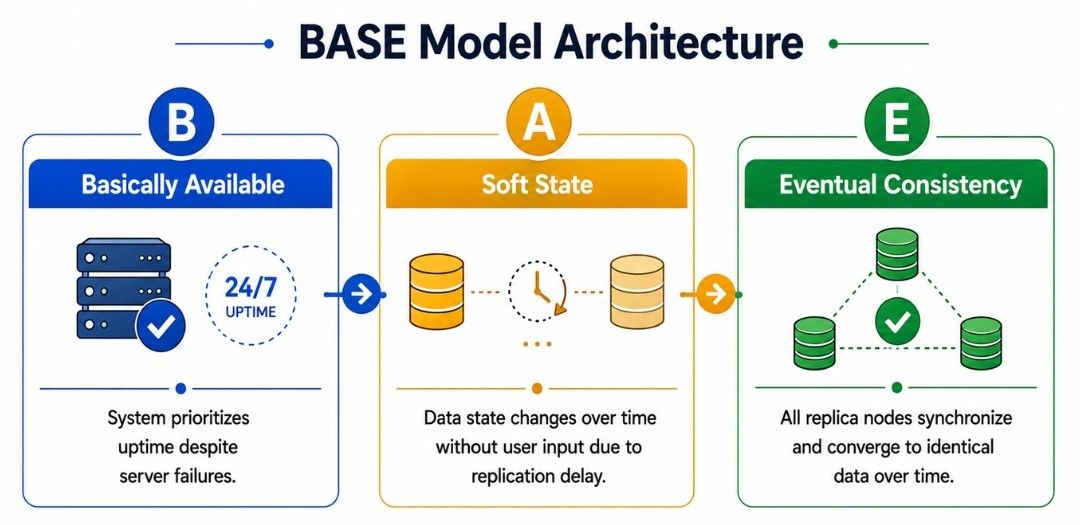
The system remains available even if some servers fail. Users continue receiving responses, although some data may be temporarily unavailable.
Example
If one server goes down, another server continues handling user requests.
Data may change over time because updates are gradually synchronized across multiple servers.
Example
A newly updated profile picture may appear on one server immediately but take a few seconds to appear on another.
The system does not guarantee immediate consistency. Instead, all copies of the data become consistent after a short period.
Example
After updating a profile picture, some users may briefly see the old image. Once the update is synchronized across all servers, everyone sees the latest version.
High availability
Horizontal scalability
Distributed architecture
Eventual consistency
Commonly used in NoSQL databases
Both ACID and BASE are used to manage database transactions, but they focus on different goals.
ACID | BASE |
|---|---|
Prioritizes data consistency. | Prioritizes availability and scalability. |
Used mainly in SQL databases. | Used mainly in NoSQL databases. |
Strong consistency. | Eventual consistency. |
Best for transactional systems. | Best for distributed systems. |
Ensures every transaction is immediately consistent. | Allows temporary inconsistencies for better performance. |
Database Performance is an important part of System Design because it directly affects application speed, reliability, and scalability.
Indexing helps retrieve data faster.
Query Optimization improves SQL query performance.
Query Execution Plans help identify and optimize slow queries.
Transactions ensure multiple operations are completed safely.
ACID Properties provide reliable and consistent transactions.
BASE Model focuses on high availability and scalability in distributed systems.
Understanding these concepts helps developers design fast, reliable, and scalable database systems for modern applications.
