
Durgesh Tiwari
Author
Every time you open a website, log in to an app, make an online payment, or use a cloud service, your data travels through multiple networks before reaching its destination.
For this communication to be reliable, two things are important: security and performance.
Network Security protects your data from unauthorized access and cyber attacks, while Network Performance ensures that data travels quickly and efficiently between devices.
Both work together to provide a good user experience. A fast network without security can expose sensitive information, while a secure network with poor performance can make websites and applications slow to use.
In this chapter, you'll learn the basic concepts of network security and the key metrics used to measure network performance.
Whenever data travels over the Internet, it passes through different devices and networks before reaching its destination.
If this data is not protected, attackers may intercept it, steal sensitive information, or even modify the data during transmission.
To keep communication secure, modern networks use technologies such as TLS, Digital Certificates, and Encryption.
These technologies work together to:
Encrypt data while it is transmitted over the network
Verify that you're connected to the correct website
Protect data from being modified during transmission
Because of these security technologies, you can safely use online banking, shopping websites, cloud applications, and many other online services without exposing your sensitive information.
Whenever you open a website that starts with HTTPS, your browser creates a secure connection with the server before any data is exchanged. This secure connection is established using TLS (Transport Layer Security).
Earlier, websites used SSL (Secure Sockets Layer) for this purpose. However, over time, several security vulnerabilities were found in SSL, so it was replaced by TLS, which is more secure, faster, and better suited for modern web applications.
Today, almost every HTTPS website relies on TLS to protect communication between the client and the server.
TLS provides three important security features:
Encryption – Converts data into a secure format so that only the sender and receiver can read it.
Authentication – Verifies that you're connected to the genuine website and not a fake one.
Data Integrity – Ensures that the data is not modified while it is being transmitted.
You may still hear people use the term SSL Certificate, but that's mainly because the name has become popular over the years. In reality, modern HTTPS websites use TLS certificates.
SSL | TLS |
|---|---|
Older security protocol | Modern security protocol |
No longer considered secure | Secure and actively used |
Deprecated | Standard for HTTPS today |
Replaced by TLS | Used by modern browsers and websites |
Interview Tip: A very common interview question is "Does HTTPS use SSL or TLS?"
The correct answer is TLS. Even though many people still say SSL Certificate, modern HTTPS communication is protected using TLS.
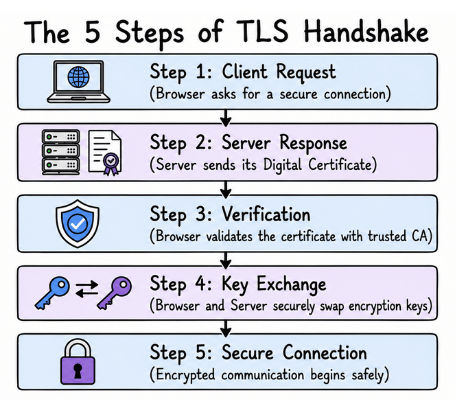
Before your browser and a website can exchange encrypted data, they first need to create a secure connection. This process is called the TLS Handshake.
You can think of it as a quick security check that happens before any sensitive information is sent. During this process, the browser and the server verify each other and agree on how to encrypt the communication.
The TLS Handshake follows these basic steps:
The browser sends a request to establish a secure connection.
The server responds by sending its Digital Certificate.
The browser verifies that the certificate is valid and issued by a trusted authority.
The browser and server securely exchange encryption keys.
A secure connection is established, and encrypted communication begins.
Only after the handshake is complete does your browser send sensitive information like usernames, passwords, or payment details.
Real-World Example
When you visit your online banking website, the TLS Handshake happens automatically before the login page loads securely. Once the secure connection is established, all the information you send is encrypted.
A Digital Certificate is a digital document that proves a website is genuine and helps browsers verify that they are communicating with the correct server.
These certificates are issued by trusted organizations called Certificate Authorities (CAs).
A digital certificate typically contains:
Domain name
Public key
Certificate issuer (Certificate Authority)
Expiration date
Whenever you visit an HTTPS website, your browser checks the website's certificate before creating a secure connection.
If the certificate is valid, the browser continues normally. If it is expired, invalid, or issued by an untrusted authority, the browser displays a security warning because the website may not be safe.
Digital certificates play an important role in protecting users from fake websites and attacks such as Man-in-the-Middle (MITM) attacks.
When you use a website or an application, you expect it to respond quickly. Nobody likes slow-loading pages, buffering videos, or video calls that keep freezing.
A network may be secure, but if data takes too long to travel, the overall user experience becomes poor.
This is why Network Performance is just as important as network security.
Network performance tells us how well a network transfers data from one device to another. It helps us measure the speed, reliability, and overall efficiency of a network.
To understand network performance, we'll look at five important metrics:
Latency
Bandwidth
Throughput
Packet Loss
Jitter
Each metric measures a different part of network performance, and together they give us a complete picture of how well a network is working.
Imagine you click the Play button on a YouTube video. If the video starts almost immediately, the network is responding quickly. But if it takes a few seconds before anything happens, there is a delay.
This delay is called Latency.
In simple words, latency is the time it takes for data to travel from your device to the destination and for the response to come back.
Latency is usually measured in milliseconds (ms).
The lower the latency, the faster the communication. Higher latency means longer waiting time before you receive a response.
Low latency is especially important for applications where every millisecond matters, such as:
Online gaming
Video calls
Live streaming
Voice calls (VoIP)
Stock trading platforms
For example, during a video call, high latency can cause noticeable delays between speaking and hearing the other person's voice. Even if your Internet speed is good, a high latency can still make the conversation feel slow and unnatural.
When people talk about Internet speed, they often mean Bandwidth. However, bandwidth doesn't tell you how fast your Internet feels. It tells you how much data the network can carry at one time.
In simple words, Bandwidth is the maximum amount of data that can be transferred over a network in a given amount of time.
It is usually measured in Mbps (Megabits per second) or Gbps (Gigabits per second).
A simple way to understand bandwidth is to imagine a highway.
A narrow road can only allow a few vehicles to travel at the same time. A wider highway can handle many more vehicles together.
The same idea applies to a network. A higher bandwidth allows more data to travel simultaneously, but it doesn't always mean you'll get faster responses. Other factors like latency, network congestion, and server performance also affect the overall experience.
While Bandwidth tells you the maximum capacity of a network, Throughput tells you how much data is actually transferred in real-world conditions.
In simple words, Throughput is the actual amount of data that successfully reaches its destination.
In practice, throughput is almost always lower than the available bandwidth. This happens because of factors such as network congestion, packet loss, interference, or hardware limitations.
For example, suppose your Internet plan provides 100 Mbps bandwidth. During a file download, you notice the actual download speed is only 80 Mbps.
In this case:
Bandwidth = 100 Mbps (maximum capacity)
Throughput = 80 Mbps (actual data transferred)
A simple way to remember the difference is:
Bandwidth tells you what the network can deliver.
Throughput tells you what the network actually delivers.
Quick Tip: Think of bandwidth as the size of a water pipe and throughput as the amount of water actually flowing through it. Even if the pipe is large, the actual flow can be lower because of blockages or other limitations.
When data is sent over a network, it is broken into small pieces called packets. These packets travel through the network and are joined together again when they reach the destination.
Sometimes, not all packets make it to the destination. When one or more packets are lost during transmission, it is called Packet Loss.
Packet loss can happen for several reasons, such as:
Network congestion
Faulty network hardware
Weak or unstable Wi-Fi signals
Damaged cables or networking equipment
Even a small amount of packet loss can affect applications that rely on real-time communication.
For example, during a video call, packet loss can cause the video to freeze, the audio to break, or parts of the conversation to be missed. In online games, it may cause lag or delayed player actions.
The lower the packet loss, the more reliable the network communication.
While Latency measures how long packets take to travel, Jitter measures whether they arrive at a consistent time.
Ideally, packets should reach the destination at regular intervals. If some packets arrive earlier and others arrive much later, the variation in their arrival time is called Jitter.
High jitter makes real-time communication unstable because data does not arrive in a steady flow.
For example, high jitter can cause:
Choppy video calls
Robotic or broken voice during calls
Lag in online games
Interruptions during live streaming
A network with low jitter delivers packets more consistently, resulting in smoother audio, video, and overall communication.
No single metric can tell you whether a network is performing well.
For example, a network may have high bandwidth, but users can still experience slow loading if the latency is high. Similarly, low latency alone doesn't guarantee good performance if there is packet loss or high jitter.
That's why network engineers look at multiple metrics together to get a complete picture of a network's health and performance.
Metric | What It Measures | Ideal Value |
|---|---|---|
Latency | Time taken for data to travel between devices | Lower |
Bandwidth | Maximum amount of data the network can carry | Higher |
Throughput | Actual amount of data successfully transferred | Higher |
Packet Loss | Percentage of packets that fail to reach the destination | Lower |
Jitter | Variation in packet arrival time | Lower |
By monitoring these metrics together, engineers can identify performance bottlenecks, troubleshoot network issues, and improve the overall user experience.
Interview Tip: A very common interview question is, "What is the difference between Bandwidth and Throughput?"
Bandwidth is the maximum amount of data a network can transfer, while Throughput is the actual amount of data that is successfully transferred under real network conditions.
