
Durgesh Tiwari
Author
Before Java 9, most Java applications were built using the traditional classpath-based architecture. These applications are commonly known as non-modular projects.
With the introduction of the Java Platform Module System (JPMS) in Java 9, Java applications became more secure, maintainable, and modular.
Migration to JPMS means converting an existing Java application into a module-based application where code is organized into well-defined modules with controlled dependencies and better encapsulation.
A non-modular project is a traditional Java application that does not use the Java Module System (JPMS).
These applications usually:
Use the classpath for dependency management.
Do not contain a module-info.java file.
Allow unrestricted access between packages.
Lack strong encapsulation and module boundaries.
Common characteristics
All classes are loaded through the classpath
Dependencies are loosely managed
Internal APIs can be accessed easily
Reflection has broad access permissions
Package boundaries are weak and less secure
Migrating to the Java Module System (JPMS) helps modernize applications by improving structure, security, and maintainability.
Benefits of Migration
Strong encapsulation between modules
Better dependency management
Improved application security
Faster startup and optimized performance
Better scalability for large applications
Cleaner and more organized architecture
More reliable configuration and module resolution
Migrating older Java applications to JPMS is not always straightforward because most legacy systems were originally designed without modular architecture in mind.
Common migration challenges
Large monolithic codebases that are difficult to split into modules
Split packages across multiple JAR files or modules
Reflection access issues caused by strong encapsulation
Compatibility problems with older third-party libraries
Cyclic dependencies between components
Usage of internal JDK APIs restricted by JPMS
Migrating a traditional Java application to JPMS is usually done gradually in multiple steps.
Before starting migration, carefully examine the current application structure.
Things to check:
Package organization
Project dependencies
Third-party libraries
Usage of internal JDK APIs
This helps identify possible migration issues early.
Add a module-info.java file to define the module structure.
Example
module com.app.core {
    exports com.app.service;
}
This defines:
The module name
Packages that can be accessed by other modules
Use the requires keyword to declare dependencies between modules.
Example
module com.app.client {
    requires com.app.core;
}
This allows com.app.client to access exported packages from com.app.core.
Many older frameworks rely heavily on reflection.
Since JPMS restricts reflective access by default, additional configuration may be required using:
opens
open module
JVM flags like -add-opens
Example
module com.app.core {
    opens com.app.entity;
}
This allows reflection-based frameworks to access the package at runtime.
Traditional Java applications use the:
classpathModular Java applications use the:
module-pathThe module path allows Java to manage dependencies and module boundaries more effectively.
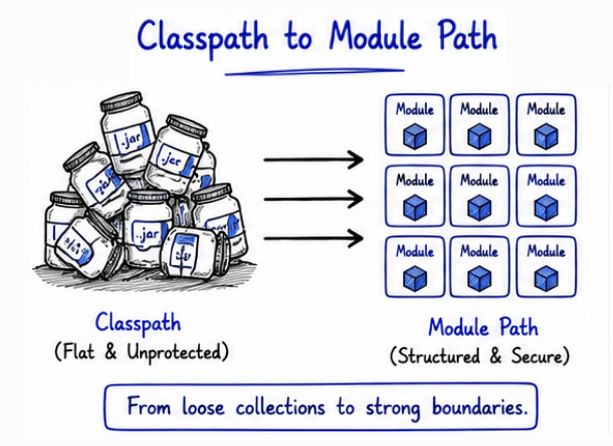
Feature | Classpath | Module Path |
|---|---|---|
Structure | Flat and loosely organized | Proper modular structure |
Encapsulation | Weak encapsulation | Strong encapsulation |
Dependency Management | No dependency validation | Supports dependency checking |
Access Control | Unrestricted package access | Controlled module access |
Security | Less secure | Better security and isolation |
Introduced In | Used before Java 9 | Introduced with JPMS in Java 9 |
Maintainability | Harder in large applications | Easier to maintain and scale |
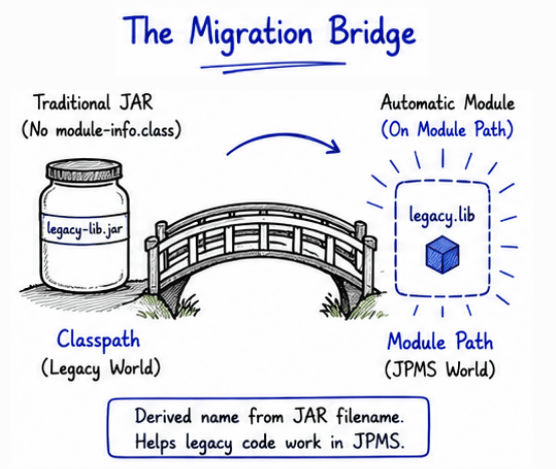
When a non-modular JAR file is placed on the module path, JPMS automatically treats it as a module. Such modules are called automatic modules.
This feature helps older libraries work with JPMS even if they do not contain a module-info.java file.
Why automatic modules are useful
Make migration easier for existing applications
Provide backward compatibility with older libraries
Support gradual migration to JPMS
Allow legacy dependencies to work in modular projects
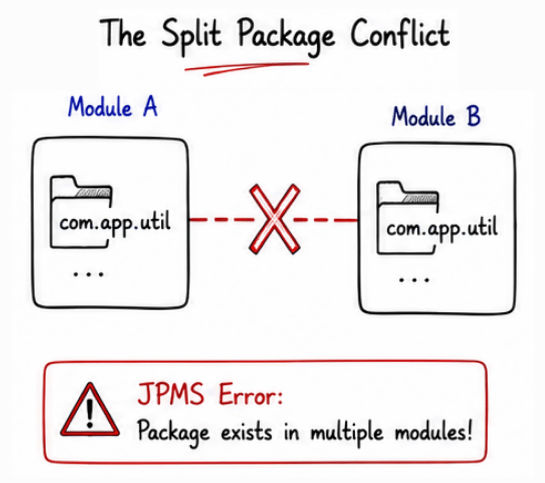
A split package occurs when the same package exists in multiple modules.
This is one of the most common problems during JPMS migration.
Example
com.app.utilexisting inside multiple modules.
Why split packages are a problem
Creates ambiguity during module resolution
Makes dependency management difficult
Breaks clear module boundaries
JPMS does not allow split packages
Recommended solution
Keep a package inside only one module
Move shared code into a separate common module
Maintain clear ownership of packages
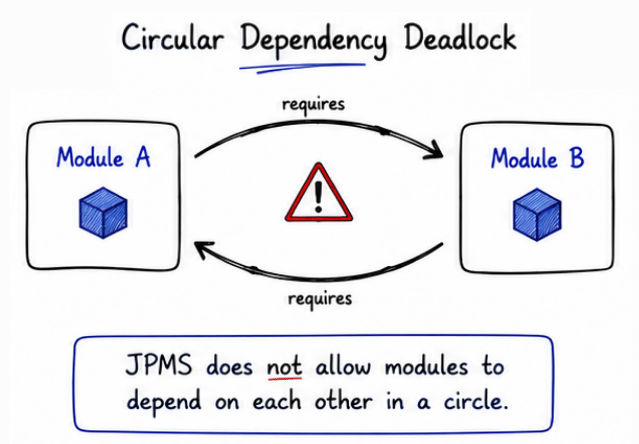
JPMS does not allow circular dependencies between modules because they create unstable and tightly coupled architectures.
Example
Module A → Module B → Module AHere:
Module A depends on Module B
Module B again depends on Module A
This creates a cyclic dependency, which JPMS does not permit.
Why cyclic dependencies are problematic
Makes applications harder to maintain
Creates tightly coupled modules
Increases architectural complexity
Causes dependency resolution issues
Common solutions
Refactor the application architecture
Move shared logic into a common/shared module
Reduce unnecessary inter-module dependencies
Keep modules focused on single responsibilities
Different projects follow different approaches when migrating from traditional Java applications to JPMS.
In incremental migration, modules are converted gradually instead of rewriting the entire application at once.
Why it is commonly used
Safer for large enterprise applications
Easier to manage and test
Reduces migration risk
Allows gradual adoption of JPMS
This approach is preferred for legacy systems and large codebases.
In full modularization, the complete application is converted into modules in a single migration process.
Advantages
Cleaner modular architecture
Better dependency management from the beginning
Consistent module structure across the application
Challenges
Higher migration complexity
More risky for large applications
Requires extensive testing and refactoring
Migration to JPMS is commonly seen in modern enterprise applications where better modularity and maintainability are important.
Some common examples include:
Enterprise Java applications
Banking and financial systems
Large Spring-based applications
Cloud-native backend systems
Microservices-based architectures
Many organizations adopt JPMS to improve long-term scalability and dependency management.
During migration, some frameworks may require additional configuration because JPMS restricts reflective and internal access by default.
Spring Framework → often requires reflective access using opens
Hibernate → relies on deep reflection for entity mapping and proxies
Jackson → requires runtime reflective access for serialization and deserialization
Migrating from non-modular projects to JPMS helps build modern Java applications with better structure, security, and maintainability.
Although migration can introduce challenges like:
Reflection restrictions
Split package issues
Dependency management problems
Framework compatibility issues
JPMS provides major advantages such as:
Strong encapsulation
Cleaner architecture
Improved security
Better scalability
Easier maintenance for large applications
