
Author
Java applications need to store and manage data, and most of this data is stored in databases. To connect Java applications with databases in a standard way, Java provides JDBC.
JDBC API is part of the java.sql package and provides important interfaces like Connection, Statement, and ResultSet to interact with databases.
? It allows Java programs to execute SQL queries and work with database data easily.
In simple words: JDBC helps Java talk to databases using SQL.
JDBC (Java Database Connectivity) is a Java API used to connect Java applications with databases and execute SQL queries.
? It acts as a bridge between Java code and the database, enabling communication between them.
Simple Example (Basic JDBC Flow)
import java.sql.*;

public class Demo {
    public static void main(String[] args) throws Exception {

        // Step 1: Load Driver (optional in modern Java)
        Class.forName("com.mysql.cj.jdbc.Driver");

        // Step 2: Create Connection
        Connection con = DriverManager.getConnection(
                "jdbc:mysql://localhost:3306/testdb", "root", "password");

        // Step 3: Create Statement
        Statement stmt = con.createStatement();

        // Step 4: Execute Query
        ResultSet rs = stmt.executeQuery("SELECT * FROM users");

        // Step 5: Process Result
        while (rs.next()) {
            System.out.println(rs.getString("name"));
        }

        // Step 6: Close Connection
        con.close();
    }
}
? This example shows how Java connects to a database and retrieves data.
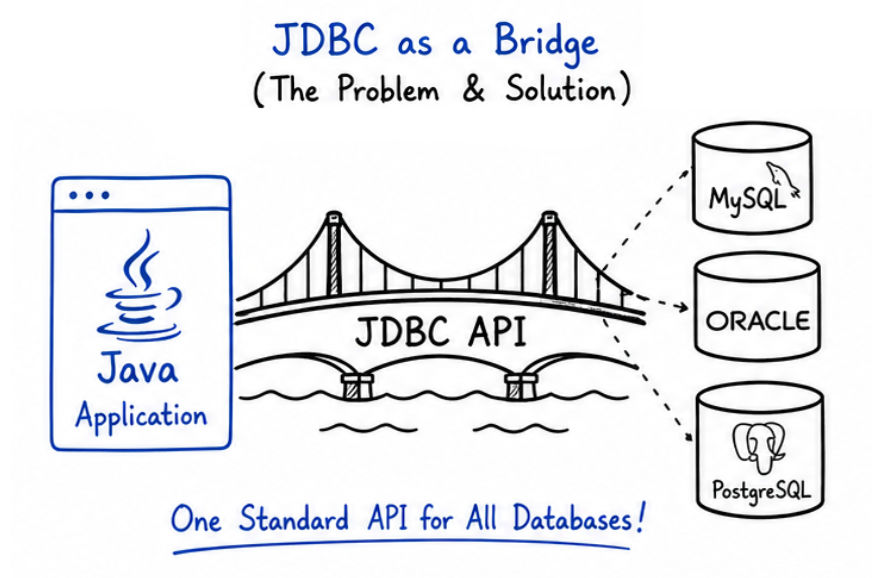
Before JDBC
Problems
After JDBC (Solution)
? JDBC solves the problem of database dependency and makes applications more flexible, portable, and scalable.
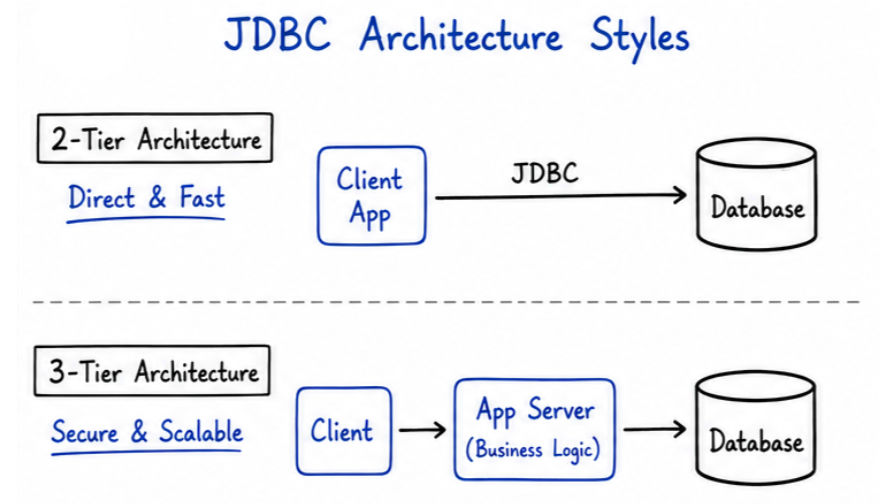
JDBC architecture defines how communication happens between a Java application and a database.
It explains how data flows and how different layers interact in real-world applications.
Direct communication between application and database
Flow:
Java Application → JDBC → Database
How it Works
Advantages
Disadvantages
Example Use Case
? Used in simple applications where performance is more important than scalability.
Uses a middle layer (Application Server)
Flow:
Client → Application Server → JDBC → Database
How it Works
Advantages
Disadvantages
Example Use Case
? Used in real-world applications where scalability, security, and maintainability are important.
| Feature | 2-Tier Architecture | 3-Tier Architecture |
|---|---|---|
| Definition | Direct connection between application and database | Uses a middle layer (application server) between client and database |
| Layers | 2 layers (Application + Database) | 3 layers (Client + Application Server + Database) |
| Flow | Java Application → JDBC → Database | Client → Application Server → JDBC → Database |
| Scalability | Low (not suitable for large systems) | High (supports large and complex applications) |
| Security | Less secure (direct DB access) | More secure (no direct DB access) |
| Performance | Faster (no middle layer) | Slightly slower (extra layer involved) |
| Maintenance | Difficult to manage in large apps | Easier due to separation of concerns |
| Business Logic | Mixed with application code | Handled in application server |
| Use Cases | Small desktop apps | Enterprise apps, web apps, APIs |
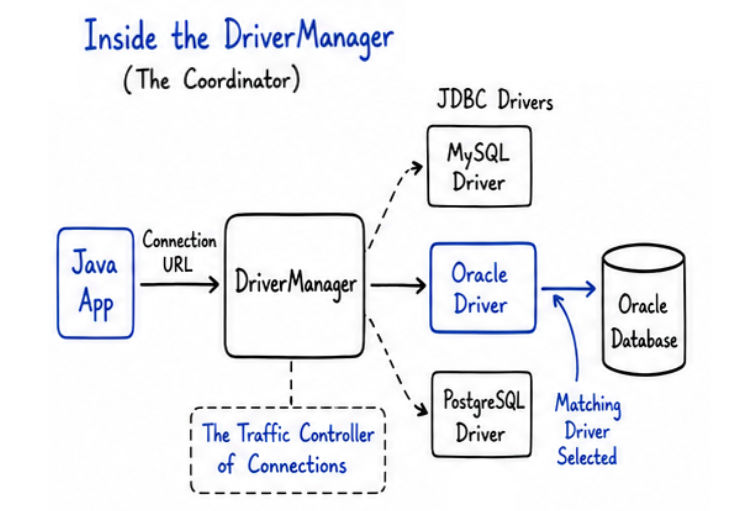
JDBC follows a structured process to interact with a database.
Each component plays an important role in establishing the connection and executing queries.
Flow Diagram
Java Application
        ↓
JDBC API
        ↓
DriverManager
        ↓
JDBC Driver
        ↓
Database
Step 1: Load Driver
Example:
Class.forName("com.mysql.cj.jdbc.Driver");
Step 2: Create Connection
DriverManagerExample:
Connection con = DriverManager.getConnection(
    "jdbc:mysql://localhost:3306/testdb", "root", "password");
Step 3: Create Statement
Used to write and send SQL queries
Example:
Statement stmt = con.createStatement();
Step 4: Execute Query
Example:
ResultSet rs = stmt.executeQuery("SELECT * FROM users");
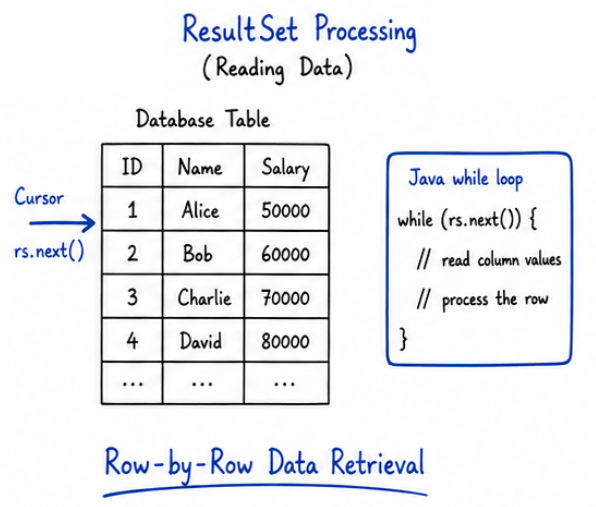
Step 5: Process Result
Retrieve and process data using ResultSet
Example:
while (rs.next()) {
    System.out.println(rs.getString("name"));
}
Step 6: Close Connection
Close connection to free resources
? Example:
con.close();
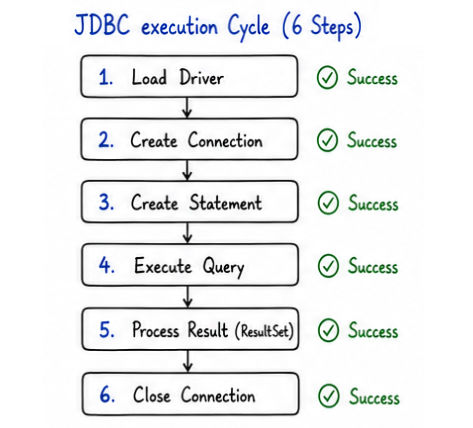
import java.sql.*;

public class Demo {
    public static void main(String[] args) throws Exception {

        // Step 1: Load Driver
        Class.forName("com.mysql.cj.jdbc.Driver");

        // Step 2: Create Connection
        Connection con = DriverManager.getConnection(
                "jdbc:mysql://localhost:3306/testdb", "root", "password");

        // Step 3: Create Statement
        Statement stmt = con.createStatement();

        // Step 4: Execute Query
        ResultSet rs = stmt.executeQuery("SELECT * FROM users");

        // Step 5: Process Result
        while (rs.next()) {
            System.out.println(rs.getString("name"));
        }

        // Step 6: Close Connection
        con.close();
    }
}
JDBC is widely used in real applications such as:
JDBC is a core technology in Java that enables applications to interact with databases in a structured and efficient way.
? Understanding JDBC API, architecture, and working flow is essential for building real-world backend systems and cracking Java interviews.
