
Durgesh Tiwari
Author
java.util.logging)The Logger class is the core part of Java’s built-in logging framework (java.util.logging). It is used to create log messages, monitor application behavior, track errors, and debug applications efficiently.
In real-world Java applications, loggers help developers:
Monitor application flow
Detect errors quickly
Debug production issues
Maintain large enterprise systems
In simple words: The
Loggerclass helps Java applications record important information while the program is running.
The Logger class is used to generate and manage log messages in Java applications.
It belongs to:
java.util.logging.LoggerThe logger records events such as:
Information messages
Warning messages
Error messages
Debugging details
👉 Instead of using System.out.println(), professional applications use Logger for structured logging.
A logger object is created using the getLogger() method.
Syntax
Logger logger =
        Logger.getLogger(ClassName.class.getName());
Example: Creating a Logger
import java.util.logging.Logger;

public class Test {

    private static final Logger logger =
            Logger.getLogger(Test.class.getName());

    public static void main(String[] args) {

        logger.info("Application Started");
    }
}
Output
INFO: Application Started👉 Logger.getLogger() creates a logger associated with the current class and helps generate professional log messages in Java applications.
The Logger class provides different logging methods to record messages based on their importance and purpose.
These methods help developers categorize logs properly for monitoring, debugging, and troubleshooting.
Common Logging Methods
Method | Purpose |
|---|---|
| Records general application information |
| Records warning or unexpected situations |
| Records critical errors and failures |
| Records configuration-related information |
| Records debugging and development details |
Example: Logging Methods
import java.util.logging.Logger;

public class Test {

    private static final Logger logger =
            Logger.getLogger(Test.class.getName());

    public static void main(String[] args) {

        logger.info("Application Started");

        logger.warning("Low Memory Warning");

        logger.severe("Database Connection Failed");
    }
}
Output
INFO: Application Started
WARNING: Low Memory Warning
SEVERE: Database Connection Failed
👉 Different logging methods help organize application logs and improve debugging and monitoring in Java applications.
Logging frameworks use different logging levels to classify messages based on their importance and purpose.
These levels help developers control which information should be displayed, stored, or ignored during application execution.
Common Logging Levels in Java
Level | Purpose |
|---|---|
| General application information and successful operations |
| Indicates possible issues or unexpected situations |
| Critical errors and application failures |
| Configuration and setup-related information |
| Basic debugging and development details |
| More detailed debugging information |
| Highly detailed internal execution logs |
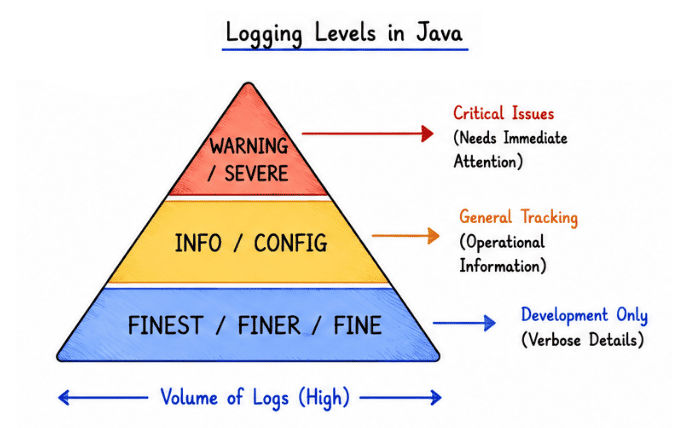
Example of Logging Levels
import java.util.logging.*;

public class Test {

    private static final Logger logger =
            Logger.getLogger(Test.class.getName());

    public static void main(String[] args) {

        logger.severe("Critical Error");

        logger.warning("Warning Message");

        logger.info("Information Message");

        logger.config("Configuration Loaded");

        logger.fine("Debugging Message");
    }
}
👉 FINE, FINER, and FINEST logs may not appear by default because the default logging level is usually set to INFO.
👉 Logging levels help developers organize logs efficiently in development, testing, and production environments.
Java allows developers to control which logging levels should be displayed during application execution.
This helps reduce unnecessary logs and improves log management.
Example
import java.util.logging.*;

public class Test {

    private static final Logger logger =
            Logger.getLogger(Test.class.getName());

    public static void main(String[] args) {

        logger.setLevel(Level.WARNING);

        logger.info("Info Message");

        logger.warning("Warning Message");

        logger.severe("Critical Error");
    }
}
👉 Since the logging level is set to WARNING, only WARNING and SEVERE messages are displayed, while lower-level logs like INFO are ignored.
Handlers in Java Logging determine where log messages should be written or stored.
They act as output destinations for logs and help manage how logging information is delivered.
Handlers can send logs to:
Console
Log files
Output streams
Remote servers
In simple words: Handlers decide where log messages will appear.
Common Handlers
Handler | Purpose |
|---|---|
| Writes log messages to the console |
| Writes log messages to files |
| Writes log messages to output streams |
Example: Using ConsoleHandler
import java.util.logging.*;

public class Test {

    private static final Logger logger =
            Logger.getLogger(Test.class.getName());

    public static void main(String[] args) {

        ConsoleHandler handler =
                new ConsoleHandler();

        logger.addHandler(handler);

        logger.info("Application Started");
    }
}By default, Java’s logging framework writes log messages to the console using ConsoleHandler.
This allows developers to monitor application activity directly in the terminal or console window during program execution.
Example
import java.util.logging.Logger;

public class Test {

    private static final Logger logger =
            Logger.getLogger(Test.class.getName());

    public static void main(String[] args) {

        logger.info("Application Started");

        logger.warning("Memory Usage High");

        logger.severe("System Failure");
    }
}Java provides the FileHandler class to store log messages inside files instead of displaying them only on the console.
File logging is very useful in real-world applications because logs remain saved even after the application stops.
👉 This helps developers analyze errors, monitor systems, and maintain application history.
Example: File Logging
import java.io.IOException;
import java.util.logging.*;

public class Test {

    private static final Logger logger =
            Logger.getLogger(Test.class.getName());

    public static void main(String[] args)
            throws IOException {

        FileHandler fileHandler =
                new FileHandler("app.log");

        logger.addHandler(fileHandler);

        logger.info("Application Started");

        logger.warning("This is a warning");
    }
}
👉 This creates a log file named:
app.log👉 File logging is commonly used in enterprise applications, banking systems, APIs, and production servers for long-term log storage and monitoring.
Formatters in Java Logging define how log messages should appear in the output.
They control the structure, style, and readability of log records.
In simple words: Formatters decide the appearance of log messages.
Common Formatters
Formatter | Purpose |
|---|---|
| Displays logs in readable plain text format |
| Displays logs in XML structured format |
import java.util.logging.*;

public class Test {

    private static final Logger logger =
            Logger.getLogger(Test.class.getName());

    public static void main(String[] args) {

        ConsoleHandler handler =
                new ConsoleHandler();

        handler.setFormatter(
                new SimpleFormatter());

        logger.addHandler(handler);

        logger.info("Application Started");
    }
}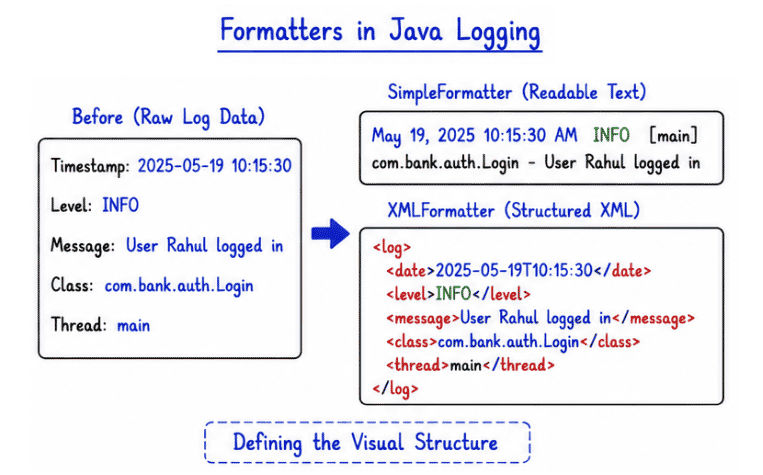
👉 SimpleFormatter displays logs in a clean and human-readable text format, making logs easier to read during development and debugging.
import java.io.IOException;
import java.util.logging.*;

public class Test {

    private static final Logger logger =
            Logger.getLogger(Test.class.getName());

    public static void main(String[] args)
            throws IOException {

        FileHandler fileHandler =
                new FileHandler("app.log");

        fileHandler.setFormatter(
                new SimpleFormatter());

        logger.addHandler(fileHandler);

        logger.info("Application Started");

        logger.warning("Low Disk Space");

        logger.severe("Database Error");
    }
}
Output in Console
INFO: Application Started
WARNING: Low Disk Space
SEVERE: Database Error
Log File Created
app.log👉 This example demonstrates both console logging and file logging using FileHandler and SimpleFormatter in Java.
The Java Logging API (java.util.logging) is widely used in real-world applications for monitoring, debugging, error tracking, and system maintenance.
Backend application monitoring
Banking and financial systems
Enterprise Java applications
APIs and web services
Production monitoring systems
Error and exception tracking
Security and audit logging
Server and database activity monitoring
Performance analysis and troubleshooting
Built-in logging support in Java.
Provides structured and organized logging.
Supports multiple logging levels (INFO, WARNING, SEVERE, etc.).
Allows logging into files and console.
Simplifies application monitoring and debugging.
Helps track errors and application flow.
Improves maintainability of large applications.
Useful for production monitoring and auditing.
The Logger class and Java Logging API provide a professional and structured way to record application events, monitor system behavior, and track errors efficiently.
Logging is an essential part of modern Java development and is widely used in enterprise and production environments.
Supports multiple logging levels
Allows logging to console and files
Improves debugging and troubleshooting
Helps monitor application performance and behavior
Simplifies maintenance of large applications
Essential for backend, enterprise, and production systems
👉 Understanding loggers, handlers, formatters, and logging levels is important for building scalable, maintainable, and production-ready Java applications.
