
Durgesh Tiwari
Author
Java provides powerful regex support through the java.util.regex package. The two most important classes are:
Pattern → Defines the regex rule
Matcher → Applies the rule to input text
Together, they help in validation, searching, replacing, and parsing text efficiently.
The Pattern class represents a compiled regular expression in Java.
In simple words: It stores the regex rule that will be used for matching text.
The Pattern class belongs to:
java.util.regex.Pattern👉 A regex pattern is compiled once and can be reused multiple times for efficient matching operations.
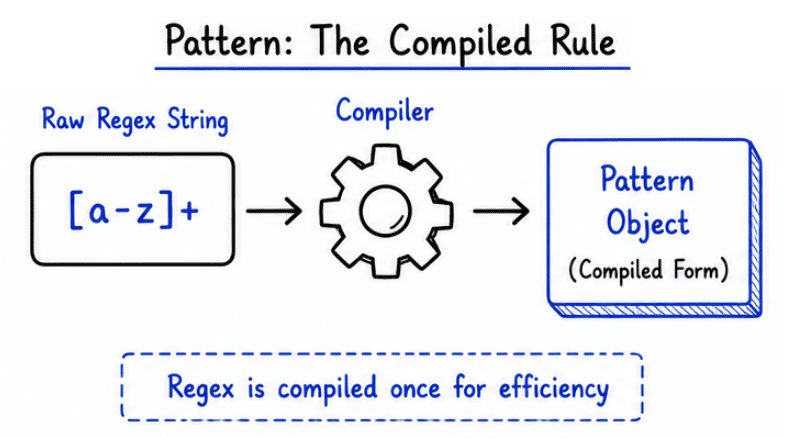
Without Pattern, Java would need to recompile the regex every time matching is performed.
Using Pattern improves:
Performance by compiling regex only once.
Reusability of the same regex pattern.
Readability and cleaner code structure.
👉 Pattern is especially useful when the same regex is used multiple times in an application.
Regex patterns are compiled using:
Pattern.compile()Example
import java.util.regex.Pattern;

public class Test {
    public static void main(String[] args) {

        Pattern pattern = Pattern.compile("[a-z]+");

        System.out.println(pattern);
    }
}
Explanation
[a-z]+ → Matches one or more lowercase letters
compile() → Converts regex string into a compiled Pattern object
Compiled patterns can be reused multiple times for matching operations
Flags are used to modify the behavior of regex matching in Java.
Common Flags
Flag | Purpose |
|---|---|
| Ignores uppercase and lowercase differences |
| Enables matching across multiple lines |
| Allows |
| Enables Unicode-aware case matching |
import java.util.regex.*;

public class Test {
    public static void main(String[] args) {

        Pattern pattern = Pattern.compile(
                "java",
                Pattern.CASE_INSENSITIVE
        );

        Matcher matcher = pattern.matcher("JAVA");

        System.out.println(matcher.matches());
    }
}
Output
trueExplanation
CASE_INSENSITIVE → Ignores uppercase and lowercase differences
"java" pattern successfully matches "JAVA"
matcher() → Applies regex pattern on input string
matches() → Checks complete string match
👉 Without this flag, "JAVA" would not match "java".
Compiled regex patterns can be reused multiple times with different input strings.
Example
Pattern pattern = Pattern.compile("\\\\d+");

Matcher m1 = pattern.matcher("123");
Matcher m2 = pattern.matcher("456");
Explanation
\\\\d+ → Matches one or more digits
Same Pattern object is reused for multiple matches
Different Matcher objects can work with different input strings
👉 This improves performance because the regex is compiled only once instead of every time matching is performed.
The Matcher class is used to perform matching operations on input strings using a Pattern.
In simple words:
Matcherchecks whether the text follows the regex rule.
The Matcher class belongs to:
java.util.regex.MatcherMatcher matcher = pattern.matcher(input);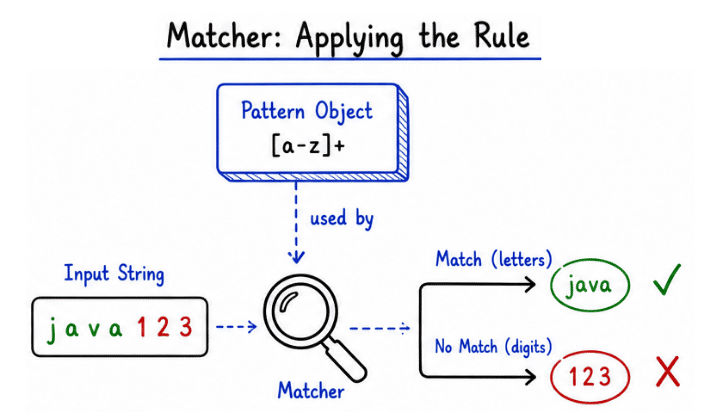
👉 The matcher() method applies the compiled regex pattern to the given input string.
The find() method searches input text and locates matching patterns one by one.
Example: find()
import java.util.regex.*;

public class Test {
    public static void main(String[] args) {

        Pattern pattern = Pattern.compile("\\\\d+");

        Matcher matcher = pattern.matcher("Age is 25");

        while (matcher.find()) {
            System.out.println(matcher.group());
        }
    }
}
Output
25Explanation
\\\\d+ → Matches one or more digits
find() → Searches for the next matching pattern
group() → Returns the matched text
👉 find() is commonly used for extracting specific data such as numbers, emails, or keywords from text.
The matches() method checks whether the entire input string matches the regex pattern.
Example: matches()
import java.util.regex.*;

public class Test {
    public static void main(String[] args) {

        Pattern pattern = Pattern.compile("\\\\d+");

        Matcher matcher = pattern.matcher("12345");

        System.out.println(matcher.matches());
    }
}
Output
trueExplanation
\\\\d+ → Matches one or more digits
"12345" contains only digits
matches() → Checks complete string match against regex
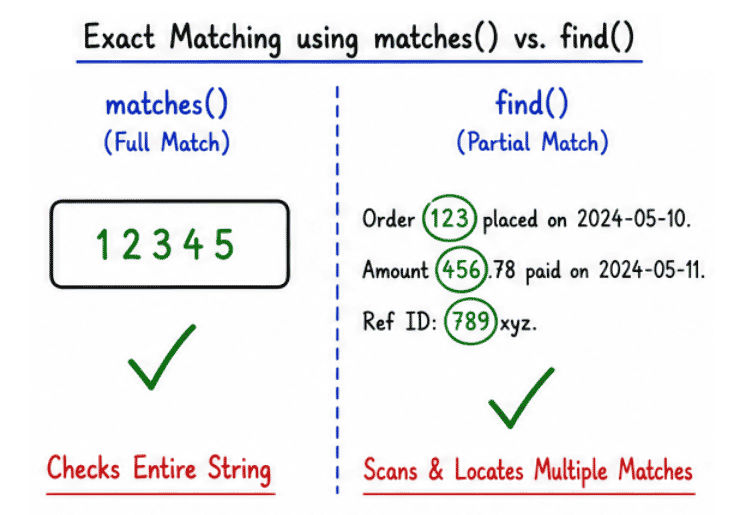
👉 If even one character does not match the pattern, matches() returns false.
The replaceAll() method replaces all text that matches the given regex pattern.
Example: replaceAll()
import java.util.regex.*;

public class Test {
    public static void main(String[] args) {

        String text = "Java 123 Python 456";

        String result = text.replaceAll("\\\\d+", "*");

        System.out.println(result);
    }
}
Output
Java * Python *Explanation
\\\\d+ → Matches one or more digits
replaceAll() → Replaces every matching value in the string
All numbers (123 and 456) are replaced with *
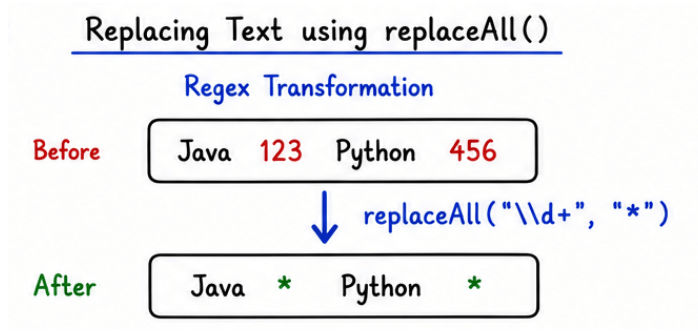
👉 replaceAll() is useful for data masking, text cleaning, and formatting operations.
The replaceFirst() method replaces only the first matching occurrence in the string.
Example: replaceFirst()
public class Test {
    public static void main(String[] args) {

        String text = "123 Java 456";

        String result = text.replaceFirst("\\\\d+", "Number");

        System.out.println(result);
    }
}
Output
Number Java 456Explanation
\\\\d+ → Matches one or more digits
replaceFirst() → Replaces only the first matching value
Only 123 is replaced with "Number"
👉 Useful when only the first occurrence needs modification instead of the entire string.
Pattern and Matcher classes are widely used in real-world Java applications for text processing and validation tasks.
Common use cases include:
Email and password validation
Searching and filtering log files
Parsing structured data from text or APIs
Data cleaning and formatting
Search engines and compiler design
Form validation in web applications
Forgetting to escape special regex characters properly
Using matches() when partial matching requires find()
Compiling regex repeatedly inside loops instead of reusing Pattern
Writing overly complex regex patterns that reduce readability
Ignoring case sensitivity when matching text
Pattern and Matcher classes form the foundation of Regex processing in Java.
Pattern defines and compiles regex rules
Matcher performs matching operations on input text
Supports validation, searching, extraction, and text replacement
Makes string processing more efficient and manageable
👉 Together, these classes provide powerful tools for handling text and pattern-based operations in Java applications.
