
Durgesh Tiwari
Author
Apache Maven is a powerful build automation and project management tool used in Java development. It helps developers automate repetitive tasks such as compiling code, managing dependencies, running tests, and packaging applications.
In simple words: Maven allows you to manage a Java project automatically instead of handling everything manually.
Maven is an Apache-based build tool that follows a standard project structure and uses a configuration file called pom.xml to manage the entire project.
It is mainly used for:
Building Java applications
Managing project dependencies (libraries)
Running unit tests
Creating JAR/WAR files
Automating the build and deployment process
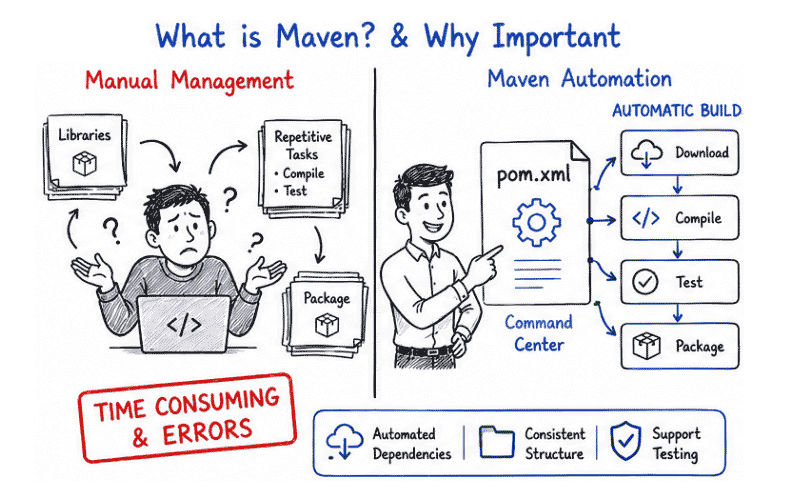
In real-world Java applications, projects depend on many external libraries and frameworks. Managing them manually can lead to errors and becomes very time-consuming.
Maven solves this problem by providing automation and structure.
Benefits of Maven:
Automatically manages project dependencies
Provides a standard and consistent project structure
Simplifies build and deployment process
Ensures consistent configuration across teams
Supports testing and CI/CD integration
👉 Maven reduces manual work and improves productivity.
Apache Maven follows a standard directory structure that helps developers organize code, resources, and tests in a clean and consistent way.
project-root/
 ├── src/
 │    ├── main/
 │    │    ├── java/        → Application source code
 │    │    ├── resources/   → Configuration files (properties, XML, etc.)
 │    │
 │    ├── test/
 │         ├── java/        → Test cases
 │         ├── resources/   → Test-related files
 │
 ├── target/               → Compiled output (auto-generated)
 ├── pom.xml               → Project configuration file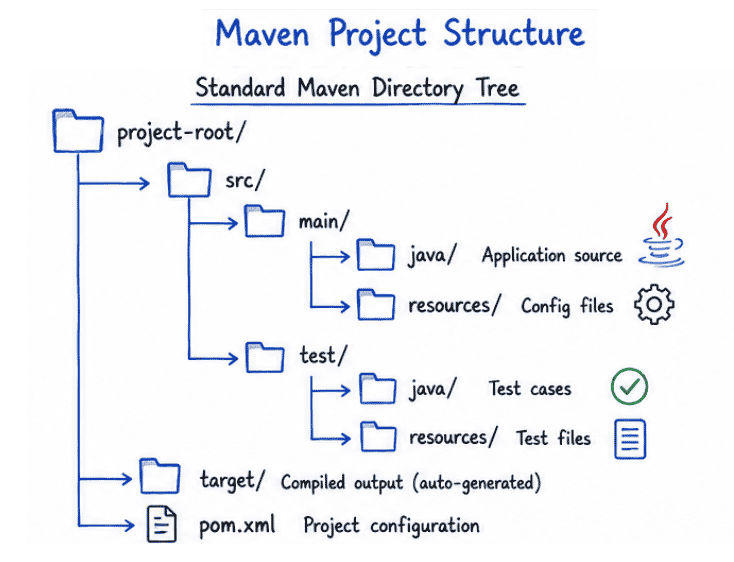
Apache Maven uses a core configuration file called pom.xml (Project Object Model). This file is the main configuration center of a Maven project.
It defines everything required to build and manage a Java project.
It contains:
Project information (name, version, group ID)
Project dependencies (external libraries)
Build plugins
Compilation and packaging configuration
Example:
<project>
    <modelVersion>4.0.0</modelVersion>

    <groupId>com.example</groupId>
    <artifactId>myapp</artifactId>
    <version>1.0</version>

    <dependencies>
        <dependency>
            <groupId>mysql</groupId>
            <artifactId>mysql-connector-j</artifactId>
            <version>8.0.33</version>
        </dependency>
    </dependencies>
</project>
How It Works
When you add a dependency in pom.xml, Maven automatically:
Downloads the required library from the repository
Adds it to the project classpath
Manages version compatibility
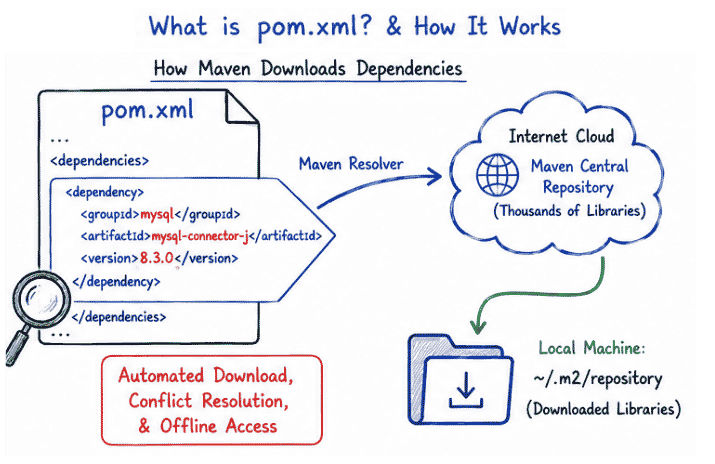
👉 Maven automatically downloads required libraries from repositories.
Apache Maven uses repositories to store and manage project dependencies (libraries). When a dependency is added in pom.xml, Maven downloads it from these repositories automatically.
Stored on your local machine
Default location: ~/.m2/repository
Contains downloaded dependencies
Works offline once dependencies are downloaded
Public repository provided by Maven
Contains thousands of open-source libraries
Default source for most dependencies
Accessible over the internet
Custom repositories hosted by companies or organizations
Used for private or internal libraries
Provides controlled access to dependencies
Dependency Management: Automatically downloads required libraries from pom.xml.
Build Automation: Handles compile, test, and package automatically.
Standard Structure: Every project follows the same folder structure.
Plugin Support: Adds extra features like build, test, and deployment.
Apache Maven follows a predefined build lifecycle that runs steps in a specific order to build a Java project.
Maven Lifecycle Phases
validate → checks project structure and configuration
compile → compiles source code
test → runs unit tests
package → creates JAR/WAR file
install → stores build in local repository
deploy → uploads build to server or remote repository
Flow of Execution
validate → compile → test → package → install → deploy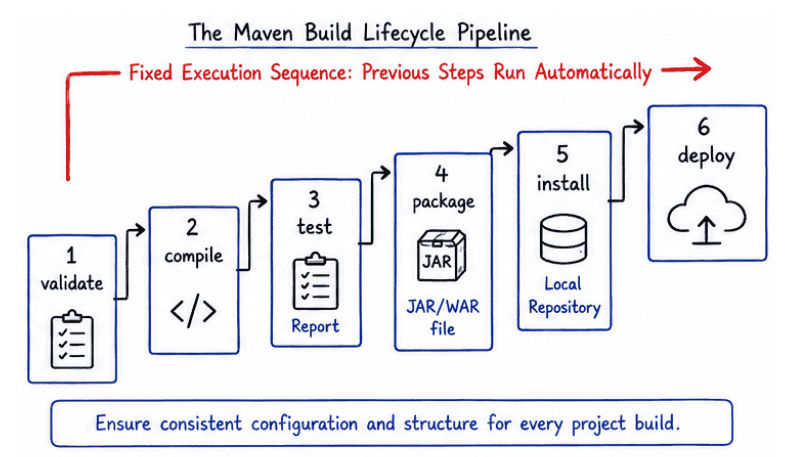
👉 Each phase depends on the previous one, so Maven executes them in a fixed sequence to ensure a successful build process.
Apache Maven provides simple commands to manage the build process.
mvn clean → Removes old build files
mvn compile → Compiles source code
mvn test → Runs unit tests
mvn package → Creates JAR/WAR file
mvn install → Installs build into local repositoryApache Maven can create executable (runnable) JAR files using the package phase along with specific build plugins.
This helps in packaging a Java application so it can run directly without an IDE.
Maven Jar Plugin
Spring Boot Maven Plugin
Source code is compiled
Dependencies are resolved
Project is packaged into a JAR file
Entry point (main class) is configured for execution
Run the JAR
java -jar app.jarSpring Boot applications
Enterprise Java systems
REST API development
Microservices architecture
CI/CD pipelines (Continuous Integration & Deployment)
Easy dependency management
Reduces manual configuration effort
Provides a standard project structure
Automates the entire build process
Widely used in the software industry
Apache Maven is one of the most important tools in Java development. It is widely used to manage project builds, handle dependencies, and automate the deployment process in a structured way.
It reduces manual work by automating tasks like compiling code, running tests, packaging applications, and managing external libraries. Because of its standard project structure and reliable build process, Maven is used in almost every modern Java backend project, including enterprise applications and microservices.
👉 Learning Maven is essential for modern Java backend development as it improves productivity, consistency, and project maintainability.
