
Durgesh Tiwari
Author
Logging is an important part of modern Java development. While Java provides a built-in logging framework (java.util.logging), most enterprise applications use advanced logging frameworks like Log4j and SLF4J for better flexibility, performance, and maintainability.
These frameworks help developers:
Track application behavior
Debug errors efficiently
Store logs professionally
Monitor production systems
Manage logs using configuration files
In simple words: Log4j and SLF4J provide professional logging support for Java applications.
Log4j is a powerful and widely used Java logging framework developed by the Apache Software Foundation.
It provides advanced logging features beyond System.out.println() and Java’s built-in logging API.
Package:
org.apache.logging.log4jLog4j helps developers:
Generate structured logs
Store logs in files
Use multiple logging levels
Configure logging externally
Improve debugging and monitoring
👉 Log4j is commonly used in enterprise applications, backend systems, APIs, and large-scale Java projects.
Log4j is widely used in enterprise and backend systems because it provides powerful and flexible logging capabilities for professional Java applications.
Compared to simple console printing, Log4j offers better performance, configuration, and log management.
Benefits of Log4j
High-performance logging
Supports file-based logging
Provides multiple logging levels
Allows flexible external configuration
Simplifies debugging and monitoring
Supports large-scale enterprise applications
Helps maintain application history through log files
Improves production system monitoring
👉 Most production-level Java applications use Log4j or similar frameworks.
SLF4J (Simple Logging Facade for Java) is not a logging framework itself. It is a logging abstraction layer that provides a common API for different logging frameworks.
This allows developers to switch between logging frameworks without changing application code.
In simple words: SLF4J acts as a bridge between Java applications and logging frameworks like Log4j, Logback, or
java.util.logging.
Example: Using SLF4J
import org.slf4j.Logger;
import org.slf4j.LoggerFactory;

public class Test {

    private static final Logger logger =
            LoggerFactory.getLogger(Test.class);

    public static void main(String[] args) {

        logger.info("Application Started");

        logger.warn("Low Memory Warning");

        logger.error("Database Connection Failed");
    }
}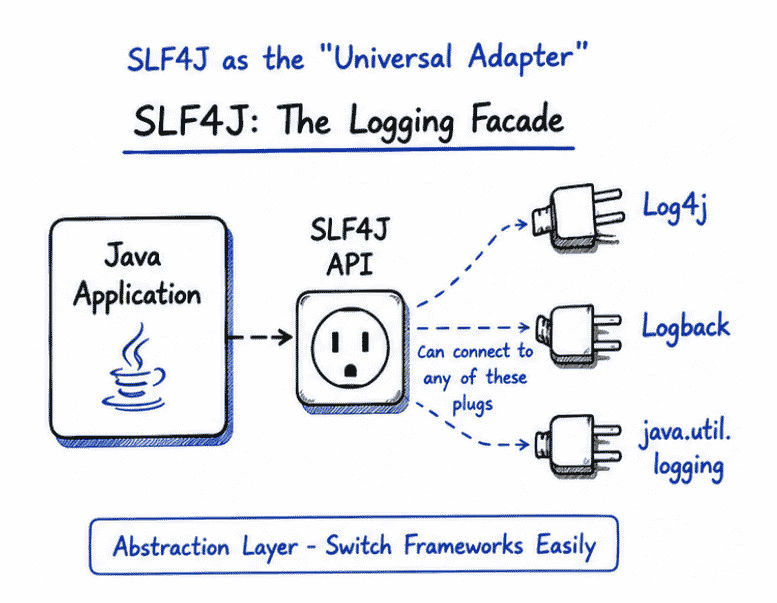
Without SLF4J, applications become tightly coupled with a specific logging framework.
SLF4J solves this problem by providing a common logging API.
Benefits of SLF4J
Decouples application from logging framework
Easy framework switching
Cleaner and consistent logging code
Better flexibility and maintainability
Widely used in Spring Boot and enterprise systems
👉 Spring Boot internally uses SLF4J with Logback.
Feature | Log4j | SLF4J |
|---|---|---|
Type | Complete logging framework | Logging facade (abstraction layer) |
Main Purpose | Generates and manages logs | Provides a common logging API |
Developed By | Apache Software Foundation | |
Direct Logging Support | Yes, directly creates logs | No, works with another logging framework |
Framework Dependency | Tightly coupled with Log4j | Independent of logging framework |
Framework Switching | Harder to switch | Easy to switch |
Configuration Support | Built-in configuration support | Depends on underlying framework |
Common Usage | Standalone logging systems | Enterprise applications and Spring Boot |
Works With | Log4j only | Log4j, Logback, JUL, etc. |
Flexibility | Less flexible | More flexible |
Log4j provides multiple logging levels to classify log messages based on their severity and importance.
These levels help developers control which logs should be displayed, stored, or ignored during application execution.
Common Logging Levels in Log4j
Level | Purpose |
|---|---|
| Very severe errors that may terminate the application |
| Error conditions and application failures |
| Warning messages for possible issues |
| General application information and successful operations |
| Debugging information used during development |
| Highly detailed execution flow and internal processing |
Example: Log4j Logging Levels
logger.fatal("System Crash");

logger.error("Database Connection Failed");

logger.warn("Memory Usage High");

logger.info("Application Started");

logger.debug("Value of x = 10");

logger.trace("Method execution started");
👉 Logging levels help developers organize logs efficiently and control the amount of logging information in development and production environments.
To use Log4j in a Maven-based Java project, developers need to add Log4j dependencies inside the pom.xml file.
These dependencies provide the required logging libraries for the application.
<dependency>
    <groupId>org.apache.logging.log4j</groupId>

    <artifactId>log4j-api</artifactId>

    <version>2.22.1</version>
</dependency>

<dependency>
    <groupId>org.apache.logging.log4j</groupId>

    <artifactId>log4j-core</artifactId>

    <version>2.22.1</version>
</dependency>The Logger object is used to generate log messages in Log4j applications.
Developers can log information, warnings, errors, and debugging details using different logging methods.
import org.apache.logging.log4j.LogManager;
import org.apache.logging.log4j.Logger;

public class Test {

    private static final Logger logger =
            LogManager.getLogger(Test.class);

    public static void main(String[] args) {

        logger.info("Application Started");

        logger.warn("Memory Usage High");

        logger.error("Database Connection Failed");
    }
}
Output
INFO  - Application Started
WARN  - Memory Usage High
ERROR - Database Connection Failed
👉 Different logging levels help categorize log messages properly.
SLF4J (Simple Logging Facade for Java) provides a common API for logging in Java applications.
Instead of directly depending on a specific logging framework, developers can use SLF4J and connect it with frameworks like Log4j, Logback, or java.util.logging.
👉 This makes applications more flexible and easier to maintain.
<dependency>
    <groupId>org.slf4j</groupId>

    <artifactId>slf4j-api</artifactId>

    <version>2.0.13</version>
</dependency>
👉 SLF4J only provides the logging API.
A logging implementation such as Logback or Log4j is also required.
import org.slf4j.Logger;
import org.slf4j.LoggerFactory;

public class Test {

    private static final Logger logger =
            LoggerFactory.getLogger(Test.class);

    public static void main(String[] args) {

        logger.info("Application Started");

        logger.warn("Warning Message");

        logger.error("Error Message");
    }
}
Parameterized logging is a feature provided by SLF4J and modern logging frameworks to improve performance and readability.
Instead of using string concatenation (+), placeholders {} are used inside log messages.
👉 This makes logging cleaner, faster, and more efficient.
Improves performance.
Avoids unnecessary string creation.
Makes code cleaner and more readable.
Reduces memory overhead.
Commonly used in enterprise applications.
Example
import org.slf4j.Logger;
import org.slf4j.LoggerFactory;

public class Test {

    private static final Logger logger =
            LoggerFactory.getLogger(Test.class);

    public static void main(String[] args) {

        String name = "Rahul";
        int marks = 90;

        logger.info(
            "Student: {} scored {} marks",
            name, marks
        );
    }
}
Output
Student: Rahul scored 90 marks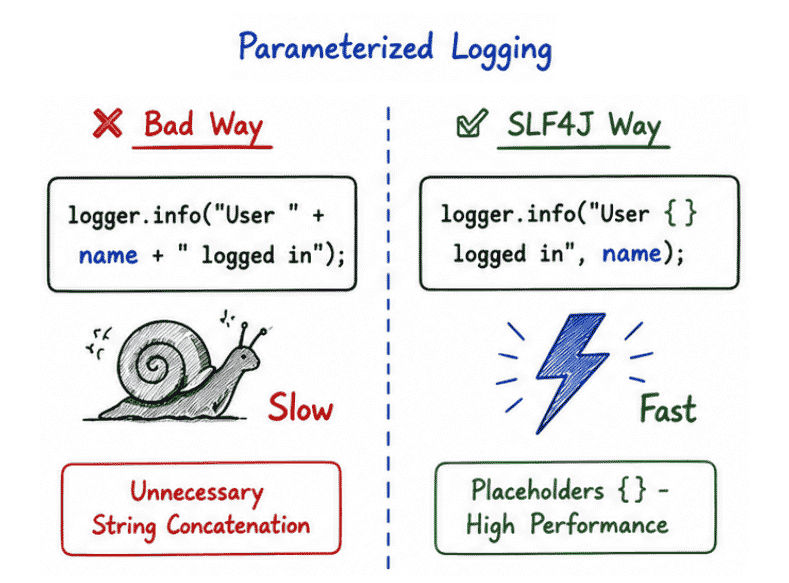
👉 Parameterized logging improves application performance because log messages are formatted only when the log level is enabled.
In modern Java applications, SLF4J is commonly used together with Log4j.
SLF4J provides the common logging API (abstraction layer).
Log4j performs the actual logging operations.
This combination provides flexibility, maintainability, and professional logging support.
Java Application
       ↓
SLF4J API
       ↓
Log4j Framework
       ↓
Console / File / Server
How It Works
The Java application sends log messages using the SLF4J API.
SLF4J forwards those messages to Log4j.
Log4j processes the logs and writes them to the console, files, or other destinations.
Framework-independent logging.
Easy switching between logging frameworks.
Cleaner and maintainable code.
Powerful Log4j logging features.
Commonly used in enterprise applications and Spring Boot.
👉 SLF4J provides abstraction, while Log4j performs the actual logging implementation.
Log4j commonly uses external configuration files to manage logging behavior.
Instead of hardcoding logging settings inside Java programs, developers can define them in separate configuration files.
This makes logging management easier and more flexible.
Common Log4j Configuration Files
log4j.properties
log4j.xml
log4j2.properties
log4j2.xml
These configuration files control:
Logging levels
Log file locations
Output formatting
Appenders / handlers
Console and file logging behavior
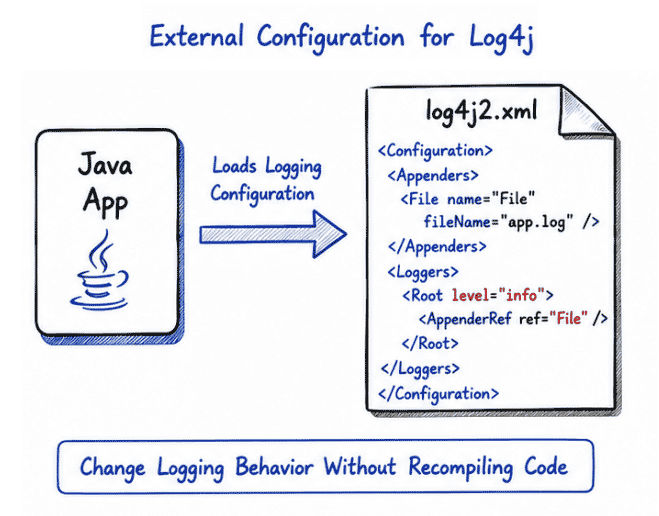
👉 External configuration allows developers to change logging behavior without modifying Java source code.
Example: log4j.properties
rootLogger=INFO, console

appender.console=org.apache.log4j.ConsoleAppender

appender.console.layout=
org.apache.log4j.PatternLayout

appender.console.layout.ConversionPattern=
%d [%t] %-5p %c - %m%n
👉 This configuration prints formatted logs to the console.
log4j.xml<?xml version="1.0" encoding="UTF-8"?>
<Configuration status="WARN">
<Appenders>
<Console name="Console"
target="SYSTEM_OUT">
<PatternLayout
pattern="%d [%t] %-5level: %msg%n"/>
</Console>
</Appenders>
<Loggers>
<Root level="info">
<AppenderRef ref="Console"/>
</Root>
</Loggers>
</Configuration>👉 XML configuration provides a more structured, readable, and flexible way to configure logging in enterprise applications.
Log4j supports file-based logging, which allows applications to store log messages inside log files instead of only displaying them on the console.
File logging is important in real-world applications because logs remain saved for monitoring, debugging, auditing, and troubleshooting.
Example
<File name="FileLogger"
      fileName="app.log">

    <PatternLayout
        pattern="%d %-5p %c - %m%n"/>

</File>
👉 Log messages will be stored inside the app.log file in a structured and readable format.
Log4j and SLF4J are widely used in modern Java applications for monitoring, debugging, and maintaining large-scale systems.
Spring Boot applications.
Enterprise backend systems.
Banking and financial applications.
APIs and microservices.
Cloud-based applications.
Production monitoring systems.
Error tracking and auditing systems.
Server and database monitoring.
Distributed enterprise applications.
👉 These frameworks help developers maintain reliable and scalable applications in production environments.
Log4j and SLF4J are essential tools for professional Java logging and application monitoring.
Log4j provides advanced logging functionality.
SLF4J provides flexibility and abstraction.
Supports structured and maintainable logging.
Widely used in enterprise and backend applications.
Helps debugging, monitoring, and production maintenance.
Improves application reliability and maintainability.
👉 Understanding Log4j and SLF4J is important for building scalable, maintainable, and production-ready Java applications.
